mirror of
https://github.com/DayuanJiang/next-ai-draw-io.git
synced 2026-09-02 01:20:23 +08:00
 449e4c4e26
* feat: add file-based admin settings panel at /admin

Settings saved in the panel are written to data/settings.json and
overlaid onto process.env, taking precedence over environment
variables and applying immediately without restart. Enable by setting
ADMIN_PASSWORD; on serverless platforms without persistent disk the
panel degrades to read-only.

* polish: admin panel UI improvements

- Provider logos in credential rows (shared ProviderLogo component,
  extracted from model-config-dialog)
- Scroll-spy active state in the sidebar nav
- Green success state in the save bar that clears after a few seconds
- Wider content column (max-w-6xl) for less wasted space on desktop

* polish: admin panel section toggles and reorder

- Move Quota & Rate Limits to the end of the settings page
- Add enable switches to Observability and Quota sections; default off
  with fields grayed out, auto-on when any field is already configured

* polish: make section enable switch more visible

Wrap the switch in a labeled pill ('Enabled'/'Disabled') with border
and background so the off state is clearly visible.

* refactor: derive admin registry from PROVIDER_INFO, simplify page state

- Provider options, labels, and base-URL placeholders now come from
  PROVIDER_INFO instead of hand-copied lists (fixes SiliconFlow .com/.cn
  placeholder drift; panel names now match the model-config dialog)
- Replace free-text subgroup strings + SUBGROUP_PROVIDERS reverse map
  with a typed provider field on SettingDef
- Precompute SETTINGS_BY_GROUP and PROVIDER_SUBGROUPS at module level
- Merge justSaved into saveMessage, drop unused mainRef, hoist
  fetchSettings out of the component, dedupe savedText logic
- Serialize from SETTINGS_REGISTRY directly; json validators in a map
  instead of a hardcoded key check
- Make allowPrivateUrls a function so ALLOW_PRIVATE_URLS edits in the
  admin panel apply without restart

* feat: graphical model management in admin panel

Replace the provider credential fields and raw AI_MODELS_CONFIG JSON
textarea with a Models section mirroring the in-app model settings UI:
provider instance list with logos, credential fields per provider type,
model add/remove with suggestions, per-model connectivity test, and a
default-provider star.

On save the server derives everything the runtime needs into
settings.json: credential env vars (with _2 suffixes for multiple
instances of one provider), AI_MODELS_CONFIG, and AI_PROVIDER/AI_MODEL
for the default. Secrets round-trip as masked markers and are never
sent back to the browser. The general settings registry now only
covers non-provider settings (generation, access, features,
observability, quota).

* fix: allow testing unsaved providers in admin panel

The test button previously looked up credentials by providerId in the
saved settings, so testing a newly added (unsaved) provider failed with
'Unknown provider or model'. The test endpoint now accepts the client's
current provider state; newly typed secrets are used as-is and masked
markers are resolved against the stored values, so testing works both
before and after saving.

* fix: merge env AI_MODELS_CONFIG with admin panel providers

Previously, saving in the admin panel wrote a complete AI_MODELS_CONFIG
into settings.json, which (by overlay precedence) replaced any config
from .env or ai-models.json — admins lost their env-configured models.

The panel no longer writes AI_MODELS_CONFIG. Instead its providers are
merged with the env baseline at read time in loadRawServerModelsConfig,
and panel credentials go to ADMIN_-prefixed env vars wired up via
apiKeyEnv/baseUrlEnv so they never shadow standard vars. Env-based
providers now appear read-only in the panel, name clashes are rejected,
and a panel default overrides the env default. data/ is now gitignored.

* fix: block global-credential providers already managed via env

Bedrock, Vertex AI, and Ollama credentials live in fixed env vars with
no apiKeyEnv redirection, so a panel instance of one of these would
silently override the credentials that env-configured models rely on.
The API now rejects saving such a provider when the env config already
uses that type, and the Add Provider dropdown disables it with a
'managed via env' note.

* fix: address admin panel review findings

- Security: test-model no longer resolves a stored secret when the
  request's baseUrl/provider differs from the stored entry, closing a
  path where a tampered baseUrl could exfiltrate a saved key
- Save failures are now visible: the save bar shows the error in red
  (was masked by the persistent 'Unsaved changes' text), and per-field
  validation errors from the settings API are surfaced under each field
- The Observability/Quota enable switch is now real: toggling off stages
  deletion of the group's saved values, and the toggle no longer snaps
  back to Enabled after saving
- Env provider's default star is hidden when a panel provider is the
  active default (no more double star)
- Clearing a credential field reverts to the stored value instead of
  silently deleting it; an explicit X button removes a stored secret
- Form inputs are disabled during an in-flight save

* refactor(admin): split 1549-line admin page into focused modules

Extract admin-shared.ts (types + fetch helper), setting-field.tsx
(registry-driven fields), and models-section.tsx (provider/model
manager) from page.tsx. Pure mechanical move, no behavior change.

* feat(admin): share credential fields with user dialog and localize panel

Extract ProviderCredentialsFields (display name + per-provider
credential inputs) used by both the user ModelConfigDialog and the
admin Models panel; secret input passed via renderSecret (plaintext
vs masked), test button via footer slot. Add full i18n for the admin
panel across en/zh/ja/zh-Hant, reusing modelConfig.* for shared parts.

* fix(admin): address Copilot review findings

- Reflect built-in defaults for boolean settings (ALLOW_PRIVATE_URLS
  defaults on) and allow clearing a saved boolean back to default,
  so the SSRF toggle matches actual runtime behavior.
- Harden JSON loading: filter settings values to strings only, and
  schema-validate stored ADMIN_PROVIDERS entries, dropping malformed
  ones instead of letting them reach runtime code.
- Set beforeunload returnValue so the unsaved-changes prompt shows in
  all browsers; reject non-finite numbers in settings validation.
- Fix README/CN/JA docs that claimed the panel auto-generates
  AI_MODELS_CONFIG (providers are merged at read time, not written).
- Add unit tests for corrupted-file value filtering and provider
  schema validation.

* docs: move admin panel details to dedicated docs/{en,cn,ja}/admin-panel.md

The READMEs now carry a short blurb + link, matching the existing
per-topic docs (docker.md, ai-providers.md, ...). Removes the ~22-line
inline section and the duplicated data/settings.json mentions.

* fix(admin): address follow-up Copilot findings on the prior fixes

- loadAdminProviders now validates against a stored-shape schema where
  secrets are plain strings, so a hand-edited ADMIN_PROVIDERS holding an
  {isSet} marker is dropped instead of later crashing maskSecret().
- loadSettings guards against array values (typeof [] === 'object'),
  which would otherwise overlay numeric keys onto process.env.
- Admin SecretInput uses the bare id so the shared component's
  <Label htmlFor> stays associated (only one ProviderDetail mounts).
- Add tests: marker-secret rejection, array-values guard, bedrock
  multi-secret round-trip.
270 lines
11 KiB
Markdown
270 lines
11 KiB
Markdown
# Next AI Draw.io
|
|
|
|
<div align="center">
|
|
|
|
**AI-Powered Diagram Creation Tool - Chat, Draw, Visualize**
|
|
|
|
English | [中文](./docs/cn/README_CN.md) | [日本語](./docs/ja/README_JA.md)
|
|
|
|
[](https://next-ai-drawio.jiang.jp/)
|
|
|
|
[](https://opensource.org/licenses/Apache-2.0)
|
|
[](https://nextjs.org/)
|
|
[](https://react.dev/)
|
|
[](https://github.com/sponsors/DayuanJiang)
|
|
|
|
[](https://next-ai-drawio.jiang.jp/)
|
|
|
|
</div>
|
|
|
|
A Next.js web application that integrates AI capabilities with draw.io diagrams. Create, modify, and enhance diagrams through natural language commands and AI-assisted visualization.
|
|
|
|
> Note: Thanks to <img src="https://raw.githubusercontent.com/DayuanJiang/next-ai-draw-io/main/public/doubao-color.png" alt="" height="20" /> [ByteDance Doubao](https://www.volcengine.com/activity/codingplan?ac=MMAP8JTTCAQ2&rc=Z9Z3LDTJ&utm_campaign=drawio&utm_content=drawio&utm_medium=devrel&utm_source=OWO&utm_term=drawio) sponsorship, the demo site now uses the powerful glm-4.7 model!
|
|
|
|
|
|
https://github.com/user-attachments/assets/9d60a3e8-4a1c-4b5e-acbb-26af2d3eabd1
|
|
|
|
|
|
|
|
## Table of Contents
|
|
- [Next AI Draw.io](#next-ai-drawio)
|
|
- [Table of Contents](#table-of-contents)
|
|
- [Examples](#examples)
|
|
- [Features](#features)
|
|
- [MCP Server](#mcp-server)
|
|
- [Claude Code CLI](#claude-code-cli)
|
|
- [Getting Started](#getting-started)
|
|
- [Try it Online](#try-it-online)
|
|
- [Desktop Application](#desktop-application)
|
|
- [Run with Docker](#run-with-docker)
|
|
- [Installation](#installation)
|
|
- [Deployment](#deployment)
|
|
- [Deploy to EdgeOne Pages](#deploy-to-edgeone-pages)
|
|
- [Deploy on Vercel](#deploy-on-vercel)
|
|
- [Deploy on Cloudflare Workers](#deploy-on-cloudflare-workers)
|
|
- [Multi-Provider Support](#multi-provider-support)
|
|
- [Server-Side Multi-Model Configuration](#server-side-multi-model-configuration)
|
|
- [Admin Panel](#admin-panel)
|
|
- [How It Works](#how-it-works)
|
|
- [Support \& Contact](#support--contact)
|
|
- [FAQ](#faq)
|
|
- [Star History](#star-history)
|
|
|
|
## Examples
|
|
|
|
Here are some example prompts and their generated diagrams:
|
|
|
|
<div align="center">
|
|
<table width="100%">
|
|
<tr>
|
|
<td colspan="2" valign="top" align="center">
|
|
<strong>Animated transformer connectors</strong><br />
|
|
<p><strong>Prompt:</strong> Give me a **animated connector** diagram of transformer's architecture.</p>
|
|
<img src="./public/animated_connectors.svg" alt="Transformer Architecture with Animated Connectors" width="480" />
|
|
</td>
|
|
</tr>
|
|
<tr>
|
|
<td width="50%" valign="top">
|
|
<strong>RAG Technique Diagram</strong><br />
|
|
<p><strong>Prompt:</strong> Generate a RAG architecture diagram for **chat application**. Use connected diagram for data ingestion</p>
|
|
<img src="./public/rag_prod.svg" alt="RAG Architecture Diagram" width="480" />
|
|
</td>
|
|
<td width="50%" valign="top">
|
|
<strong>Authentication using React and AWS</strong><br />
|
|
<p><strong>Prompt:</strong> Generate authentication process using React with **AWS**. Use Serverless architecture.</p>
|
|
<img src="./public/auth.svg" alt="Authentication Architecture Diagram" width="480" />
|
|
</td>
|
|
</tr>
|
|
<tr>
|
|
<td width="50%" valign="top">
|
|
<strong>Open Innovation</strong><br />
|
|
<p><strong>Prompt:</strong> Create visualization of Henry Chesbrough's Open Innovation model.</p>
|
|
<img src="./public/inno.svg" alt="Open Innovation Diagram" width="480" />
|
|
</td>
|
|
<td width="50%" valign="top">
|
|
<strong>Cat sketch</strong><br />
|
|
<p><strong>Prompt:</strong> Draw a cute cat for me.</p>
|
|
<img src="./public/cat_demo.svg" alt="Cat Drawing" width="240" />
|
|
</td>
|
|
</tr>
|
|
</table>
|
|
</div>
|
|
|
|
## Features
|
|
|
|
- **LLM-Powered Diagram Creation**: Leverage Large Language Models to create and manipulate draw.io diagrams directly through natural language commands
|
|
- **Image-Based Diagram Replication**: Upload existing diagrams or images and have the AI replicate and enhance them automatically
|
|
- **PDF & Text File Upload**: Upload PDF documents and text files to extract content and generate diagrams from existing documents
|
|
- **AI Reasoning Display**: View the AI's thinking process for supported models (OpenAI o1/o3, Gemini, Claude, etc.)
|
|
- **Diagram History**: Comprehensive version control that tracks all changes, allowing you to view and restore previous versions of your diagrams before the AI editing.
|
|
- **Interactive Chat Interface**: Communicate with AI to refine your diagrams in real-time
|
|
- **Cloud Architecture Diagram Support**: Specialized support for generating cloud architecture diagrams (AWS, GCP, Azure)
|
|
- **Animated Connectors**: Create dynamic and animated connectors between diagram elements for better visualization
|
|
|
|
## MCP Server
|
|
|
|
Use Next AI Draw.io with AI agents like Claude Desktop, Cursor, and VS Code via MCP (Model Context Protocol).
|
|
|
|
```json
|
|
{
|
|
"mcpServers": {
|
|
"drawio": {
|
|
"command": "npx",
|
|
"args": ["@next-ai-drawio/mcp-server@latest"]
|
|
}
|
|
}
|
|
}
|
|
```
|
|
|
|
### Claude Code CLI
|
|
|
|
```bash
|
|
claude mcp add drawio -- npx @next-ai-drawio/mcp-server@latest
|
|
```
|
|
|
|
Then ask Claude to create diagrams:
|
|
> "Create a flowchart showing user authentication with login, MFA, and session management"
|
|
|
|
The diagram appears in your browser in real-time!
|
|
|
|
See the [MCP Server README](./packages/mcp-server/README.md) for VS Code, Cursor, and other client configurations.
|
|
|
|
## Getting Started
|
|
|
|
### Try it Online
|
|
|
|
No installation needed! Try the app directly on our demo site:
|
|
|
|
[](https://next-ai-drawio.jiang.jp/)
|
|
|
|
|
|
|
|
> **Bring Your Own API Key**: You can use your own API key to bypass usage limits on the demo site. Click the Settings icon in the chat panel to configure your provider and API key. Your key is stored locally in your browser and is never stored on the server.
|
|
|
|
### Desktop Application
|
|
|
|
Download the native desktop app for your platform from the [Releases page](https://github.com/DayuanJiang/next-ai-draw-io/releases):
|
|
|
|
Supported platforms: Windows, macOS, Linux.
|
|
|
|
### Run with Docker
|
|
|
|
[Go to Docker Guide](./docs/en/docker.md)
|
|
|
|
### Installation
|
|
|
|
1. Clone the repository:
|
|
|
|
```bash
|
|
git clone https://github.com/DayuanJiang/next-ai-draw-io
|
|
cd next-ai-draw-io
|
|
npm install
|
|
cp env.example .env.local
|
|
```
|
|
|
|
See the [Provider Configuration Guide](./docs/en/ai-providers.md) for detailed setup instructions for each provider.
|
|
|
|
2. Run the development server:
|
|
|
|
```bash
|
|
npm run dev
|
|
```
|
|
|
|
3. Open [http://localhost:6002](http://localhost:6002) in your browser to see the application.
|
|
|
|
## Deployment
|
|
|
|
### Deploy to EdgeOne Pages
|
|
|
|
You can deploy with one click using [Tencent EdgeOne Pages](https://pages.edgeone.ai/).
|
|
|
|
Deploy by this button:
|
|
|
|
[](https://edgeone.ai/pages/new?repository-url=https%3A%2F%2Fgithub.com%2FDayuanJiang%2Fnext-ai-draw-io)
|
|
|
|
Check out the [Tencent EdgeOne Pages documentation](https://pages.edgeone.ai/document/deployment-overview) for more details.
|
|
|
|
Additionally, deploying through Tencent EdgeOne Pages will also grant you a [daily free quota for DeepSeek models](https://pages.edgeone.ai/document/edge-ai).
|
|
|
|
### Deploy on Vercel
|
|
|
|
[](https://vercel.com/new/clone?repository-url=https%3A%2F%2Fgithub.com%2FDayuanJiang%2Fnext-ai-draw-io)
|
|
|
|
The easiest way to deploy is using [Vercel](https://vercel.com/new), the creators of Next.js. Be sure to **set the environment variables** in the Vercel dashboard as you did in your local `.env.local` file.
|
|
|
|
See the [Next.js deployment documentation](https://nextjs.org/docs/app/building-your-application/deploying) for more details.
|
|
|
|
### Deploy on Cloudflare Workers
|
|
|
|
[Go to Cloudflare Deploy Guide](./docs/en/cloudflare-deploy.md)
|
|
|
|
|
|
|
|
## Multi-Provider Support
|
|
|
|
- [ByteDance Doubao](https://www.volcengine.com/activity/codingplan?ac=MMAP8JTTCAQ2&rc=Z9Z3LDTJ&utm_campaign=drawio&utm_content=drawio&utm_medium=devrel&utm_source=OWO&utm_term=drawio)
|
|
- AWS Bedrock (default)
|
|
- OpenAI
|
|
- Anthropic
|
|
- Google AI
|
|
- Google Vertex AI
|
|
- Azure OpenAI
|
|
- Ollama
|
|
- OpenRouter
|
|
- DeepSeek
|
|
- SiliconFlow
|
|
- ModelScope
|
|
- SGLang
|
|
- Vercel AI Gateway
|
|
|
|
|
|
All providers except AWS Bedrock and OpenRouter support custom endpoints.
|
|
|
|
📖 **[Detailed Provider Configuration Guide](./docs/en/ai-providers.md)** - See setup instructions for each provider.
|
|
|
|
### Server-Side Multi-Model Configuration
|
|
|
|
Administrators can configure multiple server-side models that are available to all users without requiring personal API keys. Configure via `AI_MODELS_CONFIG` environment variable (JSON string) or `ai-models.json` file.
|
|
|
|
### Admin Panel
|
|
|
|
Set the `ADMIN_PASSWORD` environment variable and visit `/admin` to manage server settings (models, access codes, features, observability, quota) from a web panel instead of hand-editing `.env`.
|
|
|
|
📖 **[Admin Panel Guide](./docs/en/admin-panel.md)** — setup, precedence rules, and notes.
|
|
|
|
**Model Requirements**: This task requires strong model capabilities for generating long-form text with strict formatting constraints (draw.io XML). Recommended models include Claude Sonnet 4.5, GPT-5.1, Gemini 3 Pro, and DeepSeek V3.2/R1.
|
|
|
|
Note that the `claude` series has been trained on draw.io diagrams with cloud architecture logos like AWS, Azure, GCP. So if you want to create cloud architecture diagrams, this is the best choice.
|
|
|
|
|
|
## How It Works
|
|
|
|
The application uses the following technologies:
|
|
|
|
- **Next.js**: For the frontend framework and routing
|
|
- **Vercel AI SDK** (`ai` + `@ai-sdk/*`): For streaming AI responses and multi-provider support
|
|
- **react-drawio**: For diagram representation and manipulation
|
|
|
|
Diagrams are represented as XML that can be rendered in draw.io. The AI processes your commands and generates or modifies this XML accordingly.
|
|
|
|
|
|
## Support & Contact
|
|
|
|
**Special thanks to [ByteDance Doubao](https://www.volcengine.com/activity/codingplan?ac=MMAP8JTTCAQ2&rc=Z9Z3LDTJ&utm_campaign=drawio&utm_content=drawio&utm_medium=devrel&utm_source=OWO&utm_term=drawio) for sponsoring the API token usage of the demo site!** Register on the ARK platform to get 500K free tokens for all models!
|
|
|
|
If you find this project useful, please consider [sponsoring](https://github.com/sponsors/DayuanJiang) to help me host the live demo site!
|
|
|
|
For support or inquiries, please open an issue on the GitHub repository or contact the maintainer at:
|
|
|
|
- Email: me[at]jiang.jp
|
|
|
|
## FAQ
|
|
|
|
See [FAQ](./docs/en/FAQ.md) for common issues and solutions.
|
|
|
|
## Star History
|
|
|
|
[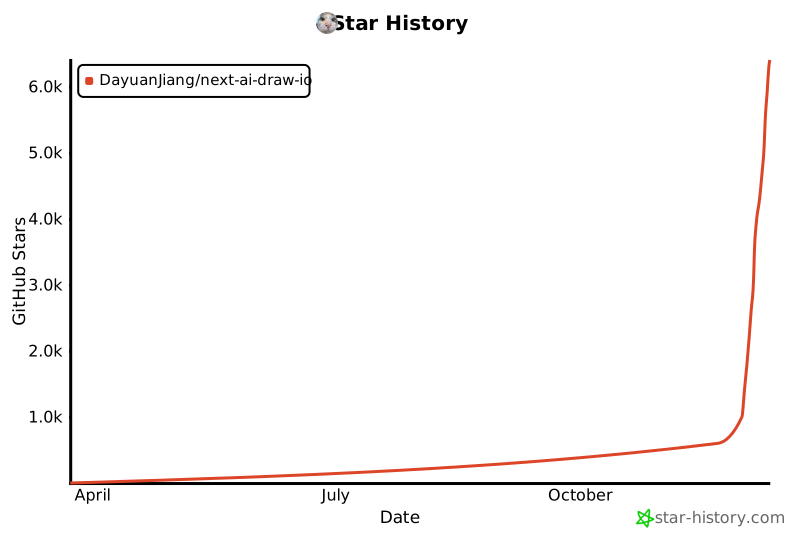](https://www.star-history.com/#DayuanJiang/next-ai-draw-io&type=date&legend=top-left)
|
|
|
|
---
|