mirror of
https://github.com/DayuanJiang/next-ai-draw-io.git
synced 2026-09-01 17:10:24 +08:00
Compare commits
1 Commits
v0.4.13
...
fix/contin
| Author | SHA1 | Date | |
|---|---|---|---|

|
5a9fed2d31 |
43
.github/CONTRIBUTING.md
vendored
43
.github/CONTRIBUTING.md
vendored
@@ -20,52 +20,15 @@ npm run lint # Check lint errors
|
||||
npm run check # Run all checks (CI)
|
||||
```
|
||||
|
||||
Git hooks via Husky run automatically:
|
||||
- **Pre-commit**: Biome (format/lint) + TypeScript type check
|
||||
- **Pre-push**: Unit tests
|
||||
Pre-commit hooks via Husky will run Biome automatically on staged files.
|
||||
|
||||
For a better experience, install the [Biome VS Code extension](https://marketplace.visualstudio.com/items?itemName=biomejs.biome) for real-time linting and format-on-save.
|
||||
|
||||
## Testing
|
||||
|
||||
Run tests before submitting PRs:
|
||||
|
||||
```bash
|
||||
npm run test # Unit tests (Vitest)
|
||||
npm run test:e2e # E2E tests (Playwright)
|
||||
```
|
||||
|
||||
E2E tests use mocked API responses - no AI provider needed. Tests are in `tests/e2e/`.
|
||||
|
||||
To run a specific test file:
|
||||
```bash
|
||||
npx playwright test tests/e2e/diagram-generation.spec.ts
|
||||
```
|
||||
|
||||
To run tests with UI mode:
|
||||
```bash
|
||||
npx playwright test --ui
|
||||
```
|
||||
|
||||
## Before You Start
|
||||
|
||||
For **significant changes** (new features, architecture changes, large refactors, etc.), please **open an issue first** to discuss your proposal before writing code. This helps avoid wasted effort and ensures alignment with the project direction. Small bug fixes and minor improvements can go straight to a PR.
|
||||
|
||||
## Pull Requests
|
||||
|
||||
1. Create a feature branch
|
||||
2. Make changes (pre-commit runs lint + type check automatically)
|
||||
3. Run E2E tests with `npm run test:e2e`
|
||||
4. Push (pre-push runs unit tests automatically)
|
||||
5. Submit PR against `main` with a clear description
|
||||
|
||||
CI will run the full test suite on your PR.
|
||||
|
||||
## Code Review
|
||||
|
||||
This project uses GitHub Copilot for automated code review. If you receive review comments from Copilot on your PR:
|
||||
- **Valid suggestions**: Please address them in your code.
|
||||
- **Invalid or irrelevant suggestions**: Feel free to click "Resolve" to dismiss them.
|
||||
2. Make changes and ensure `npm run check` passes
|
||||
3. Submit PR against `main` with a clear description
|
||||
|
||||
## Issues
|
||||
|
||||
|
||||
24
.github/ISSUE_TEMPLATE/enhancement.md
vendored
24
.github/ISSUE_TEMPLATE/enhancement.md
vendored
@@ -1,24 +0,0 @@
|
||||
---
|
||||
name: Enhancement
|
||||
about: Suggest an improvement to existing functionality
|
||||
title: '[Enhancement] '
|
||||
labels: enhancement
|
||||
assignees: ''
|
||||
---
|
||||
|
||||
> **Note**: This template is just a guide. Feel free to ignore the format entirely - any feedback is welcome! Don't let the template stop you from sharing your ideas.
|
||||
|
||||
## Current Behavior
|
||||
Describe how the feature currently works.
|
||||
|
||||
## Proposed Enhancement
|
||||
How you'd like this to be improved.
|
||||
|
||||
## Motivation
|
||||
Why this enhancement would be beneficial.
|
||||
|
||||
## Screenshots / Mockups
|
||||
If applicable, add screenshots or mockups to illustrate the proposed changes.
|
||||
|
||||
## Additional Context
|
||||
Any other information about the enhancement request.
|
||||
41
.github/renovate.json
vendored
41
.github/renovate.json
vendored
@@ -1,41 +0,0 @@
|
||||
{
|
||||
"$schema": "https://docs.renovatebot.com/renovate-schema.json",
|
||||
"extends": ["config:recommended"],
|
||||
"schedule": ["after 10am on the first day of the month"],
|
||||
"timezone": "Asia/Tokyo",
|
||||
"packageRules": [
|
||||
{
|
||||
"matchUpdateTypes": ["minor", "patch"],
|
||||
"matchPackagePatterns": ["*"],
|
||||
"groupName": "minor and patch dependencies",
|
||||
"automerge": true
|
||||
},
|
||||
{
|
||||
"matchUpdateTypes": ["major"],
|
||||
"matchPackagePatterns": ["*"],
|
||||
"groupName": "major dependencies",
|
||||
"automerge": false
|
||||
},
|
||||
{
|
||||
"matchPackagePatterns": ["@ai-sdk/*"],
|
||||
"groupName": "AI SDK packages"
|
||||
},
|
||||
{
|
||||
"matchPackagePatterns": ["@radix-ui/*"],
|
||||
"groupName": "Radix UI packages"
|
||||
},
|
||||
{
|
||||
"matchPackagePatterns": ["electron", "electron-builder"],
|
||||
"groupName": "Electron packages",
|
||||
"automerge": false
|
||||
},
|
||||
{
|
||||
"matchPackagePatterns": ["@ai-sdk/*", "ai", "next"],
|
||||
"groupName": "Core framework packages",
|
||||
"automerge": false
|
||||
}
|
||||
],
|
||||
"vulnerabilityAlerts": {
|
||||
"enabled": true
|
||||
}
|
||||
}
|
||||
27
.github/workflows/auto-format.yml
vendored
27
.github/workflows/auto-format.yml
vendored
@@ -12,18 +12,21 @@ jobs:
|
||||
runs-on: ubuntu-latest
|
||||
steps:
|
||||
- name: Checkout
|
||||
uses: actions/checkout@v6
|
||||
uses: actions/checkout@v4
|
||||
with:
|
||||
ref: ${{ github.event.pull_request.head.sha }}
|
||||
ref: ${{ github.head_ref }}
|
||||
token: ${{ secrets.GITHUB_TOKEN }}
|
||||
|
||||
- name: Setup Node.js
|
||||
uses: actions/setup-node@v6
|
||||
uses: actions/setup-node@v4
|
||||
with:
|
||||
node-version: '24'
|
||||
node-version: '20'
|
||||
|
||||
- name: Install Biome
|
||||
run: npm install --save-dev @biomejs/biome
|
||||
|
||||
- name: Run Biome format
|
||||
run: npx @biomejs/biome@latest check --write --no-errors-on-unmatched .
|
||||
run: npx @biomejs/biome check --write --no-errors-on-unmatched .
|
||||
|
||||
- name: Check for changes
|
||||
id: changes
|
||||
@@ -34,21 +37,11 @@ jobs:
|
||||
echo "has_changes=true" >> $GITHUB_OUTPUT
|
||||
fi
|
||||
|
||||
# For fork PRs, just fail if formatting is needed (can't push to forks)
|
||||
- name: Fail if fork PR needs formatting
|
||||
if: steps.changes.outputs.has_changes == 'true' && github.event.pull_request.head.repo.full_name != github.repository
|
||||
run: |
|
||||
echo "::error::This PR has formatting issues. Please run 'npx @biomejs/biome check --write .' locally and push the changes."
|
||||
git diff --stat
|
||||
exit 1
|
||||
|
||||
# For same-repo PRs, commit and push the changes
|
||||
- name: Commit changes
|
||||
if: steps.changes.outputs.has_changes == 'true' && github.event.pull_request.head.repo.full_name == github.repository
|
||||
if: steps.changes.outputs.has_changes == 'true'
|
||||
run: |
|
||||
git config --global user.name "github-actions[bot]"
|
||||
git config --global user.email "github-actions[bot]@users.noreply.github.com"
|
||||
git remote set-url origin https://x-access-token:${{ secrets.GITHUB_TOKEN }}@github.com/${{ github.repository }}
|
||||
git add .
|
||||
git commit -m "style: auto-format with Biome"
|
||||
git push origin HEAD:${{ github.head_ref }}
|
||||
git push
|
||||
|
||||
44
.github/workflows/ci.yml
vendored
44
.github/workflows/ci.yml
vendored
@@ -1,44 +0,0 @@
|
||||
name: CI
|
||||
|
||||
on:
|
||||
push:
|
||||
branches:
|
||||
- main
|
||||
pull_request:
|
||||
branches:
|
||||
- main
|
||||
|
||||
concurrency:
|
||||
group: ${{ github.workflow }}-${{ github.ref }}
|
||||
cancel-in-progress: true
|
||||
|
||||
permissions:
|
||||
contents: read
|
||||
|
||||
jobs:
|
||||
ci:
|
||||
runs-on: ubuntu-latest
|
||||
steps:
|
||||
- name: Checkout
|
||||
uses: actions/checkout@v6
|
||||
|
||||
- name: Setup Node.js
|
||||
uses: actions/setup-node@v6
|
||||
with:
|
||||
node-version: '24'
|
||||
cache: 'npm'
|
||||
|
||||
- name: Install dependencies
|
||||
run: npm install
|
||||
|
||||
- name: Type check
|
||||
run: npx tsc --noEmit
|
||||
|
||||
- name: Lint check
|
||||
run: npm run check
|
||||
|
||||
- name: Build
|
||||
run: npm run build
|
||||
|
||||
- name: Security audit
|
||||
run: npm audit --audit-level=high --omit=dev
|
||||
6
.github/workflows/docker-build.yml
vendored
6
.github/workflows/docker-build.yml
vendored
@@ -26,7 +26,7 @@ jobs:
|
||||
|
||||
steps:
|
||||
- name: Checkout repository
|
||||
uses: actions/checkout@v6
|
||||
uses: actions/checkout@v4
|
||||
|
||||
- name: Set up Docker Buildx
|
||||
uses: docker/setup-buildx-action@v3
|
||||
@@ -54,7 +54,7 @@ jobs:
|
||||
type=raw,value=latest,enable={{is_default_branch}}
|
||||
|
||||
- name: Build and push Docker image
|
||||
uses: docker/build-push-action@v6
|
||||
uses: docker/build-push-action@v5
|
||||
with:
|
||||
context: .
|
||||
push: ${{ github.event_name != 'pull_request' }}
|
||||
@@ -69,7 +69,7 @@ jobs:
|
||||
# Push to AWS ECR for App Runner auto-deploy
|
||||
- name: Configure AWS credentials
|
||||
if: github.event_name != 'pull_request' && github.ref == 'refs/heads/main'
|
||||
uses: aws-actions/configure-aws-credentials@v5
|
||||
uses: aws-actions/configure-aws-credentials@v4
|
||||
with:
|
||||
aws-access-key-id: ${{ secrets.AWS_ACCESS_KEY_ID }}
|
||||
aws-secret-access-key: ${{ secrets.AWS_SECRET_ACCESS_KEY }}
|
||||
|
||||
87
.github/workflows/electron-release.yml
vendored
87
.github/workflows/electron-release.yml
vendored
@@ -11,8 +11,7 @@ on:
|
||||
required: false
|
||||
|
||||
jobs:
|
||||
# Mac and Linux: Build and publish directly (no signing needed)
|
||||
build-mac-linux:
|
||||
build:
|
||||
permissions:
|
||||
contents: write
|
||||
strategy:
|
||||
@@ -21,93 +20,27 @@ jobs:
|
||||
include:
|
||||
- os: macos-latest
|
||||
platform: mac
|
||||
- os: windows-latest
|
||||
platform: win
|
||||
- os: ubuntu-latest
|
||||
platform: linux
|
||||
|
||||
runs-on: ${{ matrix.os }}
|
||||
|
||||
steps:
|
||||
- name: Checkout code
|
||||
uses: actions/checkout@v6
|
||||
uses: actions/checkout@v4
|
||||
|
||||
- name: Setup Node.js
|
||||
uses: actions/setup-node@v6
|
||||
uses: actions/setup-node@v4
|
||||
with:
|
||||
node-version: 24
|
||||
node-version: 20
|
||||
cache: "npm"
|
||||
|
||||
- name: Download draw.io static files for offline use
|
||||
run: |
|
||||
rm -rf public/drawio
|
||||
git clone --depth 1 --branch v29.3.5 https://github.com/jgraph/drawio.git /tmp/drawio
|
||||
mkdir -p public/drawio
|
||||
cp -r /tmp/drawio/src/main/webapp/* public/drawio/
|
||||
rm -rf public/drawio/WEB-INF
|
||||
rm -rf public/drawio/META-INF
|
||||
|
||||
- name: Install dependencies
|
||||
run: npm install
|
||||
run: npm ci
|
||||
|
||||
- name: Build and publish
|
||||
- name: Build and publish Electron app
|
||||
run: npm run dist:${{ matrix.platform }}
|
||||
env:
|
||||
GH_TOKEN: ${{ secrets.GITHUB_TOKEN }}
|
||||
|
||||
# Windows: Build, sign with SignPath, then publish
|
||||
build-windows:
|
||||
permissions:
|
||||
contents: write
|
||||
runs-on: windows-latest
|
||||
steps:
|
||||
- name: Checkout code
|
||||
uses: actions/checkout@v6
|
||||
|
||||
- name: Setup Node.js
|
||||
uses: actions/setup-node@v6
|
||||
with:
|
||||
node-version: 24
|
||||
cache: "npm"
|
||||
|
||||
- name: Download draw.io static files for offline use
|
||||
shell: bash
|
||||
run: |
|
||||
rm -rf public/drawio
|
||||
git clone --depth 1 --branch v29.3.5 https://github.com/jgraph/drawio.git /tmp/drawio
|
||||
mkdir -p public/drawio
|
||||
cp -r /tmp/drawio/src/main/webapp/* public/drawio/
|
||||
rm -rf public/drawio/WEB-INF
|
||||
rm -rf public/drawio/META-INF
|
||||
|
||||
- name: Install dependencies
|
||||
run: npm install
|
||||
|
||||
# Build WITHOUT publishing
|
||||
- name: Build Windows app
|
||||
run: npm run dist:win:build
|
||||
env:
|
||||
GH_TOKEN: ${{ secrets.GITHUB_TOKEN }}
|
||||
|
||||
- name: Upload unsigned artifacts for signing
|
||||
uses: actions/upload-artifact@v6
|
||||
id: upload-unsigned
|
||||
with:
|
||||
name: windows-unsigned
|
||||
path: release/*.exe
|
||||
retention-days: 1
|
||||
|
||||
- name: Sign with SignPath
|
||||
uses: signpath/github-action-submit-signing-request@v2
|
||||
with:
|
||||
api-token: ${{ secrets.SIGNPATH_API_TOKEN }}
|
||||
organization-id: '880a211d-2cd3-4e7b-8d04-3d1f8eb39df5'
|
||||
project-slug: 'next-ai-draw-io'
|
||||
signing-policy-slug: 'release-signing'
|
||||
artifact-configuration-slug: 'windows-exe'
|
||||
github-artifact-id: ${{ steps.upload-unsigned.outputs.artifact-id }}
|
||||
wait-for-completion: true
|
||||
output-artifact-directory: release-signed
|
||||
|
||||
- name: Upload signed artifacts to release
|
||||
uses: softprops/action-gh-release@v2
|
||||
with:
|
||||
files: release-signed/*.exe
|
||||
env:
|
||||
GITHUB_TOKEN: ${{ secrets.GITHUB_TOKEN }}
|
||||
|
||||
75
.github/workflows/test.yml
vendored
75
.github/workflows/test.yml
vendored
@@ -1,75 +0,0 @@
|
||||
name: Test
|
||||
|
||||
on:
|
||||
pull_request:
|
||||
branches: [main]
|
||||
push:
|
||||
branches: [main]
|
||||
|
||||
jobs:
|
||||
lint-and-unit:
|
||||
name: Lint & Unit Tests
|
||||
runs-on: ubuntu-latest
|
||||
steps:
|
||||
- uses: actions/checkout@v6
|
||||
|
||||
- name: Setup Node.js
|
||||
uses: actions/setup-node@v6
|
||||
with:
|
||||
node-version: "20"
|
||||
cache: "npm"
|
||||
|
||||
- name: Install dependencies
|
||||
run: npm ci
|
||||
|
||||
- name: Run lint
|
||||
run: npm run check
|
||||
|
||||
- name: Run unit tests
|
||||
run: npm run test -- --run
|
||||
|
||||
e2e:
|
||||
name: E2E Tests
|
||||
runs-on: ubuntu-latest
|
||||
steps:
|
||||
- uses: actions/checkout@v6
|
||||
|
||||
- name: Setup Node.js
|
||||
uses: actions/setup-node@v6
|
||||
with:
|
||||
node-version: "20"
|
||||
cache: "npm"
|
||||
|
||||
- name: Install dependencies
|
||||
run: npm ci
|
||||
|
||||
- name: Cache Playwright browsers
|
||||
uses: actions/cache@v5
|
||||
id: playwright-cache
|
||||
with:
|
||||
path: ~/.cache/ms-playwright
|
||||
key: playwright-${{ runner.os }}-${{ hashFiles('**/package-lock.json') }}
|
||||
|
||||
- name: Install Playwright browsers
|
||||
if: steps.playwright-cache.outputs.cache-hit != 'true'
|
||||
run: npx playwright install chromium --with-deps
|
||||
|
||||
- name: Install Playwright deps (cached)
|
||||
if: steps.playwright-cache.outputs.cache-hit == 'true'
|
||||
run: npx playwright install-deps chromium
|
||||
|
||||
- name: Build app
|
||||
run: npm run build
|
||||
|
||||
- name: Run E2E tests
|
||||
run: npm run test:e2e
|
||||
env:
|
||||
CI: true
|
||||
|
||||
- name: Upload test results
|
||||
uses: actions/upload-artifact@v6
|
||||
if: always()
|
||||
with:
|
||||
name: playwright-report
|
||||
path: playwright-report/
|
||||
retention-days: 7
|
||||
12
.gitignore
vendored
12
.gitignore
vendored
@@ -14,8 +14,6 @@ packages/*/dist
|
||||
|
||||
# testing
|
||||
/coverage
|
||||
/playwright-report/
|
||||
/test-results/
|
||||
|
||||
# next.js
|
||||
/.next/
|
||||
@@ -56,8 +54,6 @@ push-via-ec2.sh
|
||||
/dist-electron/
|
||||
/release/
|
||||
/electron-standalone/
|
||||
# Draw.io static files (downloaded during CI build)
|
||||
public/drawio/
|
||||
*.dmg
|
||||
*.exe
|
||||
*.AppImage
|
||||
@@ -67,11 +63,3 @@ public/drawio/
|
||||
|
||||
CLAUDE.md
|
||||
.spec-workflow
|
||||
|
||||
# edgeone
|
||||
.edgeone
|
||||
opencode.json
|
||||
ai-models.json
|
||||
|
||||
# local backups
|
||||
*.bak
|
||||
|
||||
@@ -1,2 +1 @@
|
||||
npx lint-staged
|
||||
npx tsc --noEmit
|
||||
|
||||
@@ -1,4 +0,0 @@
|
||||
# Skip if node_modules not installed (e.g., on EC2 push server)
|
||||
if [ -d "node_modules" ]; then
|
||||
npm run test -- --run
|
||||
fi
|
||||
18
Dockerfile
18
Dockerfile
@@ -1,7 +1,7 @@
|
||||
# Multi-stage Dockerfile for Next.js
|
||||
|
||||
# Stage 1: Install dependencies
|
||||
FROM node:24-alpine AS deps
|
||||
FROM node:20-alpine AS deps
|
||||
RUN apk add --no-cache libc6-compat
|
||||
WORKDIR /app
|
||||
|
||||
@@ -9,11 +9,10 @@ WORKDIR /app
|
||||
COPY package.json package-lock.json* ./
|
||||
|
||||
# Install dependencies
|
||||
ARG ELECTRON_SKIP_BINARY_DOWNLOAD=1
|
||||
RUN npm install
|
||||
RUN npm ci
|
||||
|
||||
# Stage 2: Build application
|
||||
FROM node:24-alpine AS builder
|
||||
FROM node:20-alpine AS builder
|
||||
WORKDIR /app
|
||||
|
||||
# Copy node_modules from deps stage
|
||||
@@ -31,20 +30,11 @@ ENV NEXT_PUBLIC_DRAWIO_BASE_URL=${NEXT_PUBLIC_DRAWIO_BASE_URL}
|
||||
ARG NEXT_PUBLIC_SHOW_ABOUT_AND_NOTICE=false
|
||||
ENV NEXT_PUBLIC_SHOW_ABOUT_AND_NOTICE=${NEXT_PUBLIC_SHOW_ABOUT_AND_NOTICE}
|
||||
|
||||
# Build-time argument for subdirectory deployment (e.g., /nextaidrawio)
|
||||
ARG NEXT_PUBLIC_BASE_PATH=""
|
||||
ENV NEXT_PUBLIC_BASE_PATH=${NEXT_PUBLIC_BASE_PATH}
|
||||
|
||||
# Control sponsorship and self-hosting messaging in quota notifications.
|
||||
# Set NEXT_PUBLIC_SELFHOSTED="true" in self-hosted deployments to hide sponsorship/self-host links and related text in quota popups.
|
||||
ARG NEXT_PUBLIC_SELFHOSTED=""
|
||||
ENV NEXT_PUBLIC_SELFHOSTED="${NEXT_PUBLIC_SELFHOSTED}"
|
||||
|
||||
# Build Next.js application (standalone mode)
|
||||
RUN npm run build
|
||||
|
||||
# Stage 3: Production runtime
|
||||
FROM node:24-alpine AS runner
|
||||
FROM node:20-alpine AS runner
|
||||
WORKDIR /app
|
||||
|
||||
ENV NODE_ENV=production
|
||||
|
||||
155
README.md
155
README.md
@@ -4,7 +4,7 @@
|
||||
|
||||
**AI-Powered Diagram Creation Tool - Chat, Draw, Visualize**
|
||||
|
||||
English | [中文](./docs/cn/README_CN.md) | [日本語](./docs/ja/README_JA.md)
|
||||
English | [中文](./docs/README_CN.md) | [日本語](./docs/README_JA.md)
|
||||
|
||||
[](https://next-ai-drawio.jiang.jp/)
|
||||
|
||||
@@ -19,7 +19,6 @@ English | [中文](./docs/cn/README_CN.md) | [日本語](./docs/ja/README_JA.md)
|
||||
|
||||
A Next.js web application that integrates AI capabilities with draw.io diagrams. Create, modify, and enhance diagrams through natural language commands and AI-assisted visualization.
|
||||
|
||||
> Note: Thanks to <img src="https://raw.githubusercontent.com/DayuanJiang/next-ai-draw-io/main/public/doubao-color.png" alt="" height="20" /> [ByteDance Doubao](https://www.volcengine.com/activity/newyear-referral?utm_campaign=doubao&utm_content=aidrawio&utm_medium=github&utm_source=coopensrc&utm_term=project) sponsorship, the demo site now uses the powerful K2-thinking model!
|
||||
|
||||
|
||||
https://github.com/user-attachments/assets/9d60a3e8-4a1c-4b5e-acbb-26af2d3eabd1
|
||||
@@ -27,25 +26,21 @@ https://github.com/user-attachments/assets/9d60a3e8-4a1c-4b5e-acbb-26af2d3eabd1
|
||||
|
||||
|
||||
## Table of Contents
|
||||
- [Next AI Draw.io](#next-ai-drawio)
|
||||
- [Next AI Draw.io ](#next-ai-drawio-)
|
||||
- [Table of Contents](#table-of-contents)
|
||||
- [Examples](#examples)
|
||||
- [Features](#features)
|
||||
- [MCP Server (Preview)](#mcp-server-preview)
|
||||
- [Claude Code CLI](#claude-code-cli)
|
||||
- [Getting Started](#getting-started)
|
||||
- [Try it Online](#try-it-online)
|
||||
- [Desktop Application](#desktop-application)
|
||||
- [Run with Docker](#run-with-docker)
|
||||
- [Run with Docker (Recommended)](#run-with-docker-recommended)
|
||||
- [Installation](#installation)
|
||||
- [Deployment](#deployment)
|
||||
- [Deploy to EdgeOne Pages](#deploy-to-edgeone-pages)
|
||||
- [Deploy on Vercel](#deploy-on-vercel)
|
||||
- [Deploy on Cloudflare Workers](#deploy-on-cloudflare-workers)
|
||||
- [Multi-Provider Support](#multi-provider-support)
|
||||
- [How It Works](#how-it-works)
|
||||
- [Project Structure](#project-structure)
|
||||
- [Support \& Contact](#support--contact)
|
||||
- [FAQ](#faq)
|
||||
- [Star History](#star-history)
|
||||
|
||||
## Examples
|
||||
@@ -101,7 +96,7 @@ Here are some example prompts and their generated diagrams:
|
||||
|
||||
## MCP Server (Preview)
|
||||
|
||||
> **Preview Feature**: This feature is experimental and may not be stable.
|
||||
> **Preview Feature**: This feature is experimental and may not stable.
|
||||
|
||||
Use Next AI Draw.io with AI agents like Claude Desktop, Cursor, and VS Code via MCP (Model Context Protocol).
|
||||
|
||||
@@ -137,7 +132,7 @@ No installation needed! Try the app directly on our demo site:
|
||||
|
||||
[](https://next-ai-drawio.jiang.jp/)
|
||||
|
||||
|
||||
> Note: Due to high traffic, the demo site currently uses minimax-m2. For best results, we recommend self-hosting with Claude Sonnet 4.5 or Claude Opus 4.5.
|
||||
|
||||
> **Bring Your Own API Key**: You can use your own API key to bypass usage limits on the demo site. Click the Settings icon in the chat panel to configure your provider and API key. Your key is stored locally in your browser and is never stored on the server.
|
||||
|
||||
@@ -145,11 +140,53 @@ No installation needed! Try the app directly on our demo site:
|
||||
|
||||
Download the native desktop app for your platform from the [Releases page](https://github.com/DayuanJiang/next-ai-draw-io/releases):
|
||||
|
||||
Supported platforms: Windows, macOS, Linux.
|
||||
| Platform | Download |
|
||||
|----------|----------|
|
||||
| macOS | `.dmg` (Intel & Apple Silicon) |
|
||||
| Windows | `.exe` installer (x64 & ARM64) |
|
||||
| Linux | `.AppImage` or `.deb` (x64 & ARM64) |
|
||||
|
||||
### Run with Docker
|
||||
**Features:**
|
||||
- **Secure API key storage**: Credentials encrypted using OS keychain
|
||||
- **Configuration presets**: Save and switch between AI providers via menu
|
||||
- **Native file dialogs**: Open/save `.drawio` files directly
|
||||
- **Offline capable**: Works without internet after first launch
|
||||
|
||||
[Go to Docker Guide](./docs/en/docker.md)
|
||||
**Quick Setup:**
|
||||
1. Download and install for your platform
|
||||
2. Open the app → **Menu → Configuration → Manage Presets**
|
||||
3. Add your AI provider credentials
|
||||
4. Start creating diagrams!
|
||||
|
||||
### Run with Docker (Recommended)
|
||||
|
||||
If you just want to run it locally, the best way is to use Docker.
|
||||
|
||||
First, install Docker if you haven't already: [Get Docker](https://docs.docker.com/get-docker/)
|
||||
|
||||
Then run:
|
||||
|
||||
```bash
|
||||
docker run -d -p 3000:3000 \
|
||||
-e AI_PROVIDER=openai \
|
||||
-e AI_MODEL=gpt-4o \
|
||||
-e OPENAI_API_KEY=your_api_key \
|
||||
ghcr.io/dayuanjiang/next-ai-draw-io:latest
|
||||
```
|
||||
|
||||
Or use an env file:
|
||||
|
||||
```bash
|
||||
cp env.example .env
|
||||
# Edit .env with your configuration
|
||||
docker run -d -p 3000:3000 --env-file .env ghcr.io/dayuanjiang/next-ai-draw-io:latest
|
||||
```
|
||||
|
||||
Open [http://localhost:3000](http://localhost:3000) in your browser.
|
||||
|
||||
Replace the environment variables with your preferred AI provider configuration. See [Multi-Provider Support](#multi-provider-support) for available options.
|
||||
|
||||
> **Offline Deployment:** If `embed.diagrams.net` is blocked, see [Offline Deployment](./docs/offline-deployment.md) for configuration options.
|
||||
|
||||
### Installation
|
||||
|
||||
@@ -158,77 +195,73 @@ Supported platforms: Windows, macOS, Linux.
|
||||
```bash
|
||||
git clone https://github.com/DayuanJiang/next-ai-draw-io
|
||||
cd next-ai-draw-io
|
||||
```
|
||||
|
||||
2. Install dependencies:
|
||||
|
||||
```bash
|
||||
npm install
|
||||
```
|
||||
|
||||
3. Configure your AI provider:
|
||||
|
||||
Create a `.env.local` file in the root directory:
|
||||
|
||||
```bash
|
||||
cp env.example .env.local
|
||||
```
|
||||
|
||||
See the [Provider Configuration Guide](./docs/en/ai-providers.md) for detailed setup instructions for each provider.
|
||||
Edit `.env.local` and configure your chosen provider:
|
||||
|
||||
2. Run the development server:
|
||||
- Set `AI_PROVIDER` to your chosen provider (bedrock, openai, anthropic, google, azure, ollama, openrouter, deepseek, siliconflow)
|
||||
- Set `AI_MODEL` to the specific model you want to use
|
||||
- Add the required API keys for your provider
|
||||
- `TEMPERATURE`: Optional temperature setting (e.g., `0` for deterministic output). Leave unset for models that don't support it (e.g., reasoning models).
|
||||
- `ACCESS_CODE_LIST`: Optional access password(s), can be comma-separated for multiple passwords.
|
||||
|
||||
> Warning: If you do not set `ACCESS_CODE_LIST`, anyone can access your deployed site directly, which may lead to rapid depletion of your token. It is recommended to set this option.
|
||||
|
||||
See the [Provider Configuration Guide](./docs/ai-providers.md) for detailed setup instructions for each provider.
|
||||
|
||||
4. Run the development server:
|
||||
|
||||
```bash
|
||||
npm run dev
|
||||
```
|
||||
|
||||
3. Open [http://localhost:6002](http://localhost:6002) in your browser to see the application.
|
||||
5. Open [http://localhost:3000](http://localhost:3000) in your browser to see the application.
|
||||
|
||||
## Deployment
|
||||
|
||||
### Deploy to EdgeOne Pages
|
||||
The easiest way to deploy your Next.js app is to use the [Vercel Platform](https://vercel.com/new) from the creators of Next.js.
|
||||
|
||||
You can deploy with one click using [Tencent EdgeOne Pages](https://pages.edgeone.ai/).
|
||||
|
||||
Deploy by this button:
|
||||
|
||||
[](https://edgeone.ai/pages/new?repository-url=https%3A%2F%2Fgithub.com%2FDayuanJiang%2Fnext-ai-draw-io)
|
||||
|
||||
Check out the [Tencent EdgeOne Pages documentation](https://pages.edgeone.ai/document/deployment-overview) for more details.
|
||||
|
||||
Additionally, deploying through Tencent EdgeOne Pages will also grant you a [daily free quota for DeepSeek models](https://pages.edgeone.ai/document/edge-ai).
|
||||
|
||||
### Deploy on Vercel
|
||||
Check out the [Next.js deployment documentation](https://nextjs.org/docs/app/building-your-application/deploying) for more details.
|
||||
|
||||
Or you can deploy by this button.
|
||||
[](https://vercel.com/new/clone?repository-url=https%3A%2F%2Fgithub.com%2FDayuanJiang%2Fnext-ai-draw-io)
|
||||
|
||||
The easiest way to deploy is using [Vercel](https://vercel.com/new), the creators of Next.js. Be sure to **set the environment variables** in the Vercel dashboard as you did in your local `.env.local` file.
|
||||
|
||||
See the [Next.js deployment documentation](https://nextjs.org/docs/app/building-your-application/deploying) for more details.
|
||||
|
||||
### Deploy on Cloudflare Workers
|
||||
|
||||
[Go to Cloudflare Deploy Guide](./docs/en/cloudflare-deploy.md)
|
||||
|
||||
Be sure to **set the environment variables** in the Vercel dashboard as you did in your local `.env.local` file.
|
||||
|
||||
|
||||
## Multi-Provider Support
|
||||
|
||||
- [ByteDance Doubao](https://www.volcengine.com/activity/newyear-referral?utm_campaign=doubao&utm_content=aidrawio&utm_medium=github&utm_source=coopensrc&utm_term=project)
|
||||
- AWS Bedrock (default)
|
||||
- OpenAI
|
||||
- Anthropic
|
||||
- Google AI
|
||||
- Google Vertex AI
|
||||
- Azure OpenAI
|
||||
- Ollama
|
||||
- OpenRouter
|
||||
- DeepSeek
|
||||
- SiliconFlow
|
||||
- ModelScope
|
||||
- SGLang
|
||||
- Vercel AI Gateway
|
||||
|
||||
|
||||
All providers except AWS Bedrock and OpenRouter support custom endpoints.
|
||||
|
||||
📖 **[Detailed Provider Configuration Guide](./docs/en/ai-providers.md)** - See setup instructions for each provider.
|
||||
|
||||
### Server-Side Multi-Model Configuration
|
||||
|
||||
Administrators can configure multiple server-side models that are available to all users without requiring personal API keys. Configure via `AI_MODELS_CONFIG` environment variable (JSON string) or `ai-models.json` file.
|
||||
📖 **[Detailed Provider Configuration Guide](./docs/ai-providers.md)** - See setup instructions for each provider.
|
||||
|
||||
**Model Requirements**: This task requires strong model capabilities for generating long-form text with strict formatting constraints (draw.io XML). Recommended models include Claude Sonnet 4.5, GPT-5.1, Gemini 3 Pro, and DeepSeek V3.2/R1.
|
||||
|
||||
Note that the `claude` series has been trained on draw.io diagrams with cloud architecture logos like AWS, Azure, GCP. So if you want to create cloud architecture diagrams, this is the best choice.
|
||||
Note that `claude` series has trained on draw.io diagrams with cloud architecture logos like AWS, Azure, GCP. So if you want to create cloud architecture diagrams, this is the best choice.
|
||||
|
||||
|
||||
## How It Works
|
||||
@@ -241,21 +274,33 @@ The application uses the following technologies:
|
||||
|
||||
Diagrams are represented as XML that can be rendered in draw.io. The AI processes your commands and generates or modifies this XML accordingly.
|
||||
|
||||
## Project Structure
|
||||
|
||||
```
|
||||
app/ # Next.js App Router
|
||||
api/chat/ # Chat API endpoint with AI tools
|
||||
page.tsx # Main page with DrawIO embed
|
||||
components/ # React components
|
||||
chat-panel.tsx # Chat interface with diagram control
|
||||
chat-input.tsx # User input component with file upload
|
||||
history-dialog.tsx # Diagram version history viewer
|
||||
ui/ # UI components (buttons, cards, etc.)
|
||||
contexts/ # React context providers
|
||||
diagram-context.tsx # Global diagram state management
|
||||
lib/ # Utility functions and helpers
|
||||
ai-providers.ts # Multi-provider AI configuration
|
||||
utils.ts # XML processing and conversion utilities
|
||||
public/ # Static assets including example images
|
||||
```
|
||||
|
||||
## Support & Contact
|
||||
|
||||
**Special thanks to [ByteDance Doubao](https://www.volcengine.com/activity/newyear-referral?utm_campaign=doubao&utm_content=aidrawio&utm_medium=github&utm_source=coopensrc&utm_term=project) for sponsoring the API token usage of the demo site!** Register on the ARK platform to get 500K free tokens for all models!
|
||||
|
||||
If you find this project useful, please consider [sponsoring](https://github.com/sponsors/DayuanJiang) to help me host the live demo site!
|
||||
|
||||
For support or inquiries, please open an issue on the GitHub repository or contact the maintainer at:
|
||||
|
||||
- Email: me[at]jiang.jp
|
||||
|
||||
## FAQ
|
||||
|
||||
See [FAQ](./docs/en/FAQ.md) for common issues and solutions.
|
||||
|
||||
## Star History
|
||||
|
||||
[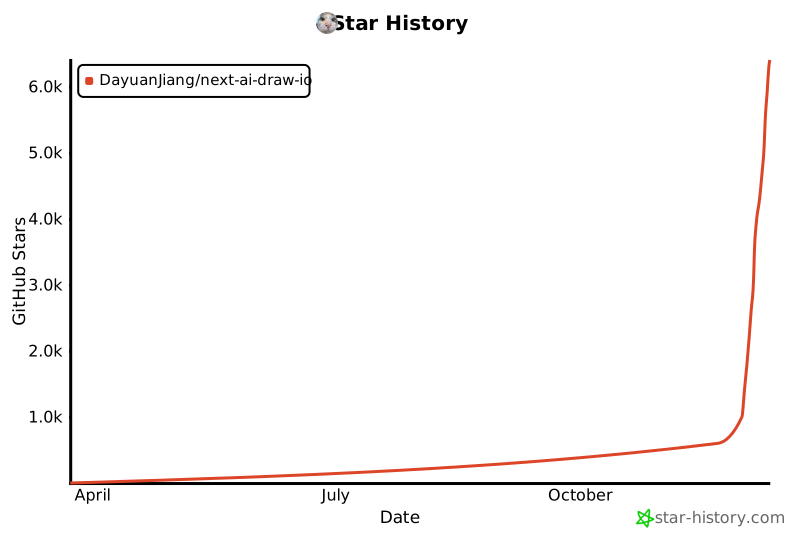](https://www.star-history.com/#DayuanJiang/next-ai-draw-io&type=date&legend=top-left)
|
||||
|
||||
@@ -1,7 +1,7 @@
|
||||
import type { Metadata } from "next"
|
||||
import Image from "next/image"
|
||||
import Link from "next/link"
|
||||
import { FaGithub } from "react-icons/fa"
|
||||
import Image from "@/components/image-with-basepath"
|
||||
|
||||
export const metadata: Metadata = {
|
||||
title: "关于 - Next AI Draw.io",
|
||||
@@ -10,7 +10,18 @@ export const metadata: Metadata = {
|
||||
keywords: ["AI图表", "draw.io", "AWS架构", "GCP图表", "Azure图表", "LLM"],
|
||||
}
|
||||
|
||||
function formatNumber(num: number): string {
|
||||
if (num >= 1000) {
|
||||
return `${num / 1000}k`
|
||||
}
|
||||
return num.toString()
|
||||
}
|
||||
|
||||
export default function AboutCN() {
|
||||
const dailyRequestLimit = Number(process.env.DAILY_REQUEST_LIMIT) || 20
|
||||
const dailyTokenLimit = Number(process.env.DAILY_TOKEN_LIMIT) || 500000
|
||||
const tpmLimit = Number(process.env.TPM_LIMIT) || 50000
|
||||
|
||||
return (
|
||||
<div className="min-h-screen bg-gray-50">
|
||||
{/* Navigation */}
|
||||
@@ -61,56 +72,147 @@ export default function AboutCN() {
|
||||
<p className="text-xl text-gray-600 font-medium">
|
||||
AI驱动的图表创建工具 - 对话、绘制、可视化
|
||||
</p>
|
||||
<div className="flex justify-center gap-4 mt-4 text-sm">
|
||||
<Link
|
||||
href="/about"
|
||||
className="text-gray-600 hover:text-blue-600"
|
||||
>
|
||||
English
|
||||
</Link>
|
||||
<span className="text-gray-400">|</span>
|
||||
<Link
|
||||
href="/about/cn"
|
||||
className="text-blue-600 font-semibold"
|
||||
>
|
||||
中文
|
||||
</Link>
|
||||
<span className="text-gray-400">|</span>
|
||||
<Link
|
||||
href="/about/ja"
|
||||
className="text-gray-600 hover:text-blue-600"
|
||||
>
|
||||
日本語
|
||||
</Link>
|
||||
</div>
|
||||
</div>
|
||||
|
||||
<div className="relative mb-8 rounded-2xl bg-gradient-to-br from-amber-50 via-orange-50 to-yellow-50 p-[1px] shadow-lg">
|
||||
<div className="absolute inset-0 rounded-2xl bg-gradient-to-br from-amber-400 via-orange-400 to-yellow-400 opacity-20" />
|
||||
<div className="relative mb-8 rounded-2xl bg-gradient-to-br from-amber-50 via-orange-50 to-rose-50 p-[1px] shadow-lg">
|
||||
<div className="absolute inset-0 rounded-2xl bg-gradient-to-br from-amber-400 via-orange-400 to-rose-400 opacity-20" />
|
||||
<div className="relative rounded-2xl bg-white/80 backdrop-blur-sm p-6">
|
||||
{/* Header */}
|
||||
<div className="mb-4">
|
||||
<h3 className="text-lg font-bold text-gray-900 tracking-tight">
|
||||
由字节跳动豆包提供支持
|
||||
模型变更与用量限制{" "}
|
||||
<span className="text-sm text-amber-600 font-medium italic font-normal">
|
||||
(或者说:我的钱包顶不住了)
|
||||
</span>
|
||||
</h3>
|
||||
</div>
|
||||
|
||||
{/* Story */}
|
||||
<div className="space-y-3 text-sm text-gray-700 leading-relaxed mb-5">
|
||||
<p>
|
||||
好消息!感谢{" "}
|
||||
<a
|
||||
href="https://www.volcengine.com/activity/newyear-referral?utm_campaign=doubao&utm_content=aidrawio&utm_medium=github&utm_source=coopensrc&utm_term=project"
|
||||
target="_blank"
|
||||
rel="noopener noreferrer"
|
||||
className="font-semibold text-blue-600 hover:underline"
|
||||
>
|
||||
字节跳动豆包
|
||||
</a>
|
||||
的慷慨赞助,演示站点现已接入强大的{" "}
|
||||
大家对这个项目的热情太高了——看来大家都真的很喜欢画图!但这也带来了一个幸福的烦恼:我们经常触发出上游
|
||||
AI 接口的频率限制
|
||||
(TPS/TPM)。一旦超限,系统就会暂停,导致请求失败。
|
||||
</p>
|
||||
<p>
|
||||
由于使用量过高,我已将模型从 Opus 4.5 更换为{" "}
|
||||
<span className="font-semibold text-amber-700">
|
||||
K2-thinking
|
||||
</span>{" "}
|
||||
模型,图表生成效果更佳!点击链接注册即可领取{" "}
|
||||
<span className="font-semibold text-amber-700">
|
||||
50万免费Token
|
||||
Haiku 4.5
|
||||
</span>
|
||||
,适用于所有模型!
|
||||
,以降低成本。
|
||||
</p>
|
||||
<p>
|
||||
作为一个
|
||||
<span className="font-semibold text-amber-700">
|
||||
独立开发者
|
||||
</span>
|
||||
,目前的 API
|
||||
费用全是我自己在掏腰包(纯属为爱发电)。为了保证服务能细水长流,同时也为了避免我个人陷入财务危机,我还设置了以下临时用量限制:
|
||||
</p>
|
||||
</div>
|
||||
|
||||
{/* Limits Cards */}
|
||||
<div className="grid grid-cols-2 gap-3 mb-5">
|
||||
<div className="rounded-xl bg-gradient-to-br from-amber-100 to-orange-100 p-4 text-center">
|
||||
<div className="text-xs font-medium text-amber-700 uppercase tracking-wide mb-1">
|
||||
Token 用量
|
||||
</div>
|
||||
<div className="text-lg font-bold text-gray-900">
|
||||
{formatNumber(tpmLimit)}
|
||||
<span className="text-sm font-normal text-gray-600">
|
||||
/分钟
|
||||
</span>
|
||||
</div>
|
||||
<div className="text-lg font-bold text-gray-900">
|
||||
{formatNumber(dailyTokenLimit)}
|
||||
<span className="text-sm font-normal text-gray-600">
|
||||
/天
|
||||
</span>
|
||||
</div>
|
||||
</div>
|
||||
<div className="rounded-xl bg-gradient-to-br from-amber-100 to-orange-100 p-4 text-center">
|
||||
<div className="text-xs font-medium text-amber-700 uppercase tracking-wide mb-1">
|
||||
每日请求数
|
||||
</div>
|
||||
<div className="text-2xl font-bold text-gray-900">
|
||||
{dailyRequestLimit}
|
||||
</div>
|
||||
<div className="text-sm text-gray-600">
|
||||
次
|
||||
</div>
|
||||
</div>
|
||||
</div>
|
||||
|
||||
{/* Divider */}
|
||||
<div className="flex items-center gap-3 my-5">
|
||||
<div className="flex-1 h-px bg-gradient-to-r from-transparent via-amber-300 to-transparent" />
|
||||
</div>
|
||||
|
||||
{/* Bring Your Own Key */}
|
||||
<div className="text-center">
|
||||
<div className="text-center mb-5">
|
||||
<h4 className="text-base font-bold text-gray-900 mb-2">
|
||||
使用自己的 API Key
|
||||
</h4>
|
||||
<p className="text-sm text-gray-600 mb-2 max-w-md mx-auto">
|
||||
您也可以使用自己的 API
|
||||
Key,支持多种服务商。点击聊天面板中的设置图标即可配置。
|
||||
您可以使用自己的 API Key
|
||||
来绕过这些限制。点击聊天面板中的设置图标即可配置您的
|
||||
Provider 和 API Key。
|
||||
</p>
|
||||
<p className="text-xs text-gray-500 max-w-md mx-auto">
|
||||
您的 Key
|
||||
仅保存在浏览器本地,不会被存储在服务器上。
|
||||
</p>
|
||||
</div>
|
||||
|
||||
{/* Divider */}
|
||||
<div className="flex items-center gap-3 mb-5">
|
||||
<div className="flex-1 h-px bg-gradient-to-r from-transparent via-amber-300 to-transparent" />
|
||||
</div>
|
||||
|
||||
{/* Sponsorship CTA */}
|
||||
<div className="text-center">
|
||||
<h4 className="text-base font-bold text-gray-900 mb-2">
|
||||
寻求赞助 (求大佬捞一把)
|
||||
</h4>
|
||||
<p className="text-sm text-gray-600 mb-4 max-w-md mx-auto">
|
||||
要想彻底解除这些限制,扩容后端是唯一的办法。我正在积极寻求
|
||||
AI API 提供商或云平台的赞助。
|
||||
</p>
|
||||
<p className="text-sm text-gray-600 mb-4 max-w-md mx-auto">
|
||||
作为回报(无论是额度支持还是资金支持),我将在
|
||||
GitHub 仓库和 Live Demo
|
||||
网站的显眼位置展示贵公司的 Logo
|
||||
作为平台赞助商。
|
||||
</p>
|
||||
<a
|
||||
href="mailto:me@jiang.jp"
|
||||
className="inline-flex items-center gap-2 px-5 py-2.5 rounded-full bg-gradient-to-r from-amber-500 to-orange-500 text-white font-medium text-sm shadow-md hover:shadow-lg hover:scale-105 transition-all duration-200"
|
||||
>
|
||||
联系我
|
||||
</a>
|
||||
</div>
|
||||
</div>
|
||||
</div>
|
||||
|
||||
@@ -275,16 +377,6 @@ export default function AboutCN() {
|
||||
多提供商支持
|
||||
</h2>
|
||||
<ul className="list-disc pl-6 text-gray-700 space-y-1">
|
||||
<li>
|
||||
<a
|
||||
href="https://www.volcengine.com/activity/newyear-referral?utm_campaign=doubao&utm_content=aidrawio&utm_medium=github&utm_source=coopensrc&utm_term=project"
|
||||
target="_blank"
|
||||
rel="noopener noreferrer"
|
||||
className="text-blue-600 hover:underline"
|
||||
>
|
||||
字节跳动豆包
|
||||
</a>
|
||||
</li>
|
||||
<li>AWS Bedrock(默认)</li>
|
||||
<li>
|
||||
OpenAI / OpenAI兼容API(通过{" "}
|
||||
@@ -292,13 +384,10 @@ export default function AboutCN() {
|
||||
</li>
|
||||
<li>Anthropic</li>
|
||||
<li>Google AI</li>
|
||||
<li>Google Vertex AI</li>
|
||||
<li>Azure OpenAI</li>
|
||||
<li>Ollama</li>
|
||||
<li>OpenRouter</li>
|
||||
<li>DeepSeek</li>
|
||||
<li>SiliconFlow</li>
|
||||
<li>ModelScope</li>
|
||||
</ul>
|
||||
<p className="text-gray-700 mt-4">
|
||||
注意:<code>claude-sonnet-4-5</code>{" "}
|
||||
@@ -306,21 +395,18 @@ export default function AboutCN() {
|
||||
</p>
|
||||
|
||||
{/* Support */}
|
||||
<h2 className="text-2xl font-semibold text-gray-900 mt-10 mb-4">
|
||||
支持与联系
|
||||
</h2>
|
||||
<p className="text-gray-700 mb-4 font-semibold">
|
||||
特别感谢{" "}
|
||||
<a
|
||||
href="https://www.volcengine.com/activity/newyear-referral?utm_campaign=doubao&utm_content=aidrawio&utm_medium=github&utm_source=coopensrc&utm_term=project"
|
||||
target="_blank"
|
||||
rel="noopener noreferrer"
|
||||
className="text-blue-600 hover:underline"
|
||||
>
|
||||
字节跳动豆包
|
||||
</a>{" "}
|
||||
为本站提供 API Token 支持!
|
||||
</p>
|
||||
<div className="flex items-center gap-4 mt-10 mb-4">
|
||||
<h2 className="text-2xl font-semibold text-gray-900">
|
||||
支持与联系
|
||||
</h2>
|
||||
<iframe
|
||||
src="https://github.com/sponsors/DayuanJiang/button"
|
||||
title="Sponsor DayuanJiang"
|
||||
height="32"
|
||||
width="114"
|
||||
style={{ border: 0, borderRadius: 6 }}
|
||||
/>
|
||||
</div>
|
||||
<p className="text-gray-700">
|
||||
如果您觉得这个项目有用,请考虑{" "}
|
||||
<a
|
||||
|
||||
@@ -1,7 +1,7 @@
|
||||
import type { Metadata } from "next"
|
||||
import Image from "next/image"
|
||||
import Link from "next/link"
|
||||
import { FaGithub } from "react-icons/fa"
|
||||
import Image from "@/components/image-with-basepath"
|
||||
|
||||
export const metadata: Metadata = {
|
||||
title: "概要 - Next AI Draw.io",
|
||||
@@ -17,7 +17,18 @@ export const metadata: Metadata = {
|
||||
],
|
||||
}
|
||||
|
||||
function formatNumber(num: number): string {
|
||||
if (num >= 1000) {
|
||||
return `${num / 1000}k`
|
||||
}
|
||||
return num.toString()
|
||||
}
|
||||
|
||||
export default function AboutJA() {
|
||||
const dailyRequestLimit = Number(process.env.DAILY_REQUEST_LIMIT) || 20
|
||||
const dailyTokenLimit = Number(process.env.DAILY_TOKEN_LIMIT) || 500000
|
||||
const tpmLimit = Number(process.env.TPM_LIMIT) || 50000
|
||||
|
||||
return (
|
||||
<div className="min-h-screen bg-gray-50">
|
||||
{/* Navigation */}
|
||||
@@ -69,54 +80,144 @@ export default function AboutJA() {
|
||||
AI搭載のダイアグラム作成ツール -
|
||||
チャット、描画、可視化
|
||||
</p>
|
||||
<div className="flex justify-center gap-4 mt-4 text-sm">
|
||||
<Link
|
||||
href="/about"
|
||||
className="text-gray-600 hover:text-blue-600"
|
||||
>
|
||||
English
|
||||
</Link>
|
||||
<span className="text-gray-400">|</span>
|
||||
<Link
|
||||
href="/about/cn"
|
||||
className="text-gray-600 hover:text-blue-600"
|
||||
>
|
||||
中文
|
||||
</Link>
|
||||
<span className="text-gray-400">|</span>
|
||||
<Link
|
||||
href="/about/ja"
|
||||
className="text-blue-600 font-semibold"
|
||||
>
|
||||
日本語
|
||||
</Link>
|
||||
</div>
|
||||
</div>
|
||||
|
||||
<div className="relative mb-8 rounded-2xl bg-gradient-to-br from-amber-50 via-orange-50 to-yellow-50 p-[1px] shadow-lg">
|
||||
<div className="absolute inset-0 rounded-2xl bg-gradient-to-br from-amber-400 via-orange-400 to-yellow-400 opacity-20" />
|
||||
<div className="relative mb-8 rounded-2xl bg-gradient-to-br from-amber-50 via-orange-50 to-rose-50 p-[1px] shadow-lg">
|
||||
<div className="absolute inset-0 rounded-2xl bg-gradient-to-br from-amber-400 via-orange-400 to-rose-400 opacity-20" />
|
||||
<div className="relative rounded-2xl bg-white/80 backdrop-blur-sm p-6">
|
||||
{/* Header */}
|
||||
<div className="mb-4">
|
||||
<h3 className="text-lg font-bold text-gray-900 tracking-tight">
|
||||
ByteDance Doubao提供
|
||||
モデル変更と利用制限について{" "}
|
||||
<span className="text-sm text-amber-600 font-medium italic font-normal">
|
||||
(別名:お財布が悲鳴を上げています)
|
||||
</span>
|
||||
</h3>
|
||||
</div>
|
||||
|
||||
{/* Story */}
|
||||
<div className="space-y-3 text-sm text-gray-700 leading-relaxed mb-5">
|
||||
<p>
|
||||
朗報です!
|
||||
<a
|
||||
href="https://www.volcengine.com/activity/newyear-referral?utm_campaign=doubao&utm_content=aidrawio&utm_medium=github&utm_source=coopensrc&utm_term=project"
|
||||
target="_blank"
|
||||
rel="noopener noreferrer"
|
||||
className="font-semibold text-blue-600 hover:underline"
|
||||
>
|
||||
ByteDance Doubao
|
||||
</a>
|
||||
様のご支援により、デモサイトでは強力な{" "}
|
||||
予想以上の反響をいただき、ありがとうございます!皆様にダイアグラム作成を楽しんでいただいているのは嬉しい限りですが、その熱量により
|
||||
AI API のレート制限 (TPS/TPM)
|
||||
に頻繁に引っかかってしまっています。制限に達するとシステムが一時停止し、エラーが発生してしまいます。
|
||||
</p>
|
||||
<p>
|
||||
利用量の増加に伴い、コスト削減のためモデルを
|
||||
Opus 4.5 から{" "}
|
||||
<span className="font-semibold text-amber-700">
|
||||
K2-thinking
|
||||
Haiku 4.5
|
||||
</span>{" "}
|
||||
モデルを利用できるようになり、より高品質なダイアグラム生成が可能になりました。リンクから登録すると、すべてのモデルで使える{" "}
|
||||
に変更しました。
|
||||
</p>
|
||||
<p>
|
||||
私は現在、
|
||||
<span className="font-semibold text-amber-700">
|
||||
50万トークン
|
||||
個人開発者
|
||||
</span>
|
||||
が無料でもらえます!
|
||||
として API
|
||||
費用を全額自腹で負担しています。サービスを継続し、かつ私自身が借金を背負わないようにするため(笑)、一時的に以下の利用制限も設けさせていただきました。
|
||||
</p>
|
||||
</div>
|
||||
|
||||
{/* Limits Cards */}
|
||||
<div className="grid grid-cols-2 gap-3 mb-5">
|
||||
<div className="rounded-xl bg-gradient-to-br from-amber-100 to-orange-100 p-4 text-center">
|
||||
<div className="text-xs font-medium text-amber-700 uppercase tracking-wide mb-1">
|
||||
トークン使用量
|
||||
</div>
|
||||
<div className="text-lg font-bold text-gray-900">
|
||||
{formatNumber(tpmLimit)}
|
||||
<span className="text-sm font-normal text-gray-600">
|
||||
/分
|
||||
</span>
|
||||
</div>
|
||||
<div className="text-lg font-bold text-gray-900">
|
||||
{formatNumber(dailyTokenLimit)}
|
||||
<span className="text-sm font-normal text-gray-600">
|
||||
/日
|
||||
</span>
|
||||
</div>
|
||||
</div>
|
||||
<div className="rounded-xl bg-gradient-to-br from-amber-100 to-orange-100 p-4 text-center">
|
||||
<div className="text-xs font-medium text-amber-700 uppercase tracking-wide mb-1">
|
||||
1日のリクエスト数
|
||||
</div>
|
||||
<div className="text-2xl font-bold text-gray-900">
|
||||
{dailyRequestLimit}
|
||||
</div>
|
||||
<div className="text-sm text-gray-600">
|
||||
回
|
||||
</div>
|
||||
</div>
|
||||
</div>
|
||||
|
||||
{/* Divider */}
|
||||
<div className="flex items-center gap-3 my-5">
|
||||
<div className="flex-1 h-px bg-gradient-to-r from-transparent via-amber-300 to-transparent" />
|
||||
</div>
|
||||
|
||||
{/* Bring Your Own Key */}
|
||||
<div className="text-center">
|
||||
<div className="text-center mb-5">
|
||||
<h4 className="text-base font-bold text-gray-900 mb-2">
|
||||
自分のAPIキーを使用
|
||||
</h4>
|
||||
<p className="text-sm text-gray-600 mb-2 max-w-md mx-auto">
|
||||
お好みのプロバイダーで自分のAPIキーを使用することもできます。チャットパネルの設定アイコンをクリックして設定してください。
|
||||
自分のAPIキーを使用することで、これらの制限を回避できます。チャットパネルの設定アイコンをクリックして、プロバイダーとAPIキーを設定してください。
|
||||
</p>
|
||||
<p className="text-xs text-gray-500 max-w-md mx-auto">
|
||||
キーはブラウザのローカルに保存され、サーバーには保存されません。
|
||||
</p>
|
||||
</div>
|
||||
|
||||
{/* Divider */}
|
||||
<div className="flex items-center gap-3 mb-5">
|
||||
<div className="flex-1 h-px bg-gradient-to-r from-transparent via-amber-300 to-transparent" />
|
||||
</div>
|
||||
|
||||
{/* Sponsorship CTA */}
|
||||
<div className="text-center">
|
||||
<h4 className="text-base font-bold text-gray-900 mb-2">
|
||||
スポンサー募集
|
||||
</h4>
|
||||
<p className="text-sm text-gray-600 mb-4 max-w-md mx-auto">
|
||||
これらの制限を取り払い、バックエンドをスケールさせるには皆様の支援が必要です。現在、AI
|
||||
API
|
||||
プロバイダー様やクラウドプラットフォーム様からのスポンサー支援を積極的に募集しています。
|
||||
</p>
|
||||
<p className="text-sm text-gray-600 mb-4 max-w-md mx-auto">
|
||||
ご支援(クレジット提供や資金援助)をいただける場合、GitHub
|
||||
リポジトリおよびデモサイトにて、プラットフォームスポンサーとして貴社を大々的にご紹介させていただきます。
|
||||
</p>
|
||||
<a
|
||||
href="mailto:me@jiang.jp"
|
||||
className="inline-flex items-center gap-2 px-5 py-2.5 rounded-full bg-gradient-to-r from-amber-500 to-orange-500 text-white font-medium text-sm shadow-md hover:shadow-lg hover:scale-105 transition-all duration-200"
|
||||
>
|
||||
お問い合わせ
|
||||
</a>
|
||||
</div>
|
||||
</div>
|
||||
</div>
|
||||
|
||||
@@ -290,16 +391,6 @@ export default function AboutJA() {
|
||||
マルチプロバイダーサポート
|
||||
</h2>
|
||||
<ul className="list-disc pl-6 text-gray-700 space-y-1">
|
||||
<li>
|
||||
<a
|
||||
href="https://www.volcengine.com/activity/newyear-referral?utm_campaign=doubao&utm_content=aidrawio&utm_medium=github&utm_source=coopensrc&utm_term=project"
|
||||
target="_blank"
|
||||
rel="noopener noreferrer"
|
||||
className="text-blue-600 hover:underline"
|
||||
>
|
||||
ByteDance Doubao
|
||||
</a>
|
||||
</li>
|
||||
<li>AWS Bedrock(デフォルト)</li>
|
||||
<li>
|
||||
OpenAI / OpenAI互換API(<code>OPENAI_BASE_URL</code>
|
||||
@@ -307,13 +398,10 @@ export default function AboutJA() {
|
||||
</li>
|
||||
<li>Anthropic</li>
|
||||
<li>Google AI</li>
|
||||
<li>Google Vertex AI</li>
|
||||
<li>Azure OpenAI</li>
|
||||
<li>Ollama</li>
|
||||
<li>OpenRouter</li>
|
||||
<li>DeepSeek</li>
|
||||
<li>SiliconFlow</li>
|
||||
<li>ModelScope</li>
|
||||
</ul>
|
||||
<p className="text-gray-700 mt-4">
|
||||
注:<code>claude-sonnet-4-5</code>
|
||||
@@ -321,21 +409,18 @@ export default function AboutJA() {
|
||||
</p>
|
||||
|
||||
{/* Support */}
|
||||
<h2 className="text-2xl font-semibold text-gray-900 mt-10 mb-4">
|
||||
サポート&お問い合わせ
|
||||
</h2>
|
||||
<p className="text-gray-700 mb-4 font-semibold">
|
||||
デモサイトのAPIトークン使用を支援してくださった{" "}
|
||||
<a
|
||||
href="https://www.volcengine.com/activity/newyear-referral?utm_campaign=doubao&utm_content=aidrawio&utm_medium=github&utm_source=coopensrc&utm_term=project"
|
||||
target="_blank"
|
||||
rel="noopener noreferrer"
|
||||
className="text-blue-600 hover:underline"
|
||||
>
|
||||
ByteDance Doubao
|
||||
</a>{" "}
|
||||
様に、心より感謝申し上げます。
|
||||
</p>
|
||||
<div className="flex items-center gap-4 mt-10 mb-4">
|
||||
<h2 className="text-2xl font-semibold text-gray-900">
|
||||
サポート&お問い合わせ
|
||||
</h2>
|
||||
<iframe
|
||||
src="https://github.com/sponsors/DayuanJiang/button"
|
||||
title="Sponsor DayuanJiang"
|
||||
height="32"
|
||||
width="114"
|
||||
style={{ border: 0, borderRadius: 6 }}
|
||||
/>
|
||||
</div>
|
||||
<p className="text-gray-700">
|
||||
このプロジェクトが役に立ったら、ライブデモサイトのホスティングを支援するために{" "}
|
||||
<a
|
||||
|
||||
@@ -1,7 +1,7 @@
|
||||
import type { Metadata } from "next"
|
||||
import Image from "next/image"
|
||||
import Link from "next/link"
|
||||
import { FaGithub } from "react-icons/fa"
|
||||
import Image from "@/components/image-with-basepath"
|
||||
|
||||
export const metadata: Metadata = {
|
||||
title: "About - Next AI Draw.io",
|
||||
@@ -17,7 +17,18 @@ export const metadata: Metadata = {
|
||||
],
|
||||
}
|
||||
|
||||
function formatNumber(num: number): string {
|
||||
if (num >= 1000) {
|
||||
return `${num / 1000}k`
|
||||
}
|
||||
return num.toString()
|
||||
}
|
||||
|
||||
export default function About() {
|
||||
const dailyRequestLimit = Number(process.env.DAILY_REQUEST_LIMIT) || 20
|
||||
const dailyTokenLimit = Number(process.env.DAILY_TOKEN_LIMIT) || 500000
|
||||
const tpmLimit = Number(process.env.TPM_LIMIT) || 50000
|
||||
|
||||
return (
|
||||
<div className="min-h-screen bg-gray-50">
|
||||
{/* Navigation */}
|
||||
@@ -69,60 +80,157 @@ export default function About() {
|
||||
AI-Powered Diagram Creation Tool - Chat, Draw,
|
||||
Visualize
|
||||
</p>
|
||||
<div className="flex justify-center gap-4 mt-4 text-sm">
|
||||
<Link
|
||||
href="/about"
|
||||
className="text-blue-600 font-semibold"
|
||||
>
|
||||
English
|
||||
</Link>
|
||||
<span className="text-gray-400">|</span>
|
||||
<Link
|
||||
href="/about/cn"
|
||||
className="text-gray-600 hover:text-blue-600"
|
||||
>
|
||||
中文
|
||||
</Link>
|
||||
<span className="text-gray-400">|</span>
|
||||
<Link
|
||||
href="/about/ja"
|
||||
className="text-gray-600 hover:text-blue-600"
|
||||
>
|
||||
日本語
|
||||
</Link>
|
||||
</div>
|
||||
</div>
|
||||
|
||||
<div className="relative mb-8 rounded-2xl bg-gradient-to-br from-amber-50 via-orange-50 to-yellow-50 p-[1px] shadow-lg">
|
||||
<div className="absolute inset-0 rounded-2xl bg-gradient-to-br from-amber-400 via-orange-400 to-yellow-400 opacity-20" />
|
||||
<div className="relative mb-8 rounded-2xl bg-gradient-to-br from-amber-50 via-orange-50 to-rose-50 p-[1px] shadow-lg">
|
||||
<div className="absolute inset-0 rounded-2xl bg-gradient-to-br from-amber-400 via-orange-400 to-rose-400 opacity-20" />
|
||||
<div className="relative rounded-2xl bg-white/80 backdrop-blur-sm p-6">
|
||||
{/* Header */}
|
||||
<div className="mb-4">
|
||||
<h3 className="text-lg font-bold text-gray-900 tracking-tight">
|
||||
Sponsored by ByteDance Doubao
|
||||
Model Change & Usage Limits{" "}
|
||||
<span className="text-sm text-amber-600 font-medium italic font-normal">
|
||||
(Or: Why My Wallet is Crying)
|
||||
</span>
|
||||
</h3>
|
||||
</div>
|
||||
|
||||
{/* Story */}
|
||||
<div className="space-y-3 text-sm text-gray-700 leading-relaxed mb-5">
|
||||
<p>
|
||||
Great news! Thanks to the generous
|
||||
sponsorship from{" "}
|
||||
<a
|
||||
href="https://www.volcengine.com/activity/newyear-referral?utm_campaign=doubao&utm_content=aidrawio&utm_medium=github&utm_source=coopensrc&utm_term=project"
|
||||
target="_blank"
|
||||
rel="noopener noreferrer"
|
||||
className="font-semibold text-blue-600 hover:underline"
|
||||
>
|
||||
ByteDance Doubao
|
||||
</a>
|
||||
, the demo site now uses the powerful{" "}
|
||||
The response to this project has been
|
||||
incredible—you all love making diagrams!
|
||||
However, this enthusiasm means we are
|
||||
frequently hitting the AI API rate limits
|
||||
(TPS/TPM). When this happens, the system
|
||||
pauses, leading to failed requests.
|
||||
</p>
|
||||
<p>
|
||||
Due to the high usage, I have changed the
|
||||
model from Opus 4.5 to{" "}
|
||||
<span className="font-semibold text-amber-700">
|
||||
K2-thinking
|
||||
</span>{" "}
|
||||
model for better diagram generation! Sign up
|
||||
via the link to get{" "}
|
||||
Haiku 4.5
|
||||
</span>
|
||||
, which is more cost-effective.
|
||||
</p>
|
||||
<p>
|
||||
As an{" "}
|
||||
<span className="font-semibold text-amber-700">
|
||||
500K free tokens
|
||||
</span>{" "}
|
||||
for all models!
|
||||
indie developer
|
||||
</span>
|
||||
, I am currently footing the entire API
|
||||
bill. To keep the lights on and ensure the
|
||||
service remains available to everyone
|
||||
without sending me into debt, I have also
|
||||
implemented the following temporary caps:
|
||||
</p>
|
||||
</div>
|
||||
|
||||
{/* Limits Cards */}
|
||||
<div className="grid grid-cols-2 gap-3 mb-5">
|
||||
<div className="rounded-xl bg-gradient-to-br from-amber-100 to-orange-100 p-4 text-center">
|
||||
<div className="text-xs font-medium text-amber-700 uppercase tracking-wide mb-1">
|
||||
Token Usage
|
||||
</div>
|
||||
<div className="text-lg font-bold text-gray-900">
|
||||
{formatNumber(tpmLimit)}
|
||||
<span className="text-sm font-normal text-gray-600">
|
||||
/min
|
||||
</span>
|
||||
</div>
|
||||
<div className="text-lg font-bold text-gray-900">
|
||||
{formatNumber(dailyTokenLimit)}
|
||||
<span className="text-sm font-normal text-gray-600">
|
||||
/day
|
||||
</span>
|
||||
</div>
|
||||
</div>
|
||||
<div className="rounded-xl bg-gradient-to-br from-amber-100 to-orange-100 p-4 text-center">
|
||||
<div className="text-xs font-medium text-amber-700 uppercase tracking-wide mb-1">
|
||||
Daily Requests
|
||||
</div>
|
||||
<div className="text-2xl font-bold text-gray-900">
|
||||
{dailyRequestLimit}
|
||||
</div>
|
||||
<div className="text-sm text-gray-600">
|
||||
requests
|
||||
</div>
|
||||
</div>
|
||||
</div>
|
||||
|
||||
{/* Divider */}
|
||||
<div className="flex items-center gap-3 my-5">
|
||||
<div className="flex-1 h-px bg-gradient-to-r from-transparent via-amber-300 to-transparent" />
|
||||
</div>
|
||||
|
||||
{/* Bring Your Own Key */}
|
||||
<div className="text-center">
|
||||
<div className="text-center mb-5">
|
||||
<h4 className="text-base font-bold text-gray-900 mb-2">
|
||||
Bring Your Own API Key
|
||||
</h4>
|
||||
<p className="text-sm text-gray-600 mb-2 max-w-md mx-auto">
|
||||
You can also use your own API key with any
|
||||
supported provider. Click the Settings icon
|
||||
in the chat panel to configure your provider
|
||||
and API key.
|
||||
You can use your own API key to bypass these
|
||||
limits. Click the Settings icon in the chat
|
||||
panel to configure your provider and API
|
||||
key.
|
||||
</p>
|
||||
<p className="text-xs text-gray-500 max-w-md mx-auto">
|
||||
Your key is stored locally in your browser
|
||||
and is never stored on the server.
|
||||
</p>
|
||||
</div>
|
||||
|
||||
{/* Divider */}
|
||||
<div className="flex items-center gap-3 mb-5">
|
||||
<div className="flex-1 h-px bg-gradient-to-r from-transparent via-amber-300 to-transparent" />
|
||||
</div>
|
||||
|
||||
{/* Sponsorship CTA */}
|
||||
<div className="text-center">
|
||||
<h4 className="text-base font-bold text-gray-900 mb-2">
|
||||
Call for Sponsorship
|
||||
</h4>
|
||||
<p className="text-sm text-gray-600 mb-4 max-w-md mx-auto">
|
||||
Scaling the backend is the only way to
|
||||
remove these limits. I am actively seeking
|
||||
sponsorship from AI API providers or Cloud
|
||||
Platforms.
|
||||
</p>
|
||||
<p className="text-sm text-gray-600 mb-4 max-w-md mx-auto">
|
||||
In return for support (credits or funding),
|
||||
I will prominently feature your company as a
|
||||
platform sponsor on both the GitHub
|
||||
repository and the live demo site.
|
||||
</p>
|
||||
<a
|
||||
href="mailto:me@jiang.jp"
|
||||
className="inline-flex items-center gap-2 px-5 py-2.5 rounded-full bg-gradient-to-r from-amber-500 to-orange-500 text-white font-medium text-sm shadow-md hover:shadow-lg hover:scale-105 transition-all duration-200"
|
||||
>
|
||||
Contact Me
|
||||
</a>
|
||||
</div>
|
||||
</div>
|
||||
</div>
|
||||
|
||||
@@ -309,16 +417,6 @@ export default function About() {
|
||||
Multi-Provider Support
|
||||
</h2>
|
||||
<ul className="list-disc pl-6 text-gray-700 space-y-1">
|
||||
<li>
|
||||
<a
|
||||
href="https://www.volcengine.com/activity/newyear-referral?utm_campaign=doubao&utm_content=aidrawio&utm_medium=github&utm_source=coopensrc&utm_term=project"
|
||||
target="_blank"
|
||||
rel="noopener noreferrer"
|
||||
className="text-blue-600 hover:underline"
|
||||
>
|
||||
ByteDance Doubao
|
||||
</a>
|
||||
</li>
|
||||
<li>AWS Bedrock (default)</li>
|
||||
<li>
|
||||
OpenAI / OpenAI-compatible APIs (via{" "}
|
||||
@@ -326,13 +424,10 @@ export default function About() {
|
||||
</li>
|
||||
<li>Anthropic</li>
|
||||
<li>Google AI</li>
|
||||
<li>Google Vertex AI</li>
|
||||
<li>Azure OpenAI</li>
|
||||
<li>Ollama</li>
|
||||
<li>OpenRouter</li>
|
||||
<li>DeepSeek</li>
|
||||
<li>SiliconFlow</li>
|
||||
<li>ModelScope</li>
|
||||
</ul>
|
||||
<p className="text-gray-700 mt-4">
|
||||
Note that <code>claude-sonnet-4-5</code> has trained on
|
||||
@@ -342,21 +437,18 @@ export default function About() {
|
||||
</p>
|
||||
|
||||
{/* Support */}
|
||||
<h2 className="text-2xl font-semibold text-gray-900 mt-10 mb-4">
|
||||
Support & Contact
|
||||
</h2>
|
||||
<p className="text-gray-700 mb-4 font-semibold">
|
||||
Special thanks to{" "}
|
||||
<a
|
||||
href="https://www.volcengine.com/activity/newyear-referral?utm_campaign=doubao&utm_content=aidrawio&utm_medium=github&utm_source=coopensrc&utm_term=project"
|
||||
target="_blank"
|
||||
rel="noopener noreferrer"
|
||||
className="text-blue-600 hover:underline"
|
||||
>
|
||||
ByteDance Doubao
|
||||
</a>{" "}
|
||||
for sponsoring the API token usage of the demo site!
|
||||
</p>
|
||||
<div className="flex items-center gap-4 mt-10 mb-4">
|
||||
<h2 className="text-2xl font-semibold text-gray-900">
|
||||
Support & Contact
|
||||
</h2>
|
||||
<iframe
|
||||
src="https://github.com/sponsors/DayuanJiang/button"
|
||||
title="Sponsor DayuanJiang"
|
||||
height="32"
|
||||
width="114"
|
||||
style={{ border: 0, borderRadius: 6 }}
|
||||
/>
|
||||
</div>
|
||||
<p className="text-gray-700">
|
||||
If you find this project useful, please consider{" "}
|
||||
<a
|
||||
|
||||
@@ -41,24 +41,19 @@ export async function generateMetadata({
|
||||
params: Promise<{ lang: string }>
|
||||
}): Promise<Metadata> {
|
||||
const { lang: rawLang } = await params
|
||||
const lang = (
|
||||
rawLang in { en: 1, zh: 1, ja: 1, "zh-Hant": 1 } ? rawLang : "en"
|
||||
) as Locale
|
||||
const lang = (rawLang in { en: 1, zh: 1, ja: 1 } ? rawLang : "en") as Locale
|
||||
|
||||
// Default to English metadata
|
||||
const titles: Record<Locale, string> = {
|
||||
en: "Next AI Draw.io - AI-Powered Diagram Generator",
|
||||
zh: "Next AI Draw.io - AI powered diagram generator",
|
||||
ja: "Next AI Draw.io - AI-powered diagram generator",
|
||||
"zh-Hant": "Next AI Draw.io - AI 驅動的圖表產生器",
|
||||
}
|
||||
|
||||
const descriptions: Record<Locale, string> = {
|
||||
en: "Create AWS architecture diagrams, flowcharts, and technical diagrams using AI. Free online tool integrating draw.io with AI assistance for professional diagram creation.",
|
||||
zh: "Use AI to create AWS architecture diagrams, flowcharts, and technical diagrams. Free online tool integrated with draw.io and AI assistance for professional diagram creation.",
|
||||
ja: "Create AWS architecture diagrams, flowcharts, and technical diagrams using AI. Create professional diagrams with a free online tool that integrates draw.io with an AI assistant.",
|
||||
"zh-Hant":
|
||||
"使用 AI 建立 AWS 架構圖、流程圖和技術圖表。免費線上工具整合 draw.io 與 AI 輔助,輕鬆建立專業圖表。",
|
||||
}
|
||||
|
||||
return {
|
||||
@@ -85,14 +80,7 @@ export async function generateMetadata({
|
||||
type: "website",
|
||||
url: "https://next-ai-drawio.jiang.jp",
|
||||
siteName: "Next AI Draw.io",
|
||||
locale:
|
||||
lang === "zh"
|
||||
? "zh_CN"
|
||||
: lang === "zh-Hant"
|
||||
? "zh_HK"
|
||||
: lang === "ja"
|
||||
? "ja_JP"
|
||||
: "en_US",
|
||||
locale: lang === "zh" ? "zh_CN" : lang === "ja" ? "ja_JP" : "en_US",
|
||||
images: [
|
||||
{
|
||||
url: "/architecture.png",
|
||||
@@ -127,7 +115,6 @@ export async function generateMetadata({
|
||||
en: "/en",
|
||||
zh: "/zh",
|
||||
ja: "/ja",
|
||||
"zh-Hant": "/zh-Hant",
|
||||
},
|
||||
},
|
||||
}
|
||||
|
||||
@@ -1,52 +1,63 @@
|
||||
"use client"
|
||||
import { usePathname, useRouter } from "next/navigation"
|
||||
import { Suspense, useCallback, useEffect, useRef, useState } from "react"
|
||||
import { useCallback, useEffect, useRef, useState } from "react"
|
||||
import { DrawIoEmbed } from "react-drawio"
|
||||
import type { ImperativePanelHandle } from "react-resizable-panels"
|
||||
import ChatPanel from "@/components/chat-panel"
|
||||
import { STORAGE_CLOSE_PROTECTION_KEY } from "@/components/settings-dialog"
|
||||
import {
|
||||
ResizableHandle,
|
||||
ResizablePanel,
|
||||
ResizablePanelGroup,
|
||||
} from "@/components/ui/resizable"
|
||||
import { useDiagram } from "@/contexts/diagram-context"
|
||||
import { i18n, type Locale } from "@/lib/i18n/config"
|
||||
|
||||
const drawioBaseUrl =
|
||||
process.env.NEXT_PUBLIC_DRAWIO_BASE_URL || "https://embed.diagrams.net"
|
||||
|
||||
export default function Home() {
|
||||
const { drawioRef, handleDiagramExport, onDrawioLoad, resetDrawioReady } =
|
||||
useDiagram()
|
||||
const router = useRouter()
|
||||
const pathname = usePathname()
|
||||
// Extract current language from pathname (e.g., "/zh/about" → "zh")
|
||||
const currentLang = (pathname.split("/")[1] || i18n.defaultLocale) as Locale
|
||||
const {
|
||||
drawioRef,
|
||||
handleDiagramExport,
|
||||
onDrawioLoad,
|
||||
resetDrawioReady,
|
||||
saveDiagramToStorage,
|
||||
showSaveDialog,
|
||||
setShowSaveDialog,
|
||||
} = useDiagram()
|
||||
const [isMobile, setIsMobile] = useState(false)
|
||||
const [isChatVisible, setIsChatVisible] = useState(true)
|
||||
const [drawioUi, setDrawioUi] = useState<"min" | "sketch">("min")
|
||||
const [darkMode, setDarkMode] = useState(false)
|
||||
const [isLoaded, setIsLoaded] = useState(false)
|
||||
const [isDrawioReady, setIsDrawioReady] = useState(false)
|
||||
const [isElectron, setIsElectron] = useState(false)
|
||||
const [drawioBaseUrl, setDrawioBaseUrl] = useState(
|
||||
process.env.NEXT_PUBLIC_DRAWIO_BASE_URL || "https://embed.diagrams.net",
|
||||
)
|
||||
const [closeProtection, setCloseProtection] = useState(false)
|
||||
|
||||
const chatPanelRef = useRef<ImperativePanelHandle>(null)
|
||||
const isSavingRef = useRef(false)
|
||||
const mouseOverDrawioRef = useRef(false)
|
||||
const isMobileRef = useRef(false)
|
||||
|
||||
// Reset saving flag when dialog closes (with delay to ignore lingering save events from draw.io)
|
||||
useEffect(() => {
|
||||
if (!showSaveDialog) {
|
||||
const timeout = setTimeout(() => {
|
||||
isSavingRef.current = false
|
||||
}, 1000)
|
||||
return () => clearTimeout(timeout)
|
||||
}
|
||||
}, [showSaveDialog])
|
||||
|
||||
// Handle save from draw.io's built-in save button
|
||||
// Note: draw.io sends save events for various reasons (focus changes, etc.)
|
||||
// We use mouse position to determine if the user is interacting with draw.io
|
||||
const handleDrawioSave = useCallback(() => {
|
||||
if (!mouseOverDrawioRef.current) return
|
||||
if (isSavingRef.current) return
|
||||
isSavingRef.current = true
|
||||
setShowSaveDialog(true)
|
||||
}, [setShowSaveDialog])
|
||||
|
||||
// Load preferences from localStorage after mount
|
||||
useEffect(() => {
|
||||
// Restore saved locale and redirect if needed
|
||||
const savedLocale = localStorage.getItem("next-ai-draw-io-locale")
|
||||
if (savedLocale && i18n.locales.includes(savedLocale as Locale)) {
|
||||
const pathParts = pathname.split("/").filter(Boolean)
|
||||
const currentLocale = pathParts[0]
|
||||
if (currentLocale !== savedLocale) {
|
||||
pathParts[0] = savedLocale
|
||||
router.replace(`/${pathParts.join("/")}`)
|
||||
return // Wait for redirect
|
||||
}
|
||||
}
|
||||
|
||||
const savedUi = localStorage.getItem("drawio-theme")
|
||||
if (savedUi === "min" || savedUi === "sketch") {
|
||||
setDrawioUi(savedUi)
|
||||
@@ -65,43 +76,34 @@ export default function Home() {
|
||||
document.documentElement.classList.toggle("dark", prefersDark)
|
||||
}
|
||||
|
||||
// Detect Electron and use bundled draw.io files for offline use
|
||||
// Note: react-drawio uses `new URL(baseUrl)` so we need absolute URL
|
||||
// Include /index.html because Next.js doesn't auto-serve index.html for directories
|
||||
const electronDetected =
|
||||
!process.env.NEXT_PUBLIC_DRAWIO_BASE_URL &&
|
||||
!!(window as unknown as { electronAPI?: unknown }).electronAPI
|
||||
if (electronDetected) {
|
||||
setIsElectron(true)
|
||||
setDrawioBaseUrl(`${window.location.origin}/drawio/index.html`)
|
||||
const savedCloseProtection = localStorage.getItem(
|
||||
STORAGE_CLOSE_PROTECTION_KEY,
|
||||
)
|
||||
if (savedCloseProtection === "true") {
|
||||
setCloseProtection(true)
|
||||
}
|
||||
|
||||
setIsLoaded(true)
|
||||
}, [pathname, router])
|
||||
}, [])
|
||||
|
||||
const handleDrawioLoad = useCallback(() => {
|
||||
setIsDrawioReady(true)
|
||||
onDrawioLoad()
|
||||
}, [onDrawioLoad])
|
||||
|
||||
const handleDarkModeChange = () => {
|
||||
const handleDarkModeChange = async () => {
|
||||
await saveDiagramToStorage()
|
||||
const newValue = !darkMode
|
||||
setDarkMode(newValue)
|
||||
localStorage.setItem("next-ai-draw-io-dark-mode", String(newValue))
|
||||
document.documentElement.classList.toggle("dark", newValue)
|
||||
setIsDrawioReady(false)
|
||||
resetDrawioReady()
|
||||
}
|
||||
|
||||
const handleDrawioUiChange = () => {
|
||||
const handleDrawioUiChange = async () => {
|
||||
await saveDiagramToStorage()
|
||||
const newUi = drawioUi === "min" ? "sketch" : "min"
|
||||
localStorage.setItem("drawio-theme", newUi)
|
||||
setDrawioUi(newUi)
|
||||
setIsDrawioReady(false)
|
||||
resetDrawioReady()
|
||||
}
|
||||
|
||||
// Check mobile - reset draw.io before crossing breakpoint
|
||||
// Check mobile - save diagram and reset draw.io before crossing breakpoint
|
||||
const isInitialRenderRef = useRef(true)
|
||||
useEffect(() => {
|
||||
const checkMobile = () => {
|
||||
@@ -110,7 +112,7 @@ export default function Home() {
|
||||
!isInitialRenderRef.current &&
|
||||
newIsMobile !== isMobileRef.current
|
||||
) {
|
||||
setIsDrawioReady(false)
|
||||
saveDiagramToStorage().catch(() => {})
|
||||
resetDrawioReady()
|
||||
}
|
||||
isMobileRef.current = newIsMobile
|
||||
@@ -121,7 +123,7 @@ export default function Home() {
|
||||
checkMobile()
|
||||
window.addEventListener("resize", checkMobile)
|
||||
return () => window.removeEventListener("resize", checkMobile)
|
||||
}, [resetDrawioReady])
|
||||
}, [saveDiagramToStorage, resetDrawioReady])
|
||||
|
||||
const toggleChatPanel = () => {
|
||||
const panel = chatPanelRef.current
|
||||
@@ -149,6 +151,20 @@ export default function Home() {
|
||||
return () => window.removeEventListener("keydown", handleKeyDown)
|
||||
}, [])
|
||||
|
||||
// Show confirmation dialog when user tries to leave the page
|
||||
useEffect(() => {
|
||||
if (!closeProtection) return
|
||||
|
||||
const handleBeforeUnload = (event: BeforeUnloadEvent) => {
|
||||
event.preventDefault()
|
||||
return ""
|
||||
}
|
||||
|
||||
window.addEventListener("beforeunload", handleBeforeUnload)
|
||||
return () =>
|
||||
window.removeEventListener("beforeunload", handleBeforeUnload)
|
||||
}, [closeProtection])
|
||||
|
||||
return (
|
||||
<div className="h-screen bg-background relative overflow-hidden">
|
||||
<ResizablePanelGroup
|
||||
@@ -165,40 +181,34 @@ export default function Home() {
|
||||
className={`h-full relative ${
|
||||
isMobile ? "p-1" : "p-2"
|
||||
}`}
|
||||
onMouseEnter={() => {
|
||||
mouseOverDrawioRef.current = true
|
||||
}}
|
||||
onMouseLeave={() => {
|
||||
mouseOverDrawioRef.current = false
|
||||
}}
|
||||
>
|
||||
<div className="h-full rounded-xl overflow-hidden shadow-soft-lg border border-border/30 relative">
|
||||
{isLoaded && (
|
||||
<div
|
||||
className={`h-full w-full ${isDrawioReady ? "" : "invisible absolute inset-0"}`}
|
||||
>
|
||||
<DrawIoEmbed
|
||||
key={`${drawioUi}-${darkMode}-${currentLang}-${isElectron}`}
|
||||
ref={drawioRef}
|
||||
onExport={handleDiagramExport}
|
||||
onLoad={handleDrawioLoad}
|
||||
baseUrl={drawioBaseUrl}
|
||||
urlParameters={{
|
||||
ui: drawioUi,
|
||||
spin: false,
|
||||
libraries: false,
|
||||
saveAndExit: false,
|
||||
noSaveBtn: true,
|
||||
noExitBtn: true,
|
||||
dark: darkMode,
|
||||
lang: currentLang,
|
||||
// Enable offline mode in Electron to disable external service calls
|
||||
...(isElectron && {
|
||||
offline: true,
|
||||
}),
|
||||
}}
|
||||
/>
|
||||
</div>
|
||||
)}
|
||||
{(!isLoaded || !isDrawioReady) && (
|
||||
<div className="h-full w-full bg-background flex items-center justify-center">
|
||||
<span className="text-muted-foreground">
|
||||
Draw.io panel is loading...
|
||||
</span>
|
||||
<div className="h-full rounded-xl overflow-hidden shadow-soft-lg border border-border/30">
|
||||
{isLoaded ? (
|
||||
<DrawIoEmbed
|
||||
key={`${drawioUi}-${darkMode}`}
|
||||
ref={drawioRef}
|
||||
onExport={handleDiagramExport}
|
||||
onLoad={onDrawioLoad}
|
||||
onSave={handleDrawioSave}
|
||||
baseUrl={drawioBaseUrl}
|
||||
urlParameters={{
|
||||
ui: drawioUi,
|
||||
spin: true,
|
||||
libraries: false,
|
||||
saveAndExit: false,
|
||||
noExitBtn: true,
|
||||
dark: darkMode,
|
||||
}}
|
||||
/>
|
||||
) : (
|
||||
<div className="h-full w-full flex items-center justify-center bg-background">
|
||||
<div className="animate-spin h-8 w-8 border-4 border-primary border-t-transparent rounded-full" />
|
||||
</div>
|
||||
)}
|
||||
</div>
|
||||
@@ -221,23 +231,16 @@ export default function Home() {
|
||||
onExpand={() => setIsChatVisible(true)}
|
||||
>
|
||||
<div className={`h-full ${isMobile ? "p-1" : "py-2 pr-2"}`}>
|
||||
<Suspense
|
||||
fallback={
|
||||
<div className="h-full bg-card rounded-xl border border-border/30 flex items-center justify-center text-muted-foreground">
|
||||
Loading chat...
|
||||
</div>
|
||||
}
|
||||
>
|
||||
<ChatPanel
|
||||
isVisible={isChatVisible}
|
||||
onToggleVisibility={toggleChatPanel}
|
||||
drawioUi={drawioUi}
|
||||
onToggleDrawioUi={handleDrawioUiChange}
|
||||
darkMode={darkMode}
|
||||
onToggleDarkMode={handleDarkModeChange}
|
||||
isMobile={isMobile}
|
||||
/>
|
||||
</Suspense>
|
||||
<ChatPanel
|
||||
isVisible={isChatVisible}
|
||||
onToggleVisibility={toggleChatPanel}
|
||||
drawioUi={drawioUi}
|
||||
onToggleDrawioUi={handleDrawioUiChange}
|
||||
darkMode={darkMode}
|
||||
onToggleDarkMode={handleDarkModeChange}
|
||||
isMobile={isMobile}
|
||||
onCloseProtectionChange={setCloseProtection}
|
||||
/>
|
||||
</div>
|
||||
</ResizablePanel>
|
||||
</ResizablePanelGroup>
|
||||
|
||||
@@ -12,35 +12,105 @@ import fs from "fs/promises"
|
||||
import { jsonrepair } from "jsonrepair"
|
||||
import path from "path"
|
||||
import { z } from "zod"
|
||||
import {
|
||||
getAIModel,
|
||||
SINGLE_SYSTEM_PROVIDERS,
|
||||
supportsImageInput,
|
||||
supportsPromptCaching,
|
||||
} from "@/lib/ai-providers"
|
||||
import { getAIModel, supportsPromptCaching } from "@/lib/ai-providers"
|
||||
import { findCachedResponse } from "@/lib/cached-responses"
|
||||
import {
|
||||
isMinimalDiagram,
|
||||
replaceHistoricalToolInputs,
|
||||
validateFileParts,
|
||||
} from "@/lib/chat-helpers"
|
||||
import {
|
||||
checkAndIncrementRequest,
|
||||
isQuotaEnabled,
|
||||
recordTokenUsage,
|
||||
} from "@/lib/dynamo-quota-manager"
|
||||
import {
|
||||
getTelemetryConfig,
|
||||
setTraceInput,
|
||||
setTraceOutput,
|
||||
wrapWithObserve,
|
||||
} from "@/lib/langfuse"
|
||||
import { findServerModelById } from "@/lib/server-model-config"
|
||||
import { getSystemPrompt } from "@/lib/system-prompts"
|
||||
import { getUserIdFromRequest } from "@/lib/user-id"
|
||||
|
||||
export const maxDuration = 120
|
||||
|
||||
// File upload limits (must match client-side)
|
||||
const MAX_FILE_SIZE = 2 * 1024 * 1024 // 2MB
|
||||
const MAX_FILES = 5
|
||||
|
||||
// Helper function to validate file parts in messages
|
||||
function validateFileParts(messages: any[]): {
|
||||
valid: boolean
|
||||
error?: string
|
||||
} {
|
||||
const lastMessage = messages[messages.length - 1]
|
||||
const fileParts =
|
||||
lastMessage?.parts?.filter((p: any) => p.type === "file") || []
|
||||
|
||||
if (fileParts.length > MAX_FILES) {
|
||||
return {
|
||||
valid: false,
|
||||
error: `Too many files. Maximum ${MAX_FILES} allowed.`,
|
||||
}
|
||||
}
|
||||
|
||||
for (const filePart of fileParts) {
|
||||
// Data URLs format: data:image/png;base64,<data>
|
||||
// Base64 increases size by ~33%, so we check the decoded size
|
||||
if (filePart.url?.startsWith("data:")) {
|
||||
const base64Data = filePart.url.split(",")[1]
|
||||
if (base64Data) {
|
||||
const sizeInBytes = Math.ceil((base64Data.length * 3) / 4)
|
||||
if (sizeInBytes > MAX_FILE_SIZE) {
|
||||
return {
|
||||
valid: false,
|
||||
error: `File exceeds ${MAX_FILE_SIZE / 1024 / 1024}MB limit.`,
|
||||
}
|
||||
}
|
||||
}
|
||||
}
|
||||
}
|
||||
|
||||
return { valid: true }
|
||||
}
|
||||
|
||||
// Helper function to check if diagram is minimal/empty
|
||||
function isMinimalDiagram(xml: string): boolean {
|
||||
const stripped = xml.replace(/\s/g, "")
|
||||
return !stripped.includes('id="2"')
|
||||
}
|
||||
|
||||
// Helper function to replace historical tool call XML with placeholders
|
||||
// This reduces token usage and forces LLM to rely on the current diagram XML (source of truth)
|
||||
// Also fixes invalid/undefined inputs from interrupted streaming
|
||||
function replaceHistoricalToolInputs(messages: any[]): any[] {
|
||||
return messages.map((msg) => {
|
||||
if (msg.role !== "assistant" || !Array.isArray(msg.content)) {
|
||||
return msg
|
||||
}
|
||||
const replacedContent = msg.content
|
||||
.map((part: any) => {
|
||||
if (part.type === "tool-call") {
|
||||
const toolName = part.toolName
|
||||
// Fix invalid/undefined inputs from interrupted streaming
|
||||
if (
|
||||
!part.input ||
|
||||
typeof part.input !== "object" ||
|
||||
Object.keys(part.input).length === 0
|
||||
) {
|
||||
// Skip tool calls with invalid inputs entirely
|
||||
return null
|
||||
}
|
||||
if (
|
||||
toolName === "display_diagram" ||
|
||||
toolName === "edit_diagram"
|
||||
) {
|
||||
return {
|
||||
...part,
|
||||
input: {
|
||||
placeholder:
|
||||
"[XML content replaced - see current diagram XML in system context]",
|
||||
},
|
||||
}
|
||||
}
|
||||
}
|
||||
return part
|
||||
})
|
||||
.filter(Boolean) // Remove null entries (invalid tool calls)
|
||||
return { ...msg, content: replacedContent }
|
||||
})
|
||||
}
|
||||
|
||||
// Helper function to create cached stream response
|
||||
function createCachedStreamResponse(xml: string): Response {
|
||||
const toolCallId = `cached-${Date.now()}`
|
||||
@@ -90,15 +160,11 @@ async function handleChatRequest(req: Request): Promise<Response> {
|
||||
}
|
||||
}
|
||||
|
||||
const body = await req.json()
|
||||
const { messages, xml, previousXml, sessionId } = body
|
||||
const customSystemMessage =
|
||||
typeof body.customSystemMessage === "string"
|
||||
? body.customSystemMessage.slice(0, 5000)
|
||||
: ""
|
||||
const { messages, xml, previousXml, sessionId } = await req.json()
|
||||
|
||||
// Get user ID for Langfuse tracking and quota
|
||||
const userId = getUserIdFromRequest(req)
|
||||
// Get user IP for Langfuse tracking
|
||||
const forwardedFor = req.headers.get("x-forwarded-for")
|
||||
const userId = forwardedFor?.split(",")[0]?.trim() || "anonymous"
|
||||
|
||||
// Validate sessionId for Langfuse (must be string, max 200 chars)
|
||||
const validSessionId =
|
||||
@@ -121,36 +187,6 @@ async function handleChatRequest(req: Request): Promise<Response> {
|
||||
userId: userId,
|
||||
})
|
||||
|
||||
// === SERVER-SIDE QUOTA CHECK START ===
|
||||
// Quota is opt-in: only enabled when DYNAMODB_QUOTA_TABLE env var is set
|
||||
const hasOwnApiKey = !!(
|
||||
req.headers.get("x-ai-provider") &&
|
||||
(req.headers.get("x-ai-api-key") ||
|
||||
req.headers.get("x-aws-access-key-id") ||
|
||||
req.headers.get("x-vertex-api-key"))
|
||||
)
|
||||
|
||||
// Skip quota check if: quota disabled, user has own API key, or is anonymous
|
||||
if (isQuotaEnabled() && !hasOwnApiKey && userId !== "anonymous") {
|
||||
const quotaCheck = await checkAndIncrementRequest(userId, {
|
||||
requests: Number(process.env.DAILY_REQUEST_LIMIT) || 10,
|
||||
tokens: Number(process.env.DAILY_TOKEN_LIMIT) || 200000,
|
||||
tpm: Number(process.env.TPM_LIMIT) || 20000,
|
||||
})
|
||||
if (!quotaCheck.allowed) {
|
||||
return Response.json(
|
||||
{
|
||||
error: quotaCheck.error,
|
||||
type: quotaCheck.type,
|
||||
used: quotaCheck.used,
|
||||
limit: quotaCheck.limit,
|
||||
},
|
||||
{ status: 429 },
|
||||
)
|
||||
}
|
||||
}
|
||||
// === SERVER-SIDE QUOTA CHECK END ===
|
||||
|
||||
// === FILE VALIDATION START ===
|
||||
const fileValidation = validateFileParts(messages)
|
||||
if (!fileValidation.valid) {
|
||||
@@ -176,45 +212,9 @@ async function handleChatRequest(req: Request): Promise<Response> {
|
||||
// === CACHE CHECK END ===
|
||||
|
||||
// Read client AI provider overrides from headers
|
||||
const provider = req.headers.get("x-ai-provider")
|
||||
let baseUrl = req.headers.get("x-ai-base-url")
|
||||
const selectedModelId = req.headers.get("x-selected-model-id")
|
||||
|
||||
// For EdgeOne provider, construct full URL from request origin
|
||||
// because createOpenAI needs absolute URL, not relative path
|
||||
if (provider === "edgeone" && !baseUrl) {
|
||||
const origin = req.headers.get("origin") || new URL(req.url).origin
|
||||
baseUrl = `${origin}/api/edgeai`
|
||||
}
|
||||
|
||||
// Get cookie header for EdgeOne authentication (eo_token, eo_time)
|
||||
const cookieHeader = req.headers.get("cookie")
|
||||
|
||||
// Check if this is a server model with custom env var names
|
||||
let serverModelConfig: {
|
||||
apiKeyEnv?: string | string[]
|
||||
baseUrlEnv?: string
|
||||
provider?: string
|
||||
} = {}
|
||||
if (selectedModelId?.startsWith("server:")) {
|
||||
const serverModel = await findServerModelById(selectedModelId)
|
||||
console.log(
|
||||
`[Server Model Lookup] ID: ${selectedModelId}, Found: ${!!serverModel}, Provider: ${serverModel?.provider}`,
|
||||
)
|
||||
if (serverModel) {
|
||||
serverModelConfig = {
|
||||
apiKeyEnv: serverModel.apiKeyEnv,
|
||||
baseUrlEnv: serverModel.baseUrlEnv,
|
||||
// Use actual provider from config (client header may have incorrect value due to ID format change)
|
||||
provider: serverModel.provider,
|
||||
}
|
||||
}
|
||||
}
|
||||
|
||||
const clientOverrides = {
|
||||
// Server model provider takes precedence over client header
|
||||
provider: serverModelConfig.provider || provider,
|
||||
baseUrl,
|
||||
provider: req.headers.get("x-ai-provider"),
|
||||
baseUrl: req.headers.get("x-ai-base-url"),
|
||||
apiKey: req.headers.get("x-ai-api-key"),
|
||||
modelId: req.headers.get("x-ai-model"),
|
||||
// AWS Bedrock credentials
|
||||
@@ -222,32 +222,14 @@ async function handleChatRequest(req: Request): Promise<Response> {
|
||||
awsSecretAccessKey: req.headers.get("x-aws-secret-access-key"),
|
||||
awsRegion: req.headers.get("x-aws-region"),
|
||||
awsSessionToken: req.headers.get("x-aws-session-token"),
|
||||
// Server model custom env var names
|
||||
...serverModelConfig,
|
||||
// Vertex AI credentials (Express Mode)
|
||||
vertexApiKey: req.headers.get("x-vertex-api-key"),
|
||||
// Pass cookies for EdgeOne Pages authentication
|
||||
...(provider === "edgeone" &&
|
||||
cookieHeader && {
|
||||
headers: { cookie: cookieHeader },
|
||||
}),
|
||||
}
|
||||
|
||||
// Read minimal style preference from header
|
||||
const minimalStyle = req.headers.get("x-minimal-style") === "true"
|
||||
|
||||
console.log(
|
||||
`[Client Overrides] provider: ${clientOverrides.provider}, modelId: ${clientOverrides.modelId}`,
|
||||
)
|
||||
|
||||
// Get AI model with optional client overrides
|
||||
const {
|
||||
model,
|
||||
providerOptions,
|
||||
headers,
|
||||
modelId,
|
||||
provider: resolvedProvider,
|
||||
} = getAIModel(clientOverrides)
|
||||
const { model, providerOptions, headers, modelId } =
|
||||
getAIModel(clientOverrides)
|
||||
|
||||
// Check if model supports prompt caching
|
||||
const shouldCache = supportsPromptCaching(modelId)
|
||||
@@ -257,26 +239,12 @@ async function handleChatRequest(req: Request): Promise<Response> {
|
||||
|
||||
// Get the appropriate system prompt based on model (extended for Opus/Haiku 4.5)
|
||||
const systemMessage = getSystemPrompt(modelId, minimalStyle)
|
||||
const finalSystemMessage = customSystemMessage
|
||||
? `${systemMessage}\n\n## Custom Instructions\n${customSystemMessage}`
|
||||
: systemMessage
|
||||
|
||||
// Extract file parts (images) from the last user message
|
||||
const fileParts =
|
||||
lastUserMessage?.parts?.filter((part: any) => part.type === "file") ||
|
||||
[]
|
||||
|
||||
// Check if user is sending images to a model that doesn't support them
|
||||
// AI SDK silently drops unsupported parts, so we need to catch this early
|
||||
if (fileParts.length > 0 && !supportsImageInput(modelId)) {
|
||||
return Response.json(
|
||||
{
|
||||
error: `The model "${modelId}" does not support image input. Please use a vision-capable model (e.g., GPT-4o, Claude, Gemini) or remove the image.`,
|
||||
},
|
||||
{ status: 400 },
|
||||
)
|
||||
}
|
||||
|
||||
// User input only - XML is now in a separate cached system message
|
||||
const formattedUserInput = `User input:
|
||||
"""md
|
||||
@@ -432,63 +400,37 @@ ${userInputText}
|
||||
}
|
||||
|
||||
// System messages with multiple cache breakpoints for optimal caching:
|
||||
// - Breakpoint 1: System instructions + custom instructions - changes when user updates custom system message
|
||||
// - Breakpoint 1: Static instructions (~1500 tokens) - rarely changes
|
||||
// - Breakpoint 2: Current XML context - changes per diagram, but constant within a conversation turn
|
||||
// Some providers (e.g. MiniMax) don't support multiple system messages
|
||||
// Merge them into a single system message for compatibility
|
||||
const isSingleSystemProvider = SINGLE_SYSTEM_PROVIDERS.has(resolvedProvider)
|
||||
|
||||
const xmlContext = `${
|
||||
previousXml
|
||||
? `Previous diagram XML (before user's last message):
|
||||
"""xml
|
||||
${previousXml}
|
||||
"""
|
||||
|
||||
`
|
||||
: ""
|
||||
}Current diagram XML (AUTHORITATIVE - the source of truth):
|
||||
"""xml
|
||||
${xml || ""}
|
||||
"""
|
||||
|
||||
IMPORTANT: The "Current diagram XML" is the SINGLE SOURCE OF TRUTH for what's on the canvas right now. The user can manually add, delete, or modify shapes directly in draw.io. Always count and describe elements based on the CURRENT XML, not on what you previously generated. If both previous and current XML are shown, compare them to understand what the user changed. When using edit_diagram, COPY search patterns exactly from the CURRENT XML - attribute order matters!`
|
||||
|
||||
const systemMessages = isSingleSystemProvider
|
||||
? [
|
||||
{
|
||||
role: "system" as const,
|
||||
content: `${finalSystemMessage}\n\n${xmlContext}`,
|
||||
},
|
||||
]
|
||||
: [
|
||||
// Cache breakpoint 1: Instructions (+ optional custom instructions)
|
||||
{
|
||||
role: "system" as const,
|
||||
content: finalSystemMessage,
|
||||
...(shouldCache && {
|
||||
providerOptions: {
|
||||
bedrock: { cachePoint: { type: "default" } },
|
||||
},
|
||||
}),
|
||||
},
|
||||
// Cache breakpoint 2: Previous and Current diagram XML context
|
||||
{
|
||||
role: "system" as const,
|
||||
content: xmlContext,
|
||||
...(shouldCache && {
|
||||
providerOptions: {
|
||||
bedrock: { cachePoint: { type: "default" } },
|
||||
},
|
||||
}),
|
||||
},
|
||||
]
|
||||
// This allows: if only user message changes, both system caches are reused
|
||||
// if XML changes, instruction cache is still reused
|
||||
const systemMessages = [
|
||||
// Cache breakpoint 1: Instructions (rarely change)
|
||||
{
|
||||
role: "system" as const,
|
||||
content: systemMessage,
|
||||
...(shouldCache && {
|
||||
providerOptions: {
|
||||
bedrock: { cachePoint: { type: "default" } },
|
||||
},
|
||||
}),
|
||||
},
|
||||
// Cache breakpoint 2: Previous and Current diagram XML context
|
||||
{
|
||||
role: "system" as const,
|
||||
content: `${previousXml ? `Previous diagram XML (before user's last message):\n"""xml\n${previousXml}\n"""\n\n` : ""}Current diagram XML (AUTHORITATIVE - the source of truth):\n"""xml\n${xml || ""}\n"""\n\nIMPORTANT: The "Current diagram XML" is the SINGLE SOURCE OF TRUTH for what's on the canvas right now. The user can manually add, delete, or modify shapes directly in draw.io. Always count and describe elements based on the CURRENT XML, not on what you previously generated. If both previous and current XML are shown, compare them to understand what the user changed. When using edit_diagram, COPY search patterns exactly from the CURRENT XML - attribute order matters!`,
|
||||
...(shouldCache && {
|
||||
providerOptions: {
|
||||
bedrock: { cachePoint: { type: "default" } },
|
||||
},
|
||||
}),
|
||||
},
|
||||
]
|
||||
|
||||
const allMessages = [...systemMessages, ...enhancedMessages]
|
||||
|
||||
const result = streamText({
|
||||
model,
|
||||
abortSignal: req.signal,
|
||||
...(process.env.MAX_OUTPUT_TOKENS && {
|
||||
maxOutputTokens: parseInt(process.env.MAX_OUTPUT_TOKENS, 10),
|
||||
}),
|
||||
@@ -516,13 +458,6 @@ IMPORTANT: The "Current diagram XML" is the SINGLE SOURCE OF TRUTH for what's on
|
||||
inputToRepair = inputToRepair.replace(/:=/g, ": ")
|
||||
// Fix `= "` instead of `: "`
|
||||
inputToRepair = inputToRepair.replace(/=\s*"/g, ': "')
|
||||
// Fix inconsistent quote escaping in XML attributes within JSON strings
|
||||
// Pattern: attribute="value\" where opening quote is unescaped but closing is escaped
|
||||
// Example: y="-20\" should be y=\"-20\"
|
||||
inputToRepair = inputToRepair.replace(
|
||||
/(\w+)="([^"]*?)\\"/g,
|
||||
'$1=\\"$2\\"',
|
||||
)
|
||||
}
|
||||
// Use jsonrepair to fix truncated JSON
|
||||
const repairedInput = jsonrepair(inputToRepair)
|
||||
@@ -571,26 +506,12 @@ IMPORTANT: The "Current diagram XML" is the SINGLE SOURCE OF TRUTH for what's on
|
||||
userId,
|
||||
}),
|
||||
}),
|
||||
onFinish: ({ text, totalUsage }) => {
|
||||
// AI SDK 6 telemetry auto-reports token usage on its spans
|
||||
setTraceOutput(text)
|
||||
|
||||
// Record token usage for server-side quota tracking (if enabled)
|
||||
// Use totalUsage (cumulative across all steps) instead of usage (final step only)
|
||||
// Include all 4 token types: input, output, cache read, cache write
|
||||
if (
|
||||
isQuotaEnabled() &&
|
||||
!hasOwnApiKey &&
|
||||
userId !== "anonymous" &&
|
||||
totalUsage
|
||||
) {
|
||||
const totalTokens =
|
||||
(totalUsage.inputTokens || 0) +
|
||||
(totalUsage.outputTokens || 0) +
|
||||
(totalUsage.cachedInputTokens || 0) +
|
||||
(totalUsage.inputTokenDetails?.cacheWriteTokens || 0)
|
||||
recordTokenUsage(userId, totalTokens)
|
||||
}
|
||||
onFinish: ({ text, usage }) => {
|
||||
// Pass usage to Langfuse (Bedrock streaming doesn't auto-report tokens to telemetry)
|
||||
setTraceOutput(text, {
|
||||
promptTokens: usage?.inputTokens,
|
||||
completionTokens: usage?.outputTokens,
|
||||
})
|
||||
},
|
||||
tools: {
|
||||
// Client-side tool that will be executed on the client
|
||||
@@ -638,26 +559,18 @@ Notes:
|
||||
Operations:
|
||||
- update: Replace an existing cell by its id. Provide cell_id and complete new_xml.
|
||||
- add: Add a new cell. Provide cell_id (new unique id) and new_xml.
|
||||
- delete: Remove a cell. Cascade is automatic: children AND edges (source/target) are auto-deleted. Only specify ONE cell_id.
|
||||
- delete: Remove a cell by its id. Only cell_id is needed.
|
||||
|
||||
For update/add, new_xml must be a complete mxCell element including mxGeometry.
|
||||
|
||||
⚠️ JSON ESCAPING: Every " inside new_xml MUST be escaped as \\". Example: id=\\"5\\" value=\\"Label\\"
|
||||
|
||||
Example - Add a rectangle:
|
||||
{"operations": [{"operation": "add", "cell_id": "rect-1", "new_xml": "<mxCell id=\\"rect-1\\" value=\\"Hello\\" style=\\"rounded=0;\\" vertex=\\"1\\" parent=\\"1\\"><mxGeometry x=\\"100\\" y=\\"100\\" width=\\"120\\" height=\\"60\\" as=\\"geometry\\"/></mxCell>"}]}
|
||||
|
||||
Example - Delete container (children & edges auto-deleted):
|
||||
{"operations": [{"operation": "delete", "cell_id": "2"}]}`,
|
||||
⚠️ JSON ESCAPING: Every " inside new_xml MUST be escaped as \\". Example: id=\\"5\\" value=\\"Label\\"`,
|
||||
inputSchema: z.object({
|
||||
operations: z
|
||||
.array(
|
||||
z.object({
|
||||
operation: z
|
||||
type: z
|
||||
.enum(["update", "add", "delete"])
|
||||
.describe(
|
||||
"Operation to perform: add, update, or delete",
|
||||
),
|
||||
.describe("Operation type"),
|
||||
cell_id: z
|
||||
.string()
|
||||
.describe(
|
||||
@@ -702,7 +615,7 @@ Available libraries:
|
||||
- Networking: cisco19, network, kubernetes, vvd, rack
|
||||
- Business: bpmn, lean_mapping
|
||||
- General: flowchart, basic, arrows2, infographic, sitemap
|
||||
- UI/Mockups: android, material_design
|
||||
- UI/Mockups: android
|
||||
- Enterprise: citrix, sap, mscae, atlassian
|
||||
- Engineering: fluidpower, electrical, pid, cabinets, floorplan
|
||||
- Icons: webicons
|
||||
@@ -747,7 +660,7 @@ Call this tool to get shape names and usage syntax for a specific library.`,
|
||||
if (
|
||||
(error as NodeJS.ErrnoException).code === "ENOENT"
|
||||
) {
|
||||
return `Library "${library}" not found. Available: aws4, azure2, gcp2, alibaba_cloud, cisco19, kubernetes, network, bpmn, flowchart, basic, arrows2, vvd, salesforce, citrix, sap, mscae, atlassian, fluidpower, electrical, pid, cabinets, floorplan, webicons, infographic, sitemap, android, material_design, lean_mapping, openstack, rack`
|
||||
return `Library "${library}" not found. Available: aws4, azure2, gcp2, alibaba_cloud, cisco19, kubernetes, network, bpmn, flowchart, basic, arrows2, vvd, salesforce, citrix, sap, mscae, atlassian, fluidpower, electrical, pid, cabinets, floorplan, webicons, infographic, sitemap, android, lean_mapping, openstack, rack`
|
||||
}
|
||||
console.error(
|
||||
`[get_shape_library] Error loading "${library}":`,
|
||||
@@ -768,9 +681,20 @@ Call this tool to get shape names and usage syntax for a specific library.`,
|
||||
messageMetadata: ({ part }) => {
|
||||
if (part.type === "finish") {
|
||||
const usage = (part as any).totalUsage
|
||||
// AI SDK 6 provides totalTokens directly
|
||||
if (!usage) {
|
||||
console.warn(
|
||||
"[messageMetadata] No usage data in finish part",
|
||||
)
|
||||
return undefined
|
||||
}
|
||||
// Total input = non-cached + cached (these are separate counts)
|
||||
// Note: cacheWriteInputTokens is not available on finish part
|
||||
const totalInputTokens =
|
||||
(usage.inputTokens ?? 0) +
|
||||
(usage.inputTokenDetails?.cacheReadTokens ?? 0)
|
||||
return {
|
||||
totalTokens: usage?.totalTokens ?? 0,
|
||||
inputTokens: totalInputTokens,
|
||||
outputTokens: usage.outputTokens ?? 0,
|
||||
finishReason: (part as any).finishReason,
|
||||
}
|
||||
}
|
||||
|
||||
@@ -1,7 +1,6 @@
|
||||
import { randomUUID } from "crypto"
|
||||
import { z } from "zod"
|
||||
import { getLangfuseClient } from "@/lib/langfuse"
|
||||
import { getUserIdFromRequest } from "@/lib/user-id"
|
||||
|
||||
const feedbackSchema = z.object({
|
||||
messageId: z.string().min(1).max(200),
|
||||
@@ -28,13 +27,9 @@ export async function POST(req: Request) {
|
||||
|
||||
const { messageId, feedback, sessionId } = data
|
||||
|
||||
// Skip logging if no sessionId - prevents attaching to wrong user's trace
|
||||
if (!sessionId) {
|
||||
return Response.json({ success: true, logged: false })
|
||||
}
|
||||
|
||||
// Get user ID for tracking
|
||||
const userId = getUserIdFromRequest(req)
|
||||
// Get user IP for tracking
|
||||
const forwardedFor = req.headers.get("x-forwarded-for")
|
||||
const userId = forwardedFor?.split(",")[0]?.trim() || "anonymous"
|
||||
|
||||
try {
|
||||
// Find the most recent chat trace for this session to attach the score to
|
||||
|
||||
@@ -27,11 +27,6 @@ export async function POST(req: Request) {
|
||||
|
||||
const { filename, format, sessionId } = data
|
||||
|
||||
// Skip logging if no sessionId - prevents attaching to wrong user's trace
|
||||
if (!sessionId) {
|
||||
return Response.json({ success: true, logged: false })
|
||||
}
|
||||
|
||||
try {
|
||||
const timestamp = new Date().toISOString()
|
||||
|
||||
|
||||
@@ -1,128 +0,0 @@
|
||||
import { extract } from "@extractus/article-extractor"
|
||||
import { NextResponse } from "next/server"
|
||||
import TurndownService from "turndown"
|
||||
import { allowPrivateUrls, isPrivateUrl } from "@/lib/ssrf-protection"
|
||||
|
||||
const MAX_CONTENT_LENGTH = 150000 // Match PDF limit
|
||||
const EXTRACT_TIMEOUT_MS = 15000
|
||||
const USER_AGENT = "Mozilla/5.0 (compatible; NextAIDrawio/1.0)"
|
||||
|
||||
export async function POST(req: Request) {
|
||||
try {
|
||||
const { url } = await req.json()
|
||||
|
||||
if (!url || typeof url !== "string") {
|
||||
return NextResponse.json(
|
||||
{ error: "URL is required" },
|
||||
{ status: 400 },
|
||||
)
|
||||
}
|
||||
|
||||
// Validate URL format
|
||||
try {
|
||||
new URL(url)
|
||||
} catch {
|
||||
return NextResponse.json(
|
||||
{ error: "Invalid URL format" },
|
||||
{ status: 400 },
|
||||
)
|
||||
}
|
||||
|
||||
// SSRF protection
|
||||
if (!allowPrivateUrls && isPrivateUrl(url)) {
|
||||
return NextResponse.json(
|
||||
{ error: "Cannot access private/internal URLs" },
|
||||
{ status: 400 },
|
||||
)
|
||||
}
|
||||
const headController = new AbortController()
|
||||
const headTimeout = setTimeout(() => headController.abort(), 3000)
|
||||
try {
|
||||
const headResponse = await fetch(url, {
|
||||
method: "HEAD",
|
||||
headers: { "User-Agent": USER_AGENT },
|
||||
signal: headController.signal,
|
||||
})
|
||||
const contentType = headResponse.headers.get("content-type")
|
||||
if (contentType?.includes("application/pdf")) {
|
||||
return NextResponse.json(
|
||||
{
|
||||
error: "PDF URLs are not supported. Please download and upload the PDF file directly",
|
||||
},
|
||||
{ status: 422 },
|
||||
)
|
||||
}
|
||||
} catch (err) {
|
||||
console.warn(
|
||||
"HEAD pre-check failed, proceeding with extraction:",
|
||||
err,
|
||||
)
|
||||
} finally {
|
||||
clearTimeout(headTimeout)
|
||||
}
|
||||
|
||||
// Extract article content with timeout to avoid tying up server resources
|
||||
const controller = new AbortController()
|
||||
const timeoutId = setTimeout(() => {
|
||||
controller.abort()
|
||||
}, EXTRACT_TIMEOUT_MS)
|
||||
|
||||
let article
|
||||
try {
|
||||
article = await extract(url, undefined, {
|
||||
headers: { "User-Agent": USER_AGENT },
|
||||
signal: controller.signal,
|
||||
})
|
||||
} catch (err: any) {
|
||||
if (err?.name === "AbortError") {
|
||||
return NextResponse.json(
|
||||
{ error: "Timed out while fetching URL content" },
|
||||
{ status: 504 },
|
||||
)
|
||||
}
|
||||
throw err
|
||||
} finally {
|
||||
clearTimeout(timeoutId)
|
||||
}
|
||||
|
||||
if (!article || !article.content) {
|
||||
return NextResponse.json(
|
||||
{ error: "Could not extract content from URL" },
|
||||
{ status: 400 },
|
||||
)
|
||||
}
|
||||
|
||||
// Convert HTML to Markdown
|
||||
const turndownService = new TurndownService({
|
||||
headingStyle: "atx",
|
||||
codeBlockStyle: "fenced",
|
||||
})
|
||||
|
||||
// Remove unwanted elements before conversion
|
||||
turndownService.remove(["script", "style", "iframe", "noscript"])
|
||||
|
||||
const markdown = turndownService.turndown(article.content)
|
||||
|
||||
// Check content length
|
||||
if (markdown.length > MAX_CONTENT_LENGTH) {
|
||||
return NextResponse.json(
|
||||
{
|
||||
error: `Content exceeds ${MAX_CONTENT_LENGTH / 1000}k character limit (${(markdown.length / 1000).toFixed(1)}k chars)`,
|
||||
},
|
||||
{ status: 400 },
|
||||
)
|
||||
}
|
||||
|
||||
return NextResponse.json({
|
||||
title: article.title || "Untitled",
|
||||
content: markdown,
|
||||
charCount: markdown.length,
|
||||
})
|
||||
} catch (error) {
|
||||
console.error("URL extraction error:", error)
|
||||
return NextResponse.json(
|
||||
{ error: "Failed to fetch or parse URL content" },
|
||||
{ status: 500 },
|
||||
)
|
||||
}
|
||||
}
|
||||
@@ -1,14 +0,0 @@
|
||||
import { NextResponse } from "next/server"
|
||||
import { loadFlattenedServerModels } from "@/lib/server-model-config"
|
||||
|
||||
// Use dynamic rendering to read AI_MODEL/AI_PROVIDER env vars at runtime
|
||||
// This ensures Docker users can set these values when starting containers
|
||||
export const dynamic = "force-dynamic"
|
||||
|
||||
export async function GET() {
|
||||
const models = await loadFlattenedServerModels()
|
||||
return NextResponse.json({
|
||||
models,
|
||||
hasConfig: models.length > 0,
|
||||
})
|
||||
}
|
||||
@@ -1,136 +0,0 @@
|
||||
/**
|
||||
* API endpoint for VLM-based diagram validation.
|
||||
* Accepts a PNG image and streams validation results using useObject-compatible format.
|
||||
*/
|
||||
|
||||
import { streamObject } from "ai"
|
||||
import { getValidationModel } from "@/lib/ai-providers"
|
||||
import { VALIDATION_SYSTEM_PROMPT } from "@/lib/validation-prompts"
|
||||
import {
|
||||
type ValidationResult,
|
||||
ValidationResultSchema,
|
||||
} from "@/lib/validation-schema"
|
||||
|
||||
export const maxDuration = 30
|
||||
|
||||
interface ValidateDiagramRequest {
|
||||
imageData: string // Base64 PNG data URL
|
||||
sessionId?: string
|
||||
}
|
||||
|
||||
// Default valid result for disabled/error cases
|
||||
const DEFAULT_VALID_RESULT: ValidationResult = {
|
||||
valid: true,
|
||||
issues: [],
|
||||
suggestions: [],
|
||||
}
|
||||
|
||||
/**
|
||||
* Create a streaming response for useObject compatibility.
|
||||
* useObject expects text stream format, not plain JSON.
|
||||
*/
|
||||
function createStreamingResponse(result: ValidationResult): Response {
|
||||
const encoder = new TextEncoder()
|
||||
const stream = new ReadableStream({
|
||||
start(controller) {
|
||||
// Stream the JSON as text (useObject parses this)
|
||||
controller.enqueue(encoder.encode(JSON.stringify(result)))
|
||||
controller.close()
|
||||
},
|
||||
})
|
||||
return new Response(stream, {
|
||||
headers: { "Content-Type": "text/plain; charset=utf-8" },
|
||||
})
|
||||
}
|
||||
|
||||
export async function POST(req: Request): Promise<Response> {
|
||||
try {
|
||||
// Check if VLM validation is enabled (default: true)
|
||||
const enableValidation = process.env.ENABLE_VLM_VALIDATION !== "false"
|
||||
if (!enableValidation) {
|
||||
return createStreamingResponse(DEFAULT_VALID_RESULT)
|
||||
}
|
||||
|
||||
const body: ValidateDiagramRequest = await req.json()
|
||||
const { imageData, sessionId } = body
|
||||
|
||||
if (!imageData) {
|
||||
return Response.json(
|
||||
{ error: "Missing imageData" },
|
||||
{ status: 400 },
|
||||
)
|
||||
}
|
||||
|
||||
// Validate image data format
|
||||
if (
|
||||
!imageData.startsWith("data:image/png;base64,") &&
|
||||
!imageData.startsWith("data:image/")
|
||||
) {
|
||||
return Response.json(
|
||||
{ error: "Invalid image data format" },
|
||||
{ status: 400 },
|
||||
)
|
||||
}
|
||||
|
||||
// Get the validation model
|
||||
let model
|
||||
try {
|
||||
model = getValidationModel()
|
||||
} catch (error) {
|
||||
console.warn(
|
||||
"[validate-diagram] Validation model not available:",
|
||||
error,
|
||||
)
|
||||
// Return valid if no vision model is configured
|
||||
return createStreamingResponse(DEFAULT_VALID_RESULT)
|
||||
}
|
||||
|
||||
// Parse timeout with validation (minimum 1000ms, default 10000ms)
|
||||
const timeout =
|
||||
Math.max(
|
||||
1000,
|
||||
parseInt(process.env.VALIDATION_TIMEOUT || "10000", 10),
|
||||
) || 10000
|
||||
|
||||
// Stream the VLM response for useObject consumption
|
||||
const result = streamObject({
|
||||
model,
|
||||
schema: ValidationResultSchema,
|
||||
system: VALIDATION_SYSTEM_PROMPT,
|
||||
messages: [
|
||||
{
|
||||
role: "user",
|
||||
content: [
|
||||
{
|
||||
type: "image",
|
||||
image: imageData,
|
||||
},
|
||||
{
|
||||
type: "text",
|
||||
text: "Please analyze this diagram for visual quality issues.",
|
||||
},
|
||||
],
|
||||
},
|
||||
],
|
||||
maxOutputTokens: 1024,
|
||||
abortSignal: AbortSignal.timeout(timeout),
|
||||
onFinish: ({ object }) => {
|
||||
if (sessionId && object) {
|
||||
console.log(
|
||||
`[validate-diagram] Session ${sessionId}: valid=${object.valid}, issues=${object.issues?.length ?? 0}`,
|
||||
)
|
||||
}
|
||||
},
|
||||
})
|
||||
|
||||
return result.toTextStreamResponse()
|
||||
} catch (error) {
|
||||
// Log with session context if available
|
||||
const errorMessage =
|
||||
error instanceof Error ? error.message : String(error)
|
||||
console.error("[validate-diagram] Error:", errorMessage)
|
||||
|
||||
// On error, return valid to not block the user
|
||||
return createStreamingResponse(DEFAULT_VALID_RESULT)
|
||||
}
|
||||
}
|
||||
@@ -3,18 +3,74 @@ import { createAnthropic } from "@ai-sdk/anthropic"
|
||||
import { createDeepSeek, deepseek } from "@ai-sdk/deepseek"
|
||||
import { createGateway } from "@ai-sdk/gateway"
|
||||
import { createGoogleGenerativeAI } from "@ai-sdk/google"
|
||||
import { createVertex } from "@ai-sdk/google-vertex"
|
||||
import { createOpenAI } from "@ai-sdk/openai"
|
||||
import { createOpenRouter } from "@openrouter/ai-sdk-provider"
|
||||
import { generateText } from "ai"
|
||||
import { NextResponse } from "next/server"
|
||||
import { createOllama } from "ollama-ai-provider-v2"
|
||||
import { normalizeMiniMaxBaseURL } from "@/lib/ai-providers"
|
||||
import { allowPrivateUrls, isPrivateUrl } from "@/lib/ssrf-protection"
|
||||
import { PROVIDER_INFO, type ProviderName } from "@/lib/types/model-config"
|
||||
|
||||
export const runtime = "nodejs"
|
||||
|
||||
/**
|
||||
* SECURITY: Check if URL points to private/internal network (SSRF protection)
|
||||
* Blocks: localhost, private IPs, link-local, AWS metadata service
|
||||
*/
|
||||
function isPrivateUrl(urlString: string): boolean {
|
||||
try {
|
||||
const url = new URL(urlString)
|
||||
const hostname = url.hostname.toLowerCase()
|
||||
|
||||
// Block localhost
|
||||
if (
|
||||
hostname === "localhost" ||
|
||||
hostname === "127.0.0.1" ||
|
||||
hostname === "::1"
|
||||
) {
|
||||
return true
|
||||
}
|
||||
|
||||
// Block AWS/cloud metadata endpoints
|
||||
if (
|
||||
hostname === "169.254.169.254" ||
|
||||
hostname === "metadata.google.internal"
|
||||
) {
|
||||
return true
|
||||
}
|
||||
|
||||
// Check for private IPv4 ranges
|
||||
const ipv4Match = hostname.match(
|
||||
/^(\d{1,3})\.(\d{1,3})\.(\d{1,3})\.(\d{1,3})$/,
|
||||
)
|
||||
if (ipv4Match) {
|
||||
const [, a, b] = ipv4Match.map(Number)
|
||||
// 10.0.0.0/8
|
||||
if (a === 10) return true
|
||||
// 172.16.0.0/12
|
||||
if (a === 172 && b >= 16 && b <= 31) return true
|
||||
// 192.168.0.0/16
|
||||
if (a === 192 && b === 168) return true
|
||||
// 169.254.0.0/16 (link-local)
|
||||
if (a === 169 && b === 254) return true
|
||||
// 127.0.0.0/8 (loopback)
|
||||
if (a === 127) return true
|
||||
}
|
||||
|
||||
// Block common internal hostnames
|
||||
if (
|
||||
hostname.endsWith(".local") ||
|
||||
hostname.endsWith(".internal") ||
|
||||
hostname.endsWith(".localhost")
|
||||
) {
|
||||
return true
|
||||
}
|
||||
|
||||
return false
|
||||
} catch {
|
||||
// Invalid URL - block it
|
||||
return true
|
||||
}
|
||||
}
|
||||
|
||||
interface ValidateRequest {
|
||||
provider: string
|
||||
apiKey: string
|
||||
@@ -24,8 +80,6 @@ interface ValidateRequest {
|
||||
awsAccessKeyId?: string
|
||||
awsSecretAccessKey?: string
|
||||
awsRegion?: string
|
||||
// Vertex AI specific
|
||||
vertexApiKey?: string // Express Mode API key
|
||||
}
|
||||
|
||||
export async function POST(req: Request) {
|
||||
@@ -39,8 +93,6 @@ export async function POST(req: Request) {
|
||||
awsAccessKeyId,
|
||||
awsSecretAccessKey,
|
||||
awsRegion,
|
||||
// Note: Express Mode only needs vertexApiKey
|
||||
vertexApiKey,
|
||||
} = body
|
||||
|
||||
if (!provider || !modelId) {
|
||||
@@ -51,7 +103,7 @@ export async function POST(req: Request) {
|
||||
}
|
||||
|
||||
// SECURITY: Block SSRF attacks via custom baseUrl
|
||||
if (baseUrl && !allowPrivateUrls && isPrivateUrl(baseUrl)) {
|
||||
if (baseUrl && isPrivateUrl(baseUrl)) {
|
||||
return NextResponse.json(
|
||||
{ valid: false, error: "Invalid base URL" },
|
||||
{ status: 400 },
|
||||
@@ -69,17 +121,7 @@ export async function POST(req: Request) {
|
||||
{ status: 400 },
|
||||
)
|
||||
}
|
||||
} else if (provider === "vertexai") {
|
||||
if (!vertexApiKey) {
|
||||
return NextResponse.json(
|
||||
{
|
||||
valid: false,
|
||||
error: "Vertex AI API key is required for Express Mode",
|
||||
},
|
||||
{ status: 400 },
|
||||
)
|
||||
}
|
||||
} else if (provider !== "ollama" && provider !== "edgeone" && !apiKey) {
|
||||
} else if (provider !== "ollama" && !apiKey) {
|
||||
return NextResponse.json(
|
||||
{ valid: false, error: "API key is required" },
|
||||
{ status: 400 },
|
||||
@@ -116,15 +158,6 @@ export async function POST(req: Request) {
|
||||
break
|
||||
}
|
||||
|
||||
case "vertexai": {
|
||||
const vertex = createVertex({
|
||||
apiKey: vertexApiKey,
|
||||
...(baseUrl && { baseURL: baseUrl }),
|
||||
})
|
||||
model = vertex(modelId)
|
||||
break
|
||||
}
|
||||
|
||||
case "azure": {
|
||||
const azure = createOpenAI({
|
||||
apiKey,
|
||||
@@ -169,28 +202,17 @@ export async function POST(req: Request) {
|
||||
case "siliconflow": {
|
||||
const sf = createOpenAI({
|
||||
apiKey,
|
||||
baseURL: baseUrl || "https://api.siliconflow.cn/v1",
|
||||
baseURL: baseUrl || "https://api.siliconflow.com/v1",
|
||||
})
|
||||
model = sf.chat(modelId)
|
||||
break
|
||||
}
|
||||
|
||||
case "ollama": {
|
||||
// SECURITY: Mirror ai-providers.ts guard — only use server
|
||||
// OLLAMA_API_KEY when the URL is also from server config.
|
||||
const ollamaApiKey = baseUrl
|
||||
? apiKey || undefined
|
||||
: apiKey || process.env.OLLAMA_API_KEY || undefined
|
||||
const ollamaProvider = createOllama({
|
||||
baseURL:
|
||||
baseUrl ||
|
||||
process.env.OLLAMA_BASE_URL ||
|
||||
"https://ollama.com/api",
|
||||
...(ollamaApiKey && {
|
||||
headers: { Authorization: `Bearer ${ollamaApiKey}` },
|
||||
}),
|
||||
const ollama = createOllama({
|
||||
baseURL: baseUrl || "http://localhost:11434",
|
||||
})
|
||||
model = ollamaProvider(modelId)
|
||||
model = ollama(modelId)
|
||||
break
|
||||
}
|
||||
|
||||
@@ -203,176 +225,6 @@ export async function POST(req: Request) {
|
||||
break
|
||||
}
|
||||
|
||||
case "edgeone": {
|
||||
// EdgeOne uses OpenAI-compatible API via Edge Functions
|
||||
// Need to pass cookies for EdgeOne Pages authentication
|
||||
const cookieHeader = req.headers.get("cookie") || ""
|
||||
const edgeone = createOpenAI({
|
||||
apiKey: "edgeone", // EdgeOne doesn't require API key
|
||||
baseURL: baseUrl || "/api/edgeai",
|
||||
headers: {
|
||||
cookie: cookieHeader,
|
||||
},
|
||||
})
|
||||
model = edgeone.chat(modelId)
|
||||
break
|
||||
}
|
||||
|
||||
case "sglang": {
|
||||
// SGLang is OpenAI-compatible
|
||||
const sglang = createOpenAI({
|
||||
apiKey: apiKey || "not-needed",
|
||||
baseURL: baseUrl || "http://127.0.0.1:8000/v1",
|
||||
})
|
||||
model = sglang.chat(modelId)
|
||||
break
|
||||
}
|
||||
|
||||
case "doubao": {
|
||||
// ByteDance Doubao: use DeepSeek for DeepSeek/Kimi models, OpenAI for others
|
||||
const doubaoBaseUrl =
|
||||
baseUrl || "https://ark.cn-beijing.volces.com/api/v3"
|
||||
const lowerModelId = modelId.toLowerCase()
|
||||
if (
|
||||
lowerModelId.includes("deepseek") ||
|
||||
lowerModelId.includes("kimi")
|
||||
) {
|
||||
const doubao = createDeepSeek({
|
||||
apiKey,
|
||||
baseURL: doubaoBaseUrl,
|
||||
})
|
||||
model = doubao(modelId)
|
||||
} else {
|
||||
const doubao = createOpenAI({
|
||||
apiKey,
|
||||
baseURL: doubaoBaseUrl,
|
||||
})
|
||||
model = doubao.chat(modelId)
|
||||
}
|
||||
break
|
||||
}
|
||||
|
||||
case "modelscope": {
|
||||
const baseURL =
|
||||
baseUrl || "https://api-inference.modelscope.cn/v1"
|
||||
const startTime = Date.now()
|
||||
|
||||
try {
|
||||
// Initiate a streaming request (required for QwQ-32B and certain Qwen3 models)
|
||||
const response = await fetch(
|
||||
`${baseURL}/chat/completions`,
|
||||
{
|
||||
method: "POST",
|
||||
headers: {
|
||||
"Content-Type": "application/json",
|
||||
Authorization: `Bearer ${apiKey}`,
|
||||
},
|
||||
body: JSON.stringify({
|
||||
model: modelId,
|
||||
messages: [
|
||||
{ role: "user", content: "Say 'OK'" },
|
||||
],
|
||||
max_tokens: 20,
|
||||
stream: true,
|
||||
enable_thinking: false,
|
||||
}),
|
||||
},
|
||||
)
|
||||
|
||||
if (!response.ok) {
|
||||
const errorText = await response.text()
|
||||
throw new Error(
|
||||
`ModelScope API error (${response.status}): ${errorText}`,
|
||||
)
|
||||
}
|
||||
|
||||
const contentType =
|
||||
response.headers.get("content-type") || ""
|
||||
const isValidStreamingResponse =
|
||||
response.status === 200 &&
|
||||
(contentType.includes("text/event-stream") ||
|
||||
contentType.includes("application/json"))
|
||||
|
||||
if (!isValidStreamingResponse) {
|
||||
throw new Error(
|
||||
`Unexpected response format: ${contentType}`,
|
||||
)
|
||||
}
|
||||
|
||||
const responseTime = Date.now() - startTime
|
||||
|
||||
if (response.body) {
|
||||
response.body.cancel().catch(() => {
|
||||
/* Ignore cancellation errors */
|
||||
})
|
||||
}
|
||||
|
||||
return NextResponse.json({
|
||||
valid: true,
|
||||
responseTime,
|
||||
note: "ModelScope model validated (using streaming API)",
|
||||
})
|
||||
} catch (error) {
|
||||
console.error(
|
||||
"[validate-model] ModelScope validation failed:",
|
||||
error,
|
||||
)
|
||||
throw error
|
||||
}
|
||||
}
|
||||
|
||||
case "minimax": {
|
||||
const rawUrl =
|
||||
baseUrl ||
|
||||
PROVIDER_INFO.minimax?.defaultBaseUrl ||
|
||||
"https://api.minimaxi.com/anthropic"
|
||||
const { baseURL: minimaxBaseUrl, isAnthropicCompatible } =
|
||||
normalizeMiniMaxBaseURL(rawUrl)
|
||||
|
||||
if (isAnthropicCompatible) {
|
||||
const minimax = createAnthropic({
|
||||
apiKey,
|
||||
baseURL: minimaxBaseUrl,
|
||||
})
|
||||
model = minimax.chat(modelId)
|
||||
} else {
|
||||
const minimax = createOpenAI({
|
||||
apiKey,
|
||||
baseURL: minimaxBaseUrl,
|
||||
})
|
||||
model = minimax.chat(modelId)
|
||||
}
|
||||
break
|
||||
}
|
||||
|
||||
// GLM, Qwen, Kimi, Qiniu - OpenAI compatible
|
||||
case "glm":
|
||||
case "qwen":
|
||||
case "kimi":
|
||||
case "qiniu": {
|
||||
const baseURL =
|
||||
baseUrl ||
|
||||
PROVIDER_INFO[provider as ProviderName]?.defaultBaseUrl ||
|
||||
""
|
||||
|
||||
if (!baseURL) {
|
||||
return NextResponse.json(
|
||||
{
|
||||
valid: false,
|
||||
error: `No base URL configured for provider: ${provider}`,
|
||||
},
|
||||
{ status: 400 },
|
||||
)
|
||||
}
|
||||
|
||||
const openai = createOpenAI({
|
||||
apiKey,
|
||||
baseURL,
|
||||
})
|
||||
model = openai.chat(modelId)
|
||||
break
|
||||
}
|
||||
|
||||
default:
|
||||
return NextResponse.json(
|
||||
{ valid: false, error: `Unknown provider: ${provider}` },
|
||||
|
||||
161
app/globals.css
161
app/globals.css
@@ -74,8 +74,8 @@
|
||||
--accent: oklch(0.94 0.03 280);
|
||||
--accent-foreground: oklch(0.35 0.08 270);
|
||||
|
||||
/* Muted rose destructive */
|
||||
--destructive: oklch(0.45 0.12 10);
|
||||
/* Coral destructive */
|
||||
--destructive: oklch(0.6 0.2 25);
|
||||
|
||||
/* Subtle borders */
|
||||
--border: oklch(0.92 0.01 260);
|
||||
@@ -122,7 +122,7 @@
|
||||
--accent: oklch(0.3 0.04 280);
|
||||
--accent-foreground: oklch(0.9 0.03 270);
|
||||
|
||||
--destructive: oklch(0.55 0.12 10);
|
||||
--destructive: oklch(0.65 0.22 25);
|
||||
|
||||
--border: oklch(0.28 0.015 260);
|
||||
--input: oklch(0.25 0.015 260);
|
||||
@@ -144,68 +144,6 @@
|
||||
--sidebar-ring: oklch(0.7 0.16 265);
|
||||
}
|
||||
|
||||
/* ============================================
|
||||
REFINED MINIMAL DESIGN SYSTEM
|
||||
============================================ */
|
||||
|
||||
:root {
|
||||
/* Surface layers for depth */
|
||||
--surface-0: oklch(1 0 0);
|
||||
--surface-1: oklch(0.985 0.002 240);
|
||||
--surface-2: oklch(0.97 0.004 240);
|
||||
--surface-elevated: oklch(1 0 0);
|
||||
|
||||
/* Subtle borders */
|
||||
--border-subtle: oklch(0.94 0.008 260);
|
||||
--border-default: oklch(0.91 0.012 260);
|
||||
|
||||
/* Interactive states */
|
||||
--interactive-hover: oklch(0.96 0.015 260);
|
||||
--interactive-active: oklch(0.93 0.02 265);
|
||||
|
||||
/* Success state */
|
||||
--success: oklch(0.65 0.18 145);
|
||||
--success-muted: oklch(0.95 0.03 145);
|
||||
|
||||
/* Animation timing */
|
||||
--duration-fast: 120ms;
|
||||
--duration-normal: 200ms;
|
||||
--duration-slow: 300ms;
|
||||
--ease-out: cubic-bezier(0.16, 1, 0.3, 1);
|
||||
--ease-in-out: cubic-bezier(0.4, 0, 0.2, 1);
|
||||
--ease-spring: cubic-bezier(0.34, 1.56, 0.64, 1);
|
||||
}
|
||||
|
||||
.dark {
|
||||
--surface-0: oklch(0.15 0.015 260);
|
||||
--surface-1: oklch(0.18 0.015 260);
|
||||
--surface-2: oklch(0.22 0.015 260);
|
||||
--surface-elevated: oklch(0.25 0.015 260);
|
||||
|
||||
--border-subtle: oklch(0.25 0.012 260);
|
||||
--border-default: oklch(0.3 0.015 260);
|
||||
|
||||
--interactive-hover: oklch(0.25 0.02 265);
|
||||
--interactive-active: oklch(0.3 0.025 270);
|
||||
|
||||
--success: oklch(0.7 0.16 145);
|
||||
--success-muted: oklch(0.25 0.04 145);
|
||||
}
|
||||
|
||||
/* Expose surface colors to Tailwind */
|
||||
@theme inline {
|
||||
--color-surface-0: var(--surface-0);
|
||||
--color-surface-1: var(--surface-1);
|
||||
--color-surface-2: var(--surface-2);
|
||||
--color-surface-elevated: var(--surface-elevated);
|
||||
--color-border-subtle: var(--border-subtle);
|
||||
--color-border-default: var(--border-default);
|
||||
--color-interactive-hover: var(--interactive-hover);
|
||||
--color-interactive-active: var(--interactive-active);
|
||||
--color-success: var(--success);
|
||||
--color-success-muted: var(--success-muted);
|
||||
}
|
||||
|
||||
@layer base {
|
||||
* {
|
||||
@apply border-border outline-ring/50;
|
||||
@@ -244,19 +182,6 @@
|
||||
.scrollbar-thin::-webkit-scrollbar-thumb:hover {
|
||||
background-color: oklch(0.75 0.01 260);
|
||||
}
|
||||
|
||||
/* Dark mode scrollbar */
|
||||
.dark .scrollbar-thin {
|
||||
scrollbar-color: oklch(0.35 0.015 260) transparent;
|
||||
}
|
||||
|
||||
.dark .scrollbar-thin::-webkit-scrollbar-thumb {
|
||||
background-color: oklch(0.35 0.015 260);
|
||||
}
|
||||
|
||||
.dark .scrollbar-thin::-webkit-scrollbar-thumb:hover {
|
||||
background-color: oklch(0.45 0.015 260);
|
||||
}
|
||||
}
|
||||
|
||||
/* Smooth page transitions */
|
||||
@@ -332,83 +257,3 @@
|
||||
-webkit-text-fill-color: transparent;
|
||||
background-clip: text;
|
||||
}
|
||||
|
||||
/* ============================================
|
||||
REFINED DIALOG STYLES
|
||||
============================================ */
|
||||
|
||||
/* Refined dialog shadow - multi-layer soft shadow */
|
||||
.shadow-dialog {
|
||||
box-shadow:
|
||||
0 0 0 1px oklch(0 0 0 / 0.03),
|
||||
0 2px 4px oklch(0 0 0 / 0.02),
|
||||
0 12px 24px oklch(0 0 0 / 0.06),
|
||||
0 24px 48px oklch(0 0 0 / 0.04);
|
||||
}
|
||||
|
||||
.dark .shadow-dialog {
|
||||
box-shadow:
|
||||
0 0 0 1px oklch(1 0 0 / 0.05),
|
||||
0 2px 4px oklch(0 0 0 / 0.2),
|
||||
0 12px 24px oklch(0 0 0 / 0.3),
|
||||
0 24px 48px oklch(0 0 0 / 0.2);
|
||||
}
|
||||
|
||||
/* Dialog animations */
|
||||
@keyframes dialog-in {
|
||||
from {
|
||||
opacity: 0;
|
||||
transform: translate(-50%, -48%) scale(0.96);
|
||||
}
|
||||
to {
|
||||
opacity: 1;
|
||||
transform: translate(-50%, -50%) scale(1);
|
||||
}
|
||||
}
|
||||
|
||||
@keyframes dialog-out {
|
||||
from {
|
||||
opacity: 1;
|
||||
transform: translate(-50%, -50%) scale(1);
|
||||
}
|
||||
to {
|
||||
opacity: 0;
|
||||
transform: translate(-50%, -48%) scale(0.96);
|
||||
}
|
||||
}
|
||||
|
||||
.animate-dialog-in {
|
||||
animation: dialog-in var(--duration-normal) var(--ease-out) forwards;
|
||||
}
|
||||
|
||||
.animate-dialog-out {
|
||||
animation: dialog-out 150ms var(--ease-out) forwards;
|
||||
}
|
||||
|
||||
/* Check pop animation for validation success */
|
||||
@keyframes check-pop {
|
||||
0% {
|
||||
transform: scale(0.8);
|
||||
opacity: 0;
|
||||
}
|
||||
50% {
|
||||
transform: scale(1.1);
|
||||
}
|
||||
100% {
|
||||
transform: scale(1);
|
||||
opacity: 1;
|
||||
}
|
||||
}
|
||||
|
||||
.animate-check-pop {
|
||||
animation: check-pop 0.25s var(--ease-spring) forwards;
|
||||
}
|
||||
|
||||
/* Reduced motion support */
|
||||
@media (prefers-reduced-motion: reduce) {
|
||||
.animate-dialog-in,
|
||||
.animate-dialog-out,
|
||||
.animate-check-pop {
|
||||
animation: none;
|
||||
}
|
||||
}
|
||||
|
||||
@@ -1,5 +1,5 @@
|
||||
{
|
||||
"$schema": "https://biomejs.dev/schemas/2.4.4/schema.json",
|
||||
"$schema": "https://biomejs.dev/schemas/2.3.8/schema.json",
|
||||
"vcs": {
|
||||
"enabled": true,
|
||||
"clientKind": "git",
|
||||
|
||||
@@ -1,6 +1,5 @@
|
||||
import { Cloud } from "lucide-react"
|
||||
import type { ComponentProps, ElementRef, ReactNode } from "react"
|
||||
import { useEffect, useRef, useState } from "react"
|
||||
import type { ComponentProps, ReactNode } from "react"
|
||||
import {
|
||||
Command,
|
||||
CommandDialog,
|
||||
@@ -67,65 +66,9 @@ export const ModelSelectorInput = ({
|
||||
|
||||
export type ModelSelectorListProps = ComponentProps<typeof CommandList>
|
||||
|
||||
export const ModelSelectorList = ({
|
||||
className,
|
||||
...props
|
||||
}: ModelSelectorListProps) => {
|
||||
const listRef = useRef<ElementRef<typeof CommandList>>(null)
|
||||
const [showShadow, setShowShadow] = useState(false)
|
||||
|
||||
useEffect(() => {
|
||||
const listElement = listRef.current
|
||||
if (!listElement) return
|
||||
|
||||
const checkScroll = () => {
|
||||
const { scrollTop, scrollHeight, clientHeight } = listElement
|
||||
// Show shadow if there is more content below
|
||||
// Using a small threshold to handle fractional pixel rendering
|
||||
setShowShadow(
|
||||
scrollHeight > Math.ceil(scrollTop + clientHeight) + 1,
|
||||
)
|
||||
}
|
||||
|
||||
// Initial check
|
||||
checkScroll()
|
||||
|
||||
// Event listeners
|
||||
listElement.addEventListener("scroll", checkScroll)
|
||||
window.addEventListener("resize", checkScroll)
|
||||
|
||||
// Observe content changes (e.g. async loading of items)
|
||||
const observer = new MutationObserver(checkScroll)
|
||||
observer.observe(listElement, { childList: true, subtree: true })
|
||||
|
||||
return () => {
|
||||
listElement.removeEventListener("scroll", checkScroll)
|
||||
window.removeEventListener("resize", checkScroll)
|
||||
observer.disconnect()
|
||||
}
|
||||
}, [])
|
||||
|
||||
return (
|
||||
<div className="relative">
|
||||
<CommandList
|
||||
ref={listRef}
|
||||
className={cn(
|
||||
// Hide scrollbar on all platforms
|
||||
"[&::-webkit-scrollbar]:hidden [-ms-overflow-style:none] [scrollbar-width:none]",
|
||||
className,
|
||||
)}
|
||||
{...props}
|
||||
/>
|
||||
{/* Bottom shadow indicator for scrollable content */}
|
||||
<div
|
||||
className={cn(
|
||||
"pointer-events-none absolute bottom-0 left-0 right-0 h-12 bg-gradient-to-t from-muted/80 via-muted/40 to-transparent transition-opacity duration-200",
|
||||
showShadow ? "opacity-100" : "opacity-0",
|
||||
)}
|
||||
/>
|
||||
</div>
|
||||
)
|
||||
}
|
||||
export const ModelSelectorList = (props: ModelSelectorListProps) => (
|
||||
<CommandList {...props} />
|
||||
)
|
||||
|
||||
export type ModelSelectorEmptyProps = ComponentProps<typeof CommandEmpty>
|
||||
|
||||
@@ -177,7 +120,6 @@ export const ModelSelectorLogo = ({
|
||||
}
|
||||
|
||||
return (
|
||||
// biome-ignore lint/performance/noImgElement: External URL from models.dev
|
||||
<img
|
||||
{...props}
|
||||
alt={`${provider} logo`}
|
||||
@@ -212,27 +154,3 @@ export const ModelSelectorName = ({
|
||||
}: ModelSelectorNameProps) => (
|
||||
<span className={cn("flex-1 truncate text-left", className)} {...props} />
|
||||
)
|
||||
|
||||
export type ModelSelectorSectionHeaderProps = {
|
||||
icon: ReactNode
|
||||
label: string
|
||||
className?: string
|
||||
}
|
||||
|
||||
export const ModelSelectorSectionHeader = ({
|
||||
icon,
|
||||
label,
|
||||
className,
|
||||
}: ModelSelectorSectionHeaderProps) => (
|
||||
<div
|
||||
className={cn(
|
||||
"flex items-center gap-2 px-2 py-1.5 text-xs font-semibold text-muted-foreground bg-muted/40 rounded-sm mx-1 mt-1",
|
||||
className,
|
||||
)}
|
||||
>
|
||||
<span className="[&>svg]:size-3.5" aria-hidden="true">
|
||||
{icon}
|
||||
</span>
|
||||
<span>{label}</span>
|
||||
</div>
|
||||
)
|
||||
|
||||
@@ -70,11 +70,9 @@ function ExampleCard({
|
||||
export default function ExamplePanel({
|
||||
setInput,
|
||||
setFiles,
|
||||
minimal = false,
|
||||
}: {
|
||||
setInput: (input: string) => void
|
||||
setFiles: (files: File[]) => void
|
||||
minimal?: boolean
|
||||
}) {
|
||||
const dict = useDictionary()
|
||||
|
||||
@@ -122,55 +120,49 @@ export default function ExamplePanel({
|
||||
}
|
||||
|
||||
return (
|
||||
<div className={minimal ? "" : "py-6 px-2 animate-fade-in"}>
|
||||
{!minimal && (
|
||||
<>
|
||||
{/* MCP Server Notice */}
|
||||
<a
|
||||
href="https://github.com/DayuanJiang/next-ai-draw-io/tree/main/packages/mcp-server"
|
||||
target="_blank"
|
||||
rel="noopener noreferrer"
|
||||
className="block mb-4 p-3 rounded-xl bg-gradient-to-r from-purple-500/10 to-blue-500/10 border border-purple-500/20 hover:border-purple-500/40 transition-colors group"
|
||||
>
|
||||
<div className="flex items-center gap-3">
|
||||
<div className="w-8 h-8 rounded-lg bg-purple-500/20 flex items-center justify-center shrink-0">
|
||||
<Terminal className="w-4 h-4 text-purple-500" />
|
||||
</div>
|
||||
<div className="min-w-0">
|
||||
<div className="flex items-center gap-2">
|
||||
<span className="text-sm font-medium text-foreground group-hover:text-purple-500 transition-colors">
|
||||
{dict.examples.mcpServer}
|
||||
</span>
|
||||
<span className="px-1.5 py-0.5 text-[10px] font-semibold bg-purple-500 text-white rounded">
|
||||
{dict.examples.preview}
|
||||
</span>
|
||||
</div>
|
||||
<p className="text-xs text-muted-foreground">
|
||||
{dict.examples.mcpDescription}
|
||||
</p>
|
||||
</div>
|
||||
<div className="py-6 px-2 animate-fade-in">
|
||||
{/* MCP Server Notice */}
|
||||
<a
|
||||
href="https://github.com/DayuanJiang/next-ai-draw-io/tree/main/packages/mcp-server"
|
||||
target="_blank"
|
||||
rel="noopener noreferrer"
|
||||
className="block mb-4 p-3 rounded-xl bg-gradient-to-r from-purple-500/10 to-blue-500/10 border border-purple-500/20 hover:border-purple-500/40 transition-colors group"
|
||||
>
|
||||
<div className="flex items-center gap-3">
|
||||
<div className="w-8 h-8 rounded-lg bg-purple-500/20 flex items-center justify-center shrink-0">
|
||||
<Terminal className="w-4 h-4 text-purple-500" />
|
||||
</div>
|
||||
<div className="min-w-0">
|
||||
<div className="flex items-center gap-2">
|
||||
<span className="text-sm font-medium text-foreground group-hover:text-purple-500 transition-colors">
|
||||
{dict.examples.mcpServer}
|
||||
</span>
|
||||
<span className="px-1.5 py-0.5 text-[10px] font-semibold bg-purple-500 text-white rounded">
|
||||
{dict.examples.preview}
|
||||
</span>
|
||||
</div>
|
||||
</a>
|
||||
|
||||
{/* Welcome section */}
|
||||
<div className="text-center mb-6">
|
||||
<h2 className="text-lg font-semibold text-foreground mb-2">
|
||||
{dict.examples.title}
|
||||
</h2>
|
||||
<p className="text-sm text-muted-foreground max-w-xs mx-auto">
|
||||
{dict.examples.subtitle}
|
||||
<p className="text-xs text-muted-foreground">
|
||||
{dict.examples.mcpDescription}
|
||||
</p>
|
||||
</div>
|
||||
</>
|
||||
)}
|
||||
</div>
|
||||
</a>
|
||||
|
||||
{/* Welcome section */}
|
||||
<div className="text-center mb-6">
|
||||
<h2 className="text-lg font-semibold text-foreground mb-2">
|
||||
{dict.examples.title}
|
||||
</h2>
|
||||
<p className="text-sm text-muted-foreground max-w-xs mx-auto">
|
||||
{dict.examples.subtitle}
|
||||
</p>
|
||||
</div>
|
||||
|
||||
{/* Examples grid */}
|
||||
<div className="space-y-3">
|
||||
{!minimal && (
|
||||
<p className="text-xs font-medium text-muted-foreground uppercase tracking-wider px-1">
|
||||
{dict.examples.quickExamples}
|
||||
</p>
|
||||
)}
|
||||
<p className="text-xs font-medium text-muted-foreground uppercase tracking-wider px-1">
|
||||
{dict.examples.quickExamples}
|
||||
</p>
|
||||
|
||||
<div className="grid gap-2">
|
||||
<ExampleCard
|
||||
|
||||
@@ -4,37 +4,32 @@ import {
|
||||
Download,
|
||||
History,
|
||||
Image as ImageIcon,
|
||||
Link,
|
||||
Loader2,
|
||||
Send,
|
||||
Square,
|
||||
Trash2,
|
||||
} from "lucide-react"
|
||||
import type React from "react"
|
||||
import {
|
||||
forwardRef,
|
||||
useCallback,
|
||||
useEffect,
|
||||
useImperativeHandle,
|
||||
useRef,
|
||||
useState,
|
||||
} from "react"
|
||||
import { useCallback, useEffect, useRef, useState } from "react"
|
||||
import { toast } from "sonner"
|
||||
import { ButtonWithTooltip } from "@/components/button-with-tooltip"
|
||||
import { ErrorToast } from "@/components/error-toast"
|
||||
import { HistoryDialog } from "@/components/history-dialog"
|
||||
import { ModelSelector } from "@/components/model-selector"
|
||||
import { ResetWarningModal } from "@/components/reset-warning-modal"
|
||||
import { SaveDialog } from "@/components/save-dialog"
|
||||
|
||||
import { Button } from "@/components/ui/button"
|
||||
import { Switch } from "@/components/ui/switch"
|
||||
import { Textarea } from "@/components/ui/textarea"
|
||||
import { UrlInputDialog } from "@/components/url-input-dialog"
|
||||
import {
|
||||
Tooltip,
|
||||
TooltipContent,
|
||||
TooltipTrigger,
|
||||
} from "@/components/ui/tooltip"
|
||||
import { useDiagram } from "@/contexts/diagram-context"
|
||||
import { useDictionary } from "@/hooks/use-dictionary"
|
||||
import { formatMessage } from "@/lib/i18n/utils"
|
||||
import { isPdfFile, isTextFile } from "@/lib/pdf-utils"
|
||||
import { STORAGE_KEYS } from "@/lib/storage"
|
||||
import type { FlattenedModel } from "@/lib/types/model-config"
|
||||
import { extractUrlContent, type UrlData } from "@/lib/url-utils"
|
||||
import { isRealDiagram } from "@/lib/utils"
|
||||
import { FilePreviewList } from "./file-preview-list"
|
||||
|
||||
const MAX_IMAGE_SIZE = 2 * 1024 * 1024 // 2MB
|
||||
@@ -145,245 +140,118 @@ function showValidationErrors(errors: string[], dict: any) {
|
||||
}
|
||||
}
|
||||
|
||||
export interface ChatInputRef {
|
||||
focus: () => void
|
||||
}
|
||||
|
||||
interface ChatInputProps {
|
||||
input: string
|
||||
status: "submitted" | "streaming" | "ready" | "error"
|
||||
onSubmit: (e: React.FormEvent<HTMLFormElement>) => void
|
||||
onChange: (e: React.ChangeEvent<HTMLTextAreaElement>) => void
|
||||
onStop?: () => void
|
||||
onClearChat: () => void
|
||||
files?: File[]
|
||||
onFileChange?: (files: File[]) => void
|
||||
pdfData?: Map<
|
||||
File,
|
||||
{ text: string; charCount: number; isExtracting: boolean }
|
||||
>
|
||||
urlData?: Map<string, UrlData>
|
||||
onUrlChange?: (data: Map<string, UrlData>) => void
|
||||
|
||||
showHistory?: boolean
|
||||
onToggleHistory?: (show: boolean) => void
|
||||
sessionId?: string
|
||||
error?: Error | null
|
||||
minimalStyle?: boolean
|
||||
onMinimalStyleChange?: (value: boolean) => void
|
||||
// Model selector props
|
||||
models?: FlattenedModel[]
|
||||
selectedModelId?: string
|
||||
onModelSelect?: (modelId: string | undefined) => void
|
||||
onConfigureModels?: () => void
|
||||
showUnvalidatedModels?: boolean
|
||||
// Focus control props
|
||||
shouldFocus?: boolean
|
||||
onFocused?: () => void
|
||||
}
|
||||
|
||||
export const ChatInput = forwardRef<ChatInputRef, ChatInputProps>(
|
||||
function ChatInput(
|
||||
{
|
||||
input,
|
||||
status,
|
||||
onSubmit,
|
||||
onChange,
|
||||
onStop,
|
||||
files = [],
|
||||
onFileChange = () => {},
|
||||
pdfData = new Map(),
|
||||
urlData,
|
||||
onUrlChange,
|
||||
sessionId,
|
||||
error = null,
|
||||
models = [],
|
||||
selectedModelId,
|
||||
onModelSelect = () => {},
|
||||
onConfigureModels,
|
||||
showUnvalidatedModels = false,
|
||||
shouldFocus = false,
|
||||
onFocused,
|
||||
},
|
||||
ref,
|
||||
) {
|
||||
const dict = useDictionary()
|
||||
const {
|
||||
chartXML,
|
||||
diagramHistory,
|
||||
saveDiagramToFile,
|
||||
showSaveDialog,
|
||||
setShowSaveDialog,
|
||||
} = useDiagram()
|
||||
export function ChatInput({
|
||||
input,
|
||||
status,
|
||||
onSubmit,
|
||||
onChange,
|
||||
onClearChat,
|
||||
files = [],
|
||||
onFileChange = () => {},
|
||||
pdfData = new Map(),
|
||||
showHistory = false,
|
||||
onToggleHistory = () => {},
|
||||
sessionId,
|
||||
error = null,
|
||||
minimalStyle = false,
|
||||
onMinimalStyleChange = () => {},
|
||||
models = [],
|
||||
selectedModelId,
|
||||
onModelSelect = () => {},
|
||||
onConfigureModels = () => {},
|
||||
}: ChatInputProps) {
|
||||
const dict = useDictionary()
|
||||
const {
|
||||
diagramHistory,
|
||||
saveDiagramToFile,
|
||||
showSaveDialog,
|
||||
setShowSaveDialog,
|
||||
} = useDiagram()
|
||||
const textareaRef = useRef<HTMLTextAreaElement>(null)
|
||||
const fileInputRef = useRef<HTMLInputElement>(null)
|
||||
const [isDragging, setIsDragging] = useState(false)
|
||||
const [showClearDialog, setShowClearDialog] = useState(false)
|
||||
// Allow retry when there's an error (even if status is still "streaming" or "submitted")
|
||||
const isDisabled =
|
||||
(status === "streaming" || status === "submitted") && !error
|
||||
|
||||
const textareaRef = useRef<HTMLTextAreaElement>(null)
|
||||
const fileInputRef = useRef<HTMLInputElement>(null)
|
||||
const [isDragging, setIsDragging] = useState(false)
|
||||
const adjustTextareaHeight = useCallback(() => {
|
||||
const textarea = textareaRef.current
|
||||
if (textarea) {
|
||||
textarea.style.height = "auto"
|
||||
textarea.style.height = `${Math.min(textarea.scrollHeight, 200)}px`
|
||||
}
|
||||
}, [])
|
||||
// Handle programmatic input changes (e.g., setInput("") after form submission)
|
||||
useEffect(() => {
|
||||
adjustTextareaHeight()
|
||||
}, [input, adjustTextareaHeight])
|
||||
|
||||
// Expose focus method via ref
|
||||
useImperativeHandle(ref, () => ({
|
||||
focus: () => {
|
||||
textareaRef.current?.focus()
|
||||
},
|
||||
}))
|
||||
const handleChange = (e: React.ChangeEvent<HTMLTextAreaElement>) => {
|
||||
onChange(e)
|
||||
adjustTextareaHeight()
|
||||
}
|
||||
|
||||
// Focus the textarea when shouldFocus becomes true
|
||||
// Use setTimeout to ensure focus happens after drawio iframe settles
|
||||
useEffect(() => {
|
||||
if (shouldFocus) {
|
||||
const timer = setTimeout(() => {
|
||||
textareaRef.current?.focus()
|
||||
onFocused?.()
|
||||
}, 150)
|
||||
return () => clearTimeout(timer)
|
||||
const handleKeyDown = (e: React.KeyboardEvent) => {
|
||||
if ((e.metaKey || e.ctrlKey) && e.key === "Enter") {
|
||||
e.preventDefault()
|
||||
const form = e.currentTarget.closest("form")
|
||||
if (form && input.trim() && !isDisabled) {
|
||||
form.requestSubmit()
|
||||
}
|
||||
}, [shouldFocus, onFocused])
|
||||
}
|
||||
}
|
||||
|
||||
const [showHistory, setShowHistory] = useState(false)
|
||||
const [showUrlDialog, setShowUrlDialog] = useState(false)
|
||||
const [isExtractingUrl, setIsExtractingUrl] = useState(false)
|
||||
const [sendShortcut, setSendShortcut] = useState("ctrl-enter")
|
||||
// Allow retry when there's an error (even if status is still "streaming" or "submitted")
|
||||
const isDisabled =
|
||||
(status === "streaming" || status === "submitted") && !error
|
||||
const handlePaste = async (e: React.ClipboardEvent) => {
|
||||
if (isDisabled) return
|
||||
|
||||
const adjustTextareaHeight = useCallback(() => {
|
||||
const textarea = textareaRef.current
|
||||
if (textarea) {
|
||||
textarea.style.height = "auto"
|
||||
textarea.style.height = `${Math.min(textarea.scrollHeight, 200)}px`
|
||||
}
|
||||
}, [])
|
||||
// Handle programmatic input changes (e.g., setInput("") after form submission)
|
||||
useEffect(() => {
|
||||
adjustTextareaHeight()
|
||||
}, [input, adjustTextareaHeight])
|
||||
const items = e.clipboardData.items
|
||||
const imageItems = Array.from(items).filter((item) =>
|
||||
item.type.startsWith("image/"),
|
||||
)
|
||||
|
||||
// Load send shortcut preference from localStorage and listen for changes
|
||||
useEffect(() => {
|
||||
const stored = localStorage.getItem(STORAGE_KEYS.sendShortcut)
|
||||
if (stored) setSendShortcut(stored)
|
||||
|
||||
const handleChange = (e: CustomEvent<string>) =>
|
||||
setSendShortcut(e.detail)
|
||||
window.addEventListener(
|
||||
"sendShortcutChange",
|
||||
handleChange as EventListener,
|
||||
)
|
||||
return () =>
|
||||
window.removeEventListener(
|
||||
"sendShortcutChange",
|
||||
handleChange as EventListener,
|
||||
if (imageItems.length > 0) {
|
||||
const imageFiles = (
|
||||
await Promise.all(
|
||||
imageItems.map(async (item, index) => {
|
||||
const file = item.getAsFile()
|
||||
if (!file) return null
|
||||
return new File(
|
||||
[file],
|
||||
`pasted-image-${Date.now()}-${index}.${file.type.split("/")[1]}`,
|
||||
{ type: file.type },
|
||||
)
|
||||
}),
|
||||
)
|
||||
}, [])
|
||||
|
||||
const handleChange = (e: React.ChangeEvent<HTMLTextAreaElement>) => {
|
||||
onChange(e)
|
||||
adjustTextareaHeight()
|
||||
}
|
||||
|
||||
const handleKeyDown = (e: React.KeyboardEvent) => {
|
||||
const shouldSend =
|
||||
sendShortcut === "enter"
|
||||
? e.key === "Enter" &&
|
||||
!e.shiftKey &&
|
||||
!e.ctrlKey &&
|
||||
!e.metaKey
|
||||
: (e.metaKey || e.ctrlKey) && e.key === "Enter"
|
||||
|
||||
if (shouldSend) {
|
||||
e.preventDefault()
|
||||
const form = e.currentTarget.closest("form")
|
||||
if (form && input.trim() && !isDisabled) {
|
||||
form.requestSubmit()
|
||||
}
|
||||
}
|
||||
}
|
||||
|
||||
const handlePaste = async (e: React.ClipboardEvent) => {
|
||||
if (isDisabled) return
|
||||
|
||||
const items = e.clipboardData.items
|
||||
const imageItems = Array.from(items).filter((item) =>
|
||||
item.type.startsWith("image/"),
|
||||
)
|
||||
|
||||
if (imageItems.length > 0) {
|
||||
const imageFiles = (
|
||||
await Promise.all(
|
||||
imageItems.map(async (item, index) => {
|
||||
const file = item.getAsFile()
|
||||
if (!file) return null
|
||||
return new File(
|
||||
[file],
|
||||
`pasted-image-${Date.now()}-${index}.${file.type.split("/")[1]}`,
|
||||
{ type: file.type },
|
||||
)
|
||||
}),
|
||||
)
|
||||
).filter((f): f is File => f !== null)
|
||||
|
||||
const { validFiles, errors } = validateFiles(
|
||||
imageFiles,
|
||||
files.length,
|
||||
dict,
|
||||
)
|
||||
showValidationErrors(errors, dict)
|
||||
if (validFiles.length > 0) {
|
||||
onFileChange([...files, ...validFiles])
|
||||
}
|
||||
}
|
||||
}
|
||||
|
||||
const handleFileChange = (e: React.ChangeEvent<HTMLInputElement>) => {
|
||||
const newFiles = Array.from(e.target.files || [])
|
||||
const { validFiles, errors } = validateFiles(
|
||||
newFiles,
|
||||
files.length,
|
||||
dict,
|
||||
)
|
||||
showValidationErrors(errors, dict)
|
||||
if (validFiles.length > 0) {
|
||||
onFileChange([...files, ...validFiles])
|
||||
}
|
||||
|
||||
if (fileInputRef.current) {
|
||||
fileInputRef.current.value = ""
|
||||
}
|
||||
}
|
||||
|
||||
const handleRemoveFile = (fileToRemove: File) => {
|
||||
onFileChange(files.filter((file) => file !== fileToRemove))
|
||||
if (fileInputRef.current) {
|
||||
fileInputRef.current.value = ""
|
||||
}
|
||||
}
|
||||
|
||||
const triggerFileInput = () => {
|
||||
fileInputRef.current?.click()
|
||||
}
|
||||
|
||||
const handleDragOver = (e: React.DragEvent<HTMLFormElement>) => {
|
||||
e.preventDefault()
|
||||
e.stopPropagation()
|
||||
setIsDragging(true)
|
||||
}
|
||||
|
||||
const handleDragLeave = (e: React.DragEvent<HTMLFormElement>) => {
|
||||
e.preventDefault()
|
||||
e.stopPropagation()
|
||||
setIsDragging(false)
|
||||
}
|
||||
|
||||
const handleDrop = (e: React.DragEvent<HTMLFormElement>) => {
|
||||
e.preventDefault()
|
||||
e.stopPropagation()
|
||||
setIsDragging(false)
|
||||
|
||||
if (isDisabled) return
|
||||
|
||||
const droppedFiles = e.dataTransfer.files
|
||||
const supportedFiles = Array.from(droppedFiles).filter((file) =>
|
||||
isValidFileType(file),
|
||||
)
|
||||
).filter((f): f is File => f !== null)
|
||||
|
||||
const { validFiles, errors } = validateFiles(
|
||||
supportedFiles,
|
||||
imageFiles,
|
||||
files.length,
|
||||
dict,
|
||||
)
|
||||
@@ -392,225 +260,253 @@ export const ChatInput = forwardRef<ChatInputRef, ChatInputProps>(
|
||||
onFileChange([...files, ...validFiles])
|
||||
}
|
||||
}
|
||||
}
|
||||
|
||||
const handleUrlExtract = async (url: string) => {
|
||||
if (!onUrlChange) return
|
||||
|
||||
setIsExtractingUrl(true)
|
||||
|
||||
try {
|
||||
const existing = urlData
|
||||
? new Map(urlData)
|
||||
: new Map<string, UrlData>()
|
||||
existing.set(url, {
|
||||
url,
|
||||
title: url,
|
||||
content: "",
|
||||
charCount: 0,
|
||||
isExtracting: true,
|
||||
})
|
||||
onUrlChange(existing)
|
||||
|
||||
const data = await extractUrlContent(url)
|
||||
|
||||
const newUrlData = new Map(existing)
|
||||
newUrlData.set(url, data)
|
||||
onUrlChange(newUrlData)
|
||||
|
||||
setShowUrlDialog(false)
|
||||
} catch (error) {
|
||||
// Remove the URL from the data map on error
|
||||
const newUrlData = urlData
|
||||
? new Map(urlData)
|
||||
: new Map<string, UrlData>()
|
||||
newUrlData.delete(url)
|
||||
onUrlChange(newUrlData)
|
||||
showErrorToast(
|
||||
<span className="text-muted-foreground">
|
||||
{error instanceof Error
|
||||
? error.message
|
||||
: "Failed to extract URL content"}
|
||||
</span>,
|
||||
)
|
||||
} finally {
|
||||
setIsExtractingUrl(false)
|
||||
}
|
||||
const handleFileChange = (e: React.ChangeEvent<HTMLInputElement>) => {
|
||||
const newFiles = Array.from(e.target.files || [])
|
||||
const { validFiles, errors } = validateFiles(
|
||||
newFiles,
|
||||
files.length,
|
||||
dict,
|
||||
)
|
||||
showValidationErrors(errors, dict)
|
||||
if (validFiles.length > 0) {
|
||||
onFileChange([...files, ...validFiles])
|
||||
}
|
||||
|
||||
return (
|
||||
<form
|
||||
onSubmit={onSubmit}
|
||||
className={`w-full transition-all duration-200 ${
|
||||
isDragging
|
||||
? "ring-2 ring-primary ring-offset-2 rounded-2xl"
|
||||
: ""
|
||||
}`}
|
||||
onDragOver={handleDragOver}
|
||||
onDragLeave={handleDragLeave}
|
||||
onDrop={handleDrop}
|
||||
>
|
||||
{/* File & URL previews */}
|
||||
{(files.length > 0 || (urlData && urlData.size > 0)) && (
|
||||
<div className="mb-3">
|
||||
<FilePreviewList
|
||||
files={files}
|
||||
onRemoveFile={handleRemoveFile}
|
||||
pdfData={pdfData}
|
||||
urlData={urlData}
|
||||
onRemoveUrl={
|
||||
onUrlChange
|
||||
? (url) => {
|
||||
const next = new Map(urlData)
|
||||
next.delete(url)
|
||||
onUrlChange(next)
|
||||
}
|
||||
: undefined
|
||||
}
|
||||
/>
|
||||
</div>
|
||||
)}
|
||||
<div className="relative rounded-2xl border border-border bg-background shadow-sm focus-within:ring-2 focus-within:ring-primary/20 focus-within:border-primary/50 transition-all duration-200">
|
||||
<Textarea
|
||||
ref={textareaRef}
|
||||
value={input}
|
||||
onChange={handleChange}
|
||||
onKeyDown={handleKeyDown}
|
||||
onPaste={handlePaste}
|
||||
placeholder={dict.chat.placeholder}
|
||||
disabled={isDisabled}
|
||||
aria-label="Chat input"
|
||||
className="min-h-[60px] max-h-[200px] resize-none border-0 bg-transparent px-4 py-3 text-sm focus-visible:ring-0 focus-visible:ring-offset-0 placeholder:text-muted-foreground/60 scrollbar-thin"
|
||||
if (fileInputRef.current) {
|
||||
fileInputRef.current.value = ""
|
||||
}
|
||||
}
|
||||
|
||||
const handleRemoveFile = (fileToRemove: File) => {
|
||||
onFileChange(files.filter((file) => file !== fileToRemove))
|
||||
if (fileInputRef.current) {
|
||||
fileInputRef.current.value = ""
|
||||
}
|
||||
}
|
||||
|
||||
const triggerFileInput = () => {
|
||||
fileInputRef.current?.click()
|
||||
}
|
||||
|
||||
const handleDragOver = (e: React.DragEvent<HTMLFormElement>) => {
|
||||
e.preventDefault()
|
||||
e.stopPropagation()
|
||||
setIsDragging(true)
|
||||
}
|
||||
|
||||
const handleDragLeave = (e: React.DragEvent<HTMLFormElement>) => {
|
||||
e.preventDefault()
|
||||
e.stopPropagation()
|
||||
setIsDragging(false)
|
||||
}
|
||||
|
||||
const handleDrop = (e: React.DragEvent<HTMLFormElement>) => {
|
||||
e.preventDefault()
|
||||
e.stopPropagation()
|
||||
setIsDragging(false)
|
||||
|
||||
if (isDisabled) return
|
||||
|
||||
const droppedFiles = e.dataTransfer.files
|
||||
const supportedFiles = Array.from(droppedFiles).filter((file) =>
|
||||
isValidFileType(file),
|
||||
)
|
||||
|
||||
const { validFiles, errors } = validateFiles(
|
||||
supportedFiles,
|
||||
files.length,
|
||||
dict,
|
||||
)
|
||||
showValidationErrors(errors, dict)
|
||||
if (validFiles.length > 0) {
|
||||
onFileChange([...files, ...validFiles])
|
||||
}
|
||||
}
|
||||
|
||||
const handleClear = () => {
|
||||
onClearChat()
|
||||
setShowClearDialog(false)
|
||||
}
|
||||
|
||||
return (
|
||||
<form
|
||||
onSubmit={onSubmit}
|
||||
className={`w-full transition-all duration-200 ${
|
||||
isDragging
|
||||
? "ring-2 ring-primary ring-offset-2 rounded-2xl"
|
||||
: ""
|
||||
}`}
|
||||
onDragOver={handleDragOver}
|
||||
onDragLeave={handleDragLeave}
|
||||
onDrop={handleDrop}
|
||||
>
|
||||
{/* File previews */}
|
||||
{files.length > 0 && (
|
||||
<div className="mb-3">
|
||||
<FilePreviewList
|
||||
files={files}
|
||||
onRemoveFile={handleRemoveFile}
|
||||
pdfData={pdfData}
|
||||
/>
|
||||
</div>
|
||||
)}
|
||||
<div className="relative rounded-2xl border border-border bg-background shadow-sm focus-within:ring-2 focus-within:ring-primary/20 focus-within:border-primary/50 transition-all duration-200">
|
||||
<Textarea
|
||||
ref={textareaRef}
|
||||
value={input}
|
||||
onChange={handleChange}
|
||||
onKeyDown={handleKeyDown}
|
||||
onPaste={handlePaste}
|
||||
placeholder={dict.chat.placeholder}
|
||||
disabled={isDisabled}
|
||||
aria-label="Chat input"
|
||||
className="min-h-[60px] max-h-[200px] resize-none border-0 bg-transparent px-4 py-3 text-sm focus-visible:ring-0 focus-visible:ring-offset-0 placeholder:text-muted-foreground/60"
|
||||
/>
|
||||
|
||||
<div className="flex items-center justify-end gap-1 px-3 py-2 border-t border-border/50">
|
||||
<div className="flex items-center gap-1 overflow-x-hidden">
|
||||
<ButtonWithTooltip
|
||||
type="button"
|
||||
variant="ghost"
|
||||
size="sm"
|
||||
onClick={() => setShowHistory(true)}
|
||||
disabled={
|
||||
isDisabled || diagramHistory.length === 0
|
||||
}
|
||||
tooltipContent={dict.chat.diagramHistory}
|
||||
className="h-8 w-8 p-0 text-muted-foreground hover:text-foreground"
|
||||
>
|
||||
<History className="h-4 w-4" />
|
||||
</ButtonWithTooltip>
|
||||
<div className="flex items-center justify-between px-3 py-2 border-t border-border/50">
|
||||
<div className="flex items-center gap-1 overflow-x-hidden">
|
||||
<ButtonWithTooltip
|
||||
type="button"
|
||||
variant="ghost"
|
||||
size="sm"
|
||||
onClick={() => setShowClearDialog(true)}
|
||||
tooltipContent={dict.chat.clearConversation}
|
||||
className="h-8 w-8 p-0 text-muted-foreground hover:text-destructive hover:bg-destructive/10"
|
||||
>
|
||||
<Trash2 className="h-4 w-4" />
|
||||
</ButtonWithTooltip>
|
||||
|
||||
<ButtonWithTooltip
|
||||
type="button"
|
||||
variant="ghost"
|
||||
size="sm"
|
||||
onClick={() => setShowSaveDialog(true)}
|
||||
disabled={
|
||||
isDisabled || !isRealDiagram(chartXML)
|
||||
}
|
||||
tooltipContent={dict.chat.saveDiagram}
|
||||
className="h-8 w-8 p-0 text-muted-foreground hover:text-foreground"
|
||||
>
|
||||
<Download className="h-4 w-4" />
|
||||
</ButtonWithTooltip>
|
||||
<ResetWarningModal
|
||||
open={showClearDialog}
|
||||
onOpenChange={setShowClearDialog}
|
||||
onClear={handleClear}
|
||||
/>
|
||||
|
||||
<ButtonWithTooltip
|
||||
type="button"
|
||||
variant="ghost"
|
||||
size="sm"
|
||||
onClick={triggerFileInput}
|
||||
disabled={isDisabled}
|
||||
tooltipContent={dict.chat.uploadFile}
|
||||
className="h-8 w-8 p-0 text-muted-foreground hover:text-foreground"
|
||||
>
|
||||
<ImageIcon className="h-4 w-4" />
|
||||
</ButtonWithTooltip>
|
||||
<HistoryDialog
|
||||
showHistory={showHistory}
|
||||
onToggleHistory={onToggleHistory}
|
||||
/>
|
||||
|
||||
{onUrlChange && (
|
||||
<ButtonWithTooltip
|
||||
type="button"
|
||||
variant="ghost"
|
||||
size="sm"
|
||||
onClick={() => setShowUrlDialog(true)}
|
||||
disabled={isDisabled}
|
||||
tooltipContent={dict.chat.ExtractURL}
|
||||
className="h-8 w-8 p-0 text-muted-foreground hover:text-foreground"
|
||||
>
|
||||
<Link className="h-4 w-4" />
|
||||
</ButtonWithTooltip>
|
||||
)}
|
||||
<Tooltip>
|
||||
<TooltipTrigger asChild>
|
||||
<div className="flex items-center gap-1.5">
|
||||
<Switch
|
||||
id="minimal-style"
|
||||
checked={minimalStyle}
|
||||
onCheckedChange={onMinimalStyleChange}
|
||||
className="scale-75"
|
||||
/>
|
||||
<label
|
||||
htmlFor="minimal-style"
|
||||
className={`text-xs cursor-pointer select-none ${
|
||||
minimalStyle
|
||||
? "text-primary font-medium"
|
||||
: "text-muted-foreground"
|
||||
}`}
|
||||
>
|
||||
{minimalStyle
|
||||
? dict.chat.minimalStyle
|
||||
: dict.chat.styledMode}
|
||||
</label>
|
||||
</div>
|
||||
</TooltipTrigger>
|
||||
<TooltipContent side="top">
|
||||
{dict.chat.minimalTooltip}
|
||||
</TooltipContent>
|
||||
</Tooltip>
|
||||
</div>
|
||||
|
||||
<div className="flex items-center gap-1 overflow-hidden justify-end">
|
||||
<ButtonWithTooltip
|
||||
type="button"
|
||||
variant="ghost"
|
||||
size="sm"
|
||||
onClick={() => onToggleHistory(true)}
|
||||
disabled={isDisabled || diagramHistory.length === 0}
|
||||
tooltipContent={dict.chat.diagramHistory}
|
||||
className="h-8 w-8 p-0 text-muted-foreground hover:text-foreground"
|
||||
>
|
||||
<History className="h-4 w-4" />
|
||||
</ButtonWithTooltip>
|
||||
|
||||
<ButtonWithTooltip
|
||||
type="button"
|
||||
variant="ghost"
|
||||
size="sm"
|
||||
onClick={() => setShowSaveDialog(true)}
|
||||
disabled={isDisabled}
|
||||
tooltipContent={dict.chat.saveDiagram}
|
||||
className="h-8 w-8 p-0 text-muted-foreground hover:text-foreground"
|
||||
>
|
||||
<Download className="h-4 w-4" />
|
||||
</ButtonWithTooltip>
|
||||
|
||||
<SaveDialog
|
||||
open={showSaveDialog}
|
||||
onOpenChange={setShowSaveDialog}
|
||||
onSave={(filename, format) =>
|
||||
saveDiagramToFile(filename, format, sessionId)
|
||||
}
|
||||
defaultFilename={`diagram-${new Date()
|
||||
.toISOString()
|
||||
.slice(0, 10)}`}
|
||||
/>
|
||||
|
||||
<ButtonWithTooltip
|
||||
type="button"
|
||||
variant="ghost"
|
||||
size="sm"
|
||||
onClick={triggerFileInput}
|
||||
disabled={isDisabled}
|
||||
tooltipContent={dict.chat.uploadFile}
|
||||
className="h-8 w-8 p-0 text-muted-foreground hover:text-foreground"
|
||||
>
|
||||
<ImageIcon className="h-4 w-4" />
|
||||
</ButtonWithTooltip>
|
||||
|
||||
<input
|
||||
type="file"
|
||||
ref={fileInputRef}
|
||||
className="hidden"
|
||||
onChange={handleFileChange}
|
||||
accept="image/*,.pdf,application/pdf,text/*,.md,.markdown,.json,.csv,.xml,.yaml,.yml,.toml"
|
||||
multiple
|
||||
disabled={isDisabled}
|
||||
/>
|
||||
|
||||
<input
|
||||
type="file"
|
||||
ref={fileInputRef}
|
||||
className="hidden"
|
||||
onChange={handleFileChange}
|
||||
accept="image/*,.pdf,application/pdf,text/*,.md,.markdown,.json,.csv,.xml,.yaml,.yml,.toml"
|
||||
multiple
|
||||
disabled={isDisabled}
|
||||
/>
|
||||
</div>
|
||||
<ModelSelector
|
||||
models={models}
|
||||
selectedModelId={selectedModelId}
|
||||
onSelect={onModelSelect}
|
||||
onConfigure={onConfigureModels}
|
||||
disabled={isDisabled}
|
||||
showUnvalidatedModels={showUnvalidatedModels}
|
||||
/>
|
||||
|
||||
<div className="w-px h-5 bg-border mx-1" />
|
||||
{(status === "streaming" || status === "submitted") &&
|
||||
onStop ? (
|
||||
<Button
|
||||
type="button"
|
||||
onClick={onStop}
|
||||
size="sm"
|
||||
variant="destructive"
|
||||
className="h-8 w-8 p-0 rounded-xl shadow-sm"
|
||||
aria-label={dict.chat.stopGeneration}
|
||||
>
|
||||
<Square className="h-4 w-4" />
|
||||
</Button>
|
||||
) : (
|
||||
<Button
|
||||
type="submit"
|
||||
disabled={isDisabled || !input.trim()}
|
||||
size="sm"
|
||||
className="h-8 px-4 rounded-xl font-medium shadow-sm"
|
||||
aria-label={dict.chat.send}
|
||||
>
|
||||
<Send className="h-4 w-4 mr-1.5" />
|
||||
{dict.chat.send}
|
||||
</Button>
|
||||
)}
|
||||
|
||||
<Button
|
||||
type="submit"
|
||||
disabled={isDisabled || !input.trim()}
|
||||
size="sm"
|
||||
className="h-8 px-4 rounded-xl font-medium shadow-sm"
|
||||
aria-label={
|
||||
isDisabled ? dict.chat.sending : dict.chat.send
|
||||
}
|
||||
>
|
||||
{isDisabled ? (
|
||||
<Loader2 className="h-4 w-4 animate-spin" />
|
||||
) : (
|
||||
<>
|
||||
<Send className="h-4 w-4 mr-1.5" />
|
||||
{dict.chat.send}
|
||||
</>
|
||||
)}
|
||||
</Button>
|
||||
</div>
|
||||
</div>
|
||||
<HistoryDialog
|
||||
showHistory={showHistory}
|
||||
onToggleHistory={setShowHistory}
|
||||
/>
|
||||
<SaveDialog
|
||||
open={showSaveDialog}
|
||||
onOpenChange={setShowSaveDialog}
|
||||
onSave={(filename, format) =>
|
||||
saveDiagramToFile(
|
||||
filename,
|
||||
format,
|
||||
sessionId,
|
||||
dict.save.savedSuccessfully,
|
||||
)
|
||||
}
|
||||
defaultFilename={`diagram-${new Date()
|
||||
.toISOString()
|
||||
.slice(0, 10)}`}
|
||||
/>
|
||||
{onUrlChange && (
|
||||
<UrlInputDialog
|
||||
open={showUrlDialog}
|
||||
onOpenChange={setShowUrlDialog}
|
||||
onSubmit={handleUrlExtract}
|
||||
isExtracting={isExtractingUrl}
|
||||
/>
|
||||
)}
|
||||
</form>
|
||||
)
|
||||
},
|
||||
)
|
||||
</div>
|
||||
</form>
|
||||
)
|
||||
}
|
||||
|
||||
@@ -7,15 +7,16 @@ import {
|
||||
ChevronDown,
|
||||
ChevronUp,
|
||||
Copy,
|
||||
Cpu,
|
||||
FileCode,
|
||||
FileText,
|
||||
Link,
|
||||
Pencil,
|
||||
RotateCcw,
|
||||
ThumbsDown,
|
||||
ThumbsUp,
|
||||
X,
|
||||
} from "lucide-react"
|
||||
import Image from "next/image"
|
||||
import type { MutableRefObject } from "react"
|
||||
import { useCallback, useEffect, useRef, useState } from "react"
|
||||
import ReactMarkdown from "react-markdown"
|
||||
@@ -25,22 +26,23 @@ import {
|
||||
ReasoningContent,
|
||||
ReasoningTrigger,
|
||||
} from "@/components/ai-elements/reasoning"
|
||||
import { ChatLobby } from "@/components/chat/ChatLobby"
|
||||
import { ToolCallCard } from "@/components/chat/ToolCallCard"
|
||||
import type { DiagramOperation, ToolPartLike } from "@/components/chat/types"
|
||||
import type { ValidationState } from "@/components/chat/ValidationCard"
|
||||
import { ValidationCard } from "@/components/chat/ValidationCard"
|
||||
import Image from "@/components/image-with-basepath"
|
||||
import { ScrollArea } from "@/components/ui/scroll-area"
|
||||
import { useDictionary } from "@/hooks/use-dictionary"
|
||||
import { getApiEndpoint } from "@/lib/base-path"
|
||||
import {
|
||||
applyDiagramOperations,
|
||||
convertToLegalXml,
|
||||
extractCompleteMxCells,
|
||||
isMxCellXmlComplete,
|
||||
replaceNodes,
|
||||
validateAndFixXml,
|
||||
} from "@/lib/utils"
|
||||
import ExamplePanel from "./chat-example-panel"
|
||||
import { CodeBlock } from "./code-block"
|
||||
|
||||
interface DiagramOperation {
|
||||
type: "update" | "add" | "delete"
|
||||
cell_id: string
|
||||
new_xml?: string
|
||||
}
|
||||
|
||||
// Helper to extract complete operations from streaming input
|
||||
function getCompleteOperations(
|
||||
@@ -50,30 +52,80 @@ function getCompleteOperations(
|
||||
return operations.filter(
|
||||
(op) =>
|
||||
op &&
|
||||
typeof op.operation === "string" &&
|
||||
["update", "add", "delete"].includes(op.operation) &&
|
||||
typeof op.type === "string" &&
|
||||
["update", "add", "delete"].includes(op.type) &&
|
||||
typeof op.cell_id === "string" &&
|
||||
op.cell_id.length > 0 &&
|
||||
(op.operation === "delete" || typeof op.new_xml === "string"),
|
||||
// delete doesn't need new_xml, update/add do
|
||||
(op.type === "delete" || typeof op.new_xml === "string"),
|
||||
)
|
||||
}
|
||||
|
||||
// Tool part interface for type safety
|
||||
interface ToolPartLike {
|
||||
type: string
|
||||
toolCallId: string
|
||||
state?: string
|
||||
input?: {
|
||||
xml?: string
|
||||
operations?: DiagramOperation[]
|
||||
} & Record<string, unknown>
|
||||
output?: string
|
||||
}
|
||||
|
||||
function OperationsDisplay({ operations }: { operations: DiagramOperation[] }) {
|
||||
return (
|
||||
<div className="space-y-3">
|
||||
{operations.map((op, index) => (
|
||||
<div
|
||||
key={`${op.type}-${op.cell_id}-${index}`}
|
||||
className="rounded-lg border border-border/50 overflow-hidden bg-background/50"
|
||||
>
|
||||
<div className="px-3 py-1.5 bg-muted/40 border-b border-border/30 flex items-center gap-2">
|
||||
<span
|
||||
className={`text-[10px] font-medium uppercase tracking-wide ${
|
||||
op.type === "delete"
|
||||
? "text-red-600"
|
||||
: op.type === "add"
|
||||
? "text-green-600"
|
||||
: "text-blue-600"
|
||||
}`}
|
||||
>
|
||||
{op.type}
|
||||
</span>
|
||||
<span className="text-xs text-muted-foreground">
|
||||
cell_id: {op.cell_id}
|
||||
</span>
|
||||
</div>
|
||||
{op.new_xml && (
|
||||
<div className="px-3 py-2">
|
||||
<pre className="text-[11px] font-mono text-foreground/80 bg-muted/30 rounded px-2 py-1.5 overflow-x-auto whitespace-pre-wrap break-all">
|
||||
{op.new_xml}
|
||||
</pre>
|
||||
</div>
|
||||
)}
|
||||
</div>
|
||||
))}
|
||||
</div>
|
||||
)
|
||||
}
|
||||
|
||||
import { useDiagram } from "@/contexts/diagram-context"
|
||||
|
||||
// Helper to split text content into regular text and file/URL sections (PDF, text files, or URLs)
|
||||
// Helper to split text content into regular text and file sections (PDF or text files)
|
||||
interface TextSection {
|
||||
type: "text" | "file" | "url"
|
||||
type: "text" | "file"
|
||||
content: string
|
||||
filename?: string
|
||||
charCount?: number
|
||||
fileType?: "pdf" | "text" | "url"
|
||||
fileType?: "pdf" | "text"
|
||||
}
|
||||
|
||||
function splitTextIntoFileSections(text: string): TextSection[] {
|
||||
const sections: TextSection[] = []
|
||||
// Match [PDF: filename], [File: filename], or [URL: url] patterns
|
||||
// Match [PDF: filename] or [File: filename] patterns
|
||||
const filePattern =
|
||||
/\[(PDF|File|URL):\s*([^\]]+)\]\n([\s\S]*?)(?=\n\n\[(PDF|File|URL):|$)/g
|
||||
/\[(PDF|File):\s*([^\]]+)\]\n([\s\S]*?)(?=\n\n\[(PDF|File):|$)/g
|
||||
let lastIndex = 0
|
||||
let match
|
||||
|
||||
@@ -84,34 +136,28 @@ function splitTextIntoFileSections(text: string): TextSection[] {
|
||||
sections.push({ type: "text", content: beforeText })
|
||||
}
|
||||
|
||||
// Add file/url section
|
||||
const sectionType = match[1].toLowerCase()
|
||||
const fileType =
|
||||
sectionType === "pdf"
|
||||
? "pdf"
|
||||
: sectionType === "url"
|
||||
? "url"
|
||||
: "text"
|
||||
// Add file section
|
||||
const fileType = match[1].toLowerCase() === "pdf" ? "pdf" : "text"
|
||||
const filename = match[2].trim()
|
||||
const content = match[3].trim()
|
||||
const fileContent = match[3].trim()
|
||||
sections.push({
|
||||
type: sectionType === "url" ? "url" : "file",
|
||||
content: content,
|
||||
type: "file",
|
||||
content: fileContent,
|
||||
filename,
|
||||
charCount: content.length,
|
||||
charCount: fileContent.length,
|
||||
fileType,
|
||||
})
|
||||
|
||||
lastIndex = match.index + match[0].length
|
||||
}
|
||||
|
||||
// Add remaining text after last section
|
||||
// Add remaining text after last file section
|
||||
const remainingText = text.slice(lastIndex).trim()
|
||||
if (remainingText) {
|
||||
sections.push({ type: "text", content: remainingText })
|
||||
}
|
||||
|
||||
// If no file/url sections found, return original text
|
||||
// If no file sections found, return original text
|
||||
if (sections.length === 0) {
|
||||
sections.push({ type: "text", content: text })
|
||||
}
|
||||
@@ -130,18 +176,11 @@ const getMessageTextContent = (message: UIMessage): string => {
|
||||
// Get only the user's original text, excluding appended file content
|
||||
const getUserOriginalText = (message: UIMessage): string => {
|
||||
const fullText = getMessageTextContent(message)
|
||||
// Strip out [PDF: ...], [File: ...], and [URL: ...] sections that were appended
|
||||
const filePattern = /\n\n\[(PDF|File|URL):\s*[^\]]+\]\n[\s\S]*$/
|
||||
// Strip out [PDF: ...] and [File: ...] sections that were appended
|
||||
const filePattern = /\n\n\[(PDF|File):\s*[^\]]+\]\n[\s\S]*$/
|
||||
return fullText.replace(filePattern, "").trim()
|
||||
}
|
||||
|
||||
interface SessionMetadata {
|
||||
id: string
|
||||
title: string
|
||||
updatedAt: number
|
||||
thumbnailDataUrl?: string
|
||||
}
|
||||
|
||||
interface ChatMessageDisplayProps {
|
||||
messages: UIMessage[]
|
||||
setInput: (input: string) => void
|
||||
@@ -152,13 +191,6 @@ interface ChatMessageDisplayProps {
|
||||
onRegenerate?: (messageIndex: number) => void
|
||||
onEditMessage?: (messageIndex: number, newText: string) => void
|
||||
status?: "streaming" | "submitted" | "idle" | "error" | "ready"
|
||||
isRestored?: boolean
|
||||
sessions?: SessionMetadata[]
|
||||
onSelectSession?: (id: string) => void
|
||||
onDeleteSession?: (id: string) => void
|
||||
loadedMessageIdsRef?: MutableRefObject<Set<string>>
|
||||
validationStates?: Record<string, ValidationState>
|
||||
onImproveWithSuggestions?: (feedback: string) => void
|
||||
}
|
||||
|
||||
export function ChatMessageDisplay({
|
||||
@@ -171,35 +203,13 @@ export function ChatMessageDisplay({
|
||||
onRegenerate,
|
||||
onEditMessage,
|
||||
status = "idle",
|
||||
isRestored = false,
|
||||
sessions = [],
|
||||
onSelectSession,
|
||||
onDeleteSession,
|
||||
loadedMessageIdsRef,
|
||||
validationStates = {},
|
||||
onImproveWithSuggestions,
|
||||
}: ChatMessageDisplayProps) {
|
||||
const dict = useDictionary()
|
||||
const { chartXML, loadDiagram: onDisplayChart } = useDiagram()
|
||||
const messagesEndRef = useRef<HTMLDivElement>(null)
|
||||
const scrollTopRef = useRef<HTMLDivElement>(null)
|
||||
const previousXML = useRef<string>("")
|
||||
const processedToolCalls = processedToolCallsRef
|
||||
// Track the last processed XML per toolCallId to skip redundant processing during streaming
|
||||
const lastProcessedXmlRef = useRef<Map<string, string>>(new Map())
|
||||
|
||||
// Reset refs when messages become empty (new chat or session switch)
|
||||
// This ensures cached examples work correctly after starting a new session
|
||||
useEffect(() => {
|
||||
if (messages.length === 0) {
|
||||
previousXML.current = ""
|
||||
lastProcessedXmlRef.current.clear()
|
||||
// Note: processedToolCalls is passed from parent, so we clear it too
|
||||
processedToolCalls.current.clear()
|
||||
// Scroll to top to show newest history items
|
||||
scrollTopRef.current?.scrollIntoView({ behavior: "instant" })
|
||||
}
|
||||
}, [messages.length, processedToolCalls])
|
||||
// Debounce streaming diagram updates - store pending XML and timeout
|
||||
const pendingXmlRef = useRef<string | null>(null)
|
||||
const debounceTimeoutRef = useRef<ReturnType<typeof setTimeout> | null>(
|
||||
@@ -217,12 +227,6 @@ export function ChatMessageDisplay({
|
||||
const [expandedTools, setExpandedTools] = useState<Record<string, boolean>>(
|
||||
{},
|
||||
)
|
||||
const [copiedToolCallId, setCopiedToolCallId] = useState<string | null>(
|
||||
null,
|
||||
)
|
||||
const [copyFailedToolCallId, setCopyFailedToolCallId] = useState<
|
||||
string | null
|
||||
>(null)
|
||||
const [copiedMessageId, setCopiedMessageId] = useState<string | null>(null)
|
||||
const [copyFailedMessageId, setCopyFailedMessageId] = useState<
|
||||
string | null
|
||||
@@ -238,39 +242,13 @@ export function ChatMessageDisplay({
|
||||
Record<string, boolean>
|
||||
>({})
|
||||
|
||||
const setCopyState = (
|
||||
messageId: string,
|
||||
isToolCall: boolean,
|
||||
isSuccess: boolean,
|
||||
) => {
|
||||
if (isSuccess) {
|
||||
if (isToolCall) {
|
||||
setCopiedToolCallId(messageId)
|
||||
setTimeout(() => setCopiedToolCallId(null), 2000)
|
||||
} else {
|
||||
setCopiedMessageId(messageId)
|
||||
setTimeout(() => setCopiedMessageId(null), 2000)
|
||||
}
|
||||
} else {
|
||||
if (isToolCall) {
|
||||
setCopyFailedToolCallId(messageId)
|
||||
setTimeout(() => setCopyFailedToolCallId(null), 2000)
|
||||
} else {
|
||||
setCopyFailedMessageId(messageId)
|
||||
setTimeout(() => setCopyFailedMessageId(null), 2000)
|
||||
}
|
||||
}
|
||||
}
|
||||
|
||||
const copyMessageToClipboard = async (
|
||||
messageId: string,
|
||||
text: string,
|
||||
isToolCall = false,
|
||||
) => {
|
||||
const copyMessageToClipboard = async (messageId: string, text: string) => {
|
||||
try {
|
||||
await navigator.clipboard.writeText(text)
|
||||
setCopyState(messageId, isToolCall, true)
|
||||
} catch (_err) {
|
||||
|
||||
setCopiedMessageId(messageId)
|
||||
setTimeout(() => setCopiedMessageId(null), 2000)
|
||||
} catch (err) {
|
||||
// Fallback for non-secure contexts (HTTP) or permission denied
|
||||
const textarea = document.createElement("textarea")
|
||||
textarea.value = text
|
||||
@@ -285,11 +263,15 @@ export function ChatMessageDisplay({
|
||||
if (!success) {
|
||||
throw new Error("Copy command failed")
|
||||
}
|
||||
setCopyState(messageId, isToolCall, true)
|
||||
setCopiedMessageId(messageId)
|
||||
setTimeout(() => setCopiedMessageId(null), 2000)
|
||||
} catch (fallbackErr) {
|
||||
console.error("Failed to copy message:", fallbackErr)
|
||||
toast.error(dict.chat.failedToCopyDetail)
|
||||
setCopyState(messageId, isToolCall, false)
|
||||
toast.error(
|
||||
"Failed to copy message. Please copy manually or check clipboard permissions.",
|
||||
)
|
||||
setCopyFailedMessageId(messageId)
|
||||
setTimeout(() => setCopyFailedMessageId(null), 2000)
|
||||
} finally {
|
||||
document.body.removeChild(textarea)
|
||||
}
|
||||
@@ -321,7 +303,7 @@ export function ChatMessageDisplay({
|
||||
})
|
||||
} catch (error) {
|
||||
console.error("Failed to log feedback:", error)
|
||||
toast.error(dict.errors.failedToRecordFeedback)
|
||||
toast.error("Failed to record your feedback. Please try again.")
|
||||
// Revert optimistic UI update
|
||||
setFeedback((prev) => {
|
||||
const next = { ...prev }
|
||||
@@ -333,33 +315,26 @@ export function ChatMessageDisplay({
|
||||
|
||||
const handleDisplayChart = useCallback(
|
||||
(xml: string, showToast = false) => {
|
||||
let currentXml = xml || ""
|
||||
|
||||
// During streaming (showToast=false), extract only complete mxCell elements
|
||||
// This allows progressive rendering even with partial/incomplete trailing XML
|
||||
if (!showToast) {
|
||||
const completeCells = extractCompleteMxCells(currentXml)
|
||||
if (!completeCells) {
|
||||
return
|
||||
}
|
||||
currentXml = completeCells
|
||||
}
|
||||
|
||||
const currentXml = xml || ""
|
||||
const convertedXml = convertToLegalXml(currentXml)
|
||||
if (convertedXml !== previousXML.current) {
|
||||
// Parse and validate XML BEFORE calling replaceNodes
|
||||
const parser = new DOMParser()
|
||||
// Wrap in root element for parsing multiple mxCell elements
|
||||
const testDoc = parser.parseFromString(
|
||||
`<root>${convertedXml}</root>`,
|
||||
"text/xml",
|
||||
)
|
||||
const testDoc = parser.parseFromString(convertedXml, "text/xml")
|
||||
const parseError = testDoc.querySelector("parsererror")
|
||||
|
||||
if (parseError) {
|
||||
// Only show toast if this is the final XML (not during streaming)
|
||||
// Use console.warn instead of console.error to avoid triggering
|
||||
// Next.js dev mode error overlay for expected streaming states
|
||||
// (partial XML during streaming is normal and will be fixed by subsequent updates)
|
||||
if (showToast) {
|
||||
toast.error(dict.errors.malformedXml)
|
||||
// Only log as error and show toast if this is the final XML
|
||||
console.error(
|
||||
"[ChatMessageDisplay] Malformed XML detected in final output",
|
||||
)
|
||||
toast.error(
|
||||
"AI generated invalid diagram XML. Please try regenerating.",
|
||||
)
|
||||
}
|
||||
return // Skip this update
|
||||
}
|
||||
@@ -372,30 +347,42 @@ export function ChatMessageDisplay({
|
||||
`<mxfile><diagram name="Page-1" id="page-1"><mxGraphModel><root><mxCell id="0"/><mxCell id="1" parent="0"/></root></mxGraphModel></diagram></mxfile>`
|
||||
const replacedXML = replaceNodes(baseXML, convertedXml)
|
||||
|
||||
// During streaming (showToast=false), skip heavy validation for lower latency
|
||||
// The quick DOM parse check above catches malformed XML
|
||||
// Full validation runs on final output (showToast=true)
|
||||
if (!showToast) {
|
||||
previousXML.current = convertedXml
|
||||
onDisplayChart(replacedXML, true)
|
||||
return
|
||||
}
|
||||
|
||||
// Final output: run full validation and auto-fix
|
||||
// Validate and auto-fix the XML
|
||||
const validation = validateAndFixXml(replacedXML)
|
||||
if (validation.valid) {
|
||||
previousXML.current = convertedXml
|
||||
// Use fixed XML if available, otherwise use original
|
||||
const xmlToLoad = validation.fixed || replacedXML
|
||||
if (validation.fixes.length > 0) {
|
||||
console.log(
|
||||
"[ChatMessageDisplay] Auto-fixed XML issues:",
|
||||
validation.fixes,
|
||||
)
|
||||
}
|
||||
// Skip validation in loadDiagram since we already validated above
|
||||
onDisplayChart(xmlToLoad, true)
|
||||
} else {
|
||||
toast.error(dict.errors.validationFailed)
|
||||
console.error(
|
||||
"[ChatMessageDisplay] XML validation failed:",
|
||||
validation.error,
|
||||
)
|
||||
// Only show toast if this is the final XML (not during streaming)
|
||||
if (showToast) {
|
||||
toast.error(
|
||||
"Diagram validation failed. Please try regenerating.",
|
||||
)
|
||||
}
|
||||
}
|
||||
} catch (error) {
|
||||
console.error("Error processing XML:", error)
|
||||
console.error(
|
||||
"[ChatMessageDisplay] Error processing XML:",
|
||||
error,
|
||||
)
|
||||
// Only show toast if this is the final XML (not during streaming)
|
||||
if (showToast) {
|
||||
toast.error(dict.errors.failedToProcess)
|
||||
toast.error(
|
||||
"Failed to process diagram. Please try regenerating.",
|
||||
)
|
||||
}
|
||||
}
|
||||
}
|
||||
@@ -403,22 +390,8 @@ export function ChatMessageDisplay({
|
||||
[chartXML, onDisplayChart],
|
||||
)
|
||||
|
||||
// Track previous message count to detect bulk loads vs streaming
|
||||
const prevMessageCountRef = useRef(0)
|
||||
|
||||
useEffect(() => {
|
||||
if (messagesEndRef.current && messages.length > 0) {
|
||||
const prevCount = prevMessageCountRef.current
|
||||
const currentCount = messages.length
|
||||
prevMessageCountRef.current = currentCount
|
||||
|
||||
// Bulk load (session restore) - instant scroll, no animation
|
||||
if (prevCount === 0 || currentCount - prevCount > 1) {
|
||||
messagesEndRef.current.scrollIntoView({ behavior: "instant" })
|
||||
return
|
||||
}
|
||||
|
||||
// Single message added - smooth scroll
|
||||
if (messagesEndRef.current) {
|
||||
messagesEndRef.current.scrollIntoView({ behavior: "smooth" })
|
||||
}
|
||||
}, [messages])
|
||||
@@ -442,15 +415,11 @@ export function ChatMessageDisplay({
|
||||
const toolPart = part as ToolPartLike
|
||||
const { toolCallId, state, input } = toolPart
|
||||
|
||||
// Auto-collapse on completion, but only if user hasn't manually toggled
|
||||
if (state === "output-available") {
|
||||
setExpandedTools((prev) => {
|
||||
// Only auto-collapse if not already set (user hasn't interacted)
|
||||
if (prev[toolCallId] === undefined) {
|
||||
return { ...prev, [toolCallId]: false }
|
||||
}
|
||||
return prev
|
||||
})
|
||||
setExpandedTools((prev) => ({
|
||||
...prev,
|
||||
[toolCallId]: false,
|
||||
}))
|
||||
}
|
||||
|
||||
if (
|
||||
@@ -634,25 +603,162 @@ export function ChatMessageDisplay({
|
||||
}
|
||||
})
|
||||
|
||||
// NOTE: Don't cleanup debounce timeouts here!
|
||||
// The cleanup runs on every re-render (when messages changes),
|
||||
// which would cancel the timeout before it fires.
|
||||
// Let the timeouts complete naturally - they're harmless if component unmounts.
|
||||
// Cleanup: clear any pending debounce timeout on unmount
|
||||
return () => {
|
||||
if (debounceTimeoutRef.current) {
|
||||
clearTimeout(debounceTimeoutRef.current)
|
||||
debounceTimeoutRef.current = null
|
||||
}
|
||||
if (editDebounceTimeoutRef.current) {
|
||||
clearTimeout(editDebounceTimeoutRef.current)
|
||||
editDebounceTimeoutRef.current = null
|
||||
}
|
||||
}
|
||||
}, [messages, handleDisplayChart, chartXML])
|
||||
|
||||
const renderToolPart = (part: ToolPartLike) => {
|
||||
const callId = part.toolCallId
|
||||
const { state, input, output } = part
|
||||
const isExpanded = expandedTools[callId] ?? true
|
||||
const toolName = part.type?.replace("tool-", "")
|
||||
|
||||
const toggleExpanded = () => {
|
||||
setExpandedTools((prev) => ({
|
||||
...prev,
|
||||
[callId]: !isExpanded,
|
||||
}))
|
||||
}
|
||||
|
||||
const getToolDisplayName = (name: string) => {
|
||||
switch (name) {
|
||||
case "display_diagram":
|
||||
return "Generate Diagram"
|
||||
case "edit_diagram":
|
||||
return "Edit Diagram"
|
||||
case "get_shape_library":
|
||||
return "Get Shape Library"
|
||||
default:
|
||||
return name
|
||||
}
|
||||
}
|
||||
|
||||
return (
|
||||
<div
|
||||
key={callId}
|
||||
className="my-3 rounded-xl border border-border/60 bg-muted/30 overflow-hidden"
|
||||
>
|
||||
<div className="flex items-center justify-between px-4 py-3 bg-muted/50">
|
||||
<div className="flex items-center gap-2">
|
||||
<div className="w-6 h-6 rounded-md bg-primary/10 flex items-center justify-center">
|
||||
<Cpu className="w-3.5 h-3.5 text-primary" />
|
||||
</div>
|
||||
<span className="text-sm font-medium text-foreground/80">
|
||||
{getToolDisplayName(toolName)}
|
||||
</span>
|
||||
</div>
|
||||
<div className="flex items-center gap-2">
|
||||
{state === "input-streaming" && (
|
||||
<div className="h-4 w-4 border-2 border-primary border-t-transparent rounded-full animate-spin" />
|
||||
)}
|
||||
{state === "output-available" && (
|
||||
<span className="text-xs font-medium text-green-600 bg-green-50 px-2 py-0.5 rounded-full">
|
||||
Complete
|
||||
</span>
|
||||
)}
|
||||
{state === "output-error" &&
|
||||
(() => {
|
||||
// Check if this is a truncation (incomplete XML) vs real error
|
||||
const isTruncated =
|
||||
(toolName === "display_diagram" ||
|
||||
toolName === "append_diagram") &&
|
||||
!isMxCellXmlComplete(input?.xml)
|
||||
return isTruncated ? (
|
||||
<span className="text-xs font-medium text-yellow-600 bg-yellow-50 px-2 py-0.5 rounded-full">
|
||||
Truncated
|
||||
</span>
|
||||
) : (
|
||||
<span className="text-xs font-medium text-red-600 bg-red-50 px-2 py-0.5 rounded-full">
|
||||
Error
|
||||
</span>
|
||||
)
|
||||
})()}
|
||||
{input && Object.keys(input).length > 0 && (
|
||||
<button
|
||||
type="button"
|
||||
onClick={toggleExpanded}
|
||||
className="p-1 rounded hover:bg-muted transition-colors"
|
||||
>
|
||||
{isExpanded ? (
|
||||
<ChevronUp className="w-4 h-4 text-muted-foreground" />
|
||||
) : (
|
||||
<ChevronDown className="w-4 h-4 text-muted-foreground" />
|
||||
)}
|
||||
</button>
|
||||
)}
|
||||
</div>
|
||||
</div>
|
||||
{input && isExpanded && (
|
||||
<div className="px-4 py-3 border-t border-border/40 bg-muted/20">
|
||||
{typeof input === "object" && input.xml ? (
|
||||
<CodeBlock code={input.xml} language="xml" />
|
||||
) : typeof input === "object" &&
|
||||
input.operations &&
|
||||
Array.isArray(input.operations) ? (
|
||||
<OperationsDisplay operations={input.operations} />
|
||||
) : typeof input === "object" &&
|
||||
Object.keys(input).length > 0 ? (
|
||||
<CodeBlock
|
||||
code={JSON.stringify(input, null, 2)}
|
||||
language="json"
|
||||
/>
|
||||
) : null}
|
||||
</div>
|
||||
)}
|
||||
{output &&
|
||||
state === "output-error" &&
|
||||
(() => {
|
||||
const isTruncated =
|
||||
(toolName === "display_diagram" ||
|
||||
toolName === "append_diagram") &&
|
||||
!isMxCellXmlComplete(input?.xml)
|
||||
return (
|
||||
<div
|
||||
className={`px-4 py-3 border-t border-border/40 text-sm ${isTruncated ? "text-yellow-600" : "text-red-600"}`}
|
||||
>
|
||||
{isTruncated
|
||||
? "Output truncated due to length limits. Try a simpler request or increase the maxOutputLength."
|
||||
: output}
|
||||
</div>
|
||||
)
|
||||
})()}
|
||||
{/* Show get_shape_library output on success */}
|
||||
{output &&
|
||||
toolName === "get_shape_library" &&
|
||||
state === "output-available" &&
|
||||
isExpanded && (
|
||||
<div className="px-4 py-3 border-t border-border/40">
|
||||
<div className="text-xs text-muted-foreground mb-2">
|
||||
Library loaded (
|
||||
{typeof output === "string" ? output.length : 0}{" "}
|
||||
chars)
|
||||
</div>
|
||||
<pre className="text-xs bg-muted/50 p-2 rounded-md overflow-auto max-h-32 whitespace-pre-wrap">
|
||||
{typeof output === "string"
|
||||
? output.substring(0, 800) +
|
||||
(output.length > 800 ? "\n..." : "")
|
||||
: String(output)}
|
||||
</pre>
|
||||
</div>
|
||||
)}
|
||||
</div>
|
||||
)
|
||||
}
|
||||
|
||||
return (
|
||||
<ScrollArea className="h-full w-full scrollbar-thin">
|
||||
<div ref={scrollTopRef} />
|
||||
{messages.length === 0 && isRestored ? (
|
||||
<ChatLobby
|
||||
sessions={sessions}
|
||||
onSelectSession={onSelectSession || (() => {})}
|
||||
onDeleteSession={onDeleteSession}
|
||||
setInput={setInput}
|
||||
setFiles={setFiles}
|
||||
dict={dict}
|
||||
/>
|
||||
) : messages.length === 0 ? null : (
|
||||
{messages.length === 0 ? (
|
||||
<ExamplePanel setInput={setInput} setFiles={setFiles} />
|
||||
) : (
|
||||
<div className="py-4 px-4 space-y-4">
|
||||
{messages.map((message, messageIndex) => {
|
||||
const userMessageText =
|
||||
@@ -672,21 +778,13 @@ export function ChatMessageDisplay({
|
||||
.slice(messageIndex + 1)
|
||||
.every((m) => m.role !== "user"))
|
||||
const isEditing = editingMessageId === message.id
|
||||
// Skip animation for loaded messages (from session restore)
|
||||
const isRestoredMessage =
|
||||
loadedMessageIdsRef?.current.has(message.id) ??
|
||||
false
|
||||
return (
|
||||
<div
|
||||
key={message.id}
|
||||
className={`flex w-full ${message.role === "user" ? "justify-end" : "justify-start"} ${isRestoredMessage ? "" : "animate-message-in"}`}
|
||||
style={
|
||||
isRestoredMessage
|
||||
? undefined
|
||||
: {
|
||||
animationDelay: `${messageIndex * 50}ms`,
|
||||
}
|
||||
}
|
||||
className={`flex w-full ${message.role === "user" ? "justify-end" : "justify-start"} animate-message-in`}
|
||||
style={{
|
||||
animationDelay: `${messageIndex * 50}ms`,
|
||||
}}
|
||||
>
|
||||
{message.role === "user" &&
|
||||
userMessageText &&
|
||||
@@ -708,10 +806,7 @@ export function ChatMessageDisplay({
|
||||
)
|
||||
}}
|
||||
className="p-1.5 rounded-lg text-muted-foreground/60 hover:text-muted-foreground hover:bg-muted transition-colors"
|
||||
title={
|
||||
dict.chat
|
||||
.editMessage
|
||||
}
|
||||
title="Edit message"
|
||||
>
|
||||
<Pencil className="h-3.5 w-3.5" />
|
||||
</button>
|
||||
@@ -728,13 +823,11 @@ export function ChatMessageDisplay({
|
||||
title={
|
||||
copiedMessageId ===
|
||||
message.id
|
||||
? dict.chat.copied
|
||||
? "Copied!"
|
||||
: copyFailedMessageId ===
|
||||
message.id
|
||||
? dict.chat
|
||||
.failedToCopy
|
||||
: dict.chat
|
||||
.copyResponse
|
||||
? "Failed to copy"
|
||||
: "Copy message"
|
||||
}
|
||||
>
|
||||
{copiedMessageId ===
|
||||
@@ -783,9 +876,6 @@ export function ChatMessageDisplay({
|
||||
isStreaming={
|
||||
isStreamingReasoning
|
||||
}
|
||||
defaultOpen={
|
||||
!isRestoredMessage
|
||||
}
|
||||
>
|
||||
<ReasoningTrigger />
|
||||
<ReasoningContent>
|
||||
@@ -852,7 +942,7 @@ export function ChatMessageDisplay({
|
||||
}}
|
||||
className="px-3 py-1.5 text-xs rounded-lg bg-muted hover:bg-muted/80 transition-colors"
|
||||
>
|
||||
{dict.common.cancel}
|
||||
Cancel
|
||||
</button>
|
||||
<button
|
||||
type="button"
|
||||
@@ -874,7 +964,7 @@ export function ChatMessageDisplay({
|
||||
disabled={!editText.trim()}
|
||||
className="px-3 py-1.5 text-xs rounded-lg bg-primary text-primary-foreground hover:bg-primary/90 disabled:opacity-50 transition-colors"
|
||||
>
|
||||
{dict.chat.saveAndSubmit}
|
||||
Save & Submit
|
||||
</button>
|
||||
</div>
|
||||
</div>
|
||||
@@ -928,56 +1018,9 @@ export function ChatMessageDisplay({
|
||||
return groups.map(
|
||||
(group, groupIndex) => {
|
||||
if (group.type === "tool") {
|
||||
const toolPart = group
|
||||
.parts[0] as ToolPartLike
|
||||
const toolCallId =
|
||||
toolPart.toolCallId
|
||||
const isDisplayDiagram =
|
||||
toolPart.type ===
|
||||
"tool-display_diagram"
|
||||
const validationState =
|
||||
validationStates[
|
||||
toolCallId
|
||||
]
|
||||
|
||||
return (
|
||||
<div
|
||||
key={`${message.id}-tool-${group.startIndex}`}
|
||||
>
|
||||
<ToolCallCard
|
||||
part={
|
||||
toolPart
|
||||
}
|
||||
expandedTools={
|
||||
expandedTools
|
||||
}
|
||||
setExpandedTools={
|
||||
setExpandedTools
|
||||
}
|
||||
onCopy={
|
||||
copyMessageToClipboard
|
||||
}
|
||||
copiedToolCallId={
|
||||
copiedToolCallId
|
||||
}
|
||||
copyFailedToolCallId={
|
||||
copyFailedToolCallId
|
||||
}
|
||||
dict={dict}
|
||||
/>
|
||||
{/* Show validation card for display_diagram tools */}
|
||||
{isDisplayDiagram &&
|
||||
validationState && (
|
||||
<ValidationCard
|
||||
state={
|
||||
validationState
|
||||
}
|
||||
onImproveWithSuggestions={
|
||||
onImproveWithSuggestions
|
||||
}
|
||||
/>
|
||||
)}
|
||||
</div>
|
||||
return renderToolPart(
|
||||
group
|
||||
.parts[0] as ToolPartLike,
|
||||
)
|
||||
}
|
||||
|
||||
@@ -1054,8 +1097,7 @@ export function ChatMessageDisplay({
|
||||
"user" &&
|
||||
isLastUserMessage &&
|
||||
onEditMessage
|
||||
? dict.chat
|
||||
.clickToEdit
|
||||
? "Click to edit"
|
||||
: undefined
|
||||
}
|
||||
>
|
||||
@@ -1091,14 +1133,12 @@ export function ChatMessageDisplay({
|
||||
) => {
|
||||
if (
|
||||
section.type ===
|
||||
"file" ||
|
||||
section.type ===
|
||||
"url"
|
||||
"file"
|
||||
) {
|
||||
const sectionKey = `${message.id}-${section.type}-${partIndex}-${sectionIndex}`
|
||||
const pdfKey = `${message.id}-file-${partIndex}-${sectionIndex}`
|
||||
const isExpanded =
|
||||
expandedPdfSections[
|
||||
sectionKey
|
||||
pdfKey
|
||||
] ??
|
||||
false
|
||||
const charDisplay =
|
||||
@@ -1107,27 +1147,10 @@ export function ChatMessageDisplay({
|
||||
1000
|
||||
? `${(section.charCount / 1000).toFixed(1)}k`
|
||||
: section.charCount
|
||||
|
||||
// Icon selector
|
||||
const Icon =
|
||||
section.fileType ===
|
||||
"pdf"
|
||||
? FileText
|
||||
: section.fileType ===
|
||||
"url"
|
||||
? Link
|
||||
: FileCode
|
||||
|
||||
const iconColor =
|
||||
section.fileType ===
|
||||
"pdf"
|
||||
? "text-red-500"
|
||||
: "text-blue-700"
|
||||
|
||||
return (
|
||||
<div
|
||||
key={
|
||||
sectionKey
|
||||
pdfKey
|
||||
}
|
||||
className="rounded-lg border border-border/60 bg-muted/30 overflow-hidden"
|
||||
>
|
||||
@@ -1142,7 +1165,7 @@ export function ChatMessageDisplay({
|
||||
prev,
|
||||
) => ({
|
||||
...prev,
|
||||
[sectionKey]:
|
||||
[pdfKey]:
|
||||
!isExpanded,
|
||||
}),
|
||||
)
|
||||
@@ -1150,10 +1173,13 @@ export function ChatMessageDisplay({
|
||||
className="w-full flex items-center justify-between px-3 py-2 hover:bg-muted/50 transition-colors"
|
||||
>
|
||||
<div className="flex items-center gap-2">
|
||||
<Icon
|
||||
className={`h-4 w-4 ${iconColor}`}
|
||||
/>
|
||||
<span className="text-xs font-medium truncate max-w-[200px]">
|
||||
{section.fileType ===
|
||||
"pdf" ? (
|
||||
<FileText className="h-4 w-4 text-red-500" />
|
||||
) : (
|
||||
<FileCode className="h-4 w-4 text-blue-500" />
|
||||
)}
|
||||
<span className="text-xs font-medium">
|
||||
{
|
||||
section.filename
|
||||
}
|
||||
@@ -1173,7 +1199,7 @@ export function ChatMessageDisplay({
|
||||
)}
|
||||
</button>
|
||||
{isExpanded && (
|
||||
<div className="px-3 py-2 border-t border-border/40 max-h-48 overflow-y-auto bg-muted/30 scrollbar-thin">
|
||||
<div className="px-3 py-2 border-t border-border/40 max-h-48 overflow-y-auto bg-muted/30">
|
||||
<pre className="text-xs whitespace-pre-wrap text-foreground/80">
|
||||
{
|
||||
section.content
|
||||
@@ -1273,8 +1299,8 @@ export function ChatMessageDisplay({
|
||||
title={
|
||||
copiedMessageId ===
|
||||
message.id
|
||||
? dict.chat.copied
|
||||
: dict.chat.copyResponse
|
||||
? "Copied!"
|
||||
: "Copy response"
|
||||
}
|
||||
>
|
||||
{copiedMessageId ===
|
||||
@@ -1300,9 +1326,7 @@ export function ChatMessageDisplay({
|
||||
)
|
||||
}
|
||||
className="p-1.5 rounded-lg text-muted-foreground/60 hover:text-foreground hover:bg-muted transition-colors"
|
||||
title={
|
||||
dict.chat.regenerate
|
||||
}
|
||||
title="Regenerate response"
|
||||
>
|
||||
<RotateCcw className="h-3.5 w-3.5" />
|
||||
</button>
|
||||
@@ -1324,7 +1348,7 @@ export function ChatMessageDisplay({
|
||||
? "text-green-600 bg-green-100"
|
||||
: "text-muted-foreground/60 hover:text-green-600 hover:bg-green-50"
|
||||
}`}
|
||||
title={dict.chat.goodResponse}
|
||||
title="Good response"
|
||||
>
|
||||
<ThumbsUp className="h-3.5 w-3.5" />
|
||||
</button>
|
||||
@@ -1343,7 +1367,7 @@ export function ChatMessageDisplay({
|
||||
? "text-red-600 bg-red-100"
|
||||
: "text-muted-foreground/60 hover:text-red-600 hover:bg-red-50"
|
||||
}`}
|
||||
title={dict.chat.badResponse}
|
||||
title="Bad response"
|
||||
>
|
||||
<ThumbsDown className="h-3.5 w-3.5" />
|
||||
</button>
|
||||
|
||||
File diff suppressed because it is too large
Load Diff
@@ -1,274 +0,0 @@
|
||||
"use client"
|
||||
|
||||
import {
|
||||
ChevronDown,
|
||||
ChevronUp,
|
||||
MessageSquare,
|
||||
Search,
|
||||
Trash2,
|
||||
X,
|
||||
} from "lucide-react"
|
||||
import { useState } from "react"
|
||||
import ExamplePanel from "@/components/chat-example-panel"
|
||||
import Image from "@/components/image-with-basepath"
|
||||
import {
|
||||
AlertDialog,
|
||||
AlertDialogAction,
|
||||
AlertDialogCancel,
|
||||
AlertDialogContent,
|
||||
AlertDialogDescription,
|
||||
AlertDialogFooter,
|
||||
AlertDialogHeader,
|
||||
AlertDialogTitle,
|
||||
} from "@/components/ui/alert-dialog"
|
||||
|
||||
interface SessionMetadata {
|
||||
id: string
|
||||
title: string
|
||||
updatedAt: number
|
||||
thumbnailDataUrl?: string
|
||||
}
|
||||
|
||||
interface ChatLobbyProps {
|
||||
sessions: SessionMetadata[]
|
||||
onSelectSession: (id: string) => void
|
||||
onDeleteSession?: (id: string) => void
|
||||
setInput: (input: string) => void
|
||||
setFiles: (files: File[]) => void
|
||||
dict: {
|
||||
sessionHistory?: {
|
||||
recentChats?: string
|
||||
searchPlaceholder?: string
|
||||
noResults?: string
|
||||
justNow?: string
|
||||
deleteTitle?: string
|
||||
deleteDescription?: string
|
||||
}
|
||||
examples?: {
|
||||
quickExamples?: string
|
||||
}
|
||||
common: {
|
||||
delete: string
|
||||
cancel: string
|
||||
}
|
||||
}
|
||||
}
|
||||
|
||||
// Helper to format session date
|
||||
function formatSessionDate(
|
||||
timestamp: number,
|
||||
dict?: { justNow?: string },
|
||||
): string {
|
||||
const date = new Date(timestamp)
|
||||
const now = new Date()
|
||||
const diffMs = now.getTime() - date.getTime()
|
||||
const diffMins = Math.floor(diffMs / (1000 * 60))
|
||||
const diffHours = Math.floor(diffMs / (1000 * 60 * 60))
|
||||
|
||||
if (diffMins < 1) return dict?.justNow || "Just now"
|
||||
if (diffMins < 60) return `${diffMins}m ago`
|
||||
if (diffHours < 24) return `${diffHours}h ago`
|
||||
|
||||
return date.toLocaleDateString(undefined, {
|
||||
month: "short",
|
||||
day: "numeric",
|
||||
})
|
||||
}
|
||||
|
||||
export function ChatLobby({
|
||||
sessions,
|
||||
onSelectSession,
|
||||
onDeleteSession,
|
||||
setInput,
|
||||
setFiles,
|
||||
dict,
|
||||
}: ChatLobbyProps) {
|
||||
// Track whether examples section is expanded (collapsed by default when there's history)
|
||||
const [examplesExpanded, setExamplesExpanded] = useState(false)
|
||||
// Delete confirmation dialog state
|
||||
const [deleteDialogOpen, setDeleteDialogOpen] = useState(false)
|
||||
const [sessionToDelete, setSessionToDelete] = useState<string | null>(null)
|
||||
// Search filter for history
|
||||
const [searchQuery, setSearchQuery] = useState("")
|
||||
|
||||
const hasHistory = sessions.length > 0
|
||||
|
||||
if (!hasHistory) {
|
||||
// Show full examples when no history
|
||||
return <ExamplePanel setInput={setInput} setFiles={setFiles} />
|
||||
}
|
||||
|
||||
// Show history + collapsible examples when there are sessions
|
||||
return (
|
||||
<div className="py-6 px-2 animate-fade-in">
|
||||
{/* Recent Chats Section */}
|
||||
<div className="mb-6">
|
||||
<p className="text-xs font-medium text-muted-foreground uppercase tracking-wider px-1 mb-3">
|
||||
{dict.sessionHistory?.recentChats || "Recent Chats"}
|
||||
</p>
|
||||
{/* Search Bar */}
|
||||
<div className="relative mb-3">
|
||||
<Search className="absolute left-3 top-1/2 -translate-y-1/2 w-4 h-4 text-muted-foreground" />
|
||||
<input
|
||||
type="text"
|
||||
placeholder={
|
||||
dict.sessionHistory?.searchPlaceholder ||
|
||||
"Search chats..."
|
||||
}
|
||||
value={searchQuery}
|
||||
onChange={(e) => setSearchQuery(e.target.value)}
|
||||
className="w-full pl-9 pr-3 py-2 text-sm rounded-lg border border-border/60 bg-background focus:outline-none focus:ring-2 focus:ring-primary/30 focus:border-primary/50 transition-all"
|
||||
/>
|
||||
{searchQuery && (
|
||||
<button
|
||||
type="button"
|
||||
onClick={() => setSearchQuery("")}
|
||||
className="absolute right-2 top-1/2 -translate-y-1/2 p-1 rounded hover:bg-muted transition-colors"
|
||||
>
|
||||
<X className="w-3 h-3 text-muted-foreground" />
|
||||
</button>
|
||||
)}
|
||||
</div>
|
||||
<div className="space-y-2">
|
||||
{sessions
|
||||
.filter((session) =>
|
||||
session.title
|
||||
.toLowerCase()
|
||||
.includes(searchQuery.toLowerCase()),
|
||||
)
|
||||
.map((session) => (
|
||||
// biome-ignore lint/a11y/useSemanticElements: Cannot use button - has nested delete button which causes hydration error
|
||||
<div
|
||||
key={session.id}
|
||||
role="button"
|
||||
tabIndex={0}
|
||||
className="group w-full flex items-center gap-3 p-3 rounded-xl border border-border/60 bg-card hover:bg-accent/50 hover:border-primary/30 transition-all duration-200 cursor-pointer text-left"
|
||||
onClick={() => onSelectSession(session.id)}
|
||||
onKeyDown={(e) => {
|
||||
if (e.key === "Enter" || e.key === " ") {
|
||||
e.preventDefault()
|
||||
onSelectSession(session.id)
|
||||
}
|
||||
}}
|
||||
>
|
||||
{session.thumbnailDataUrl ? (
|
||||
<div className="w-12 h-12 shrink-0 rounded-lg border bg-white overflow-hidden">
|
||||
<Image
|
||||
src={session.thumbnailDataUrl}
|
||||
alt=""
|
||||
width={48}
|
||||
height={48}
|
||||
className="object-contain w-full h-full"
|
||||
/>
|
||||
</div>
|
||||
) : (
|
||||
<div className="w-12 h-12 shrink-0 rounded-lg bg-primary/10 flex items-center justify-center">
|
||||
<MessageSquare className="w-5 h-5 text-primary" />
|
||||
</div>
|
||||
)}
|
||||
<div className="min-w-0 flex-1">
|
||||
<div className="text-sm font-medium truncate">
|
||||
{session.title}
|
||||
</div>
|
||||
<div className="text-xs text-muted-foreground">
|
||||
{formatSessionDate(
|
||||
session.updatedAt,
|
||||
dict.sessionHistory,
|
||||
)}
|
||||
</div>
|
||||
</div>
|
||||
{onDeleteSession && (
|
||||
<button
|
||||
type="button"
|
||||
onClick={(e) => {
|
||||
e.stopPropagation()
|
||||
setSessionToDelete(session.id)
|
||||
setDeleteDialogOpen(true)
|
||||
}}
|
||||
className="p-1.5 rounded-lg opacity-0 group-hover:opacity-100 text-muted-foreground hover:text-destructive hover:bg-destructive/10 transition-all"
|
||||
title={dict.common.delete}
|
||||
>
|
||||
<Trash2 className="w-4 h-4" />
|
||||
</button>
|
||||
)}
|
||||
</div>
|
||||
))}
|
||||
{sessions.filter((s) =>
|
||||
s.title
|
||||
.toLowerCase()
|
||||
.includes(searchQuery.toLowerCase()),
|
||||
).length === 0 &&
|
||||
searchQuery && (
|
||||
<p className="text-sm text-muted-foreground text-center py-4">
|
||||
{dict.sessionHistory?.noResults ||
|
||||
"No chats found"}
|
||||
</p>
|
||||
)}
|
||||
</div>
|
||||
</div>
|
||||
|
||||
{/* Collapsible Examples Section */}
|
||||
<div className="border-t border-border/50 pt-4">
|
||||
<button
|
||||
type="button"
|
||||
onClick={() => setExamplesExpanded(!examplesExpanded)}
|
||||
className="w-full flex items-center justify-between px-1 py-2 text-xs font-medium text-muted-foreground uppercase tracking-wider hover:text-foreground transition-colors"
|
||||
>
|
||||
<span>
|
||||
{dict.examples?.quickExamples || "Quick Examples"}
|
||||
</span>
|
||||
{examplesExpanded ? (
|
||||
<ChevronUp className="w-4 h-4" />
|
||||
) : (
|
||||
<ChevronDown className="w-4 h-4" />
|
||||
)}
|
||||
</button>
|
||||
{examplesExpanded && (
|
||||
<div className="mt-2">
|
||||
<ExamplePanel
|
||||
setInput={setInput}
|
||||
setFiles={setFiles}
|
||||
minimal
|
||||
/>
|
||||
</div>
|
||||
)}
|
||||
</div>
|
||||
|
||||
{/* Delete Confirmation Dialog */}
|
||||
<AlertDialog
|
||||
open={deleteDialogOpen}
|
||||
onOpenChange={setDeleteDialogOpen}
|
||||
>
|
||||
<AlertDialogContent className="max-w-sm">
|
||||
<AlertDialogHeader>
|
||||
<AlertDialogTitle>
|
||||
{dict.sessionHistory?.deleteTitle ||
|
||||
"Delete this chat?"}
|
||||
</AlertDialogTitle>
|
||||
<AlertDialogDescription>
|
||||
{dict.sessionHistory?.deleteDescription ||
|
||||
"This will permanently delete this chat session and its diagram. This action cannot be undone."}
|
||||
</AlertDialogDescription>
|
||||
</AlertDialogHeader>
|
||||
<AlertDialogFooter>
|
||||
<AlertDialogCancel>
|
||||
{dict.common.cancel}
|
||||
</AlertDialogCancel>
|
||||
<AlertDialogAction
|
||||
onClick={() => {
|
||||
if (sessionToDelete && onDeleteSession) {
|
||||
onDeleteSession(sessionToDelete)
|
||||
}
|
||||
setDeleteDialogOpen(false)
|
||||
setSessionToDelete(null)
|
||||
}}
|
||||
className="border border-red-300 bg-red-50 text-red-700 hover:bg-red-100 hover:border-red-400"
|
||||
>
|
||||
{dict.common.delete}
|
||||
</AlertDialogAction>
|
||||
</AlertDialogFooter>
|
||||
</AlertDialogContent>
|
||||
</AlertDialog>
|
||||
</div>
|
||||
)
|
||||
}
|
||||
@@ -1,250 +0,0 @@
|
||||
"use client"
|
||||
|
||||
import { Check, ChevronDown, ChevronUp, Copy, Cpu } from "lucide-react"
|
||||
import type { Dispatch, SetStateAction } from "react"
|
||||
import { CodeBlock } from "@/components/code-block"
|
||||
import { isMxCellXmlComplete } from "@/lib/utils"
|
||||
import type { DiagramOperation, ToolPartLike } from "./types"
|
||||
|
||||
interface ToolCallCardProps {
|
||||
part: ToolPartLike
|
||||
expandedTools: Record<string, boolean>
|
||||
setExpandedTools: Dispatch<SetStateAction<Record<string, boolean>>>
|
||||
onCopy: (callId: string, text: string, isToolCall: boolean) => void
|
||||
copiedToolCallId: string | null
|
||||
copyFailedToolCallId: string | null
|
||||
dict: {
|
||||
tools: { complete: string }
|
||||
chat: { copied: string; failedToCopy: string; copyResponse: string }
|
||||
}
|
||||
}
|
||||
|
||||
function OperationsDisplay({ operations }: { operations: DiagramOperation[] }) {
|
||||
return (
|
||||
<div className="space-y-3">
|
||||
{operations.map((op, index) => (
|
||||
<div
|
||||
key={`${op.operation}-${op.cell_id}-${index}`}
|
||||
className="rounded-lg border border-border/50 overflow-hidden bg-background/50"
|
||||
>
|
||||
<div className="px-3 py-1.5 bg-muted/40 border-b border-border/30 flex items-center gap-2">
|
||||
<span
|
||||
className={`text-[10px] font-medium uppercase tracking-wide ${
|
||||
op.operation === "delete"
|
||||
? "text-red-600"
|
||||
: op.operation === "add"
|
||||
? "text-green-600"
|
||||
: "text-blue-600"
|
||||
}`}
|
||||
>
|
||||
{op.operation}
|
||||
</span>
|
||||
<span className="text-xs text-muted-foreground">
|
||||
cell_id: {op.cell_id}
|
||||
</span>
|
||||
</div>
|
||||
{op.new_xml && (
|
||||
<div className="px-3 py-2">
|
||||
<pre className="text-[11px] font-mono text-foreground/80 bg-muted/30 rounded px-2 py-1.5 overflow-x-auto whitespace-pre-wrap break-all">
|
||||
{op.new_xml}
|
||||
</pre>
|
||||
</div>
|
||||
)}
|
||||
</div>
|
||||
))}
|
||||
</div>
|
||||
)
|
||||
}
|
||||
|
||||
export function ToolCallCard({
|
||||
part,
|
||||
expandedTools,
|
||||
setExpandedTools,
|
||||
onCopy,
|
||||
copiedToolCallId,
|
||||
copyFailedToolCallId,
|
||||
dict,
|
||||
}: ToolCallCardProps) {
|
||||
const callId = part.toolCallId
|
||||
const { state, input, output } = part
|
||||
// Default to expanded for all states (user can manually collapse if needed)
|
||||
const isExpanded = expandedTools[callId] ?? true
|
||||
const toolName = part.type?.replace("tool-", "")
|
||||
const isCopied = copiedToolCallId === callId
|
||||
|
||||
const toggleExpanded = () => {
|
||||
setExpandedTools((prev) => ({
|
||||
...prev,
|
||||
[callId]: !isExpanded,
|
||||
}))
|
||||
}
|
||||
|
||||
const getToolDisplayName = (name: string) => {
|
||||
switch (name) {
|
||||
case "display_diagram":
|
||||
return "Generate Diagram"
|
||||
case "edit_diagram":
|
||||
return "Edit Diagram"
|
||||
case "get_shape_library":
|
||||
return "Get Shape Library"
|
||||
default:
|
||||
return name
|
||||
}
|
||||
}
|
||||
|
||||
const handleCopy = () => {
|
||||
let textToCopy = ""
|
||||
|
||||
if (input && typeof input === "object") {
|
||||
if (input.xml) {
|
||||
textToCopy = input.xml
|
||||
} else if (input.operations && Array.isArray(input.operations)) {
|
||||
textToCopy = JSON.stringify(input.operations, null, 2)
|
||||
} else if (Object.keys(input).length > 0) {
|
||||
textToCopy = JSON.stringify(input, null, 2)
|
||||
}
|
||||
}
|
||||
|
||||
if (
|
||||
output &&
|
||||
toolName === "get_shape_library" &&
|
||||
typeof output === "string"
|
||||
) {
|
||||
textToCopy = output
|
||||
}
|
||||
|
||||
if (textToCopy) {
|
||||
onCopy(callId, textToCopy, true)
|
||||
}
|
||||
}
|
||||
|
||||
return (
|
||||
<div className="my-3 rounded-xl border border-border/60 bg-muted/30 overflow-hidden">
|
||||
<div className="flex items-center justify-between px-4 py-3 bg-muted/50">
|
||||
<div className="flex items-center gap-2">
|
||||
<div className="w-6 h-6 rounded-md bg-primary/10 flex items-center justify-center">
|
||||
<Cpu className="w-3.5 h-3.5 text-primary" />
|
||||
</div>
|
||||
<span className="text-sm font-medium text-foreground/80">
|
||||
{getToolDisplayName(toolName)}
|
||||
</span>
|
||||
</div>
|
||||
<div className="flex items-center gap-2">
|
||||
{state === "input-streaming" && (
|
||||
<div className="h-4 w-4 border-2 border-primary border-t-transparent rounded-full animate-spin" />
|
||||
)}
|
||||
{state === "output-available" && (
|
||||
<>
|
||||
<span className="text-xs font-medium text-green-600 bg-green-50 px-2 py-0.5 rounded-full">
|
||||
{dict.tools.complete}
|
||||
</span>
|
||||
{isExpanded && (
|
||||
<button
|
||||
type="button"
|
||||
onClick={handleCopy}
|
||||
className="p-1 rounded hover:bg-muted transition-colors"
|
||||
title={
|
||||
copiedToolCallId === callId
|
||||
? dict.chat.copied
|
||||
: copyFailedToolCallId === callId
|
||||
? dict.chat.failedToCopy
|
||||
: dict.chat.copyResponse
|
||||
}
|
||||
>
|
||||
{isCopied ? (
|
||||
<Check className="w-4 h-4 text-green-600" />
|
||||
) : (
|
||||
<Copy className="w-4 h-4 text-muted-foreground" />
|
||||
)}
|
||||
</button>
|
||||
)}
|
||||
</>
|
||||
)}
|
||||
{state === "output-error" &&
|
||||
(() => {
|
||||
// Check if this is a truncation (incomplete XML) vs real error
|
||||
const isTruncated =
|
||||
(toolName === "display_diagram" ||
|
||||
toolName === "append_diagram") &&
|
||||
!isMxCellXmlComplete(input?.xml)
|
||||
return isTruncated ? (
|
||||
<span className="text-xs font-medium text-yellow-600 bg-yellow-50 px-2 py-0.5 rounded-full">
|
||||
Truncated
|
||||
</span>
|
||||
) : (
|
||||
<span className="text-xs font-medium text-red-600 bg-red-50 px-2 py-0.5 rounded-full">
|
||||
Error
|
||||
</span>
|
||||
)
|
||||
})()}
|
||||
{input && Object.keys(input).length > 0 && (
|
||||
<button
|
||||
type="button"
|
||||
onClick={toggleExpanded}
|
||||
className="p-1 rounded hover:bg-muted transition-colors"
|
||||
>
|
||||
{isExpanded ? (
|
||||
<ChevronUp className="w-4 h-4 text-muted-foreground" />
|
||||
) : (
|
||||
<ChevronDown className="w-4 h-4 text-muted-foreground" />
|
||||
)}
|
||||
</button>
|
||||
)}
|
||||
</div>
|
||||
</div>
|
||||
{input && isExpanded && (
|
||||
<div className="px-4 py-3 border-t border-border/40 bg-muted/20">
|
||||
{typeof input === "object" && input.xml ? (
|
||||
<CodeBlock code={input.xml} language="xml" />
|
||||
) : typeof input === "object" &&
|
||||
input.operations &&
|
||||
Array.isArray(input.operations) ? (
|
||||
<OperationsDisplay operations={input.operations} />
|
||||
) : typeof input === "object" &&
|
||||
Object.keys(input).length > 0 ? (
|
||||
<CodeBlock
|
||||
code={JSON.stringify(input, null, 2)}
|
||||
language="json"
|
||||
/>
|
||||
) : null}
|
||||
</div>
|
||||
)}
|
||||
{output &&
|
||||
state === "output-error" &&
|
||||
(() => {
|
||||
const isTruncated =
|
||||
(toolName === "display_diagram" ||
|
||||
toolName === "append_diagram") &&
|
||||
!isMxCellXmlComplete(input?.xml)
|
||||
return (
|
||||
<div
|
||||
className={`px-4 py-3 border-t border-border/40 text-sm ${isTruncated ? "text-yellow-600" : "text-red-600"}`}
|
||||
>
|
||||
{isTruncated
|
||||
? "Output truncated due to length limits. Try a simpler request or increase the maxOutputLength."
|
||||
: output}
|
||||
</div>
|
||||
)
|
||||
})()}
|
||||
{/* Show get_shape_library output on success */}
|
||||
{output &&
|
||||
toolName === "get_shape_library" &&
|
||||
state === "output-available" &&
|
||||
isExpanded && (
|
||||
<div className="px-4 py-3 border-t border-border/40">
|
||||
<div className="text-xs text-muted-foreground mb-2">
|
||||
Library loaded (
|
||||
{typeof output === "string" ? output.length : 0}{" "}
|
||||
chars)
|
||||
</div>
|
||||
<pre className="text-xs bg-muted/50 p-2 rounded-md overflow-auto max-h-32 whitespace-pre-wrap">
|
||||
{typeof output === "string"
|
||||
? output.substring(0, 800) +
|
||||
(output.length > 800 ? "\n..." : "")
|
||||
: String(output)}
|
||||
</pre>
|
||||
</div>
|
||||
)}
|
||||
</div>
|
||||
)
|
||||
}
|
||||
@@ -1,328 +0,0 @@
|
||||
"use client"
|
||||
|
||||
import {
|
||||
AlertTriangle,
|
||||
Check,
|
||||
ChevronDown,
|
||||
ChevronUp,
|
||||
Eye,
|
||||
ImageIcon,
|
||||
RefreshCw,
|
||||
X,
|
||||
} from "lucide-react"
|
||||
import { useState } from "react"
|
||||
import Image from "@/components/image-with-basepath"
|
||||
import { useDictionary } from "@/hooks/use-dictionary"
|
||||
import type { ValidationResult } from "@/lib/diagram-validator"
|
||||
|
||||
export type ValidationStatus =
|
||||
| "idle"
|
||||
| "capturing"
|
||||
| "validating"
|
||||
| "success"
|
||||
| "success_with_warnings"
|
||||
| "failed"
|
||||
| "error"
|
||||
| "skipped"
|
||||
|
||||
export interface ValidationState {
|
||||
status: ValidationStatus
|
||||
attempt?: number
|
||||
maxAttempts?: number
|
||||
result?: ValidationResult
|
||||
error?: string
|
||||
imageData?: string // Base64 PNG data URL
|
||||
}
|
||||
|
||||
interface ValidationCardProps {
|
||||
state: ValidationState
|
||||
onImproveWithSuggestions?: (feedback: string) => void
|
||||
}
|
||||
|
||||
export function ValidationCard({
|
||||
state,
|
||||
onImproveWithSuggestions,
|
||||
}: ValidationCardProps) {
|
||||
const dict = useDictionary()
|
||||
const [isExpanded, setIsExpanded] = useState(
|
||||
state.status === "validating" || state.status === "failed",
|
||||
)
|
||||
const [hasRequestedImprovement, setHasRequestedImprovement] =
|
||||
useState(false)
|
||||
|
||||
// Generate improvement feedback from validation result
|
||||
const generateImprovementFeedback = (): string => {
|
||||
if (!state.result) return ""
|
||||
|
||||
const lines: string[] = []
|
||||
lines.push(
|
||||
"Please improve the diagram based on the following visual analysis feedback:",
|
||||
)
|
||||
lines.push("")
|
||||
|
||||
if (state.result.issues.length > 0) {
|
||||
lines.push("Issues to address:")
|
||||
for (const issue of state.result.issues) {
|
||||
lines.push(
|
||||
` - [${issue.severity}] ${issue.type}: ${issue.description}`,
|
||||
)
|
||||
}
|
||||
lines.push("")
|
||||
}
|
||||
|
||||
if (state.result.suggestions.length > 0) {
|
||||
lines.push("Suggestions for improvement:")
|
||||
for (const suggestion of state.result.suggestions) {
|
||||
lines.push(` - ${suggestion}`)
|
||||
}
|
||||
lines.push("")
|
||||
}
|
||||
|
||||
lines.push("Regenerate the diagram with these improvements applied.")
|
||||
return lines.join("\n")
|
||||
}
|
||||
|
||||
const handleImproveClick = () => {
|
||||
if (
|
||||
!onImproveWithSuggestions ||
|
||||
!state.result ||
|
||||
hasRequestedImprovement
|
||||
)
|
||||
return
|
||||
setHasRequestedImprovement(true)
|
||||
const feedback = generateImprovementFeedback()
|
||||
onImproveWithSuggestions(feedback)
|
||||
}
|
||||
|
||||
// Check if we should show the improve button
|
||||
const showImproveButton =
|
||||
onImproveWithSuggestions &&
|
||||
state.result &&
|
||||
(state.status === "success" ||
|
||||
state.status === "success_with_warnings" ||
|
||||
state.status === "skipped") &&
|
||||
(state.result.issues.length > 0 || state.result.suggestions.length > 0)
|
||||
|
||||
const getStatusDisplay = () => {
|
||||
switch (state.status) {
|
||||
case "capturing":
|
||||
return {
|
||||
label: dict.validation.capturing,
|
||||
color: "text-blue-600 bg-blue-50",
|
||||
icon: (
|
||||
<div className="h-4 w-4 border-2 border-blue-600 border-t-transparent rounded-full animate-spin" />
|
||||
),
|
||||
}
|
||||
case "validating":
|
||||
return {
|
||||
label: state.attempt
|
||||
? dict.validation.validatingWithAttempt
|
||||
.replace("{attempt}", String(state.attempt))
|
||||
.replace("{max}", String(state.maxAttempts || 3))
|
||||
: dict.validation.validating,
|
||||
color: "text-blue-600 bg-blue-50",
|
||||
icon: (
|
||||
<div className="h-4 w-4 border-2 border-blue-600 border-t-transparent rounded-full animate-spin" />
|
||||
),
|
||||
}
|
||||
case "success":
|
||||
return {
|
||||
label: dict.validation.valid,
|
||||
color: "text-green-600 bg-green-50",
|
||||
icon: <Check className="h-4 w-4" aria-hidden="true" />,
|
||||
}
|
||||
case "success_with_warnings":
|
||||
return {
|
||||
label: dict.validation.validWithWarnings,
|
||||
color: "text-amber-600 bg-amber-50",
|
||||
icon: (
|
||||
<AlertTriangle className="h-4 w-4" aria-hidden="true" />
|
||||
),
|
||||
}
|
||||
case "failed":
|
||||
return {
|
||||
label: dict.validation.issuesFound,
|
||||
color: "text-yellow-600 bg-yellow-50",
|
||||
icon: (
|
||||
<AlertTriangle className="h-4 w-4" aria-hidden="true" />
|
||||
),
|
||||
}
|
||||
case "error":
|
||||
return {
|
||||
label: dict.validation.error,
|
||||
color: "text-red-600 bg-red-50",
|
||||
icon: <X className="h-4 w-4" aria-hidden="true" />,
|
||||
}
|
||||
case "skipped":
|
||||
return {
|
||||
label: dict.validation.skipped,
|
||||
color: "text-gray-600 bg-gray-50",
|
||||
icon: <Check className="h-4 w-4" aria-hidden="true" />,
|
||||
}
|
||||
default:
|
||||
return null
|
||||
}
|
||||
}
|
||||
|
||||
const statusDisplay = getStatusDisplay()
|
||||
if (!statusDisplay || state.status === "idle") return null
|
||||
|
||||
return (
|
||||
<div className="my-3 rounded-xl border border-border/60 bg-muted/30 overflow-hidden">
|
||||
<div className="flex items-center justify-between px-4 py-3 bg-muted/50">
|
||||
<div className="flex items-center gap-2">
|
||||
<div className="w-6 h-6 rounded-md bg-primary/10 flex items-center justify-center">
|
||||
<Eye
|
||||
className="w-3.5 h-3.5 text-primary"
|
||||
aria-hidden="true"
|
||||
/>
|
||||
</div>
|
||||
<span className="text-sm font-medium text-foreground/80">
|
||||
{dict.validation.title}
|
||||
</span>
|
||||
</div>
|
||||
<div className="flex items-center gap-2">
|
||||
<span
|
||||
className={`text-xs font-medium px-2 py-0.5 rounded-full flex items-center gap-1 ${statusDisplay.color}`}
|
||||
>
|
||||
{statusDisplay.icon}
|
||||
<span className="ml-1">{statusDisplay.label}</span>
|
||||
</span>
|
||||
{(state.result || state.error) && (
|
||||
<button
|
||||
type="button"
|
||||
onClick={() => setIsExpanded(!isExpanded)}
|
||||
className="p-1 rounded hover:bg-muted transition-colors"
|
||||
>
|
||||
{isExpanded ? (
|
||||
<ChevronUp
|
||||
className="w-4 h-4 text-muted-foreground"
|
||||
aria-hidden="true"
|
||||
/>
|
||||
) : (
|
||||
<ChevronDown
|
||||
className="w-4 h-4 text-muted-foreground"
|
||||
aria-hidden="true"
|
||||
/>
|
||||
)}
|
||||
</button>
|
||||
)}
|
||||
</div>
|
||||
</div>
|
||||
|
||||
{/* Validation details when expanded */}
|
||||
{isExpanded && (state.result || state.imageData) && (
|
||||
<div className="px-4 py-3 border-t border-border/40 bg-muted/20 space-y-3">
|
||||
{/* Captured image */}
|
||||
{state.imageData && (
|
||||
<div>
|
||||
<div className="text-xs font-medium text-foreground/70 mb-2 flex items-center gap-1">
|
||||
<ImageIcon
|
||||
className="h-3 w-3"
|
||||
aria-hidden="true"
|
||||
/>
|
||||
{dict.validation.capturedScreenshot}
|
||||
</div>
|
||||
<div className="rounded-lg border border-border/50 overflow-hidden bg-white">
|
||||
<Image
|
||||
src={state.imageData}
|
||||
alt="Captured diagram for validation"
|
||||
width={400}
|
||||
height={300}
|
||||
className="w-full h-auto max-h-48 object-contain"
|
||||
unoptimized
|
||||
/>
|
||||
</div>
|
||||
</div>
|
||||
)}
|
||||
|
||||
{/* Issues */}
|
||||
{state.result && state.result.issues.length > 0 && (
|
||||
<div>
|
||||
<div className="text-xs font-medium text-foreground/70 mb-2">
|
||||
{dict.validation.issuesFoundLabel}
|
||||
</div>
|
||||
<div className="space-y-2">
|
||||
{state.result.issues.map((issue, index) => (
|
||||
<div
|
||||
key={index}
|
||||
className={`text-xs px-3 py-2 rounded-lg border ${
|
||||
issue.severity === "critical"
|
||||
? "bg-red-50 border-red-200 text-red-700 dark:bg-red-950 dark:border-red-800 dark:text-red-300"
|
||||
: "bg-yellow-50 border-yellow-200 text-yellow-700 dark:bg-yellow-950 dark:border-yellow-800 dark:text-yellow-300"
|
||||
}`}
|
||||
>
|
||||
<span className="font-medium uppercase text-[10px] mr-2">
|
||||
[{issue.type}]
|
||||
</span>
|
||||
{issue.description}
|
||||
</div>
|
||||
))}
|
||||
</div>
|
||||
</div>
|
||||
)}
|
||||
|
||||
{/* Suggestions */}
|
||||
{state.result && state.result.suggestions.length > 0 && (
|
||||
<div>
|
||||
<div className="text-xs font-medium text-foreground/70 mb-2">
|
||||
{dict.validation.suggestions}
|
||||
</div>
|
||||
<ul className="text-xs text-foreground/60 space-y-1 list-disc list-inside">
|
||||
{state.result.suggestions.map(
|
||||
(suggestion, index) => (
|
||||
<li key={index}>{suggestion}</li>
|
||||
),
|
||||
)}
|
||||
</ul>
|
||||
</div>
|
||||
)}
|
||||
|
||||
{/* Valid result message */}
|
||||
{state.result?.valid &&
|
||||
state.result.issues.length === 0 && (
|
||||
<div className="text-xs text-green-600 dark:text-green-400">
|
||||
{dict.validation.passedValidation}
|
||||
</div>
|
||||
)}
|
||||
</div>
|
||||
)}
|
||||
|
||||
{/* Improve with Suggestions button - shown when validation passed but has suggestions */}
|
||||
{showImproveButton && (
|
||||
<div className="px-4 py-3 border-t border-border/40 bg-muted/10">
|
||||
{hasRequestedImprovement ? (
|
||||
<div className="flex items-center justify-center gap-2 px-4 py-2 text-sm font-medium text-green-600 dark:text-green-400">
|
||||
<Check className="h-4 w-4" aria-hidden="true" />
|
||||
{dict.validation.improvementRequested}
|
||||
</div>
|
||||
) : (
|
||||
<>
|
||||
<button
|
||||
type="button"
|
||||
onClick={handleImproveClick}
|
||||
className="w-full flex items-center justify-center gap-2 px-4 py-2 text-sm font-medium text-primary bg-primary/10 hover:bg-primary/20 rounded-lg transition-colors"
|
||||
>
|
||||
<RefreshCw
|
||||
className="h-4 w-4"
|
||||
aria-hidden="true"
|
||||
/>
|
||||
{dict.validation.improveWithSuggestions}
|
||||
</button>
|
||||
<p className="text-xs text-muted-foreground mt-2 text-center">
|
||||
{dict.validation.regenerateWithFeedback}
|
||||
</p>
|
||||
</>
|
||||
)}
|
||||
</div>
|
||||
)}
|
||||
|
||||
{/* Error details when expanded */}
|
||||
{isExpanded && state.error && (
|
||||
<div className="px-4 py-3 border-t border-border/40 bg-red-50/50">
|
||||
<div className="text-xs text-red-600">{state.error}</div>
|
||||
</div>
|
||||
)}
|
||||
</div>
|
||||
)
|
||||
}
|
||||
@@ -1,16 +0,0 @@
|
||||
export interface DiagramOperation {
|
||||
operation: "update" | "add" | "delete"
|
||||
cell_id: string
|
||||
new_xml?: string
|
||||
}
|
||||
|
||||
export interface ToolPartLike {
|
||||
type: string
|
||||
toolCallId: string
|
||||
state?: string
|
||||
input?: {
|
||||
xml?: string
|
||||
operations?: DiagramOperation[]
|
||||
} & Record<string, unknown>
|
||||
output?: string
|
||||
}
|
||||
@@ -1,363 +0,0 @@
|
||||
"use client"
|
||||
|
||||
import { useEffect, useRef, useState } from "react"
|
||||
import { useDictionary } from "@/hooks/use-dictionary"
|
||||
import { wrapWithMxFile } from "@/lib/utils"
|
||||
|
||||
// Dev XML presets for streaming simulator
|
||||
const DEV_XML_PRESETS: Record<string, string> = {
|
||||
"Simple Box": `<mxCell id="2" value="Hello World" style="rounded=1;whiteSpace=wrap;html=1;fillColor=#dae8fc;strokeColor=#6c8ebf;" vertex="1" parent="1">
|
||||
<mxGeometry x="120" y="100" width="120" height="60" as="geometry"/>
|
||||
</mxCell>`,
|
||||
"Two Boxes with Arrow": `<mxCell id="2" value="Start" style="rounded=1;whiteSpace=wrap;html=1;fillColor=#d5e8d4;strokeColor=#82b366;" vertex="1" parent="1">
|
||||
<mxGeometry x="100" y="100" width="100" height="50" as="geometry"/>
|
||||
</mxCell>
|
||||
<mxCell id="3" value="End" style="rounded=1;whiteSpace=wrap;html=1;fillColor=#f8cecc;strokeColor=#b85450;" vertex="1" parent="1">
|
||||
<mxGeometry x="300" y="100" width="100" height="50" as="geometry"/>
|
||||
</mxCell>
|
||||
<mxCell id="4" value="" style="endArrow=classic;html=1;" edge="1" parent="1" source="2" target="3">
|
||||
<mxGeometry relative="1" as="geometry"/>
|
||||
</mxCell>`,
|
||||
Flowchart: `<mxCell id="2" value="Start" style="ellipse;whiteSpace=wrap;html=1;fillColor=#d5e8d4;strokeColor=#82b366;" vertex="1" parent="1">
|
||||
<mxGeometry x="160" y="40" width="80" height="40" as="geometry"/>
|
||||
</mxCell>
|
||||
<mxCell id="3" value="Process A" style="rounded=0;whiteSpace=wrap;html=1;fillColor=#dae8fc;strokeColor=#6c8ebf;" vertex="1" parent="1">
|
||||
<mxGeometry x="140" y="120" width="120" height="60" as="geometry"/>
|
||||
</mxCell>
|
||||
<mxCell id="4" value="Decision" style="rhombus;whiteSpace=wrap;html=1;fillColor=#fff2cc;strokeColor=#d6b656;" vertex="1" parent="1">
|
||||
<mxGeometry x="150" y="220" width="100" height="80" as="geometry"/>
|
||||
</mxCell>
|
||||
<mxCell id="5" value="Process B" style="rounded=0;whiteSpace=wrap;html=1;fillColor=#dae8fc;strokeColor=#6c8ebf;" vertex="1" parent="1">
|
||||
<mxGeometry x="300" y="230" width="120" height="60" as="geometry"/>
|
||||
</mxCell>
|
||||
<mxCell id="6" value="End" style="ellipse;whiteSpace=wrap;html=1;fillColor=#f8cecc;strokeColor=#b85450;" vertex="1" parent="1">
|
||||
<mxGeometry x="160" y="340" width="80" height="40" as="geometry"/>
|
||||
</mxCell>
|
||||
<mxCell id="7" style="endArrow=classic;html=1;" edge="1" parent="1" source="2" target="3">
|
||||
<mxGeometry relative="1" as="geometry"/>
|
||||
</mxCell>
|
||||
<mxCell id="8" style="endArrow=classic;html=1;" edge="1" parent="1" source="3" target="4">
|
||||
<mxGeometry relative="1" as="geometry"/>
|
||||
</mxCell>
|
||||
<mxCell id="9" value="Yes" style="endArrow=classic;html=1;" edge="1" parent="1" source="4" target="6">
|
||||
<mxGeometry relative="1" as="geometry"/>
|
||||
</mxCell>
|
||||
<mxCell id="10" value="No" style="endArrow=classic;html=1;exitX=1;exitY=0.5;exitDx=0;exitDy=0;" edge="1" parent="1" source="4" target="5">
|
||||
<mxGeometry relative="1" as="geometry"/>
|
||||
</mxCell>`,
|
||||
"Truncated (Error Test)": `<mxCell id="2" value="This cell is truncated" style="rounded=1;whiteSpace=wrap;html=1;fillColor=#dae8fc;strokeColor=#6c8ebf;" vertex="1" parent="1">
|
||||
<mxGeometry x="120" y="100" width="120" height="60" as="geometry"/>
|
||||
</mxCell>
|
||||
<mxCell id="3" value="Incomplete" style="rounded=1;whiteSpace=wrap;html=1;fillColor=#f8cecc;strokeColor`,
|
||||
"HTML Escape + Cell Truncate": `<mxCell id="2" value="<b>Chain-of-Thought Prompting</b><br/><font size='12'>Eliciting Reasoning in Large Language Models</font>" style="rounded=0;whiteSpace=wrap;html=1;fillColor=#dae8fc;strokeColor=#6c8ebf;fontSize=16;fontStyle=1;" vertex="1" parent="1">
|
||||
<mxGeometry x="40" y="40" width="720" height="60" as="geometry"/>
|
||||
</mxCell>
|
||||
<mxCell id="3" value="<b>Problem: LLM Reasoning Limitations</b><br/>• Scaling parameters alone insufficient for logical tasks<br/>• Arithmetic, commonsense, symbolic reasoning challenges<br/>• Standard prompting fails on multi-step problems" style="rounded=1;whiteSpace=wrap;html=1;fillColor=#ffe6cc;strokeColor=#d79b00;" vertex="1" parent="1">
|
||||
<mxGeometry x="40" y="120" width="340" height="120" as="geometry"/>
|
||||
</mxCell>
|
||||
<mxCell id="4" value="<b>Traditional Approaches</b><br/>1. <b>Finetuning:</b> Expensive, task-specific<br/>2. <b>Standard Few-Shot:</b> Input→Output pairs<br/> (No explanation of reasoning)" style="rounded=1;whiteSpace=wrap;html=1;fillColor=#fff2cc;strokeColor=#d6b656;" vertex="1" parent="1">
|
||||
<mxGeometry x="420" y="120" width="340" height="120" as="geometry"/>
|
||||
</mxCell>
|
||||
<mxCell id="5" value="<b>CoT Methodology</b><br/>• Add reasoning steps to few-shot examples<br/>• Natural language intermediate steps<br/>• No parameter updates needed<br/>• Model learns to generate own thought process" style="rounded=1;whiteSpace=wrap;html=1;fillColor=#d5e8d4;strokeColor=#82b366;" vertex="1" parent="1">
|
||||
<mxGeometry x="40" y="260" width="340" height="100" as="geometry"/>
|
||||
</mxCell>
|
||||
<mxCell id="6" value="<b>Example Comparison</b><br/><b>Standard:</b><br/>Q: Roger has 5 balls. He buys 2 cans of 3 balls. How many?<br/>A: 11.<br/><br/><b>CoT:</b><br/>Q: Roger has 5 balls. He buys 2 cans of 3 balls. How many?<br/>A: Roger started with 5 balls. 2 cans of 3 tennis balls each is 6 tennis balls. 5 + 6 = 11. The answer is 11." style="rounded=1;whiteSpace=wrap;html=1;fillColor=#e1d5e7;strokeColor=#9673a6;" vertex="1" parent="1">
|
||||
<mxGeometry x="420" y="260" width="340" height="140" as="geometry"/>
|
||||
</mxCell>
|
||||
<mxCell id="7" value="<b>Experimental Models</b><br/>• GPT-3 (175B)<br/>• LaMDA (137B)<br/>• PaLM (540B)<br/>• UL2 (20B)<br/>• Codex" style="rounded=1;whiteSpace=wrap;html=1;fillColor=#f8cecc;strokeColor=#b85450;" vertex="1" parent="1">
|
||||
<mxGeometry x="40" y="380" width="340" height="100" as="geometry"/>
|
||||
</mxCell>
|
||||
<mxCell id="8" value="<b>Reasoning Domains Tested</b><br/>1. <b>Arithmetic:</b> GSM8K, SVAMP, ASDiv, AQuA, MAWPS<br/>2. <b>Commonsense:</b> CSQA, StrategyQA, Date Understanding, Sports Understanding<br/>3. <b>Symbolic:</b> Last Letter Concatenation, Coin Flip" style="rounded=1;whiteSpace=wrap;html=1;fillColor=#f5f5f5;strokeColor=#666666;" vertex="1" parent="1">
|
||||
<mxGeometry x="420" y="420" width="340" height="100" as="geometry"/>
|
||||
</mxCell>
|
||||
<mxCell id="9" value="<b>Key Results: Arithmetic</b><br/>• PaLM 540B + CoT: <b>56.9%</b> on GSM8K<br/> (vs 17.9% standard)<br/>• Surpassed finetuned GPT-3 (55%)<br/>• With calculator: <b>58.6%</b>" style="rounded=1;whiteSpace=wrap;html=1;fillColor=#d5e8d4;strokeColor=#82b366;" vertex="1" parent="1">
|
||||
<mxGeometry x="40" y="500" width="220" height="100" as="geometry"/>
|
||||
</mxCell>
|
||||
<mxCell id="10" value="<b>Key Results: Commonsense</b><br/>• StrategyQA: <b>75.6%</b><br/> (vs 69.4% SOTA)<br/>• Sports Understanding: <b>95.4%</b><br/> (vs 84% human)" style="rounded=1;whiteSpace=wrap;html=1;fillColor=#d5e8d4;strokeColor=#82b366;" vertex="1" parent="1">
|
||||
<mxGeometry x="280" y="500" width="220" height="100" as="geometry"/>
|
||||
</mxCell>
|
||||
<mxCell id="11" value="<b>Key Results: Symbolic</b><br/>• OOD Generalization<br/>• Coin Flip: Trained on 2 flips<br/> Works on 3-4 flips with CoT<br/>• Standard prompting fails" style="rounded=1;whiteSpace=wrap;html=1;fillColor=#d5e8d4;strokeColor=#82b366;" vertex="1" parent="1">
|
||||
<mxGeometry x="540" y="500" width="220" height="100" as="geometry"/>
|
||||
</mxCell>
|
||||
<mxCell id="12" value="<b>Emergent Ability of Scale</b><br/>• Small models (<10B): No benefit, often harmful<br/>• Large models (100B+): Reasoning emerges<br/>• CoT gains increase dramatically with scale" style="rounded=1;whiteSpace=wrap;html=1;fillColor=#ffe6cc;strokeColor=#d79b00;" vertex="1" parent="1">
|
||||
<mxGeometry x="40" y="620" width="340" height="80" as="geometry"/>
|
||||
</mxCell>
|
||||
<mxCell id="13" value="<b>Ablation Studies</b><br/>1. Equation only: Worse than CoT<br/>2. Variable compute (...): No improvement<br/>3. Answer first, then reasoning: Same as baseline<br/>→ Content matters, not just extra tokens" style="rounded=1;whiteSpace=wrap;html=1;fillColor=#fff2cc;strokeColor=#d6b656;" vertex="1" parent="1">
|
||||
<mxGeometry x="420" y="620" width="340" height="80" as="geometry"/>
|
||||
</mxCell>
|
||||
<mxCell id="14" value="<b>Error Analysis</b><br/>• Semantic understanding errors<br/>• One-step missing errors<br/>• Calculation errors<br/>• Larger models reduce semantic/missing-step errors" style="rounded=1;whiteSpace=wrap;html=1;fillColor=#f8cecc;strokeColor=#b85450;" vertex="1" parent="1">
|
||||
<mxGeometry x="40" y="720" width="340" height="80" as="geometry"/>
|
||||
</mxCell>
|
||||
<mxCell id="15" value="<b>Conclusion</b><br/>• CoT unlocks reasoning potential<br/>• Simple paradigm: "show your work"<br/>• Emergent capability of large models<br/>• No specialized architecture needed" style="rounded=1;whiteSpace=wrap;html=1;fillColor=#dae8fc;strokeColor=#6c8ebf;" vertex="1" parent="1">
|
||||
<mxGeometry x="420" y="720" width="340" height="80" as="geometry"/>
|
||||
</mxCell>
|
||||
<mxCell id="16" style="edgeStyle=orthogonalEdgeStyle;rounded=0;orthogonalLoop=1;jettySize=auto;html=1;exitX=0.5;exitY=1;entryX=0.5;entryY=0;" edge="1" parent="1" source="3" target="5">
|
||||
<mxGeometry relative="1" as="geometry"/>
|
||||
</mxCell>
|
||||
<mxCell id="17" style="edgeStyle=orthogonalEdgeStyle;rounded=0;orthogonalLoop=1;jettySize=auto;html=1;exitX=0.5;exitY=1;entryX=0.5;entryY=0;" edge="1" parent="1" source="4" target="6">
|
||||
<mxGeometry relative="1" as="geometry"/>
|
||||
</mxCell>
|
||||
<mxCell id="18" style="edgeStyle=orthogonalEdgeStyle;rounded=0;orthogonalLoop=1;jettySize=auto;html=1;exitX=0.5;exitY=1;entryX=0.5;entryY=0;" edge="1" parent="1" source="5" target="7">
|
||||
<mxGeometry relative="1" as="geometry"/>
|
||||
</mxCell>
|
||||
<mxCell id="19" style="edgeStyle=orthogonalEdgeStyle;rounded=0;orthogonalLoop=1;jettySize=auto;html=1;exitX=0.5;exitY=1;entryX=0.5;entryY=0;" edge="1" parent="1" source="6" target="8">
|
||||
<mxGeometry relative="1" as="geometry"/>
|
||||
</mxCell>
|
||||
<mxCell id="20" style="edgeStyle=orthogonalEdgeStyle;rounded=0;orthogonalLoop=1;jettySize=auto;html=1;exitX=0.5;exitY=1;entryX=0.25;entryY=0;" edge="1" parent="1" source="7" target="9">
|
||||
<mxGeometry relative="1" as="geometry"/>
|
||||
</mxCell>
|
||||
<mxCell id="21" style="edgeStyle=orthogonalEdgeStyle;rounded=0;orthogonalLoop=1;jettySize=auto;html=1;exitX=0.5;exitY=1;entryX=0.5;entryY=0;" edge="1" parent="1" source="7" target="10">
|
||||
<mxGeometry relative="1" as="geometry"/>
|
||||
</mxCell>
|
||||
<mxCell id="22" style="edgeStyle=orthogonalEdgeStyle;rounded=0;orthogonalLoop=1;jettySize=auto;html=1;exitX=0.5;exitY=1;entryX=0.75;entryY=0;" edge="1" parent="1" source="7" target="11">
|
||||
<mxGeometry relative="1" as="geometry"/>
|
||||
</mxCell>
|
||||
<mxCell id="23" style="edgeStyle=orthogonalEdgeStyle;rounded=0;orthogonalLoop=1;jettySize=auto;html=1;exitX=0.5;exitY=1;entryX=0.5;entryY=0;" edge="1" parent="1" source="9" target="12">
|
||||
<mxGeometry relative="1" as="geometry"/>
|
||||
</mxCell>
|
||||
<mxCell id="24" style="edgeStyle=orthogonalEdgeStyle;rounded=0;orthogonalLoop=1;jettySize=auto;html=1;exitX=0.5;exitY=1;entryX=0.5;entryY=0;" edge="1" parent="1" source="10" target="13">
|
||||
<mxGeometry relative="1" as="geometry"/>
|
||||
</mxCell>
|
||||
<mxCell id="25" style="edgeStyle=orthogonalEdgeStyle;rounded=0;orthogonalLoop=1;jettySize=auto;html=1;exitX=0.5;exitY=1;entryX=0.5;entryY=0;" edge="1" parent="1" source="11" target="14">
|
||||
<mxGeometry relative="1" as="geometry"/>
|
||||
</mxCell>
|
||||
<mxCell id="26" style="edgeStyle=orthogonalEdgeStyle;rounded=0;orthogonalLoop=1;jettySize=auto;html=1;exitX=0.5;exitY=1;entryX=0.5;entryY=0;" edge="1" parent="1" source="12" target="15">
|
||||
<mxGeometry relative="1" as="geometry"/>
|
||||
</mxCell>
|
||||
<mxCell id="27" style="edgeStyle=orthogonalEdgeStyle;rounded=0;orthogonalLoop=1;jettySize=auto;html=1;exitX=0.5;exitY=1;entryX=0.5;entryY=0;" edge="1" parent="1" source="13" target="15">
|
||||
<mxGeometry relative="1" as="geometry"/>
|
||||
</mxCell>
|
||||
<mxCell id="28" style="edgeStyle=orthogonalEdgeStyle;rounded=0;orthogonalLoop=1;jettySize=auto;html=1;exitX=0.5;exitY=1;entryX=0.5;entryY=0;" edge="1" parent="1" source="14" target="15">
|
||||
<mxGeometry relative="1" as="geometry"/>
|
||||
</mxCell>`,
|
||||
}
|
||||
|
||||
interface DevXmlSimulatorProps {
|
||||
setMessages: React.Dispatch<React.SetStateAction<any[]>>
|
||||
onDisplayChart: (xml: string) => void
|
||||
onShowQuotaToast?: () => void
|
||||
}
|
||||
|
||||
export function DevXmlSimulator({
|
||||
setMessages,
|
||||
onDisplayChart,
|
||||
onShowQuotaToast,
|
||||
}: DevXmlSimulatorProps) {
|
||||
const dict = useDictionary()
|
||||
const [devXml, setDevXml] = useState("")
|
||||
const [isSimulating, setIsSimulating] = useState(false)
|
||||
const [devIntervalMs, setDevIntervalMs] = useState(1)
|
||||
const [devChunkSize, setDevChunkSize] = useState(10)
|
||||
const devStopRef = useRef(false)
|
||||
const devXmlInitializedRef = useRef(false)
|
||||
|
||||
// Restore dev XML from localStorage on mount (after hydration)
|
||||
useEffect(() => {
|
||||
const saved = localStorage.getItem("dev-xml-simulator")
|
||||
if (saved) setDevXml(saved)
|
||||
devXmlInitializedRef.current = true
|
||||
}, [])
|
||||
|
||||
// Save dev XML to localStorage (only after initial load)
|
||||
useEffect(() => {
|
||||
if (devXmlInitializedRef.current) {
|
||||
localStorage.setItem("dev-xml-simulator", devXml)
|
||||
}
|
||||
}, [devXml])
|
||||
|
||||
const handleDevSimulate = async () => {
|
||||
if (!devXml.trim() || isSimulating) return
|
||||
|
||||
setIsSimulating(true)
|
||||
devStopRef.current = false
|
||||
const toolCallId = `dev-sim-${Date.now()}`
|
||||
const xml = devXml.trim()
|
||||
|
||||
// Add user message and initial assistant message with empty XML
|
||||
const userMsg = {
|
||||
id: `user-${Date.now()}`,
|
||||
role: "user" as const,
|
||||
parts: [
|
||||
{
|
||||
type: "text" as const,
|
||||
text: dict.dev.simulatingMessage,
|
||||
},
|
||||
],
|
||||
}
|
||||
const assistantMsg = {
|
||||
id: `assistant-${Date.now()}`,
|
||||
role: "assistant" as const,
|
||||
parts: [
|
||||
{
|
||||
type: "tool-display_diagram" as const,
|
||||
toolCallId,
|
||||
state: "input-streaming" as const,
|
||||
input: { xml: "" },
|
||||
},
|
||||
],
|
||||
}
|
||||
setMessages((prev) => [...prev, userMsg, assistantMsg] as any)
|
||||
|
||||
// Stream characters progressively
|
||||
for (let i = 0; i < xml.length; i += devChunkSize) {
|
||||
if (devStopRef.current) {
|
||||
setIsSimulating(false)
|
||||
return
|
||||
}
|
||||
|
||||
const chunk = xml.slice(0, i + devChunkSize)
|
||||
|
||||
setMessages((prev) => {
|
||||
const updated = [...prev]
|
||||
const lastMsg = updated[updated.length - 1] as any
|
||||
if (lastMsg?.role === "assistant" && lastMsg.parts?.[0]) {
|
||||
lastMsg.parts[0].input = { xml: chunk }
|
||||
}
|
||||
return updated
|
||||
})
|
||||
|
||||
await new Promise((r) => setTimeout(r, devIntervalMs))
|
||||
}
|
||||
|
||||
if (devStopRef.current) {
|
||||
setIsSimulating(false)
|
||||
return
|
||||
}
|
||||
|
||||
// Finalize: set state to output-available
|
||||
setMessages((prev) => {
|
||||
const updated = [...prev]
|
||||
const lastMsg = updated[updated.length - 1] as any
|
||||
if (lastMsg?.role === "assistant" && lastMsg.parts?.[0]) {
|
||||
lastMsg.parts[0].state = "output-available"
|
||||
lastMsg.parts[0].output = dict.dev.successMessage
|
||||
lastMsg.parts[0].input = { xml }
|
||||
}
|
||||
return updated
|
||||
})
|
||||
|
||||
// Display the final diagram
|
||||
const fullXml = wrapWithMxFile(xml)
|
||||
onDisplayChart(fullXml)
|
||||
|
||||
setIsSimulating(false)
|
||||
}
|
||||
|
||||
return (
|
||||
<div className="border-t border-dashed border-orange-500/50 px-4 py-2 bg-orange-50/50 dark:bg-orange-950/30">
|
||||
<details>
|
||||
<summary className="text-xs text-orange-600 dark:text-orange-400 cursor-pointer font-medium">
|
||||
{dict.dev.title}
|
||||
</summary>
|
||||
<div className="mt-2 space-y-2">
|
||||
<div className="flex items-center gap-2">
|
||||
<label className="text-xs text-muted-foreground whitespace-nowrap">
|
||||
{dict.dev.preset}
|
||||
</label>
|
||||
<select
|
||||
onChange={(e) => {
|
||||
if (e.target.value) {
|
||||
setDevXml(DEV_XML_PRESETS[e.target.value])
|
||||
}
|
||||
}}
|
||||
className="flex-1 text-xs p-1 border rounded bg-background"
|
||||
defaultValue=""
|
||||
>
|
||||
<option value="" disabled>
|
||||
{dict.dev.selectPreset}
|
||||
</option>
|
||||
{Object.keys(DEV_XML_PRESETS).map((name) => (
|
||||
<option key={name} value={name}>
|
||||
{name}
|
||||
</option>
|
||||
))}
|
||||
</select>
|
||||
<button
|
||||
type="button"
|
||||
onClick={() => setDevXml("")}
|
||||
className="px-2 py-1 text-xs text-muted-foreground hover:text-foreground border rounded"
|
||||
>
|
||||
{dict.dev.clear}
|
||||
</button>
|
||||
</div>
|
||||
<textarea
|
||||
value={devXml}
|
||||
onChange={(e) => setDevXml(e.target.value)}
|
||||
placeholder={dict.dev.placeholder}
|
||||
className="w-full h-24 text-xs font-mono p-2 border rounded bg-background"
|
||||
/>
|
||||
<div className="flex items-center gap-4">
|
||||
<div className="flex items-center gap-2 flex-1">
|
||||
<label className="text-xs text-muted-foreground whitespace-nowrap">
|
||||
{dict.dev.interval}
|
||||
</label>
|
||||
<input
|
||||
type="range"
|
||||
min="1"
|
||||
max="200"
|
||||
step="1"
|
||||
value={devIntervalMs}
|
||||
onChange={(e) =>
|
||||
setDevIntervalMs(Number(e.target.value))
|
||||
}
|
||||
className="flex-1 h-1 accent-orange-500"
|
||||
/>
|
||||
<span className="text-xs text-muted-foreground w-12">
|
||||
{devIntervalMs}ms
|
||||
</span>
|
||||
</div>
|
||||
<div className="flex items-center gap-2">
|
||||
<label className="text-xs text-muted-foreground whitespace-nowrap">
|
||||
{dict.dev.chars}
|
||||
</label>
|
||||
<input
|
||||
type="number"
|
||||
min="1"
|
||||
max="100"
|
||||
value={devChunkSize}
|
||||
onChange={(e) =>
|
||||
setDevChunkSize(
|
||||
Math.max(1, Number(e.target.value)),
|
||||
)
|
||||
}
|
||||
className="w-14 text-xs p-1 border rounded bg-background"
|
||||
/>
|
||||
</div>
|
||||
</div>
|
||||
<div className="flex gap-2">
|
||||
<button
|
||||
type="button"
|
||||
onClick={handleDevSimulate}
|
||||
disabled={isSimulating || !devXml.trim()}
|
||||
className="px-3 py-1 text-xs bg-orange-500 text-white rounded hover:bg-orange-600 disabled:opacity-50 disabled:cursor-not-allowed"
|
||||
>
|
||||
{isSimulating
|
||||
? dict.dev.streaming
|
||||
: `${dict.dev.simulate} (${devChunkSize} chars/${devIntervalMs}ms)`}
|
||||
</button>
|
||||
{isSimulating && (
|
||||
<button
|
||||
type="button"
|
||||
onClick={() => {
|
||||
devStopRef.current = true
|
||||
}}
|
||||
className="px-3 py-1 text-xs bg-red-500 text-white rounded hover:bg-red-600"
|
||||
>
|
||||
{dict.dev.stop}
|
||||
</button>
|
||||
)}
|
||||
{onShowQuotaToast && (
|
||||
<button
|
||||
type="button"
|
||||
onClick={onShowQuotaToast}
|
||||
className="px-3 py-1 text-xs bg-purple-500 text-white rounded hover:bg-purple-600"
|
||||
>
|
||||
{dict.dev.testQuotaToast}
|
||||
</button>
|
||||
)}
|
||||
</div>
|
||||
</div>
|
||||
</details>
|
||||
</div>
|
||||
)
|
||||
}
|
||||
@@ -1,8 +1,8 @@
|
||||
"use client"
|
||||
|
||||
import { FileCode, FileText, Link, Loader2, X } from "lucide-react"
|
||||
import { FileCode, FileText, Loader2, X } from "lucide-react"
|
||||
import Image from "next/image"
|
||||
import { useEffect, useRef, useState } from "react"
|
||||
import Image from "@/components/image-with-basepath"
|
||||
import { useDictionary } from "@/hooks/use-dictionary"
|
||||
import { isPdfFile, isTextFile } from "@/lib/pdf-utils"
|
||||
|
||||
@@ -20,19 +20,12 @@ interface FilePreviewListProps {
|
||||
File,
|
||||
{ text: string; charCount: number; isExtracting: boolean }
|
||||
>
|
||||
urlData?: Map<
|
||||
string,
|
||||
{ url: string; title: string; charCount: number; isExtracting: boolean }
|
||||
>
|
||||
onRemoveUrl?: (url: string) => void
|
||||
}
|
||||
|
||||
export function FilePreviewList({
|
||||
files,
|
||||
onRemoveFile,
|
||||
pdfData = new Map(),
|
||||
urlData,
|
||||
onRemoveUrl,
|
||||
}: FilePreviewListProps) {
|
||||
const dict = useDictionary()
|
||||
const [selectedImage, setSelectedImage] = useState<string | null>(null)
|
||||
@@ -84,7 +77,7 @@ export function FilePreviewList({
|
||||
}
|
||||
}, [imageUrls, selectedImage])
|
||||
|
||||
if (files.length === 0 && (!urlData || urlData.size === 0)) return null
|
||||
if (files.length === 0) return null
|
||||
|
||||
return (
|
||||
<>
|
||||
@@ -159,59 +152,6 @@ export function FilePreviewList({
|
||||
</div>
|
||||
)
|
||||
})}
|
||||
{/* URL previews */}
|
||||
{urlData && urlData.size > 0 && (
|
||||
<div className="flex flex-wrap gap-2">
|
||||
{Array.from(urlData.entries()).map(
|
||||
([url, data], index) => (
|
||||
<div
|
||||
key={url + index}
|
||||
className="relative group"
|
||||
>
|
||||
<div className="w-20 h-20 border rounded-md overflow-hidden bg-muted">
|
||||
<div className="flex flex-col items-center justify-center h-full p-1">
|
||||
{data.isExtracting ? (
|
||||
<>
|
||||
<Loader2 className="h-6 w-6 text-blue-500 mb-1 animate-spin" />
|
||||
<span className="text-[10px] text-muted-foreground">
|
||||
{dict.file.reading}
|
||||
</span>
|
||||
</>
|
||||
) : (
|
||||
<>
|
||||
<Link className="h-6 w-6 text-blue-500 mb-1" />
|
||||
<span className="text-xs text-center truncate w-full px-1">
|
||||
{data.title.length > 10
|
||||
? `${data.title.slice(0, 7)}...`
|
||||
: data.title}
|
||||
</span>
|
||||
{data.charCount && (
|
||||
<span className="text-[10px] text-green-600 font-medium">
|
||||
{formatCharCount(
|
||||
data.charCount,
|
||||
)}{" "}
|
||||
{dict.file.chars}
|
||||
</span>
|
||||
)}
|
||||
</>
|
||||
)}
|
||||
</div>
|
||||
</div>
|
||||
{onRemoveUrl && (
|
||||
<button
|
||||
type="button"
|
||||
onClick={() => onRemoveUrl(url)}
|
||||
className="absolute -top-2 -right-2 bg-destructive rounded-full p-1 opacity-0 group-hover:opacity-100 transition-opacity"
|
||||
aria-label={dict.file.removeFile}
|
||||
>
|
||||
<X className="h-3 w-3" />
|
||||
</button>
|
||||
)}
|
||||
</div>
|
||||
),
|
||||
)}
|
||||
</div>
|
||||
)}
|
||||
</div>
|
||||
{/* Image Modal/Lightbox */}
|
||||
{selectedImage && (
|
||||
|
||||
@@ -1,7 +1,7 @@
|
||||
"use client"
|
||||
|
||||
import Image from "next/image"
|
||||
import { useState } from "react"
|
||||
import Image from "@/components/image-with-basepath"
|
||||
import { Button } from "@/components/ui/button"
|
||||
import {
|
||||
Dialog,
|
||||
@@ -43,7 +43,7 @@ export function HistoryDialog({
|
||||
|
||||
return (
|
||||
<Dialog open={showHistory} onOpenChange={onToggleHistory}>
|
||||
<DialogContent className="max-w-3xl max-h-[80vh] overflow-y-auto scrollbar-thin">
|
||||
<DialogContent className="max-w-3xl max-h-[80vh] overflow-y-auto">
|
||||
<DialogHeader>
|
||||
<DialogTitle>{dict.history.title}</DialogTitle>
|
||||
<DialogDescription>
|
||||
|
||||
@@ -1,16 +0,0 @@
|
||||
import NextImage, { type ImageProps } from "next/image"
|
||||
import { forwardRef } from "react"
|
||||
import { getAssetUrl } from "@/lib/base-path"
|
||||
|
||||
export default forwardRef<HTMLImageElement, ImageProps>(
|
||||
function Image(props, ref) {
|
||||
const src =
|
||||
typeof props.src === "string" &&
|
||||
props.src.startsWith("/") &&
|
||||
!props.src.startsWith("//")
|
||||
? getAssetUrl(props.src)
|
||||
: props.src
|
||||
|
||||
return <NextImage {...props} src={src} ref={ref} />
|
||||
},
|
||||
)
|
||||
File diff suppressed because it is too large
Load Diff
@@ -1,16 +1,7 @@
|
||||
"use client"
|
||||
|
||||
import {
|
||||
AlertTriangle,
|
||||
Bot,
|
||||
Check,
|
||||
ChevronDown,
|
||||
Monitor,
|
||||
Server,
|
||||
Settings2,
|
||||
User,
|
||||
} from "lucide-react"
|
||||
import { useEffect, useMemo, useRef, useState } from "react"
|
||||
import { Bot, Check, ChevronDown, Server, Settings2 } from "lucide-react"
|
||||
import { useMemo, useState } from "react"
|
||||
import {
|
||||
ModelSelectorContent,
|
||||
ModelSelectorEmpty,
|
||||
@@ -21,25 +12,33 @@ import {
|
||||
ModelSelectorLogo,
|
||||
ModelSelectorName,
|
||||
ModelSelector as ModelSelectorRoot,
|
||||
ModelSelectorSectionHeader,
|
||||
ModelSelectorSeparator,
|
||||
ModelSelectorTrigger,
|
||||
} from "@/components/ai-elements/model-selector"
|
||||
import { ButtonWithTooltip } from "@/components/button-with-tooltip"
|
||||
import { useDictionary } from "@/hooks/use-dictionary"
|
||||
import {
|
||||
type FlattenedModel,
|
||||
PROVIDER_LOGO_MAP,
|
||||
} from "@/lib/types/model-config"
|
||||
import type { FlattenedModel } from "@/lib/types/model-config"
|
||||
import { cn } from "@/lib/utils"
|
||||
|
||||
interface ModelSelectorProps {
|
||||
models: FlattenedModel[]
|
||||
selectedModelId: string | undefined
|
||||
onSelect: (modelId: string | undefined) => void
|
||||
onConfigure?: () => void
|
||||
onConfigure: () => void
|
||||
disabled?: boolean
|
||||
showUnvalidatedModels?: boolean
|
||||
}
|
||||
|
||||
// Map our provider names to models.dev logo names
|
||||
const PROVIDER_LOGO_MAP: Record<string, string> = {
|
||||
openai: "openai",
|
||||
anthropic: "anthropic",
|
||||
google: "google",
|
||||
azure: "azure",
|
||||
bedrock: "amazon-bedrock",
|
||||
openrouter: "openrouter",
|
||||
deepseek: "deepseek",
|
||||
siliconflow: "siliconflow",
|
||||
gateway: "vercel",
|
||||
}
|
||||
|
||||
// Group models by providerLabel (handles duplicate providers)
|
||||
@@ -51,11 +50,7 @@ function groupModelsByProvider(
|
||||
{ provider: string; models: FlattenedModel[] }
|
||||
>()
|
||||
for (const model of models) {
|
||||
// For server models, strip "Server · " prefix for cleaner grouping
|
||||
const key =
|
||||
model.source === "server"
|
||||
? model.providerLabel.replace(/^Server · /, "")
|
||||
: model.providerLabel
|
||||
const key = model.providerLabel
|
||||
const existing = groups.get(key)
|
||||
if (existing) {
|
||||
existing.models.push(model)
|
||||
@@ -72,36 +67,17 @@ export function ModelSelector({
|
||||
onSelect,
|
||||
onConfigure,
|
||||
disabled = false,
|
||||
showUnvalidatedModels = false,
|
||||
}: ModelSelectorProps) {
|
||||
const dict = useDictionary()
|
||||
const [open, setOpen] = useState(false)
|
||||
// Filter models based on showUnvalidatedModels setting
|
||||
const displayModels = useMemo(() => {
|
||||
if (showUnvalidatedModels) {
|
||||
return models
|
||||
}
|
||||
return models.filter((m) => m.validated === true)
|
||||
}, [models, showUnvalidatedModels])
|
||||
|
||||
// Separate server and user models
|
||||
const serverModels = useMemo(
|
||||
() => displayModels.filter((m) => m.source === "server"),
|
||||
[displayModels],
|
||||
// Only show validated models in the selector
|
||||
const validatedModels = useMemo(
|
||||
() => models.filter((m) => m.validated === true),
|
||||
[models],
|
||||
)
|
||||
const userModels = useMemo(
|
||||
() => displayModels.filter((m) => m.source !== "server"),
|
||||
[displayModels],
|
||||
)
|
||||
|
||||
// Group each category separately
|
||||
const groupedServerModels = useMemo(
|
||||
() => groupModelsByProvider(serverModels),
|
||||
[serverModels],
|
||||
)
|
||||
const groupedUserModels = useMemo(
|
||||
() => groupModelsByProvider(userModels),
|
||||
[userModels],
|
||||
const groupedModels = useMemo(
|
||||
() => groupModelsByProvider(validatedModels),
|
||||
[validatedModels],
|
||||
)
|
||||
|
||||
// Find selected model for display
|
||||
@@ -111,7 +87,9 @@ export function ModelSelector({
|
||||
)
|
||||
|
||||
const handleSelect = (value: string) => {
|
||||
if (value === "__server_default__") {
|
||||
if (value === "__configure__") {
|
||||
onConfigure()
|
||||
} else if (value === "__server_default__") {
|
||||
onSelect(undefined)
|
||||
} else {
|
||||
onSelect(value)
|
||||
@@ -123,317 +101,122 @@ export function ModelSelector({
|
||||
? `${selectedModel.modelId} ${dict.modelConfig.clickToChange}`
|
||||
: `${dict.modelConfig.usingServerDefault} ${dict.modelConfig.clickToChange}`
|
||||
|
||||
const wrapperRef = useRef<HTMLDivElement | null>(null)
|
||||
const [showLabel, setShowLabel] = useState(true)
|
||||
|
||||
// Threshold (px) under which we hide the label (tweak as needed)
|
||||
const HIDE_THRESHOLD = 240
|
||||
const SHOW_THRESHOLD = 260
|
||||
useEffect(() => {
|
||||
const el = wrapperRef.current
|
||||
if (!el) return
|
||||
|
||||
const target = el.parentElement ?? el
|
||||
|
||||
const ro = new ResizeObserver((entries) => {
|
||||
for (const entry of entries) {
|
||||
const width = entry.contentRect.width
|
||||
setShowLabel((prev) => {
|
||||
// if currently showing and width dropped below hide threshold -> hide
|
||||
if (prev && width <= HIDE_THRESHOLD) return false
|
||||
// if currently hidden and width rose above show threshold -> show
|
||||
if (!prev && width >= SHOW_THRESHOLD) return true
|
||||
// otherwise keep previous state (hysteresis)
|
||||
return prev
|
||||
})
|
||||
}
|
||||
})
|
||||
|
||||
ro.observe(target)
|
||||
|
||||
const initialWidth = target.getBoundingClientRect().width
|
||||
setShowLabel(initialWidth >= SHOW_THRESHOLD)
|
||||
|
||||
return () => ro.disconnect()
|
||||
}, [])
|
||||
|
||||
return (
|
||||
<div ref={wrapperRef} className="inline-block">
|
||||
<ModelSelectorRoot open={open} onOpenChange={setOpen}>
|
||||
<ModelSelectorTrigger asChild>
|
||||
<ButtonWithTooltip
|
||||
tooltipContent={tooltipContent}
|
||||
variant="ghost"
|
||||
size="sm"
|
||||
disabled={disabled}
|
||||
className={cn(
|
||||
"hover:bg-accent gap-1.5 h-8 px-2 transition-[padding,background-color] duration-150 ease-in-out",
|
||||
!showLabel && "px-1.5 justify-center",
|
||||
)}
|
||||
// accessibility: expose label to screen readers
|
||||
aria-label={tooltipContent}
|
||||
>
|
||||
<Bot className="h-4 w-4 flex-shrink-0 text-muted-foreground" />
|
||||
{/* show/hide visible label based on measured width */}
|
||||
{showLabel ? (
|
||||
<span className="text-xs truncate">
|
||||
{selectedModel
|
||||
? selectedModel.modelId
|
||||
: dict.modelConfig.default}
|
||||
</span>
|
||||
) : (
|
||||
// Keep an sr-only label for screen readers when hidden
|
||||
<span className="sr-only">
|
||||
{selectedModel
|
||||
? selectedModel.modelId
|
||||
: dict.modelConfig.default}
|
||||
</span>
|
||||
)}
|
||||
<ChevronDown className="h-3 w-3 flex-shrink-0 text-muted-foreground" />
|
||||
</ButtonWithTooltip>
|
||||
</ModelSelectorTrigger>
|
||||
<ModelSelectorRoot open={open} onOpenChange={setOpen}>
|
||||
<ModelSelectorTrigger asChild>
|
||||
<ButtonWithTooltip
|
||||
tooltipContent={tooltipContent}
|
||||
variant="ghost"
|
||||
size="sm"
|
||||
disabled={disabled}
|
||||
className="hover:bg-accent gap-1.5 h-8 max-w-[180px] px-2"
|
||||
>
|
||||
<Bot className="h-4 w-4 flex-shrink-0 text-muted-foreground" />
|
||||
<span className="text-xs truncate">
|
||||
{selectedModel
|
||||
? selectedModel.modelId
|
||||
: dict.modelConfig.default}
|
||||
</span>
|
||||
<ChevronDown className="h-3 w-3 flex-shrink-0 text-muted-foreground" />
|
||||
</ButtonWithTooltip>
|
||||
</ModelSelectorTrigger>
|
||||
<ModelSelectorContent title={dict.modelConfig.selectModel}>
|
||||
<ModelSelectorInput
|
||||
placeholder={dict.modelConfig.searchModels}
|
||||
/>
|
||||
<ModelSelectorList>
|
||||
<ModelSelectorEmpty>
|
||||
{validatedModels.length === 0 && models.length > 0
|
||||
? dict.modelConfig.noVerifiedModels
|
||||
: dict.modelConfig.noModelsFound}
|
||||
</ModelSelectorEmpty>
|
||||
|
||||
<ModelSelectorContent title={dict.modelConfig.selectModel}>
|
||||
<ModelSelectorInput
|
||||
placeholder={dict.modelConfig.searchModels}
|
||||
/>
|
||||
<div className="flex flex-1 flex-col min-h-0 overflow-hidden">
|
||||
<div className="flex-1 min-h-0 overflow-hidden">
|
||||
<ModelSelectorList className="[&::-webkit-scrollbar]:hidden [-ms-overflow-style:none] [scrollbar-width:none]">
|
||||
<ModelSelectorEmpty>
|
||||
{displayModels.length === 0 &&
|
||||
models.length > 0
|
||||
? dict.modelConfig.noVerifiedModels
|
||||
: dict.modelConfig.noModelsFound}
|
||||
</ModelSelectorEmpty>
|
||||
|
||||
{/* Server Default Option - only show when no server models are configured */}
|
||||
{serverModels.length === 0 && (
|
||||
<ModelSelectorGroup
|
||||
heading={dict.modelConfig.default}
|
||||
>
|
||||
<ModelSelectorItem
|
||||
value="__server_default__"
|
||||
onSelect={handleSelect}
|
||||
className={cn(
|
||||
"cursor-pointer",
|
||||
!selectedModelId && "bg-accent",
|
||||
)}
|
||||
>
|
||||
<Check
|
||||
className={cn(
|
||||
"mr-2 h-4 w-4",
|
||||
!selectedModelId
|
||||
? "opacity-100"
|
||||
: "opacity-0",
|
||||
)}
|
||||
/>
|
||||
<Server className="mr-2 h-4 w-4 text-muted-foreground" />
|
||||
<ModelSelectorName>
|
||||
{dict.modelConfig.serverDefault}
|
||||
</ModelSelectorName>
|
||||
</ModelSelectorItem>
|
||||
</ModelSelectorGroup>
|
||||
{/* Server Default Option */}
|
||||
<ModelSelectorGroup heading={dict.modelConfig.default}>
|
||||
<ModelSelectorItem
|
||||
value="__server_default__"
|
||||
onSelect={handleSelect}
|
||||
className={cn(
|
||||
"cursor-pointer",
|
||||
!selectedModelId && "bg-accent",
|
||||
)}
|
||||
>
|
||||
<Check
|
||||
className={cn(
|
||||
"mr-2 h-4 w-4",
|
||||
!selectedModelId
|
||||
? "opacity-100"
|
||||
: "opacity-0",
|
||||
)}
|
||||
/>
|
||||
<Server className="mr-2 h-4 w-4 text-muted-foreground" />
|
||||
<ModelSelectorName>
|
||||
{dict.modelConfig.serverDefault}
|
||||
</ModelSelectorName>
|
||||
</ModelSelectorItem>
|
||||
</ModelSelectorGroup>
|
||||
|
||||
{/* Server Models Section */}
|
||||
{serverModels.length > 0 && (
|
||||
<>
|
||||
<ModelSelectorSectionHeader
|
||||
icon={<Monitor />}
|
||||
label={
|
||||
dict.modelConfig.serverModels
|
||||
}
|
||||
/>
|
||||
{Array.from(
|
||||
groupedServerModels.entries(),
|
||||
).map(
|
||||
([
|
||||
providerLabel,
|
||||
{
|
||||
provider,
|
||||
models: providerModels,
|
||||
},
|
||||
]) => (
|
||||
<ModelSelectorGroup
|
||||
key={`server-${providerLabel}`}
|
||||
heading={providerLabel}
|
||||
className="[&>[cmdk-group-heading]]:pl-4"
|
||||
>
|
||||
{providerModels.map(
|
||||
(model) => (
|
||||
<ModelSelectorItem
|
||||
key={model.id}
|
||||
value={
|
||||
model.modelId
|
||||
}
|
||||
onSelect={() =>
|
||||
handleSelect(
|
||||
model.id,
|
||||
)
|
||||
}
|
||||
className="cursor-pointer"
|
||||
>
|
||||
<Check
|
||||
className={cn(
|
||||
"mr-2 h-4 w-4",
|
||||
selectedModelId ===
|
||||
model.id
|
||||
? "opacity-100"
|
||||
: "opacity-0",
|
||||
)}
|
||||
/>
|
||||
<ModelSelectorLogo
|
||||
provider={
|
||||
PROVIDER_LOGO_MAP[
|
||||
provider
|
||||
] ||
|
||||
provider
|
||||
}
|
||||
className="mr-2"
|
||||
/>
|
||||
<ModelSelectorName>
|
||||
{
|
||||
model.modelId
|
||||
}
|
||||
</ModelSelectorName>
|
||||
{model.isDefault && (
|
||||
<span
|
||||
title={
|
||||
dict
|
||||
.modelConfig
|
||||
.serverDefaultModel
|
||||
}
|
||||
className="ml-auto text-xs text-muted-foreground"
|
||||
>
|
||||
{
|
||||
dict
|
||||
.modelConfig
|
||||
.default
|
||||
}
|
||||
</span>
|
||||
)}
|
||||
</ModelSelectorItem>
|
||||
),
|
||||
)}
|
||||
</ModelSelectorGroup>
|
||||
),
|
||||
)}
|
||||
</>
|
||||
)}
|
||||
|
||||
{/* User Models Section */}
|
||||
{userModels.length > 0 && (
|
||||
<>
|
||||
{serverModels.length > 0 && (
|
||||
<ModelSelectorSeparator />
|
||||
)}
|
||||
<ModelSelectorSectionHeader
|
||||
icon={<User />}
|
||||
label={dict.modelConfig.userModels}
|
||||
/>
|
||||
{Array.from(
|
||||
groupedUserModels.entries(),
|
||||
).map(
|
||||
([
|
||||
providerLabel,
|
||||
{
|
||||
provider,
|
||||
models: providerModels,
|
||||
},
|
||||
]) => (
|
||||
<ModelSelectorGroup
|
||||
key={`user-${providerLabel}`}
|
||||
heading={providerLabel}
|
||||
className="[&>[cmdk-group-heading]]:pl-4"
|
||||
>
|
||||
{providerModels.map(
|
||||
(model) => (
|
||||
<ModelSelectorItem
|
||||
key={model.id}
|
||||
value={
|
||||
model.modelId
|
||||
}
|
||||
onSelect={() =>
|
||||
handleSelect(
|
||||
model.id,
|
||||
)
|
||||
}
|
||||
className="cursor-pointer"
|
||||
>
|
||||
<Check
|
||||
className={cn(
|
||||
"mr-2 h-4 w-4",
|
||||
selectedModelId ===
|
||||
model.id
|
||||
? "opacity-100"
|
||||
: "opacity-0",
|
||||
)}
|
||||
/>
|
||||
<ModelSelectorLogo
|
||||
provider={
|
||||
PROVIDER_LOGO_MAP[
|
||||
provider
|
||||
] ||
|
||||
provider
|
||||
}
|
||||
className="mr-2"
|
||||
/>
|
||||
<ModelSelectorName>
|
||||
{
|
||||
model.modelId
|
||||
}
|
||||
</ModelSelectorName>
|
||||
{model.validated !==
|
||||
true && (
|
||||
<span
|
||||
title={
|
||||
dict
|
||||
.modelConfig
|
||||
.unvalidatedModelWarning
|
||||
}
|
||||
>
|
||||
<AlertTriangle className="ml-auto h-3 w-3 text-warning" />
|
||||
</span>
|
||||
)}
|
||||
</ModelSelectorItem>
|
||||
),
|
||||
)}
|
||||
</ModelSelectorGroup>
|
||||
),
|
||||
)}
|
||||
</>
|
||||
)}
|
||||
</ModelSelectorList>
|
||||
</div>
|
||||
{/* Pinned footer: Configure Models... + info text (z-10 above list shadow) */}
|
||||
<div className="relative z-10 shrink-0 border-t bg-background">
|
||||
{onConfigure && (
|
||||
<div className="px-3 py-2">
|
||||
{/* Configured Models by Provider */}
|
||||
{Array.from(groupedModels.entries()).map(
|
||||
([
|
||||
providerLabel,
|
||||
{ provider, models: providerModels },
|
||||
]) => (
|
||||
<ModelSelectorGroup
|
||||
key={providerLabel}
|
||||
heading={providerLabel}
|
||||
>
|
||||
{providerModels.map((model) => (
|
||||
<ModelSelectorItem
|
||||
value="__configure_models__"
|
||||
onSelect={() => {
|
||||
onConfigure()
|
||||
setOpen(false)
|
||||
}}
|
||||
className="flex cursor-pointer items-center gap-2 rounded-sm"
|
||||
key={model.id}
|
||||
value={model.modelId}
|
||||
onSelect={() => handleSelect(model.id)}
|
||||
className="cursor-pointer"
|
||||
>
|
||||
<Settings2 className="h-4 w-4 shrink-0 text-muted-foreground" />
|
||||
<Check
|
||||
className={cn(
|
||||
"mr-2 h-4 w-4",
|
||||
selectedModelId === model.id
|
||||
? "opacity-100"
|
||||
: "opacity-0",
|
||||
)}
|
||||
/>
|
||||
<ModelSelectorLogo
|
||||
provider={
|
||||
PROVIDER_LOGO_MAP[provider] ||
|
||||
provider
|
||||
}
|
||||
className="mr-2"
|
||||
/>
|
||||
<ModelSelectorName>
|
||||
{dict.modelConfig.configureModels}
|
||||
{model.modelId}
|
||||
</ModelSelectorName>
|
||||
</ModelSelectorItem>
|
||||
</div>
|
||||
)}
|
||||
<div className="px-3 pb-2 text-xs text-muted-foreground">
|
||||
{showUnvalidatedModels
|
||||
? dict.modelConfig.allModelsShown
|
||||
: dict.modelConfig.onlyVerifiedShown}
|
||||
</div>
|
||||
</div>
|
||||
))}
|
||||
</ModelSelectorGroup>
|
||||
),
|
||||
)}
|
||||
|
||||
{/* Configure Option */}
|
||||
<ModelSelectorSeparator />
|
||||
<ModelSelectorGroup>
|
||||
<ModelSelectorItem
|
||||
value="__configure__"
|
||||
onSelect={handleSelect}
|
||||
className="cursor-pointer"
|
||||
>
|
||||
<Settings2 className="mr-2 h-4 w-4" />
|
||||
<ModelSelectorName>
|
||||
{dict.modelConfig.configureModels}
|
||||
</ModelSelectorName>
|
||||
</ModelSelectorItem>
|
||||
</ModelSelectorGroup>
|
||||
{/* Info text */}
|
||||
<div className="px-3 py-2 text-xs text-muted-foreground border-t">
|
||||
{dict.modelConfig.onlyVerifiedShown}
|
||||
</div>
|
||||
</ModelSelectorContent>
|
||||
</ModelSelectorRoot>
|
||||
</div>
|
||||
</ModelSelectorList>
|
||||
</ModelSelectorContent>
|
||||
</ModelSelectorRoot>
|
||||
)
|
||||
}
|
||||
|
||||
@@ -1,6 +1,7 @@
|
||||
"use client"
|
||||
|
||||
import { Coffee, Settings, X } from "lucide-react"
|
||||
import { Coffee, X } from "lucide-react"
|
||||
import Link from "next/link"
|
||||
import type React from "react"
|
||||
import { FaGithub } from "react-icons/fa"
|
||||
import { useDictionary } from "@/hooks/use-dictionary"
|
||||
@@ -11,7 +12,6 @@ interface QuotaLimitToastProps {
|
||||
used: number
|
||||
limit: number
|
||||
onDismiss: () => void
|
||||
onConfigModel?: () => void
|
||||
}
|
||||
|
||||
export function QuotaLimitToast({
|
||||
@@ -19,26 +19,12 @@ export function QuotaLimitToast({
|
||||
used,
|
||||
limit,
|
||||
onDismiss,
|
||||
onConfigModel,
|
||||
}: QuotaLimitToastProps) {
|
||||
const dict = useDictionary()
|
||||
const isTokenLimit = type === "token"
|
||||
const isSelfHosted = process.env.NEXT_PUBLIC_SELFHOSTED === "true"
|
||||
const formatNumber = (n: number) =>
|
||||
n >= 1000 ? `${(n / 1000).toFixed(1)}k` : n.toString()
|
||||
|
||||
const quotaMessage = isTokenLimit
|
||||
? isSelfHosted
|
||||
? (dict.quota.messageTokenSelfHosted ?? dict.quota.messageToken)
|
||||
: dict.quota.messageToken
|
||||
: isSelfHosted
|
||||
? (dict.quota.messageApiSelfHosted ?? dict.quota.messageApi)
|
||||
: dict.quota.messageApi
|
||||
|
||||
const tipHtml = isSelfHosted
|
||||
? (dict.quota.tipSelfHosted ?? dict.quota.tip)
|
||||
: dict.quota.tip
|
||||
|
||||
const handleKeyDown = (e: React.KeyboardEvent) => {
|
||||
if (e.key === "Escape") {
|
||||
e.preventDefault()
|
||||
@@ -84,63 +70,34 @@ export function QuotaLimitToast({
|
||||
</div>
|
||||
{/* Message */}
|
||||
<div className="text-sm text-muted-foreground leading-relaxed mb-4 space-y-2">
|
||||
<p>{quotaMessage}</p>
|
||||
{!isSelfHosted && (
|
||||
<p
|
||||
dangerouslySetInnerHTML={{
|
||||
__html: formatMessage(
|
||||
dict.quota.doubaoSponsorship,
|
||||
{
|
||||
link: "https://www.volcengine.com/activity/newyear-referral?utm_campaign=doubao&utm_content=aidrawio&utm_medium=github&utm_source=coopensrc&utm_term=project",
|
||||
},
|
||||
),
|
||||
}}
|
||||
/>
|
||||
)}
|
||||
<p
|
||||
dangerouslySetInnerHTML={{
|
||||
__html: tipHtml,
|
||||
}}
|
||||
/>
|
||||
<p>
|
||||
{isTokenLimit
|
||||
? dict.quota.messageToken
|
||||
: dict.quota.messageApi}
|
||||
</p>
|
||||
<p dangerouslySetInnerHTML={{ __html: dict.quota.tip }} />
|
||||
<p>{dict.quota.reset}</p>
|
||||
</div>{" "}
|
||||
{/* Action buttons */}
|
||||
<div className="flex items-center gap-2">
|
||||
{onConfigModel && (
|
||||
<button
|
||||
type="button"
|
||||
onClick={() => {
|
||||
onConfigModel()
|
||||
onDismiss()
|
||||
}}
|
||||
className="inline-flex items-center gap-1.5 px-3 py-1.5 text-xs font-medium rounded-lg bg-primary text-primary-foreground hover:bg-primary/90 transition-colors"
|
||||
>
|
||||
<Settings className="w-3.5 h-3.5" />
|
||||
{dict.quota.configModel}
|
||||
</button>
|
||||
)}
|
||||
{!isSelfHosted && (
|
||||
<>
|
||||
<a
|
||||
href="https://github.com/DayuanJiang/next-ai-draw-io"
|
||||
target="_blank"
|
||||
rel="noopener noreferrer"
|
||||
className="inline-flex items-center gap-1.5 px-3 py-1.5 text-xs font-medium rounded-lg border border-border text-foreground hover:bg-muted transition-colors"
|
||||
>
|
||||
<FaGithub className="w-3.5 h-3.5" />
|
||||
{dict.quota.selfHost}
|
||||
</a>
|
||||
<a
|
||||
href="https://github.com/sponsors/DayuanJiang"
|
||||
target="_blank"
|
||||
rel="noopener noreferrer"
|
||||
className="inline-flex items-center gap-1.5 px-3 py-1.5 text-xs font-medium rounded-lg border border-border text-foreground hover:bg-muted transition-colors"
|
||||
>
|
||||
<Coffee className="w-3.5 h-3.5" />
|
||||
{dict.quota.sponsor}
|
||||
</a>
|
||||
</>
|
||||
)}
|
||||
<a
|
||||
href="https://github.com/DayuanJiang/next-ai-draw-io"
|
||||
target="_blank"
|
||||
rel="noopener noreferrer"
|
||||
className="inline-flex items-center gap-1.5 px-3 py-1.5 text-xs font-medium rounded-lg bg-primary text-primary-foreground hover:bg-primary/90 transition-colors"
|
||||
>
|
||||
<FaGithub className="w-3.5 h-3.5" />
|
||||
{dict.quota.selfHost}
|
||||
</a>
|
||||
<a
|
||||
href="https://github.com/sponsors/DayuanJiang"
|
||||
target="_blank"
|
||||
rel="noopener noreferrer"
|
||||
className="inline-flex items-center gap-1.5 px-3 py-1.5 text-xs font-medium rounded-lg border border-border text-foreground hover:bg-muted transition-colors"
|
||||
>
|
||||
<Coffee className="w-3.5 h-3.5" />
|
||||
{dict.quota.sponsor}
|
||||
</a>
|
||||
</div>
|
||||
</div>
|
||||
)
|
||||
|
||||
@@ -1,9 +1,8 @@
|
||||
"use client"
|
||||
|
||||
import { ChevronRight, Github, Info, Moon, Sun, Tag } from "lucide-react"
|
||||
import { Moon, Sun } from "lucide-react"
|
||||
import { usePathname, useRouter, useSearchParams } from "next/navigation"
|
||||
import { Suspense, useEffect, useState } from "react"
|
||||
import { toast } from "sonner"
|
||||
import { Button } from "@/components/ui/button"
|
||||
import {
|
||||
Dialog,
|
||||
@@ -22,61 +21,28 @@ import {
|
||||
SelectValue,
|
||||
} from "@/components/ui/select"
|
||||
import { Switch } from "@/components/ui/switch"
|
||||
import { Textarea } from "@/components/ui/textarea"
|
||||
import { useDictionary } from "@/hooks/use-dictionary"
|
||||
import { getApiEndpoint } from "@/lib/base-path"
|
||||
import { i18n, type Locale } from "@/lib/i18n/config"
|
||||
import { STORAGE_KEYS } from "@/lib/storage"
|
||||
|
||||
// Reusable setting item component for consistent layout
|
||||
function SettingItem({
|
||||
label,
|
||||
description,
|
||||
children,
|
||||
}: {
|
||||
label: string
|
||||
description?: string
|
||||
children: React.ReactNode
|
||||
}) {
|
||||
return (
|
||||
<div className="flex items-center justify-between py-4 first:pt-0 last:pb-0">
|
||||
<div className="space-y-0.5 pr-4">
|
||||
<Label className="text-sm font-medium">{label}</Label>
|
||||
{description && (
|
||||
<p className="text-xs text-muted-foreground max-w-[260px]">
|
||||
{description}
|
||||
</p>
|
||||
)}
|
||||
</div>
|
||||
<div className="shrink-0">{children}</div>
|
||||
</div>
|
||||
)
|
||||
}
|
||||
|
||||
const LANGUAGE_LABELS: Record<Locale, string> = {
|
||||
en: "English",
|
||||
zh: "中文",
|
||||
ja: "日本語",
|
||||
"zh-Hant": "繁體中文",
|
||||
}
|
||||
|
||||
interface SettingsDialogProps {
|
||||
open: boolean
|
||||
onOpenChange: (open: boolean) => void
|
||||
onCloseProtectionChange?: (enabled: boolean) => void
|
||||
drawioUi: "min" | "sketch"
|
||||
onToggleDrawioUi: () => void
|
||||
darkMode: boolean
|
||||
onToggleDarkMode: () => void
|
||||
minimalStyle?: boolean
|
||||
onMinimalStyleChange?: (value: boolean) => void
|
||||
vlmValidationEnabled?: boolean
|
||||
onVlmValidationChange?: (value: boolean) => void
|
||||
onOpenModelConfig?: () => void
|
||||
customSystemMessage?: string
|
||||
onCustomSystemMessageChange?: (value: string) => void
|
||||
}
|
||||
|
||||
export const STORAGE_ACCESS_CODE_KEY = "next-ai-draw-io-access-code"
|
||||
export const STORAGE_CLOSE_PROTECTION_KEY = "next-ai-draw-io-close-protection"
|
||||
const STORAGE_ACCESS_CODE_REQUIRED_KEY = "next-ai-draw-io-access-code-required"
|
||||
|
||||
function getStoredAccessCodeRequired(): boolean | null {
|
||||
@@ -89,35 +55,24 @@ function getStoredAccessCodeRequired(): boolean | null {
|
||||
function SettingsContent({
|
||||
open,
|
||||
onOpenChange,
|
||||
onCloseProtectionChange,
|
||||
drawioUi,
|
||||
onToggleDrawioUi,
|
||||
darkMode,
|
||||
onToggleDarkMode,
|
||||
minimalStyle = false,
|
||||
onMinimalStyleChange = () => {},
|
||||
vlmValidationEnabled = false,
|
||||
onVlmValidationChange = () => {},
|
||||
onOpenModelConfig,
|
||||
customSystemMessage = "",
|
||||
onCustomSystemMessageChange = () => {},
|
||||
}: SettingsDialogProps) {
|
||||
const dict = useDictionary()
|
||||
const router = useRouter()
|
||||
const pathname = usePathname() || "/"
|
||||
const search = useSearchParams()
|
||||
const [accessCode, setAccessCode] = useState("")
|
||||
const [closeProtection, setCloseProtection] = useState(true)
|
||||
const [isVerifying, setIsVerifying] = useState(false)
|
||||
const [error, setError] = useState("")
|
||||
const [accessCodeRequired, setAccessCodeRequired] = useState(
|
||||
() => getStoredAccessCodeRequired() ?? false,
|
||||
)
|
||||
const [currentLang, setCurrentLang] = useState("en")
|
||||
const [sendShortcut, setSendShortcut] = useState("ctrl-enter")
|
||||
|
||||
// Proxy settings state (Electron only)
|
||||
const [httpProxy, setHttpProxy] = useState("")
|
||||
const [httpsProxy, setHttpsProxy] = useState("")
|
||||
const [isApplyingProxy, setIsApplyingProxy] = useState(false)
|
||||
|
||||
useEffect(() => {
|
||||
// Only fetch if not cached in localStorage
|
||||
@@ -159,34 +114,17 @@ function SettingsContent({
|
||||
localStorage.getItem(STORAGE_ACCESS_CODE_KEY) || ""
|
||||
setAccessCode(storedCode)
|
||||
|
||||
const storedSendShortcut = localStorage.getItem(
|
||||
STORAGE_KEYS.sendShortcut,
|
||||
const storedCloseProtection = localStorage.getItem(
|
||||
STORAGE_CLOSE_PROTECTION_KEY,
|
||||
)
|
||||
setSendShortcut(storedSendShortcut || "ctrl-enter")
|
||||
// Default to true if not set
|
||||
setCloseProtection(storedCloseProtection !== "false")
|
||||
|
||||
setError("")
|
||||
|
||||
// Load proxy settings (Electron only)
|
||||
if (window.electronAPI?.getProxy) {
|
||||
window.electronAPI.getProxy().then((config) => {
|
||||
setHttpProxy(config.httpProxy || "")
|
||||
setHttpsProxy(config.httpsProxy || "")
|
||||
})
|
||||
}
|
||||
}
|
||||
}, [open])
|
||||
|
||||
const changeLanguage = (lang: string) => {
|
||||
// Save locale to localStorage for persistence across restarts
|
||||
localStorage.setItem("next-ai-draw-io-locale", lang)
|
||||
|
||||
// Notify Electron main process to update its menu language
|
||||
if (window.electronAPI?.setUserLocale) {
|
||||
window.electronAPI.setUserLocale(lang).catch((error) => {
|
||||
console.error("Failed to sync locale with Electron:", error)
|
||||
})
|
||||
}
|
||||
|
||||
const parts = pathname.split("/")
|
||||
if (parts.length > 1 && i18n.locales.includes(parts[1] as Locale)) {
|
||||
parts[1] = lang
|
||||
@@ -238,377 +176,148 @@ function SettingsContent({
|
||||
}
|
||||
}
|
||||
|
||||
const handleApplyProxy = async () => {
|
||||
if (!window.electronAPI?.setProxy) return
|
||||
|
||||
// Validate proxy URLs (must start with http:// or https://)
|
||||
const validateProxyUrl = (url: string): boolean => {
|
||||
if (!url) return true // Empty is OK
|
||||
return url.startsWith("http://") || url.startsWith("https://")
|
||||
}
|
||||
|
||||
const trimmedHttp = httpProxy.trim()
|
||||
const trimmedHttps = httpsProxy.trim()
|
||||
|
||||
if (trimmedHttp && !validateProxyUrl(trimmedHttp)) {
|
||||
toast.error("HTTP Proxy must start with http:// or https://")
|
||||
return
|
||||
}
|
||||
if (trimmedHttps && !validateProxyUrl(trimmedHttps)) {
|
||||
toast.error("HTTPS Proxy must start with http:// or https://")
|
||||
return
|
||||
}
|
||||
|
||||
setIsApplyingProxy(true)
|
||||
try {
|
||||
const result = await window.electronAPI.setProxy({
|
||||
httpProxy: trimmedHttp || undefined,
|
||||
httpsProxy: trimmedHttps || undefined,
|
||||
})
|
||||
|
||||
if (result.success) {
|
||||
toast.success(dict.settings.proxyApplied)
|
||||
} else {
|
||||
toast.error(result.error || "Failed to apply proxy settings")
|
||||
}
|
||||
} catch {
|
||||
toast.error("Failed to apply proxy settings")
|
||||
} finally {
|
||||
setIsApplyingProxy(false)
|
||||
}
|
||||
}
|
||||
|
||||
return (
|
||||
<DialogContent className="sm:max-w-lg p-0 gap-0">
|
||||
{/* Header */}
|
||||
<DialogHeader className="px-6 pt-6 pb-4">
|
||||
<DialogContent className="sm:max-w-md">
|
||||
<DialogHeader>
|
||||
<DialogTitle>{dict.settings.title}</DialogTitle>
|
||||
<DialogDescription className="mt-1">
|
||||
<DialogDescription>
|
||||
{dict.settings.description}
|
||||
</DialogDescription>
|
||||
</DialogHeader>
|
||||
|
||||
{/* Content */}
|
||||
<div className="px-6 pb-6">
|
||||
<div className="divide-y divide-border-subtle">
|
||||
{/* API Keys & Models */}
|
||||
{onOpenModelConfig && (
|
||||
<SettingItem
|
||||
label={dict.settings.apiKeysModels}
|
||||
description={dict.settings.apiKeysModelsDescription}
|
||||
>
|
||||
<div className="space-y-4 py-2">
|
||||
{accessCodeRequired && (
|
||||
<div className="space-y-2">
|
||||
<Label htmlFor="access-code">
|
||||
{dict.settings.accessCode}
|
||||
</Label>
|
||||
<div className="flex gap-2">
|
||||
<Input
|
||||
id="access-code"
|
||||
type="password"
|
||||
value={accessCode}
|
||||
onChange={(e) => setAccessCode(e.target.value)}
|
||||
onKeyDown={handleKeyDown}
|
||||
placeholder={
|
||||
dict.settings.accessCodePlaceholder
|
||||
}
|
||||
autoComplete="off"
|
||||
/>
|
||||
<Button
|
||||
variant="ghost"
|
||||
size="sm"
|
||||
className="h-9 w-9 p-0"
|
||||
onClick={() => {
|
||||
onOpenChange(false)
|
||||
onOpenModelConfig()
|
||||
}}
|
||||
aria-label={dict.settings.apiKeysModels}
|
||||
onClick={handleSave}
|
||||
disabled={isVerifying || !accessCode.trim()}
|
||||
>
|
||||
<ChevronRight className="h-4 w-4" />
|
||||
{isVerifying ? "..." : dict.common.save}
|
||||
</Button>
|
||||
</SettingItem>
|
||||
)}
|
||||
|
||||
{/* Access Code (conditional) */}
|
||||
{accessCodeRequired && (
|
||||
<div className="py-4 first:pt-0 space-y-3">
|
||||
<div className="space-y-0.5">
|
||||
<Label
|
||||
htmlFor="access-code"
|
||||
className="text-sm font-medium"
|
||||
>
|
||||
{dict.settings.accessCode}
|
||||
</Label>
|
||||
<p className="text-xs text-muted-foreground">
|
||||
{dict.settings.accessCodeDescription}
|
||||
</p>
|
||||
</div>
|
||||
<div className="flex gap-2">
|
||||
<Input
|
||||
id="access-code"
|
||||
type="password"
|
||||
value={accessCode}
|
||||
onChange={(e) =>
|
||||
setAccessCode(e.target.value)
|
||||
}
|
||||
onKeyDown={handleKeyDown}
|
||||
placeholder={
|
||||
dict.settings.accessCodePlaceholder
|
||||
}
|
||||
autoComplete="off"
|
||||
className="h-9"
|
||||
/>
|
||||
<Button
|
||||
onClick={handleSave}
|
||||
disabled={isVerifying || !accessCode.trim()}
|
||||
className="h-9 px-4 rounded-xl"
|
||||
>
|
||||
{isVerifying ? "..." : dict.common.save}
|
||||
</Button>
|
||||
</div>
|
||||
{error && (
|
||||
<p className="text-xs text-destructive">
|
||||
{error}
|
||||
</p>
|
||||
)}
|
||||
</div>
|
||||
)}
|
||||
|
||||
{/* Language */}
|
||||
<SettingItem
|
||||
label={dict.settings.language}
|
||||
description={dict.settings.languageDescription}
|
||||
>
|
||||
<Select
|
||||
value={currentLang}
|
||||
onValueChange={changeLanguage}
|
||||
>
|
||||
<SelectTrigger
|
||||
id="language-select"
|
||||
className="w-[120px] h-9 rounded-xl"
|
||||
>
|
||||
<SelectValue />
|
||||
</SelectTrigger>
|
||||
<SelectContent>
|
||||
{i18n.locales.map((locale) => (
|
||||
<SelectItem key={locale} value={locale}>
|
||||
{LANGUAGE_LABELS[locale]}
|
||||
</SelectItem>
|
||||
))}
|
||||
</SelectContent>
|
||||
</Select>
|
||||
</SettingItem>
|
||||
|
||||
{/* Theme */}
|
||||
<SettingItem
|
||||
label={dict.settings.theme}
|
||||
description={dict.settings.themeDescription}
|
||||
>
|
||||
<Button
|
||||
id="theme-toggle"
|
||||
variant="outline"
|
||||
size="icon"
|
||||
onClick={onToggleDarkMode}
|
||||
className="h-9 w-9 rounded-xl border-border-subtle hover:bg-interactive-hover"
|
||||
>
|
||||
{darkMode ? (
|
||||
<Sun className="h-4 w-4" />
|
||||
) : (
|
||||
<Moon className="h-4 w-4" />
|
||||
)}
|
||||
</Button>
|
||||
</SettingItem>
|
||||
|
||||
{/* Draw.io Style */}
|
||||
<SettingItem
|
||||
label={dict.settings.drawioStyle}
|
||||
description={`${dict.settings.drawioStyleDescription} ${
|
||||
drawioUi === "min"
|
||||
? dict.settings.minimal
|
||||
: dict.settings.sketch
|
||||
}`}
|
||||
>
|
||||
<Button
|
||||
id="drawio-ui"
|
||||
variant="outline"
|
||||
onClick={onToggleDrawioUi}
|
||||
className="h-9 w-[120px] rounded-xl border-border-subtle hover:bg-interactive-hover font-normal"
|
||||
>
|
||||
{dict.settings.switchTo}{" "}
|
||||
{drawioUi === "min"
|
||||
? dict.settings.sketch
|
||||
: dict.settings.minimal}
|
||||
</Button>
|
||||
</SettingItem>
|
||||
|
||||
{/* Diagram Style */}
|
||||
<SettingItem
|
||||
label={dict.settings.diagramStyle}
|
||||
description={dict.settings.diagramStyleDescription}
|
||||
>
|
||||
<div className="flex items-center gap-2">
|
||||
<Switch
|
||||
id="minimal-style"
|
||||
checked={minimalStyle}
|
||||
onCheckedChange={onMinimalStyleChange}
|
||||
/>
|
||||
<span className="text-sm text-muted-foreground">
|
||||
{minimalStyle
|
||||
? dict.chat.minimalStyle
|
||||
: dict.chat.styledMode}
|
||||
</span>
|
||||
</div>
|
||||
</SettingItem>
|
||||
|
||||
{/* VLM Diagram Validation */}
|
||||
<SettingItem
|
||||
label={dict.settings.diagramValidation}
|
||||
description={dict.settings.diagramValidationDescription}
|
||||
>
|
||||
<div className="flex items-center gap-2">
|
||||
<Switch
|
||||
id="vlm-validation"
|
||||
checked={vlmValidationEnabled}
|
||||
onCheckedChange={onVlmValidationChange}
|
||||
/>
|
||||
<span className="text-sm text-muted-foreground">
|
||||
{vlmValidationEnabled
|
||||
? dict.settings.enabled
|
||||
: dict.settings.disabled}
|
||||
</span>
|
||||
</div>
|
||||
</SettingItem>
|
||||
|
||||
{/* Custom System Message */}
|
||||
<div className="py-4 space-y-3">
|
||||
<div className="space-y-0.5">
|
||||
<Label
|
||||
htmlFor="custom-system-message"
|
||||
className="text-sm font-medium"
|
||||
>
|
||||
{dict.settings.customSystemMessage}
|
||||
</Label>
|
||||
<p className="text-xs text-muted-foreground">
|
||||
{dict.settings.customSystemMessageDescription}
|
||||
<p className="text-[0.8rem] text-muted-foreground">
|
||||
{dict.settings.accessCodeDescription}
|
||||
</p>
|
||||
{error && (
|
||||
<p className="text-[0.8rem] text-destructive">
|
||||
{error}
|
||||
</p>
|
||||
</div>
|
||||
<Textarea
|
||||
id="custom-system-message"
|
||||
value={customSystemMessage}
|
||||
onChange={(e) =>
|
||||
onCustomSystemMessageChange(e.target.value)
|
||||
}
|
||||
placeholder={
|
||||
dict.settings.customSystemMessagePlaceholder
|
||||
}
|
||||
className="min-h-[80px] max-h-[160px] text-sm"
|
||||
maxLength={5000}
|
||||
/>
|
||||
</div>
|
||||
|
||||
{/* Send Shortcut */}
|
||||
<SettingItem
|
||||
label={dict.settings.sendShortcut}
|
||||
description={dict.settings.sendShortcutDescription}
|
||||
>
|
||||
<Select
|
||||
value={sendShortcut}
|
||||
onValueChange={(value) => {
|
||||
setSendShortcut(value)
|
||||
localStorage.setItem(
|
||||
STORAGE_KEYS.sendShortcut,
|
||||
value,
|
||||
)
|
||||
window.dispatchEvent(
|
||||
new CustomEvent("sendShortcutChange", {
|
||||
detail: value,
|
||||
}),
|
||||
)
|
||||
}}
|
||||
>
|
||||
<SelectTrigger
|
||||
id="send-shortcut-select"
|
||||
className="w-auto h-9 rounded-xl"
|
||||
>
|
||||
<SelectValue />
|
||||
</SelectTrigger>
|
||||
<SelectContent>
|
||||
<SelectItem value="enter">
|
||||
{dict.settings.enterToSend}
|
||||
</SelectItem>
|
||||
<SelectItem value="ctrl-enter">
|
||||
{dict.settings.ctrlEnterToSend}
|
||||
</SelectItem>
|
||||
</SelectContent>
|
||||
</Select>
|
||||
</SettingItem>
|
||||
|
||||
{/* Proxy Settings - Electron only */}
|
||||
{typeof window !== "undefined" &&
|
||||
window.electronAPI?.isElectron && (
|
||||
<div className="py-4 space-y-3">
|
||||
<div className="space-y-0.5">
|
||||
<Label className="text-sm font-medium">
|
||||
{dict.settings.proxy}
|
||||
</Label>
|
||||
<p className="text-xs text-muted-foreground">
|
||||
{dict.settings.proxyDescription}
|
||||
</p>
|
||||
</div>
|
||||
|
||||
<div className="space-y-2">
|
||||
<Input
|
||||
id="http-proxy"
|
||||
type="text"
|
||||
value={httpProxy}
|
||||
onChange={(e) =>
|
||||
setHttpProxy(e.target.value)
|
||||
}
|
||||
placeholder={`${dict.settings.httpProxy}: http://proxy:8080`}
|
||||
className="h-9"
|
||||
/>
|
||||
<Input
|
||||
id="https-proxy"
|
||||
type="text"
|
||||
value={httpsProxy}
|
||||
onChange={(e) =>
|
||||
setHttpsProxy(e.target.value)
|
||||
}
|
||||
placeholder={`${dict.settings.httpsProxy}: http://proxy:8080`}
|
||||
className="h-9"
|
||||
/>
|
||||
</div>
|
||||
|
||||
<Button
|
||||
onClick={handleApplyProxy}
|
||||
disabled={isApplyingProxy}
|
||||
className="h-9 px-4 rounded-xl w-full"
|
||||
>
|
||||
{isApplyingProxy
|
||||
? "..."
|
||||
: dict.settings.applyProxy}
|
||||
</Button>
|
||||
</div>
|
||||
)}
|
||||
</div>
|
||||
)}
|
||||
|
||||
<div className="flex items-center justify-between">
|
||||
<div className="space-y-0.5">
|
||||
<Label htmlFor="language-select">
|
||||
{dict.settings.language}
|
||||
</Label>
|
||||
<p className="text-[0.8rem] text-muted-foreground">
|
||||
{dict.settings.languageDescription}
|
||||
</p>
|
||||
</div>
|
||||
<Select value={currentLang} onValueChange={changeLanguage}>
|
||||
<SelectTrigger id="language-select" className="w-32">
|
||||
<SelectValue />
|
||||
</SelectTrigger>
|
||||
<SelectContent>
|
||||
{i18n.locales.map((locale) => (
|
||||
<SelectItem key={locale} value={locale}>
|
||||
{LANGUAGE_LABELS[locale]}
|
||||
</SelectItem>
|
||||
))}
|
||||
</SelectContent>
|
||||
</Select>
|
||||
</div>
|
||||
|
||||
<div className="flex items-center justify-between">
|
||||
<div className="space-y-0.5">
|
||||
<Label htmlFor="theme-toggle">
|
||||
{dict.settings.theme}
|
||||
</Label>
|
||||
<p className="text-[0.8rem] text-muted-foreground">
|
||||
{dict.settings.themeDescription}
|
||||
</p>
|
||||
</div>
|
||||
<Button
|
||||
id="theme-toggle"
|
||||
variant="outline"
|
||||
size="icon"
|
||||
onClick={onToggleDarkMode}
|
||||
>
|
||||
{darkMode ? (
|
||||
<Sun className="h-4 w-4" />
|
||||
) : (
|
||||
<Moon className="h-4 w-4" />
|
||||
)}
|
||||
</Button>
|
||||
</div>
|
||||
|
||||
<div className="flex items-center justify-between">
|
||||
<div className="space-y-0.5">
|
||||
<Label htmlFor="drawio-ui">
|
||||
{dict.settings.drawioStyle}
|
||||
</Label>
|
||||
<p className="text-[0.8rem] text-muted-foreground">
|
||||
{dict.settings.drawioStyleDescription}{" "}
|
||||
{drawioUi === "min"
|
||||
? dict.settings.minimal
|
||||
: dict.settings.sketch}
|
||||
</p>
|
||||
</div>
|
||||
<Button
|
||||
id="drawio-ui"
|
||||
variant="outline"
|
||||
size="sm"
|
||||
onClick={onToggleDrawioUi}
|
||||
>
|
||||
{dict.settings.switchTo}{" "}
|
||||
{drawioUi === "min"
|
||||
? dict.settings.sketch
|
||||
: dict.settings.minimal}
|
||||
</Button>
|
||||
</div>
|
||||
|
||||
<div className="flex items-center justify-between">
|
||||
<div className="space-y-0.5">
|
||||
<Label htmlFor="close-protection">
|
||||
{dict.settings.closeProtection}
|
||||
</Label>
|
||||
<p className="text-[0.8rem] text-muted-foreground">
|
||||
{dict.settings.closeProtectionDescription}
|
||||
</p>
|
||||
</div>
|
||||
<Switch
|
||||
id="close-protection"
|
||||
checked={closeProtection}
|
||||
onCheckedChange={(checked) => {
|
||||
setCloseProtection(checked)
|
||||
localStorage.setItem(
|
||||
STORAGE_CLOSE_PROTECTION_KEY,
|
||||
checked.toString(),
|
||||
)
|
||||
onCloseProtectionChange?.(checked)
|
||||
}}
|
||||
/>
|
||||
</div>
|
||||
</div>
|
||||
|
||||
{/* Footer */}
|
||||
<div className="px-6 py-4 border-t border-border-subtle bg-surface-1/50 rounded-b-2xl">
|
||||
<div className="flex items-center justify-center gap-3">
|
||||
<span className="text-xs text-muted-foreground flex items-center gap-1">
|
||||
<Tag className="h-3 w-3" />
|
||||
{process.env.APP_VERSION}
|
||||
</span>
|
||||
<span className="text-muted-foreground">·</span>
|
||||
<a
|
||||
href="https://github.com/DayuanJiang/next-ai-draw-io"
|
||||
target="_blank"
|
||||
rel="noopener noreferrer"
|
||||
className="text-xs text-muted-foreground hover:text-foreground transition-colors flex items-center gap-1"
|
||||
>
|
||||
<Github className="h-3 w-3" />
|
||||
GitHub
|
||||
</a>
|
||||
{process.env.NEXT_PUBLIC_SHOW_ABOUT_AND_NOTICE ===
|
||||
"true" && (
|
||||
<>
|
||||
<span className="text-muted-foreground">·</span>
|
||||
<a
|
||||
href={`/${currentLang}/about${currentLang === "zh" ? "/cn" : currentLang === "ja" ? "/ja" : ""}`}
|
||||
target="_blank"
|
||||
rel="noopener noreferrer"
|
||||
className="text-xs text-muted-foreground hover:text-foreground transition-colors flex items-center gap-1"
|
||||
>
|
||||
<Info className="h-3 w-3" />
|
||||
{dict.nav.about}
|
||||
</a>
|
||||
</>
|
||||
)}
|
||||
</div>
|
||||
<div className="pt-4 border-t border-border/50">
|
||||
<p className="text-[0.75rem] text-muted-foreground text-center">
|
||||
Version {process.env.APP_VERSION}
|
||||
</p>
|
||||
</div>
|
||||
</DialogContent>
|
||||
)
|
||||
@@ -619,9 +328,9 @@ export function SettingsDialog(props: SettingsDialogProps) {
|
||||
<Dialog open={props.open} onOpenChange={props.onOpenChange}>
|
||||
<Suspense
|
||||
fallback={
|
||||
<DialogContent className="sm:max-w-lg p-0">
|
||||
<div className="h-80 flex items-center justify-center">
|
||||
<div className="animate-spin h-6 w-6 border-2 border-primary border-t-transparent rounded-full" />
|
||||
<DialogContent className="sm:max-w-md">
|
||||
<div className="h-64 flex items-center justify-center">
|
||||
<div className="animate-spin h-8 w-8 border-4 border-primary border-t-transparent rounded-full" />
|
||||
</div>
|
||||
</DialogContent>
|
||||
}
|
||||
|
||||
92
components/ui/card.tsx
Normal file
92
components/ui/card.tsx
Normal file
@@ -0,0 +1,92 @@
|
||||
import * as React from "react"
|
||||
|
||||
import { cn } from "@/lib/utils"
|
||||
|
||||
function Card({ className, ...props }: React.ComponentProps<"div">) {
|
||||
return (
|
||||
<div
|
||||
data-slot="card"
|
||||
className={cn(
|
||||
"bg-card text-card-foreground flex flex-col gap-6 rounded-xl border py-6 shadow-sm",
|
||||
className
|
||||
)}
|
||||
{...props}
|
||||
/>
|
||||
)
|
||||
}
|
||||
|
||||
function CardHeader({ className, ...props }: React.ComponentProps<"div">) {
|
||||
return (
|
||||
<div
|
||||
data-slot="card-header"
|
||||
className={cn(
|
||||
"@container/card-header grid auto-rows-min grid-rows-[auto_auto] items-start gap-1.5 px-6 has-[data-slot=card-action]:grid-cols-[1fr_auto] [.border-b]:pb-6",
|
||||
className
|
||||
)}
|
||||
{...props}
|
||||
/>
|
||||
)
|
||||
}
|
||||
|
||||
function CardTitle({ className, ...props }: React.ComponentProps<"div">) {
|
||||
return (
|
||||
<div
|
||||
data-slot="card-title"
|
||||
className={cn("leading-none font-semibold", className)}
|
||||
{...props}
|
||||
/>
|
||||
)
|
||||
}
|
||||
|
||||
function CardDescription({ className, ...props }: React.ComponentProps<"div">) {
|
||||
return (
|
||||
<div
|
||||
data-slot="card-description"
|
||||
className={cn("text-muted-foreground text-sm", className)}
|
||||
{...props}
|
||||
/>
|
||||
)
|
||||
}
|
||||
|
||||
function CardAction({ className, ...props }: React.ComponentProps<"div">) {
|
||||
return (
|
||||
<div
|
||||
data-slot="card-action"
|
||||
className={cn(
|
||||
"col-start-2 row-span-2 row-start-1 self-start justify-self-end",
|
||||
className
|
||||
)}
|
||||
{...props}
|
||||
/>
|
||||
)
|
||||
}
|
||||
|
||||
function CardContent({ className, ...props }: React.ComponentProps<"div">) {
|
||||
return (
|
||||
<div
|
||||
data-slot="card-content"
|
||||
className={cn("px-6", className)}
|
||||
{...props}
|
||||
/>
|
||||
)
|
||||
}
|
||||
|
||||
function CardFooter({ className, ...props }: React.ComponentProps<"div">) {
|
||||
return (
|
||||
<div
|
||||
data-slot="card-footer"
|
||||
className={cn("flex items-center px-6 [.border-t]:pt-6", className)}
|
||||
{...props}
|
||||
/>
|
||||
)
|
||||
}
|
||||
|
||||
export {
|
||||
Card,
|
||||
CardHeader,
|
||||
CardFooter,
|
||||
CardTitle,
|
||||
CardAction,
|
||||
CardDescription,
|
||||
CardContent,
|
||||
}
|
||||
@@ -77,13 +77,12 @@ function CommandInput({
|
||||
)
|
||||
}
|
||||
|
||||
const CommandList = React.forwardRef<
|
||||
React.ElementRef<typeof CommandPrimitive.List>,
|
||||
React.ComponentPropsWithoutRef<typeof CommandPrimitive.List>
|
||||
>(({ className, ...props }, ref) => {
|
||||
function CommandList({
|
||||
className,
|
||||
...props
|
||||
}: React.ComponentProps<typeof CommandPrimitive.List>) {
|
||||
return (
|
||||
<CommandPrimitive.List
|
||||
ref={ref}
|
||||
data-slot="command-list"
|
||||
className={cn(
|
||||
"max-h-[300px] scroll-py-1 overflow-x-hidden overflow-y-auto",
|
||||
@@ -92,8 +91,7 @@ const CommandList = React.forwardRef<
|
||||
{...props}
|
||||
/>
|
||||
)
|
||||
})
|
||||
CommandList.displayName = CommandPrimitive.List.displayName ?? "CommandList"
|
||||
}
|
||||
|
||||
function CommandEmpty({
|
||||
...props
|
||||
|
||||
@@ -38,10 +38,7 @@ function DialogOverlay({
|
||||
<DialogPrimitive.Overlay
|
||||
data-slot="dialog-overlay"
|
||||
className={cn(
|
||||
"fixed inset-0 z-50 bg-black/40 backdrop-blur-[2px]",
|
||||
"data-[state=open]:animate-in data-[state=closed]:animate-out",
|
||||
"data-[state=closed]:fade-out-0 data-[state=open]:fade-in-0",
|
||||
"duration-200",
|
||||
"data-[state=open]:animate-in data-[state=closed]:animate-out data-[state=closed]:fade-out-0 data-[state=open]:fade-in-0 fixed inset-0 z-50 bg-black/50",
|
||||
className
|
||||
)}
|
||||
{...props}
|
||||
@@ -60,32 +57,13 @@ function DialogContent({
|
||||
<DialogPrimitive.Content
|
||||
data-slot="dialog-content"
|
||||
className={cn(
|
||||
// Base styles
|
||||
"fixed top-[50%] left-[50%] z-50 w-full",
|
||||
"max-w-[calc(100%-2rem)] translate-x-[-50%] translate-y-[-50%]",
|
||||
"grid gap-4 p-6",
|
||||
// Refined visual treatment
|
||||
"bg-surface-0 rounded-2xl border border-border-subtle shadow-dialog",
|
||||
// Entry/exit animations
|
||||
"data-[state=open]:animate-in data-[state=closed]:animate-out",
|
||||
"data-[state=closed]:fade-out-0 data-[state=open]:fade-in-0",
|
||||
"data-[state=closed]:zoom-out-[0.98] data-[state=open]:zoom-in-[0.98]",
|
||||
"data-[state=closed]:slide-out-to-top-[2%] data-[state=open]:slide-in-from-top-[2%]",
|
||||
"duration-200 sm:max-w-lg",
|
||||
"bg-background data-[state=open]:animate-in data-[state=closed]:animate-out data-[state=closed]:fade-out-0 data-[state=open]:fade-in-0 data-[state=closed]:zoom-out-95 data-[state=open]:zoom-in-95 fixed top-[50%] left-[50%] z-50 grid w-full max-w-[calc(100%-2rem)] translate-x-[-50%] translate-y-[-50%] gap-4 rounded-lg border p-6 shadow-lg duration-200 sm:max-w-lg",
|
||||
className
|
||||
)}
|
||||
{...props}
|
||||
>
|
||||
{children}
|
||||
<DialogPrimitive.Close className={cn(
|
||||
"absolute top-4 right-4 rounded-xl p-1.5",
|
||||
"text-muted-foreground/60 hover:text-foreground",
|
||||
"hover:bg-interactive-hover",
|
||||
"transition-all duration-150",
|
||||
"focus:outline-none focus:ring-2 focus:ring-ring focus:ring-offset-2",
|
||||
"disabled:pointer-events-none",
|
||||
"[&_svg]:pointer-events-none [&_svg]:shrink-0 [&_svg]:size-4"
|
||||
)}>
|
||||
<DialogPrimitive.Close className="ring-offset-background focus:ring-ring data-[state=open]:bg-accent data-[state=open]:text-muted-foreground absolute top-4 right-4 rounded-xs opacity-70 transition-opacity hover:opacity-100 focus:ring-2 focus:ring-offset-2 focus:outline-hidden disabled:pointer-events-none [&_svg]:pointer-events-none [&_svg]:shrink-0 [&_svg:not([class*='size-'])]:size-4">
|
||||
<XIcon />
|
||||
<span className="sr-only">Close</span>
|
||||
</DialogPrimitive.Close>
|
||||
@@ -124,10 +102,7 @@ function DialogTitle({
|
||||
return (
|
||||
<DialogPrimitive.Title
|
||||
data-slot="dialog-title"
|
||||
className={cn(
|
||||
"text-xl font-semibold tracking-tight leading-tight",
|
||||
className
|
||||
)}
|
||||
className={cn("text-lg leading-none font-semibold", className)}
|
||||
{...props}
|
||||
/>
|
||||
)
|
||||
@@ -140,10 +115,7 @@ function DialogDescription({
|
||||
return (
|
||||
<DialogPrimitive.Description
|
||||
data-slot="dialog-description"
|
||||
className={cn(
|
||||
"text-sm text-muted-foreground leading-relaxed",
|
||||
className
|
||||
)}
|
||||
className={cn("text-muted-foreground text-sm", className)}
|
||||
{...props}
|
||||
/>
|
||||
)
|
||||
|
||||
@@ -8,30 +8,9 @@ function Input({ className, type, ...props }: React.ComponentProps<"input">) {
|
||||
type={type}
|
||||
data-slot="input"
|
||||
className={cn(
|
||||
// Base styles
|
||||
"flex h-10 w-full min-w-0 rounded-xl px-3.5 py-2",
|
||||
"border border-border-subtle bg-surface-1",
|
||||
"text-sm text-foreground",
|
||||
// Placeholder
|
||||
"placeholder:text-muted-foreground/60",
|
||||
// Selection
|
||||
"selection:bg-primary selection:text-primary-foreground",
|
||||
// Transitions
|
||||
"transition-all duration-150 ease-out",
|
||||
// Hover state
|
||||
"hover:border-border-default",
|
||||
// Focus state - refined ring
|
||||
"focus:outline-none focus:border-primary focus:ring-2 focus:ring-primary/10",
|
||||
// File input
|
||||
"file:text-foreground file:inline-flex file:h-7 file:border-0",
|
||||
"file:bg-transparent file:text-sm file:font-medium",
|
||||
// Disabled
|
||||
"disabled:pointer-events-none disabled:cursor-not-allowed disabled:opacity-50",
|
||||
// Invalid state
|
||||
"aria-invalid:border-destructive aria-invalid:ring-destructive/20",
|
||||
"dark:aria-invalid:ring-destructive/40",
|
||||
// Dark mode background
|
||||
"dark:bg-surface-1",
|
||||
"file:text-foreground placeholder:text-muted-foreground selection:bg-primary selection:text-primary-foreground dark:bg-input/30 border-input flex h-9 w-full min-w-0 rounded-md border bg-transparent px-3 py-1 text-base shadow-xs transition-[color,box-shadow] outline-none file:inline-flex file:h-7 file:border-0 file:bg-transparent file:text-sm file:font-medium disabled:pointer-events-none disabled:cursor-not-allowed disabled:opacity-50 md:text-sm",
|
||||
"focus-visible:border-ring focus-visible:ring-ring/50 focus-visible:ring-[3px]",
|
||||
"aria-invalid:ring-destructive/20 dark:aria-invalid:ring-destructive/40 aria-invalid:border-destructive",
|
||||
className
|
||||
)}
|
||||
{...props}
|
||||
|
||||
@@ -1,116 +0,0 @@
|
||||
"use client"
|
||||
|
||||
import { Link, Loader2 } from "lucide-react"
|
||||
import { useState } from "react"
|
||||
import { Button } from "@/components/ui/button"
|
||||
import {
|
||||
Dialog,
|
||||
DialogContent,
|
||||
DialogDescription,
|
||||
DialogFooter,
|
||||
DialogHeader,
|
||||
DialogTitle,
|
||||
} from "@/components/ui/dialog"
|
||||
import { Input } from "@/components/ui/input"
|
||||
import { useDictionary } from "@/hooks/use-dictionary"
|
||||
|
||||
interface UrlInputDialogProps {
|
||||
open: boolean
|
||||
onOpenChange: (open: boolean) => void
|
||||
onSubmit: (url: string) => void
|
||||
isExtracting: boolean
|
||||
}
|
||||
|
||||
export function UrlInputDialog({
|
||||
open,
|
||||
onOpenChange,
|
||||
onSubmit,
|
||||
isExtracting,
|
||||
}: UrlInputDialogProps) {
|
||||
const dict = useDictionary()
|
||||
const [url, setUrl] = useState("")
|
||||
const [error, setError] = useState("")
|
||||
|
||||
const handleSubmit = () => {
|
||||
setError("")
|
||||
|
||||
if (!url.trim()) {
|
||||
setError(dict.url.enterUrl)
|
||||
return
|
||||
}
|
||||
|
||||
try {
|
||||
new URL(url)
|
||||
} catch {
|
||||
setError(dict.url.invalidFormat)
|
||||
return
|
||||
}
|
||||
|
||||
onSubmit(url.trim())
|
||||
}
|
||||
|
||||
const handleKeyDown = (e: React.KeyboardEvent<HTMLInputElement>) => {
|
||||
if (e.key === "Enter" && !isExtracting) {
|
||||
e.preventDefault()
|
||||
handleSubmit()
|
||||
}
|
||||
}
|
||||
|
||||
return (
|
||||
<Dialog open={open} onOpenChange={onOpenChange}>
|
||||
<DialogContent className="sm:max-w-md">
|
||||
<DialogHeader>
|
||||
<DialogTitle>{dict.url.title}</DialogTitle>
|
||||
<DialogDescription>
|
||||
{dict.url.description}
|
||||
</DialogDescription>
|
||||
</DialogHeader>
|
||||
|
||||
<div className="space-y-4">
|
||||
<div className="space-y-2">
|
||||
<Input
|
||||
value={url}
|
||||
onChange={(e) => {
|
||||
setUrl(e.target.value)
|
||||
setError("")
|
||||
}}
|
||||
onKeyDown={handleKeyDown}
|
||||
placeholder="https://example.com/article"
|
||||
disabled={isExtracting}
|
||||
autoFocus
|
||||
/>
|
||||
{error && (
|
||||
<p className="text-sm text-destructive">{error}</p>
|
||||
)}
|
||||
</div>
|
||||
</div>
|
||||
|
||||
<DialogFooter>
|
||||
<Button
|
||||
variant="outline"
|
||||
onClick={() => onOpenChange(false)}
|
||||
disabled={isExtracting}
|
||||
>
|
||||
{dict.url.Cancel}
|
||||
</Button>
|
||||
<Button
|
||||
onClick={handleSubmit}
|
||||
disabled={isExtracting || !url.trim()}
|
||||
>
|
||||
{isExtracting ? (
|
||||
<>
|
||||
<Loader2 className="mr-2 h-4 w-4 animate-spin" />
|
||||
{dict.url.Extracting}
|
||||
</>
|
||||
) : (
|
||||
<>
|
||||
<Link className="mr-2 h-4 w-4" />
|
||||
{dict.url.extract}
|
||||
</>
|
||||
)}
|
||||
</Button>
|
||||
</DialogFooter>
|
||||
</DialogContent>
|
||||
</Dialog>
|
||||
)
|
||||
}
|
||||
@@ -3,20 +3,15 @@
|
||||
import type React from "react"
|
||||
import { createContext, useContext, useEffect, useRef, useState } from "react"
|
||||
import type { DrawIoEmbedRef } from "react-drawio"
|
||||
import { toast } from "sonner"
|
||||
import { STORAGE_DIAGRAM_XML_KEY } from "@/components/chat-panel"
|
||||
import type { ExportFormat } from "@/components/save-dialog"
|
||||
import { getApiEndpoint } from "@/lib/base-path"
|
||||
import {
|
||||
extractDiagramXML,
|
||||
isRealDiagram,
|
||||
validateAndFixXml,
|
||||
} from "../lib/utils"
|
||||
import { extractDiagramXML, validateAndFixXml } from "../lib/utils"
|
||||
|
||||
interface DiagramContextType {
|
||||
chartXML: string
|
||||
latestSvg: string
|
||||
diagramHistory: { svg: string; xml: string }[]
|
||||
setDiagramHistory: (history: { svg: string; xml: string }[]) => void
|
||||
loadDiagram: (chart: string, skipValidation?: boolean) => string | null
|
||||
handleExport: () => void
|
||||
handleExportWithoutHistory: () => void
|
||||
@@ -28,10 +23,8 @@ interface DiagramContextType {
|
||||
filename: string,
|
||||
format: ExportFormat,
|
||||
sessionId?: string,
|
||||
successMessage?: string,
|
||||
) => void
|
||||
getThumbnailSvg: () => Promise<string | null>
|
||||
captureValidationPng: () => Promise<string | null>
|
||||
saveDiagramToStorage: () => Promise<void>
|
||||
isDrawioReady: boolean
|
||||
onDrawioLoad: () => void
|
||||
resetDrawioReady: () => void
|
||||
@@ -48,54 +41,72 @@ export function DiagramProvider({ children }: { children: React.ReactNode }) {
|
||||
{ svg: string; xml: string }[]
|
||||
>([])
|
||||
const [isDrawioReady, setIsDrawioReady] = useState(false)
|
||||
const [canSaveDiagram, setCanSaveDiagram] = useState(false)
|
||||
const [showSaveDialog, setShowSaveDialog] = useState(false)
|
||||
const hasCalledOnLoadRef = useRef(false)
|
||||
const drawioRef = useRef<DrawIoEmbedRef | null>(null)
|
||||
const resolverRef = useRef<((value: string) => void) | null>(null)
|
||||
// Resolver for PNG export (used for VLM validation)
|
||||
const pngResolverRef = useRef<((value: string) => void) | null>(null)
|
||||
// Track if we're expecting an export for history (user-initiated)
|
||||
const expectHistoryExportRef = useRef<boolean>(false)
|
||||
// Track if diagram has been restored after DrawIO remount (e.g., theme change)
|
||||
// Track if diagram has been restored from localStorage
|
||||
const hasDiagramRestoredRef = useRef<boolean>(false)
|
||||
// Track latest chartXML for restoration after remount
|
||||
const chartXMLRef = useRef<string>("")
|
||||
|
||||
const onDrawioLoad = () => {
|
||||
// Only set ready state once to prevent infinite loops
|
||||
if (hasCalledOnLoadRef.current) return
|
||||
hasCalledOnLoadRef.current = true
|
||||
// console.log("[DiagramContext] DrawIO loaded, setting ready state")
|
||||
setIsDrawioReady(true)
|
||||
}
|
||||
|
||||
const resetDrawioReady = () => {
|
||||
// console.log("[DiagramContext] Resetting DrawIO ready state")
|
||||
hasCalledOnLoadRef.current = false
|
||||
setIsDrawioReady(false)
|
||||
}
|
||||
|
||||
// Keep chartXMLRef in sync with state for restoration after remount
|
||||
// Restore diagram XML when DrawIO becomes ready
|
||||
// eslint-disable-next-line react-hooks/exhaustive-deps -- loadDiagram uses refs internally and is stable
|
||||
useEffect(() => {
|
||||
chartXMLRef.current = chartXML
|
||||
}, [chartXML])
|
||||
|
||||
// Restore diagram when DrawIO becomes ready after remount (e.g., theme/UI change)
|
||||
useEffect(() => {
|
||||
// Reset restore flag when DrawIO is not ready (preparing for next restore cycle)
|
||||
// Reset restore flag when DrawIO is not ready (e.g., theme/UI change remounts it)
|
||||
if (!isDrawioReady) {
|
||||
hasDiagramRestoredRef.current = false
|
||||
setCanSaveDiagram(false)
|
||||
return
|
||||
}
|
||||
// Only restore once per ready cycle
|
||||
if (hasDiagramRestoredRef.current) return
|
||||
hasDiagramRestoredRef.current = true
|
||||
|
||||
// Restore diagram from ref if we have one
|
||||
const xmlToRestore = chartXMLRef.current
|
||||
if (isRealDiagram(xmlToRestore) && drawioRef.current) {
|
||||
drawioRef.current.load({ xml: xmlToRestore })
|
||||
try {
|
||||
const savedDiagramXml = localStorage.getItem(
|
||||
STORAGE_DIAGRAM_XML_KEY,
|
||||
)
|
||||
if (savedDiagramXml) {
|
||||
// Skip validation for trusted saved diagrams
|
||||
loadDiagram(savedDiagramXml, true)
|
||||
}
|
||||
} catch (error) {
|
||||
console.error("Failed to restore diagram from localStorage:", error)
|
||||
}
|
||||
|
||||
// Allow saving after restore is complete
|
||||
setTimeout(() => {
|
||||
setCanSaveDiagram(true)
|
||||
}, 500)
|
||||
}, [isDrawioReady])
|
||||
|
||||
// Save diagram XML to localStorage whenever it changes (debounced)
|
||||
useEffect(() => {
|
||||
if (!canSaveDiagram) return
|
||||
if (!chartXML || chartXML.length <= 300) return
|
||||
|
||||
const timeoutId = setTimeout(() => {
|
||||
localStorage.setItem(STORAGE_DIAGRAM_XML_KEY, chartXML)
|
||||
}, 1000)
|
||||
|
||||
return () => clearTimeout(timeoutId)
|
||||
}, [chartXML, canSaveDiagram])
|
||||
|
||||
// Track if we're expecting an export for file save (stores raw export data)
|
||||
const saveResolverRef = useRef<{
|
||||
resolver: ((data: string) => void) | null
|
||||
@@ -121,63 +132,27 @@ export function DiagramProvider({ children }: { children: React.ReactNode }) {
|
||||
}
|
||||
}
|
||||
|
||||
// Get current diagram as SVG for thumbnail (used by session storage)
|
||||
const getThumbnailSvg = async (): Promise<string | null> => {
|
||||
if (!drawioRef.current) return null
|
||||
// Don't export if diagram is empty
|
||||
if (!isRealDiagram(chartXML)) return null
|
||||
// Save current diagram to localStorage (used before theme/UI changes)
|
||||
const saveDiagramToStorage = async (): Promise<void> => {
|
||||
if (!drawioRef.current) return
|
||||
|
||||
try {
|
||||
const svgData = await Promise.race([
|
||||
const currentXml = await Promise.race([
|
||||
new Promise<string>((resolve) => {
|
||||
resolverRef.current = resolve
|
||||
drawioRef.current?.exportDiagram({ format: "xmlsvg" })
|
||||
}),
|
||||
new Promise<string>((_, reject) =>
|
||||
setTimeout(() => reject(new Error("Export timeout")), 3000),
|
||||
setTimeout(() => reject(new Error("Export timeout")), 2000),
|
||||
),
|
||||
])
|
||||
|
||||
// Update latestSvg so it's available for future saves
|
||||
if (svgData?.includes("<svg")) {
|
||||
setLatestSvg(svgData)
|
||||
return svgData
|
||||
// Only save if diagram has meaningful content (not empty template)
|
||||
if (currentXml && currentXml.length > 300) {
|
||||
localStorage.setItem(STORAGE_DIAGRAM_XML_KEY, currentXml)
|
||||
}
|
||||
return null
|
||||
} catch {
|
||||
// Timeout is expected occasionally - don't log as error
|
||||
return null
|
||||
}
|
||||
}
|
||||
|
||||
// Capture current diagram as PNG for VLM validation
|
||||
const captureValidationPng = async (): Promise<string | null> => {
|
||||
if (!drawioRef.current) return null
|
||||
// Don't export if diagram is empty
|
||||
if (!isRealDiagram(chartXML)) return null
|
||||
|
||||
try {
|
||||
const pngData = await Promise.race([
|
||||
new Promise<string>((resolve) => {
|
||||
pngResolverRef.current = resolve
|
||||
drawioRef.current?.exportDiagram({ format: "png" })
|
||||
}),
|
||||
new Promise<string>((_, reject) =>
|
||||
setTimeout(
|
||||
() => reject(new Error("PNG export timeout")),
|
||||
5000,
|
||||
),
|
||||
),
|
||||
])
|
||||
|
||||
// PNG data should be a base64 data URL
|
||||
if (pngData?.startsWith("data:image/png")) {
|
||||
return pngData
|
||||
}
|
||||
return null
|
||||
} catch {
|
||||
// Timeout is expected occasionally - don't log as error
|
||||
return null
|
||||
} catch (error) {
|
||||
console.error("Failed to save diagram to storage:", error)
|
||||
}
|
||||
}
|
||||
|
||||
@@ -220,13 +195,6 @@ export function DiagramProvider({ children }: { children: React.ReactNode }) {
|
||||
}
|
||||
|
||||
const handleDiagramExport = (data: any) => {
|
||||
// Handle PNG export for VLM validation
|
||||
if (pngResolverRef.current && data.data?.startsWith("data:image/png")) {
|
||||
pngResolverRef.current(data.data)
|
||||
pngResolverRef.current = null
|
||||
return
|
||||
}
|
||||
|
||||
// Handle save to file if requested (process raw data before extraction)
|
||||
if (saveResolverRef.current.resolver) {
|
||||
const format = saveResolverRef.current.format
|
||||
@@ -279,7 +247,6 @@ export function DiagramProvider({ children }: { children: React.ReactNode }) {
|
||||
filename: string,
|
||||
format: ExportFormat,
|
||||
sessionId?: string,
|
||||
successMessage?: string,
|
||||
) => {
|
||||
if (!drawioRef.current) {
|
||||
console.warn("Draw.io editor not ready")
|
||||
@@ -306,6 +273,9 @@ export function DiagramProvider({ children }: { children: React.ReactNode }) {
|
||||
fileContent = xmlContent
|
||||
mimeType = "application/xml"
|
||||
extension = ".drawio"
|
||||
|
||||
// Save to localStorage when user manually saves
|
||||
localStorage.setItem(STORAGE_DIAGRAM_XML_KEY, xmlContent)
|
||||
} else if (format === "png") {
|
||||
// PNG data comes as base64 data URL
|
||||
fileContent = exportData
|
||||
@@ -341,14 +311,6 @@ export function DiagramProvider({ children }: { children: React.ReactNode }) {
|
||||
a.click()
|
||||
document.body.removeChild(a)
|
||||
|
||||
// Show success toast after download is initiated
|
||||
if (successMessage) {
|
||||
toast.success(successMessage, {
|
||||
position: "bottom-left",
|
||||
duration: 2500,
|
||||
})
|
||||
}
|
||||
|
||||
// Delay URL revocation to ensure download completes
|
||||
if (!url.startsWith("data:")) {
|
||||
setTimeout(() => URL.revokeObjectURL(url), 100)
|
||||
@@ -384,7 +346,6 @@ export function DiagramProvider({ children }: { children: React.ReactNode }) {
|
||||
chartXML,
|
||||
latestSvg,
|
||||
diagramHistory,
|
||||
setDiagramHistory,
|
||||
loadDiagram,
|
||||
handleExport,
|
||||
handleExportWithoutHistory,
|
||||
@@ -393,8 +354,7 @@ export function DiagramProvider({ children }: { children: React.ReactNode }) {
|
||||
handleDiagramExport,
|
||||
clearDiagram,
|
||||
saveDiagramToFile,
|
||||
getThumbnailSvg,
|
||||
captureValidationPng,
|
||||
saveDiagramToStorage,
|
||||
isDrawioReady,
|
||||
onDrawioLoad,
|
||||
resetDrawioReady,
|
||||
|
||||
@@ -11,7 +11,7 @@ services:
|
||||
# - NEXT_PUBLIC_BASE_PATH=/nextaidrawio
|
||||
ports: ["3000:3000"]
|
||||
env_file: .env
|
||||
# environment:
|
||||
# # For subdirectory deployment, uncomment and set your path:
|
||||
# NEXT_PUBLIC_BASE_PATH: /nextaidrawio
|
||||
environment:
|
||||
# For subdirectory deployment, uncomment and set your path:
|
||||
# NEXT_PUBLIC_BASE_PATH: /nextaidrawio
|
||||
depends_on: [drawio]
|
||||
|
||||
@@ -4,7 +4,7 @@
|
||||
|
||||
**AI驱动的图表创建工具 - 对话、绘制、可视化**
|
||||
|
||||
[English](../../README.md) | 中文 | [日本語](../ja/README_JA.md)
|
||||
[English](../README.md) | 中文 | [日本語](./README_JA.md)
|
||||
|
||||
[](https://next-ai-drawio.jiang.jp/)
|
||||
|
||||
@@ -13,14 +13,12 @@
|
||||
[](https://react.dev/)
|
||||
[](https://github.com/sponsors/DayuanJiang)
|
||||
|
||||
[](https://next-ai-drawio.jiang.jp/)
|
||||
[](https://next-ai-drawio.jiang.jp/)
|
||||
|
||||
</div>
|
||||
|
||||
一个集成了AI功能的Next.js网页应用,与draw.io图表无缝结合。通过自然语言命令和AI辅助可视化来创建、修改和增强图表。
|
||||
|
||||
> 注:感谢 <img src="https://raw.githubusercontent.com/DayuanJiang/next-ai-draw-io/main/public/doubao-color.png" alt="" height="20" /> [字节跳动豆包](https://www.volcengine.com/activity/newyear-referral?utm_campaign=doubao&utm_content=aidrawio&utm_medium=github&utm_source=coopensrc&utm_term=project) 的赞助支持,本项目的 Demo 现已接入强大的 K2-thinking 模型!
|
||||
|
||||
https://github.com/user-attachments/assets/b2eef5f3-b335-4e71-a755-dc2e80931979
|
||||
|
||||
## 目录
|
||||
@@ -29,20 +27,15 @@ https://github.com/user-attachments/assets/b2eef5f3-b335-4e71-a755-dc2e80931979
|
||||
- [示例](#示例)
|
||||
- [功能特性](#功能特性)
|
||||
- [MCP服务器(预览)](#mcp服务器预览)
|
||||
- [Claude Code CLI](#claude-code-cli)
|
||||
- [快速开始](#快速开始)
|
||||
- [在线试用](#在线试用)
|
||||
- [桌面应用](#桌面应用)
|
||||
- [使用Docker运行](#使用docker运行)
|
||||
- [使用Docker运行(推荐)](#使用docker运行推荐)
|
||||
- [安装](#安装)
|
||||
- [部署](#部署)
|
||||
- [部署到腾讯云EdgeOne Pages](#部署到腾讯云edgeone-pages)
|
||||
- [部署到Vercel](#部署到vercel)
|
||||
- [部署到Cloudflare Workers](#部署到cloudflare-workers)
|
||||
- [多提供商支持](#多提供商支持)
|
||||
- [工作原理](#工作原理)
|
||||
- [项目结构](#项目结构)
|
||||
- [支持与联系](#支持与联系)
|
||||
- [常见问题](#常见问题)
|
||||
- [Star历史](#star历史)
|
||||
|
||||
## 示例
|
||||
@@ -55,31 +48,31 @@ https://github.com/user-attachments/assets/b2eef5f3-b335-4e71-a755-dc2e80931979
|
||||
<td colspan="2" valign="top" align="center">
|
||||
<strong>动画Transformer连接器</strong><br />
|
||||
<p><strong>提示词:</strong> 给我一个带有**动画连接器**的Transformer架构图。</p>
|
||||
<img src="../../public/animated_connectors.svg" alt="带动画连接器的Transformer架构" width="480" />
|
||||
<img src="../public/animated_connectors.svg" alt="带动画连接器的Transformer架构" width="480" />
|
||||
</td>
|
||||
</tr>
|
||||
<tr>
|
||||
<td width="50%" valign="top">
|
||||
<strong>GCP架构图</strong><br />
|
||||
<p><strong>提示词:</strong> 使用**GCP图标**生成一个GCP架构图。在这个图中,用户连接到托管在实例上的前端。</p>
|
||||
<img src="../../public/gcp_demo.svg" alt="GCP架构图" width="480" />
|
||||
<img src="../public/gcp_demo.svg" alt="GCP架构图" width="480" />
|
||||
</td>
|
||||
<td width="50%" valign="top">
|
||||
<strong>AWS架构图</strong><br />
|
||||
<p><strong>提示词:</strong> 使用**AWS图标**生成一个AWS架构图。在这个图中,用户连接到托管在实例上的前端。</p>
|
||||
<img src="../../public/aws_demo.svg" alt="AWS架构图" width="480" />
|
||||
<img src="../public/aws_demo.svg" alt="AWS架构图" width="480" />
|
||||
</td>
|
||||
</tr>
|
||||
<tr>
|
||||
<td width="50%" valign="top">
|
||||
<strong>Azure架构图</strong><br />
|
||||
<p><strong>提示词:</strong> 使用**Azure图标**生成一个Azure架构图。在这个图中,用户连接到托管在实例上的前端。</p>
|
||||
<img src="../../public/azure_demo.svg" alt="Azure架构图" width="480" />
|
||||
<img src="../public/azure_demo.svg" alt="Azure架构图" width="480" />
|
||||
</td>
|
||||
<td width="50%" valign="top">
|
||||
<strong>猫咪素描</strong><br />
|
||||
<p><strong>提示词:</strong> 给我画一只可爱的猫。</p>
|
||||
<img src="../../public/cat_demo.svg" alt="猫咪绘图" width="240" />
|
||||
<img src="../public/cat_demo.svg" alt="猫咪绘图" width="240" />
|
||||
</td>
|
||||
</tr>
|
||||
</table>
|
||||
@@ -98,7 +91,7 @@ https://github.com/user-attachments/assets/b2eef5f3-b335-4e71-a755-dc2e80931979
|
||||
|
||||
## MCP服务器(预览)
|
||||
|
||||
> **预览功能**:此功能为实验性功能,可能不稳定。
|
||||
> **预览功能**:此功能为实验性功能,可能会有变化。
|
||||
|
||||
通过MCP(模型上下文协议)在Claude Desktop、Cursor和VS Code等AI代理中使用Next AI Draw.io。
|
||||
|
||||
@@ -124,7 +117,7 @@ claude mcp add drawio -- npx @next-ai-drawio/mcp-server@latest
|
||||
|
||||
图表会实时显示在浏览器中!
|
||||
|
||||
详情请参阅[MCP服务器README](../../packages/mcp-server/README.md),了解VS Code、Cursor等客户端配置。
|
||||
详情请参阅[MCP服务器README](../packages/mcp-server/README.md),了解VS Code、Cursor等客户端配置。
|
||||
|
||||
## 快速开始
|
||||
|
||||
@@ -132,19 +125,41 @@ claude mcp add drawio -- npx @next-ai-drawio/mcp-server@latest
|
||||
|
||||
无需安装!直接在我们的演示站点试用:
|
||||
|
||||
[](https://next-ai-drawio.jiang.jp/)
|
||||
[](https://next-ai-drawio.jiang.jp/)
|
||||
|
||||
> 注意:由于访问量较大,演示站点目前使用 minimax-m2 模型。如需获得最佳效果,建议使用 Claude Sonnet 4.5 或 Claude Opus 4.5 自行部署。
|
||||
|
||||
> **使用自己的 API Key**:您可以使用自己的 API Key 来绕过演示站点的用量限制。点击聊天面板中的设置图标即可配置您的 Provider 和 API Key。您的 Key 仅保存在浏览器本地,不会被存储在服务器上。
|
||||
|
||||
### 桌面应用
|
||||
### 使用Docker运行(推荐)
|
||||
|
||||
从 [Releases 页面](https://github.com/DayuanJiang/next-ai-draw-io/releases) 下载适用于您平台的原生桌面应用:
|
||||
如果您只想在本地运行,最好的方式是使用Docker。
|
||||
|
||||
支持的平台:Windows、macOS、Linux。
|
||||
首先,如果您还没有安装Docker,请先安装:[获取Docker](https://docs.docker.com/get-docker/)
|
||||
|
||||
### 使用Docker运行
|
||||
然后运行:
|
||||
|
||||
[查看 Docker 指南](./docker.md)
|
||||
```bash
|
||||
docker run -d -p 3000:3000 \
|
||||
-e AI_PROVIDER=openai \
|
||||
-e AI_MODEL=gpt-4o \
|
||||
-e OPENAI_API_KEY=your_api_key \
|
||||
ghcr.io/dayuanjiang/next-ai-draw-io:latest
|
||||
```
|
||||
|
||||
或者使用 env 文件:
|
||||
|
||||
```bash
|
||||
cp env.example .env
|
||||
# 编辑 .env 填写您的配置
|
||||
docker run -d -p 3000:3000 --env-file .env ghcr.io/dayuanjiang/next-ai-draw-io:latest
|
||||
```
|
||||
|
||||
在浏览器中打开 [http://localhost:3000](http://localhost:3000)。
|
||||
|
||||
请根据您首选的AI提供商配置替换环境变量。可用选项请参阅[多提供商支持](#多提供商支持)。
|
||||
|
||||
> **离线部署:** 如果 `embed.diagrams.net` 被屏蔽,请参阅 [离线部署指南](./offline-deployment.md) 了解配置选项。
|
||||
|
||||
### 安装
|
||||
|
||||
@@ -153,74 +168,73 @@ claude mcp add drawio -- npx @next-ai-drawio/mcp-server@latest
|
||||
```bash
|
||||
git clone https://github.com/DayuanJiang/next-ai-draw-io
|
||||
cd next-ai-draw-io
|
||||
```
|
||||
|
||||
2. 安装依赖:
|
||||
|
||||
```bash
|
||||
npm install
|
||||
```
|
||||
|
||||
3. 配置您的AI提供商:
|
||||
|
||||
在根目录创建 `.env.local` 文件:
|
||||
|
||||
```bash
|
||||
cp env.example .env.local
|
||||
```
|
||||
|
||||
编辑 `.env.local` 并配置您选择的提供商:
|
||||
|
||||
- 将 `AI_PROVIDER` 设置为您选择的提供商(bedrock, openai, anthropic, google, azure, ollama, openrouter, deepseek, siliconflow)
|
||||
- 将 `AI_MODEL` 设置为您要使用的特定模型
|
||||
- 添加您的提供商所需的API密钥
|
||||
- `TEMPERATURE`:可选的温度设置(例如 `0` 表示确定性输出)。对于不支持此参数的模型(如推理模型),请不要设置。
|
||||
- `ACCESS_CODE_LIST` 访问密码,可选,可以使用逗号隔开多个密码。
|
||||
|
||||
> 警告:如果不填写 `ACCESS_CODE_LIST`,则任何人都可以直接使用你部署后的网站,可能会导致你的 token 被急速消耗完毕,建议填写此选项。
|
||||
|
||||
详细设置说明请参阅[提供商配置指南](./ai-providers.md)。
|
||||
|
||||
2. 运行开发服务器:
|
||||
4. 运行开发服务器:
|
||||
|
||||
```bash
|
||||
npm run dev
|
||||
```
|
||||
|
||||
3. 在浏览器中打开 [http://localhost:6002](http://localhost:6002) 查看应用。
|
||||
5. 在浏览器中打开 [http://localhost:3000](http://localhost:3000) 查看应用。
|
||||
|
||||
## 部署
|
||||
|
||||
### 部署到腾讯云EdgeOne Pages
|
||||
|
||||
您可以通过[腾讯云EdgeOne Pages](https://pages.edgeone.ai/zh)一键部署。
|
||||
|
||||
直接点击此按钮一键部署:
|
||||
[](https://console.cloud.tencent.com/edgeone/pages/new?repository-url=https%3A%2F%2Fgithub.com%2FDayuanJiang%2Fnext-ai-draw-io)
|
||||
|
||||
查看[腾讯云EdgeOne Pages文档](https://pages.edgeone.ai/zh/document/product-introduction)了解更多详情。
|
||||
|
||||
同时,通过腾讯云EdgeOne Pages部署,也会获得[每日免费的DeepSeek模型额度](https://edgeone.cloud.tencent.com/pages/document/169925463311781888)。
|
||||
|
||||
### 部署到Vercel
|
||||
|
||||
[](https://vercel.com/new/clone?repository-url=https%3A%2F%2Fgithub.com%2FDayuanJiang%2Fnext-ai-draw-io)
|
||||
|
||||
部署Next.js应用最简单的方式是使用Next.js创建者提供的[Vercel平台](https://vercel.com/new)。请确保在Vercel控制台中**设置环境变量**,就像您在本地 `.env.local` 文件中所做的那样。
|
||||
部署Next.js应用最简单的方式是使用Next.js创建者提供的[Vercel平台](https://vercel.com/new)。
|
||||
|
||||
查看[Next.js部署文档](https://nextjs.org/docs/app/building-your-application/deploying)了解更多详情。
|
||||
|
||||
### 部署到Cloudflare Workers
|
||||
或者您可以通过此按钮部署:
|
||||
[](https://vercel.com/new/clone?repository-url=https%3A%2F%2Fgithub.com%2FDayuanJiang%2Fnext-ai-draw-io)
|
||||
|
||||
[查看 Cloudflare 部署指南](./cloudflare-deploy.md)
|
||||
请确保在Vercel控制台中**设置环境变量**,就像您在本地 `.env.local` 文件中所做的那样。
|
||||
|
||||
|
||||
## 多提供商支持
|
||||
|
||||
- [字节跳动豆包](https://www.volcengine.com/activity/newyear-referral?utm_campaign=doubao&utm_content=aidrawio&utm_medium=github&utm_source=coopensrc&utm_term=project)
|
||||
- AWS Bedrock(默认)
|
||||
- OpenAI
|
||||
- Anthropic
|
||||
- Google AI
|
||||
- Google Vertex AI
|
||||
- Azure OpenAI
|
||||
- Ollama
|
||||
- OpenRouter
|
||||
- DeepSeek
|
||||
- SiliconFlow
|
||||
- ModelScope
|
||||
- SGLang
|
||||
- Vercel AI Gateway
|
||||
|
||||
除AWS Bedrock和OpenRouter外,所有提供商都支持自定义端点。
|
||||
|
||||
📖 **[详细的提供商配置指南](./ai-providers.md)** - 查看各提供商的设置说明。
|
||||
|
||||
### 服务端多模型配置
|
||||
**模型要求**:此任务需要强大的模型能力,因为它涉及生成具有严格格式约束的长文本(draw.io XML)。推荐使用Claude Sonnet 4.5、GPT-4o、Gemini 2.0和DeepSeek V3/R1。
|
||||
|
||||
管理员可以配置多个服务端模型,让所有用户无需提供个人 API Key 即可使用。通过 `AI_MODELS_CONFIG` 环境变量(JSON 字符串)或 `ai-models.json` 文件配置。
|
||||
|
||||
**模型要求**:此任务需要强大的模型能力,因为它涉及生成具有严格格式约束的长文本(draw.io XML)。推荐使用 Claude Sonnet 4.5、GPT-5.1、Gemini 3 Pro 和 DeepSeek V3.2/R1。
|
||||
|
||||
注意:`claude` 系列已在带有 AWS、Azure、GCP 等云架构 Logo 的 draw.io 图表上进行训练,因此如果您想创建云架构图,这是最佳选择。
|
||||
注意:`claude-sonnet-4-5` 已在带有AWS标志的draw.io图表上进行训练,因此如果您想创建AWS架构图,这是最佳选择。
|
||||
|
||||
|
||||
## 工作原理
|
||||
@@ -233,21 +247,33 @@ npm run dev
|
||||
|
||||
图表以XML格式表示,可在draw.io中渲染。AI处理您的命令并相应地生成或修改此XML。
|
||||
|
||||
## 项目结构
|
||||
|
||||
```
|
||||
app/ # Next.js App Router
|
||||
api/chat/ # 带AI工具的聊天API端点
|
||||
page.tsx # 带DrawIO嵌入的主页面
|
||||
components/ # React组件
|
||||
chat-panel.tsx # 带图表控制的聊天界面
|
||||
chat-input.tsx # 带文件上传的用户输入组件
|
||||
history-dialog.tsx # 图表版本历史查看器
|
||||
ui/ # UI组件(按钮、卡片等)
|
||||
contexts/ # React上下文提供者
|
||||
diagram-context.tsx # 全局图表状态管理
|
||||
lib/ # 工具函数和辅助程序
|
||||
ai-providers.ts # 多提供商AI配置
|
||||
utils.ts # XML处理和转换工具
|
||||
public/ # 静态资源包括示例图片
|
||||
```
|
||||
|
||||
## 支持与联系
|
||||
|
||||
**特别感谢[字节跳动豆包](https://www.volcengine.com/activity/newyear-referral?utm_campaign=doubao&utm_content=aidrawio&utm_medium=github&utm_source=coopensrc&utm_term=project)赞助演示站点的 API Token 使用!** 注册火山引擎 ARK 平台即可获得50万免费Token!
|
||||
|
||||
如果您觉得这个项目有用,请考虑[赞助](https://github.com/sponsors/DayuanJiang)来帮助我托管在线演示站点!
|
||||
|
||||
如需支持或咨询,请在GitHub仓库上提交issue或联系维护者:
|
||||
|
||||
- 邮箱:me[at]jiang.jp
|
||||
|
||||
## 常见问题
|
||||
|
||||
请参阅 [FAQ](./FAQ.md) 了解常见问题和解决方案。
|
||||
|
||||
## Star历史
|
||||
|
||||
[](https://www.star-history.com/#DayuanJiang/next-ai-draw-io&type=date&legend=top-left)
|
||||
@@ -4,7 +4,7 @@
|
||||
|
||||
**AI搭載のダイアグラム作成ツール - チャット、描画、可視化**
|
||||
|
||||
[English](../../README.md) | [中文](../cn/README_CN.md) | 日本語
|
||||
[English](../README.md) | [中文](./README_CN.md) | 日本語
|
||||
|
||||
[](https://next-ai-drawio.jiang.jp/)
|
||||
|
||||
@@ -13,14 +13,12 @@
|
||||
[](https://react.dev/)
|
||||
[](https://github.com/sponsors/DayuanJiang)
|
||||
|
||||
[](https://next-ai-drawio.jiang.jp/)
|
||||
[](https://next-ai-drawio.jiang.jp/)
|
||||
|
||||
</div>
|
||||
|
||||
AI機能とdraw.ioダイアグラムを統合したNext.jsウェブアプリケーションです。自然言語コマンドとAI支援の可視化により、ダイアグラムを作成、修正、強化できます。
|
||||
|
||||
> 注:<img src="https://raw.githubusercontent.com/DayuanJiang/next-ai-draw-io/main/public/doubao-color.png" alt="" height="20" /> [ByteDance Doubao](https://www.volcengine.com/activity/newyear-referral?utm_campaign=doubao&utm_content=aidrawio&utm_medium=github&utm_source=coopensrc&utm_term=project) のご支援により、デモサイトに強力な K2-thinking モデルを導入しました!
|
||||
|
||||
https://github.com/user-attachments/assets/b2eef5f3-b335-4e71-a755-dc2e80931979
|
||||
|
||||
## 目次
|
||||
@@ -29,20 +27,15 @@ https://github.com/user-attachments/assets/b2eef5f3-b335-4e71-a755-dc2e80931979
|
||||
- [例](#例)
|
||||
- [機能](#機能)
|
||||
- [MCPサーバー(プレビュー)](#mcpサーバープレビュー)
|
||||
- [Claude Code CLI](#claude-code-cli)
|
||||
- [はじめに](#はじめに)
|
||||
- [オンラインで試す](#オンラインで試す)
|
||||
- [デスクトップアプリケーション](#デスクトップアプリケーション)
|
||||
- [Dockerで実行](#dockerで実行)
|
||||
- [Dockerで実行(推奨)](#dockerで実行推奨)
|
||||
- [インストール](#インストール)
|
||||
- [デプロイ](#デプロイ)
|
||||
- [EdgeOne Pagesへのデプロイ](#edgeone-pagesへのデプロイ)
|
||||
- [Vercelへのデプロイ](#vercelへのデプロイ)
|
||||
- [Cloudflare Workersへのデプロイ](#cloudflare-workersへのデプロイ)
|
||||
- [マルチプロバイダーサポート](#マルチプロバイダーサポート)
|
||||
- [仕組み](#仕組み)
|
||||
- [プロジェクト構造](#プロジェクト構造)
|
||||
- [サポート&お問い合わせ](#サポートお問い合わせ)
|
||||
- [よくある質問](#よくある質問)
|
||||
- [スター履歴](#スター履歴)
|
||||
|
||||
## 例
|
||||
@@ -55,31 +48,31 @@ https://github.com/user-attachments/assets/b2eef5f3-b335-4e71-a755-dc2e80931979
|
||||
<td colspan="2" valign="top" align="center">
|
||||
<strong>アニメーションTransformerコネクタ</strong><br />
|
||||
<p><strong>プロンプト:</strong> **アニメーションコネクタ**付きのTransformerアーキテクチャ図を作成してください。</p>
|
||||
<img src="../../public/animated_connectors.svg" alt="アニメーションコネクタ付きTransformerアーキテクチャ" width="480" />
|
||||
<img src="../public/animated_connectors.svg" alt="アニメーションコネクタ付きTransformerアーキテクチャ" width="480" />
|
||||
</td>
|
||||
</tr>
|
||||
<tr>
|
||||
<td width="50%" valign="top">
|
||||
<strong>GCPアーキテクチャ図</strong><br />
|
||||
<p><strong>プロンプト:</strong> **GCPアイコン**を使用してGCPアーキテクチャ図を生成してください。この図では、ユーザーがインスタンス上でホストされているフロントエンドに接続します。</p>
|
||||
<img src="../../public/gcp_demo.svg" alt="GCPアーキテクチャ図" width="480" />
|
||||
<img src="../public/gcp_demo.svg" alt="GCPアーキテクチャ図" width="480" />
|
||||
</td>
|
||||
<td width="50%" valign="top">
|
||||
<strong>AWSアーキテクチャ図</strong><br />
|
||||
<p><strong>プロンプト:</strong> **AWSアイコン**を使用してAWSアーキテクチャ図を生成してください。この図では、ユーザーがインスタンス上でホストされているフロントエンドに接続します。</p>
|
||||
<img src="../../public/aws_demo.svg" alt="AWSアーキテクチャ図" width="480" />
|
||||
<img src="../public/aws_demo.svg" alt="AWSアーキテクチャ図" width="480" />
|
||||
</td>
|
||||
</tr>
|
||||
<tr>
|
||||
<td width="50%" valign="top">
|
||||
<strong>Azureアーキテクチャ図</strong><br />
|
||||
<p><strong>プロンプト:</strong> **Azureアイコン**を使用してAzureアーキテクチャ図を生成してください。この図では、ユーザーがインスタンス上でホストされているフロントエンドに接続します。</p>
|
||||
<img src="../../public/azure_demo.svg" alt="Azureアーキテクチャ図" width="480" />
|
||||
<img src="../public/azure_demo.svg" alt="Azureアーキテクチャ図" width="480" />
|
||||
</td>
|
||||
<td width="50%" valign="top">
|
||||
<strong>猫のスケッチ</strong><br />
|
||||
<p><strong>プロンプト:</strong> かわいい猫を描いてください。</p>
|
||||
<img src="../../public/cat_demo.svg" alt="猫の絵" width="240" />
|
||||
<img src="../public/cat_demo.svg" alt="猫の絵" width="240" />
|
||||
</td>
|
||||
</tr>
|
||||
</table>
|
||||
@@ -98,7 +91,7 @@ https://github.com/user-attachments/assets/b2eef5f3-b335-4e71-a755-dc2e80931979
|
||||
|
||||
## MCPサーバー(プレビュー)
|
||||
|
||||
> **プレビュー機能**:この機能は実験的であり、安定しない可能性があります。
|
||||
> **プレビュー機能**:この機能は実験的であり、変更される可能性があります。
|
||||
|
||||
MCP(Model Context Protocol)を介して、Claude Desktop、Cursor、VS CodeなどのAIエージェントでNext AI Draw.ioを使用できます。
|
||||
|
||||
@@ -124,7 +117,7 @@ Claudeにダイアグラムの作成を依頼:
|
||||
|
||||
ダイアグラムがリアルタイムでブラウザに表示されます!
|
||||
|
||||
詳細は[MCPサーバーREADME](../../packages/mcp-server/README.md)をご覧ください(VS Code、Cursorなどのクライアント設定も含む)。
|
||||
詳細は[MCPサーバーREADME](../packages/mcp-server/README.md)をご覧ください(VS Code、Cursorなどのクライアント設定も含む)。
|
||||
|
||||
## はじめに
|
||||
|
||||
@@ -132,19 +125,41 @@ Claudeにダイアグラムの作成を依頼:
|
||||
|
||||
インストール不要!デモサイトで直接お試しください:
|
||||
|
||||
[](https://next-ai-drawio.jiang.jp/)
|
||||
[](https://next-ai-drawio.jiang.jp/)
|
||||
|
||||
> 注意:アクセス数が多いため、デモサイトでは現在 minimax-m2 モデルを使用しています。最高の結果を得るには、Claude Sonnet 4.5 または Claude Opus 4.5 でのセルフホスティングをお勧めします。
|
||||
|
||||
> **自分のAPIキーを使用**:自分のAPIキーを使用することで、デモサイトの利用制限を回避できます。チャットパネルの設定アイコンをクリックして、プロバイダーとAPIキーを設定してください。キーはブラウザのローカルに保存され、サーバーには保存されません。
|
||||
|
||||
### デスクトップアプリケーション
|
||||
### Dockerで実行(推奨)
|
||||
|
||||
[Releases ページ](https://github.com/DayuanJiang/next-ai-draw-io/releases)からお使いのプラットフォーム用のネイティブデスクトップアプリをダウンロードしてください:
|
||||
ローカルで実行したいだけなら、Dockerを使用するのが最も簡単です。
|
||||
|
||||
対応プラットフォーム:Windows、macOS、Linux。
|
||||
まず、Dockerをインストールしていない場合はインストールしてください:[Dockerを入手](https://docs.docker.com/get-docker/)
|
||||
|
||||
### Dockerで実行
|
||||
次に実行:
|
||||
|
||||
[Docker ガイドを参照](./docker.md)
|
||||
```bash
|
||||
docker run -d -p 3000:3000 \
|
||||
-e AI_PROVIDER=openai \
|
||||
-e AI_MODEL=gpt-4o \
|
||||
-e OPENAI_API_KEY=your_api_key \
|
||||
ghcr.io/dayuanjiang/next-ai-draw-io:latest
|
||||
```
|
||||
|
||||
または env ファイルを使用:
|
||||
|
||||
```bash
|
||||
cp env.example .env
|
||||
# .env を編集して設定を入力
|
||||
docker run -d -p 3000:3000 --env-file .env ghcr.io/dayuanjiang/next-ai-draw-io:latest
|
||||
```
|
||||
|
||||
ブラウザで [http://localhost:3000](http://localhost:3000) を開いてください。
|
||||
|
||||
環境変数はお好みのAIプロバイダー設定に置き換えてください。利用可能なオプションについては[マルチプロバイダーサポート](#マルチプロバイダーサポート)を参照してください。
|
||||
|
||||
> **オフラインデプロイ:** `embed.diagrams.net` がブロックされている場合は、[オフラインデプロイガイド](./offline-deployment.md) で設定オプションをご確認ください。
|
||||
|
||||
### インストール
|
||||
|
||||
@@ -153,75 +168,73 @@ Claudeにダイアグラムの作成を依頼:
|
||||
```bash
|
||||
git clone https://github.com/DayuanJiang/next-ai-draw-io
|
||||
cd next-ai-draw-io
|
||||
```
|
||||
|
||||
2. 依存関係をインストール:
|
||||
|
||||
```bash
|
||||
npm install
|
||||
```
|
||||
|
||||
3. AIプロバイダーを設定:
|
||||
|
||||
ルートディレクトリに`.env.local`ファイルを作成:
|
||||
|
||||
```bash
|
||||
cp env.example .env.local
|
||||
```
|
||||
|
||||
`.env.local`を編集して選択したプロバイダーを設定:
|
||||
|
||||
- `AI_PROVIDER`を選択したプロバイダーに設定(bedrock, openai, anthropic, google, azure, ollama, openrouter, deepseek, siliconflow)
|
||||
- `AI_MODEL`を使用する特定のモデルに設定
|
||||
- プロバイダーに必要なAPIキーを追加
|
||||
- `TEMPERATURE`:オプションの温度設定(例:`0`で決定論的な出力)。温度をサポートしないモデル(推論モデルなど)では設定しないでください。
|
||||
- `ACCESS_CODE_LIST` アクセスパスワード(オプション)。カンマ区切りで複数のパスワードを指定できます。
|
||||
|
||||
> 警告:`ACCESS_CODE_LIST`を設定しない場合、誰でもデプロイされたサイトに直接アクセスできるため、トークンが急速に消費される可能性があります。このオプションを設定することをお勧めします。
|
||||
|
||||
詳細な設定手順については[プロバイダー設定ガイド](./ai-providers.md)を参照してください。
|
||||
|
||||
2. 開発サーバーを起動:
|
||||
4. 開発サーバーを起動:
|
||||
|
||||
```bash
|
||||
npm run dev
|
||||
```
|
||||
|
||||
3. ブラウザで[http://localhost:6002](http://localhost:6002)を開いてアプリケーションを確認。
|
||||
5. ブラウザで[http://localhost:3000](http://localhost:3000)を開いてアプリケーションを確認。
|
||||
|
||||
## デプロイ
|
||||
|
||||
### EdgeOne Pagesへのデプロイ
|
||||
|
||||
[Tencent EdgeOne Pages](https://pages.edgeone.ai/)を使用してワンクリックでデプロイできます。
|
||||
|
||||
このボタンでデプロイ:
|
||||
|
||||
[](https://edgeone.ai/pages/new?repository-url=https%3A%2F%2Fgithub.com%2FDayuanJiang%2Fnext-ai-draw-io)
|
||||
|
||||
詳細は[Tencent EdgeOne Pagesドキュメント](https://pages.edgeone.ai/document/deployment-overview)をご覧ください。
|
||||
|
||||
また、Tencent EdgeOne Pagesでデプロイすると、[DeepSeekモデルの毎日の無料クォータ](https://pages.edgeone.ai/document/edge-ai)が付与されます。
|
||||
|
||||
### Vercelへのデプロイ
|
||||
|
||||
[](https://vercel.com/new/clone?repository-url=https%3A%2F%2Fgithub.com%2FDayuanJiang%2Fnext-ai-draw-io)
|
||||
|
||||
Next.jsアプリをデプロイする最も簡単な方法は、Next.jsの作成者による[Vercelプラットフォーム](https://vercel.com/new)を使用することです。ローカルの`.env.local`ファイルと同様に、Vercelダッシュボードで**環境変数を設定**してください。
|
||||
Next.jsアプリをデプロイする最も簡単な方法は、Next.jsの作成者による[Vercelプラットフォーム](https://vercel.com/new)を使用することです。
|
||||
|
||||
詳細は[Next.jsデプロイメントドキュメント](https://nextjs.org/docs/app/building-your-application/deploying)をご覧ください。
|
||||
|
||||
### Cloudflare Workersへのデプロイ
|
||||
または、このボタンでデプロイできます:
|
||||
[](https://vercel.com/new/clone?repository-url=https%3A%2F%2Fgithub.com%2FDayuanJiang%2Fnext-ai-draw-io)
|
||||
|
||||
[Cloudflare デプロイガイドを参照](./cloudflare-deploy.md)
|
||||
ローカルの`.env.local`ファイルと同様に、Vercelダッシュボードで**環境変数を設定**してください。
|
||||
|
||||
|
||||
## マルチプロバイダーサポート
|
||||
|
||||
- [ByteDance Doubao](https://www.volcengine.com/activity/newyear-referral?utm_campaign=doubao&utm_content=aidrawio&utm_medium=github&utm_source=coopensrc&utm_term=project)
|
||||
- AWS Bedrock(デフォルト)
|
||||
- OpenAI
|
||||
- Anthropic
|
||||
- Google AI
|
||||
- Google Vertex AI
|
||||
- Azure OpenAI
|
||||
- Ollama
|
||||
- OpenRouter
|
||||
- DeepSeek
|
||||
- SiliconFlow
|
||||
- ModelScope
|
||||
- SGLang
|
||||
- Vercel AI Gateway
|
||||
|
||||
AWS BedrockとOpenRouter以外のすべてのプロバイダーはカスタムエンドポイントをサポートしています。
|
||||
|
||||
📖 **[詳細なプロバイダー設定ガイド](./ai-providers.md)** - 各プロバイダーの設定手順をご覧ください。
|
||||
|
||||
### サーバーサイドマルチモデル設定
|
||||
**モデル要件**:このタスクは厳密なフォーマット制約(draw.io XML)を持つ長文テキスト生成を伴うため、強力なモデル機能が必要です。Claude Sonnet 4.5、GPT-4o、Gemini 2.0、DeepSeek V3/R1を推奨します。
|
||||
|
||||
管理者は、ユーザーが個人のAPIキーを提供することなく利用できる複数のサーバーサイドモデルを設定できます。`AI_MODELS_CONFIG` 環境変数(JSON文字列)または `ai-models.json` ファイルで設定します。
|
||||
|
||||
**モデル要件**:このタスクは厳密なフォーマット制約(draw.io XML)を持つ長文テキスト生成を伴うため、強力なモデル機能が必要です。Claude Sonnet 4.5、GPT-5.1、Gemini 3 Pro、DeepSeek V3.2/R1を推奨します。
|
||||
|
||||
注:`claude`シリーズはAWS、Azure、GCPなどのクラウドアーキテクチャロゴ付きのdraw.ioダイアグラムで学習されているため、クラウドアーキテクチャダイアグラムを作成したい場合は最適な選択です。
|
||||
注:`claude-sonnet-4-5`はAWSロゴ付きのdraw.ioダイアグラムで学習されているため、AWSアーキテクチャダイアグラムを作成したい場合は最適な選択です。
|
||||
|
||||
|
||||
## 仕組み
|
||||
@@ -234,21 +247,33 @@ AWS BedrockとOpenRouter以外のすべてのプロバイダーはカスタム
|
||||
|
||||
ダイアグラムはdraw.ioでレンダリングできるXMLとして表現されます。AIがコマンドを処理し、それに応じてこのXMLを生成または変更します。
|
||||
|
||||
## プロジェクト構造
|
||||
|
||||
```
|
||||
app/ # Next.js App Router
|
||||
api/chat/ # AIツール付きチャットAPIエンドポイント
|
||||
page.tsx # DrawIO埋め込み付きメインページ
|
||||
components/ # Reactコンポーネント
|
||||
chat-panel.tsx # ダイアグラム制御付きチャットインターフェース
|
||||
chat-input.tsx # ファイルアップロード付きユーザー入力コンポーネント
|
||||
history-dialog.tsx # ダイアグラムバージョン履歴ビューア
|
||||
ui/ # UIコンポーネント(ボタン、カードなど)
|
||||
contexts/ # Reactコンテキストプロバイダー
|
||||
diagram-context.tsx # グローバルダイアグラム状態管理
|
||||
lib/ # ユーティリティ関数とヘルパー
|
||||
ai-providers.ts # マルチプロバイダーAI設定
|
||||
utils.ts # XML処理と変換ユーティリティ
|
||||
public/ # サンプル画像を含む静的アセット
|
||||
```
|
||||
|
||||
## サポート&お問い合わせ
|
||||
|
||||
**デモサイトのAPIトークン使用を支援してくださった[ByteDance Doubao](https://www.volcengine.com/activity/newyear-referral?utm_campaign=doubao&utm_content=aidrawio&utm_medium=github&utm_source=coopensrc&utm_term=project)に特別な感謝を申し上げます!** ARKプラットフォームに登録すると、50万トークンが無料でもらえます!
|
||||
|
||||
このプロジェクトが役に立ったら、ライブデモサイトのホスティングを支援するために[スポンサー](https://github.com/sponsors/DayuanJiang)をご検討ください!
|
||||
|
||||
サポートやお問い合わせについては、GitHubリポジトリでissueを開くか、メンテナーにご連絡ください:
|
||||
|
||||
- メール:me[at]jiang.jp
|
||||
|
||||
## よくある質問
|
||||
|
||||
一般的な問題と解決策については [FAQ](./FAQ.md) をご覧ください。
|
||||
|
||||
## スター履歴
|
||||
|
||||
[](https://www.star-history.com/#DayuanJiang/next-ai-draw-io&type=date&legend=top-left)
|
||||
@@ -11,15 +11,6 @@ This guide explains how to configure different AI model providers for next-ai-dr
|
||||
|
||||
## Supported Providers
|
||||
|
||||
### Doubao (ByteDance Volcengine)
|
||||
|
||||
> **Free tokens**: Register on the [Volcengine ARK platform](https://www.volcengine.com/activity/newyear-referral?utm_campaign=doubao&utm_content=aidrawio&utm_medium=github&utm_source=coopensrc&utm_term=project) to get 500K free tokens for all models!
|
||||
|
||||
```bash
|
||||
DOUBAO_API_KEY=your_api_key
|
||||
AI_MODEL=doubao-seed-1-8-251215 # or other Doubao model
|
||||
```
|
||||
|
||||
### Google Gemini
|
||||
|
||||
```bash
|
||||
@@ -33,21 +24,6 @@ Optional custom endpoint:
|
||||
GOOGLE_BASE_URL=https://your-custom-endpoint
|
||||
```
|
||||
|
||||
### Google Vertex AI (Enterprise GCP)
|
||||
|
||||
Google Vertex AI offers enterprise-grade features and data residency. **Express Mode** allows for simple API key authentication, making it compatible with edge runtimes like Vercel and Cloudflare.
|
||||
|
||||
```bash
|
||||
GOOGLE_VERTEX_API_KEY=your_api_key
|
||||
AI_MODEL=gemini-2.0-flash
|
||||
```
|
||||
|
||||
Optional custom endpoint:
|
||||
|
||||
```bash
|
||||
GOOGLE_VERTEX_BASE_URL=https://your-custom-endpoint
|
||||
```
|
||||
|
||||
### OpenAI
|
||||
|
||||
```bash
|
||||
@@ -100,19 +76,6 @@ Optional custom endpoint (defaults to the recommended domain):
|
||||
SILICONFLOW_BASE_URL=https://api.siliconflow.com/v1 # or https://api.siliconflow.cn/v1
|
||||
```
|
||||
|
||||
### SGLang
|
||||
|
||||
```bash
|
||||
SGLANG_API_KEY=your_api_key
|
||||
AI_MODEL=your_model_id
|
||||
```
|
||||
|
||||
Optional custom endpoint:
|
||||
|
||||
```bash
|
||||
SGLANG_BASE_URL=https://your-custom-endpoint/v1
|
||||
```
|
||||
|
||||
### Azure OpenAI
|
||||
|
||||
```bash
|
||||
@@ -173,19 +136,6 @@ Optional custom URL:
|
||||
OLLAMA_BASE_URL=http://localhost:11434
|
||||
```
|
||||
|
||||
### ModelScope
|
||||
|
||||
```bash
|
||||
MODELSCOPE_API_KEY=your_api_key
|
||||
AI_MODEL=Qwen/Qwen3-235B-A22B-Instruct-2507
|
||||
```
|
||||
|
||||
Optional custom endpoint:
|
||||
|
||||
```bash
|
||||
MODELSCOPE_BASE_URL=https://your-custom-endpoint
|
||||
```
|
||||
|
||||
### Vercel AI Gateway
|
||||
|
||||
Vercel AI Gateway provides unified access to multiple AI providers through a single API key. This simplifies authentication and allows you to switch between providers without managing multiple API keys.
|
||||
@@ -222,85 +172,6 @@ Model format uses `provider/model` syntax:
|
||||
|
||||
Get your API key from the [Vercel AI Gateway dashboard](https://vercel.com/ai-gateway).
|
||||
|
||||
### MiniMax
|
||||
|
||||
MiniMax supports two API formats:
|
||||
- **Anthropic-compatible** (`/anthropic` endpoint) — recommended, supports interleaved thinking
|
||||
- **OpenAI-compatible** (`/v1` endpoint) — standard OpenAI chat completions format
|
||||
|
||||
```bash
|
||||
MINIMAX_API_KEY=your_api_key
|
||||
AI_MODEL=MiniMax-M2.5
|
||||
```
|
||||
|
||||
Optional configuration:
|
||||
|
||||
```bash
|
||||
# China mainland, Anthropic-compatible (default)
|
||||
MINIMAX_BASE_URL=https://api.minimaxi.com/anthropic
|
||||
|
||||
# China mainland, OpenAI-compatible
|
||||
MINIMAX_BASE_URL=https://api.minimaxi.com/v1
|
||||
|
||||
# International, Anthropic-compatible
|
||||
MINIMAX_BASE_URL=https://api.minimax.io/anthropic
|
||||
|
||||
# International, OpenAI-compatible
|
||||
MINIMAX_BASE_URL=https://api.minimax.io/v1
|
||||
```
|
||||
|
||||
### GLM (Zhipu AI)
|
||||
|
||||
```bash
|
||||
GLM_API_KEY=your_api_key
|
||||
AI_MODEL=glm-4
|
||||
```
|
||||
|
||||
Optional custom endpoint:
|
||||
|
||||
```bash
|
||||
GLM_BASE_URL=https://your-custom-endpoint
|
||||
```
|
||||
|
||||
### Qwen (Alibaba Cloud)
|
||||
|
||||
```bash
|
||||
QWEN_API_KEY=your_api_key
|
||||
AI_MODEL=qwen-turbo
|
||||
```
|
||||
|
||||
Optional custom endpoint:
|
||||
|
||||
```bash
|
||||
QWEN_BASE_URL=https://your-custom-endpoint
|
||||
```
|
||||
|
||||
### Kimi (Moonshot AI)
|
||||
|
||||
```bash
|
||||
KIMI_API_KEY=your_api_key
|
||||
AI_MODEL=kimi-latest
|
||||
```
|
||||
|
||||
Optional custom endpoint:
|
||||
|
||||
```bash
|
||||
KIMI_BASE_URL=https://your-custom-endpoint
|
||||
```
|
||||
|
||||
### Qiniu (Qiniu Cloud)
|
||||
|
||||
```bash
|
||||
QINIU_API_KEY=your_api_key
|
||||
AI_MODEL=your_model_id
|
||||
```
|
||||
|
||||
Optional custom endpoint:
|
||||
|
||||
```bash
|
||||
QINIU_BASE_URL=https://your-custom-endpoint
|
||||
```
|
||||
|
||||
## Auto-Detection
|
||||
|
||||
If you only configure **one** provider's API key, the system will automatically detect and use that provider. No need to set `AI_PROVIDER`.
|
||||
@@ -308,66 +179,9 @@ If you only configure **one** provider's API key, the system will automatically
|
||||
If you configure **multiple** API keys, you must explicitly set `AI_PROVIDER`:
|
||||
|
||||
```bash
|
||||
AI_PROVIDER=google # or: openai, anthropic, deepseek, siliconflow, doubao, azure, bedrock, openrouter, ollama, gateway, sglang, modelscope, minimax, glm, qwen, kimi, qiniu
|
||||
AI_PROVIDER=google # or: openai, anthropic, deepseek, siliconflow, azure, bedrock, openrouter, ollama, gateway
|
||||
```
|
||||
|
||||
## Server-Side Multi-Model Configuration
|
||||
|
||||
Administrators can configure multiple server-side models that are available to all users without requiring personal API keys.
|
||||
|
||||
### Configuration Methods
|
||||
|
||||
**Option 1: Environment Variable** (recommended for cloud deployments)
|
||||
|
||||
Set `AI_MODELS_CONFIG` as a JSON string:
|
||||
|
||||
```bash
|
||||
AI_MODELS_CONFIG='{"providers":[{"name":"OpenAI","provider":"openai","models":["gpt-4o"],"default":true}]}'
|
||||
```
|
||||
|
||||
**Option 2: Config File**
|
||||
|
||||
Create an `ai-models.json` file in the project root (or set `AI_MODELS_CONFIG_PATH` to a custom location).
|
||||
|
||||
### Example Configuration
|
||||
|
||||
```json
|
||||
{
|
||||
"providers": [
|
||||
{
|
||||
"name": "OpenAI Production",
|
||||
"provider": "openai",
|
||||
"models": ["gpt-4o", "gpt-4o-mini"],
|
||||
"default": true
|
||||
},
|
||||
{
|
||||
"name": "Custom DeepSeek",
|
||||
"provider": "deepseek",
|
||||
"models": ["deepseek-chat"],
|
||||
"apiKeyEnv": "MY_DEEPSEEK_KEY",
|
||||
"baseUrlEnv": "MY_DEEPSEEK_URL"
|
||||
}
|
||||
]
|
||||
}
|
||||
```
|
||||
|
||||
### Field Reference
|
||||
|
||||
| Field | Required | Description |
|
||||
|-------|----------|-------------|
|
||||
| `name` | Yes | Display name (supports multiple configs for same provider) |
|
||||
| `provider` | Yes | Provider type (`openai`, `anthropic`, `google`, `bedrock`, etc.) |
|
||||
| `models` | Yes | List of model IDs |
|
||||
| `default` | No | Set to `true` to auto-select this provider's first model as default |
|
||||
| `apiKeyEnv` | No | Custom API key env var name (defaults to provider's standard var like `OPENAI_API_KEY`) |
|
||||
| `baseUrlEnv` | No | Custom base URL env var name |
|
||||
|
||||
### Notes
|
||||
|
||||
- API keys and credentials are provided via environment variables. By default, standard var names are used (e.g., `OPENAI_API_KEY`), but you can specify custom var names with `apiKeyEnv`.
|
||||
- The `name` field allows multiple configurations for the same provider (e.g., "OpenAI Production" and "OpenAI Staging" both using `provider: "openai"` but with different `apiKeyEnv` values).
|
||||
- If config is not present, the app falls back to `AI_PROVIDER`/`AI_MODEL` environment variable configuration.
|
||||
|
||||
## Model Capability Requirements
|
||||
|
||||
This task requires exceptionally strong model capabilities, as it involves generating long-form text with strict formatting constraints (draw.io XML).
|
||||
@@ -1,78 +0,0 @@
|
||||
# 常见问题解答 (FAQ)
|
||||
|
||||
---
|
||||
|
||||
## 1. 无法导出 PDF
|
||||
|
||||
**问题**: Web 版点击导出 PDF 后跳转到 `convert.diagrams.net/node/export` 然后无响应
|
||||
|
||||
**原因**: 嵌入式 Draw.io 不支持直接 PDF 导出,依赖外部转换服务,在 iframe 中无法正常工作
|
||||
|
||||
**解决方案**: 先导出为图片(PNG),再打印转成 PDF
|
||||
|
||||
**相关 Issue**: #539, #125
|
||||
|
||||
---
|
||||
|
||||
## 2. 无法访问 embed.diagrams.net(离线/内网部署)
|
||||
|
||||
**问题**: 内网环境提示"找不到 embed.diagrams.net 的服务器 IP 地址"
|
||||
|
||||
**关键点**: `NEXT_PUBLIC_*` 环境变量是**构建时**变量,会被打包到 JS 代码中,**运行时设置无效**!
|
||||
|
||||
**解决方案**: 必须在构建时通过 `args` 传入:
|
||||
|
||||
```yaml
|
||||
# docker-compose.yml
|
||||
services:
|
||||
drawio:
|
||||
image: jgraph/drawio:latest
|
||||
ports: ["8080:8080"]
|
||||
next-ai-draw-io:
|
||||
build:
|
||||
context: .
|
||||
args:
|
||||
- NEXT_PUBLIC_DRAWIO_BASE_URL=http://你的服务器IP:8080/
|
||||
ports: ["3000:3000"]
|
||||
env_file: .env
|
||||
```
|
||||
|
||||
**内网用户**: 在外网修改 Dockerfile 并构建镜像,再传到内网使用
|
||||
|
||||
**相关 Issue**: #295, #317
|
||||
|
||||
---
|
||||
|
||||
## 3. 自建模型只思考不画图
|
||||
|
||||
**问题**: 本地部署的模型(如 Qwen、LiteLLM)只输出思考过程,不生成图表
|
||||
|
||||
**可能原因**:
|
||||
1. **模型太小** - 小模型难以正确遵循 tool calling 指令,建议使用 32B+ 参数的模型
|
||||
2. **未开启 tool calling** - 模型服务需要配置 tool use 功能
|
||||
|
||||
**解决方案**: 开启 tool calling,例如 vLLM:
|
||||
```bash
|
||||
python -m vllm.entrypoints.openai.api_server \
|
||||
--model Qwen/Qwen3-32B \
|
||||
--enable-auto-tool-choice \
|
||||
--tool-call-parser hermes
|
||||
```
|
||||
|
||||
**相关 Issue**: #269, #75
|
||||
|
||||
---
|
||||
|
||||
## 4. 上传图片后提示"未提供图片"
|
||||
|
||||
**问题**: 上传图片后,系统显示"未提供图片"错误
|
||||
|
||||
**可能原因**:
|
||||
1. 模型不支持视觉功能(如 Kimi K2、DeepSeek、Qwen 文本模型)
|
||||
|
||||
**解决方案**:
|
||||
- 使用支持视觉的模型:GPT-5.2、Claude 4.5 Sonnet、Gemini 3 Pro
|
||||
- 模型名带 `vision` 或 `vl` 的支持图片
|
||||
- 更新到最新版本(v0.4.9+)
|
||||
|
||||
**相关 Issue**: #324, #421, #469
|
||||
@@ -1,385 +0,0 @@
|
||||
# AI 提供商配置
|
||||
|
||||
本指南介绍如何为 next-ai-draw-io 配置不同的 AI 模型提供商。
|
||||
|
||||
## 快速开始
|
||||
|
||||
1. 将 `.env.example` 复制为 `.env.local`
|
||||
2. 设置所选提供商的 API 密钥
|
||||
3. 将 `AI_MODEL` 设置为所需的模型
|
||||
4. 运行 `npm run dev`
|
||||
|
||||
## 支持的提供商
|
||||
|
||||
### 豆包 (字节跳动火山引擎)
|
||||
|
||||
> **免费 Token**:在 [火山引擎 ARK 平台](https://www.volcengine.com/activity/newyear-referral?utm_campaign=doubao&utm_content=aidrawio&utm_medium=github&utm_source=coopensrc&utm_term=project) 注册,即可获得所有模型 50 万免费 Token!
|
||||
|
||||
```bash
|
||||
DOUBAO_API_KEY=your_api_key
|
||||
AI_MODEL=doubao-seed-1-8-251215 # 或其他豆包模型
|
||||
```
|
||||
|
||||
### Google Gemini
|
||||
|
||||
```bash
|
||||
GOOGLE_GENERATIVE_AI_API_KEY=your_api_key
|
||||
AI_MODEL=gemini-2.0-flash
|
||||
```
|
||||
|
||||
可选的自定义端点:
|
||||
|
||||
```bash
|
||||
GOOGLE_BASE_URL=https://your-custom-endpoint
|
||||
```
|
||||
|
||||
### OpenAI
|
||||
|
||||
```bash
|
||||
OPENAI_API_KEY=your_api_key
|
||||
AI_MODEL=gpt-4o
|
||||
```
|
||||
|
||||
可选的自定义端点(用于 OpenAI 兼容服务):
|
||||
|
||||
```bash
|
||||
OPENAI_BASE_URL=https://your-custom-endpoint/v1
|
||||
```
|
||||
|
||||
### Anthropic
|
||||
|
||||
```bash
|
||||
ANTHROPIC_API_KEY=your_api_key
|
||||
AI_MODEL=claude-sonnet-4-5-20250514
|
||||
```
|
||||
|
||||
可选的自定义端点:
|
||||
|
||||
```bash
|
||||
ANTHROPIC_BASE_URL=https://your-custom-endpoint
|
||||
```
|
||||
|
||||
### DeepSeek
|
||||
|
||||
```bash
|
||||
DEEPSEEK_API_KEY=your_api_key
|
||||
AI_MODEL=deepseek-chat
|
||||
```
|
||||
|
||||
可选的自定义端点:
|
||||
|
||||
```bash
|
||||
DEEPSEEK_BASE_URL=https://your-custom-endpoint
|
||||
```
|
||||
|
||||
### SiliconFlow (OpenAI 兼容)
|
||||
|
||||
```bash
|
||||
SILICONFLOW_API_KEY=your_api_key
|
||||
AI_MODEL=deepseek-ai/DeepSeek-V3 # 示例;使用任何 SiliconFlow 模型 ID
|
||||
```
|
||||
|
||||
可选的自定义端点(默认为推荐域名):
|
||||
|
||||
```bash
|
||||
SILICONFLOW_BASE_URL=https://api.siliconflow.com/v1 # 或 https://api.siliconflow.cn/v1
|
||||
```
|
||||
|
||||
### SGLang
|
||||
|
||||
```bash
|
||||
SGLANG_API_KEY=your_api_key
|
||||
AI_MODEL=your_model_id
|
||||
```
|
||||
|
||||
可选的自定义端点:
|
||||
|
||||
```bash
|
||||
SGLANG_BASE_URL=https://your-custom-endpoint/v1
|
||||
```
|
||||
|
||||
### Azure OpenAI
|
||||
|
||||
```bash
|
||||
AZURE_API_KEY=your_api_key
|
||||
AZURE_RESOURCE_NAME=your-resource-name # 必填:您的 Azure 资源名称
|
||||
AI_MODEL=your-deployment-name
|
||||
```
|
||||
|
||||
或者使用自定义端点代替资源名称:
|
||||
|
||||
```bash
|
||||
AZURE_API_KEY=your_api_key
|
||||
AZURE_BASE_URL=https://your-resource.openai.azure.com # AZURE_RESOURCE_NAME 的替代方案
|
||||
AI_MODEL=your-deployment-name
|
||||
```
|
||||
|
||||
可选的推理配置:
|
||||
|
||||
```bash
|
||||
AZURE_REASONING_EFFORT=low # 可选:low, medium, high
|
||||
AZURE_REASONING_SUMMARY=detailed # 可选:none, brief, detailed
|
||||
```
|
||||
|
||||
### AWS Bedrock
|
||||
|
||||
```bash
|
||||
AWS_REGION=us-west-2
|
||||
AWS_ACCESS_KEY_ID=your_access_key_id
|
||||
AWS_SECRET_ACCESS_KEY=your_secret_access_key
|
||||
AI_MODEL=anthropic.claude-sonnet-4-5-20250514-v1:0
|
||||
```
|
||||
|
||||
注意:在 AWS 环境(Lambda、带有 IAM 角色的 EC2)中,凭证会自动从 IAM 角色获取。
|
||||
|
||||
### OpenRouter
|
||||
|
||||
```bash
|
||||
OPENROUTER_API_KEY=your_api_key
|
||||
AI_MODEL=anthropic/claude-sonnet-4
|
||||
```
|
||||
|
||||
可选的自定义端点:
|
||||
|
||||
```bash
|
||||
OPENROUTER_BASE_URL=https://your-custom-endpoint
|
||||
```
|
||||
|
||||
### Ollama (本地)
|
||||
|
||||
```bash
|
||||
AI_PROVIDER=ollama
|
||||
AI_MODEL=llama3.2
|
||||
```
|
||||
|
||||
### ModelScope
|
||||
|
||||
```bash
|
||||
MODELSCOPE_API_KEY=your_api_key
|
||||
AI_MODEL=Qwen/Qwen3-235B-A22B-Instruct-2507
|
||||
```
|
||||
|
||||
可选的自定义端点:
|
||||
|
||||
```bash
|
||||
MODELSCOPE_BASE_URL=https://your-custom-endpoint
|
||||
```
|
||||
|
||||
可选的自定义 URL:
|
||||
|
||||
```bash
|
||||
OLLAMA_BASE_URL=http://localhost:11434
|
||||
```
|
||||
|
||||
### Vercel AI Gateway
|
||||
|
||||
Vercel AI Gateway 通过单个 API 密钥提供对多个 AI 提供商的统一访问。这简化了身份验证,让您无需管理多个 API 密钥即可在不同提供商之间切换。
|
||||
|
||||
**基本用法(Vercel 托管网关):**
|
||||
|
||||
```bash
|
||||
AI_GATEWAY_API_KEY=your_gateway_api_key
|
||||
AI_MODEL=openai/gpt-4o
|
||||
```
|
||||
|
||||
**自定义网关 URL(用于本地开发或自托管网关):**
|
||||
|
||||
```bash
|
||||
AI_GATEWAY_API_KEY=your_custom_api_key
|
||||
AI_GATEWAY_BASE_URL=https://your-custom-gateway.com/v1/ai
|
||||
AI_MODEL=openai/gpt-4o
|
||||
```
|
||||
|
||||
模型格式使用 `provider/model` 语法:
|
||||
|
||||
- `openai/gpt-4o` - OpenAI GPT-4o
|
||||
- `anthropic/claude-sonnet-4-5` - Anthropic Claude Sonnet 4.5
|
||||
- `google/gemini-2.0-flash` - Google Gemini 2.0 Flash
|
||||
|
||||
**配置说明:**
|
||||
|
||||
- 如果未设置 `AI_GATEWAY_BASE_URL`,则使用默认的 Vercel Gateway URL (`https://ai-gateway.vercel.sh/v1/ai`)
|
||||
- 自定义基础 URL 适用于:
|
||||
- 使用自定义网关实例进行本地开发
|
||||
- 自托管 AI Gateway 部署
|
||||
- 企业代理配置
|
||||
- 当使用自定义基础 URL 时,必须同时提供 `AI_GATEWAY_API_KEY`
|
||||
|
||||
从 [Vercel AI Gateway 仪表板](https://vercel.com/ai-gateway) 获取您的 API 密钥。
|
||||
|
||||
### MiniMax
|
||||
|
||||
MiniMax 支持两种 API 格式:
|
||||
- **Anthropic 兼容**(`/anthropic` 端点)— 推荐,支持 interleaved thinking
|
||||
- **OpenAI 兼容**(`/v1` 端点)— 标准 OpenAI 聊天补全格式
|
||||
|
||||
```bash
|
||||
MINIMAX_API_KEY=your_api_key
|
||||
AI_MODEL=MiniMax-M2.5
|
||||
```
|
||||
|
||||
可选配置:
|
||||
|
||||
```bash
|
||||
# 中国大陆版,Anthropic 兼容(默认)
|
||||
MINIMAX_BASE_URL=https://api.minimaxi.com/anthropic
|
||||
|
||||
# 中国大陆版,OpenAI 兼容
|
||||
MINIMAX_BASE_URL=https://api.minimaxi.com/v1
|
||||
|
||||
# 国际版,Anthropic 兼容
|
||||
MINIMAX_BASE_URL=https://api.minimax.io/anthropic
|
||||
|
||||
# 国际版,OpenAI 兼容
|
||||
MINIMAX_BASE_URL=https://api.minimax.io/v1
|
||||
```
|
||||
|
||||
### GLM (智谱 AI)
|
||||
|
||||
```bash
|
||||
GLM_API_KEY=your_api_key
|
||||
AI_MODEL=glm-4
|
||||
```
|
||||
|
||||
可选的自定义端点:
|
||||
|
||||
```bash
|
||||
GLM_BASE_URL=https://your-custom-endpoint
|
||||
```
|
||||
|
||||
### Qwen (阿里云通义千问)
|
||||
|
||||
```bash
|
||||
QWEN_API_KEY=your_api_key
|
||||
AI_MODEL=qwen-turbo
|
||||
```
|
||||
|
||||
可选的自定义端点:
|
||||
|
||||
```bash
|
||||
QWEN_BASE_URL=https://your-custom-endpoint
|
||||
```
|
||||
|
||||
### Kimi (月之暗面 Moonshot AI)
|
||||
|
||||
```bash
|
||||
KIMI_API_KEY=your_api_key
|
||||
AI_MODEL=kimi-latest
|
||||
```
|
||||
|
||||
可选的自定义端点:
|
||||
|
||||
```bash
|
||||
KIMI_BASE_URL=https://your-custom-endpoint
|
||||
```
|
||||
|
||||
### Qiniu (七牛云)
|
||||
|
||||
```bash
|
||||
QINIU_API_KEY=your_api_key
|
||||
AI_MODEL=your_model_id
|
||||
```
|
||||
|
||||
可选的自定义端点:
|
||||
|
||||
```bash
|
||||
QINIU_BASE_URL=https://your-custom-endpoint
|
||||
```
|
||||
|
||||
## 自动检测
|
||||
|
||||
如果您只配置了**一个**提供商的 API 密钥,系统将自动检测并使用该提供商。无需设置 `AI_PROVIDER`。
|
||||
|
||||
如果您配置了**多个** API 密钥,则必须显式设置 `AI_PROVIDER`:
|
||||
|
||||
```bash
|
||||
AI_PROVIDER=google # 或:openai, anthropic, deepseek, siliconflow, doubao, azure, bedrock, openrouter, ollama, gateway, sglang, modelscope, minimax, glm, qwen, kimi, qiniu
|
||||
```
|
||||
|
||||
## 服务端多模型配置
|
||||
|
||||
管理员可以配置多个服务端模型,让所有用户无需提供个人 API Key 即可使用。
|
||||
|
||||
### 配置方式
|
||||
|
||||
**方式一:环境变量**(推荐用于云部署)
|
||||
|
||||
设置 `AI_MODELS_CONFIG` 为 JSON 字符串:
|
||||
|
||||
```bash
|
||||
AI_MODELS_CONFIG='{"providers":[{"name":"OpenAI","provider":"openai","models":["gpt-4o"],"default":true}]}'
|
||||
```
|
||||
|
||||
**方式二:配置文件**
|
||||
|
||||
在项目根目录创建 `ai-models.json` 文件(或通过 `AI_MODELS_CONFIG_PATH` 指定路径)。
|
||||
|
||||
### 配置示例
|
||||
|
||||
```json
|
||||
{
|
||||
"providers": [
|
||||
{
|
||||
"name": "OpenAI Production",
|
||||
"provider": "openai",
|
||||
"models": ["gpt-4o", "gpt-4o-mini"],
|
||||
"default": true
|
||||
},
|
||||
{
|
||||
"name": "Custom DeepSeek",
|
||||
"provider": "deepseek",
|
||||
"models": ["deepseek-chat"],
|
||||
"apiKeyEnv": "MY_DEEPSEEK_KEY",
|
||||
"baseUrlEnv": "MY_DEEPSEEK_URL"
|
||||
}
|
||||
]
|
||||
}
|
||||
```
|
||||
|
||||
### 字段说明
|
||||
|
||||
| 字段 | 必填 | 说明 |
|
||||
|------|------|------|
|
||||
| `name` | 是 | 显示名称(支持同一提供商多个配置) |
|
||||
| `provider` | 是 | 提供商类型(`openai`, `anthropic`, `google`, `bedrock` 等) |
|
||||
| `models` | 是 | 模型 ID 列表 |
|
||||
| `default` | 否 | 设为 `true` 表示默认选中该提供商的第一个模型 |
|
||||
| `apiKeyEnv` | 否 | 自定义 API Key 环境变量名(默认使用提供商标准变量如 `OPENAI_API_KEY`) |
|
||||
| `baseUrlEnv` | 否 | 自定义 Base URL 环境变量名 |
|
||||
|
||||
### 说明
|
||||
|
||||
- API Key 和凭证通过环境变量提供。默认使用标准变量名(如 `OPENAI_API_KEY`),也可通过 `apiKeyEnv` 指定自定义变量名。
|
||||
- `name` 字段允许同一提供商多个配置(例如 "OpenAI Production" 和 "OpenAI Staging" 都使用 `provider: "openai"` 但 `apiKeyEnv` 不同)。
|
||||
- 如果配置不存在,应用会回退到 `AI_PROVIDER`/`AI_MODEL` 环境变量配置。
|
||||
|
||||
## 模型能力要求
|
||||
|
||||
此任务对模型能力要求极高,因为它涉及生成具有严格格式约束(draw.io XML)的长文本。
|
||||
|
||||
**推荐模型**:
|
||||
|
||||
- Claude Sonnet 4.5 / Opus 4.5
|
||||
|
||||
**关于 Ollama 的说明**:虽然支持将 Ollama 作为提供商,但除非您在本地运行像 DeepSeek R1 或 Qwen3-235B 这样的高性能模型,否则对于此用例通常不太实用。
|
||||
|
||||
## 温度设置 (Temperature)
|
||||
|
||||
您可以通过环境变量选择性地配置温度:
|
||||
|
||||
```bash
|
||||
TEMPERATURE=0 # 输出更具确定性(推荐用于图表)
|
||||
```
|
||||
|
||||
**重要提示**:对于不支持温度设置的模型(例如以下模型),请勿设置 `TEMPERATURE`:
|
||||
- GPT-5.1 和其他推理模型
|
||||
- 某些专用模型
|
||||
|
||||
未设置时,模型将使用其默认行为。
|
||||
|
||||
## 推荐
|
||||
|
||||
- **最佳体验**:使用支持视觉的模型(GPT-4o, Claude, Gemini)以获得图像转图表功能
|
||||
- **经济实惠**:DeepSeek 提供具有竞争力的价格
|
||||
- **隐私保护**:使用 Ollama 进行完全本地、离线的操作(需要强大的硬件支持)
|
||||
- **灵活性**:OpenRouter 通过单一 API 提供对众多模型的访问
|
||||
@@ -1,267 +0,0 @@
|
||||
# 部署到 Cloudflare Workers
|
||||
|
||||
本项目可以通过 **OpenNext 适配器** 部署为 **Cloudflare Worker**,为您提供:
|
||||
|
||||
- 全球边缘部署
|
||||
- 极低延迟
|
||||
- 免费的 `workers.dev` 域名托管
|
||||
- 通过 R2 实现完整的 Next.js ISR 支持(可选)
|
||||
|
||||
> **Windows 用户重要提示:** OpenNext 和 Wrangler 在 **原生 Windows 环境下并不完全可靠**。建议方案:
|
||||
>
|
||||
> - 使用 **GitHub Codespaces**(完美运行)
|
||||
> - 或者使用 **WSL (Linux)**
|
||||
>
|
||||
> 纯 Windows 构建可能会因为 WASM 文件路径问题而失败。
|
||||
|
||||
---
|
||||
|
||||
## 前置条件
|
||||
|
||||
1. 一个 **Cloudflare 账户**(免费版即可满足基本部署需求)
|
||||
2. **Node.js 18+**
|
||||
3. 安装 **Wrangler CLI**(作为开发依赖安装即可):
|
||||
|
||||
```bash
|
||||
npm install -D wrangler
|
||||
```
|
||||
|
||||
4. 登录 Cloudflare:
|
||||
|
||||
```bash
|
||||
npx wrangler login
|
||||
```
|
||||
|
||||
> **注意:** 只有在启用 R2 进行 ISR 缓存时才需要绑定支付方式。基本的 Workers 部署是免费的。
|
||||
|
||||
---
|
||||
|
||||
## 第一步 — 安装依赖
|
||||
|
||||
```bash
|
||||
npm install
|
||||
```
|
||||
|
||||
---
|
||||
|
||||
## 第二步 — 配置环境变量
|
||||
|
||||
Cloudflare 在本地测试时使用不同的文件。
|
||||
|
||||
### 1) 创建 `.dev.vars`(用于 Cloudflare 本地调试 + 部署)
|
||||
|
||||
```bash
|
||||
cp env.example .dev.vars
|
||||
```
|
||||
|
||||
填入您的 API 密钥和配置信息。
|
||||
|
||||
### 2) 确保 `.env.local` 也存在(用于常规 Next.js 开发)
|
||||
|
||||
```bash
|
||||
cp env.example .env.local
|
||||
```
|
||||
|
||||
在此处填入相同的值。
|
||||
|
||||
---
|
||||
|
||||
## 第三步 — 选择部署类型
|
||||
|
||||
### 选项 A:不使用 R2 部署(简单,免费)
|
||||
|
||||
如果您不需要 ISR 缓存,可以选择不使用 R2 进行部署:
|
||||
|
||||
**1. 使用简单的 `open-next.config.ts`:**
|
||||
|
||||
```ts
|
||||
import { defineCloudflareConfig } from "@opennextjs/cloudflare/config"
|
||||
|
||||
export default defineCloudflareConfig({})
|
||||
```
|
||||
|
||||
**2. 使用简单的 `wrangler.jsonc`(不包含 r2_buckets):**
|
||||
|
||||
```jsonc
|
||||
{
|
||||
"$schema": "node_modules/wrangler/config-schema.json",
|
||||
"main": ".open-next/worker.js",
|
||||
"name": "next-ai-draw-io-worker",
|
||||
"compatibility_date": "2025-12-08",
|
||||
"compatibility_flags": ["nodejs_compat", "global_fetch_strictly_public"],
|
||||
"assets": {
|
||||
"directory": ".open-next/assets",
|
||||
"binding": "ASSETS"
|
||||
},
|
||||
"services": [
|
||||
{
|
||||
"binding": "WORKER_SELF_REFERENCE",
|
||||
"service": "next-ai-draw-io-worker"
|
||||
}
|
||||
]
|
||||
}
|
||||
```
|
||||
|
||||
直接跳至 **第四步**。
|
||||
|
||||
---
|
||||
|
||||
### 选项 B:使用 R2 部署(完整的 ISR 支持)
|
||||
|
||||
R2 开启了 **增量静态再生 (ISR)** 缓存功能。需要在您的 Cloudflare 账户中绑定支付方式。
|
||||
|
||||
**1. 在 Cloudflare 控制台中创建 R2 存储桶:**
|
||||
|
||||
- 进入 **Storage & Databases → R2**
|
||||
- 点击 **Create bucket**
|
||||
- 命名为:`next-inc-cache`
|
||||
|
||||
**2. 配置 `open-next.config.ts`:**
|
||||
|
||||
```ts
|
||||
import { defineCloudflareConfig } from "@opennextjs/cloudflare/config"
|
||||
import r2IncrementalCache from "@opennextjs/cloudflare/overrides/incremental-cache/r2-incremental-cache"
|
||||
|
||||
export default defineCloudflareConfig({
|
||||
incrementalCache: r2IncrementalCache,
|
||||
})
|
||||
```
|
||||
|
||||
**3. 配置 `wrangler.jsonc`(包含 R2):**
|
||||
|
||||
```jsonc
|
||||
{
|
||||
"$schema": "node_modules/wrangler/config-schema.json",
|
||||
"main": ".open-next/worker.js",
|
||||
"name": "next-ai-draw-io-worker",
|
||||
"compatibility_date": "2025-12-08",
|
||||
"compatibility_flags": ["nodejs_compat", "global_fetch_strictly_public"],
|
||||
"assets": {
|
||||
"directory": ".open-next/assets",
|
||||
"binding": "ASSETS"
|
||||
},
|
||||
"r2_buckets": [
|
||||
{
|
||||
"binding": "NEXT_INC_CACHE_R2_BUCKET",
|
||||
"bucket_name": "next-inc-cache"
|
||||
}
|
||||
],
|
||||
"services": [
|
||||
{
|
||||
"binding": "WORKER_SELF_REFERENCE",
|
||||
"service": "next-ai-draw-io-worker"
|
||||
}
|
||||
]
|
||||
}
|
||||
```
|
||||
|
||||
> **重要提示:** `bucket_name` 必须与您在 Cloudflare 控制台中创建的名称完全一致。
|
||||
|
||||
---
|
||||
|
||||
## 第四步 — 注册 workers.dev 子域名(仅首次需要)
|
||||
|
||||
在首次部署之前,您需要一个 workers.dev 子域名。
|
||||
|
||||
**选项 1:通过 Cloudflare 控制台(推荐)**
|
||||
|
||||
访问:https://dash.cloudflare.com → Workers & Pages → Overview → Set up a subdomain
|
||||
|
||||
**选项 2:在部署过程中**
|
||||
|
||||
运行 `npm run deploy` 时,Wrangler 可能会提示:
|
||||
|
||||
```
|
||||
Would you like to register a workers.dev subdomain? (Y/n)
|
||||
```
|
||||
|
||||
输入 `Y` 并选择一个子域名。
|
||||
|
||||
> **注意:** 在 CI/CD 或非交互式环境中,该提示不会出现。请先通过控制台进行注册。
|
||||
|
||||
---
|
||||
|
||||
## 第五步 — 部署到 Cloudflare
|
||||
|
||||
```bash
|
||||
npm run deploy
|
||||
```
|
||||
|
||||
该脚本执行的操作:
|
||||
|
||||
- 构建 Next.js 应用
|
||||
- 通过 OpenNext 将其转换为 Cloudflare Worker
|
||||
- 上传静态资源
|
||||
- 发布 Worker
|
||||
|
||||
您的应用将可通过以下地址访问:
|
||||
|
||||
```
|
||||
https://<worker-name>.<your-subdomain>.workers.dev
|
||||
```
|
||||
|
||||
---
|
||||
|
||||
## 常见问题与修复
|
||||
|
||||
### `You need to register a workers.dev subdomain`
|
||||
|
||||
**原因:** 您的账户尚未注册 workers.dev 子域名。
|
||||
|
||||
**修复:** 前往 https://dash.cloudflare.com → Workers & Pages → Set up a subdomain。
|
||||
|
||||
---
|
||||
|
||||
### `Please enable R2 through the Cloudflare Dashboard`
|
||||
|
||||
**原因:** wrangler.jsonc 中配置了 R2,但您的账户尚未启用该功能。
|
||||
|
||||
**修复:** 启用 R2(需要支付方式)或使用选项 A(不使用 R2 部署)。
|
||||
|
||||
---
|
||||
|
||||
### `No R2 binding "NEXT_INC_CACHE_R2_BUCKET" found`
|
||||
|
||||
**原因:** `wrangler.jsonc` 中缺少 `r2_buckets` 配置。
|
||||
|
||||
**修复:** 添加 `r2_buckets` 部分或切换到选项 A(不使用 R2)。
|
||||
|
||||
---
|
||||
|
||||
### `Can't set compatibility date in the future`
|
||||
|
||||
**原因:** wrangler 配置中的 `compatibility_date` 设置为了未来的日期。
|
||||
|
||||
**修复:** 将 `compatibility_date` 修改为今天或更早的日期。
|
||||
|
||||
---
|
||||
|
||||
### Windows 错误:`resvg.wasm?module` (ENOENT)
|
||||
|
||||
**原因:** Windows 文件名不能包含 `?`,但某个 wasm 资源文件名中使用了 `?module`。
|
||||
|
||||
**修复:** 在 Linux 环境(WSL、Codespaces 或 CI)上进行构建/部署。
|
||||
|
||||
---
|
||||
|
||||
## 可选:本地预览
|
||||
|
||||
部署前在本地预览 Worker:
|
||||
|
||||
```bash
|
||||
npm run preview
|
||||
```
|
||||
|
||||
---
|
||||
|
||||
## 总结
|
||||
|
||||
| 功能 | 不使用 R2 | 使用 R2 |
|
||||
|---------|------------|---------|
|
||||
| 成本 | 免费 | 需要绑定支付方式 |
|
||||
| ISR 缓存 | 无 | 有 |
|
||||
| 静态页面 | 支持 | 支持 |
|
||||
| API 路由 | 支持 | 支持 |
|
||||
| 配置复杂度 | 简单 | 中等 |
|
||||
|
||||
测试或简单应用请选择 **不使用 R2**。需要 ISR 缓存的生产环境应用请选择 **使用 R2**。
|
||||
@@ -1,29 +0,0 @@
|
||||
# 使用 Docker 运行
|
||||
|
||||
如果您只是想在本地运行,最好的方式是使用 Docker。
|
||||
|
||||
首先,如果您尚未安装 Docker,请先安装:[获取 Docker](https://docs.docker.com/get-docker/)
|
||||
|
||||
然后运行:
|
||||
|
||||
```bash
|
||||
docker run -d -p 3000:3000 \
|
||||
-e AI_PROVIDER=openai \
|
||||
-e AI_MODEL=gpt-4o \
|
||||
-e OPENAI_API_KEY=your_api_key \
|
||||
ghcr.io/dayuanjiang/next-ai-draw-io:latest
|
||||
```
|
||||
|
||||
或者使用环境变量文件:
|
||||
|
||||
```bash
|
||||
cp env.example .env
|
||||
# 编辑 .env 文件并填入您的配置
|
||||
docker run -d -p 3000:3000 --env-file .env ghcr.io/dayuanjiang/next-ai-draw-io:latest
|
||||
```
|
||||
|
||||
在浏览器中打开 [http://localhost:3000](http://localhost:3000)。
|
||||
|
||||
请将环境变量替换为您首选的 AI 提供商配置。查看 [AI 提供商](./ai-providers.md) 了解可用选项。
|
||||
|
||||
> **离线部署:** 如果无法访问 `embed.diagrams.net`,请参阅 [离线部署](./offline-deployment.md) 了解配置选项。
|
||||
@@ -1,38 +0,0 @@
|
||||
# 离线部署
|
||||
|
||||
通过自托管 draw.io 来替代 `embed.diagrams.net`,从而离线部署 Next AI Draw.io。
|
||||
|
||||
**注意:** `NEXT_PUBLIC_DRAWIO_BASE_URL` 是一个**构建时**变量。修改它需要重新构建 Docker 镜像。
|
||||
|
||||
## Docker Compose 设置
|
||||
|
||||
1. 克隆仓库并在 `.env` 文件中定义 API 密钥。
|
||||
2. 创建 `docker-compose.yml`:
|
||||
|
||||
```yaml
|
||||
services:
|
||||
drawio:
|
||||
image: jgraph/drawio:latest
|
||||
ports: ["8080:8080"]
|
||||
next-ai-draw-io:
|
||||
build:
|
||||
context: .
|
||||
args:
|
||||
- NEXT_PUBLIC_DRAWIO_BASE_URL=http://localhost:8080
|
||||
ports: ["3000:3000"]
|
||||
env_file: .env
|
||||
depends_on: [drawio]
|
||||
```
|
||||
|
||||
3. 运行 `docker compose up -d` 并打开 `http://localhost:3000`。
|
||||
|
||||
## 配置与重要警告
|
||||
|
||||
**`NEXT_PUBLIC_DRAWIO_BASE_URL` 必须是用户浏览器可访问的地址。**
|
||||
|
||||
| 场景 | URL 值 |
|
||||
|----------|-----------|
|
||||
| 本地主机 (Localhost) | `http://localhost:8080` |
|
||||
| 远程/服务器 | `http://YOUR_SERVER_IP:8080` |
|
||||
|
||||
**切勿使用** Docker 内部别名(如 `http://drawio:8080`),因为浏览器无法解析它们。
|
||||
@@ -1,78 +0,0 @@
|
||||
# Frequently Asked Questions (FAQ)
|
||||
|
||||
---
|
||||
|
||||
## 1. Cannot Export PDF
|
||||
|
||||
**Problem**: Web version redirects to `convert.diagrams.net/node/export` when exporting PDF, then nothing happens
|
||||
|
||||
**Cause**: Embedded Draw.io doesn't support direct PDF export, it relies on external conversion service which doesn't work in iframe
|
||||
|
||||
**Solution**: Export as image (PNG) first, then print to PDF
|
||||
|
||||
**Related Issues**: #539, #125
|
||||
|
||||
---
|
||||
|
||||
## 2. Cannot Access embed.diagrams.net (Offline/Intranet Deployment)
|
||||
|
||||
**Problem**: Intranet environment shows "Cannot find server IP address for embed.diagrams.net"
|
||||
|
||||
**Key Point**: `NEXT_PUBLIC_*` environment variables are **build-time** variables, they get bundled into JS code. **Runtime settings don't work!**
|
||||
|
||||
**Solution**: Must pass via `args` at build time:
|
||||
|
||||
```yaml
|
||||
# docker-compose.yml
|
||||
services:
|
||||
drawio:
|
||||
image: jgraph/drawio:latest
|
||||
ports: ["8080:8080"]
|
||||
next-ai-draw-io:
|
||||
build:
|
||||
context: .
|
||||
args:
|
||||
- NEXT_PUBLIC_DRAWIO_BASE_URL=http://your-server-ip:8080/
|
||||
ports: ["3000:3000"]
|
||||
env_file: .env
|
||||
```
|
||||
|
||||
**Intranet Users**: Modify Dockerfile and build image on external network, then transfer to intranet
|
||||
|
||||
**Related Issues**: #295, #317
|
||||
|
||||
---
|
||||
|
||||
## 3. Self-hosted Model Only Thinks But Doesn't Draw
|
||||
|
||||
**Problem**: Locally deployed models (e.g., Qwen, LiteLLM) only output thinking process, don't generate diagrams
|
||||
|
||||
**Possible Causes**:
|
||||
1. **Model too small** - Small models struggle to follow tool calling instructions correctly, recommend 32B+ parameter models
|
||||
2. **Tool calling not enabled** - Model service needs tool use configuration
|
||||
|
||||
**Solution**: Enable tool calling, e.g., vLLM:
|
||||
```bash
|
||||
python -m vllm.entrypoints.openai.api_server \
|
||||
--model Qwen/Qwen3-32B \
|
||||
--enable-auto-tool-choice \
|
||||
--tool-call-parser hermes
|
||||
```
|
||||
|
||||
**Related Issues**: #269, #75
|
||||
|
||||
---
|
||||
|
||||
## 4. "No Image Provided" After Uploading Image
|
||||
|
||||
**Problem**: After uploading an image, the system shows "No image provided" error
|
||||
|
||||
**Possible Causes**:
|
||||
1. Model doesn't support vision (e.g., Kimi K2, DeepSeek, Qwen text models)
|
||||
|
||||
**Solution**:
|
||||
- Use vision-capable models: GPT-5.2, Claude 4.5 Sonnet, Gemini 3 Pro
|
||||
- Models with `vision` or `vl` in name support images
|
||||
- Update to latest version (v0.4.9+)
|
||||
|
||||
**Related Issues**: #324, #421, #469
|
||||
@@ -1,267 +0,0 @@
|
||||
# Deploy on Cloudflare Workers
|
||||
|
||||
This project can be deployed as a **Cloudflare Worker** using the **OpenNext adapter**, giving you:
|
||||
|
||||
- Global edge deployment
|
||||
- Very low latency
|
||||
- Free `workers.dev` hosting
|
||||
- Full Next.js ISR support via R2 (optional)
|
||||
|
||||
> **Important Windows Note:** OpenNext and Wrangler are **not fully reliable on native Windows**. Recommended options:
|
||||
>
|
||||
> - Use **GitHub Codespaces** (works perfectly)
|
||||
> - OR use **WSL (Linux)**
|
||||
>
|
||||
> Pure Windows builds may fail due to WASM file path issues.
|
||||
|
||||
---
|
||||
|
||||
## Prerequisites
|
||||
|
||||
1. A **Cloudflare account** (free tier works for basic deployment)
|
||||
2. **Node.js 18+**
|
||||
3. **Wrangler CLI** installed (dev dependency is fine):
|
||||
|
||||
```bash
|
||||
npm install -D wrangler
|
||||
```
|
||||
|
||||
4. Cloudflare login:
|
||||
|
||||
```bash
|
||||
npx wrangler login
|
||||
```
|
||||
|
||||
> **Note:** A payment method is only required if you want to enable R2 for ISR caching. Basic Workers deployment is free.
|
||||
|
||||
---
|
||||
|
||||
## Step 1 — Install dependencies
|
||||
|
||||
```bash
|
||||
npm install
|
||||
```
|
||||
|
||||
---
|
||||
|
||||
## Step 2 — Configure environment variables
|
||||
|
||||
Cloudflare uses a different file for local testing.
|
||||
|
||||
### 1) Create `.dev.vars` (for Cloudflare local + deploy)
|
||||
|
||||
```bash
|
||||
cp env.example .dev.vars
|
||||
```
|
||||
|
||||
Fill in your API keys and configuration.
|
||||
|
||||
### 2) Make sure `.env.local` also exists (for regular Next.js dev)
|
||||
|
||||
```bash
|
||||
cp env.example .env.local
|
||||
```
|
||||
|
||||
Fill in the same values there.
|
||||
|
||||
---
|
||||
|
||||
## Step 3 — Choose your deployment type
|
||||
|
||||
### Option A: Deploy WITHOUT R2 (Simple, Free)
|
||||
|
||||
If you don't need ISR caching, you can deploy without R2:
|
||||
|
||||
**1. Use simple `open-next.config.ts`:**
|
||||
|
||||
```ts
|
||||
import { defineCloudflareConfig } from "@opennextjs/cloudflare/config"
|
||||
|
||||
export default defineCloudflareConfig({})
|
||||
```
|
||||
|
||||
**2. Use simple `wrangler.jsonc` (without r2_buckets):**
|
||||
|
||||
```jsonc
|
||||
{
|
||||
"$schema": "node_modules/wrangler/config-schema.json",
|
||||
"main": ".open-next/worker.js",
|
||||
"name": "next-ai-draw-io-worker",
|
||||
"compatibility_date": "2025-12-08",
|
||||
"compatibility_flags": ["nodejs_compat", "global_fetch_strictly_public"],
|
||||
"assets": {
|
||||
"directory": ".open-next/assets",
|
||||
"binding": "ASSETS"
|
||||
},
|
||||
"services": [
|
||||
{
|
||||
"binding": "WORKER_SELF_REFERENCE",
|
||||
"service": "next-ai-draw-io-worker"
|
||||
}
|
||||
]
|
||||
}
|
||||
```
|
||||
|
||||
Skip to **Step 4**.
|
||||
|
||||
---
|
||||
|
||||
### Option B: Deploy WITH R2 (Full ISR Support)
|
||||
|
||||
R2 enables **Incremental Static Regeneration (ISR)** caching. Requires a payment method on your Cloudflare account.
|
||||
|
||||
**1. Create an R2 bucket** in the Cloudflare Dashboard:
|
||||
|
||||
- Go to **Storage & Databases → R2**
|
||||
- Click **Create bucket**
|
||||
- Name it: `next-inc-cache`
|
||||
|
||||
**2. Configure `open-next.config.ts`:**
|
||||
|
||||
```ts
|
||||
import { defineCloudflareConfig } from "@opennextjs/cloudflare/config"
|
||||
import r2IncrementalCache from "@opennextjs/cloudflare/overrides/incremental-cache/r2-incremental-cache"
|
||||
|
||||
export default defineCloudflareConfig({
|
||||
incrementalCache: r2IncrementalCache,
|
||||
})
|
||||
```
|
||||
|
||||
**3. Configure `wrangler.jsonc` (with R2):**
|
||||
|
||||
```jsonc
|
||||
{
|
||||
"$schema": "node_modules/wrangler/config-schema.json",
|
||||
"main": ".open-next/worker.js",
|
||||
"name": "next-ai-draw-io-worker",
|
||||
"compatibility_date": "2025-12-08",
|
||||
"compatibility_flags": ["nodejs_compat", "global_fetch_strictly_public"],
|
||||
"assets": {
|
||||
"directory": ".open-next/assets",
|
||||
"binding": "ASSETS"
|
||||
},
|
||||
"r2_buckets": [
|
||||
{
|
||||
"binding": "NEXT_INC_CACHE_R2_BUCKET",
|
||||
"bucket_name": "next-inc-cache"
|
||||
}
|
||||
],
|
||||
"services": [
|
||||
{
|
||||
"binding": "WORKER_SELF_REFERENCE",
|
||||
"service": "next-ai-draw-io-worker"
|
||||
}
|
||||
]
|
||||
}
|
||||
```
|
||||
|
||||
> **Important:** The `bucket_name` must exactly match the name you created in the Cloudflare dashboard.
|
||||
|
||||
---
|
||||
|
||||
## Step 4 — Register a workers.dev subdomain (first-time only)
|
||||
|
||||
Before your first deployment, you need a workers.dev subdomain.
|
||||
|
||||
**Option 1: Via Cloudflare Dashboard (Recommended)**
|
||||
|
||||
Visit: https://dash.cloudflare.com → Workers & Pages → Overview → Set up a subdomain
|
||||
|
||||
**Option 2: During deploy**
|
||||
|
||||
When you run `npm run deploy`, Wrangler may prompt:
|
||||
|
||||
```
|
||||
Would you like to register a workers.dev subdomain? (Y/n)
|
||||
```
|
||||
|
||||
Type `Y` and choose a subdomain name.
|
||||
|
||||
> **Note:** In CI/CD or non-interactive environments, the prompt won't appear. Register via the dashboard first.
|
||||
|
||||
---
|
||||
|
||||
## Step 5 — Deploy to Cloudflare
|
||||
|
||||
```bash
|
||||
npm run deploy
|
||||
```
|
||||
|
||||
What the script does:
|
||||
|
||||
- Builds the Next.js app
|
||||
- Converts it to a Cloudflare Worker via OpenNext
|
||||
- Uploads static assets
|
||||
- Publishes the Worker
|
||||
|
||||
Your app will be available at:
|
||||
|
||||
```
|
||||
https://<worker-name>.<your-subdomain>.workers.dev
|
||||
```
|
||||
|
||||
---
|
||||
|
||||
## Common issues & fixes
|
||||
|
||||
### `You need to register a workers.dev subdomain`
|
||||
|
||||
**Cause:** No workers.dev subdomain registered for your account.
|
||||
|
||||
**Fix:** Go to https://dash.cloudflare.com → Workers & Pages → Set up a subdomain.
|
||||
|
||||
---
|
||||
|
||||
### `Please enable R2 through the Cloudflare Dashboard`
|
||||
|
||||
**Cause:** R2 is configured in wrangler.jsonc but not enabled on your account.
|
||||
|
||||
**Fix:** Either enable R2 (requires payment method) or use Option A (deploy without R2).
|
||||
|
||||
---
|
||||
|
||||
### `No R2 binding "NEXT_INC_CACHE_R2_BUCKET" found`
|
||||
|
||||
**Cause:** `r2_buckets` is missing from `wrangler.jsonc`.
|
||||
|
||||
**Fix:** Add the `r2_buckets` section or switch to Option A (without R2).
|
||||
|
||||
---
|
||||
|
||||
### `Can't set compatibility date in the future`
|
||||
|
||||
**Cause:** `compatibility_date` in wrangler config is set to a future date.
|
||||
|
||||
**Fix:** Change `compatibility_date` to today or an earlier date.
|
||||
|
||||
---
|
||||
|
||||
### Windows error: `resvg.wasm?module` (ENOENT)
|
||||
|
||||
**Cause:** Windows filenames cannot include `?`, but a wasm asset uses `?module` in its filename.
|
||||
|
||||
**Fix:** Build/deploy on Linux (WSL, Codespaces, or CI).
|
||||
|
||||
---
|
||||
|
||||
## Optional: Preview locally
|
||||
|
||||
Preview the Worker locally before deploying:
|
||||
|
||||
```bash
|
||||
npm run preview
|
||||
```
|
||||
|
||||
---
|
||||
|
||||
## Summary
|
||||
|
||||
| Feature | Without R2 | With R2 |
|
||||
|---------|------------|---------|
|
||||
| Cost | Free | Requires payment method |
|
||||
| ISR Caching | No | Yes |
|
||||
| Static Pages | Yes | Yes |
|
||||
| API Routes | Yes | Yes |
|
||||
| Setup Complexity | Simple | Moderate |
|
||||
|
||||
Choose **without R2** for testing or simple apps. Choose **with R2** for production apps that need ISR caching.
|
||||
@@ -1,50 +0,0 @@
|
||||
# Run with Docker
|
||||
|
||||
If you just want to run it locally, the best way is to use Docker.
|
||||
|
||||
First, install Docker if you haven't already: [Get Docker](https://docs.docker.com/get-docker/)
|
||||
|
||||
Then run:
|
||||
|
||||
```bash
|
||||
docker run -d -p 3000:3000 \
|
||||
-e AI_PROVIDER=openai \
|
||||
-e AI_MODEL=gpt-4o \
|
||||
-e OPENAI_API_KEY=your_api_key \
|
||||
ghcr.io/dayuanjiang/next-ai-draw-io:latest
|
||||
```
|
||||
|
||||
Or use an env file:
|
||||
|
||||
```bash
|
||||
cp env.example .env
|
||||
# Edit .env with your configuration
|
||||
docker run -d -p 3000:3000 --env-file .env ghcr.io/dayuanjiang/next-ai-draw-io:latest
|
||||
```
|
||||
|
||||
### Using server-side model configuration
|
||||
|
||||
You can mount an `ai-models.json` file into the container to provide multiple server-side models without exposing user API keys:
|
||||
|
||||
```bash
|
||||
docker run -d -p 3000:3000 \
|
||||
-e OPENAI_API_KEY=your_api_key \
|
||||
-v $(pwd)/ai-models.json:/app/ai-models.json:ro \
|
||||
ghcr.io/dayuanjiang/next-ai-draw-io:latest
|
||||
```
|
||||
|
||||
If you prefer to keep the config in a different path inside the container, set `AI_MODELS_CONFIG_PATH`:
|
||||
|
||||
```bash
|
||||
docker run -d -p 3000:3000 \
|
||||
-e OPENAI_API_KEY=your_api_key \
|
||||
-e AI_MODELS_CONFIG_PATH=/config/ai-models.json \
|
||||
-v $(pwd)/ai-models.json:/config/ai-models.json:ro \
|
||||
ghcr.io/dayuanjiang/next-ai-draw-io:latest
|
||||
```
|
||||
|
||||
Open [http://localhost:3000](http://localhost:3000) in your browser.
|
||||
|
||||
Replace the environment variables with your preferred AI provider configuration. See [AI Providers](./ai-providers.md) for available options.
|
||||
|
||||
> **Offline Deployment:** If `embed.diagrams.net` is blocked, see [Offline Deployment](./offline-deployment.md) for configuration options.
|
||||
@@ -1,78 +0,0 @@
|
||||
# よくある質問 (FAQ)
|
||||
|
||||
---
|
||||
|
||||
## 1. PDFをエクスポートできない
|
||||
|
||||
**問題**: Web版でPDFエクスポートをクリックすると `convert.diagrams.net/node/export` にリダイレクトされ、その後何も起こらない
|
||||
|
||||
**原因**: 埋め込みDraw.ioは直接PDFエクスポートをサポートしておらず、外部変換サービスに依存しているが、iframe内では正常に動作しない
|
||||
|
||||
**解決策**: まず画像(PNG)としてエクスポートし、その後PDFに印刷する
|
||||
|
||||
**関連Issue**: #539, #125
|
||||
|
||||
---
|
||||
|
||||
## 2. embed.diagrams.netにアクセスできない(オフライン/イントラネットデプロイ)
|
||||
|
||||
**問題**: イントラネット環境で「embed.diagrams.netのサーバーIPアドレスが見つかりません」と表示される
|
||||
|
||||
**重要**: `NEXT_PUBLIC_*` 環境変数は**ビルド時**変数であり、JSコードにバンドルされます。**実行時の設定は無効です!**
|
||||
|
||||
**解決策**: ビルド時に `args` で渡す必要があります:
|
||||
|
||||
```yaml
|
||||
# docker-compose.yml
|
||||
services:
|
||||
drawio:
|
||||
image: jgraph/drawio:latest
|
||||
ports: ["8080:8080"]
|
||||
next-ai-draw-io:
|
||||
build:
|
||||
context: .
|
||||
args:
|
||||
- NEXT_PUBLIC_DRAWIO_BASE_URL=http://あなたのサーバーIP:8080/
|
||||
ports: ["3000:3000"]
|
||||
env_file: .env
|
||||
```
|
||||
|
||||
**イントラネットユーザー**: 外部ネットワークでDockerfileを修正してイメージをビルドし、イントラネットに転送する
|
||||
|
||||
**関連Issue**: #295, #317
|
||||
|
||||
---
|
||||
|
||||
## 3. 自前モデルが思考するだけで描画しない
|
||||
|
||||
**問題**: ローカルデプロイのモデル(Qwen、LiteLLMなど)が思考過程のみを出力し、図表を生成しない
|
||||
|
||||
**考えられる原因**:
|
||||
1. **モデルが小さすぎる** - 小さいモデルはtool calling指示に正しく従うことが難しい、32B+パラメータのモデルを推奨
|
||||
2. **tool callingが有効になっていない** - モデルサービスでtool use機能を設定する必要がある
|
||||
|
||||
**解決策**: tool callingを有効にする、例えばvLLM:
|
||||
```bash
|
||||
python -m vllm.entrypoints.openai.api_server \
|
||||
--model Qwen/Qwen3-32B \
|
||||
--enable-auto-tool-choice \
|
||||
--tool-call-parser hermes
|
||||
```
|
||||
|
||||
**関連Issue**: #269, #75
|
||||
|
||||
---
|
||||
|
||||
## 4. 画像アップロード後「画像が提供されていません」と表示される
|
||||
|
||||
**問題**: 画像をアップロードした後、「画像が提供されていません」というエラーが表示される
|
||||
|
||||
**考えられる原因**:
|
||||
1. モデルがビジョン機能をサポートしていない(Kimi K2、DeepSeek、Qwenテキストモデルなど)
|
||||
|
||||
**解決策**:
|
||||
- ビジョン対応モデルを使用:GPT-5.2、Claude 4.5 Sonnet、Gemini 3 Pro
|
||||
- モデル名に `vision` または `vl` が含まれているものは画像をサポート
|
||||
- 最新バージョン(v0.4.9+)にアップデート
|
||||
|
||||
**関連Issue**: #324, #421, #469
|
||||
@@ -1,385 +0,0 @@
|
||||
# AIプロバイダーの設定
|
||||
|
||||
このガイドでは、next-ai-draw-io でさまざまな AI モデルプロバイダーを設定する方法について説明します。
|
||||
|
||||
## クイックスタート
|
||||
|
||||
1. `.env.example` を `.env.local` にコピーします
|
||||
2. 選択したプロバイダーの API キーを設定します
|
||||
3. `AI_MODEL` を希望のモデルに設定します
|
||||
4. `npm run dev` を実行します
|
||||
|
||||
## 対応プロバイダー
|
||||
|
||||
### Doubao (ByteDance Volcengine)
|
||||
|
||||
> **無料トークン**: [Volcengine ARK プラットフォーム](https://www.volcengine.com/activity/newyear-referral?utm_campaign=doubao&utm_content=aidrawio&utm_medium=github&utm_source=coopensrc&utm_term=project)に登録すると、すべてのモデルで使える50万トークンが無料で入手できます!
|
||||
|
||||
```bash
|
||||
DOUBAO_API_KEY=your_api_key
|
||||
AI_MODEL=doubao-seed-1-8-251215 # または他の Doubao モデル
|
||||
```
|
||||
|
||||
### Google Gemini
|
||||
|
||||
```bash
|
||||
GOOGLE_GENERATIVE_AI_API_KEY=your_api_key
|
||||
AI_MODEL=gemini-2.0-flash
|
||||
```
|
||||
|
||||
任意のカスタムエンドポイント:
|
||||
|
||||
```bash
|
||||
GOOGLE_BASE_URL=https://your-custom-endpoint
|
||||
```
|
||||
|
||||
### OpenAI
|
||||
|
||||
```bash
|
||||
OPENAI_API_KEY=your_api_key
|
||||
AI_MODEL=gpt-4o
|
||||
```
|
||||
|
||||
任意のカスタムエンドポイント(OpenAI 互換サービス用):
|
||||
|
||||
```bash
|
||||
OPENAI_BASE_URL=https://your-custom-endpoint/v1
|
||||
```
|
||||
|
||||
### Anthropic
|
||||
|
||||
```bash
|
||||
ANTHROPIC_API_KEY=your_api_key
|
||||
AI_MODEL=claude-sonnet-4-5-20250514
|
||||
```
|
||||
|
||||
任意のカスタムエンドポイント:
|
||||
|
||||
```bash
|
||||
ANTHROPIC_BASE_URL=https://your-custom-endpoint
|
||||
```
|
||||
|
||||
### DeepSeek
|
||||
|
||||
```bash
|
||||
DEEPSEEK_API_KEY=your_api_key
|
||||
AI_MODEL=deepseek-chat
|
||||
```
|
||||
|
||||
任意のカスタムエンドポイント:
|
||||
|
||||
```bash
|
||||
DEEPSEEK_BASE_URL=https://your-custom-endpoint
|
||||
```
|
||||
|
||||
### SiliconFlow (OpenAI 互換)
|
||||
|
||||
```bash
|
||||
SILICONFLOW_API_KEY=your_api_key
|
||||
AI_MODEL=deepseek-ai/DeepSeek-V3 # 例; 任意の SiliconFlow モデル ID を使用
|
||||
```
|
||||
|
||||
任意のカスタムエンドポイント(デフォルトは推奨ドメイン):
|
||||
|
||||
```bash
|
||||
SILICONFLOW_BASE_URL=https://api.siliconflow.com/v1 # または https://api.siliconflow.cn/v1
|
||||
```
|
||||
|
||||
### SGLang
|
||||
|
||||
```bash
|
||||
SGLANG_API_KEY=your_api_key
|
||||
AI_MODEL=your_model_id
|
||||
```
|
||||
|
||||
任意のカスタムエンドポイント:
|
||||
|
||||
```bash
|
||||
SGLANG_BASE_URL=https://your-custom-endpoint/v1
|
||||
```
|
||||
|
||||
### Azure OpenAI
|
||||
|
||||
```bash
|
||||
AZURE_API_KEY=your_api_key
|
||||
AZURE_RESOURCE_NAME=your-resource-name # 必須: Azure リソース名
|
||||
AI_MODEL=your-deployment-name
|
||||
```
|
||||
|
||||
またはリソース名の代わりにカスタムエンドポイントを使用:
|
||||
|
||||
```bash
|
||||
AZURE_API_KEY=your_api_key
|
||||
AZURE_BASE_URL=https://your-resource.openai.azure.com # AZURE_RESOURCE_NAME の代替
|
||||
AI_MODEL=your-deployment-name
|
||||
```
|
||||
|
||||
任意の推論設定:
|
||||
|
||||
```bash
|
||||
AZURE_REASONING_EFFORT=low # 任意: low, medium, high
|
||||
AZURE_REASONING_SUMMARY=detailed # 任意: none, brief, detailed
|
||||
```
|
||||
|
||||
### AWS Bedrock
|
||||
|
||||
```bash
|
||||
AWS_REGION=us-west-2
|
||||
AWS_ACCESS_KEY_ID=your_access_key_id
|
||||
AWS_SECRET_ACCESS_KEY=your_secret_access_key
|
||||
AI_MODEL=anthropic.claude-sonnet-4-5-20250514-v1:0
|
||||
```
|
||||
|
||||
注: AWS 上(IAM ロールを持つ Lambda や EC2)では、認証情報は IAM ロールから自動的に取得されます。
|
||||
|
||||
### OpenRouter
|
||||
|
||||
```bash
|
||||
OPENROUTER_API_KEY=your_api_key
|
||||
AI_MODEL=anthropic/claude-sonnet-4
|
||||
```
|
||||
|
||||
任意のカスタムエンドポイント:
|
||||
|
||||
```bash
|
||||
OPENROUTER_BASE_URL=https://your-custom-endpoint
|
||||
```
|
||||
|
||||
### Ollama (ローカル)
|
||||
|
||||
```bash
|
||||
AI_PROVIDER=ollama
|
||||
AI_MODEL=llama3.2
|
||||
```
|
||||
|
||||
任意のカスタム URL:
|
||||
|
||||
```bash
|
||||
OLLAMA_BASE_URL=http://localhost:11434
|
||||
```
|
||||
|
||||
### ModelScope
|
||||
|
||||
```bash
|
||||
MODELSCOPE_API_KEY=your_api_key
|
||||
AI_MODEL=Qwen/Qwen3-235B-A22B-Instruct-2507
|
||||
```
|
||||
|
||||
任意のカスタムエンドポイント:
|
||||
|
||||
```bash
|
||||
MODELSCOPE_BASE_URL=https://your-custom-endpoint
|
||||
```
|
||||
|
||||
### Vercel AI Gateway
|
||||
|
||||
Vercel AI Gateway は、単一の API キーで複数の AI プロバイダーへの統合アクセスを提供します。これにより認証が簡素化され、複数の API キーを管理することなくプロバイダーを切り替えることができます。
|
||||
|
||||
**基本的な使用法 (Vercel ホストの Gateway):**
|
||||
|
||||
```bash
|
||||
AI_GATEWAY_API_KEY=your_gateway_api_key
|
||||
AI_MODEL=openai/gpt-4o
|
||||
```
|
||||
|
||||
**カスタム Gateway URL (ローカル開発またはセルフホスト Gateway 用):**
|
||||
|
||||
```bash
|
||||
AI_GATEWAY_API_KEY=your_custom_api_key
|
||||
AI_GATEWAY_BASE_URL=https://your-custom-gateway.com/v1/ai
|
||||
AI_MODEL=openai/gpt-4o
|
||||
```
|
||||
|
||||
モデル形式は `provider/model` 構文を使用します:
|
||||
|
||||
- `openai/gpt-4o` - OpenAI GPT-4o
|
||||
- `anthropic/claude-sonnet-4-5` - Anthropic Claude Sonnet 4.5
|
||||
- `google/gemini-2.0-flash` - Google Gemini 2.0 Flash
|
||||
|
||||
**設定に関する注意点:**
|
||||
|
||||
- `AI_GATEWAY_BASE_URL` が設定されていない場合、デフォルトの Vercel Gateway URL (`https://ai-gateway.vercel.sh/v1/ai`) が使用されます
|
||||
- カスタムベース URL は以下の場合に便利です:
|
||||
- カスタム Gateway インスタンスを使用したローカル開発
|
||||
- セルフホスト AI Gateway デプロイメント
|
||||
- エンタープライズプロキシ設定
|
||||
- カスタムベース URL を使用する場合、`AI_GATEWAY_API_KEY` も指定する必要があります
|
||||
|
||||
[Vercel AI Gateway ダッシュボード](https://vercel.com/ai-gateway)から API キーを取得してください。
|
||||
|
||||
### MiniMax
|
||||
|
||||
MiniMax は 2 つの API 形式をサポートしています:
|
||||
- **Anthropic 互換**(`/anthropic` エンドポイント)— 推奨、インターリーブ思考をサポート
|
||||
- **OpenAI 互換**(`/v1` エンドポイント)— 標準 OpenAI チャット補完形式
|
||||
|
||||
```bash
|
||||
MINIMAX_API_KEY=your_api_key
|
||||
AI_MODEL=MiniMax-M2.5
|
||||
```
|
||||
|
||||
オプション設定:
|
||||
|
||||
```bash
|
||||
# 中国大陸版、Anthropic 互換(デフォルト)
|
||||
MINIMAX_BASE_URL=https://api.minimaxi.com/anthropic
|
||||
|
||||
# 中国大陸版、OpenAI 互換
|
||||
MINIMAX_BASE_URL=https://api.minimaxi.com/v1
|
||||
|
||||
# 国際版、Anthropic 互換
|
||||
MINIMAX_BASE_URL=https://api.minimax.io/anthropic
|
||||
|
||||
# 国際版、OpenAI 互換
|
||||
MINIMAX_BASE_URL=https://api.minimax.io/v1
|
||||
```
|
||||
|
||||
### GLM (Zhipu AI)
|
||||
|
||||
```bash
|
||||
GLM_API_KEY=your_api_key
|
||||
AI_MODEL=glm-4
|
||||
```
|
||||
|
||||
オプションのカスタムエンドポイント:
|
||||
|
||||
```bash
|
||||
GLM_BASE_URL=https://your-custom-endpoint
|
||||
```
|
||||
|
||||
### Qwen (Alibaba Cloud)
|
||||
|
||||
```bash
|
||||
QWEN_API_KEY=your_api_key
|
||||
AI_MODEL=qwen-turbo
|
||||
```
|
||||
|
||||
オプションのカスタムエンドポイント:
|
||||
|
||||
```bash
|
||||
QWEN_BASE_URL=https://your-custom-endpoint
|
||||
```
|
||||
|
||||
### Kimi (Moonshot AI)
|
||||
|
||||
```bash
|
||||
KIMI_API_KEY=your_api_key
|
||||
AI_MODEL=kimi-latest
|
||||
```
|
||||
|
||||
オプションのカスタムエンドポイント:
|
||||
|
||||
```bash
|
||||
KIMI_BASE_URL=https://your-custom-endpoint
|
||||
```
|
||||
|
||||
### Qiniu (Qiniu Cloud)
|
||||
|
||||
```bash
|
||||
QINIU_API_KEY=your_api_key
|
||||
AI_MODEL=your_model_id
|
||||
```
|
||||
|
||||
オプションのカスタムエンドポイント:
|
||||
|
||||
```bash
|
||||
QINIU_BASE_URL=https://your-custom-endpoint
|
||||
```
|
||||
|
||||
## 自動検出
|
||||
|
||||
**1つ**のプロバイダーの API キーのみを設定した場合、システムはそのプロバイダーを自動的に検出して使用します。`AI_PROVIDER` を設定する必要はありません。
|
||||
|
||||
**複数**の API キーを設定する場合は、`AI_PROVIDER` を明示的に設定する必要があります:
|
||||
|
||||
```bash
|
||||
AI_PROVIDER=google # または: openai, anthropic, deepseek, siliconflow, doubao, azure, bedrock, openrouter, ollama, gateway, sglang, modelscope, minimax, glm, qwen, kimi, qiniu
|
||||
```
|
||||
|
||||
## サーバーサイドマルチモデル設定
|
||||
|
||||
管理者は、ユーザーが個人のAPIキーを提供することなく利用できる複数のサーバーサイドモデルを設定できます。
|
||||
|
||||
### 設定方法
|
||||
|
||||
**方法1:環境変数**(クラウドデプロイ推奨)
|
||||
|
||||
`AI_MODELS_CONFIG` をJSON文字列として設定:
|
||||
|
||||
```bash
|
||||
AI_MODELS_CONFIG='{"providers":[{"name":"OpenAI","provider":"openai","models":["gpt-4o"],"default":true}]}'
|
||||
```
|
||||
|
||||
**方法2:設定ファイル**
|
||||
|
||||
プロジェクトルートに `ai-models.json` ファイルを作成します(または `AI_MODELS_CONFIG_PATH` でパスを指定)。
|
||||
|
||||
### 設定例
|
||||
|
||||
```json
|
||||
{
|
||||
"providers": [
|
||||
{
|
||||
"name": "OpenAI Production",
|
||||
"provider": "openai",
|
||||
"models": ["gpt-4o", "gpt-4o-mini"],
|
||||
"default": true
|
||||
},
|
||||
{
|
||||
"name": "Custom DeepSeek",
|
||||
"provider": "deepseek",
|
||||
"models": ["deepseek-chat"],
|
||||
"apiKeyEnv": "MY_DEEPSEEK_KEY",
|
||||
"baseUrlEnv": "MY_DEEPSEEK_URL"
|
||||
}
|
||||
]
|
||||
}
|
||||
```
|
||||
|
||||
### フィールド説明
|
||||
|
||||
| フィールド | 必須 | 説明 |
|
||||
|------------|------|------|
|
||||
| `name` | はい | 表示名(同一プロバイダーの複数設定をサポート) |
|
||||
| `provider` | はい | プロバイダータイプ(`openai`, `anthropic`, `google`, `bedrock` など) |
|
||||
| `models` | はい | モデルIDのリスト |
|
||||
| `default` | いいえ | `true` に設定すると、そのプロバイダーの最初のモデルがデフォルトで選択されます |
|
||||
| `apiKeyEnv` | いいえ | カスタムAPIキー環境変数名(デフォルトは `OPENAI_API_KEY` などの標準変数) |
|
||||
| `baseUrlEnv` | いいえ | カスタムBase URL環境変数名 |
|
||||
|
||||
### 備考
|
||||
|
||||
- APIキーと認証情報は環境変数で提供します。デフォルトは標準変数名(例:`OPENAI_API_KEY`)を使用しますが、`apiKeyEnv` でカスタム変数名を指定できます。
|
||||
- `name` フィールドにより同一プロバイダーの複数設定が可能です(例:「OpenAI Production」と「OpenAI Staging」が両方とも `provider: "openai"` を使用しつつ、異なる `apiKeyEnv` を持つ)。
|
||||
- 設定が存在しない場合、アプリは `AI_PROVIDER`/`AI_MODEL` 環境変数設定にフォールバックします。
|
||||
|
||||
## モデル性能要件
|
||||
|
||||
このタスクは、厳密なフォーマット制約(draw.io XML)を伴う長文テキストの生成を含むため、非常に強力なモデル性能が必要です。
|
||||
|
||||
**推奨モデル**:
|
||||
|
||||
- Claude Sonnet 4.5 / Opus 4.5
|
||||
|
||||
**Ollama に関する注意**: Ollama はプロバイダーとしてサポートされていますが、DeepSeek R1 や Qwen3-235B のような高性能モデルをローカルで実行していない限り、このユースケースでは一般的に実用的ではありません。
|
||||
|
||||
## Temperature(温度)設定
|
||||
|
||||
環境変数で Temperature を任意に設定できます:
|
||||
|
||||
```bash
|
||||
TEMPERATURE=0 # より決定論的な出力(ダイアグラムに推奨)
|
||||
```
|
||||
|
||||
**重要**: 以下の Temperature 設定をサポートしていないモデルでは、`TEMPERATURE` を未設定のままにしてください:
|
||||
- GPT-5.1 およびその他の推論モデル
|
||||
- 一部の特殊なモデル
|
||||
|
||||
未設定の場合、モデルはデフォルトの挙動を使用します。
|
||||
|
||||
## 推奨事項
|
||||
|
||||
- **最高の体験**: 画像からダイアグラムを生成する機能には、ビジョン(画像認識)をサポートするモデル(GPT-4o, Claude, Gemini)を使用してください
|
||||
- **低コスト**: DeepSeek は競争力のある価格を提供しています
|
||||
- **プライバシー**: 完全にローカルなオフライン操作には Ollama を使用してください(強力なハードウェアが必要です)
|
||||
- **柔軟性**: OpenRouter は単一の API で多数のモデルへのアクセスを提供します
|
||||
@@ -1,267 +0,0 @@
|
||||
# Cloudflare Workers へのデプロイ
|
||||
|
||||
このプロジェクトは **OpenNext アダプター** を使用して **Cloudflare Worker** としてデプロイすることができ、以下のメリットがあります:
|
||||
|
||||
- グローバルエッジへのデプロイ
|
||||
- 超低レイテンシー
|
||||
- 無料の `workers.dev` ホスティング
|
||||
- R2 を介した完全な Next.js ISR サポート(オプション)
|
||||
|
||||
> **Windows ユーザー向けの重要な注意:** OpenNext と Wrangler は、**ネイティブ Windows 環境では完全には信頼できません**。以下の方法を推奨します:
|
||||
>
|
||||
> - **GitHub Codespaces** を使用する(完全に動作します)
|
||||
> - または **WSL (Linux)** を使用する
|
||||
>
|
||||
> 純粋な Windows 環境でのビルドは、WASM ファイルパスの問題により失敗する可能性があります。
|
||||
|
||||
---
|
||||
|
||||
## 前提条件
|
||||
|
||||
1. **Cloudflare アカウント**(基本的なデプロイには無料プランで十分です)
|
||||
2. **Node.js 18以上**
|
||||
3. **Wrangler CLI** のインストール(開発依存関係で問題ありません):
|
||||
|
||||
```bash
|
||||
npm install -D wrangler
|
||||
```
|
||||
|
||||
4. Cloudflare へのログイン:
|
||||
|
||||
```bash
|
||||
npx wrangler login
|
||||
```
|
||||
|
||||
> **注意:** 支払い方法の登録が必要なのは、ISR キャッシュのために R2 を有効にする場合のみです。基本的な Workers へのデプロイは無料です。
|
||||
|
||||
---
|
||||
|
||||
## ステップ 1 — 依存関係のインストール
|
||||
|
||||
```bash
|
||||
npm install
|
||||
```
|
||||
|
||||
---
|
||||
|
||||
## ステップ 2 — 環境変数の設定
|
||||
|
||||
Cloudflare はローカルテスト用に別のファイルを使用します。
|
||||
|
||||
### 1) `.dev.vars` の作成(Cloudflare ローカルおよびデプロイ用)
|
||||
|
||||
```bash
|
||||
cp env.example .dev.vars
|
||||
```
|
||||
|
||||
API キーと設定を入力してください。
|
||||
|
||||
### 2) `.env.local` も存在することを確認(通常の Next.js 開発用)
|
||||
|
||||
```bash
|
||||
cp env.example .env.local
|
||||
```
|
||||
|
||||
同じ値を入力してください。
|
||||
|
||||
---
|
||||
|
||||
## ステップ 3 — デプロイタイプの選択
|
||||
|
||||
### オプション A: R2 なしでのデプロイ(シンプル、無料)
|
||||
|
||||
ISR キャッシュが不要な場合は、R2 なしでデプロイできます:
|
||||
|
||||
**1. シンプルな `open-next.config.ts` を使用:**
|
||||
|
||||
```ts
|
||||
import { defineCloudflareConfig } from "@opennextjs/cloudflare/config"
|
||||
|
||||
export default defineCloudflareConfig({})
|
||||
```
|
||||
|
||||
**2. シンプルな `wrangler.jsonc` を使用(r2_buckets なし):**
|
||||
|
||||
```jsonc
|
||||
{
|
||||
"$schema": "node_modules/wrangler/config-schema.json",
|
||||
"main": ".open-next/worker.js",
|
||||
"name": "next-ai-draw-io-worker",
|
||||
"compatibility_date": "2025-12-08",
|
||||
"compatibility_flags": ["nodejs_compat", "global_fetch_strictly_public"],
|
||||
"assets": {
|
||||
"directory": ".open-next/assets",
|
||||
"binding": "ASSETS"
|
||||
},
|
||||
"services": [
|
||||
{
|
||||
"binding": "WORKER_SELF_REFERENCE",
|
||||
"service": "next-ai-draw-io-worker"
|
||||
}
|
||||
]
|
||||
}
|
||||
```
|
||||
|
||||
**ステップ 4** へ進んでください。
|
||||
|
||||
---
|
||||
|
||||
### オプション B: R2 ありでのデプロイ(完全な ISR サポート)
|
||||
|
||||
R2 を使用すると **Incremental Static Regeneration (ISR)** キャッシュが有効になります。これには Cloudflare アカウントに支払い方法の登録が必要です。
|
||||
|
||||
**1. R2 バケットの作成**(Cloudflare ダッシュボードにて):
|
||||
|
||||
- **Storage & Databases → R2** へ移動
|
||||
- **Create bucket** をクリック
|
||||
- 名前を入力: `next-inc-cache`
|
||||
|
||||
**2. `open-next.config.ts` の設定:**
|
||||
|
||||
```ts
|
||||
import { defineCloudflareConfig } from "@opennextjs/cloudflare/config"
|
||||
import r2IncrementalCache from "@opennextjs/cloudflare/overrides/incremental-cache/r2-incremental-cache"
|
||||
|
||||
export default defineCloudflareConfig({
|
||||
incrementalCache: r2IncrementalCache,
|
||||
})
|
||||
```
|
||||
|
||||
**3. `wrangler.jsonc` の設定(R2 あり):**
|
||||
|
||||
```jsonc
|
||||
{
|
||||
"$schema": "node_modules/wrangler/config-schema.json",
|
||||
"main": ".open-next/worker.js",
|
||||
"name": "next-ai-draw-io-worker",
|
||||
"compatibility_date": "2025-12-08",
|
||||
"compatibility_flags": ["nodejs_compat", "global_fetch_strictly_public"],
|
||||
"assets": {
|
||||
"directory": ".open-next/assets",
|
||||
"binding": "ASSETS"
|
||||
},
|
||||
"r2_buckets": [
|
||||
{
|
||||
"binding": "NEXT_INC_CACHE_R2_BUCKET",
|
||||
"bucket_name": "next-inc-cache"
|
||||
}
|
||||
],
|
||||
"services": [
|
||||
{
|
||||
"binding": "WORKER_SELF_REFERENCE",
|
||||
"service": "next-ai-draw-io-worker"
|
||||
}
|
||||
]
|
||||
}
|
||||
```
|
||||
|
||||
> **重要:** `bucket_name` は Cloudflare ダッシュボードで作成した名前と完全に一致させる必要があります。
|
||||
|
||||
---
|
||||
|
||||
## ステップ 4 — workers.dev サブドメインの登録(初回のみ)
|
||||
|
||||
初回デプロイの前に、workers.dev サブドメインが必要です。
|
||||
|
||||
**オプション 1: Cloudflare ダッシュボード経由(推奨)**
|
||||
|
||||
アクセス先: https://dash.cloudflare.com → Workers & Pages → Overview → Set up a subdomain
|
||||
|
||||
**オプション 2: デプロイ時**
|
||||
|
||||
`npm run deploy` を実行した際、Wrangler が以下のように尋ねてくる場合があります:
|
||||
|
||||
```
|
||||
Would you like to register a workers.dev subdomain? (Y/n)
|
||||
```
|
||||
|
||||
`Y` を入力し、サブドメイン名を選択してください。
|
||||
|
||||
> **注意:** CI/CD や非対話型環境では、このプロンプトは表示されません。事前にダッシュボードで登録してください。
|
||||
|
||||
---
|
||||
|
||||
## ステップ 5 — Cloudflare へのデプロイ
|
||||
|
||||
```bash
|
||||
npm run deploy
|
||||
```
|
||||
|
||||
スクリプトの処理内容:
|
||||
|
||||
- Next.js アプリのビルド
|
||||
- OpenNext を介した Cloudflare Worker への変換
|
||||
- 静的アセットのアップロード
|
||||
- Worker の公開
|
||||
|
||||
アプリは以下の URL で利用可能になります:
|
||||
|
||||
```
|
||||
https://<worker-name>.<your-subdomain>.workers.dev
|
||||
```
|
||||
|
||||
---
|
||||
|
||||
## よくある問題と解決策
|
||||
|
||||
### `You need to register a workers.dev subdomain`
|
||||
|
||||
**原因:** アカウントに workers.dev サブドメインが登録されていません。
|
||||
|
||||
**解決策:** https://dash.cloudflare.com → Workers & Pages → Set up a subdomain から登録してください。
|
||||
|
||||
---
|
||||
|
||||
### `Please enable R2 through the Cloudflare Dashboard`
|
||||
|
||||
**原因:** `wrangler.jsonc` で R2 が設定されていますが、アカウントで R2 が有効になっていません。
|
||||
|
||||
**解決策:** R2 を有効にする(支払い方法が必要)か、オプション A(R2 なしでデプロイ)を使用してください。
|
||||
|
||||
---
|
||||
|
||||
### `No R2 binding "NEXT_INC_CACHE_R2_BUCKET" found`
|
||||
|
||||
**原因:** `wrangler.jsonc` に `r2_buckets` がありません。
|
||||
|
||||
**解決策:** `r2_buckets` セクションを追加するか、オプション A(R2 なし)に切り替えてください。
|
||||
|
||||
---
|
||||
|
||||
### `Can't set compatibility date in the future`
|
||||
|
||||
**原因:** wrangler 設定の `compatibility_date` が未来の日付に設定されています。
|
||||
|
||||
**解決策:** `compatibility_date` を今日またはそれ以前の日付に変更してください。
|
||||
|
||||
---
|
||||
|
||||
### Windows エラー: `resvg.wasm?module` (ENOENT)
|
||||
|
||||
**原因:** Windows のファイル名には `?` を含めることができませんが、wasm アセットのファイル名に `?module` が使用されているためです。
|
||||
|
||||
**解決策:** Linux 環境(WSL、Codespaces、または CI)でビルド/デプロイしてください。
|
||||
|
||||
---
|
||||
|
||||
## オプション: ローカルでのプレビュー
|
||||
|
||||
デプロイ前に Worker をローカルでプレビューできます:
|
||||
|
||||
```bash
|
||||
npm run preview
|
||||
```
|
||||
|
||||
---
|
||||
|
||||
## まとめ
|
||||
|
||||
| 機能 | R2 なし | R2 あり |
|
||||
|---------|------------|---------|
|
||||
| コスト | 無料 | 支払い方法が必要 |
|
||||
| ISR キャッシュ | なし | あり |
|
||||
| 静的ページ | あり | あり |
|
||||
| API ルート | あり | あり |
|
||||
| 設定の複雑さ | シンプル | 普通 |
|
||||
|
||||
テストやシンプルなアプリには **R2 なし** を選んでください。ISR キャッシュが必要な本番アプリには **R2 あり** を選んでください。
|
||||
@@ -1,29 +0,0 @@
|
||||
# Dockerで実行する
|
||||
|
||||
ローカルで実行したいだけであれば、Dockerを使用するのが最も良い方法です。
|
||||
|
||||
まず、Dockerがまだインストールされていない場合はインストールしてください: [Dockerを入手](https://docs.docker.com/get-docker/)
|
||||
|
||||
次に、以下を実行します。
|
||||
|
||||
```bash
|
||||
docker run -d -p 3000:3000 \
|
||||
-e AI_PROVIDER=openai \
|
||||
-e AI_MODEL=gpt-4o \
|
||||
-e OPENAI_API_KEY=your_api_key \
|
||||
ghcr.io/dayuanjiang/next-ai-draw-io:latest
|
||||
```
|
||||
|
||||
または、envファイルを使用します。
|
||||
|
||||
```bash
|
||||
cp env.example .env
|
||||
# .envを構成に合わせて編集します
|
||||
docker run -d -p 3000:3000 --env-file .env ghcr.io/dayuanjiang/next-ai-draw-io:latest
|
||||
```
|
||||
|
||||
ブラウザで[http://localhost:3000](http://localhost:3000)を開きます。
|
||||
|
||||
環境変数は、お好みのAIプロバイダー設定に置き換えてください。利用可能なオプションについては、[AIプロバイダー](./ai-providers.md)を参照してください。
|
||||
|
||||
> **オフラインデプロイ:** `embed.diagrams.net`がブロックされている場合は、構成オプションについて[オフラインデプロイ](./offline-deployment.md)を参照してください。
|
||||
@@ -1,38 +0,0 @@
|
||||
# オフラインデプロイ
|
||||
|
||||
`embed.diagrams.net` の代わりに draw.io をセルフホストすることで、Next AI Draw.io をオフライン環境にデプロイできます。
|
||||
|
||||
**注:** `NEXT_PUBLIC_DRAWIO_BASE_URL` は**ビルド時**の変数です。これを変更する場合は、Docker イメージの再ビルドが必要です。
|
||||
|
||||
## Docker Compose のセットアップ
|
||||
|
||||
1. リポジトリをクローンし、`.env` ファイルに API キーを定義します。
|
||||
2. `docker-compose.yml` を作成します。
|
||||
|
||||
```yaml
|
||||
services:
|
||||
drawio:
|
||||
image: jgraph/drawio:latest
|
||||
ports: ["8080:8080"]
|
||||
next-ai-draw-io:
|
||||
build:
|
||||
context: .
|
||||
args:
|
||||
- NEXT_PUBLIC_DRAWIO_BASE_URL=http://localhost:8080
|
||||
ports: ["3000:3000"]
|
||||
env_file: .env
|
||||
depends_on: [drawio]
|
||||
```
|
||||
|
||||
3. `docker compose up -d` を実行し、`http://localhost:3000` にアクセスします。
|
||||
|
||||
## 設定と重要な警告
|
||||
|
||||
**`NEXT_PUBLIC_DRAWIO_BASE_URL` は、ユーザーのブラウザからアクセスできる必要があります。**
|
||||
|
||||
| シナリオ | URL の値 |
|
||||
|----------|-----------|
|
||||
| ローカルホスト | `http://localhost:8080` |
|
||||
| リモート/サーバー | `http://YOUR_SERVER_IP:8080` |
|
||||
|
||||
**`http://drawio:8080` のような Docker 内部のエイリアスは絶対に使用しないでください。** ブラウザはこれらを名前解決できません。
|
||||
@@ -33,7 +33,7 @@ services:
|
||||
| Scenario | URL Value |
|
||||
|----------|-----------|
|
||||
| Localhost | `http://localhost:8080` |
|
||||
| Remote/Server | `http://YOUR_SERVER_IP:8080` |
|
||||
| Remote/Server | `http://YOUR_SERVER_IP:8080` or `https://drawio.your-domain.com` |
|
||||
|
||||
**Do NOT use** internal Docker aliases like `http://drawio:8080`; the browser cannot resolve them.
|
||||
|
||||
@@ -6,7 +6,7 @@
|
||||
## Usage
|
||||
|
||||
```xml
|
||||
<mxCell value="label" style="shape=mxgraph.alibaba_cloud.{shape};fillColor=#FF6A00;strokeColor=none;verticalLabelPosition=bottom;verticalAlign=top;align=center;" vertex="1" parent="1">
|
||||
<mxCell value="label" style="shape=mxgraph.alibaba_cloud.{shape};fillColor=#FF6A00;strokeColor=none;" vertex="1" parent="1">
|
||||
<mxGeometry x="0" y="0" width="60" height="60" as="geometry" />
|
||||
</mxCell>
|
||||
```
|
||||
|
||||
@@ -6,7 +6,7 @@
|
||||
## Usage
|
||||
|
||||
```xml
|
||||
<mxCell value="label" style="image;aspect=fixed;image=img/lib/atlassian/Jira_Logo.svg;verticalLabelPosition=bottom;verticalAlign=top;align=center;" vertex="1" parent="1">
|
||||
<mxCell value="label" style="image;aspect=fixed;image=img/lib/atlassian/Jira_Logo.svg;" vertex="1" parent="1">
|
||||
<mxGeometry x="0" y="0" width="60" height="60" as="geometry" />
|
||||
</mxCell>
|
||||
```
|
||||
|
||||
@@ -6,7 +6,7 @@
|
||||
## Usage
|
||||
|
||||
```xml
|
||||
<mxCell value="label" style="shape=mxgraph.aws4.resourceIcon;resIcon=mxgraph.aws4.{shape};fillColor=#ED7100;strokeColor=#ffffff;verticalLabelPosition=bottom;verticalAlign=top;align=center;" vertex="1" parent="1">
|
||||
<mxCell value="label" style="shape=mxgraph.aws4.resourceIcon;resIcon=mxgraph.aws4.{shape};fillColor=#ED7100;strokeColor=#ffffff;" vertex="1" parent="1">
|
||||
<mxGeometry x="0" y="0" width="60" height="60" as="geometry" />
|
||||
</mxCell>
|
||||
```
|
||||
|
||||
@@ -6,7 +6,7 @@
|
||||
## Usage
|
||||
|
||||
```xml
|
||||
<mxCell value="label" style="image;aspect=fixed;image=img/lib/azure2/compute/Virtual_Machine.svg;verticalLabelPosition=bottom;verticalAlign=top;align=center;" vertex="1" parent="1">
|
||||
<mxCell value="label" style="image;aspect=fixed;image=img/lib/azure2/compute/Virtual_Machine.svg;" vertex="1" parent="1">
|
||||
<mxGeometry x="0" y="0" width="60" height="60" as="geometry" />
|
||||
</mxCell>
|
||||
```
|
||||
|
||||
@@ -6,7 +6,7 @@
|
||||
## Usage
|
||||
|
||||
```xml
|
||||
<mxCell value="label" style="shape=mxgraph.cisco19.rect;prIcon={shape};fillColor=#00bceb;strokeColor=none;verticalLabelPosition=bottom;verticalAlign=top;align=center;" vertex="1" parent="1">
|
||||
<mxCell value="label" style="shape=mxgraph.cisco19.rect;prIcon={shape};fillColor=#00bceb;strokeColor=none;" vertex="1" parent="1">
|
||||
<mxGeometry x="0" y="0" width="60" height="60" as="geometry" />
|
||||
</mxCell>
|
||||
```
|
||||
|
||||
@@ -6,7 +6,7 @@
|
||||
## Usage
|
||||
|
||||
```xml
|
||||
<mxCell value="label" style="shape=mxgraph.citrix.{shape};fillColor=#00A4E4;strokeColor=none;verticalLabelPosition=bottom;verticalAlign=top;align=center;" vertex="1" parent="1">
|
||||
<mxCell value="label" style="shape=mxgraph.citrix.{shape};fillColor=#00A4E4;strokeColor=none;" vertex="1" parent="1">
|
||||
<mxGeometry x="0" y="0" width="60" height="60" as="geometry" />
|
||||
</mxCell>
|
||||
```
|
||||
|
||||
@@ -6,7 +6,7 @@
|
||||
## Usage
|
||||
|
||||
```xml
|
||||
<mxCell value="label" style="shape=mxgraph.gcp2.{shape};fillColor=#4285F4;strokeColor=none;verticalLabelPosition=bottom;verticalAlign=top;align=center;" vertex="1" parent="1">
|
||||
<mxCell value="label" style="shape=mxgraph.gcp2.{shape};fillColor=#4285F4;strokeColor=none;" vertex="1" parent="1">
|
||||
<mxGeometry x="0" y="0" width="60" height="60" as="geometry" />
|
||||
</mxCell>
|
||||
```
|
||||
|
||||
@@ -6,7 +6,7 @@
|
||||
## Usage
|
||||
|
||||
```xml
|
||||
<mxCell value="label" style="shape=mxgraph.kubernetes.icon;prIcon={shape};fillColor=#326CE5;strokeColor=none;verticalLabelPosition=bottom;verticalAlign=top;align=center;" vertex="1" parent="1">
|
||||
<mxCell value="label" style="shape=mxgraph.kubernetes.icon;prIcon={shape};fillColor=#326CE5;strokeColor=none;" vertex="1" parent="1">
|
||||
<mxGeometry x="0" y="0" width="60" height="60" as="geometry" />
|
||||
</mxCell>
|
||||
```
|
||||
|
||||
@@ -1,367 +0,0 @@
|
||||
# material_design
|
||||
|
||||
**Type:** SVG images (Google Material Icons CDN)
|
||||
**URL Pattern:** `https://fonts.gstatic.com/s/i/materialicons/{icon_name}/v6/24px.svg`
|
||||
|
||||
## Usage
|
||||
|
||||
```xml
|
||||
<mxCell value="label" style="image;aspect=fixed;html=1;image=https://fonts.gstatic.com/s/i/materialicons/{icon_name}/v6/24px.svg;verticalLabelPosition=bottom;verticalAlign=top;align=center;" vertex="1" parent="1">
|
||||
<mxGeometry x="0" y="0" width="48" height="48" as="geometry" />
|
||||
</mxCell>
|
||||
```
|
||||
|
||||
Replace `{icon_name}` with any icon name from the list below.
|
||||
|
||||
## action (115)
|
||||
|
||||
- `account_balance`
|
||||
- `account_balance_wallet`
|
||||
- `account_box`
|
||||
- `account_circle`
|
||||
- `add_shopping_cart`
|
||||
- `admin_panel_settings`
|
||||
- `analytics`
|
||||
- `arrow_right_alt`
|
||||
- `article`
|
||||
- `assessment`
|
||||
- `assignment`
|
||||
- `assignment_ind`
|
||||
- `assignment_turned_in`
|
||||
- `autorenew`
|
||||
- `bookmark`
|
||||
- `bookmark_border`
|
||||
- `build`
|
||||
- `calendar_month`
|
||||
- `calendar_today`
|
||||
- `card_giftcard`
|
||||
- `check_circle`
|
||||
- `check_circle_outline`
|
||||
- `code`
|
||||
- `contact_support`
|
||||
- `credit_card`
|
||||
- `dashboard`
|
||||
- `date_range`
|
||||
- `delete`
|
||||
- `delete_forever`
|
||||
- `delete_outline`
|
||||
- `description`
|
||||
- `dns`
|
||||
- `done`
|
||||
- `done_all`
|
||||
- `done_outline`
|
||||
- `drag_indicator`
|
||||
- `event`
|
||||
- `exit_to_app`
|
||||
- `explore`
|
||||
- `face`
|
||||
- `fact_check`
|
||||
- `favorite`
|
||||
- `favorite_border`
|
||||
- `feedback`
|
||||
- `filter_alt`
|
||||
- `fingerprint`
|
||||
- `flight_takeoff`
|
||||
- `grade`
|
||||
- `help`
|
||||
- `help_outline`
|
||||
- `highlight_off`
|
||||
- `history`
|
||||
- `home`
|
||||
- `info`
|
||||
- `label`
|
||||
- `language`
|
||||
- `launch`
|
||||
- `leaderboard`
|
||||
- `lightbulb`
|
||||
- `list`
|
||||
- `lock`
|
||||
- `lock_open`
|
||||
- `login`
|
||||
- `logout`
|
||||
- `manage_accounts`
|
||||
- `note_add`
|
||||
- `open_in_full`
|
||||
- `open_in_new`
|
||||
- `paid`
|
||||
- `payment`
|
||||
- `pending`
|
||||
- `pending_actions`
|
||||
- `perm_identity`
|
||||
- `pets`
|
||||
- `power_settings_new`
|
||||
- `preview`
|
||||
- `print`
|
||||
- `published_with_changes`
|
||||
- `question_answer`
|
||||
- `receipt`
|
||||
- `reorder`
|
||||
- `report_problem`
|
||||
- `room`
|
||||
- `savings`
|
||||
- `schedule`
|
||||
- `search`
|
||||
- `settings`
|
||||
- `shopping_bag`
|
||||
- `shopping_basket`
|
||||
- `shopping_cart`
|
||||
- `star_rate`
|
||||
- `stars`
|
||||
- `store`
|
||||
- `supervisor_account`
|
||||
- `swap_horiz`
|
||||
- `sync_alt`
|
||||
- `task_alt`
|
||||
- `thumb_up`
|
||||
- `thumb_up_off_alt`
|
||||
- `timeline`
|
||||
- `tips_and_updates`
|
||||
- `today`
|
||||
- `touch_app`
|
||||
- `trending_up`
|
||||
- `update`
|
||||
- `verified`
|
||||
- `verified_user`
|
||||
- `view_in_ar`
|
||||
- `view_list`
|
||||
- `visibility`
|
||||
- `visibility_off`
|
||||
- `watch_later`
|
||||
- `work`
|
||||
- `work_outline`
|
||||
- `zoom_in`
|
||||
|
||||
## alert (4)
|
||||
|
||||
- `error`
|
||||
- `error_outline`
|
||||
- `warning`
|
||||
- `warning_amber`
|
||||
|
||||
## av (12)
|
||||
|
||||
- `library_books`
|
||||
- `mic`
|
||||
- `pause`
|
||||
- `play_arrow`
|
||||
- `play_circle`
|
||||
- `play_circle_filled`
|
||||
- `play_circle_outline`
|
||||
- `replay`
|
||||
- `skip_next`
|
||||
- `videocam`
|
||||
- `volume_off`
|
||||
- `volume_up`
|
||||
|
||||
## communication (13)
|
||||
|
||||
- `alternate_email`
|
||||
- `business`
|
||||
- `call`
|
||||
- `chat`
|
||||
- `chat_bubble_outline`
|
||||
- `email`
|
||||
- `forum`
|
||||
- `list_alt`
|
||||
- `location_on`
|
||||
- `mail_outline`
|
||||
- `phone`
|
||||
- `qr_code_scanner`
|
||||
- `vpn_key`
|
||||
|
||||
## content (27)
|
||||
|
||||
- `add`
|
||||
- `add_box`
|
||||
- `add_circle`
|
||||
- `add_circle_outline`
|
||||
- `block`
|
||||
- `bolt`
|
||||
- `calculate`
|
||||
- `clear`
|
||||
- `content_copy`
|
||||
- `create`
|
||||
- `filter_list`
|
||||
- `flag`
|
||||
- `how_to_reg`
|
||||
- `insights`
|
||||
- `inventory`
|
||||
- `inventory_2`
|
||||
- `link`
|
||||
- `mail`
|
||||
- `push_pin`
|
||||
- `remove`
|
||||
- `remove_circle`
|
||||
- `remove_circle_outline`
|
||||
- `reply`
|
||||
- `save`
|
||||
- `send`
|
||||
- `sort`
|
||||
- `undo`
|
||||
|
||||
## device (9)
|
||||
|
||||
- `dark_mode`
|
||||
- `devices`
|
||||
- `light_mode`
|
||||
- `password`
|
||||
- `restart_alt`
|
||||
- `sell`
|
||||
- `signal_cellular_alt`
|
||||
- `summarize`
|
||||
- `task`
|
||||
|
||||
## editor (9)
|
||||
|
||||
- `attach_file`
|
||||
- `attach_money`
|
||||
- `bar_chart`
|
||||
- `checklist`
|
||||
- `edit_note`
|
||||
- `format_list_bulleted`
|
||||
- `mode_edit`
|
||||
- `monetization_on`
|
||||
- `post_add`
|
||||
|
||||
## file (8)
|
||||
|
||||
- `cloud_upload`
|
||||
- `download`
|
||||
- `file_download`
|
||||
- `file_upload`
|
||||
- `folder`
|
||||
- `folder_open`
|
||||
- `grid_view`
|
||||
- `upload_file`
|
||||
|
||||
## hardware (6)
|
||||
|
||||
- `computer`
|
||||
- `keyboard_arrow_down`
|
||||
- `keyboard_arrow_right`
|
||||
- `phone_iphone`
|
||||
- `security`
|
||||
- `smartphone`
|
||||
|
||||
## image (16)
|
||||
|
||||
- `add_a_photo`
|
||||
- `auto_awesome`
|
||||
- `auto_stories`
|
||||
- `circle`
|
||||
- `collections`
|
||||
- `edit`
|
||||
- `image`
|
||||
- `navigate_before`
|
||||
- `navigate_next`
|
||||
- `palette`
|
||||
- `photo_camera`
|
||||
- `picture_as_pdf`
|
||||
- `receipt_long`
|
||||
- `remove_red_eye`
|
||||
- `timer`
|
||||
- `tune`
|
||||
|
||||
## maps (11)
|
||||
|
||||
- `badge`
|
||||
- `category`
|
||||
- `directions_car`
|
||||
- `local_fire_department`
|
||||
- `local_offer`
|
||||
- `local_shipping`
|
||||
- `map`
|
||||
- `menu_book`
|
||||
- `place`
|
||||
- `restaurant`
|
||||
- `volunteer_activism`
|
||||
|
||||
## navigation (29)
|
||||
|
||||
- `apps`
|
||||
- `arrow_back`
|
||||
- `arrow_back_ios`
|
||||
- `arrow_back_ios_new`
|
||||
- `arrow_downward`
|
||||
- `arrow_drop_down`
|
||||
- `arrow_drop_up`
|
||||
- `arrow_forward`
|
||||
- `arrow_forward_ios`
|
||||
- `arrow_right`
|
||||
- `arrow_upward`
|
||||
- `campaign`
|
||||
- `cancel`
|
||||
- `check`
|
||||
- `chevron_left`
|
||||
- `chevron_right`
|
||||
- `close`
|
||||
- `double_arrow`
|
||||
- `east`
|
||||
- `expand_less`
|
||||
- `expand_more`
|
||||
- `fullscreen`
|
||||
- `menu`
|
||||
- `menu_open`
|
||||
- `more_horiz`
|
||||
- `more_vert`
|
||||
- `payments`
|
||||
- `refresh`
|
||||
- `unfold_more`
|
||||
|
||||
## notification (6)
|
||||
|
||||
- `account_tree`
|
||||
- `event_available`
|
||||
- `priority_high`
|
||||
- `support_agent`
|
||||
- `sync`
|
||||
- `wifi`
|
||||
|
||||
## places (2)
|
||||
|
||||
- `apartment`
|
||||
- `storefront`
|
||||
|
||||
## search (2)
|
||||
|
||||
- `feed`
|
||||
- `manage_search`
|
||||
|
||||
## social (23)
|
||||
|
||||
- `construction`
|
||||
- `emoji_emotions`
|
||||
- `emoji_events`
|
||||
- `engineering`
|
||||
- `group`
|
||||
- `group_add`
|
||||
- `groups`
|
||||
- `health_and_safety`
|
||||
- `notifications`
|
||||
- `notifications_active`
|
||||
- `notifications_none`
|
||||
- `people`
|
||||
- `people_alt`
|
||||
- `person`
|
||||
- `person_add`
|
||||
- `person_outline`
|
||||
- `psychology`
|
||||
- `public`
|
||||
- `school`
|
||||
- `share`
|
||||
- `thumb_up_alt`
|
||||
- `travel_explore`
|
||||
- `water_drop`
|
||||
|
||||
## toggle (8)
|
||||
|
||||
- `check_box`
|
||||
- `check_box_outline_blank`
|
||||
- `radio_button_checked`
|
||||
- `radio_button_unchecked`
|
||||
- `star`
|
||||
- `star_border`
|
||||
- `star_outline`
|
||||
- `toggle_on`
|
||||
|
||||
Total: 300 icons (top by popularity from 2100+ available)
|
||||
@@ -6,7 +6,7 @@
|
||||
## Usage
|
||||
|
||||
```xml
|
||||
<mxCell value="label" style="shape=mxgraph.mscae.cloud.azure;fillColor=#0078D4;strokeColor=none;verticalLabelPosition=bottom;verticalAlign=top;align=center;" vertex="1" parent="1">
|
||||
<mxCell value="label" style="shape=mxgraph.mscae.cloud.azure;fillColor=#0078D4;strokeColor=none;" vertex="1" parent="1">
|
||||
<mxGeometry x="0" y="0" width="60" height="60" as="geometry" />
|
||||
</mxCell>
|
||||
```
|
||||
|
||||
@@ -6,7 +6,7 @@
|
||||
## Usage
|
||||
|
||||
```xml
|
||||
<mxCell value="label" style="shape=mxgraph.networks.server;fillColor=#29AAE1;strokeColor=none;verticalLabelPosition=bottom;verticalAlign=top;align=center;" vertex="1" parent="1">
|
||||
<mxCell value="label" style="shape=mxgraph.networks.server;fillColor=#29AAE1;strokeColor=none;" vertex="1" parent="1">
|
||||
<mxGeometry x="0" y="0" width="60" height="60" as="geometry" />
|
||||
</mxCell>
|
||||
```
|
||||
|
||||
@@ -6,7 +6,7 @@
|
||||
## Usage
|
||||
|
||||
```xml
|
||||
<mxCell value="label" style="shape=mxgraph.openstack.{shape};fillColor=#3F51B5;strokeColor=none;verticalLabelPosition=bottom;verticalAlign=top;align=center;" vertex="1" parent="1">
|
||||
<mxCell value="label" style="shape=mxgraph.openstack.{shape};fillColor=#3F51B5;strokeColor=none;" vertex="1" parent="1">
|
||||
<mxGeometry x="0" y="0" width="60" height="60" as="geometry" />
|
||||
</mxCell>
|
||||
```
|
||||
|
||||
@@ -6,7 +6,7 @@
|
||||
## Usage
|
||||
|
||||
```xml
|
||||
<mxCell value="label" style="shape=mxgraph.salesforce.analytics;fillColor=#7f8de1;strokeColor=none;verticalLabelPosition=bottom;verticalAlign=top;align=center;" vertex="1" parent="1">
|
||||
<mxCell value="label" style="shape=mxgraph.salesforce.analytics;fillColor=#7f8de1;strokeColor=none;" vertex="1" parent="1">
|
||||
<mxGeometry x="0" y="0" width="60" height="60" as="geometry" />
|
||||
</mxCell>
|
||||
```
|
||||
|
||||
@@ -6,7 +6,7 @@
|
||||
## Usage
|
||||
|
||||
```xml
|
||||
<mxCell value="label" style="image;aspect=fixed;image=img/lib/sap/SAP_Logo.svg;verticalLabelPosition=bottom;verticalAlign=top;align=center;" vertex="1" parent="1">
|
||||
<mxCell value="label" style="image;aspect=fixed;image=img/lib/sap/SAP_Logo.svg;" vertex="1" parent="1">
|
||||
<mxGeometry x="0" y="0" width="60" height="60" as="geometry" />
|
||||
</mxCell>
|
||||
```
|
||||
|
||||
@@ -6,7 +6,7 @@
|
||||
## Usage
|
||||
|
||||
```xml
|
||||
<mxCell value="label" style="shape=mxgraph.vvd.{shape};fillColor=#00AEEF;strokeColor=none;verticalLabelPosition=bottom;verticalAlign=top;align=center;" vertex="1" parent="1">
|
||||
<mxCell value="label" style="shape=mxgraph.vvd.{shape};fillColor=#00AEEF;strokeColor=none;" vertex="1" parent="1">
|
||||
<mxGeometry x="0" y="0" width="60" height="60" as="geometry" />
|
||||
</mxCell>
|
||||
```
|
||||
|
||||
@@ -6,7 +6,7 @@
|
||||
## Usage
|
||||
|
||||
```xml
|
||||
<mxCell value="label" style="shape=mxgraph.webicons.{shape};fillColor=#3b5998;strokeColor=none;verticalLabelPosition=bottom;verticalAlign=top;align=center;" vertex="1" parent="1">
|
||||
<mxCell value="label" style="shape=mxgraph.webicons.{shape};fillColor=#3b5998;strokeColor=none;" vertex="1" parent="1">
|
||||
<mxGeometry x="0" y="0" width="60" height="60" as="geometry" />
|
||||
</mxCell>
|
||||
```
|
||||
|
||||
@@ -1,270 +0,0 @@
|
||||
/**
|
||||
* EdgeOne Pages Edge Function for OpenAI-compatible Chat Completions API
|
||||
*
|
||||
* This endpoint provides an OpenAI-compatible API that can be used with
|
||||
* AI SDK's createOpenAI({ baseURL: '/api/edgeai' })
|
||||
*
|
||||
* Uses EdgeOne Edge AI's AI.chatCompletions() which now supports native tool calling.
|
||||
*/
|
||||
|
||||
import { z } from "zod"
|
||||
|
||||
// EdgeOne Pages global AI object
|
||||
declare const AI: {
|
||||
chatCompletions(options: {
|
||||
model: string
|
||||
messages: Array<{ role: string; content: string | null }>
|
||||
stream?: boolean
|
||||
max_tokens?: number
|
||||
temperature?: number
|
||||
tools?: any
|
||||
tool_choice?: any
|
||||
}): Promise<ReadableStream<Uint8Array> | any>
|
||||
}
|
||||
|
||||
const messageItemSchema = z
|
||||
.object({
|
||||
role: z.enum(["user", "assistant", "system", "tool", "function"]),
|
||||
content: z.string().nullable().optional(),
|
||||
})
|
||||
.passthrough()
|
||||
|
||||
const messageSchema = z
|
||||
.object({
|
||||
messages: z.array(messageItemSchema),
|
||||
model: z.string().optional(),
|
||||
stream: z.boolean().optional(),
|
||||
tools: z.any().optional(),
|
||||
tool_choice: z.any().optional(),
|
||||
functions: z.any().optional(),
|
||||
function_call: z.any().optional(),
|
||||
temperature: z.number().optional(),
|
||||
top_p: z.number().optional(),
|
||||
max_tokens: z.number().optional(),
|
||||
presence_penalty: z.number().optional(),
|
||||
frequency_penalty: z.number().optional(),
|
||||
stop: z.union([z.string(), z.array(z.string())]).optional(),
|
||||
response_format: z.any().optional(),
|
||||
seed: z.number().optional(),
|
||||
user: z.string().optional(),
|
||||
n: z.number().int().optional(),
|
||||
logit_bias: z.record(z.string(), z.number()).optional(),
|
||||
parallel_tool_calls: z.boolean().optional(),
|
||||
stream_options: z.any().optional(),
|
||||
})
|
||||
.passthrough()
|
||||
|
||||
// Model configuration
|
||||
const ALLOWED_MODELS = [
|
||||
"@tx/deepseek-ai/deepseek-v32",
|
||||
"@tx/deepseek-ai/deepseek-r1-0528",
|
||||
"@tx/deepseek-ai/deepseek-v3-0324",
|
||||
]
|
||||
|
||||
const MODEL_ALIASES: Record<string, string> = {
|
||||
"deepseek-v3.2": "@tx/deepseek-ai/deepseek-v32",
|
||||
"deepseek-r1-0528": "@tx/deepseek-ai/deepseek-r1-0528",
|
||||
"deepseek-v3-0324": "@tx/deepseek-ai/deepseek-v3-0324",
|
||||
}
|
||||
|
||||
const CORS_HEADERS = {
|
||||
"Access-Control-Allow-Origin": "*",
|
||||
"Access-Control-Allow-Methods": "POST, OPTIONS",
|
||||
"Access-Control-Allow-Headers": "Content-Type, Authorization",
|
||||
}
|
||||
|
||||
/**
|
||||
* Create standardized response with CORS headers
|
||||
*/
|
||||
function createResponse(body: any, status = 200, extraHeaders = {}): Response {
|
||||
return new Response(JSON.stringify(body), {
|
||||
status,
|
||||
headers: {
|
||||
"Content-Type": "application/json",
|
||||
...CORS_HEADERS,
|
||||
...extraHeaders,
|
||||
},
|
||||
})
|
||||
}
|
||||
|
||||
/**
|
||||
* Handle OPTIONS request for CORS preflight
|
||||
*/
|
||||
function handleOptionsRequest(): Response {
|
||||
return new Response(null, {
|
||||
headers: {
|
||||
...CORS_HEADERS,
|
||||
"Access-Control-Max-Age": "86400",
|
||||
},
|
||||
})
|
||||
}
|
||||
|
||||
export async function onRequest({ request, env: _env }: any) {
|
||||
if (request.method === "OPTIONS") {
|
||||
return handleOptionsRequest()
|
||||
}
|
||||
|
||||
request.headers.delete("accept-encoding")
|
||||
|
||||
try {
|
||||
const json = await request.clone().json()
|
||||
const parseResult = messageSchema.safeParse(json)
|
||||
|
||||
if (!parseResult.success) {
|
||||
return createResponse(
|
||||
{
|
||||
error: {
|
||||
message: parseResult.error.message,
|
||||
type: "invalid_request_error",
|
||||
},
|
||||
},
|
||||
400,
|
||||
)
|
||||
}
|
||||
|
||||
const { messages, model, stream, tools, tool_choice, ...extraParams } =
|
||||
parseResult.data
|
||||
|
||||
// Validate messages
|
||||
const userMessages = messages.filter(
|
||||
(message) => message.role === "user",
|
||||
)
|
||||
if (!userMessages.length) {
|
||||
return createResponse(
|
||||
{
|
||||
error: {
|
||||
message: "No user message found",
|
||||
type: "invalid_request_error",
|
||||
},
|
||||
},
|
||||
400,
|
||||
)
|
||||
}
|
||||
|
||||
// Resolve model
|
||||
const requestedModel = model || ALLOWED_MODELS[0]
|
||||
const selectedModel = MODEL_ALIASES[requestedModel] || requestedModel
|
||||
|
||||
if (!ALLOWED_MODELS.includes(selectedModel)) {
|
||||
return createResponse(
|
||||
{
|
||||
error: {
|
||||
message: `Invalid model: ${requestedModel}.`,
|
||||
type: "invalid_request_error",
|
||||
},
|
||||
},
|
||||
429,
|
||||
)
|
||||
}
|
||||
|
||||
console.log(
|
||||
`[EdgeOne] Model: ${selectedModel}, Tools: ${tools?.length || 0}, Stream: ${stream ?? true}`,
|
||||
)
|
||||
|
||||
try {
|
||||
const isStream = !!stream
|
||||
|
||||
// Non-streaming: return mock response for validation
|
||||
// AI.chatCompletions doesn't support non-streaming mode
|
||||
if (!isStream) {
|
||||
const mockResponse = {
|
||||
id: `chatcmpl-${Date.now()}`,
|
||||
object: "chat.completion",
|
||||
created: Math.floor(Date.now() / 1000),
|
||||
model: selectedModel,
|
||||
choices: [
|
||||
{
|
||||
index: 0,
|
||||
message: {
|
||||
role: "assistant",
|
||||
content: "OK",
|
||||
},
|
||||
finish_reason: "stop",
|
||||
},
|
||||
],
|
||||
usage: {
|
||||
prompt_tokens: 10,
|
||||
completion_tokens: 1,
|
||||
total_tokens: 11,
|
||||
},
|
||||
}
|
||||
return createResponse(mockResponse)
|
||||
}
|
||||
|
||||
// Build AI.chatCompletions options for streaming
|
||||
const aiOptions: any = {
|
||||
...extraParams,
|
||||
model: selectedModel,
|
||||
messages,
|
||||
stream: true,
|
||||
}
|
||||
|
||||
// Add tools if provided
|
||||
if (tools && tools.length > 0) {
|
||||
aiOptions.tools = tools
|
||||
}
|
||||
if (tool_choice !== undefined) {
|
||||
aiOptions.tool_choice = tool_choice
|
||||
}
|
||||
|
||||
const aiResponse = await AI.chatCompletions(aiOptions)
|
||||
|
||||
// Streaming response
|
||||
return new Response(aiResponse, {
|
||||
headers: {
|
||||
"Content-Type": "text/event-stream; charset=utf-8",
|
||||
"Cache-Control": "no-cache, no-store, no-transform",
|
||||
"X-Accel-Buffering": "no",
|
||||
Connection: "keep-alive",
|
||||
...CORS_HEADERS,
|
||||
},
|
||||
})
|
||||
} catch (error: any) {
|
||||
// Handle EdgeOne specific errors
|
||||
try {
|
||||
const message = JSON.parse(error.message)
|
||||
if (message.code === 14020) {
|
||||
return createResponse(
|
||||
{
|
||||
error: {
|
||||
message:
|
||||
"The daily public quota has been exhausted. After deployment, you can enjoy a personal daily exclusive quota.",
|
||||
type: "rate_limit_error",
|
||||
},
|
||||
},
|
||||
429,
|
||||
)
|
||||
}
|
||||
return createResponse(
|
||||
{ error: { message: error.message, type: "api_error" } },
|
||||
500,
|
||||
)
|
||||
} catch {
|
||||
// Not a JSON error message
|
||||
}
|
||||
|
||||
console.error("[EdgeOne] AI error:", error.message)
|
||||
return createResponse(
|
||||
{
|
||||
error: {
|
||||
message: error.message || "AI service error",
|
||||
type: "api_error",
|
||||
},
|
||||
},
|
||||
500,
|
||||
)
|
||||
}
|
||||
} catch (error: any) {
|
||||
console.error("[EdgeOne] Request error:", error.message)
|
||||
return createResponse(
|
||||
{
|
||||
error: {
|
||||
message: "Request processing failed",
|
||||
type: "server_error",
|
||||
details: error.message,
|
||||
},
|
||||
},
|
||||
500,
|
||||
)
|
||||
}
|
||||
}
|
||||
@@ -1,5 +0,0 @@
|
||||
{
|
||||
"nodeFunctionsConfig": {
|
||||
"maxDuration": 120
|
||||
}
|
||||
}
|
||||
@@ -10,13 +10,8 @@ directories:
|
||||
afterPack: ./scripts/afterPack.cjs
|
||||
|
||||
files:
|
||||
- from: dist-electron
|
||||
to: dist-electron
|
||||
filter:
|
||||
- "**/*"
|
||||
- from: .
|
||||
filter:
|
||||
- package.json
|
||||
- dist-electron/**/*
|
||||
- "!node_modules"
|
||||
|
||||
asarUnpack:
|
||||
- "**/*.node"
|
||||
@@ -42,11 +37,10 @@ mac:
|
||||
arch:
|
||||
- x64
|
||||
- arm64
|
||||
# Disable electron-builder's signing - we use custom ad-hoc signing in afterPack
|
||||
# to properly sign nested bundles with --deep flag for bundled draw.io files
|
||||
identity: null
|
||||
hardenedRuntime: false
|
||||
hardenedRuntime: true
|
||||
gatekeeperAssess: false
|
||||
entitlements: resources/entitlements.mac.plist
|
||||
entitlementsInherit: resources/entitlements.mac.plist
|
||||
|
||||
dmg:
|
||||
contents:
|
||||
37
electron/electron.d.ts → electron.d.ts
vendored
37
electron/electron.d.ts → electron.d.ts
vendored
@@ -25,25 +25,6 @@ interface ApplyPresetResult {
|
||||
env?: Record<string, string>
|
||||
}
|
||||
|
||||
/** Proxy configuration interface */
|
||||
interface ProxyConfig {
|
||||
httpProxy?: string
|
||||
httpsProxy?: string
|
||||
}
|
||||
|
||||
/** Result of setting proxy */
|
||||
interface SetProxyResult {
|
||||
success: boolean
|
||||
error?: string
|
||||
devMode?: boolean
|
||||
}
|
||||
|
||||
/** Result of setting user locale */
|
||||
interface SetUserLocaleResult {
|
||||
success: boolean
|
||||
error?: string
|
||||
}
|
||||
|
||||
declare global {
|
||||
interface Window {
|
||||
/** Main window Electron API */
|
||||
@@ -64,16 +45,6 @@ declare global {
|
||||
openFile: () => Promise<string | null>
|
||||
/** Save data to file via save dialog */
|
||||
saveFile: (data: string) => Promise<boolean>
|
||||
/** Get proxy configuration */
|
||||
getProxy: () => Promise<ProxyConfig>
|
||||
/** Set proxy configuration (saves and restarts server) */
|
||||
setProxy: (config: ProxyConfig) => Promise<SetProxyResult>
|
||||
/** Get user's preferred locale */
|
||||
getUserLocale: () => Promise<
|
||||
"en" | "zh" | "ja" | "zh-Hant" | undefined
|
||||
>
|
||||
/** Set user's preferred locale */
|
||||
setUserLocale: (locale: string) => Promise<SetUserLocaleResult>
|
||||
}
|
||||
|
||||
/** Settings window Electron API */
|
||||
@@ -100,10 +71,4 @@ declare global {
|
||||
}
|
||||
}
|
||||
|
||||
export type {
|
||||
ConfigPreset,
|
||||
ApplyPresetResult,
|
||||
ProxyConfig,
|
||||
SetProxyResult,
|
||||
SetUserLocaleResult,
|
||||
}
|
||||
export { ConfigPreset, ApplyPresetResult }
|
||||
@@ -12,12 +12,11 @@ import {
|
||||
getCurrentPresetId,
|
||||
setCurrentPreset,
|
||||
} from "./config-manager"
|
||||
import { getMenuTranslations, getPreferredLocale } from "./menu-i18n"
|
||||
import { restartNextServer } from "./next-server"
|
||||
import { showSettingsWindow } from "./settings-window"
|
||||
|
||||
/**
|
||||
* Build and set the application menu with i18n support
|
||||
* Build and set the application menu
|
||||
*/
|
||||
export function buildAppMenu(): void {
|
||||
const template = getMenuTemplate()
|
||||
@@ -26,22 +25,18 @@ export function buildAppMenu(): void {
|
||||
}
|
||||
|
||||
/**
|
||||
* Rebuild the menu (call this when presets change or language changes)
|
||||
* Rebuild the menu (call this when presets change)
|
||||
*/
|
||||
export function rebuildAppMenu(): void {
|
||||
buildAppMenu()
|
||||
}
|
||||
|
||||
/**
|
||||
* Get the menu template with translations
|
||||
* Get the menu template
|
||||
*/
|
||||
function getMenuTemplate(): MenuItemConstructorOptions[] {
|
||||
const isMac = process.platform === "darwin"
|
||||
|
||||
// Get translations for preferred locale (saved preference or system default)
|
||||
const locale = getPreferredLocale(app.getLocale())
|
||||
const t = getMenuTranslations(locale)
|
||||
|
||||
const template: MenuItemConstructorOptions[] = []
|
||||
|
||||
// macOS app menu
|
||||
@@ -49,10 +44,10 @@ function getMenuTemplate(): MenuItemConstructorOptions[] {
|
||||
template.push({
|
||||
label: app.name,
|
||||
submenu: [
|
||||
{ role: "about" }, // System-translated
|
||||
{ role: "about" },
|
||||
{ type: "separator" },
|
||||
{
|
||||
label: t.settings,
|
||||
label: "Settings...",
|
||||
accelerator: "CmdOrCtrl+,",
|
||||
click: () => {
|
||||
const win = BrowserWindow.getFocusedWindow()
|
||||
@@ -60,26 +55,26 @@ function getMenuTemplate(): MenuItemConstructorOptions[] {
|
||||
},
|
||||
},
|
||||
{ type: "separator" },
|
||||
{ role: "services" }, // System-translated
|
||||
{ role: "services" },
|
||||
{ type: "separator" },
|
||||
{ role: "hide" }, // System-translated
|
||||
{ role: "hideOthers" }, // System-translated
|
||||
{ role: "unhide" }, // System-translated
|
||||
{ role: "hide" },
|
||||
{ role: "hideOthers" },
|
||||
{ role: "unhide" },
|
||||
{ type: "separator" },
|
||||
{ role: "quit" }, // System-translated
|
||||
{ role: "quit" },
|
||||
],
|
||||
})
|
||||
}
|
||||
|
||||
// File menu
|
||||
template.push({
|
||||
label: t.file,
|
||||
label: "File",
|
||||
submenu: [
|
||||
...(isMac
|
||||
? []
|
||||
: [
|
||||
{
|
||||
label: t.settings,
|
||||
label: "Settings",
|
||||
accelerator: "CmdOrCtrl+,",
|
||||
click: () => {
|
||||
const win = BrowserWindow.getFocusedWindow()
|
||||
@@ -88,76 +83,76 @@ function getMenuTemplate(): MenuItemConstructorOptions[] {
|
||||
},
|
||||
{ type: "separator" } as MenuItemConstructorOptions,
|
||||
]),
|
||||
isMac ? { role: "close" } : { role: "quit" }, // System-translated
|
||||
isMac ? { role: "close" } : { role: "quit" },
|
||||
],
|
||||
})
|
||||
|
||||
// Edit menu
|
||||
template.push({
|
||||
label: t.edit,
|
||||
label: "Edit",
|
||||
submenu: [
|
||||
{ role: "undo" }, // System-translated
|
||||
{ role: "redo" }, // System-translated
|
||||
{ role: "undo" },
|
||||
{ role: "redo" },
|
||||
{ type: "separator" },
|
||||
{ role: "cut" }, // System-translated
|
||||
{ role: "copy" }, // System-translated
|
||||
{ role: "paste" }, // System-translated
|
||||
{ role: "cut" },
|
||||
{ role: "copy" },
|
||||
{ role: "paste" },
|
||||
...(isMac
|
||||
? [
|
||||
{
|
||||
role: "pasteAndMatchStyle",
|
||||
} as MenuItemConstructorOptions, // System-translated
|
||||
{ role: "delete" } as MenuItemConstructorOptions, // System-translated
|
||||
{ role: "selectAll" } as MenuItemConstructorOptions, // System-translated
|
||||
} as MenuItemConstructorOptions,
|
||||
{ role: "delete" } as MenuItemConstructorOptions,
|
||||
{ role: "selectAll" } as MenuItemConstructorOptions,
|
||||
]
|
||||
: [
|
||||
{ role: "delete" } as MenuItemConstructorOptions, // System-translated
|
||||
{ role: "delete" } as MenuItemConstructorOptions,
|
||||
{ type: "separator" } as MenuItemConstructorOptions,
|
||||
{ role: "selectAll" } as MenuItemConstructorOptions, // System-translated
|
||||
{ role: "selectAll" } as MenuItemConstructorOptions,
|
||||
]),
|
||||
],
|
||||
})
|
||||
|
||||
// View menu
|
||||
template.push({
|
||||
label: t.view,
|
||||
label: "View",
|
||||
submenu: [
|
||||
{ role: "reload" }, // System-translated
|
||||
{ role: "forceReload" }, // System-translated
|
||||
{ role: "toggleDevTools" }, // System-translated
|
||||
{ role: "reload" },
|
||||
{ role: "forceReload" },
|
||||
{ role: "toggleDevTools" },
|
||||
{ type: "separator" },
|
||||
{ role: "resetZoom" }, // System-translated
|
||||
{ role: "zoomIn" }, // System-translated
|
||||
{ role: "zoomOut" }, // System-translated
|
||||
{ role: "resetZoom" },
|
||||
{ role: "zoomIn" },
|
||||
{ role: "zoomOut" },
|
||||
{ type: "separator" },
|
||||
{ role: "togglefullscreen" }, // System-translated
|
||||
{ role: "togglefullscreen" },
|
||||
],
|
||||
})
|
||||
|
||||
// Configuration menu with presets
|
||||
template.push(buildConfigMenu(t))
|
||||
template.push(buildConfigMenu())
|
||||
|
||||
// Window menu
|
||||
template.push({
|
||||
label: t.window,
|
||||
label: "Window",
|
||||
submenu: [
|
||||
{ role: "minimize" }, // System-translated
|
||||
{ role: "zoom" }, // System-translated
|
||||
{ role: "minimize" },
|
||||
{ role: "zoom" },
|
||||
...(isMac
|
||||
? [
|
||||
{ type: "separator" } as MenuItemConstructorOptions,
|
||||
{ role: "front" } as MenuItemConstructorOptions, // System-translated
|
||||
{ role: "front" } as MenuItemConstructorOptions,
|
||||
]
|
||||
: [{ role: "close" } as MenuItemConstructorOptions]), // System-translated
|
||||
: [{ role: "close" } as MenuItemConstructorOptions]),
|
||||
],
|
||||
})
|
||||
|
||||
// Help menu
|
||||
template.push({
|
||||
label: t.help,
|
||||
label: "Help",
|
||||
submenu: [
|
||||
{
|
||||
label: t.documentation,
|
||||
label: "Documentation",
|
||||
click: async () => {
|
||||
await shell.openExternal(
|
||||
"https://github.com/dayuanjiang/next-ai-draw-io",
|
||||
@@ -165,7 +160,7 @@ function getMenuTemplate(): MenuItemConstructorOptions[] {
|
||||
},
|
||||
},
|
||||
{
|
||||
label: t.reportIssue,
|
||||
label: "Report Issue",
|
||||
click: async () => {
|
||||
await shell.openExternal(
|
||||
"https://github.com/dayuanjiang/next-ai-draw-io/issues",
|
||||
@@ -181,9 +176,7 @@ function getMenuTemplate(): MenuItemConstructorOptions[] {
|
||||
/**
|
||||
* Build the Configuration menu with presets
|
||||
*/
|
||||
function buildConfigMenu(
|
||||
t: ReturnType<typeof getMenuTranslations>,
|
||||
): MenuItemConstructorOptions {
|
||||
function buildConfigMenu(): MenuItemConstructorOptions {
|
||||
const presets = getAllPresets()
|
||||
const currentPresetId = getCurrentPresetId()
|
||||
|
||||
@@ -223,11 +216,11 @@ function buildConfigMenu(
|
||||
}))
|
||||
|
||||
return {
|
||||
label: t.configuration,
|
||||
label: "Configuration",
|
||||
submenu: [
|
||||
...(presetItems.length > 0
|
||||
? [
|
||||
{ label: t.switchPreset, enabled: false },
|
||||
{ label: "Switch Preset", enabled: false },
|
||||
{ type: "separator" } as MenuItemConstructorOptions,
|
||||
...presetItems,
|
||||
{ type: "separator" } as MenuItemConstructorOptions,
|
||||
@@ -236,8 +229,8 @@ function buildConfigMenu(
|
||||
{
|
||||
label:
|
||||
presetItems.length > 0
|
||||
? t.managePresets
|
||||
: t.addConfigurationPreset,
|
||||
? "Manage Presets..."
|
||||
: "Add Configuration Preset...",
|
||||
click: () => {
|
||||
const win = BrowserWindow.getFocusedWindow()
|
||||
showSettingsWindow(win || undefined)
|
||||
|
||||
@@ -137,7 +137,6 @@ interface ConfigPresetsFile {
|
||||
version: 1
|
||||
currentPresetId: string | null
|
||||
presets: ConfigPreset[]
|
||||
userLocale?: "en" | "zh" | "ja" | "zh-Hant"
|
||||
}
|
||||
|
||||
const CONFIG_FILE_NAME = "config-presets.json"
|
||||
@@ -162,7 +161,6 @@ export function loadPresets(): ConfigPresetsFile {
|
||||
version: 1,
|
||||
currentPresetId: null,
|
||||
presets: [],
|
||||
userLocale: undefined,
|
||||
}
|
||||
}
|
||||
|
||||
@@ -183,7 +181,6 @@ export function loadPresets(): ConfigPresetsFile {
|
||||
version: 1,
|
||||
currentPresetId: null,
|
||||
presets: [],
|
||||
userLocale: undefined,
|
||||
}
|
||||
}
|
||||
}
|
||||
@@ -354,14 +351,10 @@ const PROVIDER_ENV_MAP: Record<string, { apiKey: string; baseUrl: string }> = {
|
||||
apiKey: "SILICONFLOW_API_KEY",
|
||||
baseUrl: "SILICONFLOW_BASE_URL",
|
||||
},
|
||||
modelscope: {
|
||||
apiKey: "MODELSCOPE_API_KEY",
|
||||
baseUrl: "MODELSCOPE_BASE_URL",
|
||||
},
|
||||
gateway: { apiKey: "AI_GATEWAY_API_KEY", baseUrl: "AI_GATEWAY_BASE_URL" },
|
||||
// bedrock doesn't use API keys in the same way
|
||||
// bedrock and ollama don't use API keys in the same way
|
||||
bedrock: { apiKey: "", baseUrl: "" },
|
||||
ollama: { apiKey: "OLLAMA_API_KEY", baseUrl: "OLLAMA_BASE_URL" },
|
||||
ollama: { apiKey: "", baseUrl: "OLLAMA_BASE_URL" },
|
||||
}
|
||||
|
||||
/**
|
||||
@@ -465,23 +458,3 @@ export function getCurrentPresetEnv(): Record<string, string> {
|
||||
}
|
||||
return env
|
||||
}
|
||||
|
||||
/**
|
||||
* Get user's preferred locale from config
|
||||
* Returns undefined if not set
|
||||
*/
|
||||
export function getUserLocale(): "en" | "zh" | "ja" | "zh-Hant" | undefined {
|
||||
const data = loadPresets()
|
||||
return data.userLocale
|
||||
}
|
||||
|
||||
/**
|
||||
* Set user's preferred locale in config
|
||||
*/
|
||||
export function setUserLocale(
|
||||
locale: "en" | "zh" | "ja" | "zh-Hant" | null,
|
||||
): void {
|
||||
const data = loadPresets()
|
||||
data.userLocale = locale === null ? undefined : locale
|
||||
savePresets(data)
|
||||
}
|
||||
|
||||
@@ -4,7 +4,6 @@ import { getCurrentPresetEnv } from "./config-manager"
|
||||
import { loadEnvFile } from "./env-loader"
|
||||
import { registerIpcHandlers } from "./ipc-handlers"
|
||||
import { startNextServer, stopNextServer } from "./next-server"
|
||||
import { applyProxyToEnv } from "./proxy-manager"
|
||||
import { registerSettingsWindowHandlers } from "./settings-window"
|
||||
import { createWindow, getMainWindow } from "./window-manager"
|
||||
|
||||
@@ -25,9 +24,6 @@ if (!gotTheLock) {
|
||||
// Load environment variables from .env files
|
||||
loadEnvFile()
|
||||
|
||||
// Apply proxy settings from saved config
|
||||
applyProxyToEnv()
|
||||
|
||||
// Apply saved preset environment variables (overrides .env)
|
||||
const presetEnv = getCurrentPresetEnv()
|
||||
for (const [key, value] of Object.entries(presetEnv)) {
|
||||
|
||||
@@ -1,5 +1,4 @@
|
||||
import { app, BrowserWindow, dialog, ipcMain } from "electron"
|
||||
import { rebuildAppMenu } from "./app-menu"
|
||||
import {
|
||||
applyPresetToEnv,
|
||||
type ConfigPreset,
|
||||
@@ -8,18 +7,10 @@ import {
|
||||
getAllPresets,
|
||||
getCurrentPreset,
|
||||
getCurrentPresetId,
|
||||
getUserLocale,
|
||||
setCurrentPreset,
|
||||
setUserLocale,
|
||||
updatePreset,
|
||||
} from "./config-manager"
|
||||
import { restartNextServer } from "./next-server"
|
||||
import {
|
||||
applyProxyToEnv,
|
||||
getProxyConfig,
|
||||
type ProxyConfig,
|
||||
saveProxyConfig,
|
||||
} from "./proxy-manager"
|
||||
|
||||
/**
|
||||
* Allowed configuration keys for presets
|
||||
@@ -218,68 +209,4 @@ export function registerIpcHandlers(): void {
|
||||
return setCurrentPreset(id)
|
||||
},
|
||||
)
|
||||
|
||||
// ==================== Proxy Settings ====================
|
||||
|
||||
ipcMain.handle("get-proxy", () => {
|
||||
return getProxyConfig()
|
||||
})
|
||||
|
||||
ipcMain.handle("set-proxy", async (_event, config: ProxyConfig) => {
|
||||
try {
|
||||
// Save config to file
|
||||
saveProxyConfig(config)
|
||||
|
||||
// Apply to current process environment
|
||||
applyProxyToEnv()
|
||||
|
||||
const isDev = process.env.NODE_ENV === "development"
|
||||
|
||||
if (isDev) {
|
||||
// In development, env vars are already applied
|
||||
// Next.js dev server may need manual restart
|
||||
return { success: true, devMode: true }
|
||||
}
|
||||
|
||||
// Production: restart Next.js server to pick up new env vars
|
||||
await restartNextServer()
|
||||
return { success: true }
|
||||
} catch (error) {
|
||||
return {
|
||||
success: false,
|
||||
error:
|
||||
error instanceof Error
|
||||
? error.message
|
||||
: "Failed to apply proxy settings",
|
||||
}
|
||||
}
|
||||
})
|
||||
|
||||
// ==================== User Locale ====================
|
||||
|
||||
ipcMain.handle("get-user-locale", () => {
|
||||
return getUserLocale()
|
||||
})
|
||||
|
||||
ipcMain.handle("set-user-locale", (_event, locale: string) => {
|
||||
// Validate locale is one of the supported values
|
||||
if (!["en", "zh", "ja", "zh-Hant"].includes(locale)) {
|
||||
return { success: false, error: "Invalid locale" }
|
||||
}
|
||||
|
||||
try {
|
||||
setUserLocale(locale as "en" | "zh" | "ja" | "zh-Hant")
|
||||
// Rebuild the menu to reflect the new locale
|
||||
rebuildAppMenu()
|
||||
return { success: true }
|
||||
} catch (error) {
|
||||
return {
|
||||
success: false,
|
||||
error:
|
||||
error instanceof Error
|
||||
? error.message
|
||||
: "Failed to set locale",
|
||||
}
|
||||
}
|
||||
})
|
||||
}
|
||||
|
||||
@@ -1,211 +0,0 @@
|
||||
/**
|
||||
* Internationalization support for Electron menu
|
||||
* Translations for menu labels that don't use Electron's built-in roles
|
||||
*/
|
||||
|
||||
import { getUserLocale } from "./config-manager"
|
||||
|
||||
export type MenuLocale = "en" | "zh" | "ja" | "zh-Hant"
|
||||
|
||||
export interface MenuTranslations {
|
||||
// App menu (macOS only)
|
||||
settings: string
|
||||
|
||||
// File menu
|
||||
file: string
|
||||
|
||||
// Edit menu
|
||||
edit: string
|
||||
|
||||
// View menu
|
||||
view: string
|
||||
|
||||
// Configuration menu
|
||||
configuration: string
|
||||
switchPreset: string
|
||||
managePresets: string
|
||||
addConfigurationPreset: string
|
||||
|
||||
// Window menu
|
||||
window: string
|
||||
|
||||
// Help menu
|
||||
help: string
|
||||
documentation: string
|
||||
reportIssue: string
|
||||
}
|
||||
|
||||
const translations: Record<MenuLocale, MenuTranslations> = {
|
||||
en: {
|
||||
// App menu
|
||||
settings: "Settings...",
|
||||
|
||||
// File menu
|
||||
file: "File",
|
||||
|
||||
// Edit menu
|
||||
edit: "Edit",
|
||||
|
||||
// View menu
|
||||
view: "View",
|
||||
|
||||
// Configuration menu
|
||||
configuration: "Configuration",
|
||||
switchPreset: "Switch Preset",
|
||||
managePresets: "Manage Presets...",
|
||||
addConfigurationPreset: "Add Configuration Preset...",
|
||||
|
||||
// Window menu
|
||||
window: "Window",
|
||||
|
||||
// Help menu
|
||||
help: "Help",
|
||||
documentation: "Documentation",
|
||||
reportIssue: "Report Issue",
|
||||
},
|
||||
|
||||
zh: {
|
||||
// App menu
|
||||
settings: "设置...",
|
||||
|
||||
// File menu
|
||||
file: "文件",
|
||||
|
||||
// Edit menu
|
||||
edit: "编辑",
|
||||
|
||||
// View menu
|
||||
view: "查看",
|
||||
|
||||
// Configuration menu
|
||||
configuration: "配置",
|
||||
switchPreset: "切换预设",
|
||||
managePresets: "管理预设...",
|
||||
addConfigurationPreset: "添加配置预设...",
|
||||
|
||||
// Window menu
|
||||
window: "窗口",
|
||||
|
||||
// Help menu
|
||||
help: "帮助",
|
||||
documentation: "文档",
|
||||
reportIssue: "报告问题",
|
||||
},
|
||||
|
||||
ja: {
|
||||
// App menu
|
||||
settings: "設定...",
|
||||
|
||||
// File menu
|
||||
file: "ファイル",
|
||||
|
||||
// Edit menu
|
||||
edit: "編集",
|
||||
|
||||
// View menu
|
||||
view: "表示",
|
||||
|
||||
// Configuration menu
|
||||
configuration: "設定",
|
||||
switchPreset: "プリセット切り替え",
|
||||
managePresets: "プリセット管理...",
|
||||
addConfigurationPreset: "設定プリセットを追加...",
|
||||
|
||||
// Window menu
|
||||
window: "ウインドウ",
|
||||
|
||||
// Help menu
|
||||
help: "ヘルプ",
|
||||
documentation: "ドキュメント",
|
||||
reportIssue: "問題を報告",
|
||||
},
|
||||
|
||||
"zh-Hant": {
|
||||
// App menu
|
||||
settings: "設定...",
|
||||
|
||||
// File menu
|
||||
file: "檔案",
|
||||
|
||||
// Edit menu
|
||||
edit: "編輯",
|
||||
|
||||
// View menu
|
||||
view: "檢視",
|
||||
|
||||
// Configuration menu
|
||||
configuration: "配置",
|
||||
switchPreset: "切換預設",
|
||||
managePresets: "管理預設...",
|
||||
addConfigurationPreset: "新增配置預設...",
|
||||
|
||||
// Window menu
|
||||
window: "視窗",
|
||||
|
||||
// Help menu
|
||||
help: "說明",
|
||||
documentation: "文件",
|
||||
reportIssue: "回報問題",
|
||||
},
|
||||
}
|
||||
|
||||
/**
|
||||
* Get menu translations for a given locale
|
||||
* Falls back to English if locale is not supported
|
||||
*/
|
||||
export function getMenuTranslations(locale: string): MenuTranslations {
|
||||
// Check for zh-Hant before normalizing
|
||||
if (
|
||||
locale === "zh-Hant" ||
|
||||
locale.toLowerCase().startsWith("zh-hant") ||
|
||||
locale.toLowerCase().startsWith("zh-tw") ||
|
||||
locale.toLowerCase().startsWith("zh-hk")
|
||||
) {
|
||||
return translations["zh-Hant"]
|
||||
}
|
||||
|
||||
// Normalize locale (e.g., "zh-CN" -> "zh", "ja-JP" -> "ja")
|
||||
const normalized = locale.toLowerCase().split("-")[0]
|
||||
|
||||
if (normalized === "zh") return translations.zh
|
||||
if (normalized === "ja") return translations.ja
|
||||
return translations.en
|
||||
}
|
||||
|
||||
/**
|
||||
* Detect system locale from Electron app
|
||||
* Returns one of: "en", "zh", "ja", "zh-Hant"
|
||||
*/
|
||||
export function detectSystemLocale(appLocale: string): MenuLocale {
|
||||
const lower = appLocale.toLowerCase()
|
||||
|
||||
// Distinguish Traditional Chinese locales (TW, HK, Hant) from Simplified
|
||||
if (
|
||||
lower.startsWith("zh-hant") ||
|
||||
lower.startsWith("zh-tw") ||
|
||||
lower.startsWith("zh-hk")
|
||||
) {
|
||||
return "zh-Hant"
|
||||
}
|
||||
|
||||
const normalized = lower.split("-")[0]
|
||||
|
||||
if (normalized === "zh") return "zh"
|
||||
if (normalized === "ja") return "ja"
|
||||
return "en"
|
||||
}
|
||||
|
||||
/**
|
||||
* Get locale from stored preference or system default
|
||||
* Checks config file for user's language preference first
|
||||
*/
|
||||
export function getPreferredLocale(appLocale: string): MenuLocale {
|
||||
// Try to get from saved preference first
|
||||
const savedLocale = getUserLocale()
|
||||
if (savedLocale) {
|
||||
return savedLocale
|
||||
}
|
||||
|
||||
// Fall back to system locale
|
||||
return detectSystemLocale(appLocale)
|
||||
}
|
||||
@@ -69,8 +69,6 @@ export async function startNextServer(): Promise<string> {
|
||||
NODE_ENV: "production",
|
||||
PORT: String(port),
|
||||
HOSTNAME: "localhost",
|
||||
// Enable Node.js built-in proxy support for fetch (Node.js 24+)
|
||||
NODE_USE_ENV_PROXY: "1",
|
||||
}
|
||||
|
||||
// Set cache directory to a writable location (user's app data folder)
|
||||
@@ -87,13 +85,6 @@ export async function startNextServer(): Promise<string> {
|
||||
}
|
||||
}
|
||||
|
||||
// Debug: log proxy-related env vars
|
||||
console.log("Proxy env vars being passed to server:", {
|
||||
HTTP_PROXY: env.HTTP_PROXY || env.http_proxy || "not set",
|
||||
HTTPS_PROXY: env.HTTPS_PROXY || env.https_proxy || "not set",
|
||||
NODE_USE_ENV_PROXY: env.NODE_USE_ENV_PROXY || "not set",
|
||||
})
|
||||
|
||||
// Use Electron's utilityProcess API for running Node.js in background
|
||||
// This is the recommended way to run Node.js code in Electron
|
||||
serverProcess = utilityProcess.fork(serverPath, [], {
|
||||
@@ -123,41 +114,13 @@ export async function startNextServer(): Promise<string> {
|
||||
}
|
||||
|
||||
/**
|
||||
* Stop the Next.js server process and wait for it to exit
|
||||
* Stop the Next.js server process
|
||||
*/
|
||||
export async function stopNextServer(): Promise<void> {
|
||||
export function stopNextServer(): void {
|
||||
if (serverProcess) {
|
||||
console.log("Stopping Next.js server...")
|
||||
|
||||
// Create a promise that resolves when the process exits
|
||||
const exitPromise = new Promise<void>((resolve) => {
|
||||
const proc = serverProcess
|
||||
if (!proc) {
|
||||
resolve()
|
||||
return
|
||||
}
|
||||
|
||||
const onExit = () => {
|
||||
resolve()
|
||||
}
|
||||
|
||||
proc.once("exit", onExit)
|
||||
|
||||
// Timeout after 5 seconds
|
||||
setTimeout(() => {
|
||||
proc.removeListener("exit", onExit)
|
||||
resolve()
|
||||
}, 5000)
|
||||
})
|
||||
|
||||
serverProcess.kill()
|
||||
serverProcess = null
|
||||
|
||||
// Wait for process to exit
|
||||
await exitPromise
|
||||
|
||||
// Additional wait for OS to release port
|
||||
await new Promise((resolve) => setTimeout(resolve, 500))
|
||||
}
|
||||
}
|
||||
|
||||
@@ -187,8 +150,8 @@ async function waitForServerStop(timeout = 5000): Promise<void> {
|
||||
export async function restartNextServer(): Promise<string> {
|
||||
console.log("Restarting Next.js server...")
|
||||
|
||||
// Stop the current server and wait for it to exit
|
||||
await stopNextServer()
|
||||
// Stop the current server
|
||||
stopNextServer()
|
||||
|
||||
// Wait for the port to be released
|
||||
await waitForServerStop()
|
||||
|
||||
@@ -3,16 +3,16 @@ import { app } from "electron"
|
||||
|
||||
/**
|
||||
* Port configuration
|
||||
* Using fixed ports to preserve localStorage across restarts
|
||||
* (localStorage is origin-specific, so changing ports loses all saved data)
|
||||
*/
|
||||
const PORT_CONFIG = {
|
||||
// Development mode uses fixed port for hot reload compatibility
|
||||
development: 6002,
|
||||
// Production mode uses fixed port (61337) to preserve localStorage
|
||||
// Falls back to sequential ports if unavailable
|
||||
production: 61337,
|
||||
// Maximum attempts to find an available port (fallback)
|
||||
// Production mode port range (will find first available)
|
||||
production: {
|
||||
min: 10000,
|
||||
max: 65535,
|
||||
},
|
||||
// Maximum attempts to find an available port
|
||||
maxAttempts: 100,
|
||||
}
|
||||
|
||||
@@ -36,11 +36,19 @@ export function isPortAvailable(port: number): Promise<boolean> {
|
||||
})
|
||||
}
|
||||
|
||||
/**
|
||||
* Generate a random port within the production range
|
||||
*/
|
||||
function getRandomPort(): number {
|
||||
const { min, max } = PORT_CONFIG.production
|
||||
return Math.floor(Math.random() * (max - min + 1)) + min
|
||||
}
|
||||
|
||||
/**
|
||||
* Find an available port
|
||||
* - In development: uses fixed port (6002)
|
||||
* - In production: uses fixed port (61337) to preserve localStorage
|
||||
* - Falls back to sequential ports if preferred port is unavailable
|
||||
* - In production: finds a random available port
|
||||
* - If a port was previously allocated, verifies it's still available
|
||||
*
|
||||
* @param reuseExisting If true, try to reuse the previously allocated port
|
||||
* @returns Promise<number> The available port
|
||||
@@ -48,9 +56,6 @@ export function isPortAvailable(port: number): Promise<boolean> {
|
||||
*/
|
||||
export async function findAvailablePort(reuseExisting = true): Promise<number> {
|
||||
const isDev = !app.isPackaged
|
||||
const preferredPort = isDev
|
||||
? PORT_CONFIG.development
|
||||
: PORT_CONFIG.production
|
||||
|
||||
// Try to reuse cached port if requested and available
|
||||
if (reuseExisting && allocatedPort !== null) {
|
||||
@@ -64,22 +69,29 @@ export async function findAvailablePort(reuseExisting = true): Promise<number> {
|
||||
allocatedPort = null
|
||||
}
|
||||
|
||||
// Try preferred port first
|
||||
if (await isPortAvailable(preferredPort)) {
|
||||
allocatedPort = preferredPort
|
||||
return preferredPort
|
||||
if (isDev) {
|
||||
// Development mode: use fixed port
|
||||
const port = PORT_CONFIG.development
|
||||
const available = await isPortAvailable(port)
|
||||
if (available) {
|
||||
allocatedPort = port
|
||||
return port
|
||||
}
|
||||
console.warn(
|
||||
`Development port ${port} is in use, finding alternative...`,
|
||||
)
|
||||
}
|
||||
|
||||
console.warn(
|
||||
`Preferred port ${preferredPort} is in use, finding alternative...`,
|
||||
)
|
||||
// Production mode or dev port unavailable: find random available port
|
||||
for (let attempt = 0; attempt < PORT_CONFIG.maxAttempts; attempt++) {
|
||||
const port = isDev
|
||||
? PORT_CONFIG.development + attempt + 1
|
||||
: getRandomPort()
|
||||
|
||||
// Fallback: try sequential ports starting from preferred + 1
|
||||
for (let attempt = 1; attempt <= PORT_CONFIG.maxAttempts; attempt++) {
|
||||
const port = preferredPort + attempt
|
||||
if (await isPortAvailable(port)) {
|
||||
const available = await isPortAvailable(port)
|
||||
if (available) {
|
||||
allocatedPort = port
|
||||
console.log(`Allocated fallback port: ${port}`)
|
||||
console.log(`Allocated port: ${port}`)
|
||||
return port
|
||||
}
|
||||
}
|
||||
|
||||
@@ -1,75 +0,0 @@
|
||||
import { app } from "electron"
|
||||
import * as fs from "fs"
|
||||
import * as path from "path"
|
||||
import type { ProxyConfig } from "../electron.d"
|
||||
|
||||
export type { ProxyConfig }
|
||||
|
||||
const CONFIG_FILE = "proxy-config.json"
|
||||
|
||||
function getConfigPath(): string {
|
||||
return path.join(app.getPath("userData"), CONFIG_FILE)
|
||||
}
|
||||
|
||||
/**
|
||||
* Load proxy configuration from JSON file
|
||||
*/
|
||||
export function loadProxyConfig(): ProxyConfig {
|
||||
try {
|
||||
const configPath = getConfigPath()
|
||||
if (fs.existsSync(configPath)) {
|
||||
const data = fs.readFileSync(configPath, "utf-8")
|
||||
return JSON.parse(data) as ProxyConfig
|
||||
}
|
||||
} catch (error) {
|
||||
console.error("Failed to load proxy config:", error)
|
||||
}
|
||||
return {}
|
||||
}
|
||||
|
||||
/**
|
||||
* Save proxy configuration to JSON file
|
||||
*/
|
||||
export function saveProxyConfig(config: ProxyConfig): void {
|
||||
try {
|
||||
const configPath = getConfigPath()
|
||||
fs.writeFileSync(configPath, JSON.stringify(config, null, 2), "utf-8")
|
||||
} catch (error) {
|
||||
console.error("Failed to save proxy config:", error)
|
||||
throw error
|
||||
}
|
||||
}
|
||||
|
||||
/**
|
||||
* Apply proxy configuration to process.env
|
||||
* Must be called BEFORE starting the Next.js server
|
||||
*/
|
||||
export function applyProxyToEnv(): void {
|
||||
const config = loadProxyConfig()
|
||||
|
||||
if (config.httpProxy) {
|
||||
process.env.HTTP_PROXY = config.httpProxy
|
||||
process.env.http_proxy = config.httpProxy
|
||||
} else {
|
||||
delete process.env.HTTP_PROXY
|
||||
delete process.env.http_proxy
|
||||
}
|
||||
|
||||
if (config.httpsProxy) {
|
||||
process.env.HTTPS_PROXY = config.httpsProxy
|
||||
process.env.https_proxy = config.httpsProxy
|
||||
} else {
|
||||
delete process.env.HTTPS_PROXY
|
||||
delete process.env.https_proxy
|
||||
}
|
||||
}
|
||||
|
||||
/**
|
||||
* Get current proxy configuration (from process.env)
|
||||
*/
|
||||
export function getProxyConfig(): ProxyConfig {
|
||||
return {
|
||||
httpProxy: process.env.HTTP_PROXY || process.env.http_proxy || "",
|
||||
httpsProxy: process.env.HTTPS_PROXY || process.env.https_proxy || "",
|
||||
}
|
||||
}
|
||||
@@ -21,14 +21,4 @@ contextBridge.exposeInMainWorld("electronAPI", {
|
||||
// File operations
|
||||
openFile: () => ipcRenderer.invoke("dialog-open-file"),
|
||||
saveFile: (data: string) => ipcRenderer.invoke("dialog-save-file", data),
|
||||
|
||||
// Proxy settings
|
||||
getProxy: () => ipcRenderer.invoke("get-proxy"),
|
||||
setProxy: (config: { httpProxy?: string; httpsProxy?: string }) =>
|
||||
ipcRenderer.invoke("set-proxy", config),
|
||||
|
||||
// User locale settings
|
||||
getUserLocale: () => ipcRenderer.invoke("get-user-locale"),
|
||||
setUserLocale: (locale: string) =>
|
||||
ipcRenderer.invoke("set-user-locale", locale),
|
||||
})
|
||||
|
||||
@@ -9,12 +9,6 @@
|
||||
</head>
|
||||
<body>
|
||||
<div class="container">
|
||||
<div class="deprecation-notice">
|
||||
<strong>⚠️ Deprecation Notice</strong>
|
||||
<p>This settings panel will be removed in a future update.</p>
|
||||
<p>Please use the <strong>AI Model Configuration</strong> button (left of the Send button in the chat panel) to configure your AI providers. Your settings there will persist across updates.</p>
|
||||
</div>
|
||||
|
||||
<h1>Configuration Presets</h1>
|
||||
|
||||
<div class="section">
|
||||
@@ -55,7 +49,6 @@
|
||||
<option value="openrouter">OpenRouter</option>
|
||||
<option value="deepseek">DeepSeek</option>
|
||||
<option value="siliconflow">SiliconFlow</option>
|
||||
<option value="modelscope">ModelScope</option>
|
||||
<option value="ollama">Ollama (Local)</option>
|
||||
</select>
|
||||
</div>
|
||||
|
||||
@@ -24,39 +24,6 @@
|
||||
}
|
||||
}
|
||||
|
||||
.deprecation-notice {
|
||||
background-color: #fff3cd;
|
||||
border: 1px solid #ffc107;
|
||||
border-radius: 8px;
|
||||
padding: 16px;
|
||||
margin-bottom: 20px;
|
||||
}
|
||||
|
||||
.deprecation-notice strong {
|
||||
color: #856404;
|
||||
display: block;
|
||||
margin-bottom: 8px;
|
||||
font-size: 14px;
|
||||
}
|
||||
|
||||
.deprecation-notice p {
|
||||
color: #856404;
|
||||
font-size: 13px;
|
||||
margin: 4px 0;
|
||||
}
|
||||
|
||||
@media (prefers-color-scheme: dark) {
|
||||
.deprecation-notice {
|
||||
background-color: #332701;
|
||||
border-color: #665200;
|
||||
}
|
||||
|
||||
.deprecation-notice strong,
|
||||
.deprecation-notice p {
|
||||
color: #ffc107;
|
||||
}
|
||||
}
|
||||
|
||||
* {
|
||||
margin: 0;
|
||||
padding: 0;
|
||||
|
||||
@@ -288,7 +288,6 @@ function getProviderLabel(provider) {
|
||||
openrouter: "OpenRouter",
|
||||
deepseek: "DeepSeek",
|
||||
siliconflow: "SiliconFlow",
|
||||
modelscope: "ModelScope",
|
||||
ollama: "Ollama",
|
||||
}
|
||||
return labels[provider] || provider
|
||||
|
||||
Some files were not shown because too many files have changed in this diff Show More
Reference in New Issue
Block a user