mirror of
https://github.com/DayuanJiang/next-ai-draw-io.git
synced 2026-10-12 20:49:53 +08:00
Compare commits
1
Commits
| Author | SHA1 | Date | |
|---|---|---|---|
 dayuan.jiang dayuan.jiang
|
ffed9b6062 |
@@ -0,0 +1,3 @@
|
||||
{
|
||||
"extends": ["next/core-web-vitals", "next/typescript"]
|
||||
}
|
||||
@@ -0,0 +1,42 @@
|
||||
name: CI
|
||||
|
||||
on:
|
||||
push:
|
||||
branches:
|
||||
- main
|
||||
pull_request:
|
||||
branches:
|
||||
- main
|
||||
|
||||
concurrency:
|
||||
group: ${{ github.workflow }}-${{ github.ref }}
|
||||
cancel-in-progress: true
|
||||
|
||||
permissions:
|
||||
contents: read
|
||||
|
||||
jobs:
|
||||
ci:
|
||||
runs-on: ubuntu-latest
|
||||
steps:
|
||||
- name: Checkout
|
||||
uses: actions/checkout@v6
|
||||
|
||||
- name: Setup Node.js
|
||||
uses: actions/setup-node@v6
|
||||
with:
|
||||
node-version: '24'
|
||||
cache: 'npm'
|
||||
|
||||
- name: Install dependencies
|
||||
run: npm install
|
||||
|
||||
- name: Type check
|
||||
run: npx tsc --noEmit
|
||||
|
||||
- name: Lint check
|
||||
run: npm run check
|
||||
|
||||
- name: Build
|
||||
run: npm run build
|
||||
|
||||
@@ -4,11 +4,14 @@ on:
|
||||
push:
|
||||
branches:
|
||||
- main
|
||||
- master
|
||||
- dev
|
||||
tags:
|
||||
- 'v*'
|
||||
pull_request:
|
||||
branches:
|
||||
- main
|
||||
- master
|
||||
|
||||
env:
|
||||
REGISTRY: ghcr.io
|
||||
|
||||
@@ -86,9 +86,6 @@ jobs:
|
||||
artifact-configuration-slug: 'windows-exe'
|
||||
github-artifact-id: ${{ steps.upload-unsigned.outputs.artifact-id }}
|
||||
wait-for-completion: true
|
||||
# The release-signing policy needs a manual approval in SignPath;
|
||||
# the default 600 s wait made the job fail before anyone could approve.
|
||||
wait-for-completion-timeout-in-seconds: 3600
|
||||
output-artifact-directory: release-signed
|
||||
|
||||
- name: Upload signed artifacts to release
|
||||
|
||||
@@ -1,8 +1,7 @@
|
||||
name: Publish MCP Server
|
||||
|
||||
# Publishes @next-ai-drawio/mcp-server to npm via OIDC trusted publishing
|
||||
# (no token, no OTP). Triggers when packages/mcp-server or the web app code
|
||||
# bundled into the canvas shell (scripts/build-shell.mjs) changes on main;
|
||||
# (no token, no OTP). Triggers when packages/mcp-server changes on main;
|
||||
# skips silently if the package.json version is already on npm — so a
|
||||
# release is just "bump the version in a PR and merge".
|
||||
on:
|
||||
@@ -11,16 +10,6 @@ on:
|
||||
- main
|
||||
paths:
|
||||
- "packages/mcp-server/**"
|
||||
# The canvas shell is bundled from these with the root's lockfile
|
||||
- "components/**"
|
||||
- "contexts/**"
|
||||
- "hooks/**"
|
||||
- "lib/**"
|
||||
- "stores/**"
|
||||
- "app/globals.css"
|
||||
- "package-lock.json"
|
||||
# The package's build scripts import the root's scripts/drawio-zip.mjs
|
||||
- "scripts/**"
|
||||
workflow_dispatch:
|
||||
|
||||
permissions:
|
||||
@@ -46,9 +35,7 @@ jobs:
|
||||
with:
|
||||
node-version: 24
|
||||
cache: "npm"
|
||||
cache-dependency-path: |
|
||||
package-lock.json
|
||||
packages/mcp-server/package-lock.json
|
||||
cache-dependency-path: packages/mcp-server/package-lock.json
|
||||
registry-url: "https://registry.npmjs.org"
|
||||
|
||||
# Trusted publishing requires npm >= 11.5.1
|
||||
@@ -67,13 +54,6 @@ jobs:
|
||||
echo "publish=true" >> "$GITHUB_OUTPUT"
|
||||
fi
|
||||
|
||||
# The canvas shell (scripts/build-shell.mjs) is bundled from the web
|
||||
# app's components with the root's esbuild, Tailwind and React
|
||||
- name: Install repository dependencies
|
||||
if: steps.version.outputs.publish == 'true'
|
||||
working-directory: .
|
||||
run: npm ci
|
||||
|
||||
- name: Install dependencies
|
||||
if: steps.version.outputs.publish == 'true'
|
||||
run: npm ci
|
||||
@@ -82,9 +62,6 @@ jobs:
|
||||
if: steps.version.outputs.publish == 'true'
|
||||
run: npm test
|
||||
|
||||
# The build downloads the pinned draw.war from GitHub releases
|
||||
# (scripts/fetch-drawio.mjs) and bundles a trimmed draw.io into
|
||||
# dist/drawio; check-package confirms it is in the tarball
|
||||
- name: Build and check package contents
|
||||
if: steps.version.outputs.publish == 'true'
|
||||
run: npm run build && npm run check-package
|
||||
|
||||
+19
-119
@@ -6,13 +6,6 @@ on:
|
||||
push:
|
||||
branches: [main]
|
||||
|
||||
concurrency:
|
||||
group: ${{ github.workflow }}-${{ github.ref }}
|
||||
cancel-in-progress: true
|
||||
|
||||
permissions:
|
||||
contents: read
|
||||
|
||||
jobs:
|
||||
lint-and-unit:
|
||||
name: Lint & Unit Tests
|
||||
@@ -23,136 +16,43 @@ jobs:
|
||||
- name: Setup Node.js
|
||||
uses: actions/setup-node@v6
|
||||
with:
|
||||
node-version: "24"
|
||||
node-version: "20"
|
||||
cache: "npm"
|
||||
|
||||
- name: Install dependencies
|
||||
run: npm ci
|
||||
|
||||
- name: Type check
|
||||
run: npx tsc --noEmit
|
||||
|
||||
- name: Run lint
|
||||
run: npm run check
|
||||
|
||||
- name: Run unit tests
|
||||
run: npm run test -- --run
|
||||
|
||||
# The MCP server package: its own vitest (its DOM polyfill, linkedom, needs
|
||||
# `environment: node`, while the root vitest uses jsdom for the Next.js
|
||||
# app), the npm package as it is built, the draw.io file list, and the
|
||||
# canvas shell in a browser.
|
||||
mcp-shell:
|
||||
name: MCP Server & Shell
|
||||
# The MCP server package ships its own vitest because its DOM polyfill
|
||||
# (linkedom) needs `environment: node`, while the root vitest uses jsdom
|
||||
# for the Next.js app. Install + run its tests separately so CI catches
|
||||
# multi-page mxfile regressions.
|
||||
- name: Install MCP server dependencies
|
||||
run: npm --prefix packages/mcp-server ci
|
||||
|
||||
- name: Run MCP server unit tests
|
||||
run: npm --prefix packages/mcp-server test
|
||||
|
||||
# Tests run from src/, so check the built npm package separately
|
||||
- name: Build MCP server and check package contents
|
||||
run: npm --prefix packages/mcp-server run build && npm --prefix packages/mcp-server run check-package
|
||||
|
||||
e2e:
|
||||
name: E2E Tests
|
||||
runs-on: ubuntu-latest
|
||||
steps:
|
||||
- uses: actions/checkout@v6
|
||||
with:
|
||||
# HEAD^1 is the base branch for the version bump reminder below
|
||||
fetch-depth: 2
|
||||
|
||||
- name: Setup Node.js
|
||||
uses: actions/setup-node@v6
|
||||
with:
|
||||
node-version: "20"
|
||||
cache: "npm"
|
||||
cache-dependency-path: |
|
||||
package-lock.json
|
||||
packages/mcp-server/package-lock.json
|
||||
|
||||
# The shell is bundled from the web app's components with the root's
|
||||
# esbuild, Tailwind and React; Playwright comes from the root too
|
||||
- name: Install dependencies
|
||||
run: npm ci
|
||||
|
||||
- name: Install MCP server dependencies
|
||||
run: npm --prefix packages/mcp-server ci
|
||||
|
||||
- name: Cache Playwright browsers
|
||||
uses: actions/cache@v5
|
||||
id: playwright-cache
|
||||
with:
|
||||
path: ~/.cache/ms-playwright
|
||||
key: playwright-${{ runner.os }}-${{ hashFiles('**/package-lock.json') }}
|
||||
|
||||
- name: Install Playwright browsers
|
||||
if: steps.playwright-cache.outputs.cache-hit != 'true'
|
||||
run: npx playwright install chromium --with-deps
|
||||
|
||||
- name: Install Playwright deps (cached)
|
||||
if: steps.playwright-cache.outputs.cache-hit == 'true'
|
||||
run: npx playwright install-deps chromium
|
||||
|
||||
- name: Run MCP server unit tests
|
||||
run: npm --prefix packages/mcp-server test
|
||||
|
||||
# Tests run from src/, so check the built npm package separately. The
|
||||
# build downloads the pinned draw.war and bundles a trimmed draw.io.
|
||||
- name: Build MCP server and check package contents
|
||||
run: npm --prefix packages/mcp-server run build && npm --prefix packages/mcp-server run check-package
|
||||
|
||||
# The trimmed draw.io is cut from this list; the guard drives the full
|
||||
# copy (public/drawio) in Chromium and fails when the editor requests a
|
||||
# file the list does not have
|
||||
- name: Download the full draw.io
|
||||
run: node scripts/fetch-drawio.mjs
|
||||
|
||||
- name: Check the MCP draw.io file list
|
||||
run: npm --prefix packages/mcp-server run check-drawio
|
||||
|
||||
# The canvas shell in a browser, from the package as npm installs it:
|
||||
# the packed tarball goes into an empty directory, its dist/index.js is
|
||||
# started over stdio and headless Chromium opens the URL start_session
|
||||
# returns (packages/mcp-server/tests/e2e)
|
||||
- name: Run the MCP shell E2E tests on the packed tarball
|
||||
run: |
|
||||
mkdir -p "$RUNNER_TEMP/mcp-pack" "$RUNNER_TEMP/mcp-install"
|
||||
npm pack ./packages/mcp-server --pack-destination "$RUNNER_TEMP/mcp-pack"
|
||||
npm --prefix "$RUNNER_TEMP/mcp-install" install "$RUNNER_TEMP"/mcp-pack/*.tgz
|
||||
MCP_SERVER_ENTRY="$RUNNER_TEMP/mcp-install/node_modules/@next-ai-drawio/mcp-server/dist/index.js" \
|
||||
npm --prefix packages/mcp-server run test:e2e
|
||||
env:
|
||||
CI: true
|
||||
|
||||
# The shell bundles the web app's canvas and the root's dependencies,
|
||||
# so a change under these paths (the ones publish-mcp.yml triggers on)
|
||||
# reaches users with the next MCP release, and publish-mcp.yml only
|
||||
# publishes a new version number
|
||||
- name: Remind to bump the MCP version when bundled code changed
|
||||
if: github.event_name == 'pull_request'
|
||||
run: |
|
||||
changed=$(git diff --name-only HEAD^1 HEAD -- components contexts hooks lib stores app/globals.css package-lock.json scripts packages/mcp-server)
|
||||
base_version=$(git show HEAD^1:packages/mcp-server/package.json | node -p "JSON.parse(require('fs').readFileSync(0, 'utf8')).version")
|
||||
head_version=$(node -p "require('./packages/mcp-server/package.json').version")
|
||||
if [ -n "$changed" ] && [ "$base_version" = "$head_version" ]; then
|
||||
echo "::warning::Code bundled into the MCP server changed without a version bump in packages/mcp-server/package.json (still ${head_version}). Bump it if the change should be published."
|
||||
fi
|
||||
|
||||
- name: Upload test results
|
||||
uses: actions/upload-artifact@v6
|
||||
if: always()
|
||||
with:
|
||||
name: playwright-report-mcp-shell
|
||||
path: packages/mcp-server/test-results/
|
||||
retention-days: 7
|
||||
|
||||
e2e:
|
||||
# Six jobs at once, each with a sixth of the tests and one worker: the
|
||||
# same conditions per test, a fraction of the time
|
||||
name: E2E Tests (${{ matrix.shard }}/6)
|
||||
runs-on: ubuntu-latest
|
||||
strategy:
|
||||
fail-fast: false
|
||||
matrix:
|
||||
shard: [1, 2, 3, 4, 5, 6]
|
||||
steps:
|
||||
- uses: actions/checkout@v6
|
||||
|
||||
- name: Setup Node.js
|
||||
uses: actions/setup-node@v6
|
||||
with:
|
||||
node-version: "24"
|
||||
cache: "npm"
|
||||
|
||||
- name: Install dependencies
|
||||
run: npm ci
|
||||
@@ -176,7 +76,7 @@ jobs:
|
||||
run: npm run build
|
||||
|
||||
- name: Run E2E tests
|
||||
run: npm run test:e2e -- --shard=${{ matrix.shard }}/6
|
||||
run: npm run test:e2e
|
||||
env:
|
||||
CI: true
|
||||
|
||||
@@ -184,6 +84,6 @@ jobs:
|
||||
uses: actions/upload-artifact@v6
|
||||
if: always()
|
||||
with:
|
||||
name: playwright-report-${{ matrix.shard }}
|
||||
name: playwright-report
|
||||
path: playwright-report/
|
||||
retention-days: 7
|
||||
|
||||
@@ -1,55 +0,0 @@
|
||||
# Issues labelled "wait for confrim" are waiting for the reporter. After 15
|
||||
# days without activity the issue gets a reminder and the "no response"
|
||||
# label; after 15 more days it is closed. A reply from the reporter removes
|
||||
# both labels, so the issue shows up as needing the maintainer again.
|
||||
name: Wait for confirmation
|
||||
|
||||
on:
|
||||
schedule:
|
||||
- cron: "17 3 * * *"
|
||||
workflow_dispatch:
|
||||
issue_comment:
|
||||
types: [created]
|
||||
|
||||
permissions:
|
||||
issues: write
|
||||
|
||||
jobs:
|
||||
remind-and-close:
|
||||
if: github.event_name != 'issue_comment'
|
||||
runs-on: ubuntu-latest
|
||||
steps:
|
||||
- uses: actions/stale@v9
|
||||
with:
|
||||
only-issue-labels: "wait for confrim"
|
||||
days-before-issue-stale: 15
|
||||
days-before-issue-close: 15
|
||||
days-before-pr-stale: -1
|
||||
days-before-pr-close: -1
|
||||
stale-issue-label: "no response"
|
||||
stale-issue-message: >-
|
||||
Still there? We asked for more information 15 days ago. A reply
|
||||
would help; if we hear nothing in another 15 days this issue will
|
||||
be closed. It can be reopened any time.
|
||||
close-issue-message: >-
|
||||
No reply in 30 days, so this issue is closed for now. If the
|
||||
problem is still there, reply or reopen it.
|
||||
close-issue-reason: not_planned
|
||||
remove-stale-when-updated: true
|
||||
|
||||
reporter-replied:
|
||||
if: >-
|
||||
github.event_name == 'issue_comment' &&
|
||||
contains(github.event.issue.labels.*.name, 'wait for confrim') &&
|
||||
github.event.comment.user.type != 'Bot' &&
|
||||
!contains(fromJSON('["OWNER","MEMBER","COLLABORATOR"]'), github.event.comment.author_association)
|
||||
runs-on: ubuntu-latest
|
||||
steps:
|
||||
- name: The reporter answered, so the issue is the maintainer's again
|
||||
run: >-
|
||||
gh issue edit "$NUMBER" --repo "$REPO"
|
||||
--remove-label "wait for confrim" --remove-label "no response"
|
||||
env:
|
||||
GH_TOKEN: ${{ github.token }}
|
||||
NUMBER: ${{ github.event.issue.number }}
|
||||
REPO: ${{ github.repository }}
|
||||
@@ -16,8 +16,6 @@ packages/*/dist
|
||||
/coverage
|
||||
/playwright-report/
|
||||
/test-results/
|
||||
packages/*/playwright-report/
|
||||
packages/*/test-results/
|
||||
|
||||
# next.js
|
||||
/.next/
|
||||
|
||||
@@ -1,100 +1,121 @@
|
||||
<div align="center">
|
||||
|
||||
# Next AI Draw.io
|
||||
|
||||
**Draw and edit draw.io diagrams by chatting with an AI.**
|
||||
<div align="center">
|
||||
|
||||
**AI-Powered Diagram Creation Tool - Chat, Draw, Visualize**
|
||||
|
||||
English | [中文](./docs/cn/README_CN.md) | [日本語](./docs/ja/README_JA.md)
|
||||
|
||||
[](https://next-ai-drawio.jiang.jp/)
|
||||
|
||||
[](https://opensource.org/licenses/Apache-2.0)
|
||||
[](https://nextjs.org/)
|
||||
[](https://react.dev/)
|
||||
[](https://github.com/sponsors/DayuanJiang)
|
||||
|
||||
[**Live Demo**](https://next-ai-drawio.jiang.jp/) · [**Desktop App**](https://github.com/DayuanJiang/next-ai-draw-io/releases) · [**MCP Server**](#in-your-ai-agent-mcp)
|
||||
[](https://next-ai-drawio.jiang.jp/)
|
||||
|
||||
</div>
|
||||
|
||||
https://github.com/user-attachments/assets/66b9f12f-219f-4d62-acc0-0725e6850eec
|
||||
A Next.js web application that integrates AI capabilities with draw.io diagrams. Create, modify, and enhance diagrams through natural language commands and AI-assisted visualization.
|
||||
|
||||
Describe a diagram in a sentence and the AI draws it on a real draw.io canvas. Edit it by hand like any draw.io file, or select a few shapes and tell the AI what to change. Every AI change is a version you can compare, restore or undo, and the result exports as `.drawio`, `.png` or `.svg`.
|
||||
> Note: Thanks to <img src="https://raw.githubusercontent.com/DayuanJiang/next-ai-draw-io/main/public/doubao-color.png" alt="" height="20" /> [ByteDance Doubao](https://www.volcengine.com/activity/codingplan?ac=MMAP8JTTCAQ2&rc=Z9Z3LDTJ&utm_campaign=drawio&utm_content=drawio&utm_medium=devrel&utm_source=OWO&utm_term=drawio) sponsorship, the demo site now uses the powerful glm-4.7 model!
|
||||
|
||||
Available as a web app, a desktop app for Windows, macOS and Linux, and an MCP server for AI agents such as Claude Code, Cursor and VS Code.
|
||||
<p align="center">
|
||||
<a href="https://www.atlascloud.ai/?utm_source=github&utm_medium=link&utm_campaign=next-ai-draw-io">
|
||||
<picture>
|
||||
<source media="(prefers-color-scheme: dark)" srcset="./public/atlas-cloud-logo-white.svg">
|
||||
<img src="./public/atlas-cloud-logo.svg" alt="Atlas Cloud" width="200">
|
||||
</picture>
|
||||
</a>
|
||||
</p>
|
||||
|
||||
## Highlights
|
||||
> 🎁 Thanks to **[Atlas Cloud](https://www.atlascloud.ai/?utm_source=github&utm_medium=link&utm_campaign=next-ai-draw-io)** for sponsoring next-ai-draw-io. Its OpenAI-compatible API gives diagram workflows one provider connection for DeepSeek, Qwen, GLM, Kimi, MiniMax, and more. Budget-friendly access is available through the [Coding Plan](https://www.atlascloud.ai/console/coding-plan).
|
||||
|
||||
**Draw**
|
||||
|
||||
- Architecture diagrams, flowcharts, sequence diagrams and more from one sentence, with built-in AWS, Azure, GCP and Kubernetes icon libraries
|
||||
- Connectors can carry a flowing animation
|
||||
- Upload a screenshot or a sketch and the AI redraws it; upload PDF, Markdown, code and other text files and get a diagram of their content
|
||||
https://github.com/user-attachments/assets/9d60a3e8-4a1c-4b5e-acbb-26af2d3eabd1
|
||||
|
||||
**Edit**
|
||||
|
||||
- Edit by chat: changes stream onto the canvas and the shapes the AI just changed are highlighted
|
||||
- Ask about a selection: select shapes on the canvas and the AI changes only those
|
||||
- Versions and undo: every AI change is a version card with a thumbnail; compare it with the canvas, restore it or undo it, and Ctrl+Z on the canvas also takes back an AI change in one step
|
||||
- It is a normal draw.io diagram: double-click to rename, drag, restyle, use several pages, and export as `.drawio`, `.png`, `.svg` or `.drawio.svg` at any time
|
||||
|
||||
**Use**
|
||||
|
||||
- 25 model providers, including an OpenAI-compatible preset for any other URL; enter your own API key in the browser and it stays on your machine
|
||||
- Models that reason show their thinking
|
||||
- Dark mode; the interface is available in English, Simplified Chinese, Traditional Chinese and Japanese
|
||||
## Table of Contents
|
||||
- [Next AI Draw.io](#next-ai-drawio)
|
||||
- [Table of Contents](#table-of-contents)
|
||||
- [Examples](#examples)
|
||||
- [Features](#features)
|
||||
- [MCP Server](#mcp-server)
|
||||
- [Claude Code CLI](#claude-code-cli)
|
||||
- [Getting Started](#getting-started)
|
||||
- [Try it Online](#try-it-online)
|
||||
- [Desktop Application](#desktop-application)
|
||||
- [Run with Docker](#run-with-docker)
|
||||
- [Installation](#installation)
|
||||
- [Deployment](#deployment)
|
||||
- [Deploy to EdgeOne Pages](#deploy-to-edgeone-pages)
|
||||
- [Deploy on Vercel](#deploy-on-vercel)
|
||||
- [Deploy on Cloudflare Workers](#deploy-on-cloudflare-workers)
|
||||
- [Multi-Provider Support](#multi-provider-support)
|
||||
- [Server-Side Multi-Model Configuration](#server-side-multi-model-configuration)
|
||||
- [Admin Panel](#admin-panel)
|
||||
- [How It Works](#how-it-works)
|
||||
- [Support \& Contact](#support--contact)
|
||||
- [FAQ](#faq)
|
||||
- [Star History](#star-history)
|
||||
|
||||
## Examples
|
||||
|
||||
Here are some example prompts and their generated diagrams:
|
||||
|
||||
<div align="center">
|
||||
<table width="100%">
|
||||
<tr>
|
||||
<td colspan="2" valign="top" align="center">
|
||||
<strong>Transformer architecture with animated connectors</strong><br />
|
||||
<p><strong>Prompt:</strong> Give me a <strong>animated connector</strong> diagram of transformer's architecture.</p>
|
||||
<img src="./public/animated_connectors.svg" alt="Transformer architecture with animated connectors" width="440" />
|
||||
<strong>Animated transformer connectors</strong><br />
|
||||
<p><strong>Prompt:</strong> Give me a **animated connector** diagram of transformer's architecture.</p>
|
||||
<img src="./public/animated_connectors.svg" alt="Transformer Architecture with Animated Connectors" width="480" />
|
||||
</td>
|
||||
</tr>
|
||||
<tr>
|
||||
<td width="50%" valign="top">
|
||||
<strong>RAG architecture</strong><br />
|
||||
<p><strong>Prompt:</strong> Generate a RAG architecture diagram for <strong>chat application</strong>. Use connected diagram for data ingestion</p>
|
||||
<img src="./public/rag_prod.svg" alt="RAG architecture diagram" width="400" />
|
||||
<strong>RAG Technique Diagram</strong><br />
|
||||
<p><strong>Prompt:</strong> Generate a RAG architecture diagram for **chat application**. Use connected diagram for data ingestion</p>
|
||||
<img src="./public/rag_prod.svg" alt="RAG Architecture Diagram" width="480" />
|
||||
</td>
|
||||
<td width="50%" valign="top">
|
||||
<strong>Authentication with React and AWS</strong><br />
|
||||
<p><strong>Prompt:</strong> Generate authentication process using React with <strong>AWS</strong>. Use Serverless architecture.</p>
|
||||
<img src="./public/auth.svg" alt="Authentication architecture diagram" width="400" />
|
||||
<strong>Authentication using React and AWS</strong><br />
|
||||
<p><strong>Prompt:</strong> Generate authentication process using React with **AWS**. Use Serverless architecture.</p>
|
||||
<img src="./public/auth.svg" alt="Authentication Architecture Diagram" width="480" />
|
||||
</td>
|
||||
</tr>
|
||||
<tr>
|
||||
<td width="50%" valign="top">
|
||||
<strong>Open Innovation model</strong><br />
|
||||
<strong>Open Innovation</strong><br />
|
||||
<p><strong>Prompt:</strong> Create visualization of Henry Chesbrough's Open Innovation model.</p>
|
||||
<img src="./public/inno.svg" alt="Open Innovation diagram" width="400" />
|
||||
<img src="./public/inno.svg" alt="Open Innovation Diagram" width="480" />
|
||||
</td>
|
||||
<td width="50%" valign="top">
|
||||
<strong>Cat sketch</strong><br />
|
||||
<p><strong>Prompt:</strong> Draw a cute cat for me.</p>
|
||||
<img src="./public/cat_demo.svg" alt="Cat drawing" width="200" />
|
||||
<img src="./public/cat_demo.svg" alt="Cat Drawing" width="240" />
|
||||
</td>
|
||||
</tr>
|
||||
</table>
|
||||
</div>
|
||||
|
||||
## Use it
|
||||
## Features
|
||||
|
||||
### Online demo
|
||||
- **LLM-Powered Diagram Creation**: Leverage Large Language Models to create and manipulate draw.io diagrams directly through natural language commands
|
||||
- **Image-Based Diagram Replication**: Upload existing diagrams or images and have the AI replicate and enhance them automatically
|
||||
- **PDF & Text File Upload**: Upload PDF documents and text files to extract content and generate diagrams from existing documents
|
||||
- **AI Reasoning Display**: View the AI's thinking process for supported models (OpenAI o1/o3, Gemini, Claude, etc.)
|
||||
- **Versions and Undo**: Every AI change shows up in the chat as a version with a thumbnail. Compare it with the canvas, restore it, or undo it; Ctrl+Z on the canvas also takes back an AI change in one step. Shapes the AI just changed are highlighted.
|
||||
- **Ask About a Selection**: Select shapes on the canvas and ask the AI to change just those.
|
||||
- **Interactive Chat Interface**: Communicate with AI to refine your diagrams in real-time
|
||||
- **Cloud Architecture Diagram Support**: Specialized support for generating cloud architecture diagrams (AWS, GCP, Azure)
|
||||
- **Animated Connectors**: Create dynamic and animated connectors between diagram elements for better visualization
|
||||
|
||||
Open [next-ai-drawio.jiang.jp](https://next-ai-drawio.jiang.jp/), nothing to install. The demo has a usage limit; click the settings icon in the chat panel and enter your own provider and API key to lift it. The key stays in your browser and is never sent to the server for storage.
|
||||
## MCP Server
|
||||
|
||||
### Desktop app
|
||||
|
||||
Download the Windows, macOS or Linux installer from the [Releases page](https://github.com/DayuanJiang/next-ai-draw-io/releases).
|
||||
|
||||
### In your AI agent (MCP)
|
||||
|
||||
https://github.com/user-attachments/assets/6f53a67b-ab21-4113-9fee-7fb32f9de678
|
||||
|
||||
Through MCP (Model Context Protocol, the protocol AI agents use to call outside tools), Claude Desktop, Cursor, VS Code and others can draw draw.io diagrams directly. Add this to your client's MCP configuration:
|
||||
Use Next AI Draw.io with AI agents like Claude Desktop, Cursor, and VS Code via MCP (Model Context Protocol).
|
||||
|
||||
```json
|
||||
{
|
||||
@@ -107,64 +128,165 @@ Through MCP (Model Context Protocol, the protocol AI agents use to call outside
|
||||
}
|
||||
```
|
||||
|
||||
For Claude Code, one command does it:
|
||||
### Claude Code CLI
|
||||
|
||||
```bash
|
||||
claude mcp add drawio -- npx @next-ai-drawio/mcp-server@latest
|
||||
```
|
||||
|
||||
Then ask the AI for "a flowchart of user authentication with login, MFA and session management" and the diagram appears in your browser as it is drawn. The MCP server has most of the web app's drawing features:
|
||||
Then ask Claude to create diagrams:
|
||||
> "Create a flowchart showing user authentication with login, MFA, and session management"
|
||||
|
||||
- The same drawing rules and icon libraries (AWS, Azure, GCP, Kubernetes and more)
|
||||
- The preview is the same canvas as the web app: the AI's changes are outlined, one Ctrl+Z takes them back, and the AI can read the shapes you select
|
||||
- The draw.io editor ships inside the package, so after install the preview works offline (`DRAWIO_BASE_URL` points it at an external draw.io instead)
|
||||
- A screenshot tool, so the AI can look at the rendered diagram and fix it
|
||||
- Version history, multi-page diagrams, and download as `.drawio`, `.png`, `.svg` or `.drawio.svg`
|
||||
- Auto-save to `~/.next-ai-drawio/`, so a diagram survives a restart
|
||||
- Ask the AI to undo, and keep your own drawing rules in `~/.next-ai-drawio/instructions.md`
|
||||
The diagram appears in your browser in real-time!
|
||||
|
||||
See the [MCP server README](./packages/mcp-server/README.md) for VS Code, Cursor and other client configurations.
|
||||
The MCP server includes most of the web app's drawing features:
|
||||
|
||||
## Self-host
|
||||
- The same drawing rules and shape libraries (AWS, Azure, GCP, Kubernetes and more)
|
||||
- A screenshot tool, so the AI can check the rendered diagram and fix it
|
||||
- Version history, multi-page diagrams, and download as `.drawio`, `.png`, `.svg`, or `.drawio.svg`
|
||||
- Auto-save to `~/.next-ai-drawio/`, so you can continue a diagram after a restart
|
||||
|
||||
### Run locally
|
||||
See the [MCP Server README](./packages/mcp-server/README.md) for VS Code, Cursor, and other client configurations.
|
||||
|
||||
## Getting Started
|
||||
|
||||
### Try it Online
|
||||
|
||||
No installation needed! Try the app directly on our demo site:
|
||||
|
||||
[](https://next-ai-drawio.jiang.jp/)
|
||||
|
||||
|
||||
|
||||
> **Bring Your Own API Key**: You can use your own API key to bypass usage limits on the demo site. Click the Settings icon in the chat panel to configure your provider and API key. Your key is stored locally in your browser and is never stored on the server.
|
||||
|
||||
### Desktop Application
|
||||
|
||||
Download the native desktop app for your platform from the [Releases page](https://github.com/DayuanJiang/next-ai-draw-io/releases):
|
||||
|
||||
Supported platforms: Windows, macOS, Linux.
|
||||
|
||||
### Run with Docker
|
||||
|
||||
[Go to Docker Guide](./docs/en/docker.md)
|
||||
|
||||
### Installation
|
||||
|
||||
1. Clone the repository:
|
||||
|
||||
```bash
|
||||
git clone https://github.com/DayuanJiang/next-ai-draw-io
|
||||
cd next-ai-draw-io
|
||||
npm install
|
||||
cp env.example .env.local # add your provider and API key, see "Models and providers" below
|
||||
cp env.example .env.local
|
||||
```
|
||||
|
||||
See the [Provider Configuration Guide](./docs/en/ai-providers.md) for detailed setup instructions for each provider.
|
||||
|
||||
2. Run the development server:
|
||||
|
||||
```bash
|
||||
npm run dev
|
||||
```
|
||||
|
||||
Open [http://localhost:6002](http://localhost:6002).
|
||||
3. Open [http://localhost:6002](http://localhost:6002) in your browser to see the application.
|
||||
|
||||
### One-click deploy
|
||||
## Deployment
|
||||
|
||||
| Platform | How |
|
||||
| --- | --- |
|
||||
| Tencent EdgeOne Pages | [](https://edgeone.ai/pages/new?repository-url=https%3A%2F%2Fgithub.com%2FDayuanJiang%2Fnext-ai-draw-io) Deploying there also gives you a [daily free quota for DeepSeek models](https://pages.edgeone.ai/document/edge-ai) |
|
||||
| Vercel | [](https://vercel.com/new/clone?repository-url=https%3A%2F%2Fgithub.com%2FDayuanJiang%2Fnext-ai-draw-io) Set the same environment variables in the Vercel dashboard as in your `.env.local` |
|
||||
| Cloudflare Workers | [Cloudflare deploy guide](./docs/en/cloudflare-deploy.md) |
|
||||
| Docker | [Docker guide](./docs/en/docker.md) |
|
||||
| Offline or intranet | [Offline deployment](./docs/en/offline-deployment.md) |
|
||||
### Deploy to EdgeOne Pages
|
||||
|
||||
### Models and providers
|
||||
You can deploy with one click using [Tencent EdgeOne Pages](https://pages.edgeone.ai/).
|
||||
|
||||
25 providers are supported: AWS Bedrock (default), OpenAI, Anthropic, Google AI, Google Vertex AI, Azure OpenAI, Ollama, OpenRouter, AIHubMix, DeepSeek, SiliconFlow, SGLang, Vercel AI Gateway, Tencent EdgeOne, ByteDance Doubao, ModelScope, Zhipu GLM, Qwen, Qiniu, Kimi, MiniMax, Novita, Xiaomi MiMo, Atlas Cloud, and an OpenAI-compatible preset for any other URL (vLLM, LM Studio, a gateway). The environment variables and notes for each are in the [provider configuration guide](./docs/en/ai-providers.md).
|
||||
Deploy by this button:
|
||||
|
||||
**Which model**: the task is to produce long text in a strict format (draw.io XML), so pick a capable model; small models tend to produce broken diagrams.
|
||||
[](https://edgeone.ai/pages/new?repository-url=https%3A%2F%2Fgithub.com%2FDayuanJiang%2Fnext-ai-draw-io)
|
||||
|
||||
**Several models and the admin panel**: list several model IDs in `AI_MODEL` separated by commas, or configure models from several providers with the `AI_MODELS_CONFIG` environment variable or an `ai-models.json` file, and every user can use them without a key of their own. Set `ADMIN_PASSWORD` and open `/admin` to manage models, access codes, feature switches, observability and quotas from a web page; see the [admin panel guide](./docs/en/admin-panel.md).
|
||||
Check out the [Tencent EdgeOne Pages documentation](https://pages.edgeone.ai/document/deployment-overview) for more details.
|
||||
|
||||
## Support
|
||||
Additionally, deploying through Tencent EdgeOne Pages will also grant you a [daily free quota for DeepSeek models](https://pages.edgeone.ai/document/edge-ai).
|
||||
|
||||
- Questions and ideas: open a [GitHub issue](https://github.com/DayuanJiang/next-ai-draw-io/issues) or email me[at]jiang.jp
|
||||
- Common problems: [FAQ](./docs/en/FAQ.md)
|
||||
- If the project is useful to you, consider [sponsoring](https://github.com/sponsors/DayuanJiang) to help keep the demo site running
|
||||
### Deploy on Vercel
|
||||
|
||||
<div align="center">
|
||||
[](https://vercel.com/new/clone?repository-url=https%3A%2F%2Fgithub.com%2FDayuanJiang%2Fnext-ai-draw-io)
|
||||
|
||||
The easiest way to deploy is using [Vercel](https://vercel.com/new), the creators of Next.js. Be sure to **set the environment variables** in the Vercel dashboard as you did in your local `.env.local` file.
|
||||
|
||||
See the [Next.js deployment documentation](https://nextjs.org/docs/app/building-your-application/deploying) for more details.
|
||||
|
||||
### Deploy on Cloudflare Workers
|
||||
|
||||
[Go to Cloudflare Deploy Guide](./docs/en/cloudflare-deploy.md)
|
||||
|
||||
|
||||
|
||||
## Multi-Provider Support
|
||||
|
||||
- [ByteDance Doubao](https://www.volcengine.com/activity/codingplan?ac=MMAP8JTTCAQ2&rc=Z9Z3LDTJ&utm_campaign=drawio&utm_content=drawio&utm_medium=devrel&utm_source=OWO&utm_term=drawio)
|
||||
- AWS Bedrock (default)
|
||||
- OpenAI
|
||||
- Anthropic
|
||||
- Google AI
|
||||
- Google Vertex AI
|
||||
- Azure OpenAI
|
||||
- Ollama
|
||||
- OpenRouter
|
||||
- AIHubMix
|
||||
- DeepSeek
|
||||
- SiliconFlow
|
||||
- ModelScope
|
||||
- SGLang
|
||||
- Vercel AI Gateway
|
||||
- [Atlas Cloud](https://www.atlascloud.ai/?utm_source=github&utm_medium=link&utm_campaign=next-ai-draw-io)
|
||||
|
||||
|
||||
All providers except AWS Bedrock and OpenRouter support custom endpoints.
|
||||
|
||||
📖 **[Detailed Provider Configuration Guide](./docs/en/ai-providers.md)** - See setup instructions for each provider.
|
||||
|
||||
### Server-Side Multi-Model Configuration
|
||||
|
||||
Administrators can configure multiple server-side models that are available to all users without requiring personal API keys. Configure via `AI_MODELS_CONFIG` environment variable (JSON string) or `ai-models.json` file. For a single-provider quick setup, list comma-separated model IDs in `AI_MODEL`.
|
||||
|
||||
### Admin Panel
|
||||
|
||||
Set the `ADMIN_PASSWORD` environment variable and visit `/admin` to manage server settings (models, access codes, features, observability, quota) from a web panel instead of hand-editing `.env`.
|
||||
|
||||
📖 **[Admin Panel Guide](./docs/en/admin-panel.md)** — setup, precedence rules, and notes.
|
||||
|
||||
**Model Requirements**: This task requires strong model capabilities for generating long-form text with strict formatting constraints (draw.io XML). Recommended models include Claude Sonnet 4.5, GPT-5.1, Gemini 3 Pro, and DeepSeek V3.2/R1.
|
||||
|
||||
Note that the `claude` series has been trained on draw.io diagrams with cloud architecture logos like AWS, Azure, GCP. So if you want to create cloud architecture diagrams, this is the best choice.
|
||||
|
||||
|
||||
## How It Works
|
||||
|
||||
The application uses the following technologies:
|
||||
|
||||
- **Next.js**: For the frontend framework and routing
|
||||
- **Vercel AI SDK** (`ai` + `@ai-sdk/*`): For streaming AI responses and multi-provider support
|
||||
- **draw.io**: The editor runs from a copy bundled into `public/drawio` (downloaded by `npm run dev` / `npm run build`), so the app can drive it directly
|
||||
|
||||
Diagrams are represented as XML that can be rendered in draw.io. The AI processes your commands and generates or modifies this XML accordingly.
|
||||
|
||||
|
||||
## Support & Contact
|
||||
|
||||
**Special thanks to [ByteDance Doubao](https://www.volcengine.com/activity/codingplan?ac=MMAP8JTTCAQ2&rc=Z9Z3LDTJ&utm_campaign=drawio&utm_content=drawio&utm_medium=devrel&utm_source=OWO&utm_term=drawio) for sponsoring the API token usage of the demo site!** Register on the ARK platform to get 500K free tokens for all models!
|
||||
|
||||
**Special thanks to [Atlas Cloud](https://www.atlascloud.ai/?utm_source=github&utm_medium=link&utm_campaign=next-ai-draw-io) for sponsoring next-ai-draw-io and supporting its multi-provider ecosystem!** Try its OpenAI-compatible LLM API through the [Atlas Cloud Coding Plan](https://www.atlascloud.ai/console/coding-plan).
|
||||
|
||||
If you find this project useful, please consider [sponsoring](https://github.com/sponsors/DayuanJiang) to help me host the live demo site!
|
||||
|
||||
For support or inquiries, please open an issue on the GitHub repository or contact the maintainer at:
|
||||
|
||||
- Email: me[at]jiang.jp
|
||||
|
||||
## FAQ
|
||||
|
||||
See [FAQ](./docs/en/FAQ.md) for common issues and solutions.
|
||||
|
||||
## Star History
|
||||
|
||||
[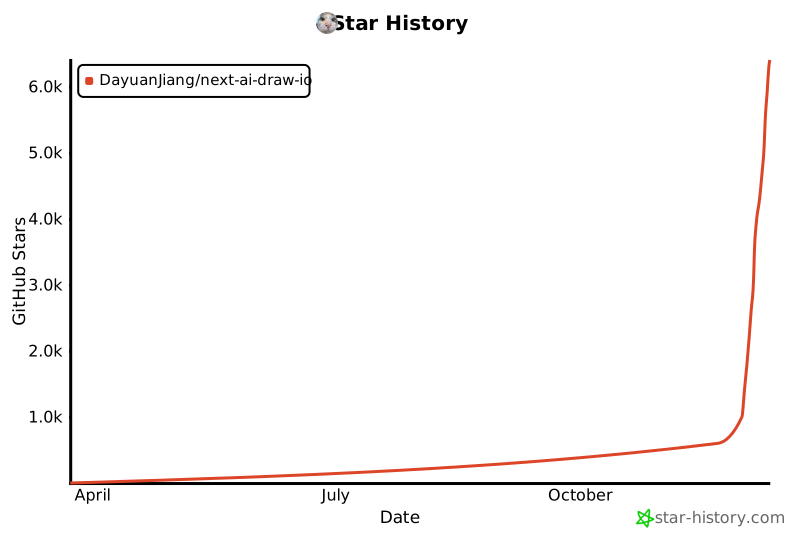](https://www.star-history.com/#DayuanJiang/next-ai-draw-io&type=date&legend=top-left)
|
||||
|
||||
</div>
|
||||
---
|
||||
|
||||
@@ -0,0 +1,405 @@
|
||||
import type { Metadata } from "next"
|
||||
import Link from "next/link"
|
||||
import { FaGithub } from "react-icons/fa"
|
||||
import Image from "@/components/image-with-basepath"
|
||||
|
||||
export const metadata: Metadata = {
|
||||
title: "关于 - Next AI Draw.io",
|
||||
description:
|
||||
"AI驱动的图表创建工具 - 对话、绘制、可视化。使用自然语言创建AWS、GCP和Azure架构图。",
|
||||
keywords: ["AI图表", "draw.io", "AWS架构", "GCP图表", "Azure图表", "LLM"],
|
||||
}
|
||||
|
||||
export default function AboutCN() {
|
||||
return (
|
||||
<div className="min-h-screen bg-gray-50">
|
||||
{/* Navigation */}
|
||||
<header className="bg-white border-b border-gray-200">
|
||||
<div className="max-w-4xl mx-auto px-4 sm:px-6 lg:px-8 py-4">
|
||||
<div className="flex items-center justify-between">
|
||||
<Link
|
||||
href="/"
|
||||
className="text-xl font-bold text-gray-900 hover:text-gray-700"
|
||||
>
|
||||
Next AI Draw.io
|
||||
</Link>
|
||||
<nav className="flex items-center gap-6 text-sm">
|
||||
<Link
|
||||
href="/"
|
||||
className="text-gray-600 hover:text-gray-900 transition-colors"
|
||||
>
|
||||
编辑器
|
||||
</Link>
|
||||
<Link
|
||||
href="/about/cn"
|
||||
className="text-blue-600 font-semibold"
|
||||
>
|
||||
关于
|
||||
</Link>
|
||||
<a
|
||||
href="https://github.com/DayuanJiang/next-ai-draw-io"
|
||||
target="_blank"
|
||||
rel="noopener noreferrer"
|
||||
className="text-gray-600 hover:text-gray-900 transition-colors"
|
||||
aria-label="在GitHub上查看"
|
||||
>
|
||||
<FaGithub className="w-5 h-5" />
|
||||
</a>
|
||||
</nav>
|
||||
</div>
|
||||
</div>
|
||||
</header>
|
||||
|
||||
{/* Main Content */}
|
||||
<main className="max-w-4xl mx-auto px-4 sm:px-6 lg:px-8 py-12">
|
||||
<article className="prose prose-lg max-w-none">
|
||||
{/* Title */}
|
||||
<div className="text-center mb-8">
|
||||
<h1 className="text-4xl font-bold text-gray-900 mb-2">
|
||||
Next AI Draw.io
|
||||
</h1>
|
||||
<p className="text-xl text-gray-600 font-medium">
|
||||
AI驱动的图表创建工具 - 对话、绘制、可视化
|
||||
</p>
|
||||
</div>
|
||||
|
||||
<div className="relative mb-8 rounded-2xl bg-gradient-to-br from-amber-50 via-orange-50 to-yellow-50 p-[1px] shadow-lg">
|
||||
<div className="absolute inset-0 rounded-2xl bg-gradient-to-br from-amber-400 via-orange-400 to-yellow-400 opacity-20" />
|
||||
<div className="relative rounded-2xl bg-white/80 backdrop-blur-sm p-6">
|
||||
{/* Header */}
|
||||
<div className="mb-4">
|
||||
<h3 className="text-lg font-bold text-gray-900 tracking-tight">
|
||||
由字节跳动豆包提供支持
|
||||
</h3>
|
||||
</div>
|
||||
|
||||
{/* Story */}
|
||||
<div className="space-y-3 text-sm text-gray-700 leading-relaxed mb-5">
|
||||
<p>
|
||||
好消息!感谢{" "}
|
||||
<a
|
||||
href="https://www.volcengine.com/activity/codingplan?ac=MMAP8JTTCAQ2&rc=Z9Z3LDTJ&utm_campaign=drawio&utm_content=drawio&utm_medium=devrel&utm_source=OWO&utm_term=drawio"
|
||||
target="_blank"
|
||||
rel="noopener noreferrer"
|
||||
className="font-semibold text-blue-600 hover:underline"
|
||||
>
|
||||
字节跳动豆包
|
||||
</a>
|
||||
的慷慨赞助,演示站点现已接入强大的{" "}
|
||||
<span className="font-semibold text-amber-700">
|
||||
glm-4.7
|
||||
</span>{" "}
|
||||
模型,图表生成效果更佳!点击链接注册即可领取{" "}
|
||||
<span className="font-semibold text-amber-700">
|
||||
50万免费Token
|
||||
</span>
|
||||
,适用于所有模型!
|
||||
</p>
|
||||
</div>
|
||||
|
||||
{/* Invite Poster */}
|
||||
<div className="text-center mb-5">
|
||||
<a
|
||||
href="https://www.volcengine.com/activity/codingplan?ac=MMAP8JTTCAQ2&rc=Z9Z3LDTJ&utm_campaign=drawio&utm_content=drawio&utm_medium=devrel&utm_source=OWO&utm_term=drawio"
|
||||
target="_blank"
|
||||
rel="noopener noreferrer"
|
||||
>
|
||||
<Image
|
||||
src="/volcengine-invite.png"
|
||||
alt="火山引擎方舟 Coding Plan"
|
||||
width={300}
|
||||
height={400}
|
||||
className="mx-auto rounded-lg"
|
||||
/>
|
||||
</a>
|
||||
</div>
|
||||
|
||||
{/* Bring Your Own Key */}
|
||||
<div className="text-center">
|
||||
<h4 className="text-base font-bold text-gray-900 mb-2">
|
||||
使用自己的 API Key
|
||||
</h4>
|
||||
<p className="text-sm text-gray-600 mb-2 max-w-md mx-auto">
|
||||
您也可以使用自己的 API
|
||||
Key,支持多种服务商。点击聊天面板中的设置图标即可配置。
|
||||
</p>
|
||||
<p className="text-xs text-gray-500 max-w-md mx-auto">
|
||||
您的 Key
|
||||
仅保存在浏览器本地,不会被存储在服务器上。
|
||||
</p>
|
||||
</div>
|
||||
</div>
|
||||
</div>
|
||||
|
||||
<p className="text-gray-700">
|
||||
一个集成了AI功能的Next.js网页应用,与draw.io图表无缝结合。通过自然语言命令和AI辅助可视化来创建、修改和增强图表。
|
||||
</p>
|
||||
|
||||
{/* Features */}
|
||||
<h2 className="text-2xl font-semibold text-gray-900 mt-10 mb-4">
|
||||
功能特性
|
||||
</h2>
|
||||
<ul className="list-disc pl-6 text-gray-700 space-y-2">
|
||||
<li>
|
||||
<strong>LLM驱动的图表创建</strong>
|
||||
:利用大语言模型通过自然语言命令直接创建和操作draw.io图表
|
||||
</li>
|
||||
<li>
|
||||
<strong>基于图像的图表复制</strong>
|
||||
:上传现有图表或图像,让AI自动复制和增强
|
||||
</li>
|
||||
<li>
|
||||
<strong>版本与撤销</strong>
|
||||
:AI
|
||||
的每次修改都会成为聊天里的一个版本,可以对比、恢复或撤销;在画布上按
|
||||
Ctrl+Z 也能撤回
|
||||
</li>
|
||||
<li>
|
||||
<strong>交互式聊天界面</strong>
|
||||
:与AI实时对话来完善您的图表
|
||||
</li>
|
||||
<li>
|
||||
<strong>AWS架构图支持</strong>
|
||||
:专门支持生成AWS架构图
|
||||
</li>
|
||||
<li>
|
||||
<strong>动画连接器</strong>
|
||||
:在图表元素之间创建动态动画连接器,实现更好的可视化效果
|
||||
</li>
|
||||
</ul>
|
||||
|
||||
{/* Examples */}
|
||||
<h2 className="text-2xl font-semibold text-gray-900 mt-10 mb-4">
|
||||
示例
|
||||
</h2>
|
||||
<p className="text-gray-700 mb-6">
|
||||
以下是一些示例提示词及其生成的图表:
|
||||
</p>
|
||||
|
||||
<div className="space-y-8">
|
||||
{/* ResNet50 Architecture */}
|
||||
<div className="text-center">
|
||||
<h3 className="text-lg font-semibold text-gray-900 mb-2">
|
||||
ResNet50模型架构动画
|
||||
</h3>
|
||||
<p className="text-gray-600 mb-4">
|
||||
<strong>Prompt:</strong> Give me an{" "}
|
||||
<strong>animated</strong> architecture diagram
|
||||
of the ResNet50 model.
|
||||
</p>
|
||||
<div className="bg-neutral-950 rounded-lg p-4 inline-block">
|
||||
<Image
|
||||
src="/resnet50.svg"
|
||||
alt="ResNet50模型架构图"
|
||||
width={480}
|
||||
height={360}
|
||||
className="mx-auto"
|
||||
/>
|
||||
</div>
|
||||
</div>
|
||||
|
||||
{/* Diagram Grid */}
|
||||
<div className="grid md:grid-cols-2 gap-6">
|
||||
<div className="text-center">
|
||||
<h3 className="text-lg font-semibold text-gray-900 mb-2">
|
||||
RAG技术图
|
||||
</h3>
|
||||
<p className="text-gray-600 text-sm mb-4">
|
||||
<strong>Prompt:</strong> Generate a RAG
|
||||
architecture diagram for{" "}
|
||||
<strong>chat application</strong>. Use
|
||||
connected diagram for data ingestion
|
||||
</p>
|
||||
<div className="bg-neutral-950 rounded-lg p-4 flex items-center justify-center w-full h-[400px]">
|
||||
<Image
|
||||
src="/rag_prod.svg"
|
||||
alt="RAG架构图"
|
||||
width={480}
|
||||
height={360}
|
||||
className="max-w-full max-h-full object-contain"
|
||||
/>
|
||||
</div>
|
||||
</div>
|
||||
<div className="text-center">
|
||||
<h3 className="text-lg font-semibold text-gray-900 mb-2">
|
||||
React和AWS认证流程
|
||||
</h3>
|
||||
<p className="text-gray-600 text-sm mb-4">
|
||||
<strong>Prompt:</strong> Generate
|
||||
authentication process using React with{" "}
|
||||
<strong>AWS</strong>. Use Serverless
|
||||
architecture.
|
||||
</p>
|
||||
<div className="bg-neutral-950 rounded-lg p-4 flex items-center justify-center w-full h-[400px]">
|
||||
<Image
|
||||
src="/auth.svg"
|
||||
alt="认证架构图"
|
||||
width={480}
|
||||
height={360}
|
||||
className="max-w-full max-h-full object-contain"
|
||||
/>
|
||||
</div>
|
||||
</div>
|
||||
<div className="text-center">
|
||||
<h3 className="text-lg font-semibold text-gray-900 mb-2">
|
||||
敏捷Scrum流程
|
||||
</h3>
|
||||
<p className="text-gray-600 text-sm mb-4">
|
||||
<strong>Prompt:</strong> Generate agile
|
||||
scrum workflow diagram for software
|
||||
development team.
|
||||
</p>
|
||||
<div className="bg-neutral-950 rounded-lg p-4 flex items-center justify-center w-full h-[400px]">
|
||||
<Image
|
||||
src="/agile_scrum.svg"
|
||||
alt="敏捷Scrum流程图"
|
||||
width={480}
|
||||
height={360}
|
||||
className="max-w-full max-h-full object-contain"
|
||||
/>
|
||||
</div>
|
||||
</div>
|
||||
<div className="text-center">
|
||||
<h3 className="text-lg font-semibold text-gray-900 mb-2">
|
||||
开放式创新
|
||||
</h3>
|
||||
<p className="text-gray-600 text-sm mb-4">
|
||||
<strong>Prompt:</strong> Create
|
||||
visualization of Henry Chesbrough's
|
||||
Open Innovation model.
|
||||
</p>
|
||||
<div className="bg-neutral-950 rounded-lg p-4 flex items-center justify-center w-full h-[400px]">
|
||||
<Image
|
||||
src="/inno.svg"
|
||||
alt="开放式创新图"
|
||||
width={480}
|
||||
height={360}
|
||||
className="max-w-full max-h-full object-contain"
|
||||
/>
|
||||
</div>
|
||||
</div>
|
||||
</div>
|
||||
</div>
|
||||
|
||||
{/* How It Works */}
|
||||
<h2 className="text-2xl font-semibold text-gray-900 mt-10 mb-4">
|
||||
工作原理
|
||||
</h2>
|
||||
<p className="text-gray-700 mb-4">本应用使用以下技术:</p>
|
||||
<ul className="list-disc pl-6 text-gray-700 space-y-2">
|
||||
<li>
|
||||
<strong>Next.js</strong>:用于前端框架和路由
|
||||
</li>
|
||||
<li>
|
||||
<strong>Vercel AI SDK</strong>(<code>ai</code> +{" "}
|
||||
<code>@ai-sdk/*</code>
|
||||
):用于流式AI响应和多提供商支持
|
||||
</li>
|
||||
<li>
|
||||
<strong>draw.io</strong>
|
||||
:内置在应用里的编辑器,应用可以直接控制它
|
||||
</li>
|
||||
</ul>
|
||||
<p className="text-gray-700 mt-4">
|
||||
图表以XML格式表示,可在draw.io中渲染。AI处理您的命令并相应地生成或修改此XML。
|
||||
</p>
|
||||
|
||||
{/* Multi-Provider Support */}
|
||||
<h2 className="text-2xl font-semibold text-gray-900 mt-10 mb-4">
|
||||
多提供商支持
|
||||
</h2>
|
||||
<ul className="list-disc pl-6 text-gray-700 space-y-1">
|
||||
<li>
|
||||
<a
|
||||
href="https://www.volcengine.com/activity/codingplan?ac=MMAP8JTTCAQ2&rc=Z9Z3LDTJ&utm_campaign=drawio&utm_content=drawio&utm_medium=devrel&utm_source=OWO&utm_term=drawio"
|
||||
target="_blank"
|
||||
rel="noopener noreferrer"
|
||||
className="text-blue-600 hover:underline"
|
||||
>
|
||||
字节跳动豆包
|
||||
</a>
|
||||
</li>
|
||||
<li>AWS Bedrock(默认)</li>
|
||||
<li>
|
||||
OpenAI / OpenAI兼容API(通过{" "}
|
||||
<code>OPENAI_BASE_URL</code>)
|
||||
</li>
|
||||
<li>Anthropic</li>
|
||||
<li>Google AI</li>
|
||||
<li>Google Vertex AI</li>
|
||||
<li>Azure OpenAI</li>
|
||||
<li>Ollama</li>
|
||||
<li>OpenRouter</li>
|
||||
<li>DeepSeek</li>
|
||||
<li>SiliconFlow</li>
|
||||
<li>ModelScope</li>
|
||||
</ul>
|
||||
<p className="text-gray-700 mt-4">
|
||||
注意:<code>claude-sonnet-4-5</code>{" "}
|
||||
已在带有AWS标志的draw.io图表上进行训练,因此如果您想创建AWS架构图,这是最佳选择。
|
||||
</p>
|
||||
|
||||
{/* Support */}
|
||||
<h2 className="text-2xl font-semibold text-gray-900 mt-10 mb-4">
|
||||
支持与联系
|
||||
</h2>
|
||||
<p className="text-gray-700 mb-4 font-semibold">
|
||||
特别感谢{" "}
|
||||
<a
|
||||
href="https://www.volcengine.com/activity/codingplan?ac=MMAP8JTTCAQ2&rc=Z9Z3LDTJ&utm_campaign=drawio&utm_content=drawio&utm_medium=devrel&utm_source=OWO&utm_term=drawio"
|
||||
target="_blank"
|
||||
rel="noopener noreferrer"
|
||||
className="text-blue-600 hover:underline"
|
||||
>
|
||||
字节跳动豆包
|
||||
</a>{" "}
|
||||
为本站提供 API Token 支持!
|
||||
</p>
|
||||
<p className="text-gray-700">
|
||||
如果您觉得这个项目有用,请考虑{" "}
|
||||
<a
|
||||
href="https://github.com/sponsors/DayuanJiang"
|
||||
target="_blank"
|
||||
rel="noopener noreferrer"
|
||||
className="text-blue-600 hover:underline"
|
||||
>
|
||||
赞助
|
||||
</a>{" "}
|
||||
来帮助托管在线演示站点!
|
||||
</p>
|
||||
<p className="text-gray-700 mt-2">
|
||||
如需支持或咨询,请在{" "}
|
||||
<a
|
||||
href="https://github.com/DayuanJiang/next-ai-draw-io"
|
||||
target="_blank"
|
||||
rel="noopener noreferrer"
|
||||
className="text-blue-600 hover:underline"
|
||||
>
|
||||
GitHub仓库
|
||||
</a>{" "}
|
||||
上提交issue或联系:me[at]jiang.jp
|
||||
</p>
|
||||
|
||||
{/* CTA */}
|
||||
<div className="mt-12 text-center">
|
||||
<Link
|
||||
href="/"
|
||||
className="inline-block bg-blue-600 text-white px-8 py-3 rounded-lg font-semibold hover:bg-blue-700 transition-colors"
|
||||
>
|
||||
打开编辑器
|
||||
</Link>
|
||||
</div>
|
||||
</article>
|
||||
</main>
|
||||
|
||||
{/* Footer */}
|
||||
<footer className="bg-white border-t border-gray-200 mt-16">
|
||||
<div className="max-w-4xl mx-auto px-4 sm:px-6 lg:px-8 py-6">
|
||||
<p className="text-center text-gray-600 text-sm">
|
||||
Next AI Draw.io - 开源AI驱动的图表生成器
|
||||
</p>
|
||||
</div>
|
||||
</footer>
|
||||
</div>
|
||||
)
|
||||
}
|
||||
@@ -0,0 +1,402 @@
|
||||
import type { Metadata } from "next"
|
||||
import Link from "next/link"
|
||||
import { FaGithub } from "react-icons/fa"
|
||||
import Image from "@/components/image-with-basepath"
|
||||
|
||||
export const metadata: Metadata = {
|
||||
title: "概要 - Next AI Draw.io",
|
||||
description:
|
||||
"AI搭載のダイアグラム作成ツール - チャット、描画、可視化。自然言語でAWS、GCP、Azureアーキテクチャ図を作成。",
|
||||
keywords: [
|
||||
"AIダイアグラム",
|
||||
"draw.io",
|
||||
"AWSアーキテクチャ",
|
||||
"GCPダイアグラム",
|
||||
"Azureダイアグラム",
|
||||
"LLM",
|
||||
],
|
||||
}
|
||||
|
||||
export default function AboutJA() {
|
||||
return (
|
||||
<div className="min-h-screen bg-gray-50">
|
||||
{/* Navigation */}
|
||||
<header className="bg-white border-b border-gray-200">
|
||||
<div className="max-w-4xl mx-auto px-4 sm:px-6 lg:px-8 py-4">
|
||||
<div className="flex items-center justify-between">
|
||||
<Link
|
||||
href="/"
|
||||
className="text-xl font-bold text-gray-900 hover:text-gray-700"
|
||||
>
|
||||
Next AI Draw.io
|
||||
</Link>
|
||||
<nav className="flex items-center gap-6 text-sm">
|
||||
<Link
|
||||
href="/"
|
||||
className="text-gray-600 hover:text-gray-900 transition-colors"
|
||||
>
|
||||
エディタ
|
||||
</Link>
|
||||
<Link
|
||||
href="/about/ja"
|
||||
className="text-blue-600 font-semibold"
|
||||
>
|
||||
概要
|
||||
</Link>
|
||||
<a
|
||||
href="https://github.com/DayuanJiang/next-ai-draw-io"
|
||||
target="_blank"
|
||||
rel="noopener noreferrer"
|
||||
className="text-gray-600 hover:text-gray-900 transition-colors"
|
||||
aria-label="GitHubで見る"
|
||||
>
|
||||
<FaGithub className="w-5 h-5" />
|
||||
</a>
|
||||
</nav>
|
||||
</div>
|
||||
</div>
|
||||
</header>
|
||||
|
||||
{/* Main Content */}
|
||||
<main className="max-w-4xl mx-auto px-4 sm:px-6 lg:px-8 py-12">
|
||||
<article className="prose prose-lg max-w-none">
|
||||
{/* Title */}
|
||||
<div className="text-center mb-8">
|
||||
<h1 className="text-4xl font-bold text-gray-900 mb-2">
|
||||
Next AI Draw.io
|
||||
</h1>
|
||||
<p className="text-xl text-gray-600 font-medium">
|
||||
AI搭載のダイアグラム作成ツール -
|
||||
チャット、描画、可視化
|
||||
</p>
|
||||
</div>
|
||||
|
||||
<div className="relative mb-8 rounded-2xl bg-gradient-to-br from-amber-50 via-orange-50 to-yellow-50 p-[1px] shadow-lg">
|
||||
<div className="absolute inset-0 rounded-2xl bg-gradient-to-br from-amber-400 via-orange-400 to-yellow-400 opacity-20" />
|
||||
<div className="relative rounded-2xl bg-white/80 backdrop-blur-sm p-6">
|
||||
{/* Header */}
|
||||
<div className="mb-4">
|
||||
<h3 className="text-lg font-bold text-gray-900 tracking-tight">
|
||||
ByteDance Doubao提供
|
||||
</h3>
|
||||
</div>
|
||||
|
||||
{/* Story */}
|
||||
<div className="space-y-3 text-sm text-gray-700 leading-relaxed mb-5">
|
||||
<p>
|
||||
朗報です!
|
||||
<a
|
||||
href="https://www.volcengine.com/activity/codingplan?ac=MMAP8JTTCAQ2&rc=Z9Z3LDTJ&utm_campaign=drawio&utm_content=drawio&utm_medium=devrel&utm_source=OWO&utm_term=drawio"
|
||||
target="_blank"
|
||||
rel="noopener noreferrer"
|
||||
className="font-semibold text-blue-600 hover:underline"
|
||||
>
|
||||
ByteDance Doubao
|
||||
</a>
|
||||
様のご支援により、デモサイトでは強力な{" "}
|
||||
<span className="font-semibold text-amber-700">
|
||||
glm-4.7
|
||||
</span>{" "}
|
||||
モデルを利用できるようになり、より高品質なダイアグラム生成が可能になりました。リンクから登録すると、すべてのモデルで使える{" "}
|
||||
<span className="font-semibold text-amber-700">
|
||||
50万トークン
|
||||
</span>
|
||||
が無料でもらえます!
|
||||
</p>
|
||||
</div>
|
||||
|
||||
{/* Bring Your Own Key */}
|
||||
<div className="text-center">
|
||||
<h4 className="text-base font-bold text-gray-900 mb-2">
|
||||
自分のAPIキーを使用
|
||||
</h4>
|
||||
<p className="text-sm text-gray-600 mb-2 max-w-md mx-auto">
|
||||
お好みのプロバイダーで自分のAPIキーを使用することもできます。チャットパネルの設定アイコンをクリックして設定してください。
|
||||
</p>
|
||||
<p className="text-xs text-gray-500 max-w-md mx-auto">
|
||||
キーはブラウザのローカルに保存され、サーバーには保存されません。
|
||||
</p>
|
||||
</div>
|
||||
</div>
|
||||
</div>
|
||||
|
||||
<p className="text-gray-700">
|
||||
AI機能とdraw.ioダイアグラムを統合したNext.jsウェブアプリケーションです。自然言語コマンドとAI支援の可視化により、ダイアグラムを作成、修正、強化できます。
|
||||
</p>
|
||||
|
||||
{/* Features */}
|
||||
<h2 className="text-2xl font-semibold text-gray-900 mt-10 mb-4">
|
||||
機能
|
||||
</h2>
|
||||
<ul className="list-disc pl-6 text-gray-700 space-y-2">
|
||||
<li>
|
||||
<strong>LLM搭載のダイアグラム作成</strong>
|
||||
:大規模言語モデルを活用して、自然言語コマンドで直接draw.ioダイアグラムを作成・操作
|
||||
</li>
|
||||
<li>
|
||||
<strong>画像ベースのダイアグラム複製</strong>
|
||||
:既存のダイアグラムや画像をアップロードし、AIが自動的に複製・強化
|
||||
</li>
|
||||
<li>
|
||||
<strong>バージョンと取り消し</strong>
|
||||
:AI
|
||||
の変更はそれぞれチャット内のバージョンになり、比較・復元・取り消しができます。キャンバスで
|
||||
Ctrl+Z を押しても元に戻せます
|
||||
</li>
|
||||
<li>
|
||||
<strong>
|
||||
インタラクティブなチャットインターフェース
|
||||
</strong>
|
||||
:AIとリアルタイムでコミュニケーションしてダイアグラムを改善
|
||||
</li>
|
||||
<li>
|
||||
<strong>
|
||||
AWSアーキテクチャダイアグラムサポート
|
||||
</strong>
|
||||
:AWSアーキテクチャダイアグラムの生成を専門的にサポート
|
||||
</li>
|
||||
<li>
|
||||
<strong>アニメーションコネクタ</strong>
|
||||
:より良い可視化のためにダイアグラム要素間に動的でアニメーション化されたコネクタを作成
|
||||
</li>
|
||||
</ul>
|
||||
|
||||
{/* Examples */}
|
||||
<h2 className="text-2xl font-semibold text-gray-900 mt-10 mb-4">
|
||||
例
|
||||
</h2>
|
||||
<p className="text-gray-700 mb-6">
|
||||
以下はいくつかのプロンプト例と生成されたダイアグラムです:
|
||||
</p>
|
||||
|
||||
<div className="space-y-8">
|
||||
{/* ResNet50 Architecture */}
|
||||
<div className="text-center">
|
||||
<h3 className="text-lg font-semibold text-gray-900 mb-2">
|
||||
ResNet50モデルアーキテクチャアニメーション
|
||||
</h3>
|
||||
<p className="text-gray-600 mb-4">
|
||||
<strong>Prompt:</strong> Give me an{" "}
|
||||
<strong>animated</strong> architecture diagram
|
||||
of the ResNet50 model.
|
||||
</p>
|
||||
<div className="bg-neutral-950 rounded-lg p-4 inline-block">
|
||||
<Image
|
||||
src="/resnet50.svg"
|
||||
alt="ResNet50モデルアーキテクチャ図"
|
||||
width={480}
|
||||
height={360}
|
||||
className="mx-auto"
|
||||
/>
|
||||
</div>
|
||||
</div>
|
||||
|
||||
{/* Diagram Grid */}
|
||||
<div className="grid md:grid-cols-2 gap-6">
|
||||
<div className="text-center">
|
||||
<h3 className="text-lg font-semibold text-gray-900 mb-2">
|
||||
RAG技術ダイアグラム
|
||||
</h3>
|
||||
<p className="text-gray-600 text-sm mb-4">
|
||||
<strong>Prompt:</strong> Generate a RAG
|
||||
architecture diagram for{" "}
|
||||
<strong>chat application</strong>. Use
|
||||
connected diagram for data ingestion
|
||||
</p>
|
||||
<div className="bg-neutral-950 rounded-lg p-4 flex items-center justify-center w-full h-[400px]">
|
||||
<Image
|
||||
src="/rag_prod.svg"
|
||||
alt="RAGアーキテクチャ図"
|
||||
width={480}
|
||||
height={360}
|
||||
className="max-w-full max-h-full object-contain"
|
||||
/>
|
||||
</div>
|
||||
</div>
|
||||
<div className="text-center">
|
||||
<h3 className="text-lg font-semibold text-gray-900 mb-2">
|
||||
ReactとAWSによる認証
|
||||
</h3>
|
||||
<p className="text-gray-600 text-sm mb-4">
|
||||
<strong>Prompt:</strong> Generate
|
||||
authentication process using React with{" "}
|
||||
<strong>AWS</strong>. Use Serverless
|
||||
architecture.
|
||||
</p>
|
||||
<div className="bg-neutral-950 rounded-lg p-4 flex items-center justify-center w-full h-[400px]">
|
||||
<Image
|
||||
src="/auth.svg"
|
||||
alt="認証アーキテクチャ図"
|
||||
width={480}
|
||||
height={360}
|
||||
className="max-w-full max-h-full object-contain"
|
||||
/>
|
||||
</div>
|
||||
</div>
|
||||
<div className="text-center">
|
||||
<h3 className="text-lg font-semibold text-gray-900 mb-2">
|
||||
アジャイルスクラムプロセス
|
||||
</h3>
|
||||
<p className="text-gray-600 text-sm mb-4">
|
||||
<strong>Prompt:</strong> Generate agile
|
||||
scrum workflow diagram for software
|
||||
development team.
|
||||
</p>
|
||||
<div className="bg-neutral-950 rounded-lg p-4 flex items-center justify-center w-full h-[400px]">
|
||||
<Image
|
||||
src="/agile_scrum.svg"
|
||||
alt="アジャイルスクラム図"
|
||||
width={480}
|
||||
height={360}
|
||||
className="max-w-full max-h-full object-contain"
|
||||
/>
|
||||
</div>
|
||||
</div>
|
||||
<div className="text-center">
|
||||
<h3 className="text-lg font-semibold text-gray-900 mb-2">
|
||||
オープンイノベーション
|
||||
</h3>
|
||||
<p className="text-gray-600 text-sm mb-4">
|
||||
<strong>Prompt:</strong> Create
|
||||
visualization of Henry Chesbrough's
|
||||
Open Innovation model.
|
||||
</p>
|
||||
<div className="bg-neutral-950 rounded-lg p-4 flex items-center justify-center w-full h-[400px]">
|
||||
<Image
|
||||
src="/inno.svg"
|
||||
alt="オープンイノベーション図"
|
||||
width={480}
|
||||
height={360}
|
||||
className="max-w-full max-h-full object-contain"
|
||||
/>
|
||||
</div>
|
||||
</div>
|
||||
</div>
|
||||
</div>
|
||||
|
||||
{/* How It Works */}
|
||||
<h2 className="text-2xl font-semibold text-gray-900 mt-10 mb-4">
|
||||
仕組み
|
||||
</h2>
|
||||
<p className="text-gray-700 mb-4">
|
||||
本アプリケーションは以下の技術を使用しています:
|
||||
</p>
|
||||
<ul className="list-disc pl-6 text-gray-700 space-y-2">
|
||||
<li>
|
||||
<strong>Next.js</strong>
|
||||
:フロントエンドフレームワークとルーティング
|
||||
</li>
|
||||
<li>
|
||||
<strong>Vercel AI SDK</strong>(<code>ai</code> +{" "}
|
||||
<code>@ai-sdk/*</code>
|
||||
):ストリーミングAIレスポンスとマルチプロバイダーサポート
|
||||
</li>
|
||||
<li>
|
||||
<strong>draw.io</strong>
|
||||
:アプリに同梱されたエディター。アプリから直接操作できます
|
||||
</li>
|
||||
</ul>
|
||||
<p className="text-gray-700 mt-4">
|
||||
ダイアグラムはdraw.ioでレンダリングできるXMLとして表現されます。AIがコマンドを処理し、それに応じてこのXMLを生成または変更します。
|
||||
</p>
|
||||
|
||||
{/* Multi-Provider Support */}
|
||||
<h2 className="text-2xl font-semibold text-gray-900 mt-10 mb-4">
|
||||
マルチプロバイダーサポート
|
||||
</h2>
|
||||
<ul className="list-disc pl-6 text-gray-700 space-y-1">
|
||||
<li>
|
||||
<a
|
||||
href="https://www.volcengine.com/activity/codingplan?ac=MMAP8JTTCAQ2&rc=Z9Z3LDTJ&utm_campaign=drawio&utm_content=drawio&utm_medium=devrel&utm_source=OWO&utm_term=drawio"
|
||||
target="_blank"
|
||||
rel="noopener noreferrer"
|
||||
className="text-blue-600 hover:underline"
|
||||
>
|
||||
ByteDance Doubao
|
||||
</a>
|
||||
</li>
|
||||
<li>AWS Bedrock(デフォルト)</li>
|
||||
<li>
|
||||
OpenAI / OpenAI互換API(<code>OPENAI_BASE_URL</code>
|
||||
経由)
|
||||
</li>
|
||||
<li>Anthropic</li>
|
||||
<li>Google AI</li>
|
||||
<li>Google Vertex AI</li>
|
||||
<li>Azure OpenAI</li>
|
||||
<li>Ollama</li>
|
||||
<li>OpenRouter</li>
|
||||
<li>DeepSeek</li>
|
||||
<li>SiliconFlow</li>
|
||||
<li>ModelScope</li>
|
||||
</ul>
|
||||
<p className="text-gray-700 mt-4">
|
||||
注:<code>claude-sonnet-4-5</code>
|
||||
はAWSロゴ付きのdraw.ioダイアグラムで学習されているため、AWSアーキテクチャダイアグラムを作成したい場合は最適な選択です。
|
||||
</p>
|
||||
|
||||
{/* Support */}
|
||||
<h2 className="text-2xl font-semibold text-gray-900 mt-10 mb-4">
|
||||
サポート&お問い合わせ
|
||||
</h2>
|
||||
<p className="text-gray-700 mb-4 font-semibold">
|
||||
デモサイトのAPIトークン使用を支援してくださった{" "}
|
||||
<a
|
||||
href="https://www.volcengine.com/activity/codingplan?ac=MMAP8JTTCAQ2&rc=Z9Z3LDTJ&utm_campaign=drawio&utm_content=drawio&utm_medium=devrel&utm_source=OWO&utm_term=drawio"
|
||||
target="_blank"
|
||||
rel="noopener noreferrer"
|
||||
className="text-blue-600 hover:underline"
|
||||
>
|
||||
ByteDance Doubao
|
||||
</a>{" "}
|
||||
様に、心より感謝申し上げます。
|
||||
</p>
|
||||
<p className="text-gray-700">
|
||||
このプロジェクトが役に立ったら、ライブデモサイトのホスティングを支援するために{" "}
|
||||
<a
|
||||
href="https://github.com/sponsors/DayuanJiang"
|
||||
target="_blank"
|
||||
rel="noopener noreferrer"
|
||||
className="text-blue-600 hover:underline"
|
||||
>
|
||||
スポンサー
|
||||
</a>{" "}
|
||||
をご検討ください!
|
||||
</p>
|
||||
<p className="text-gray-700 mt-2">
|
||||
サポートやお問い合わせについては、{" "}
|
||||
<a
|
||||
href="https://github.com/DayuanJiang/next-ai-draw-io"
|
||||
target="_blank"
|
||||
rel="noopener noreferrer"
|
||||
className="text-blue-600 hover:underline"
|
||||
>
|
||||
GitHubリポジトリ
|
||||
</a>{" "}
|
||||
でissueを開くか、ご連絡ください:me[at]jiang.jp
|
||||
</p>
|
||||
|
||||
{/* CTA */}
|
||||
<div className="mt-12 text-center">
|
||||
<Link
|
||||
href="/"
|
||||
className="inline-block bg-blue-600 text-white px-8 py-3 rounded-lg font-semibold hover:bg-blue-700 transition-colors"
|
||||
>
|
||||
エディタを開く
|
||||
</Link>
|
||||
</div>
|
||||
</article>
|
||||
</main>
|
||||
|
||||
{/* Footer */}
|
||||
<footer className="bg-white border-t border-gray-200 mt-16">
|
||||
<div className="max-w-4xl mx-auto px-4 sm:px-6 lg:px-8 py-6">
|
||||
<p className="text-center text-gray-600 text-sm">
|
||||
Next AI Draw.io -
|
||||
オープンソースAI搭載ダイアグラムジェネレーター
|
||||
</p>
|
||||
</div>
|
||||
</footer>
|
||||
</div>
|
||||
)
|
||||
}
|
||||
+248
-491
@@ -1,420 +1,23 @@
|
||||
import type { Metadata } from "next"
|
||||
import Link from "next/link"
|
||||
import type { ReactNode } from "react"
|
||||
import { GitHubIcon } from "@/components/icons/github"
|
||||
import { FaGithub } from "react-icons/fa"
|
||||
import Image from "@/components/image-with-basepath"
|
||||
import type { Locale } from "@/lib/i18n/config"
|
||||
import { hasLocale } from "@/lib/i18n/dictionaries"
|
||||
|
||||
type ExampleId = "resnet50" | "rag" | "auth" | "scrum" | "inno"
|
||||
|
||||
type AboutTexts = {
|
||||
title: string
|
||||
description: string
|
||||
keywords: string[]
|
||||
nav: { editor: string; about: string; github: string }
|
||||
tagline: string
|
||||
byok: { title: string; body: string; note: string }
|
||||
intro: string
|
||||
// Punctuation differs between Latin and CJK text
|
||||
colon: string
|
||||
parenOpen: string
|
||||
parenClose: string
|
||||
featuresHeading: string
|
||||
features: { title: string; text: string }[]
|
||||
examplesHeading: string
|
||||
examplesIntro: string
|
||||
examples: Record<ExampleId, { title: string; alt: string }>
|
||||
howHeading: string
|
||||
howIntro: string
|
||||
tech: { nextjs: string; aiSdk: string; drawio: string }
|
||||
howOutro: string
|
||||
providersHeading: string
|
||||
doubao: string
|
||||
bedrock: string
|
||||
// Text around the OPENAI_BASE_URL code span
|
||||
openai: { before: string; after: string }
|
||||
// Text around the claude-sonnet-4-5 code span
|
||||
modelNote: { before: string; after: string }
|
||||
supportHeading: string
|
||||
// Text around the sponsor link
|
||||
sponsor: { before: string; link: string; after: string }
|
||||
// Text around the GitHub repository link
|
||||
contact: { before: string; link: string; after: string }
|
||||
openEditor: string
|
||||
footer: string
|
||||
export const metadata: Metadata = {
|
||||
title: "About - Next AI Draw.io",
|
||||
description:
|
||||
"AI-Powered Diagram Creation Tool - Chat, Draw, Visualize. Create AWS, GCP, and Azure architecture diagrams with natural language.",
|
||||
keywords: [
|
||||
"AI diagram",
|
||||
"draw.io",
|
||||
"AWS architecture",
|
||||
"GCP diagram",
|
||||
"Azure diagram",
|
||||
"LLM",
|
||||
],
|
||||
}
|
||||
|
||||
const texts: Record<"en" | "zh" | "ja", AboutTexts> = {
|
||||
en: {
|
||||
title: "About - Next AI Draw.io",
|
||||
description:
|
||||
"AI-Powered Diagram Creation Tool - Chat, Draw, Visualize. Create AWS, GCP, and Azure architecture diagrams with natural language.",
|
||||
keywords: [
|
||||
"AI diagram",
|
||||
"draw.io",
|
||||
"AWS architecture",
|
||||
"GCP diagram",
|
||||
"Azure diagram",
|
||||
"LLM",
|
||||
],
|
||||
nav: { editor: "Editor", about: "About", github: "View on GitHub" },
|
||||
tagline: "AI-Powered Diagram Creation Tool - Chat, Draw, Visualize",
|
||||
byok: {
|
||||
title: "Bring Your Own API Key",
|
||||
body: "You can also use your own API key with any supported provider. Click the Settings icon in the chat panel to configure your provider and API key.",
|
||||
note: "Your key is stored locally in your browser and is never stored on the server.",
|
||||
},
|
||||
intro: "A Next.js web application that integrates AI capabilities with draw.io diagrams. Create, modify, and enhance diagrams through natural language commands and AI-assisted visualization.",
|
||||
colon: ": ",
|
||||
parenOpen: " (",
|
||||
parenClose: ")",
|
||||
featuresHeading: "Features",
|
||||
features: [
|
||||
{
|
||||
title: "LLM-Powered Diagram Creation",
|
||||
text: "Leverage Large Language Models to create and manipulate draw.io diagrams directly through natural language commands",
|
||||
},
|
||||
{
|
||||
title: "Image-Based Diagram Replication",
|
||||
text: "Upload existing diagrams or images and have the AI replicate and enhance them automatically",
|
||||
},
|
||||
{
|
||||
title: "Versions and Undo",
|
||||
text: "Every AI change becomes a version in the chat that you can compare, restore or undo; Ctrl+Z on the canvas takes it back too",
|
||||
},
|
||||
{
|
||||
title: "Interactive Chat Interface",
|
||||
text: "Communicate with AI to refine your diagrams in real-time",
|
||||
},
|
||||
{
|
||||
title: "AWS Architecture Diagram Support",
|
||||
text: "Specialized support for generating AWS architecture diagrams",
|
||||
},
|
||||
{
|
||||
title: "Animated Connectors",
|
||||
text: "Create dynamic and animated connectors between diagram elements for better visualization",
|
||||
},
|
||||
],
|
||||
examplesHeading: "Examples",
|
||||
examplesIntro:
|
||||
"Here are some example prompts and their generated diagrams:",
|
||||
examples: {
|
||||
resnet50: {
|
||||
title: "Animated ResNet50 Model Architecture",
|
||||
alt: "Architecture diagram for ResNet50 model",
|
||||
},
|
||||
rag: {
|
||||
title: "RAG Technique Diagram",
|
||||
alt: "RAG Architecture Diagram",
|
||||
},
|
||||
auth: {
|
||||
title: "Authentication using React and AWS",
|
||||
alt: "Authentication Architecture Diagram",
|
||||
},
|
||||
scrum: { title: "Agile Scrum Process", alt: "Agile Scrum Diagram" },
|
||||
inno: { title: "Open Innovation", alt: "Open Innovation Diagram" },
|
||||
},
|
||||
howHeading: "How It Works",
|
||||
howIntro: "The application uses the following technologies:",
|
||||
tech: {
|
||||
nextjs: "For the frontend framework and routing",
|
||||
aiSdk: "For streaming AI responses and multi-provider support",
|
||||
drawio: "The editor, bundled with the app so it can be driven directly",
|
||||
},
|
||||
howOutro:
|
||||
"Diagrams are represented as XML that can be rendered in draw.io. The AI processes your commands and generates or modifies this XML accordingly.",
|
||||
providersHeading: "Multi-Provider Support",
|
||||
doubao: "ByteDance Doubao",
|
||||
bedrock: "AWS Bedrock (default)",
|
||||
openai: { before: "OpenAI / OpenAI-compatible APIs (via ", after: ")" },
|
||||
modelNote: {
|
||||
before: "Note that ",
|
||||
after: " has trained on draw.io diagrams with AWS logos, so if you want to create AWS architecture diagrams, this is the best choice.",
|
||||
},
|
||||
supportHeading: "Support & Contact",
|
||||
sponsor: {
|
||||
before: "If you find this project useful, please consider",
|
||||
link: "sponsoring",
|
||||
after: "to help host the live demo site!",
|
||||
},
|
||||
contact: {
|
||||
before: "For support or inquiries, please open an issue on the",
|
||||
link: "GitHub repository",
|
||||
after: "or contact: me[at]jiang.jp",
|
||||
},
|
||||
openEditor: "Open Editor",
|
||||
footer: "Next AI Draw.io - Open Source AI-Powered Diagram Generator",
|
||||
},
|
||||
zh: {
|
||||
title: "关于 - Next AI Draw.io",
|
||||
description:
|
||||
"AI驱动的图表创建工具 - 对话、绘制、可视化。使用自然语言创建AWS、GCP和Azure架构图。",
|
||||
keywords: [
|
||||
"AI图表",
|
||||
"draw.io",
|
||||
"AWS架构",
|
||||
"GCP图表",
|
||||
"Azure图表",
|
||||
"LLM",
|
||||
],
|
||||
nav: { editor: "编辑器", about: "关于", github: "在GitHub上查看" },
|
||||
tagline: "AI驱动的图表创建工具 - 对话、绘制、可视化",
|
||||
byok: {
|
||||
title: "使用自己的 API Key",
|
||||
body: "您也可以使用自己的 API Key,支持多种服务商。点击聊天面板中的设置图标即可配置。",
|
||||
note: "您的 Key 仅保存在浏览器本地,不会被存储在服务器上。",
|
||||
},
|
||||
intro: "一个集成了AI功能的Next.js网页应用,与draw.io图表无缝结合。通过自然语言命令和AI辅助可视化来创建、修改和增强图表。",
|
||||
colon: ":",
|
||||
parenOpen: "(",
|
||||
parenClose: ")",
|
||||
featuresHeading: "功能特性",
|
||||
features: [
|
||||
{
|
||||
title: "LLM驱动的图表创建",
|
||||
text: "利用大语言模型通过自然语言命令直接创建和操作draw.io图表",
|
||||
},
|
||||
{
|
||||
title: "基于图像的图表复制",
|
||||
text: "上传现有图表或图像,让AI自动复制和增强",
|
||||
},
|
||||
{
|
||||
title: "版本与撤销",
|
||||
text: "AI 的每次修改都会成为聊天里的一个版本,可以对比、恢复或撤销;在画布上按 Ctrl+Z 也能撤回",
|
||||
},
|
||||
{
|
||||
title: "交互式聊天界面",
|
||||
text: "与AI实时对话来完善您的图表",
|
||||
},
|
||||
{ title: "AWS架构图支持", text: "专门支持生成AWS架构图" },
|
||||
{
|
||||
title: "动画连接器",
|
||||
text: "在图表元素之间创建动态动画连接器,实现更好的可视化效果",
|
||||
},
|
||||
],
|
||||
examplesHeading: "示例",
|
||||
examplesIntro: "以下是一些示例提示词及其生成的图表:",
|
||||
examples: {
|
||||
resnet50: {
|
||||
title: "ResNet50模型架构动画",
|
||||
alt: "ResNet50模型架构图",
|
||||
},
|
||||
rag: { title: "RAG技术图", alt: "RAG架构图" },
|
||||
auth: { title: "React和AWS认证流程", alt: "认证架构图" },
|
||||
scrum: { title: "敏捷Scrum流程", alt: "敏捷Scrum流程图" },
|
||||
inno: { title: "开放式创新", alt: "开放式创新图" },
|
||||
},
|
||||
howHeading: "工作原理",
|
||||
howIntro: "本应用使用以下技术:",
|
||||
tech: {
|
||||
nextjs: "用于前端框架和路由",
|
||||
aiSdk: "用于流式AI响应和多提供商支持",
|
||||
drawio: "内置在应用里的编辑器,应用可以直接控制它",
|
||||
},
|
||||
howOutro:
|
||||
"图表以XML格式表示,可在draw.io中渲染。AI处理您的命令并相应地生成或修改此XML。",
|
||||
providersHeading: "多提供商支持",
|
||||
doubao: "字节跳动豆包",
|
||||
bedrock: "AWS Bedrock(默认)",
|
||||
openai: { before: "OpenAI / OpenAI兼容API(通过 ", after: ")" },
|
||||
modelNote: {
|
||||
before: "注意:",
|
||||
after: " 已在带有AWS标志的draw.io图表上进行训练,因此如果您想创建AWS架构图,这是最佳选择。",
|
||||
},
|
||||
supportHeading: "支持与联系",
|
||||
sponsor: {
|
||||
before: "如果您觉得这个项目有用,请考虑",
|
||||
link: "赞助",
|
||||
after: "来帮助托管在线演示站点!",
|
||||
},
|
||||
contact: {
|
||||
before: "如需支持或咨询,请在",
|
||||
link: "GitHub仓库",
|
||||
after: "上提交issue或联系:me[at]jiang.jp",
|
||||
},
|
||||
openEditor: "打开编辑器",
|
||||
footer: "Next AI Draw.io - 开源AI驱动的图表生成器",
|
||||
},
|
||||
ja: {
|
||||
title: "概要 - Next AI Draw.io",
|
||||
description:
|
||||
"AI搭載のダイアグラム作成ツール - チャット、描画、可視化。自然言語でAWS、GCP、Azureアーキテクチャ図を作成。",
|
||||
keywords: [
|
||||
"AIダイアグラム",
|
||||
"draw.io",
|
||||
"AWSアーキテクチャ",
|
||||
"GCPダイアグラム",
|
||||
"Azureダイアグラム",
|
||||
"LLM",
|
||||
],
|
||||
nav: { editor: "エディタ", about: "概要", github: "GitHubで見る" },
|
||||
tagline: "AI搭載のダイアグラム作成ツール - チャット、描画、可視化",
|
||||
byok: {
|
||||
title: "自分のAPIキーを使用",
|
||||
body: "お好みのプロバイダーで自分のAPIキーを使用することもできます。チャットパネルの設定アイコンをクリックして設定してください。",
|
||||
note: "キーはブラウザのローカルに保存され、サーバーには保存されません。",
|
||||
},
|
||||
intro: "AI機能とdraw.ioダイアグラムを統合したNext.jsウェブアプリケーションです。自然言語コマンドとAI支援の可視化により、ダイアグラムを作成、修正、強化できます。",
|
||||
colon: ":",
|
||||
parenOpen: "(",
|
||||
parenClose: ")",
|
||||
featuresHeading: "機能",
|
||||
features: [
|
||||
{
|
||||
title: "LLM搭載のダイアグラム作成",
|
||||
text: "大規模言語モデルを活用して、自然言語コマンドで直接draw.ioダイアグラムを作成・操作",
|
||||
},
|
||||
{
|
||||
title: "画像ベースのダイアグラム複製",
|
||||
text: "既存のダイアグラムや画像をアップロードし、AIが自動的に複製・強化",
|
||||
},
|
||||
{
|
||||
title: "バージョンと取り消し",
|
||||
text: "AI の変更はそれぞれチャット内のバージョンになり、比較・復元・取り消しができます。キャンバスで Ctrl+Z を押しても元に戻せます",
|
||||
},
|
||||
{
|
||||
title: "インタラクティブなチャットインターフェース",
|
||||
text: "AIとリアルタイムでコミュニケーションしてダイアグラムを改善",
|
||||
},
|
||||
{
|
||||
title: "AWSアーキテクチャダイアグラムサポート",
|
||||
text: "AWSアーキテクチャダイアグラムの生成を専門的にサポート",
|
||||
},
|
||||
{
|
||||
title: "アニメーションコネクタ",
|
||||
text: "より良い可視化のためにダイアグラム要素間に動的でアニメーション化されたコネクタを作成",
|
||||
},
|
||||
],
|
||||
examplesHeading: "例",
|
||||
examplesIntro:
|
||||
"以下はいくつかのプロンプト例と生成されたダイアグラムです:",
|
||||
examples: {
|
||||
resnet50: {
|
||||
title: "ResNet50モデルアーキテクチャアニメーション",
|
||||
alt: "ResNet50モデルアーキテクチャ図",
|
||||
},
|
||||
rag: { title: "RAG技術ダイアグラム", alt: "RAGアーキテクチャ図" },
|
||||
auth: {
|
||||
title: "ReactとAWSによる認証",
|
||||
alt: "認証アーキテクチャ図",
|
||||
},
|
||||
scrum: {
|
||||
title: "アジャイルスクラムプロセス",
|
||||
alt: "アジャイルスクラム図",
|
||||
},
|
||||
inno: {
|
||||
title: "オープンイノベーション",
|
||||
alt: "オープンイノベーション図",
|
||||
},
|
||||
},
|
||||
howHeading: "仕組み",
|
||||
howIntro: "本アプリケーションは以下の技術を使用しています:",
|
||||
tech: {
|
||||
nextjs: "フロントエンドフレームワークとルーティング",
|
||||
aiSdk: "ストリーミングAIレスポンスとマルチプロバイダーサポート",
|
||||
drawio: "アプリに同梱されたエディター。アプリから直接操作できます",
|
||||
},
|
||||
howOutro:
|
||||
"ダイアグラムはdraw.ioでレンダリングできるXMLとして表現されます。AIがコマンドを処理し、それに応じてこのXMLを生成または変更します。",
|
||||
providersHeading: "マルチプロバイダーサポート",
|
||||
doubao: "ByteDance Doubao",
|
||||
bedrock: "AWS Bedrock(デフォルト)",
|
||||
openai: { before: "OpenAI / OpenAI互換API(", after: "経由)" },
|
||||
modelNote: {
|
||||
before: "注:",
|
||||
after: "はAWSロゴ付きのdraw.ioダイアグラムで学習されているため、AWSアーキテクチャダイアグラムを作成したい場合は最適な選択です。",
|
||||
},
|
||||
supportHeading: "サポート&お問い合わせ",
|
||||
sponsor: {
|
||||
before: "このプロジェクトが役に立ったら、ライブデモサイトのホスティングを支援するために",
|
||||
link: "スポンサー",
|
||||
after: "をご検討ください!",
|
||||
},
|
||||
contact: {
|
||||
before: "サポートやお問い合わせについては、",
|
||||
link: "GitHubリポジトリ",
|
||||
after: "でissueを開くか、ご連絡ください:me[at]jiang.jp",
|
||||
},
|
||||
openEditor: "エディタを開く",
|
||||
footer: "Next AI Draw.io - オープンソースAI搭載ダイアグラムジェネレーター",
|
||||
},
|
||||
}
|
||||
|
||||
// The example prompts stay in English in every language
|
||||
const examples: { id: ExampleId; src: string; prompt: ReactNode }[] = [
|
||||
{
|
||||
id: "resnet50",
|
||||
src: "/resnet50.svg",
|
||||
prompt: (
|
||||
<>
|
||||
Give me an <strong>animated</strong> architecture diagram of the
|
||||
ResNet50 model.
|
||||
</>
|
||||
),
|
||||
},
|
||||
{
|
||||
id: "rag",
|
||||
src: "/rag_prod.svg",
|
||||
prompt: (
|
||||
<>
|
||||
Generate a RAG architecture diagram for{" "}
|
||||
<strong>chat application</strong>. Use connected diagram for
|
||||
data ingestion
|
||||
</>
|
||||
),
|
||||
},
|
||||
{
|
||||
id: "auth",
|
||||
src: "/auth.svg",
|
||||
prompt: (
|
||||
<>
|
||||
Generate authentication process using React with{" "}
|
||||
<strong>AWS</strong>. Use Serverless architecture.
|
||||
</>
|
||||
),
|
||||
},
|
||||
{
|
||||
id: "scrum",
|
||||
src: "/agile_scrum.svg",
|
||||
prompt: (
|
||||
<>
|
||||
Generate agile scrum workflow diagram for software development
|
||||
team.
|
||||
</>
|
||||
),
|
||||
},
|
||||
{
|
||||
id: "inno",
|
||||
src: "/inno.svg",
|
||||
prompt: (
|
||||
<>
|
||||
Create visualization of Henry Chesbrough's Open Innovation
|
||||
model.
|
||||
</>
|
||||
),
|
||||
},
|
||||
]
|
||||
|
||||
// Traditional Chinese has no About text of its own and shows the Simplified one
|
||||
function textsFor(rawLang: string): AboutTexts {
|
||||
const lang: Locale = hasLocale(rawLang) ? rawLang : "en"
|
||||
return texts[lang === "zh-Hant" ? "zh" : lang]
|
||||
}
|
||||
|
||||
type Props = { params: Promise<{ lang: string }> }
|
||||
|
||||
export async function generateMetadata({ params }: Props): Promise<Metadata> {
|
||||
const { lang } = await params
|
||||
const t = textsFor(lang)
|
||||
return { title: t.title, description: t.description, keywords: t.keywords }
|
||||
}
|
||||
|
||||
export default async function About({ params }: Props) {
|
||||
const { lang } = await params
|
||||
const t = textsFor(lang)
|
||||
const [hero, ...grid] = examples
|
||||
|
||||
export default function About() {
|
||||
return (
|
||||
<div className="min-h-screen bg-gray-50">
|
||||
{/* Navigation */}
|
||||
@@ -422,32 +25,32 @@ export default async function About({ params }: Props) {
|
||||
<div className="max-w-4xl mx-auto px-4 sm:px-6 lg:px-8 py-4">
|
||||
<div className="flex items-center justify-between">
|
||||
<Link
|
||||
href={`/${lang}`}
|
||||
href="/"
|
||||
className="text-xl font-bold text-gray-900 hover:text-gray-700"
|
||||
>
|
||||
Next AI Draw.io
|
||||
</Link>
|
||||
<nav className="flex items-center gap-6 text-sm">
|
||||
<Link
|
||||
href={`/${lang}`}
|
||||
href="/"
|
||||
className="text-gray-600 hover:text-gray-900 transition-colors"
|
||||
>
|
||||
{t.nav.editor}
|
||||
Editor
|
||||
</Link>
|
||||
<Link
|
||||
href={`/${lang}/about`}
|
||||
href="/about"
|
||||
className="text-blue-600 font-semibold"
|
||||
>
|
||||
{t.nav.about}
|
||||
About
|
||||
</Link>
|
||||
<a
|
||||
href="https://github.com/DayuanJiang/next-ai-draw-io"
|
||||
target="_blank"
|
||||
rel="noopener noreferrer"
|
||||
className="text-gray-600 hover:text-gray-900 transition-colors"
|
||||
aria-label={t.nav.github}
|
||||
aria-label="View on GitHub"
|
||||
>
|
||||
<GitHubIcon className="w-5 h-5" />
|
||||
<FaGithub className="w-5 h-5" />
|
||||
</a>
|
||||
</nav>
|
||||
</div>
|
||||
@@ -463,63 +66,136 @@ export default async function About({ params }: Props) {
|
||||
Next AI Draw.io
|
||||
</h1>
|
||||
<p className="text-xl text-gray-600 font-medium">
|
||||
{t.tagline}
|
||||
AI-Powered Diagram Creation Tool - Chat, Draw,
|
||||
Visualize
|
||||
</p>
|
||||
</div>
|
||||
|
||||
<div className="relative mb-8 rounded-2xl bg-gradient-to-br from-amber-50 via-orange-50 to-yellow-50 p-[1px] shadow-lg">
|
||||
<div className="absolute inset-0 rounded-2xl bg-gradient-to-br from-amber-400 via-orange-400 to-yellow-400 opacity-20" />
|
||||
<div className="relative rounded-2xl bg-white/80 backdrop-blur-sm p-6">
|
||||
{/* Header */}
|
||||
<div className="mb-4">
|
||||
<h3 className="text-lg font-bold text-gray-900 tracking-tight">
|
||||
Sponsored by ByteDance Doubao
|
||||
</h3>
|
||||
</div>
|
||||
|
||||
{/* Story */}
|
||||
<div className="space-y-3 text-sm text-gray-700 leading-relaxed mb-5">
|
||||
<p>
|
||||
Great news! Thanks to the generous
|
||||
sponsorship from{" "}
|
||||
<a
|
||||
href="https://www.volcengine.com/activity/codingplan?ac=MMAP8JTTCAQ2&rc=Z9Z3LDTJ&utm_campaign=drawio&utm_content=drawio&utm_medium=devrel&utm_source=OWO&utm_term=drawio"
|
||||
target="_blank"
|
||||
rel="noopener noreferrer"
|
||||
className="font-semibold text-blue-600 hover:underline"
|
||||
>
|
||||
ByteDance Doubao
|
||||
</a>
|
||||
, the demo site now uses the powerful{" "}
|
||||
<span className="font-semibold text-amber-700">
|
||||
glm-4.7
|
||||
</span>{" "}
|
||||
model for better diagram generation! Sign up
|
||||
via the link to get{" "}
|
||||
<span className="font-semibold text-amber-700">
|
||||
500K free tokens
|
||||
</span>{" "}
|
||||
for all models!
|
||||
</p>
|
||||
</div>
|
||||
|
||||
{/* Bring Your Own Key */}
|
||||
<div className="text-center">
|
||||
<h4 className="text-base font-bold text-gray-900 mb-2">
|
||||
{t.byok.title}
|
||||
Bring Your Own API Key
|
||||
</h4>
|
||||
<p className="text-sm text-gray-600 mb-2 max-w-md mx-auto">
|
||||
{t.byok.body}
|
||||
You can also use your own API key with any
|
||||
supported provider. Click the Settings icon
|
||||
in the chat panel to configure your provider
|
||||
and API key.
|
||||
</p>
|
||||
<p className="text-xs text-gray-500 max-w-md mx-auto">
|
||||
{t.byok.note}
|
||||
Your key is stored locally in your browser
|
||||
and is never stored on the server.
|
||||
</p>
|
||||
</div>
|
||||
</div>
|
||||
</div>
|
||||
|
||||
<p className="text-gray-700">{t.intro}</p>
|
||||
<p className="text-gray-700">
|
||||
A Next.js web application that integrates AI
|
||||
capabilities with draw.io diagrams. Create, modify, and
|
||||
enhance diagrams through natural language commands and
|
||||
AI-assisted visualization.
|
||||
</p>
|
||||
|
||||
{/* Features */}
|
||||
<h2 className="text-2xl font-semibold text-gray-900 mt-10 mb-4">
|
||||
{t.featuresHeading}
|
||||
Features
|
||||
</h2>
|
||||
<ul className="list-disc pl-6 text-gray-700 space-y-2">
|
||||
{t.features.map((feature) => (
|
||||
<li key={feature.title}>
|
||||
<strong>{feature.title}</strong>
|
||||
{t.colon}
|
||||
{feature.text}
|
||||
</li>
|
||||
))}
|
||||
<li>
|
||||
<strong>LLM-Powered Diagram Creation</strong>:
|
||||
Leverage Large Language Models to create and
|
||||
manipulate draw.io diagrams directly through natural
|
||||
language commands
|
||||
</li>
|
||||
<li>
|
||||
<strong>Image-Based Diagram Replication</strong>:
|
||||
Upload existing diagrams or images and have the AI
|
||||
replicate and enhance them automatically
|
||||
</li>
|
||||
<li>
|
||||
<strong>Versions and Undo</strong>: Every AI change
|
||||
becomes a version in the chat that you can compare,
|
||||
restore or undo; Ctrl+Z on the canvas takes it back
|
||||
too
|
||||
</li>
|
||||
<li>
|
||||
<strong>Interactive Chat Interface</strong>:
|
||||
Communicate with AI to refine your diagrams in
|
||||
real-time
|
||||
</li>
|
||||
<li>
|
||||
<strong>AWS Architecture Diagram Support</strong>:
|
||||
Specialized support for generating AWS architecture
|
||||
diagrams
|
||||
</li>
|
||||
<li>
|
||||
<strong>Animated Connectors</strong>: Create dynamic
|
||||
and animated connectors between diagram elements for
|
||||
better visualization
|
||||
</li>
|
||||
</ul>
|
||||
|
||||
{/* Examples */}
|
||||
<h2 className="text-2xl font-semibold text-gray-900 mt-10 mb-4">
|
||||
{t.examplesHeading}
|
||||
Examples
|
||||
</h2>
|
||||
<p className="text-gray-700 mb-6">{t.examplesIntro}</p>
|
||||
<p className="text-gray-700 mb-6">
|
||||
Here are some example prompts and their generated
|
||||
diagrams:
|
||||
</p>
|
||||
|
||||
<div className="space-y-8">
|
||||
{/* First example on its own */}
|
||||
{/* ResNet50 Architecture */}
|
||||
<div className="text-center">
|
||||
<h3 className="text-lg font-semibold text-gray-900 mb-2">
|
||||
{t.examples[hero.id].title}
|
||||
Animated ResNet50 Model Architecture
|
||||
</h3>
|
||||
<p className="text-gray-600 mb-4">
|
||||
<strong>Prompt:</strong> {hero.prompt}
|
||||
<strong>Prompt:</strong> Give me an{" "}
|
||||
<strong>animated</strong> architecture diagram
|
||||
of the ResNet50 model.
|
||||
</p>
|
||||
<div className="bg-neutral-950 rounded-lg p-4 inline-block">
|
||||
<Image
|
||||
src={hero.src}
|
||||
alt={t.examples[hero.id].alt}
|
||||
src="/resnet50.svg"
|
||||
alt="Architecture diagram for ResNet50 model"
|
||||
width={480}
|
||||
height={360}
|
||||
className="mx-auto"
|
||||
@@ -529,67 +205,134 @@ export default async function About({ params }: Props) {
|
||||
|
||||
{/* Diagram Grid */}
|
||||
<div className="grid md:grid-cols-2 gap-6">
|
||||
{grid.map((example) => (
|
||||
<div key={example.id} className="text-center">
|
||||
<h3 className="text-lg font-semibold text-gray-900 mb-2">
|
||||
{t.examples[example.id].title}
|
||||
</h3>
|
||||
<p className="text-gray-600 text-sm mb-4">
|
||||
<strong>Prompt:</strong>{" "}
|
||||
{example.prompt}
|
||||
</p>
|
||||
<div className="bg-neutral-950 rounded-lg p-4 flex items-center justify-center w-full h-[400px]">
|
||||
<Image
|
||||
src={example.src}
|
||||
alt={t.examples[example.id].alt}
|
||||
width={480}
|
||||
height={360}
|
||||
className="max-w-full max-h-full object-contain"
|
||||
/>
|
||||
</div>
|
||||
<div className="text-center">
|
||||
<h3 className="text-lg font-semibold text-gray-900 mb-2">
|
||||
RAG Technique Diagram
|
||||
</h3>
|
||||
<p className="text-gray-600 text-sm mb-4">
|
||||
<strong>Prompt:</strong> Generate a RAG
|
||||
architecture diagram for{" "}
|
||||
<strong>chat application</strong>. Use
|
||||
connected diagram for data ingestion
|
||||
</p>
|
||||
<div className="bg-neutral-950 rounded-lg p-4 flex items-center justify-center w-full h-[400px]">
|
||||
<Image
|
||||
src="/rag_prod.svg"
|
||||
alt="RAG Architecture Diagram"
|
||||
width={480}
|
||||
height={360}
|
||||
className="max-w-full max-h-full object-contain"
|
||||
/>
|
||||
</div>
|
||||
))}
|
||||
</div>
|
||||
<div className="text-center">
|
||||
<h3 className="text-lg font-semibold text-gray-900 mb-2">
|
||||
Authentication using React and AWS
|
||||
</h3>
|
||||
<p className="text-gray-600 text-sm mb-4">
|
||||
<strong>Prompt:</strong> Generate
|
||||
authentication process using React with{" "}
|
||||
<strong>AWS</strong>. Use Serverless
|
||||
architecture.
|
||||
</p>
|
||||
<div className="bg-neutral-950 rounded-lg p-4 flex items-center justify-center w-full h-[400px]">
|
||||
<Image
|
||||
src="/auth.svg"
|
||||
alt="Authentication Architecture Diagram"
|
||||
width={480}
|
||||
height={360}
|
||||
className="max-w-full max-h-full object-contain"
|
||||
/>
|
||||
</div>
|
||||
</div>
|
||||
<div className="text-center">
|
||||
<h3 className="text-lg font-semibold text-gray-900 mb-2">
|
||||
Agile Scrum Process
|
||||
</h3>
|
||||
<p className="text-gray-600 text-sm mb-4">
|
||||
<strong>Prompt:</strong> Generate agile
|
||||
scrum workflow diagram for software
|
||||
development team.
|
||||
</p>
|
||||
<div className="bg-neutral-950 rounded-lg p-4 flex items-center justify-center w-full h-[400px]">
|
||||
<Image
|
||||
src="/agile_scrum.svg"
|
||||
alt="Agile Scrum Diagram"
|
||||
width={480}
|
||||
height={360}
|
||||
className="max-w-full max-h-full object-contain"
|
||||
/>
|
||||
</div>
|
||||
</div>
|
||||
<div className="text-center">
|
||||
<h3 className="text-lg font-semibold text-gray-900 mb-2">
|
||||
Open Innovation
|
||||
</h3>
|
||||
<p className="text-gray-600 text-sm mb-4">
|
||||
<strong>Prompt:</strong> Create
|
||||
visualization of Henry Chesbrough's
|
||||
Open Innovation model.
|
||||
</p>
|
||||
<div className="bg-neutral-950 rounded-lg p-4 flex items-center justify-center w-full h-[400px]">
|
||||
<Image
|
||||
src="/inno.svg"
|
||||
alt="Open Innovation Diagram"
|
||||
width={480}
|
||||
height={360}
|
||||
className="max-w-full max-h-full object-contain"
|
||||
/>
|
||||
</div>
|
||||
</div>
|
||||
</div>
|
||||
</div>
|
||||
|
||||
{/* How It Works */}
|
||||
<h2 className="text-2xl font-semibold text-gray-900 mt-10 mb-4">
|
||||
{t.howHeading}
|
||||
How It Works
|
||||
</h2>
|
||||
<p className="text-gray-700 mb-4">{t.howIntro}</p>
|
||||
<p className="text-gray-700 mb-4">
|
||||
The application uses the following technologies:
|
||||
</p>
|
||||
<ul className="list-disc pl-6 text-gray-700 space-y-2">
|
||||
<li>
|
||||
<strong>Next.js</strong>
|
||||
{t.colon}
|
||||
{t.tech.nextjs}
|
||||
<strong>Next.js</strong>: For the frontend framework
|
||||
and routing
|
||||
</li>
|
||||
<li>
|
||||
<strong>Vercel AI SDK</strong>
|
||||
{t.parenOpen}
|
||||
<code>ai</code> + <code>@ai-sdk/*</code>
|
||||
{t.parenClose}
|
||||
{t.colon}
|
||||
{t.tech.aiSdk}
|
||||
<strong>Vercel AI SDK</strong> (<code>ai</code> +{" "}
|
||||
<code>@ai-sdk/*</code>): For streaming AI responses
|
||||
and multi-provider support
|
||||
</li>
|
||||
<li>
|
||||
<strong>draw.io</strong>
|
||||
{t.colon}
|
||||
{t.tech.drawio}
|
||||
<strong>draw.io</strong>: The editor, bundled with
|
||||
the app so it can be driven directly
|
||||
</li>
|
||||
</ul>
|
||||
<p className="text-gray-700 mt-4">{t.howOutro}</p>
|
||||
<p className="text-gray-700 mt-4">
|
||||
Diagrams are represented as XML that can be rendered in
|
||||
draw.io. The AI processes your commands and generates or
|
||||
modifies this XML accordingly.
|
||||
</p>
|
||||
|
||||
{/* Multi-Provider Support */}
|
||||
<h2 className="text-2xl font-semibold text-gray-900 mt-10 mb-4">
|
||||
{t.providersHeading}
|
||||
Multi-Provider Support
|
||||
</h2>
|
||||
<ul className="list-disc pl-6 text-gray-700 space-y-1">
|
||||
<li>{t.doubao}</li>
|
||||
<li>{t.bedrock}</li>
|
||||
<li>
|
||||
{t.openai.before}
|
||||
<code>OPENAI_BASE_URL</code>
|
||||
{t.openai.after}
|
||||
<a
|
||||
href="https://www.volcengine.com/activity/codingplan?ac=MMAP8JTTCAQ2&rc=Z9Z3LDTJ&utm_campaign=drawio&utm_content=drawio&utm_medium=devrel&utm_source=OWO&utm_term=drawio"
|
||||
target="_blank"
|
||||
rel="noopener noreferrer"
|
||||
className="text-blue-600 hover:underline"
|
||||
>
|
||||
ByteDance Doubao
|
||||
</a>
|
||||
</li>
|
||||
<li>AWS Bedrock (default)</li>
|
||||
<li>
|
||||
OpenAI / OpenAI-compatible APIs (via{" "}
|
||||
<code>OPENAI_BASE_URL</code>)
|
||||
</li>
|
||||
<li>Anthropic</li>
|
||||
<li>Google AI</li>
|
||||
@@ -602,47 +345,60 @@ export default async function About({ params }: Props) {
|
||||
<li>ModelScope</li>
|
||||
</ul>
|
||||
<p className="text-gray-700 mt-4">
|
||||
{t.modelNote.before}
|
||||
<code>claude-sonnet-4-5</code>
|
||||
{t.modelNote.after}
|
||||
Note that <code>claude-sonnet-4-5</code> has trained on
|
||||
draw.io diagrams with AWS logos, so if you want to
|
||||
create AWS architecture diagrams, this is the best
|
||||
choice.
|
||||
</p>
|
||||
|
||||
{/* Support */}
|
||||
<h2 className="text-2xl font-semibold text-gray-900 mt-10 mb-4">
|
||||
{t.supportHeading}
|
||||
Support & Contact
|
||||
</h2>
|
||||
<p className="text-gray-700 mb-4 font-semibold">
|
||||
Special thanks to{" "}
|
||||
<a
|
||||
href="https://www.volcengine.com/activity/codingplan?ac=MMAP8JTTCAQ2&rc=Z9Z3LDTJ&utm_campaign=drawio&utm_content=drawio&utm_medium=devrel&utm_source=OWO&utm_term=drawio"
|
||||
target="_blank"
|
||||
rel="noopener noreferrer"
|
||||
className="text-blue-600 hover:underline"
|
||||
>
|
||||
ByteDance Doubao
|
||||
</a>{" "}
|
||||
for sponsoring the API token usage of the demo site!
|
||||
</p>
|
||||
<p className="text-gray-700">
|
||||
{t.sponsor.before}{" "}
|
||||
If you find this project useful, please consider{" "}
|
||||
<a
|
||||
href="https://github.com/sponsors/DayuanJiang"
|
||||
target="_blank"
|
||||
rel="noopener noreferrer"
|
||||
className="text-blue-600 hover:underline"
|
||||
>
|
||||
{t.sponsor.link}
|
||||
sponsoring
|
||||
</a>{" "}
|
||||
{t.sponsor.after}
|
||||
to help host the live demo site!
|
||||
</p>
|
||||
<p className="text-gray-700 mt-2">
|
||||
{t.contact.before}{" "}
|
||||
For support or inquiries, please open an issue on the{" "}
|
||||
<a
|
||||
href="https://github.com/DayuanJiang/next-ai-draw-io"
|
||||
target="_blank"
|
||||
rel="noopener noreferrer"
|
||||
className="text-blue-600 hover:underline"
|
||||
>
|
||||
{t.contact.link}
|
||||
GitHub repository
|
||||
</a>{" "}
|
||||
{t.contact.after}
|
||||
or contact: me[at]jiang.jp
|
||||
</p>
|
||||
|
||||
{/* CTA */}
|
||||
<div className="mt-12 text-center">
|
||||
<Link
|
||||
href={`/${lang}`}
|
||||
href="/"
|
||||
className="inline-block bg-blue-600 text-white px-8 py-3 rounded-lg font-semibold hover:bg-blue-700 transition-colors"
|
||||
>
|
||||
{t.openEditor}
|
||||
Open Editor
|
||||
</Link>
|
||||
</div>
|
||||
</article>
|
||||
@@ -652,7 +408,8 @@ export default async function About({ params }: Props) {
|
||||
<footer className="bg-white border-t border-gray-200 mt-16">
|
||||
<div className="max-w-4xl mx-auto px-4 sm:px-6 lg:px-8 py-6">
|
||||
<p className="text-center text-gray-600 text-sm">
|
||||
{t.footer}
|
||||
Next AI Draw.io - Open Source AI-Powered Diagram
|
||||
Generator
|
||||
</p>
|
||||
</div>
|
||||
</footer>
|
||||
|
||||
@@ -1,5 +1,3 @@
|
||||
import type { MaskedSecret as SecretValue } from "@/lib/admin/auth"
|
||||
import type { AdminProviderInput as AdminProvider } from "@/lib/admin/providers"
|
||||
import { getApiEndpoint } from "@/lib/base-path"
|
||||
import type { ProviderName } from "@/lib/types/model-config"
|
||||
|
||||
@@ -7,10 +5,7 @@ export const SESSION_PASSWORD_KEY = "next-ai-draw-io-admin-password"
|
||||
|
||||
// ── Shared types ─────────────────────────────────────────────────────
|
||||
|
||||
// The same shapes the admin API validates and returns. Secret fields of a
|
||||
// provider hold either a masked marker (unchanged) or a plaintext string
|
||||
// (new value).
|
||||
export type { AdminProvider, SecretValue }
|
||||
export type SecretValue = { isSet: true; hint: string }
|
||||
|
||||
export function isSecretValue(v: unknown): v is SecretValue {
|
||||
return typeof v === "object" && v !== null && "isSet" in v
|
||||
@@ -29,6 +24,22 @@ export function savedTextOf(state: SettingState | undefined): string {
|
||||
return state && !isSecretValue(state.value) ? (state.value ?? "") : ""
|
||||
}
|
||||
|
||||
// Admin provider in client state. Secret fields hold either a masked
|
||||
// marker (unchanged) or a plaintext string (new value).
|
||||
export interface AdminProvider {
|
||||
id: string
|
||||
provider: ProviderName
|
||||
name?: string
|
||||
apiKey?: string | SecretValue
|
||||
baseUrl?: string
|
||||
awsAccessKeyId?: string | SecretValue
|
||||
awsSecretAccessKey?: string | SecretValue
|
||||
awsRegion?: string
|
||||
vertexApiKey?: string | SecretValue
|
||||
models: string[]
|
||||
isDefault?: boolean
|
||||
}
|
||||
|
||||
// Provider defined in AI_MODELS_CONFIG / ai-models.json — shown read-only
|
||||
export interface EnvProvider {
|
||||
name: string
|
||||
|
||||
@@ -33,9 +33,14 @@ import {
|
||||
import { Switch } from "@/components/ui/switch"
|
||||
import { useDictionary } from "@/hooks/use-dictionary"
|
||||
import { formatMessage } from "@/lib/i18n/utils"
|
||||
import { PROVIDERS, type ProviderName } from "@/lib/providers"
|
||||
import { STORAGE_KEYS } from "@/lib/storage"
|
||||
import { generateId } from "@/lib/types/model-config"
|
||||
import {
|
||||
FIXED_CRED_PROVIDERS,
|
||||
generateId,
|
||||
PROVIDER_INFO,
|
||||
type ProviderName,
|
||||
SUGGESTED_MODELS,
|
||||
} from "@/lib/types/model-config"
|
||||
import { cn } from "@/lib/utils"
|
||||
import {
|
||||
type AdminProvider,
|
||||
@@ -67,10 +72,8 @@ function ProviderDetail({
|
||||
Record<string, { ok: boolean; message: string }>
|
||||
>({})
|
||||
|
||||
const info = PROVIDERS[provider.provider]
|
||||
// Only providers that cannot list their models have a list here; for
|
||||
// the others the admin types the model id
|
||||
const suggestions = (info.models ?? []).filter(
|
||||
const info = PROVIDER_INFO[provider.provider]
|
||||
const suggestions = (SUGGESTED_MODELS[provider.provider] || []).filter(
|
||||
(m) => !provider.models.includes(m),
|
||||
)
|
||||
|
||||
@@ -497,7 +500,7 @@ export function ModelsSection({
|
||||
>
|
||||
<ProviderLogo provider={p.provider} />
|
||||
<span className="min-w-0 flex-1 truncate">
|
||||
{p.name || PROVIDERS[p.provider].label}
|
||||
{p.name || PROVIDER_INFO[p.provider].label}
|
||||
</span>
|
||||
{p.isDefault && (
|
||||
<Star
|
||||
@@ -523,13 +526,13 @@ export function ModelsSection({
|
||||
{dict.modelConfig.addProvider}
|
||||
</SelectTrigger>
|
||||
<SelectContent className="max-h-72">
|
||||
{(Object.keys(PROVIDERS) as ProviderName[]).map(
|
||||
{(Object.keys(PROVIDER_INFO) as ProviderName[]).map(
|
||||
(p) => {
|
||||
// Global-credential providers already in
|
||||
// the env config can't be added here —
|
||||
// panel credentials would override theirs
|
||||
const envBlocked =
|
||||
!!PROVIDERS[p].fixedCredentials &&
|
||||
FIXED_CRED_PROVIDERS.includes(p) &&
|
||||
envProviders.some(
|
||||
(e) => e.provider === p,
|
||||
)
|
||||
@@ -541,7 +544,7 @@ export function ModelsSection({
|
||||
>
|
||||
<div className="flex items-center gap-2">
|
||||
<ProviderLogo provider={p} />
|
||||
{PROVIDERS[p].label}
|
||||
{PROVIDER_INFO[p].label}
|
||||
{envBlocked && (
|
||||
<span className="text-xs text-muted-foreground">
|
||||
{
|
||||
|
||||
@@ -3,6 +3,13 @@ import { useState } from "react"
|
||||
import { Button } from "@/components/ui/button"
|
||||
import { Input } from "@/components/ui/input"
|
||||
import { Label } from "@/components/ui/label"
|
||||
import {
|
||||
Select,
|
||||
SelectContent,
|
||||
SelectItem,
|
||||
SelectTrigger,
|
||||
SelectValue,
|
||||
} from "@/components/ui/select"
|
||||
import { Switch } from "@/components/ui/switch"
|
||||
import { useDictionary } from "@/hooks/use-dictionary"
|
||||
import type { SettingDef } from "@/lib/admin/settings-registry"
|
||||
@@ -199,6 +206,26 @@ export function SettingField({
|
||||
)
|
||||
break
|
||||
}
|
||||
case "enum":
|
||||
control = (
|
||||
<Select
|
||||
value={currentValue || undefined}
|
||||
disabled={disabled}
|
||||
onValueChange={onChange}
|
||||
>
|
||||
<SelectTrigger id={inputId} className="w-full max-w-xs">
|
||||
<SelectValue placeholder={dict.admin.notSet} />
|
||||
</SelectTrigger>
|
||||
<SelectContent>
|
||||
{def.options?.map((opt) => (
|
||||
<SelectItem key={opt} value={opt}>
|
||||
{opt}
|
||||
</SelectItem>
|
||||
))}
|
||||
</SelectContent>
|
||||
</Select>
|
||||
)
|
||||
break
|
||||
case "secret":
|
||||
control = (
|
||||
<div className="w-full max-w-md">
|
||||
|
||||
+17
-17
@@ -3,7 +3,6 @@ import type { Metadata, Viewport } from "next"
|
||||
import { Instrument_Sans, JetBrains_Mono } from "next/font/google"
|
||||
import { notFound } from "next/navigation"
|
||||
import Script from "next/script"
|
||||
import { LocaleProvider } from "@/components/canvas/locale-context"
|
||||
import { AppToaster } from "@/components/workspace/app-toaster"
|
||||
import { DiagramProvider } from "@/contexts/diagram-context"
|
||||
import { DictionaryProvider } from "@/hooks/use-dictionary"
|
||||
@@ -41,13 +40,6 @@ export async function generateStaticParams() {
|
||||
return i18n.locales.map((locale) => ({ lang: locale }))
|
||||
}
|
||||
|
||||
const OG_LOCALE: Record<Locale, string> = {
|
||||
en: "en_US",
|
||||
zh: "zh_CN",
|
||||
ja: "ja_JP",
|
||||
"zh-Hant": "zh_HK",
|
||||
}
|
||||
|
||||
// Generate metadata per locale
|
||||
export async function generateMetadata({
|
||||
params,
|
||||
@@ -55,19 +47,22 @@ export async function generateMetadata({
|
||||
params: Promise<{ lang: string }>
|
||||
}): Promise<Metadata> {
|
||||
const { lang: rawLang } = await params
|
||||
const lang: Locale = hasLocale(rawLang) ? rawLang : i18n.defaultLocale
|
||||
const lang = (
|
||||
rawLang in { en: 1, zh: 1, ja: 1, "zh-Hant": 1 } ? rawLang : "en"
|
||||
) as Locale
|
||||
|
||||
// Default to English metadata
|
||||
const titles: Record<Locale, string> = {
|
||||
en: "Next AI Draw.io - AI-Powered Diagram Generator",
|
||||
zh: "Next AI Draw.io - AI 驱动的图表生成器",
|
||||
ja: "Next AI Draw.io - AI 搭載ダイアグラム生成ツール",
|
||||
zh: "Next AI Draw.io - AI powered diagram generator",
|
||||
ja: "Next AI Draw.io - AI-powered diagram generator",
|
||||
"zh-Hant": "Next AI Draw.io - AI 驅動的圖表產生器",
|
||||
}
|
||||
|
||||
const descriptions: Record<Locale, string> = {
|
||||
en: "Create AWS architecture diagrams, flowcharts, and technical diagrams using AI. Free online tool integrating draw.io with AI assistance for professional diagram creation.",
|
||||
zh: "使用 AI 创建 AWS 架构图、流程图和技术图表。免费在线工具,整合 draw.io 与 AI 辅助,轻松创建专业图表。",
|
||||
ja: "AI で AWS アーキテクチャ図、フローチャート、技術図を作成。draw.io と AI アシスタントを統合した無料オンラインツールで、プロ品質の図を簡単に作成できます。",
|
||||
zh: "Use AI to create AWS architecture diagrams, flowcharts, and technical diagrams. Free online tool integrated with draw.io and AI assistance for professional diagram creation.",
|
||||
ja: "Create AWS architecture diagrams, flowcharts, and technical diagrams using AI. Create professional diagrams with a free online tool that integrates draw.io with an AI assistant.",
|
||||
"zh-Hant":
|
||||
"使用 AI 建立 AWS 架構圖、流程圖和技術圖表。免費線上工具整合 draw.io 與 AI 輔助,輕鬆建立專業圖表。",
|
||||
}
|
||||
@@ -96,7 +91,14 @@ export async function generateMetadata({
|
||||
type: "website",
|
||||
url: "https://next-ai-drawio.jiang.jp",
|
||||
siteName: "Next AI Draw.io",
|
||||
locale: OG_LOCALE[lang],
|
||||
locale:
|
||||
lang === "zh"
|
||||
? "zh_CN"
|
||||
: lang === "zh-Hant"
|
||||
? "zh_HK"
|
||||
: lang === "ja"
|
||||
? "ja_JP"
|
||||
: "en_US",
|
||||
images: [
|
||||
{
|
||||
url: "/architecture.png",
|
||||
@@ -182,9 +184,7 @@ export default async function RootLayout({
|
||||
className={`${instrumentSans.variable} ${jetbrainsMono.variable} antialiased`}
|
||||
>
|
||||
<DictionaryProvider dictionary={dictionary}>
|
||||
<LocaleProvider locale={validLang}>
|
||||
<DiagramProvider>{children}</DiagramProvider>
|
||||
</LocaleProvider>
|
||||
<DiagramProvider>{children}</DiagramProvider>
|
||||
</DictionaryProvider>
|
||||
<AppToaster />
|
||||
</body>
|
||||
|
||||
@@ -53,6 +53,10 @@ function validateValue(def: SettingDef, value: string): string | null {
|
||||
return value === "true" || value === "false"
|
||||
? null
|
||||
: 'Must be "true" or "false"'
|
||||
case "enum":
|
||||
return def.options?.includes(value)
|
||||
? null
|
||||
: `Must be one of: ${def.options?.join(", ")}`
|
||||
default:
|
||||
return null
|
||||
}
|
||||
|
||||
@@ -1,3 +1,4 @@
|
||||
import { POST as validateModel } from "@/app/api/validate-model/route"
|
||||
import { checkAdminAuth } from "@/lib/admin/auth"
|
||||
import {
|
||||
AdminProviderSchema,
|
||||
@@ -5,7 +6,6 @@ import {
|
||||
mergeSecrets,
|
||||
} from "@/lib/admin/providers"
|
||||
import { globalBaseUrl } from "@/lib/ai-providers"
|
||||
import { testModelConnection } from "@/lib/test-model-connection"
|
||||
|
||||
export const runtime = "nodejs"
|
||||
export const dynamic = "force-dynamic"
|
||||
@@ -48,24 +48,37 @@ export async function POST(req: Request) {
|
||||
sameEndpoint && stored ? [stored] : [],
|
||||
)
|
||||
|
||||
// Without a URL of its own, chat sends the entry's key to the server's
|
||||
// <P>_BASE_URL: test that endpoint, not another one. It is the server's
|
||||
// own, which chat uses without the checks for a URL a user typed.
|
||||
// The admin's own request supplies the EdgeOne endpoint, cookies and
|
||||
// access code, as a chat request would.
|
||||
const serverUrl = globalBaseUrl(resolved.provider)
|
||||
return testModelConnection(
|
||||
req,
|
||||
{
|
||||
provider: resolved.provider,
|
||||
apiKey: resolved.apiKey,
|
||||
baseUrl: resolved.baseUrl || serverUrl,
|
||||
modelId: body.modelId,
|
||||
awsAccessKeyId: resolved.awsAccessKeyId,
|
||||
awsSecretAccessKey: resolved.awsSecretAccessKey,
|
||||
awsRegion: resolved.awsRegion,
|
||||
vertexApiKey: resolved.vertexApiKey,
|
||||
},
|
||||
!resolved.baseUrl && !!serverUrl,
|
||||
return validateModel(
|
||||
new Request(new URL("/api/validate-model", req.url), {
|
||||
method: "POST",
|
||||
headers: {
|
||||
"Content-Type": "application/json",
|
||||
// Checked again there, in place of an access code
|
||||
"x-admin-password": req.headers.get("x-admin-password") || "",
|
||||
// The EdgeOne function checks the access code and Pages
|
||||
// cookies, and its URL is built from the page's origin
|
||||
"x-access-code": req.headers.get("x-access-code") || "",
|
||||
cookie: req.headers.get("cookie") || "",
|
||||
...(req.headers.get("origin") && {
|
||||
origin: req.headers.get("origin") as string,
|
||||
}),
|
||||
},
|
||||
body: JSON.stringify({
|
||||
provider: resolved.provider,
|
||||
apiKey: resolved.apiKey,
|
||||
// Without a URL of its own, chat sends the entry's key to
|
||||
// the server's <P>_BASE_URL: test that endpoint, not
|
||||
// another one. It is the server's own, which chat uses
|
||||
// without the checks for a URL a user typed.
|
||||
baseUrl: resolved.baseUrl || serverUrl,
|
||||
...(!resolved.baseUrl && serverUrl && { serverBaseUrl: true }),
|
||||
modelId: body.modelId,
|
||||
awsAccessKeyId: resolved.awsAccessKeyId,
|
||||
awsSecretAccessKey: resolved.awsSecretAccessKey,
|
||||
awsRegion: resolved.awsRegion,
|
||||
vertexApiKey: resolved.vertexApiKey,
|
||||
}),
|
||||
}),
|
||||
)
|
||||
}
|
||||
|
||||
+328
-107
@@ -1,33 +1,34 @@
|
||||
import {
|
||||
APICallError,
|
||||
convertToModelMessages,
|
||||
createUIMessageStream,
|
||||
createUIMessageStreamResponse,
|
||||
InvalidToolInputError,
|
||||
isFileUIPart,
|
||||
isTextUIPart,
|
||||
pruneMessages,
|
||||
safeValidateUIMessages,
|
||||
stepCountIs,
|
||||
streamText,
|
||||
} from "ai"
|
||||
import { jsonrepair } from "jsonrepair"
|
||||
import path from "path"
|
||||
import { z } from "zod"
|
||||
import { checkAccessCode, rejectCrossSite } from "@/lib/access-code"
|
||||
import {
|
||||
CACHE_POINT,
|
||||
edgeOneEndpoint,
|
||||
getAIModel,
|
||||
getServerProvider,
|
||||
SINGLE_SYSTEM_PROVIDERS,
|
||||
supportsPromptCaching,
|
||||
usesServerCredentials,
|
||||
usesServerEndpoint,
|
||||
} from "@/lib/ai-providers"
|
||||
import { findCachedResponse } from "@/lib/cached-responses"
|
||||
import {
|
||||
dropInvalidToolCalls,
|
||||
fixToolInputJson,
|
||||
formatSelectionContext,
|
||||
replaceHistoricalToolInputs,
|
||||
validateFileParts,
|
||||
} from "@/lib/chat-helpers"
|
||||
import type { ChatUIMessage } from "@/lib/chat-message"
|
||||
import { chatTools } from "@/lib/chat-tools"
|
||||
import { withDeprecatedParamsFallback } from "@/lib/deprecated-params"
|
||||
import {
|
||||
checkAndIncrementRequest,
|
||||
@@ -46,7 +47,6 @@ import {
|
||||
resolveMaxOutputTokens,
|
||||
withOutputTokenLimitFallback,
|
||||
} from "@/lib/output-token-limit"
|
||||
import { PROVIDERS, type ProviderName } from "@/lib/providers"
|
||||
import {
|
||||
type FlattenedServerModel,
|
||||
findServerModelById,
|
||||
@@ -55,38 +55,53 @@ import { allowPrivateUrls, isPrivateUrl } from "@/lib/ssrf-protection"
|
||||
import { getSystemPrompt } from "@/lib/system-prompts"
|
||||
import { normalizeBaseUrl } from "@/lib/types/model-config"
|
||||
import { getUserIdFromRequest } from "@/lib/user-id"
|
||||
import { foldCells } from "@/packages/mcp-server/src/compact-cells.ts"
|
||||
import { hasCells } from "@/packages/mcp-server/src/pages.ts"
|
||||
import {
|
||||
getShapeLibrary,
|
||||
SHAPE_LIBRARY_LIST,
|
||||
} from "@/packages/mcp-server/src/shape-library.ts"
|
||||
import { SWIMLANE_EXAMPLE } from "@/packages/mcp-server/src/xml-examples.ts"
|
||||
|
||||
// No explicit cap: a reasoning model can spend minutes planning before it emits
|
||||
// the tool call, so take whatever the host allows. Vercel's own default is 300s,
|
||||
// which is also where Node's response-body timeout on the upstream stream lands.
|
||||
|
||||
// Helper function to create cached stream response
|
||||
function createCachedStreamResponse(xml: string): Response {
|
||||
const toolCallId = `cached-${Date.now()}`
|
||||
|
||||
const stream = createUIMessageStream({
|
||||
execute: async ({ writer }) => {
|
||||
writer.write({ type: "start" })
|
||||
writer.write({
|
||||
type: "tool-input-start",
|
||||
toolCallId,
|
||||
toolName: "display_diagram",
|
||||
})
|
||||
writer.write({
|
||||
type: "tool-input-delta",
|
||||
toolCallId,
|
||||
inputTextDelta: xml,
|
||||
})
|
||||
writer.write({
|
||||
type: "tool-input-available",
|
||||
toolCallId,
|
||||
toolName: "display_diagram",
|
||||
input: { xml },
|
||||
})
|
||||
writer.write({ type: "finish" })
|
||||
},
|
||||
})
|
||||
|
||||
return createUIMessageStreamResponse({ stream })
|
||||
}
|
||||
|
||||
// Responses streamed from the model, whose trace streamText's callbacks end
|
||||
const modelStreamResponses = new WeakSet<Response>()
|
||||
// A Request's signal follows the client's disconnect only while the Request
|
||||
// object itself is alive: once it is garbage collected, the abort is lost
|
||||
// (nodejs/undici#3644) and a stopped chat would run on at the provider.
|
||||
// Each request is kept as long as its answer streams.
|
||||
const requestOfResponse = new WeakMap<Response, Request>()
|
||||
|
||||
// Inner handler function
|
||||
const DEBUG_LLM_PAYLOAD = process.env.DEBUG_LLM_PAYLOAD === "true"
|
||||
|
||||
// Message structure for DEBUG_LLM_PAYLOAD logs: roles, part types, tool names
|
||||
// and input keys, without the diagram XML or image data
|
||||
const describeMessages = (msgs: any[]) =>
|
||||
msgs.map((m) => ({
|
||||
role: m.role,
|
||||
parts: (m.parts ?? m.content ?? []).map(
|
||||
(p: any) =>
|
||||
p.type +
|
||||
(p.toolName ? `:${p.toolName}` : "") +
|
||||
(p.input && typeof p.input === "object"
|
||||
? `(${Object.keys(p.input).join(",")})`
|
||||
: ""),
|
||||
),
|
||||
}))
|
||||
|
||||
async function handleChatRequest(req: Request): Promise<Response> {
|
||||
const crossSite = rejectCrossSite(req)
|
||||
if (crossSite) return crossSite
|
||||
@@ -95,19 +110,7 @@ async function handleChatRequest(req: Request): Promise<Response> {
|
||||
if (accessDenied) return accessDenied
|
||||
|
||||
const body = await req.json()
|
||||
// The messages in the SDK's UI shape. The route writes its own system
|
||||
// messages, so none may come from the client.
|
||||
const validated = await safeValidateUIMessages<ChatUIMessage>({
|
||||
messages: body.messages,
|
||||
})
|
||||
if (!validated.success) {
|
||||
return Response.json(
|
||||
{ error: validated.error.message },
|
||||
{ status: 400 },
|
||||
)
|
||||
}
|
||||
const messages = validated.data.filter((m) => m.role !== "system")
|
||||
const { xml, previousXml, sessionId } = body
|
||||
const { messages, xml, previousXml, sessionId } = body
|
||||
const customSystemMessage =
|
||||
typeof body.customSystemMessage === "string"
|
||||
? body.customSystemMessage.slice(0, 5000)
|
||||
@@ -126,8 +129,9 @@ async function handleChatRequest(req: Request): Promise<Response> {
|
||||
// Find the last USER message, not just the last message (which could be assistant in multi-step tool flows)
|
||||
const lastUserMessage = [...messages]
|
||||
.reverse()
|
||||
.find((m) => m.role === "user")
|
||||
const userInputText = lastUserMessage?.parts.find(isTextUIPart)?.text || ""
|
||||
.find((m: any) => m.role === "user")
|
||||
const userInputText =
|
||||
lastUserMessage?.parts?.find((p: any) => p.type === "text")?.text || ""
|
||||
|
||||
// Update Langfuse trace with input, session, and user
|
||||
setTraceInput({
|
||||
@@ -143,6 +147,23 @@ async function handleChatRequest(req: Request): Promise<Response> {
|
||||
}
|
||||
// === FILE VALIDATION END ===
|
||||
|
||||
// === CACHE CHECK START ===
|
||||
const isFirstMessage = messages.length === 1
|
||||
const isEmptyDiagram = !xml || !hasCells(xml)
|
||||
|
||||
if (isFirstMessage && isEmptyDiagram) {
|
||||
const lastMessage = messages[0]
|
||||
const textPart = lastMessage.parts?.find((p: any) => p.type === "text")
|
||||
const filePart = lastMessage.parts?.find((p: any) => p.type === "file")
|
||||
|
||||
const cached = findCachedResponse(textPart?.text || "", !!filePart)
|
||||
|
||||
if (cached) {
|
||||
return createCachedStreamResponse(cached.xml)
|
||||
}
|
||||
}
|
||||
// === CACHE CHECK END ===
|
||||
|
||||
// Read client AI provider overrides from headers
|
||||
const provider = req.headers.get("x-ai-provider")
|
||||
let baseUrl = req.headers.get("x-ai-base-url")
|
||||
@@ -173,17 +194,14 @@ async function handleChatRequest(req: Request): Promise<Response> {
|
||||
// A server model's provider comes from its config: for one set up in
|
||||
// the admin panel the header holds the provider name's slug. Without
|
||||
// either, the server's own AI_PROVIDER.
|
||||
const requestedProvider =
|
||||
serverModelConfig.provider || provider || getServerProvider()
|
||||
// A provider without credentials (EdgeOne) is this deployment's own
|
||||
// function, whatever URL the request names: another host would get the
|
||||
// user's EdgeOne cookies, and the quota counts it. Absolute, as the SDK
|
||||
// needs.
|
||||
const onSiteFunction =
|
||||
!!requestedProvider &&
|
||||
Object.hasOwn(PROVIDERS, requestedProvider) &&
|
||||
PROVIDERS[requestedProvider as ProviderName].credential === "none"
|
||||
if (onSiteFunction) baseUrl = edgeOneEndpoint(req)
|
||||
const isEdgeOne =
|
||||
(serverModelConfig.provider || provider || getServerProvider()) ===
|
||||
"edgeone"
|
||||
|
||||
// EdgeOne is this deployment's own function, whatever URL the request
|
||||
// names: another host would get the user's EdgeOne cookies, and the
|
||||
// quota counts it. Absolute, as the SDK needs.
|
||||
if (isEdgeOne) baseUrl = edgeOneEndpoint(req)
|
||||
|
||||
// Same rule as validate-model: with ALLOW_PRIVATE_URLS=false a request may
|
||||
// not point the server at a private or internal address
|
||||
@@ -198,13 +216,12 @@ async function handleChatRequest(req: Request): Promise<Response> {
|
||||
const cookieHeader = req.headers.get("cookie")
|
||||
|
||||
const clientOverrides = {
|
||||
// Server model provider takes precedence over client header; the
|
||||
// site's function named only in AI_PROVIDER is named here, for its
|
||||
// own base URL
|
||||
// Server model provider takes precedence over client header; EdgeOne
|
||||
// named only in AI_PROVIDER is named here, for its own base URL
|
||||
provider:
|
||||
serverModelConfig.provider ||
|
||||
provider ||
|
||||
(onSiteFunction ? requestedProvider : null),
|
||||
(isEdgeOne ? "edgeone" : null),
|
||||
baseUrl,
|
||||
apiKey: req.headers.get("x-ai-api-key"),
|
||||
// A server model runs the model it was configured with, whatever the header says
|
||||
@@ -220,7 +237,7 @@ async function handleChatRequest(req: Request): Promise<Response> {
|
||||
vertexApiKey: req.headers.get("x-vertex-api-key"),
|
||||
// Pass cookies for EdgeOne Pages authentication, and the access code,
|
||||
// which the EdgeOne function checks too
|
||||
...(onSiteFunction && {
|
||||
...(isEdgeOne && {
|
||||
headers: {
|
||||
...(cookieHeader && { cookie: cookieHeader }),
|
||||
"x-access-code": req.headers.get("x-access-code") || "",
|
||||
@@ -322,14 +339,16 @@ async function handleChatRequest(req: Request): Promise<Response> {
|
||||
`[Prompt Caching] ${shouldCache ? "ENABLED" : "DISABLED"} for model: ${modelId}`,
|
||||
)
|
||||
|
||||
// System prompt, with the model name filled in and the style section chosen
|
||||
// Get the appropriate system prompt based on model (extended for Opus/Haiku 4.5)
|
||||
const systemMessage = getSystemPrompt(modelId, minimalStyle)
|
||||
const finalSystemMessage = customSystemMessage
|
||||
? `${systemMessage}\n\n## Custom Instructions\n${customSystemMessage}`
|
||||
: systemMessage
|
||||
|
||||
// Extract file parts (images) from the last user message
|
||||
const fileParts = lastUserMessage?.parts.filter(isFileUIPart) ?? []
|
||||
const fileParts =
|
||||
lastUserMessage?.parts?.filter((part: any) => part.type === "file") ||
|
||||
[]
|
||||
|
||||
// Note: we used to pre-emptively reject images for models we guessed were
|
||||
// text-only (by name matching). That heuristic misfired on newer models
|
||||
@@ -342,37 +361,98 @@ async function handleChatRequest(req: Request): Promise<Response> {
|
||||
${userInputText}
|
||||
"""`
|
||||
|
||||
// Convert UIMessages to ModelMessages. A tool call that never got its
|
||||
// result (the user stopped while it ran) is left out: the SDK would
|
||||
// refuse this and every later request of the chat
|
||||
// (MissingToolResultsError). Messages left without content (a notice
|
||||
// the chat shows is a data part, which the model never sees) are
|
||||
// dropped: Bedrock rejects empty content.
|
||||
const modelMessages = pruneMessages({
|
||||
messages: await convertToModelMessages(messages, {
|
||||
ignoreIncompleteToolCalls: true,
|
||||
}),
|
||||
// Convert UIMessages to ModelMessages and add system message. A tool
|
||||
// call that never got its result (the user stopped while it ran) is
|
||||
// left out: the SDK would refuse this and every later request of the
|
||||
// chat (MissingToolResultsError)
|
||||
const modelMessages = await convertToModelMessages(messages, {
|
||||
ignoreIncompleteToolCalls: true,
|
||||
})
|
||||
|
||||
// DEBUG_LLM_PAYLOAD=true logs the incoming message structure
|
||||
if (DEBUG_LLM_PAYLOAD) {
|
||||
console.log(
|
||||
"[route.ts] incoming",
|
||||
JSON.stringify(describeMessages(messages)),
|
||||
)
|
||||
console.log("[route.ts] Incoming messages count:", messages.length)
|
||||
messages.forEach((msg: any, idx: number) => {
|
||||
console.log(
|
||||
`[route.ts] Message ${idx} role:`,
|
||||
msg.role,
|
||||
"parts count:",
|
||||
msg.parts?.length,
|
||||
)
|
||||
if (msg.parts) {
|
||||
msg.parts.forEach((part: any, partIdx: number) => {
|
||||
if (
|
||||
part.type === "tool-invocation" ||
|
||||
part.type === "tool-result"
|
||||
) {
|
||||
console.log(`[route.ts] Part ${partIdx}:`, {
|
||||
type: part.type,
|
||||
toolName: part.toolName,
|
||||
hasInput: !!part.input,
|
||||
inputType: typeof part.input,
|
||||
inputKeys:
|
||||
part.input && typeof part.input === "object"
|
||||
? Object.keys(part.input)
|
||||
: null,
|
||||
})
|
||||
}
|
||||
})
|
||||
}
|
||||
})
|
||||
}
|
||||
|
||||
// Replace historical tool call XML with placeholders to reduce tokens
|
||||
// Disabled by default - some models (e.g. minimax) copy placeholders instead of generating XML
|
||||
const enableHistoryReplace =
|
||||
process.env.ENABLE_HISTORY_XML_REPLACE === "true"
|
||||
const placeholderMessages = enableHistoryReplace
|
||||
? replaceHistoricalToolInputs(modelMessages)
|
||||
: modelMessages
|
||||
|
||||
// Filter out messages with empty content arrays (Bedrock API rejects these)
|
||||
// This is a safety measure - ideally convertToModelMessages should handle all cases
|
||||
let enhancedMessages = placeholderMessages.filter(
|
||||
(msg: any) =>
|
||||
msg.content && Array.isArray(msg.content) && msg.content.length > 0,
|
||||
)
|
||||
|
||||
// Filter out tool-calls with invalid inputs (from failed repair or interrupted streaming)
|
||||
// and their results. Bedrock API rejects messages where toolUse.input is not a valid
|
||||
// JSON object, and every provider rejects a tool result whose call is gone.
|
||||
let enhancedMessages = dropInvalidToolCalls(modelMessages)
|
||||
enhancedMessages = dropInvalidToolCalls(enhancedMessages)
|
||||
|
||||
// DEBUG_LLM_PAYLOAD=true logs what is sent to the model
|
||||
if (DEBUG_LLM_PAYLOAD) {
|
||||
console.log(
|
||||
"[route.ts] to model",
|
||||
JSON.stringify(describeMessages(enhancedMessages)),
|
||||
)
|
||||
console.log("[route.ts] Model messages count:", enhancedMessages.length)
|
||||
enhancedMessages.forEach((msg: any, idx: number) => {
|
||||
console.log(
|
||||
`[route.ts] ModelMsg ${idx} role:`,
|
||||
msg.role,
|
||||
"content count:",
|
||||
msg.content?.length,
|
||||
)
|
||||
if (msg.content) {
|
||||
msg.content.forEach((part: any, partIdx: number) => {
|
||||
if (
|
||||
part.type === "tool-call" ||
|
||||
part.type === "tool-result"
|
||||
) {
|
||||
console.log(`[route.ts] Content ${partIdx}:`, {
|
||||
type: part.type,
|
||||
toolName: part.toolName,
|
||||
hasInput: !!part.input,
|
||||
inputType: typeof part.input,
|
||||
inputValue:
|
||||
part.input === undefined
|
||||
? "undefined"
|
||||
: part.input === null
|
||||
? "null"
|
||||
: "object",
|
||||
})
|
||||
}
|
||||
})
|
||||
}
|
||||
})
|
||||
}
|
||||
|
||||
// Update the last message with user input only (XML moved to separate cached system message)
|
||||
@@ -424,7 +504,7 @@ ${userInputText}
|
||||
// Also merge for OpenAI-compatible providers with custom base URLs (e.g. vLLM, LMStudio)
|
||||
// because open-source model chat templates (Qwen, Llama, etc.) typically reject multiple system messages
|
||||
const isCustomOpenAIEndpoint =
|
||||
PROVIDERS[resolvedProvider].sdk === "openai" &&
|
||||
resolvedProvider === "openai" &&
|
||||
!!(
|
||||
baseUrl ||
|
||||
process.env.OPENAI_BASE_URL ||
|
||||
@@ -432,23 +512,21 @@ ${userInputText}
|
||||
process.env[serverModelConfig.baseUrlEnv])
|
||||
)
|
||||
const isSingleSystemProvider =
|
||||
!!PROVIDERS[resolvedProvider].singleSystem || isCustomOpenAIEndpoint
|
||||
SINGLE_SYSTEM_PROVIDERS.has(resolvedProvider) || isCustomOpenAIEndpoint
|
||||
|
||||
const selectionContext = formatSelectionContext(body.selectedCells)
|
||||
// The model reads the diagram in the compact notation it writes
|
||||
// (compact-cells.ts); the canvas itself keeps the full XML
|
||||
const xmlContext = `${
|
||||
previousXml
|
||||
? `Previous diagram XML (before user's last message):
|
||||
"""xml
|
||||
${foldCells(previousXml)}
|
||||
${previousXml}
|
||||
"""
|
||||
|
||||
`
|
||||
: ""
|
||||
}Current diagram XML (AUTHORITATIVE - the source of truth), shown in the same compact notation you write (shapes with x, y, w, h; edges with source and target):
|
||||
}Current diagram XML (AUTHORITATIVE - the source of truth):
|
||||
"""xml
|
||||
${foldCells(xml || "")}
|
||||
${xml || ""}
|
||||
"""
|
||||
|
||||
IMPORTANT: The "Current diagram XML" is the SINGLE SOURCE OF TRUTH for what's on the canvas right now. The user can manually add, delete, or modify shapes directly in draw.io. Always count and describe elements based on the CURRENT XML, not on what you previously generated. If both previous and current XML are shown, compare them to understand what the user changed.${selectionContext ? `\n\n${selectionContext}` : ""}`
|
||||
@@ -477,10 +555,13 @@ IMPORTANT: The "Current diagram XML" is the SINGLE SOURCE OF TRUTH for what's on
|
||||
|
||||
const allMessages = [...systemMessages, ...enhancedMessages]
|
||||
|
||||
// Set by onAbort, which records the finished steps' tokens itself
|
||||
let stopped = false
|
||||
const result = streamText({
|
||||
model,
|
||||
// The system messages carry cache points, so they go in messages
|
||||
// (the client's own system messages were dropped above)
|
||||
// The system messages carry cache points, so they go in messages.
|
||||
// A client's own system messages have string content and were
|
||||
// dropped by the empty-content filter above.
|
||||
allowSystemInMessages: true,
|
||||
abortSignal: req.signal,
|
||||
// Must be sent: unset means the provider's own default, and Bedrock's is
|
||||
@@ -527,31 +608,161 @@ IMPORTANT: The "Current diagram XML" is the SINGLE SOURCE OF TRUTH for what's on
|
||||
},
|
||||
messages: allMessages,
|
||||
...(providerOptions && { providerOptions }), // This now includes all reasoning configs
|
||||
// Langfuse telemetry (undefined when not configured)
|
||||
experimental_telemetry: getTelemetryConfig({
|
||||
sessionId: validSessionId,
|
||||
userId,
|
||||
// Langfuse telemetry config (returns undefined if not configured)
|
||||
...(getTelemetryConfig({ sessionId: validSessionId, userId }) && {
|
||||
experimental_telemetry: getTelemetryConfig({
|
||||
sessionId: validSessionId,
|
||||
userId,
|
||||
}),
|
||||
}),
|
||||
// The quota counts each step as it ends: a later step that fails or
|
||||
// is stopped has still used these tokens (onFinish runs only for a
|
||||
// completed answer). Awaited, so the write is done before the host
|
||||
// may freeze the function after the answer ends.
|
||||
onStepFinish: async ({ usage }) => {
|
||||
if (countsQuota) {
|
||||
await recordTokenUsage(userId, usage.totalTokens ?? 0)
|
||||
}
|
||||
},
|
||||
onFinish: ({ text }) => {
|
||||
onFinish: ({ text, totalUsage }) => {
|
||||
// AI SDK 6 telemetry auto-reports token usage on its spans
|
||||
setTraceOutput(text)
|
||||
|
||||
// Record token usage for server-side quota tracking (if enabled)
|
||||
// Use totalUsage (cumulative across all steps) instead of usage (final step only)
|
||||
// inputTokens already includes cache reads and writes in AI SDK 6
|
||||
if (countsQuota && totalUsage && !stopped) {
|
||||
const totalTokens =
|
||||
(totalUsage.inputTokens || 0) +
|
||||
(totalUsage.outputTokens || 0)
|
||||
recordTokenUsage(userId, totalTokens)
|
||||
}
|
||||
},
|
||||
// onFinish is skipped when the stream fails or is aborted, so end the trace here
|
||||
onError: ({ error }) => {
|
||||
console.error(error) // what AI SDK does without an onError
|
||||
endTrace()
|
||||
},
|
||||
onAbort: () => endTrace(),
|
||||
tools: chatTools,
|
||||
onAbort: ({ steps }) => {
|
||||
stopped = true
|
||||
endTrace()
|
||||
// Stopped (or disconnected) after some steps finished: their
|
||||
// tokens were used, or stopping every request after a costly
|
||||
// first step would get around the token limits
|
||||
if (countsQuota) {
|
||||
const tokens = steps.reduce(
|
||||
(sum, step) =>
|
||||
sum +
|
||||
(step.usage.inputTokens || 0) +
|
||||
(step.usage.outputTokens || 0),
|
||||
0,
|
||||
)
|
||||
if (tokens > 0) recordTokenUsage(userId, tokens)
|
||||
}
|
||||
},
|
||||
tools: {
|
||||
// Client-side tool that will be executed on the client
|
||||
display_diagram: {
|
||||
description: `Display a diagram on draw.io. Pass ONLY the mxCell elements - wrapper tags and root cells are added automatically.
|
||||
|
||||
VALIDATION RULES (XML will be rejected if violated):
|
||||
1. Generate ONLY mxCell elements - NO wrapper tags (<mxfile>, <mxGraphModel>, <root>)
|
||||
2. Do NOT include root cells (id="0" or id="1") - they are added automatically
|
||||
3. All mxCell elements must be siblings - never nested
|
||||
4. Every mxCell needs a unique id (start from "2")
|
||||
5. Every mxCell needs a valid parent attribute (use "1" for top-level)
|
||||
6. Escape special chars in values: < > & "
|
||||
|
||||
Example (generate ONLY this - no wrapper tags):
|
||||
${SWIMLANE_EXAMPLE}
|
||||
|
||||
Notes:
|
||||
- For AWS diagrams, use **AWS 2025 icons**.
|
||||
- For animated connectors, add "flowAnimation=1" to edge style.
|
||||
`,
|
||||
inputSchema: z.object({
|
||||
xml: z
|
||||
.string()
|
||||
.describe("XML string to be displayed on draw.io"),
|
||||
}),
|
||||
},
|
||||
edit_diagram: {
|
||||
description: `Edit the current diagram by ID-based operations (update/add/delete cells).
|
||||
|
||||
Operations:
|
||||
- update: Replace an existing cell by its id. Provide cell_id and complete new_xml.
|
||||
- add: Add a new cell. Provide cell_id (new unique id) and new_xml.
|
||||
- delete: Remove a cell. Cascade is automatic: children AND edges (source/target) are auto-deleted. Only specify ONE cell_id.
|
||||
|
||||
For update/add, new_xml must be a complete mxCell element including mxGeometry.
|
||||
|
||||
⚠️ JSON ESCAPING: Every " inside new_xml MUST be escaped as \\". Example: id=\\"5\\" value=\\"Label\\"
|
||||
|
||||
Example - Add a rectangle:
|
||||
{"operations": [{"operation": "add", "cell_id": "rect-1", "new_xml": "<mxCell id=\\"rect-1\\" value=\\"Hello\\" style=\\"rounded=0;\\" vertex=\\"1\\" parent=\\"1\\"><mxGeometry x=\\"100\\" y=\\"100\\" width=\\"120\\" height=\\"60\\" as=\\"geometry\\"/></mxCell>"}]}
|
||||
|
||||
Example - Delete container (children & edges auto-deleted):
|
||||
{"operations": [{"operation": "delete", "cell_id": "2"}]}`,
|
||||
inputSchema: z.object({
|
||||
operations: z
|
||||
.array(
|
||||
z.object({
|
||||
operation: z
|
||||
.enum(["update", "add", "delete"])
|
||||
.describe(
|
||||
"Operation to perform: add, update, or delete",
|
||||
),
|
||||
cell_id: z
|
||||
.string()
|
||||
.describe(
|
||||
"The id of the mxCell. Must match the id attribute in new_xml.",
|
||||
),
|
||||
new_xml: z
|
||||
.string()
|
||||
.optional()
|
||||
.describe(
|
||||
"Complete mxCell XML element (required for update/add)",
|
||||
),
|
||||
}),
|
||||
)
|
||||
.describe("Array of operations to apply"),
|
||||
}),
|
||||
},
|
||||
append_diagram: {
|
||||
description: `Continue generating diagram XML when previous display_diagram output was truncated due to length limits.
|
||||
|
||||
WHEN TO USE: Only call this tool after display_diagram was truncated (you'll see an error message about truncation).
|
||||
|
||||
CRITICAL INSTRUCTIONS:
|
||||
1. Do NOT include any wrapper tags - just continue the mxCell elements
|
||||
2. Continue from EXACTLY where your previous output stopped
|
||||
3. Complete the remaining mxCell elements
|
||||
4. If still truncated, call append_diagram again with the next fragment
|
||||
|
||||
Example: If previous output ended with '<mxCell id="x" style="rounded=1', continue with ';" vertex="1">...' and complete the remaining elements.`,
|
||||
inputSchema: z.object({
|
||||
xml: z
|
||||
.string()
|
||||
.describe(
|
||||
"Continuation XML fragment to append (NO wrapper tags)",
|
||||
),
|
||||
}),
|
||||
},
|
||||
get_shape_library: {
|
||||
description: `Get draw.io shape/icon library documentation with style syntax and shape names.
|
||||
|
||||
Available libraries:
|
||||
${SHAPE_LIBRARY_LIST}
|
||||
|
||||
Call this tool to get shape names and usage syntax for a specific library.`,
|
||||
inputSchema: z.object({
|
||||
library: z
|
||||
.string()
|
||||
.describe(
|
||||
"Library name (e.g., 'aws4', 'kubernetes', 'flowchart')",
|
||||
),
|
||||
}),
|
||||
execute: async ({ library }) => {
|
||||
// Only known library names reach the file system
|
||||
const result = await getShapeLibrary(
|
||||
library,
|
||||
path.join(process.cwd(), "docs/shape-libraries"),
|
||||
)
|
||||
return result.ok ? result.text : result.error
|
||||
},
|
||||
},
|
||||
},
|
||||
...(process.env.TEMPERATURE !== undefined && {
|
||||
temperature: parseFloat(process.env.TEMPERATURE),
|
||||
}),
|
||||
@@ -563,9 +774,19 @@ IMPORTANT: The "Current diagram XML" is the SINGLE SOURCE OF TRUTH for what's on
|
||||
// Keyless endpoints keep theirs: the desktop app's Ollama is the
|
||||
// user's own, and EdgeOne's text is our function's explanation.
|
||||
onError: (error) => streamErrorText(error, onServerCredentials),
|
||||
messageMetadata: ({ part }) => {
|
||||
if (part.type === "finish") {
|
||||
const usage = (part as any).totalUsage
|
||||
// AI SDK 6 provides totalTokens directly
|
||||
return {
|
||||
totalTokens: usage?.totalTokens ?? 0,
|
||||
finishReason: (part as any).finishReason,
|
||||
}
|
||||
}
|
||||
return undefined
|
||||
},
|
||||
})
|
||||
modelStreamResponses.add(response)
|
||||
requestOfResponse.set(response, req)
|
||||
return response
|
||||
}
|
||||
|
||||
@@ -602,7 +823,7 @@ async function safeHandler(req: Request): Promise<Response> {
|
||||
} catch (error) {
|
||||
response = handleError(error)
|
||||
}
|
||||
// Early returns and errors never reach streamText's callbacks,
|
||||
// Early returns, cache hits and errors never reach streamText's callbacks,
|
||||
// so their Langfuse trace has to be ended here
|
||||
if (!modelStreamResponses.has(response)) endTrace()
|
||||
return response
|
||||
|
||||
@@ -0,0 +1,321 @@
|
||||
# Draw.io XML Schema Guide
|
||||
|
||||
This guide explains the structure of draw.io (diagrams.net) XML files to help you understand and create diagrams programmatically.
|
||||
|
||||
## Basic Structure
|
||||
|
||||
A draw.io XML file has the following hierarchy:
|
||||
|
||||
```xml
|
||||
<mxfile>
|
||||
<diagram>
|
||||
<mxGraphModel>
|
||||
<root>
|
||||
<mxCell /> <!-- Cells that make up the diagram -->
|
||||
</root>
|
||||
</mxGraphModel>
|
||||
</diagram>
|
||||
</mxfile>
|
||||
```
|
||||
|
||||
## Root Element: `<mxfile>`
|
||||
|
||||
The root element of a draw.io file.
|
||||
|
||||
**Attributes:**
|
||||
|
||||
- `host`: The application that created the file (e.g., "app.diagrams.net")
|
||||
- `modified`: Last modification timestamp
|
||||
- `agent`: Browser / user agent information
|
||||
- `version`: Version of the application
|
||||
- `type`: File type (usually "device" or "google")
|
||||
|
||||
**Example:**
|
||||
|
||||
```xml
|
||||
<mxfile host="app.diagrams.net" modified="2023-07-14T10:20:30.123Z" agent="Mozilla/5.0" version="21.5.2" type="device">
|
||||
```
|
||||
|
||||
## Diagram Element: `<diagram>`
|
||||
|
||||
Each page in your draw.io document is represented by a `<diagram>` element.
|
||||
|
||||
**Attributes:**
|
||||
|
||||
- `id`: Unique identifier for the diagram
|
||||
- `name`: The name of the diagram / page
|
||||
|
||||
**Example:**
|
||||
|
||||
```xml
|
||||
<diagram id="pWHN0msd4Ud1ZK5cD-Hr" name="Page-1">
|
||||
```
|
||||
|
||||
## Graph Model: `<mxGraphModel>`
|
||||
|
||||
Contains the actual diagram data.
|
||||
|
||||
**Attributes:**
|
||||
|
||||
- `dx`: Grid size in x-direction (usually 1)
|
||||
- `dy`: Grid size in y-direction (usually 1)
|
||||
- `grid`: Whether grid is enabled (0 or 1)
|
||||
- `gridSize`: Grid cell size (usually 10)
|
||||
- `guides`: Whether guides are enabled (0 or 1)
|
||||
- `tooltips`: Whether tooltips are enabled (0 or 1)
|
||||
- `connect`: Whether connections are enabled (0 or 1)
|
||||
- `arrows`: Whether arrows are enabled (0 or 1)
|
||||
- `fold`: Whether folding is enabled (0 or 1)
|
||||
- `page`: Whether page view is enabled (0 or 1)
|
||||
- `pageScale`: Scale of the page (usually 1)
|
||||
- `pageWidth`: Width of the page (e.g., 850)
|
||||
- `pageHeight`: Height of the page (e.g., 1100)
|
||||
- `math`: Whether math typesetting is enabled (0 or 1)
|
||||
- `shadow`: Whether shadows are enabled (0 or 1)
|
||||
|
||||
**Example:**
|
||||
|
||||
```xml
|
||||
<mxGraphModel dx="1" dy="1" grid="1" gridSize="10" guides="1" tooltips="1" connect="1" arrows="1" fold="1" page="1" pageScale="1" pageWidth="850" pageHeight="1100" math="0" shadow="0">
|
||||
```
|
||||
|
||||
## Root Cell Container: `<root>`
|
||||
|
||||
Contains all the cells in the diagram. **Note:** When generating diagrams, you only need to provide the mxCell elements - the root container and root cells (id="0", id="1") are added automatically.
|
||||
|
||||
**Internal structure (auto-generated):**
|
||||
|
||||
```xml
|
||||
<root>
|
||||
<mxCell id="0"/> <!-- Auto-added -->
|
||||
<mxCell id="1" parent="0"/> <!-- Auto-added -->
|
||||
<!-- Your mxCell elements go here (start from id="2") -->
|
||||
</root>
|
||||
```
|
||||
|
||||
## Cell Elements: `<mxCell>`
|
||||
|
||||
The basic building block of diagrams. Cells represent shapes, connectors, text, etc.
|
||||
|
||||
**Attributes for all cells:**
|
||||
|
||||
- `id`: Unique identifier for the cell
|
||||
- `parent`: ID of the parent cell (typically "1" for most cells)
|
||||
- `value`: Text content of the cell
|
||||
- `style`: Styling information (see Style section below)
|
||||
|
||||
**Attributes for shapes (vertices):**
|
||||
|
||||
- `vertex`: Set to "1" for shapes
|
||||
- `connectable`: Whether the shape can be connected (0 or 1)
|
||||
|
||||
**Attributes for connectors (edges):**
|
||||
|
||||
- `edge`: Set to "1" for connectors
|
||||
- `source`: ID of the source cell
|
||||
- `target`: ID of the target cell
|
||||
|
||||
**Example (Rectangle shape):**
|
||||
|
||||
```xml
|
||||
<mxCell id="2" value="Hello World" style="rounded=0;whiteSpace=wrap;html=1;" vertex="1" parent="1">
|
||||
<mxGeometry x="350" y="190" width="120" height="60" as="geometry"/>
|
||||
</mxCell>
|
||||
```
|
||||
|
||||
**Example (Connector):**
|
||||
|
||||
```xml
|
||||
<mxCell id="3" value="" style="endArrow=classic;html=1;rounded=0;" edge="1" parent="1" source="2" target="4">
|
||||
<mxGeometry width="50" height="50" relative="1" as="geometry">
|
||||
<mxPoint x="400" y="430" as="sourcePoint"/>
|
||||
<mxPoint x="450" y="380" as="targetPoint"/>
|
||||
</mxGeometry>
|
||||
</mxCell>
|
||||
```
|
||||
|
||||
## Geometry: `<mxGeometry>`
|
||||
|
||||
Defines the position and dimensions of cells.
|
||||
|
||||
**Attributes for shapes:**
|
||||
|
||||
- `x`: The x-coordinate of the **top-left** point of the shape.
|
||||
- `y`: The y-coordinate of the **top-left** point of the shape.
|
||||
- `width`: The width of the shape.
|
||||
- `height`: The height of the shape.
|
||||
- `as`: Specifies the role of this geometry within its parent cell. Typically set to `"geometry"` for the main shape definition.
|
||||
|
||||
**Attributes for connectors:**
|
||||
|
||||
- `relative`: Set to "1" for relative geometry
|
||||
- `as`: Set to "geometry"
|
||||
|
||||
**Example for shapes:**
|
||||
|
||||
```xml
|
||||
<mxGeometry x="350" y="190" width="120" height="60" as="geometry"/>
|
||||
```
|
||||
|
||||
**Example for connectors:**
|
||||
|
||||
```xml
|
||||
<mxGeometry width="50" height="50" relative="1" as="geometry">
|
||||
<mxPoint x="400" y="430" as="sourcePoint"/>
|
||||
<mxPoint x="450" y="380" as="targetPoint"/>
|
||||
</mxGeometry>
|
||||
```
|
||||
|
||||
## Cell Style Reference
|
||||
|
||||
Styles are specified as semicolon-separated `key=value` pairs in the `style` attribute of `<mxCell>` elements.
|
||||
|
||||
### Shape-specific Styles
|
||||
|
||||
- Rectangle: `shape=rectangle`
|
||||
- Ellipse: `shape=ellipse`
|
||||
- Triangle: `shape=triangle`
|
||||
- Rhombus: `shape=rhombus`
|
||||
- Hexagon: `shape=hexagon`
|
||||
- Cloud: `shape=cloud`
|
||||
- Actor: `shape=actor`
|
||||
- Cylinder: `shape=cylinder`
|
||||
- Document: `shape=document`
|
||||
- Note: `shape=note`
|
||||
- Card: `shape=card`
|
||||
- Parallelogram: `shape=parallelogram`
|
||||
|
||||
### Connector Styles
|
||||
|
||||
- `endArrow=classic`: Arrow type at the end (classic, open, oval, diamond, block)
|
||||
- `startArrow=none`: Arrow type at the start (none, classic, open, oval, diamond)
|
||||
- `curved=1`: Curved connector (0 or 1)
|
||||
- `edgeStyle=orthogonalEdgeStyle`: Connector routing style
|
||||
- `elbow=vertical`: Elbow direction (vertical, horizontal)
|
||||
- `jumpStyle=arc`: Jump style for line crossing (arc, gap)
|
||||
- `jumpSize=10`: Size of the jump
|
||||
|
||||
## Special Cells
|
||||
|
||||
Draw.io files contain two special cells that are always present:
|
||||
|
||||
1. **Root Cell** (id = "0"): The parent of all cells
|
||||
2. **Default Parent Cell** (id = "1", parent = "0"): The default layer and parent for most cells
|
||||
|
||||
## Tips for Creating Draw.io XML
|
||||
|
||||
1. **Generate ONLY mxCell elements** - wrapper tags and root cells (id="0", id="1") are added automatically
|
||||
2. Start IDs from "2" (id="0" and id="1" are reserved for root cells)
|
||||
3. Assign unique and sequential IDs to all cells
|
||||
4. Define parent relationships correctly (use parent="1" for top-level shapes)
|
||||
5. Use `mxGeometry` elements to position shapes
|
||||
6. For connectors, specify `source` and `target` attributes
|
||||
7. **CRITICAL: All mxCell elements must be siblings. NEVER nest mxCell inside another mxCell.**
|
||||
|
||||
## Common Patterns
|
||||
|
||||
### Grouping Elements
|
||||
|
||||
To group elements, create a parent cell and set other cells' `parent` attribute to its ID:
|
||||
|
||||
```xml
|
||||
<!-- Group container -->
|
||||
<mxCell id="10" value="Group" style="group" vertex="1" connectable="0" parent="1">
|
||||
<mxGeometry x="200" y="200" width="200" height="100" as="geometry" />
|
||||
</mxCell>
|
||||
<!-- Elements inside the group -->
|
||||
<mxCell id="11" value="Element 1" style="rounded=0;whiteSpace=wrap;html=1;" vertex="1" parent="10">
|
||||
<mxGeometry width="90" height="40" as="geometry" />
|
||||
</mxCell>
|
||||
<mxCell id="12" value="Element 2" style="rounded=0;whiteSpace=wrap;html=1;" vertex="1" parent="10">
|
||||
<mxGeometry x="110" width="90" height="40" as="geometry" />
|
||||
</mxCell>
|
||||
```
|
||||
|
||||
### Swimlanes
|
||||
|
||||
Swimlanes use the `swimlane` shape style. **IMPORTANT: All mxCell elements (swimlanes, steps, and edges) must be siblings under `<root>`. Edges are NOT nested inside swimlanes or steps.**
|
||||
|
||||
```xml
|
||||
<root>
|
||||
<mxCell id="0"/>
|
||||
<mxCell id="1" parent="0"/>
|
||||
<!-- Swimlane 1 -->
|
||||
<mxCell id="lane1" value="Frontend" style="swimlane;startSize=30;" vertex="1" parent="1">
|
||||
<mxGeometry x="40" y="40" width="200" height="300" as="geometry"/>
|
||||
</mxCell>
|
||||
<!-- Swimlane 2 -->
|
||||
<mxCell id="lane2" value="Backend" style="swimlane;startSize=30;" vertex="1" parent="1">
|
||||
<mxGeometry x="280" y="40" width="200" height="300" as="geometry"/>
|
||||
</mxCell>
|
||||
<!-- Step inside lane1 (parent="lane1") -->
|
||||
<mxCell id="step1" value="Send Request" style="rounded=1;" vertex="1" parent="lane1">
|
||||
<mxGeometry x="20" y="60" width="160" height="40" as="geometry"/>
|
||||
</mxCell>
|
||||
<!-- Step inside lane2 (parent="lane2") -->
|
||||
<mxCell id="step2" value="Process" style="rounded=1;" vertex="1" parent="lane2">
|
||||
<mxGeometry x="20" y="60" width="160" height="40" as="geometry"/>
|
||||
</mxCell>
|
||||
<!-- Edge connecting step1 to step2 (sibling element, NOT nested inside steps) -->
|
||||
<mxCell id="edge1" style="edgeStyle=orthogonalEdgeStyle;endArrow=classic;" edge="1" parent="1" source="step1" target="step2">
|
||||
<mxGeometry relative="1" as="geometry"/>
|
||||
</mxCell>
|
||||
</root>
|
||||
```
|
||||
|
||||
### Tables
|
||||
|
||||
Tables use multiple cells with parent-child relationships:
|
||||
|
||||
```xml
|
||||
<mxCell id="30" value="Table" style="shape=table;startSize=30;container=1;collapsible=1;childLayout=tableLayout;fixedRows=1;rowLines=0;fontStyle=1;align=center;resizeLast=1;html=1;" vertex="1" parent="1">
|
||||
<mxGeometry x="200" y="200" width="180" height="120" as="geometry" />
|
||||
</mxCell>
|
||||
<mxCell id="31" value="" style="shape=tableRow;horizontal=0;startSize=0;swimlaneHead=0;swimlaneBody=0;fillColor=none;collapsible=0;dropTarget=0;points=[0,0.5,1,0.5];portConstraint=eastwest;top=0;left=0;right=0;bottom=1;" vertex="1" parent="30">
|
||||
<mxGeometry y="30" width="180" height="30" as="geometry" />
|
||||
</mxCell>
|
||||
```
|
||||
|
||||
## Advanced Features
|
||||
|
||||
### Custom Attributes
|
||||
|
||||
Draw.io allows adding custom attributes to cells:
|
||||
|
||||
```xml
|
||||
<mxCell id="40" value="Custom Element" style="rounded=0;whiteSpace=wrap;html=1;" vertex="1" parent="1">
|
||||
<mxGeometry x="200" y="200" width="120" height="60" as="geometry"/>
|
||||
<Object label="Custom Label" customAttr="value" />
|
||||
</mxCell>
|
||||
```
|
||||
|
||||
These custom attributes can store additional metadata or be used by plugins and custom behaviors.
|
||||
|
||||
### User-defined Styles
|
||||
|
||||
You can define custom styles for cells by combining various style attributes:
|
||||
|
||||
```xml
|
||||
<mxCell id="50" value="Custom Styled Cell"
|
||||
style="shape=hexagon;perimeter=hexagonPerimeter2;whiteSpace=wrap;html=1;fixedSize=1;fillColor=#f8cecc;strokeColor=#b85450;strokeWidth=2;fontSize=14;fontStyle=1"
|
||||
vertex="1" parent="1">
|
||||
<mxGeometry x="300" y="200" width="120" height="80" as="geometry"/>
|
||||
</mxCell>
|
||||
```
|
||||
|
||||
### Layers
|
||||
|
||||
You can create multiple layers in a diagram to organize complex diagrams:
|
||||
|
||||
```xml
|
||||
<!-- Default layer (always present) -->
|
||||
<mxCell id="1" parent="0"/>
|
||||
|
||||
<!-- Additional custom layer -->
|
||||
<mxCell id="60" value="Layer 2" style="locked=0;group=" parent="0"/>
|
||||
|
||||
<!-- Elements in Layer 2 -->
|
||||
<mxCell id="61" value="Element in Layer 2" style="rounded=0;whiteSpace=wrap;html=1;" vertex="1" parent="60">
|
||||
<mxGeometry x="200" y="300" width="120" height="60" as="geometry"/>
|
||||
</mxCell>
|
||||
```
|
||||
@@ -3,5 +3,8 @@ import { NextResponse } from "next/server"
|
||||
export async function GET() {
|
||||
return NextResponse.json({
|
||||
accessCodeRequired: !!process.env.ACCESS_CODE_LIST,
|
||||
dailyRequestLimit: Number(process.env.DAILY_REQUEST_LIMIT) || 0,
|
||||
dailyTokenLimit: Number(process.env.DAILY_TOKEN_LIMIT) || 0,
|
||||
tpmLimit: Number(process.env.TPM_LIMIT) || 0,
|
||||
})
|
||||
}
|
||||
|
||||
@@ -1,5 +1,6 @@
|
||||
import { randomUUID } from "crypto"
|
||||
import { z } from "zod"
|
||||
import { getLangfuseClient, scoreLatestTrace } from "@/lib/langfuse"
|
||||
import { getLangfuseClient } from "@/lib/langfuse"
|
||||
import { getUserIdFromRequest } from "@/lib/user-id"
|
||||
|
||||
const feedbackSchema = z.object({
|
||||
@@ -36,24 +37,75 @@ export async function POST(req: Request) {
|
||||
const userId = getUserIdFromRequest(req)
|
||||
|
||||
try {
|
||||
// Score the session's latest chat trace; without one, a standalone
|
||||
// feedback trace carries the score
|
||||
await scoreLatestTrace(langfuse, {
|
||||
// Find the most recent chat trace for this session to attach the score to
|
||||
const tracesResponse = await langfuse.api.trace.list({
|
||||
sessionId,
|
||||
name: "user-feedback",
|
||||
value: feedback === "good" ? 1 : 0,
|
||||
comment: `User gave ${feedback} feedback`,
|
||||
fallbackTrace: {
|
||||
name: "user-feedback",
|
||||
userId,
|
||||
input: { messageId, feedback },
|
||||
metadata: {
|
||||
source: "feedback-button",
|
||||
note: "standalone - no chat trace found",
|
||||
},
|
||||
},
|
||||
limit: 1,
|
||||
})
|
||||
|
||||
const traces = tracesResponse.data || []
|
||||
const latestTrace = traces[0]
|
||||
|
||||
if (!latestTrace) {
|
||||
// No trace found for this session - create a standalone feedback trace
|
||||
const traceId = randomUUID()
|
||||
const timestamp = new Date().toISOString()
|
||||
|
||||
await langfuse.api.ingestion.batch({
|
||||
batch: [
|
||||
{
|
||||
type: "trace-create",
|
||||
id: randomUUID(),
|
||||
timestamp,
|
||||
body: {
|
||||
id: traceId,
|
||||
name: "user-feedback",
|
||||
sessionId,
|
||||
userId,
|
||||
input: { messageId, feedback },
|
||||
metadata: {
|
||||
source: "feedback-button",
|
||||
note: "standalone - no chat trace found",
|
||||
},
|
||||
timestamp,
|
||||
},
|
||||
},
|
||||
{
|
||||
type: "score-create",
|
||||
id: randomUUID(),
|
||||
timestamp,
|
||||
body: {
|
||||
id: randomUUID(),
|
||||
traceId,
|
||||
name: "user-feedback",
|
||||
value: feedback === "good" ? 1 : 0,
|
||||
comment: `User gave ${feedback} feedback`,
|
||||
},
|
||||
},
|
||||
],
|
||||
})
|
||||
} else {
|
||||
// Attach score to the existing chat trace
|
||||
const timestamp = new Date().toISOString()
|
||||
|
||||
await langfuse.api.ingestion.batch({
|
||||
batch: [
|
||||
{
|
||||
type: "score-create",
|
||||
id: randomUUID(),
|
||||
timestamp,
|
||||
body: {
|
||||
id: randomUUID(),
|
||||
traceId: latestTrace.id,
|
||||
name: "user-feedback",
|
||||
value: feedback === "good" ? 1 : 0,
|
||||
comment: `User gave ${feedback} feedback`,
|
||||
},
|
||||
},
|
||||
],
|
||||
})
|
||||
}
|
||||
|
||||
return Response.json({ success: true, logged: true })
|
||||
} catch (error) {
|
||||
console.error("Langfuse feedback error:", error)
|
||||
|
||||
@@ -1,5 +1,6 @@
|
||||
import { randomUUID } from "crypto"
|
||||
import { z } from "zod"
|
||||
import { getLangfuseClient, scoreLatestTrace } from "@/lib/langfuse"
|
||||
import { getLangfuseClient } from "@/lib/langfuse"
|
||||
|
||||
const saveSchema = z.object({
|
||||
filename: z.string().min(1).max(255),
|
||||
@@ -32,16 +33,39 @@ export async function POST(req: Request) {
|
||||
}
|
||||
|
||||
try {
|
||||
// Flag the session's latest chat trace as saved; a session without a
|
||||
// trace (no chat yet) is skipped
|
||||
const logged = await scoreLatestTrace(langfuse, {
|
||||
const timestamp = new Date().toISOString()
|
||||
|
||||
// Find the most recent chat trace for this session to attach the save flag
|
||||
const tracesResponse = await langfuse.api.trace.list({
|
||||
sessionId,
|
||||
name: "diagram-saved",
|
||||
value: 1,
|
||||
comment: `User saved diagram as ${filename}.${format}`,
|
||||
limit: 1,
|
||||
})
|
||||
|
||||
return Response.json({ success: true, logged })
|
||||
const traces = tracesResponse.data || []
|
||||
const latestTrace = traces[0]
|
||||
|
||||
if (latestTrace) {
|
||||
// Add a score to the existing trace to flag that user saved
|
||||
await langfuse.api.ingestion.batch({
|
||||
batch: [
|
||||
{
|
||||
type: "score-create",
|
||||
id: randomUUID(),
|
||||
timestamp,
|
||||
body: {
|
||||
id: randomUUID(),
|
||||
traceId: latestTrace.id,
|
||||
name: "diagram-saved",
|
||||
value: 1,
|
||||
comment: `User saved diagram as ${filename}.${format}`,
|
||||
},
|
||||
},
|
||||
],
|
||||
})
|
||||
}
|
||||
// If no trace found, skip logging (user hasn't chatted yet)
|
||||
|
||||
return Response.json({ success: true, logged: !!latestTrace })
|
||||
} catch (error) {
|
||||
console.error("Langfuse save error:", error)
|
||||
return Response.json(
|
||||
|
||||
@@ -6,16 +6,23 @@ import {
|
||||
listProviderModels,
|
||||
ModelListError,
|
||||
} from "@/lib/provider-models"
|
||||
import { PROVIDERS, type ProviderName } from "@/lib/providers"
|
||||
import {
|
||||
allowPrivateUrls,
|
||||
isPrivateUrl,
|
||||
RedirectRefusedError,
|
||||
redirectGuardedFetch,
|
||||
} from "@/lib/ssrf-protection"
|
||||
import type { ProviderName } from "@/lib/types/model-config"
|
||||
|
||||
export const runtime = "nodejs"
|
||||
|
||||
// Public lists need no key
|
||||
const NO_KEY_NEEDED = new Set<ProviderName>([
|
||||
"ollama",
|
||||
"openrouter",
|
||||
"aihubmix",
|
||||
])
|
||||
|
||||
/**
|
||||
* The models a provider offers, for the "Fetch models" button in model
|
||||
* settings. Answers { models: null } for providers that cannot list them,
|
||||
@@ -40,8 +47,7 @@ export async function POST(req: Request) {
|
||||
if (baseUrl && !allowPrivateUrls() && (await isPrivateUrl(baseUrl))) {
|
||||
return NextResponse.json({ error: "Invalid base URL" }, { status: 400 })
|
||||
}
|
||||
// Public and local lists need no key
|
||||
if (!apiKey && !PROVIDERS[provider].listNeedsNoKey) {
|
||||
if (!apiKey && !NO_KEY_NEEDED.has(provider)) {
|
||||
return NextResponse.json(
|
||||
{ error: "API key is required" },
|
||||
{ status: 400 },
|
||||
|
||||
@@ -7,5 +7,8 @@ export const dynamic = "force-dynamic"
|
||||
|
||||
export async function GET() {
|
||||
const models = await loadFlattenedServerModels()
|
||||
return NextResponse.json({ models })
|
||||
return NextResponse.json({
|
||||
models,
|
||||
hasConfig: models.length > 0,
|
||||
})
|
||||
}
|
||||
|
||||
@@ -1,9 +1,9 @@
|
||||
/**
|
||||
* API endpoint for VLM-based diagram validation.
|
||||
* Accepts a PNG image and answers with the validation result as JSON.
|
||||
* Accepts a PNG image and streams validation results using useObject-compatible format.
|
||||
*/
|
||||
|
||||
import { generateText, Output } from "ai"
|
||||
import { Output, streamText } from "ai"
|
||||
import { checkAccessCode, rejectCrossSite } from "@/lib/access-code"
|
||||
import { getValidationModel } from "@/lib/ai-providers"
|
||||
import {
|
||||
@@ -11,7 +11,6 @@ import {
|
||||
isQuotaEnabled,
|
||||
recordTokenUsage,
|
||||
} from "@/lib/dynamo-quota-manager"
|
||||
import { getTelemetryConfig } from "@/lib/langfuse"
|
||||
import { getUserIdFromRequest } from "@/lib/user-id"
|
||||
import { VALIDATION_SYSTEM_PROMPT } from "@/lib/validation-prompts"
|
||||
import {
|
||||
@@ -36,6 +35,13 @@ const DEFAULT_VALID_RESULT: ValidationResult = {
|
||||
suggestions: [],
|
||||
}
|
||||
|
||||
/** A fixed result in the text format useObject reads */
|
||||
function createStreamingResponse(result: ValidationResult): Response {
|
||||
return new Response(JSON.stringify(result), {
|
||||
headers: { "Content-Type": "text/plain; charset=utf-8" },
|
||||
})
|
||||
}
|
||||
|
||||
export async function POST(req: Request): Promise<Response> {
|
||||
const crossSite = rejectCrossSite(req)
|
||||
if (crossSite) return crossSite
|
||||
@@ -47,7 +53,7 @@ export async function POST(req: Request): Promise<Response> {
|
||||
// Check if VLM validation is enabled (default: true)
|
||||
const enableValidation = process.env.ENABLE_VLM_VALIDATION !== "false"
|
||||
if (!enableValidation) {
|
||||
return Response.json(DEFAULT_VALID_RESULT)
|
||||
return createStreamingResponse(DEFAULT_VALID_RESULT)
|
||||
}
|
||||
|
||||
const body: ValidateDiagramRequest = await req.json()
|
||||
@@ -117,7 +123,7 @@ export async function POST(req: Request): Promise<Response> {
|
||||
error,
|
||||
)
|
||||
// Return valid if no vision model is configured
|
||||
return Response.json(DEFAULT_VALID_RESULT)
|
||||
return createStreamingResponse(DEFAULT_VALID_RESULT)
|
||||
}
|
||||
|
||||
// Parse timeout with validation (minimum 1000ms, default 10000ms)
|
||||
@@ -127,7 +133,8 @@ export async function POST(req: Request): Promise<Response> {
|
||||
parseInt(process.env.VALIDATION_TIMEOUT || "10000", 10),
|
||||
) || 10000
|
||||
|
||||
const { output, totalUsage } = await generateText({
|
||||
// Stream the VLM response for useObject consumption
|
||||
const result = streamText({
|
||||
model,
|
||||
output: Output.object({ schema: ValidationResultSchema }),
|
||||
system: VALIDATION_SYSTEM_PROMPT,
|
||||
@@ -147,25 +154,24 @@ export async function POST(req: Request): Promise<Response> {
|
||||
},
|
||||
],
|
||||
maxOutputTokens: 1024,
|
||||
// Ends with the request: the user pressed Stop, or left
|
||||
abortSignal: req.signal,
|
||||
timeout,
|
||||
// Its usage and cost show in Langfuse next to the chat's
|
||||
experimental_telemetry: getTelemetryConfig({
|
||||
functionId: "validate-diagram",
|
||||
sessionId,
|
||||
userId,
|
||||
}),
|
||||
abortSignal: AbortSignal.timeout(timeout),
|
||||
onFinish: ({ output, totalUsage }) => {
|
||||
if (countsQuota && totalUsage) {
|
||||
recordTokenUsage(
|
||||
userId,
|
||||
(totalUsage.inputTokens || 0) +
|
||||
(totalUsage.outputTokens || 0),
|
||||
)
|
||||
}
|
||||
if (sessionId && output) {
|
||||
console.log(
|
||||
`[validate-diagram] Session ${sessionId}: valid=${output.valid}, issues=${output.issues?.length ?? 0}`,
|
||||
)
|
||||
}
|
||||
},
|
||||
})
|
||||
if (countsQuota) {
|
||||
await recordTokenUsage(userId, totalUsage.totalTokens ?? 0)
|
||||
}
|
||||
if (sessionId) {
|
||||
console.log(
|
||||
`[validate-diagram] Session ${sessionId}: valid=${output.valid}, issues=${output.issues?.length ?? 0}`,
|
||||
)
|
||||
}
|
||||
return Response.json(output)
|
||||
|
||||
return result.toTextStreamResponse()
|
||||
} catch (error) {
|
||||
// Log with session context if available
|
||||
const errorMessage =
|
||||
@@ -173,6 +179,6 @@ export async function POST(req: Request): Promise<Response> {
|
||||
console.error("[validate-diagram] Error:", errorMessage)
|
||||
|
||||
// On error, return valid to not block the user
|
||||
return Response.json(DEFAULT_VALID_RESULT)
|
||||
return createStreamingResponse(DEFAULT_VALID_RESULT)
|
||||
}
|
||||
}
|
||||
|
||||
+233
-13
@@ -1,29 +1,249 @@
|
||||
import { streamText, tool } from "ai"
|
||||
import { NextResponse } from "next/server"
|
||||
import { z } from "zod"
|
||||
import { checkAccessCode, rejectCrossSite } from "@/lib/access-code"
|
||||
import { checkAdminAuth } from "@/lib/admin/auth"
|
||||
import {
|
||||
type TestModelRequest,
|
||||
testModelConnection,
|
||||
} from "@/lib/test-model-connection"
|
||||
edgeOneEndpoint,
|
||||
getAIModel,
|
||||
globalBaseUrl,
|
||||
usesServerCredentials,
|
||||
usesServerEndpoint,
|
||||
} from "@/lib/ai-providers"
|
||||
import {
|
||||
checkAndIncrementRequest,
|
||||
isQuotaEnabled,
|
||||
} from "@/lib/dynamo-quota-manager"
|
||||
import { classifyLLMError } from "@/lib/llm-errors"
|
||||
import { allowPrivateUrls, isPrivateUrl } from "@/lib/ssrf-protection"
|
||||
import { normalizeBaseUrl, type ProviderName } from "@/lib/types/model-config"
|
||||
import { getUserIdFromRequest } from "@/lib/user-id"
|
||||
|
||||
export const runtime = "nodejs"
|
||||
|
||||
// The Settings dialog's Test button: a model on the user's own credentials
|
||||
interface ValidateRequest {
|
||||
provider: ProviderName
|
||||
apiKey: string
|
||||
baseUrl?: string
|
||||
modelId: string
|
||||
// AWS Bedrock specific
|
||||
awsAccessKeyId?: string
|
||||
awsSecretAccessKey?: string
|
||||
awsRegion?: string
|
||||
awsSessionToken?: string
|
||||
// Vertex AI specific
|
||||
vertexApiKey?: string // Express Mode API key
|
||||
// Set by the admin panel's Test: baseUrl is the server's <P>_BASE_URL
|
||||
serverBaseUrl?: boolean
|
||||
}
|
||||
|
||||
const TEST_TIMEOUT_MS = 15_000
|
||||
|
||||
// Drawing works through tool calls, so the test asks for one
|
||||
const PING_TOOL = tool({
|
||||
description: "Report that the connection works.",
|
||||
inputSchema: z.object({}),
|
||||
})
|
||||
|
||||
const NO_TOOL_CALL_WARNING =
|
||||
"Connected, but the model answered without calling a tool. It may not support tool calls, which drawing needs."
|
||||
|
||||
export async function POST(req: Request) {
|
||||
const crossSite = rejectCrossSite(req)
|
||||
if (crossSite) return crossSite
|
||||
// Lets the server send requests to arbitrary URLs, so require the access code
|
||||
// Lets the server send requests to arbitrary URLs, so require the access
|
||||
// code, or the admin password (the admin panel's Test button)
|
||||
const accessError = checkAccessCode(req)
|
||||
if (accessError) return accessError
|
||||
if (accessError && checkAdminAuth(req)) return accessError
|
||||
|
||||
let body: TestModelRequest
|
||||
try {
|
||||
body = await req.json()
|
||||
} catch {
|
||||
const body: ValidateRequest = await req.json()
|
||||
const {
|
||||
provider,
|
||||
apiKey,
|
||||
modelId,
|
||||
awsAccessKeyId,
|
||||
awsSecretAccessKey,
|
||||
awsRegion,
|
||||
awsSessionToken,
|
||||
// Note: Express Mode only needs vertexApiKey
|
||||
vertexApiKey,
|
||||
} = body
|
||||
|
||||
if (!provider || !modelId) {
|
||||
return NextResponse.json(
|
||||
{ valid: false, error: "Provider and model ID are required" },
|
||||
{ status: 400 },
|
||||
)
|
||||
}
|
||||
// EdgeOne is this site's own function, as in the chat; the admin
|
||||
// panel's Test sends no URL, and a relative one cannot be fetched
|
||||
const baseUrl =
|
||||
provider === "edgeone" ? edgeOneEndpoint(req) : body.baseUrl
|
||||
// The admin panel's Test of an entry without a URL sends the
|
||||
// server's own <P>_BASE_URL, which chat uses as it is: not a URL a
|
||||
// user chose, so no private-address or redirect rules
|
||||
const serverUrl =
|
||||
body.serverBaseUrl === true &&
|
||||
!!baseUrl &&
|
||||
baseUrl === globalBaseUrl(provider) &&
|
||||
!checkAdminAuth(req)
|
||||
|
||||
// SECURITY: Block SSRF attacks via custom baseUrl
|
||||
if (
|
||||
baseUrl &&
|
||||
!serverUrl &&
|
||||
!allowPrivateUrls() &&
|
||||
(await isPrivateUrl(baseUrl))
|
||||
) {
|
||||
return NextResponse.json(
|
||||
{ valid: false, error: "Invalid base URL" },
|
||||
{ status: 400 },
|
||||
)
|
||||
}
|
||||
|
||||
// Validate credentials based on provider
|
||||
if (provider === "bedrock") {
|
||||
if (
|
||||
!(apiKey || (awsAccessKeyId && awsSecretAccessKey)) ||
|
||||
!awsRegion
|
||||
) {
|
||||
return NextResponse.json(
|
||||
{
|
||||
valid: false,
|
||||
error: "AWS credentials (a Bedrock API key, or an Access Key ID and Secret Access Key, and a Region) are required",
|
||||
},
|
||||
{ status: 400 },
|
||||
)
|
||||
}
|
||||
} else if (provider === "vertexai") {
|
||||
if (!vertexApiKey) {
|
||||
return NextResponse.json(
|
||||
{
|
||||
valid: false,
|
||||
error: "Vertex AI API key is required for Express Mode",
|
||||
},
|
||||
{ status: 400 },
|
||||
)
|
||||
}
|
||||
} else if (provider !== "ollama" && provider !== "edgeone" && !apiKey) {
|
||||
return NextResponse.json(
|
||||
{ valid: false, error: "API key is required" },
|
||||
{ status: 400 },
|
||||
)
|
||||
}
|
||||
// The Test button checks the user's own provider. On the server's
|
||||
// keys (Ollama Cloud without a key or URL) anyone could run any model.
|
||||
if (
|
||||
usesServerCredentials(provider, {
|
||||
apiKey,
|
||||
baseUrl,
|
||||
awsAccessKeyId,
|
||||
awsSecretAccessKey,
|
||||
vertexApiKey,
|
||||
})
|
||||
) {
|
||||
return NextResponse.json(
|
||||
{ valid: false, error: "API key is required" },
|
||||
{ status: 400 },
|
||||
)
|
||||
}
|
||||
|
||||
// On the deployment's own endpoints a Test runs a model as a chat
|
||||
// does, so with the quota on it counts as a chat request (an
|
||||
// admin's Test of the server's URL does not)
|
||||
const userId = getUserIdFromRequest(req)
|
||||
if (
|
||||
isQuotaEnabled() &&
|
||||
!serverUrl &&
|
||||
userId !== "anonymous" &&
|
||||
(await usesServerEndpoint(
|
||||
provider,
|
||||
normalizeBaseUrl(body.baseUrl ?? ""),
|
||||
apiKey,
|
||||
))
|
||||
) {
|
||||
const quotaCheck = await checkAndIncrementRequest(userId, {
|
||||
requests: Number(process.env.DAILY_REQUEST_LIMIT) || 10,
|
||||
tokens: Number(process.env.DAILY_TOKEN_LIMIT) || 200000,
|
||||
tpm: Number(process.env.TPM_LIMIT) || 20000,
|
||||
})
|
||||
if (!quotaCheck.allowed) {
|
||||
return NextResponse.json(
|
||||
{ valid: false, error: quotaCheck.error },
|
||||
{ status: 429 },
|
||||
)
|
||||
}
|
||||
}
|
||||
|
||||
// The same model the chat would use. A client base URL makes it
|
||||
// refuse redirects to internal hosts.
|
||||
const { model } = getAIModel({
|
||||
provider,
|
||||
modelId,
|
||||
apiKey,
|
||||
baseUrl,
|
||||
trustedBaseUrl: serverUrl,
|
||||
awsAccessKeyId,
|
||||
awsSecretAccessKey,
|
||||
awsRegion,
|
||||
// Temporary AWS credentials need it, as in the chat
|
||||
awsSessionToken,
|
||||
vertexApiKey,
|
||||
// EdgeOne checks the Pages cookies and the access code
|
||||
...(provider === "edgeone" && {
|
||||
headers: {
|
||||
cookie: req.headers.get("cookie") || "",
|
||||
"x-access-code": req.headers.get("x-access-code") || "",
|
||||
},
|
||||
}),
|
||||
})
|
||||
|
||||
// Streaming, like the chat (some models only stream). Stop at the
|
||||
// first tool call; a reasoning model that runs out of tokens first
|
||||
// proves the connection but not tool support.
|
||||
const startTime = Date.now()
|
||||
const result = streamText({
|
||||
model,
|
||||
prompt: "Call the ping tool.",
|
||||
tools: { ping: PING_TOOL },
|
||||
maxOutputTokens: 1024,
|
||||
maxRetries: 0,
|
||||
abortSignal: AbortSignal.timeout(TEST_TIMEOUT_MS),
|
||||
})
|
||||
let calledTool = false
|
||||
let finishReason: string | undefined
|
||||
for await (const part of result.fullStream) {
|
||||
if (part.type === "error") throw part.error
|
||||
// The timeout ends the stream with an abort part, not an error
|
||||
if (part.type === "abort") {
|
||||
const timeout = new Error(
|
||||
`The model did not answer within ${TEST_TIMEOUT_MS / 1000} s.`,
|
||||
)
|
||||
timeout.name = "TimeoutError"
|
||||
throw timeout
|
||||
}
|
||||
if (part.type === "tool-call") {
|
||||
calledTool = true
|
||||
break
|
||||
}
|
||||
if (part.type === "finish") finishReason = part.finishReason
|
||||
}
|
||||
const responseTime = Date.now() - startTime
|
||||
|
||||
return NextResponse.json({
|
||||
valid: true,
|
||||
responseTime,
|
||||
...(!calledTool &&
|
||||
finishReason !== "length" && { warning: NO_TOOL_CALL_WARNING }),
|
||||
})
|
||||
} catch (error) {
|
||||
console.error("[validate-model] Error:", error)
|
||||
|
||||
const { code, message } = classifyLLMError(error)
|
||||
return NextResponse.json(
|
||||
{ valid: false, error: "Invalid JSON body" },
|
||||
{ status: 400 },
|
||||
{ valid: false, code, error: message },
|
||||
{ status: 200 }, // Return 200 so client can read error message
|
||||
)
|
||||
}
|
||||
// A URL in the request is one the user typed, never the server's own
|
||||
return testModelConnection(req, body, false)
|
||||
}
|
||||
|
||||
Binary file not shown.
|
Before Width: | Height: | Size: 2.0 KiB After Width: | Height: | Size: 15 KiB |
+22
-9
@@ -98,7 +98,9 @@
|
||||
--shadow-pop:
|
||||
0 1px 2px rgb(20 24 29 / 0.06), 0 18px 48px -12px rgb(20 24 29 / 0.22);
|
||||
|
||||
--duration-normal: 200ms;
|
||||
--ease-out: cubic-bezier(0.16, 1, 0.3, 1);
|
||||
--ease-spring: cubic-bezier(0.34, 1.56, 0.64, 1);
|
||||
}
|
||||
|
||||
/*
|
||||
@@ -239,6 +241,13 @@
|
||||
.shadow-pop {
|
||||
box-shadow: var(--shadow-pop);
|
||||
}
|
||||
/* Older names kept for components that still use them */
|
||||
.shadow-soft {
|
||||
box-shadow: var(--shadow-float);
|
||||
}
|
||||
.shadow-dialog {
|
||||
box-shadow: var(--shadow-pop);
|
||||
}
|
||||
}
|
||||
|
||||
@keyframes fadeIn {
|
||||
@@ -275,13 +284,17 @@
|
||||
}
|
||||
}
|
||||
|
||||
/* A highlight sweeps across "Thinking..." text (Shimmer) */
|
||||
@keyframes shimmer {
|
||||
from {
|
||||
background-position: 100% center;
|
||||
@keyframes check-pop {
|
||||
0% {
|
||||
transform: scale(0.8);
|
||||
opacity: 0;
|
||||
}
|
||||
to {
|
||||
background-position: 0% center;
|
||||
50% {
|
||||
transform: scale(1.1);
|
||||
}
|
||||
100% {
|
||||
transform: scale(1);
|
||||
opacity: 1;
|
||||
}
|
||||
}
|
||||
|
||||
@@ -294,15 +307,15 @@
|
||||
.animate-panel-in {
|
||||
animation: panelIn 0.32s var(--ease-out) both;
|
||||
}
|
||||
.animate-shimmer {
|
||||
animation: shimmer var(--shimmer-duration, 2s) linear infinite;
|
||||
.animate-check-pop {
|
||||
animation: check-pop 0.25s var(--ease-spring) forwards;
|
||||
}
|
||||
|
||||
@media (prefers-reduced-motion: reduce) {
|
||||
.animate-fade-in,
|
||||
.animate-message-in,
|
||||
.animate-panel-in,
|
||||
.animate-shimmer {
|
||||
.animate-check-pop {
|
||||
animation: none;
|
||||
}
|
||||
}
|
||||
|
||||
@@ -11,7 +11,6 @@
|
||||
"**",
|
||||
"!public",
|
||||
"!packages/mcp-server/src/preview",
|
||||
"!packages/mcp-server/shell/index.html",
|
||||
"!lib/model-catalog.json"
|
||||
]
|
||||
},
|
||||
|
||||
@@ -0,0 +1,238 @@
|
||||
import { Cloud } from "lucide-react"
|
||||
import type { ComponentProps, ElementRef, ReactNode } from "react"
|
||||
import { useEffect, useRef, useState } from "react"
|
||||
import {
|
||||
Command,
|
||||
CommandDialog,
|
||||
CommandEmpty,
|
||||
CommandGroup,
|
||||
CommandInput,
|
||||
CommandItem,
|
||||
CommandList,
|
||||
CommandSeparator,
|
||||
CommandShortcut,
|
||||
} from "@/components/ui/command"
|
||||
import {
|
||||
Dialog,
|
||||
DialogContent,
|
||||
DialogTitle,
|
||||
DialogTrigger,
|
||||
} from "@/components/ui/dialog"
|
||||
import { cn } from "@/lib/utils"
|
||||
|
||||
export type ModelSelectorProps = ComponentProps<typeof Dialog>
|
||||
|
||||
export const ModelSelector = (props: ModelSelectorProps) => (
|
||||
<Dialog {...props} />
|
||||
)
|
||||
|
||||
export type ModelSelectorTriggerProps = ComponentProps<typeof DialogTrigger>
|
||||
|
||||
export const ModelSelectorTrigger = (props: ModelSelectorTriggerProps) => (
|
||||
<DialogTrigger {...props} />
|
||||
)
|
||||
|
||||
export type ModelSelectorContentProps = ComponentProps<typeof DialogContent> & {
|
||||
title?: ReactNode
|
||||
}
|
||||
|
||||
export const ModelSelectorContent = ({
|
||||
className,
|
||||
children,
|
||||
title = "Model Selector",
|
||||
...props
|
||||
}: ModelSelectorContentProps) => (
|
||||
<DialogContent className={cn("p-0", className)} {...props}>
|
||||
<DialogTitle className="sr-only">{title}</DialogTitle>
|
||||
<Command className="**:data-[slot=command-input-wrapper]:h-auto">
|
||||
{children}
|
||||
</Command>
|
||||
</DialogContent>
|
||||
)
|
||||
|
||||
export type ModelSelectorDialogProps = ComponentProps<typeof CommandDialog>
|
||||
|
||||
export const ModelSelectorDialog = (props: ModelSelectorDialogProps) => (
|
||||
<CommandDialog {...props} />
|
||||
)
|
||||
|
||||
export type ModelSelectorInputProps = ComponentProps<typeof CommandInput>
|
||||
|
||||
export const ModelSelectorInput = ({
|
||||
className,
|
||||
...props
|
||||
}: ModelSelectorInputProps) => (
|
||||
<CommandInput className={cn("h-auto py-3.5", className)} {...props} />
|
||||
)
|
||||
|
||||
export type ModelSelectorListProps = ComponentProps<typeof CommandList>
|
||||
|
||||
export const ModelSelectorList = ({
|
||||
className,
|
||||
...props
|
||||
}: ModelSelectorListProps) => {
|
||||
const listRef = useRef<ElementRef<typeof CommandList>>(null)
|
||||
const [showShadow, setShowShadow] = useState(false)
|
||||
|
||||
useEffect(() => {
|
||||
const listElement = listRef.current
|
||||
if (!listElement) return
|
||||
|
||||
const checkScroll = () => {
|
||||
const { scrollTop, scrollHeight, clientHeight } = listElement
|
||||
// Show shadow if there is more content below
|
||||
// Using a small threshold to handle fractional pixel rendering
|
||||
setShowShadow(
|
||||
scrollHeight > Math.ceil(scrollTop + clientHeight) + 1,
|
||||
)
|
||||
}
|
||||
|
||||
// Initial check
|
||||
checkScroll()
|
||||
|
||||
// Event listeners
|
||||
listElement.addEventListener("scroll", checkScroll)
|
||||
window.addEventListener("resize", checkScroll)
|
||||
|
||||
// Observe content changes (e.g. async loading of items)
|
||||
const observer = new MutationObserver(checkScroll)
|
||||
observer.observe(listElement, { childList: true, subtree: true })
|
||||
|
||||
return () => {
|
||||
listElement.removeEventListener("scroll", checkScroll)
|
||||
window.removeEventListener("resize", checkScroll)
|
||||
observer.disconnect()
|
||||
}
|
||||
}, [])
|
||||
|
||||
return (
|
||||
<div className="relative">
|
||||
<CommandList
|
||||
ref={listRef}
|
||||
className={cn(
|
||||
// Hide scrollbar on all platforms
|
||||
"[&::-webkit-scrollbar]:hidden [-ms-overflow-style:none] [scrollbar-width:none]",
|
||||
className,
|
||||
)}
|
||||
{...props}
|
||||
/>
|
||||
{/* Bottom shadow indicator for scrollable content */}
|
||||
<div
|
||||
className={cn(
|
||||
"pointer-events-none absolute bottom-0 left-0 right-0 h-12 bg-gradient-to-t from-muted/80 via-muted/40 to-transparent transition-opacity duration-200",
|
||||
showShadow ? "opacity-100" : "opacity-0",
|
||||
)}
|
||||
/>
|
||||
</div>
|
||||
)
|
||||
}
|
||||
|
||||
export type ModelSelectorEmptyProps = ComponentProps<typeof CommandEmpty>
|
||||
|
||||
export const ModelSelectorEmpty = (props: ModelSelectorEmptyProps) => (
|
||||
<CommandEmpty {...props} />
|
||||
)
|
||||
|
||||
export type ModelSelectorGroupProps = ComponentProps<typeof CommandGroup>
|
||||
|
||||
export const ModelSelectorGroup = (props: ModelSelectorGroupProps) => (
|
||||
<CommandGroup {...props} />
|
||||
)
|
||||
|
||||
export type ModelSelectorItemProps = ComponentProps<typeof CommandItem>
|
||||
|
||||
export const ModelSelectorItem = (props: ModelSelectorItemProps) => (
|
||||
<CommandItem {...props} />
|
||||
)
|
||||
|
||||
export type ModelSelectorShortcutProps = ComponentProps<typeof CommandShortcut>
|
||||
|
||||
export const ModelSelectorShortcut = (props: ModelSelectorShortcutProps) => (
|
||||
<CommandShortcut {...props} />
|
||||
)
|
||||
|
||||
export type ModelSelectorSeparatorProps = ComponentProps<
|
||||
typeof CommandSeparator
|
||||
>
|
||||
|
||||
export const ModelSelectorSeparator = (props: ModelSelectorSeparatorProps) => (
|
||||
<CommandSeparator {...props} />
|
||||
)
|
||||
|
||||
export type ModelSelectorLogoProps = Omit<
|
||||
ComponentProps<"img">,
|
||||
"src" | "alt"
|
||||
> & {
|
||||
provider: string
|
||||
}
|
||||
|
||||
export const ModelSelectorLogo = ({
|
||||
provider,
|
||||
className,
|
||||
...props
|
||||
}: ModelSelectorLogoProps) => {
|
||||
// Use Lucide icon for bedrock since models.dev doesn't have a good AWS icon
|
||||
if (provider === "amazon-bedrock") {
|
||||
return <Cloud className={cn("size-4", className)} />
|
||||
}
|
||||
|
||||
return (
|
||||
// biome-ignore lint/performance/noImgElement: External URL from models.dev
|
||||
<img
|
||||
{...props}
|
||||
alt={`${provider} logo`}
|
||||
className={cn("size-4 dark:invert", className)}
|
||||
height={16}
|
||||
src={`https://models.dev/logos/${provider}.svg`}
|
||||
width={16}
|
||||
/>
|
||||
)
|
||||
}
|
||||
|
||||
export type ModelSelectorLogoGroupProps = ComponentProps<"div">
|
||||
|
||||
export const ModelSelectorLogoGroup = ({
|
||||
className,
|
||||
...props
|
||||
}: ModelSelectorLogoGroupProps) => (
|
||||
<div
|
||||
className={cn(
|
||||
"-space-x-1 flex shrink-0 items-center [&>img]:rounded-full [&>img]:bg-background [&>img]:p-px [&>img]:ring-1 dark:[&>img]:bg-foreground",
|
||||
className,
|
||||
)}
|
||||
{...props}
|
||||
/>
|
||||
)
|
||||
|
||||
export type ModelSelectorNameProps = ComponentProps<"span">
|
||||
|
||||
export const ModelSelectorName = ({
|
||||
className,
|
||||
...props
|
||||
}: ModelSelectorNameProps) => (
|
||||
<span className={cn("flex-1 truncate text-left", className)} {...props} />
|
||||
)
|
||||
|
||||
export type ModelSelectorSectionHeaderProps = {
|
||||
icon: ReactNode
|
||||
label: string
|
||||
className?: string
|
||||
}
|
||||
|
||||
export const ModelSelectorSectionHeader = ({
|
||||
icon,
|
||||
label,
|
||||
className,
|
||||
}: ModelSelectorSectionHeaderProps) => (
|
||||
<div
|
||||
className={cn(
|
||||
"flex items-center gap-2 px-2 py-1.5 text-xs font-semibold text-muted-foreground bg-muted/40 rounded-sm mx-1 mt-1",
|
||||
className,
|
||||
)}
|
||||
>
|
||||
<span className="[&>svg]:size-3.5" aria-hidden="true">
|
||||
{icon}
|
||||
</span>
|
||||
<span>{label}</span>
|
||||
</div>
|
||||
)
|
||||
@@ -1,83 +1,186 @@
|
||||
"use client"
|
||||
|
||||
import { useControllableState } from "@radix-ui/react-use-controllable-state"
|
||||
import { BrainIcon, ChevronDownIcon } from "lucide-react"
|
||||
import type { ReactNode } from "react"
|
||||
import { useEffect, useState } from "react"
|
||||
import type { ComponentProps, ReactNode } from "react"
|
||||
import { createContext, memo, useContext, useEffect, useState } from "react"
|
||||
import {
|
||||
Collapsible,
|
||||
CollapsibleContent,
|
||||
CollapsibleTrigger,
|
||||
} from "@/components/ui/collapsible"
|
||||
import { cn } from "@/lib/utils"
|
||||
import { Shimmer } from "./shimmer"
|
||||
|
||||
export type ReasoningProps = {
|
||||
className?: string
|
||||
type ReasoningContextValue = {
|
||||
isStreaming: boolean
|
||||
isOpen: boolean
|
||||
setIsOpen: (open: boolean) => void
|
||||
duration: number | undefined
|
||||
}
|
||||
|
||||
const ReasoningContext = createContext<ReasoningContextValue | null>(null)
|
||||
|
||||
export const useReasoning = () => {
|
||||
const context = useContext(ReasoningContext)
|
||||
if (!context) {
|
||||
throw new Error("Reasoning components must be used within Reasoning")
|
||||
}
|
||||
return context
|
||||
}
|
||||
|
||||
export type ReasoningProps = ComponentProps<typeof Collapsible> & {
|
||||
isStreaming?: boolean
|
||||
/** Open while streaming, then folds once about a second after it ends */
|
||||
open?: boolean
|
||||
defaultOpen?: boolean
|
||||
getThinkingMessage: (isStreaming: boolean, duration?: number) => ReactNode
|
||||
children: string
|
||||
onOpenChange?: (open: boolean) => void
|
||||
duration?: number
|
||||
}
|
||||
|
||||
const AUTO_CLOSE_DELAY = 1000
|
||||
const MS_IN_S = 1000
|
||||
|
||||
export function Reasoning({
|
||||
className,
|
||||
isStreaming = false,
|
||||
defaultOpen = true,
|
||||
getThinkingMessage,
|
||||
children,
|
||||
}: ReasoningProps) {
|
||||
const [isOpen, setIsOpen] = useState(defaultOpen)
|
||||
const [duration, setDuration] = useState<number>()
|
||||
const [hasAutoClosed, setHasAutoClosed] = useState(false)
|
||||
const [startTime, setStartTime] = useState<number | null>(null)
|
||||
export const Reasoning = memo(
|
||||
({
|
||||
className,
|
||||
isStreaming = false,
|
||||
open,
|
||||
defaultOpen = true,
|
||||
onOpenChange,
|
||||
duration: durationProp,
|
||||
children,
|
||||
...props
|
||||
}: ReasoningProps) => {
|
||||
const [isOpen, setIsOpen] = useControllableState({
|
||||
prop: open,
|
||||
defaultProp: defaultOpen,
|
||||
onChange: onOpenChange,
|
||||
})
|
||||
const [duration, setDuration] = useControllableState({
|
||||
prop: durationProp,
|
||||
defaultProp: undefined,
|
||||
})
|
||||
|
||||
// Track duration when streaming starts and ends
|
||||
useEffect(() => {
|
||||
if (isStreaming) {
|
||||
if (startTime === null) {
|
||||
setStartTime(Date.now())
|
||||
const [hasAutoClosed, setHasAutoClosed] = useState(false)
|
||||
const [startTime, setStartTime] = useState<number | null>(null)
|
||||
|
||||
// Track duration when streaming starts and ends
|
||||
useEffect(() => {
|
||||
if (isStreaming) {
|
||||
if (startTime === null) {
|
||||
setStartTime(Date.now())
|
||||
}
|
||||
} else if (startTime !== null) {
|
||||
setDuration(Math.ceil((Date.now() - startTime) / MS_IN_S))
|
||||
setStartTime(null)
|
||||
}
|
||||
} else if (startTime !== null) {
|
||||
setDuration(Math.ceil((Date.now() - startTime) / MS_IN_S))
|
||||
setStartTime(null)
|
||||
}, [isStreaming, startTime, setDuration])
|
||||
|
||||
// Auto-open when streaming starts, auto-close when streaming ends (once only)
|
||||
useEffect(() => {
|
||||
if (defaultOpen && !isStreaming && isOpen && !hasAutoClosed) {
|
||||
// Add a small delay before closing to allow user to see the content
|
||||
const timer = setTimeout(() => {
|
||||
setIsOpen(false)
|
||||
setHasAutoClosed(true)
|
||||
}, AUTO_CLOSE_DELAY)
|
||||
|
||||
return () => clearTimeout(timer)
|
||||
}
|
||||
}, [isStreaming, isOpen, defaultOpen, setIsOpen, hasAutoClosed])
|
||||
|
||||
const handleOpenChange = (newOpen: boolean) => {
|
||||
setIsOpen(newOpen)
|
||||
}
|
||||
}, [isStreaming, startTime])
|
||||
|
||||
// Auto-close once when streaming ends, after a short delay so the user
|
||||
// sees the content
|
||||
useEffect(() => {
|
||||
if (defaultOpen && !isStreaming && isOpen && !hasAutoClosed) {
|
||||
const timer = setTimeout(() => {
|
||||
setIsOpen(false)
|
||||
setHasAutoClosed(true)
|
||||
}, AUTO_CLOSE_DELAY)
|
||||
return (
|
||||
<ReasoningContext.Provider
|
||||
value={{ isStreaming, isOpen, setIsOpen, duration }}
|
||||
>
|
||||
<Collapsible
|
||||
className={cn("not-prose mb-4", className)}
|
||||
onOpenChange={handleOpenChange}
|
||||
open={isOpen}
|
||||
{...props}
|
||||
>
|
||||
{children}
|
||||
</Collapsible>
|
||||
</ReasoningContext.Provider>
|
||||
)
|
||||
},
|
||||
)
|
||||
|
||||
return () => clearTimeout(timer)
|
||||
}
|
||||
}, [isStreaming, isOpen, defaultOpen, hasAutoClosed])
|
||||
|
||||
return (
|
||||
<Collapsible
|
||||
className={cn("not-prose mb-4", className)}
|
||||
onOpenChange={setIsOpen}
|
||||
open={isOpen}
|
||||
>
|
||||
<CollapsibleTrigger className="flex w-full items-center gap-2 text-muted-foreground text-sm transition-colors hover:text-foreground">
|
||||
<BrainIcon className="size-4" />
|
||||
{getThinkingMessage(isStreaming, duration)}
|
||||
<ChevronDownIcon
|
||||
className={cn(
|
||||
"size-4 transition-transform",
|
||||
isOpen ? "rotate-180" : "rotate-0",
|
||||
)}
|
||||
/>
|
||||
</CollapsibleTrigger>
|
||||
<CollapsibleContent className="mt-4 text-sm data-[state=closed]:fade-out-0 data-[state=closed]:slide-out-to-top-2 data-[state=open]:slide-in-from-top-2 text-muted-foreground outline-none data-[state=closed]:animate-out data-[state=open]:animate-in">
|
||||
<div className="whitespace-pre-wrap">{children}</div>
|
||||
</CollapsibleContent>
|
||||
</Collapsible>
|
||||
)
|
||||
export type ReasoningTriggerProps = ComponentProps<
|
||||
typeof CollapsibleTrigger
|
||||
> & {
|
||||
getThinkingMessage?: (isStreaming: boolean, duration?: number) => ReactNode
|
||||
}
|
||||
|
||||
const defaultGetThinkingMessage = (isStreaming: boolean, duration?: number) => {
|
||||
if (isStreaming || duration === 0) {
|
||||
return <Shimmer duration={1}>Thinking...</Shimmer>
|
||||
}
|
||||
if (duration === undefined) {
|
||||
return <p>Thought for a few seconds</p>
|
||||
}
|
||||
return <p>Thought for {duration} seconds</p>
|
||||
}
|
||||
|
||||
export const ReasoningTrigger = memo(
|
||||
({
|
||||
className,
|
||||
children,
|
||||
getThinkingMessage = defaultGetThinkingMessage,
|
||||
...props
|
||||
}: ReasoningTriggerProps) => {
|
||||
const { isStreaming, isOpen, duration } = useReasoning()
|
||||
|
||||
return (
|
||||
<CollapsibleTrigger
|
||||
className={cn(
|
||||
"flex w-full items-center gap-2 text-muted-foreground text-sm transition-colors hover:text-foreground",
|
||||
className,
|
||||
)}
|
||||
{...props}
|
||||
>
|
||||
{children ?? (
|
||||
<>
|
||||
<BrainIcon className="size-4" />
|
||||
{getThinkingMessage(isStreaming, duration)}
|
||||
<ChevronDownIcon
|
||||
className={cn(
|
||||
"size-4 transition-transform",
|
||||
isOpen ? "rotate-180" : "rotate-0",
|
||||
)}
|
||||
/>
|
||||
</>
|
||||
)}
|
||||
</CollapsibleTrigger>
|
||||
)
|
||||
},
|
||||
)
|
||||
|
||||
export type ReasoningContentProps = ComponentProps<
|
||||
typeof CollapsibleContent
|
||||
> & {
|
||||
children: string
|
||||
}
|
||||
|
||||
export const ReasoningContent = memo(
|
||||
({ className, children, ...props }: ReasoningContentProps) => (
|
||||
<CollapsibleContent
|
||||
className={cn(
|
||||
"mt-4 text-sm",
|
||||
"data-[state=closed]:fade-out-0 data-[state=closed]:slide-out-to-top-2 data-[state=open]:slide-in-from-top-2 text-muted-foreground outline-none data-[state=closed]:animate-out data-[state=open]:animate-in",
|
||||
className,
|
||||
)}
|
||||
{...props}
|
||||
>
|
||||
<div className="whitespace-pre-wrap">{children}</div>
|
||||
</CollapsibleContent>
|
||||
),
|
||||
)
|
||||
|
||||
Reasoning.displayName = "Reasoning"
|
||||
ReasoningTrigger.displayName = "ReasoningTrigger"
|
||||
ReasoningContent.displayName = "ReasoningContent"
|
||||
|
||||
@@ -1,6 +1,13 @@
|
||||
"use client"
|
||||
|
||||
import { type CSSProperties, type ElementType, memo, useMemo } from "react"
|
||||
import { motion } from "motion/react"
|
||||
import {
|
||||
type CSSProperties,
|
||||
type ElementType,
|
||||
type JSX,
|
||||
memo,
|
||||
useMemo,
|
||||
} from "react"
|
||||
import { cn } from "@/lib/utils"
|
||||
|
||||
export type TextShimmerProps = {
|
||||
@@ -18,29 +25,39 @@ const ShimmerComponent = ({
|
||||
duration = 2,
|
||||
spread = 2,
|
||||
}: TextShimmerProps) => {
|
||||
const MotionComponent = motion.create(
|
||||
Component as keyof JSX.IntrinsicElements,
|
||||
)
|
||||
|
||||
const dynamicSpread = useMemo(
|
||||
() => (children?.length ?? 0) * spread,
|
||||
[children, spread],
|
||||
)
|
||||
|
||||
return (
|
||||
<Component
|
||||
<MotionComponent
|
||||
animate={{ backgroundPosition: "0% center" }}
|
||||
className={cn(
|
||||
"animate-shimmer relative inline-block bg-[length:250%_100%,auto] bg-clip-text text-transparent",
|
||||
"relative inline-block bg-[length:250%_100%,auto] bg-clip-text text-transparent",
|
||||
"[--bg:linear-gradient(90deg,#0000_calc(50%-var(--spread)),var(--color-background),#0000_calc(50%+var(--spread)))] [background-repeat:no-repeat,padding-box]",
|
||||
className,
|
||||
)}
|
||||
initial={{ backgroundPosition: "100% center" }}
|
||||
style={
|
||||
{
|
||||
"--spread": `${dynamicSpread}px`,
|
||||
"--shimmer-duration": `${duration}s`,
|
||||
backgroundImage:
|
||||
"var(--bg), linear-gradient(var(--color-muted-foreground), var(--color-muted-foreground))",
|
||||
} as CSSProperties
|
||||
}
|
||||
transition={{
|
||||
repeat: Number.POSITIVE_INFINITY,
|
||||
duration,
|
||||
ease: "linear",
|
||||
}}
|
||||
>
|
||||
{children}
|
||||
</Component>
|
||||
</MotionComponent>
|
||||
)
|
||||
}
|
||||
|
||||
|
||||
@@ -0,0 +1,36 @@
|
||||
import type { VariantProps } from "class-variance-authority"
|
||||
import type React from "react"
|
||||
import { Button, type buttonVariants } from "@/components/ui/button"
|
||||
import {
|
||||
Tooltip,
|
||||
TooltipContent,
|
||||
TooltipProvider,
|
||||
TooltipTrigger,
|
||||
} from "@/components/ui/tooltip"
|
||||
|
||||
interface ButtonWithTooltipProps
|
||||
extends React.ComponentProps<"button">,
|
||||
VariantProps<typeof buttonVariants> {
|
||||
tooltipContent: string
|
||||
children: React.ReactNode
|
||||
asChild?: boolean
|
||||
}
|
||||
|
||||
export function ButtonWithTooltip({
|
||||
tooltipContent,
|
||||
children,
|
||||
...buttonProps
|
||||
}: ButtonWithTooltipProps) {
|
||||
return (
|
||||
<TooltipProvider>
|
||||
<Tooltip>
|
||||
<TooltipTrigger asChild>
|
||||
<Button {...buttonProps}>{children}</Button>
|
||||
</TooltipTrigger>
|
||||
<TooltipContent className="max-w-xs text-wrap">
|
||||
{tooltipContent}
|
||||
</TooltipContent>
|
||||
</Tooltip>
|
||||
</TooltipProvider>
|
||||
)
|
||||
}
|
||||
@@ -1,14 +1,11 @@
|
||||
import { useParams } from "next/navigation"
|
||||
import { useEffect, useRef, useState } from "react"
|
||||
import { DrawioFrame } from "@/components/canvas/drawio-frame"
|
||||
import { useLocale } from "@/components/canvas/locale-context"
|
||||
import { SelectionAsk } from "@/components/canvas/selection-ask"
|
||||
import { useChatEngine } from "@/components/chat/chat-engine"
|
||||
import { useDiagram } from "@/contexts/diagram-context"
|
||||
import { useDictionary } from "@/hooks/use-dictionary"
|
||||
import {
|
||||
DRAWIO_CSS,
|
||||
type DrawioSource,
|
||||
getDrawioSrc,
|
||||
webDrawioSource,
|
||||
} from "@/lib/drawio/drawio-config"
|
||||
import { DRAWIO_CSS, getDrawioSrc } from "@/lib/drawio/drawio-config"
|
||||
import { keepCenter, refitIfRecent } from "@/lib/drawio/editor-bridge"
|
||||
import { i18n, type Locale } from "@/lib/i18n/config"
|
||||
import { STORAGE_KEYS } from "@/lib/storage"
|
||||
@@ -16,42 +13,28 @@ import { cn } from "@/lib/utils"
|
||||
import { useCanvasStore } from "@/stores/canvas-store"
|
||||
import { useSettingsStore } from "@/stores/settings-store"
|
||||
|
||||
/** Size of the canvas area, for overlays that stay inside it */
|
||||
export interface CanvasSize {
|
||||
width: number
|
||||
height: number
|
||||
}
|
||||
|
||||
/**
|
||||
* The draw.io canvas, with draw.io's own toolbar, menus and page tabs, and
|
||||
* an overlay laid over it (the web app's "ask AI" button; only when the
|
||||
* page can drive draw.io directly, not with an external cross-origin
|
||||
* draw.io).
|
||||
* the "ask AI" button laid over it (only when the page can drive draw.io
|
||||
* directly, not with an external cross-origin draw.io).
|
||||
*/
|
||||
export function CanvasStage({
|
||||
className,
|
||||
style,
|
||||
hideOverlays = false,
|
||||
overlay,
|
||||
drawioSource,
|
||||
waitForSavedLocale = false,
|
||||
}: {
|
||||
className?: string
|
||||
style?: React.CSSProperties
|
||||
/** Hide the overlay (e.g. while the start screen covers the canvas) */
|
||||
/** Hide the "ask AI" button (e.g. while the start screen covers the canvas) */
|
||||
hideOverlays?: boolean
|
||||
/** Rendered over the canvas once draw.io is ready */
|
||||
overlay?: (size: CanvasSize) => React.ReactNode
|
||||
/** Where the editor comes from; none: the web app's own copy (the MCP
|
||||
* shell passes what its server configured) */
|
||||
drawioSource?: DrawioSource
|
||||
/** Web app: the page is about to switch to the language picked last
|
||||
* time (useSavedLocale in the workspace); do not load draw.io in the
|
||||
* URL's language meanwhile */
|
||||
waitForSavedLocale?: boolean
|
||||
}) {
|
||||
const dict = useDictionary()
|
||||
const lang = useLocale()
|
||||
const params = useParams<{ lang: string }>()
|
||||
const lang = (
|
||||
i18n.locales.includes(params.lang as Locale)
|
||||
? params.lang
|
||||
: i18n.defaultLocale
|
||||
) as Locale
|
||||
const {
|
||||
drawioRef,
|
||||
handleDiagramAutoSave,
|
||||
@@ -60,8 +43,14 @@ export function CanvasStage({
|
||||
resetDrawioReady,
|
||||
isDrawioReady,
|
||||
} = useDiagram()
|
||||
const engine = useChatEngine()
|
||||
const isDark = useSettingsStore((s) => s.isDark)
|
||||
const hasEditor = useCanvasStore((s) => s.hasEditor)
|
||||
// The model sees the first page only, so asking about shapes elsewhere
|
||||
// would change the wrong page
|
||||
const onFirstPage = useCanvasStore(
|
||||
(s) => s.pages.length === 0 || s.pages[0]?.id === s.currentPageId,
|
||||
)
|
||||
// Canvas width when the chat panel starts sliding in or out
|
||||
const slideStartWidthRef = useRef(0)
|
||||
|
||||
@@ -69,24 +58,20 @@ export function CanvasStage({
|
||||
// null until draw.io tells us whether we can drive it directly
|
||||
const [editorAccess, setEditorAccess] = useState<boolean | null>(null)
|
||||
const stageRef = useRef<HTMLDivElement>(null)
|
||||
const [size, setSize] = useState<CanvasSize>({ width: 0, height: 0 })
|
||||
const [size, setSize] = useState({ width: 0, height: 0 })
|
||||
|
||||
useEffect(() => {
|
||||
// Load draw.io once, in the language the page will have
|
||||
if (waitForSavedLocale) {
|
||||
const saved = localStorage.getItem(STORAGE_KEYS.locale)
|
||||
if (
|
||||
saved &&
|
||||
saved !== lang &&
|
||||
i18n.locales.includes(saved as Locale)
|
||||
) {
|
||||
return
|
||||
}
|
||||
// The page is about to switch to the language picked last time
|
||||
// (useSavedLocale): load draw.io once, in that language
|
||||
const saved = localStorage.getItem(STORAGE_KEYS.locale)
|
||||
if (saved && saved !== lang && i18n.locales.includes(saved as Locale)) {
|
||||
return
|
||||
}
|
||||
const isElectron = !!(window as { electronAPI?: unknown }).electronAPI
|
||||
// The theme class is set before the page renders; the settings store
|
||||
// may not have read it yet
|
||||
const dark = document.documentElement.classList.contains("dark")
|
||||
setSrc(getDrawioSrc(drawioSource ?? webDrawioSource(lang), dark))
|
||||
setSrc(getDrawioSrc({ lang, isElectron, dark }))
|
||||
}, [lang])
|
||||
|
||||
// A new iframe starts over: draw.io reports load and access again
|
||||
@@ -102,7 +87,8 @@ export function CanvasStage({
|
||||
if (editorAccess !== false || !src) return
|
||||
const startedDark = new URL(src).searchParams.get("dark") === "1"
|
||||
if (startedDark === isDark) return
|
||||
setSrc(getDrawioSrc(drawioSource ?? webDrawioSource(lang), isDark))
|
||||
const isElectron = !!(window as { electronAPI?: unknown }).electronAPI
|
||||
setSrc(getDrawioSrc({ lang, isElectron, dark: isDark }))
|
||||
}, [isDark, editorAccess, lang, src])
|
||||
|
||||
useEffect(() => {
|
||||
@@ -155,7 +141,8 @@ export function CanvasStage({
|
||||
key={src}
|
||||
ref={drawioRef}
|
||||
src={src}
|
||||
css={DRAWIO_CSS}
|
||||
configCss={DRAWIO_CSS}
|
||||
editorCss={DRAWIO_CSS}
|
||||
dark={isDark}
|
||||
onLoad={onDrawioLoad}
|
||||
onAutoSave={handleDiagramAutoSave}
|
||||
@@ -177,7 +164,13 @@ export function CanvasStage({
|
||||
</div>
|
||||
)}
|
||||
|
||||
{showOverlays && overlay?.(size)}
|
||||
{showOverlays && (
|
||||
<SelectionAsk
|
||||
width={size.width}
|
||||
height={size.height}
|
||||
hidden={engine.isBusy || !onFirstPage}
|
||||
/>
|
||||
)}
|
||||
</div>
|
||||
)
|
||||
}
|
||||
|
||||
@@ -30,11 +30,10 @@ export interface DrawioFrameHandle {
|
||||
|
||||
interface DrawioFrameProps {
|
||||
src: string
|
||||
/**
|
||||
* Theme CSS: sent with the configure message (works cross-origin too)
|
||||
* and, same origin, injected as a <style> so it updates without a reload
|
||||
*/
|
||||
css: string
|
||||
/** CSS sent with the configure message (works cross-origin too) */
|
||||
configCss: string
|
||||
/** CSS injected once the editor is reachable directly (same origin) */
|
||||
editorCss: string
|
||||
/** draw.io's dark mode, switched in place when the editor is reachable */
|
||||
dark: boolean
|
||||
onLoad?: () => void
|
||||
@@ -53,14 +52,25 @@ const STYLE_ID = "next-ai-drawio-theme"
|
||||
*/
|
||||
export const DrawioFrame = forwardRef<DrawioFrameHandle, DrawioFrameProps>(
|
||||
function DrawioFrame(
|
||||
{ src, css, dark, onLoad, onAutoSave, onExport, onEditorAccess },
|
||||
{
|
||||
src,
|
||||
configCss,
|
||||
editorCss,
|
||||
dark,
|
||||
onLoad,
|
||||
onAutoSave,
|
||||
onExport,
|
||||
onEditorAccess,
|
||||
},
|
||||
ref,
|
||||
) {
|
||||
const iframeRef = useRef<HTMLIFrameElement>(null)
|
||||
const editorUiRef = useRef<any>(null)
|
||||
const attachedRef = useRef(false)
|
||||
const cssRef = useRef(css)
|
||||
cssRef.current = css
|
||||
const configCssRef = useRef(configCss)
|
||||
configCssRef.current = configCss
|
||||
const editorCssRef = useRef(editorCss)
|
||||
editorCssRef.current = editorCss
|
||||
const darkRef = useRef(dark)
|
||||
darkRef.current = dark
|
||||
// Handlers change on every render; the message listener reads refs
|
||||
@@ -101,7 +111,7 @@ export const DrawioFrame = forwardRef<DrawioFrameHandle, DrawioFrameProps>(
|
||||
style.id = STYLE_ID
|
||||
doc.head.appendChild(style)
|
||||
}
|
||||
style.textContent = cssRef.current
|
||||
style.textContent = editorCssRef.current
|
||||
} catch {
|
||||
// Cross-origin: the configure message already applied it
|
||||
}
|
||||
@@ -109,7 +119,7 @@ export const DrawioFrame = forwardRef<DrawioFrameHandle, DrawioFrameProps>(
|
||||
|
||||
useEffect(() => {
|
||||
applyThemeCss()
|
||||
}, [css])
|
||||
}, [editorCss])
|
||||
|
||||
// Same-origin only: draw.io's own dark mode, without a reload
|
||||
const applyDarkMode = () => {
|
||||
@@ -199,7 +209,7 @@ export const DrawioFrame = forwardRef<DrawioFrameHandle, DrawioFrameProps>(
|
||||
send("configure", {
|
||||
config: {
|
||||
...DRAWIO_CONFIG,
|
||||
css: cssRef.current,
|
||||
css: configCssRef.current,
|
||||
},
|
||||
})
|
||||
break
|
||||
|
||||
@@ -1,29 +0,0 @@
|
||||
"use client"
|
||||
|
||||
import { createContext, useContext } from "react"
|
||||
import type { Locale } from "@/lib/i18n/config"
|
||||
|
||||
const LocaleContext = createContext<Locale | null>(null)
|
||||
|
||||
/** The page's language; the web layout feeds it from its route param */
|
||||
export function LocaleProvider({
|
||||
locale,
|
||||
children,
|
||||
}: {
|
||||
locale: Locale
|
||||
children: React.ReactNode
|
||||
}) {
|
||||
return (
|
||||
<LocaleContext.Provider value={locale}>
|
||||
{children}
|
||||
</LocaleContext.Provider>
|
||||
)
|
||||
}
|
||||
|
||||
export function useLocale(): Locale {
|
||||
const locale = useContext(LocaleContext)
|
||||
if (!locale) {
|
||||
throw new Error("useLocale must be used within a LocaleProvider")
|
||||
}
|
||||
return locale
|
||||
}
|
||||
@@ -10,25 +10,25 @@ const GAP = 10
|
||||
/**
|
||||
* "Ask AI to change this" next to the selected shapes. Clicking it moves
|
||||
* focus to the chat input, where the selection already shows as a chip.
|
||||
* Hidden while an answer is changing the canvas.
|
||||
*/
|
||||
export function SelectionAsk({
|
||||
width,
|
||||
height,
|
||||
hidden,
|
||||
}: {
|
||||
/** Size of the canvas area, for keeping the button inside it */
|
||||
width: number
|
||||
height: number
|
||||
hidden: boolean
|
||||
}) {
|
||||
const dict = useDictionary()
|
||||
const rect = useCanvasStore((s) => s.selectionRect)
|
||||
const selection = useCanvasStore((s) => s.selection)
|
||||
const isFreehand = useCanvasStore((s) => s.isFreehand)
|
||||
const popupOpen = useCanvasStore((s) => s.isDrawioPopupOpen)
|
||||
const isBusy = useCanvasStore((s) => s.isBusy)
|
||||
const focusComposer = useUiStore((s) => s.focusComposer)
|
||||
|
||||
if (isBusy || popupOpen || !rect || selection.length === 0 || isFreehand) {
|
||||
if (hidden || popupOpen || !rect || selection.length === 0 || isFreehand) {
|
||||
return null
|
||||
}
|
||||
// Selection scrolled out of view
|
||||
|
||||
@@ -1,217 +0,0 @@
|
||||
import { Redo2, RotateCcw, Undo2 } from "lucide-react"
|
||||
import { Shimmer } from "@/components/ai-elements/shimmer"
|
||||
import {
|
||||
useVersionsContext,
|
||||
type VersionItem,
|
||||
} from "@/components/canvas/versions-context"
|
||||
import { useDictionary } from "@/hooks/use-dictionary"
|
||||
import { formatMessage } from "@/lib/i18n/utils"
|
||||
import { cn } from "@/lib/utils"
|
||||
import { describeChangeSummary, describeTotals } from "@/lib/version-text"
|
||||
import { useUiStore } from "@/stores/ui-store"
|
||||
|
||||
/** Picture of a version (SVG data URL), or what stands in for it */
|
||||
export function VersionThumb({
|
||||
svg,
|
||||
dimmed,
|
||||
className,
|
||||
}: {
|
||||
/** undefined or null: still being made; "": none could be made */
|
||||
svg: string | null | undefined
|
||||
dimmed?: boolean
|
||||
className?: string
|
||||
}) {
|
||||
const t = useDictionary().versions
|
||||
if (svg) {
|
||||
return (
|
||||
// biome-ignore lint/performance/noImgElement: data URL thumbnail
|
||||
<img
|
||||
src={svg}
|
||||
alt=""
|
||||
className={cn(
|
||||
"object-contain transition-opacity",
|
||||
dimmed && "opacity-40",
|
||||
className,
|
||||
)}
|
||||
/>
|
||||
)
|
||||
}
|
||||
if (svg === "") {
|
||||
return <span className="text-xs text-faint">{t.noPreview}</span>
|
||||
}
|
||||
return (
|
||||
<Shimmer as="span" className="text-xs">
|
||||
{t.rendering}
|
||||
</Shimmer>
|
||||
)
|
||||
}
|
||||
|
||||
interface VersionCardProps extends React.ComponentProps<"div"> {
|
||||
version: VersionItem
|
||||
/** The newest version shows its picture; older ones fold into one row */
|
||||
isLatest: boolean
|
||||
/** What happened ("Drew the diagram"); an undone change says so instead */
|
||||
label: string
|
||||
/** Goes after the summary text (the chat adds its "Show XML" link) */
|
||||
afterSummary?: React.ReactNode
|
||||
/** Panel below the card (the chat shows the AI's XML there) */
|
||||
children?: React.ReactNode
|
||||
}
|
||||
|
||||
/**
|
||||
* Card for one diagram version: picture, number, label, what changed, and
|
||||
* the action (undo or redo on the latest, restore on older ones). The
|
||||
* picture opens Compare. Other attributes go on the card's element.
|
||||
*/
|
||||
export function VersionCard({
|
||||
version,
|
||||
isLatest,
|
||||
label,
|
||||
afterSummary,
|
||||
children,
|
||||
className,
|
||||
...rest
|
||||
}: VersionCardProps) {
|
||||
const t = useDictionary().versions
|
||||
const source = useVersionsContext()
|
||||
const openCompare = useUiStore((s) => s.openCompare)
|
||||
|
||||
const isUndone = source.undoneId === version.id
|
||||
const isOnCanvas = source.onCanvasId === version.id
|
||||
const title = isUndone ? t.undone : label
|
||||
const summary = version.fromScratch
|
||||
? describeTotals(version.summary, t)
|
||||
: describeChangeSummary(version.summary, t)
|
||||
const badge = (
|
||||
<span
|
||||
className={cn(
|
||||
"shrink-0 rounded-md px-1.5 py-0.5 text-[11px] font-semibold tabular-nums",
|
||||
isOnCanvas
|
||||
? "bg-marker-soft text-marker-ink"
|
||||
: "bg-muted text-muted-foreground",
|
||||
)}
|
||||
>
|
||||
v{version.number}
|
||||
</span>
|
||||
)
|
||||
const actionClass =
|
||||
"inline-flex h-7 shrink-0 items-center gap-1 rounded-lg px-2 text-xs text-muted-foreground hover:bg-accent hover:text-foreground disabled:opacity-40"
|
||||
const restoreButton = (
|
||||
<button
|
||||
type="button"
|
||||
disabled={source.isBusy || isOnCanvas}
|
||||
onClick={() => source.restore(version.id)}
|
||||
className={actionClass}
|
||||
data-testid="version-restore"
|
||||
>
|
||||
<RotateCcw className="size-3.5" />
|
||||
{formatMessage(t.restoreVersion, { n: version.number })}
|
||||
</button>
|
||||
)
|
||||
const summaryLine = (
|
||||
<div className="text-xs text-muted-foreground">
|
||||
{summary}
|
||||
{afterSummary}
|
||||
</div>
|
||||
)
|
||||
|
||||
if (!isLatest) {
|
||||
return (
|
||||
<div
|
||||
className={cn(
|
||||
"overflow-hidden rounded-xl border border-border bg-card",
|
||||
className,
|
||||
)}
|
||||
data-testid="version-card"
|
||||
{...rest}
|
||||
>
|
||||
<div className="flex items-center gap-2.5 p-1.5 pr-2">
|
||||
<button
|
||||
type="button"
|
||||
onClick={() => openCompare(version.id)}
|
||||
className="sheet-light flex h-9 w-14 shrink-0 items-center justify-center overflow-hidden rounded-md border border-border bg-white hover:border-foreground/30"
|
||||
aria-label={t.compare}
|
||||
title={t.compare}
|
||||
>
|
||||
<VersionThumb
|
||||
svg={version.svg}
|
||||
className="max-h-8 max-w-[52px]"
|
||||
/>
|
||||
</button>
|
||||
{badge}
|
||||
<div className="min-w-0 flex-1">
|
||||
<div className="truncate text-[13px] text-foreground">
|
||||
{title}
|
||||
</div>
|
||||
{summaryLine}
|
||||
</div>
|
||||
{restoreButton}
|
||||
</div>
|
||||
{children}
|
||||
</div>
|
||||
)
|
||||
}
|
||||
|
||||
// Undo and redo belong to the newest change while it is (or was) on
|
||||
// the canvas; after an older version was restored, this one is
|
||||
// restored too
|
||||
const canUndo = source.canUndo || source.canRedo
|
||||
return (
|
||||
<div
|
||||
className={cn(
|
||||
"overflow-hidden rounded-xl border border-border bg-card",
|
||||
isOnCanvas && "border-foreground/15",
|
||||
className,
|
||||
)}
|
||||
data-testid="version-card"
|
||||
{...rest}
|
||||
>
|
||||
<button
|
||||
type="button"
|
||||
onClick={() => openCompare(version.id)}
|
||||
className="group/thumb sheet-light relative flex h-24 w-full items-center justify-center border-b border-border bg-white"
|
||||
aria-label={t.compare}
|
||||
>
|
||||
<VersionThumb
|
||||
svg={version.svg}
|
||||
dimmed={isUndone}
|
||||
className="max-h-20 max-w-[88%]"
|
||||
/>
|
||||
<span className="absolute right-2 bottom-2 rounded-md bg-black/60 px-1.5 py-0.5 text-[11px] text-white opacity-0 transition-opacity group-hover/thumb:opacity-100">
|
||||
{t.compare}
|
||||
</span>
|
||||
</button>
|
||||
{/* Title row with the action; the summary runs under both */}
|
||||
<div className="grid grid-cols-[auto_minmax(0,1fr)_auto] items-center gap-x-2.5 px-3 py-2.5">
|
||||
{badge}
|
||||
<div className="truncate text-[13px] font-medium text-foreground">
|
||||
{title}
|
||||
</div>
|
||||
{canUndo ? (
|
||||
<button
|
||||
type="button"
|
||||
disabled={source.isBusy}
|
||||
onClick={() =>
|
||||
source.canRedo ? source.redo() : source.undo()
|
||||
}
|
||||
className={actionClass}
|
||||
data-testid="version-undo"
|
||||
>
|
||||
{source.canRedo ? (
|
||||
<Redo2 className="size-3.5" />
|
||||
) : (
|
||||
<Undo2 className="size-3.5" />
|
||||
)}
|
||||
{source.canRedo ? t.redo : t.undo}
|
||||
</button>
|
||||
) : (
|
||||
restoreButton
|
||||
)}
|
||||
<div className="col-span-2 col-start-2 mt-0.5">
|
||||
{summaryLine}
|
||||
</div>
|
||||
</div>
|
||||
{children}
|
||||
</div>
|
||||
)
|
||||
}
|
||||
@@ -1,72 +0,0 @@
|
||||
"use client"
|
||||
|
||||
import { createContext, useContext } from "react"
|
||||
import type { ChangeSummary } from "@/lib/diagram-diff"
|
||||
|
||||
/** One saved state of the diagram, as the version card and the compare
|
||||
* dialog show it */
|
||||
export interface VersionItem {
|
||||
id: string
|
||||
/** Shown as v{number} */
|
||||
number: number
|
||||
/** Full multi-page document */
|
||||
xml: string
|
||||
/** The page the change was made on; none: the first page */
|
||||
pageId?: string
|
||||
/** Document before the change, when it is known */
|
||||
beforeXml?: string
|
||||
/** SVG data URL thumbnail; undefined: still being made; "": none could
|
||||
* be made */
|
||||
svg?: string
|
||||
summary: ChangeSummary
|
||||
/** Drawn on an empty canvas (the card shows totals, not changes) */
|
||||
fromScratch?: boolean
|
||||
}
|
||||
|
||||
/**
|
||||
* Where the versions come from and what can be done with them. The web app
|
||||
* fills it from the chat's version store; the MCP shell from the server's
|
||||
* history.
|
||||
*/
|
||||
export interface VersionsSource {
|
||||
versions: VersionItem[]
|
||||
/** The version the canvas shows now, or null (hand edits, undone) */
|
||||
onCanvasId: string | null
|
||||
/** The latest version, when its change was undone */
|
||||
undoneId: string | null
|
||||
/** Something is changing the canvas: version actions wait */
|
||||
isBusy: boolean
|
||||
/** The latest version's change can be undone */
|
||||
canUndo: boolean
|
||||
/** The latest version's change was undone and can be put back */
|
||||
canRedo: boolean
|
||||
restore: (id: string) => void
|
||||
undo: () => void
|
||||
redo: () => void
|
||||
}
|
||||
|
||||
const VersionsContext = createContext<VersionsSource | null>(null)
|
||||
|
||||
export function VersionsProvider({
|
||||
value,
|
||||
children,
|
||||
}: {
|
||||
value: VersionsSource
|
||||
children: React.ReactNode
|
||||
}) {
|
||||
return (
|
||||
<VersionsContext.Provider value={value}>
|
||||
{children}
|
||||
</VersionsContext.Provider>
|
||||
)
|
||||
}
|
||||
|
||||
export function useVersionsContext(): VersionsSource {
|
||||
const source = useContext(VersionsContext)
|
||||
if (!source) {
|
||||
throw new Error(
|
||||
"useVersionsContext must be used within a VersionsProvider",
|
||||
)
|
||||
}
|
||||
return source
|
||||
}
|
||||
@@ -0,0 +1,206 @@
|
||||
"use client"
|
||||
|
||||
import { Bookmark, Plus } from "lucide-react"
|
||||
import { useEffect, useState } from "react"
|
||||
import { Button } from "@/components/ui/button"
|
||||
import {
|
||||
Dialog,
|
||||
DialogContent,
|
||||
DialogDescription,
|
||||
DialogFooter,
|
||||
DialogHeader,
|
||||
DialogTitle,
|
||||
} from "@/components/ui/dialog"
|
||||
import { Input } from "@/components/ui/input"
|
||||
import { Label } from "@/components/ui/label"
|
||||
import { Switch } from "@/components/ui/switch"
|
||||
import { Textarea } from "@/components/ui/textarea"
|
||||
import { useDictionary } from "@/hooks/use-dictionary"
|
||||
import {
|
||||
createTemplate,
|
||||
type TemplateCreateInput,
|
||||
} from "@/lib/template-storage"
|
||||
|
||||
interface TemplateCreateDialogProps {
|
||||
open: boolean
|
||||
onOpenChange: (open: boolean) => void
|
||||
onSuccess: () => void
|
||||
initialPrompt?: string
|
||||
}
|
||||
|
||||
export function TemplateCreateDialog({
|
||||
open,
|
||||
onOpenChange,
|
||||
onSuccess,
|
||||
initialPrompt = "",
|
||||
}: TemplateCreateDialogProps) {
|
||||
const dict = useDictionary()
|
||||
const [title, setTitle] = useState("")
|
||||
const [description, setDescription] = useState("")
|
||||
const [prompt, setPrompt] = useState("")
|
||||
const [pinned, setPinned] = useState(false)
|
||||
const [isSubmitting, setIsSubmitting] = useState(false)
|
||||
const [error, setError] = useState<string | null>(null)
|
||||
|
||||
// Reset form when dialog opens with the latest initialPrompt
|
||||
useEffect(() => {
|
||||
if (open) {
|
||||
setTitle("")
|
||||
setDescription("")
|
||||
setPrompt(initialPrompt)
|
||||
setPinned(false)
|
||||
setError(null)
|
||||
}
|
||||
}, [open, initialPrompt])
|
||||
|
||||
const handleSubmit = async (e: React.FormEvent) => {
|
||||
e.preventDefault()
|
||||
// React submit events bubble through the portal; keep them away from
|
||||
// the chat form this dialog may be rendered in
|
||||
e.stopPropagation()
|
||||
|
||||
const trimmedPrompt = prompt.trim()
|
||||
if (!trimmedPrompt) {
|
||||
setError(dict.templates.promptRequired)
|
||||
return
|
||||
}
|
||||
|
||||
setIsSubmitting(true)
|
||||
setError(null)
|
||||
|
||||
try {
|
||||
const input: TemplateCreateInput = {
|
||||
prompt: trimmedPrompt,
|
||||
title: title.trim() || undefined,
|
||||
description: description.trim() || undefined,
|
||||
pinned,
|
||||
}
|
||||
|
||||
const template = await createTemplate(input)
|
||||
if (template) {
|
||||
onSuccess()
|
||||
onOpenChange(false)
|
||||
} else {
|
||||
setError(dict.templates.createFailed)
|
||||
}
|
||||
} catch (err) {
|
||||
console.error("Failed to create template:", err)
|
||||
setError(dict.templates.createFailed)
|
||||
} finally {
|
||||
setIsSubmitting(false)
|
||||
}
|
||||
}
|
||||
|
||||
return (
|
||||
<Dialog open={open} onOpenChange={onOpenChange}>
|
||||
<DialogContent className="sm:max-w-[500px] overflow-hidden">
|
||||
<form onSubmit={handleSubmit}>
|
||||
<DialogHeader>
|
||||
<DialogTitle className="flex items-center gap-2">
|
||||
<Plus className="w-5 h-5" />
|
||||
{dict.templates.createTitle}
|
||||
</DialogTitle>
|
||||
<DialogDescription>
|
||||
{dict.templates.createDescription}
|
||||
</DialogDescription>
|
||||
</DialogHeader>
|
||||
|
||||
<div className="space-y-4 py-4">
|
||||
{/* Prompt field - required */}
|
||||
<div className="space-y-2">
|
||||
<Label htmlFor="prompt" className="text-foreground">
|
||||
{dict.templates.promptLabel}
|
||||
<span className="text-destructive ml-1">*</span>
|
||||
</Label>
|
||||
<Textarea
|
||||
id="prompt"
|
||||
value={prompt}
|
||||
onChange={(e) => setPrompt(e.target.value)}
|
||||
placeholder={dict.templates.promptPlaceholder}
|
||||
className="min-h-[100px] resize-none break-words"
|
||||
required
|
||||
/>
|
||||
</div>
|
||||
|
||||
{/* Title field - optional */}
|
||||
<div className="space-y-2">
|
||||
<Label htmlFor="title" className="text-foreground">
|
||||
{dict.templates.titleLabel}
|
||||
</Label>
|
||||
<Input
|
||||
id="title"
|
||||
value={title}
|
||||
onChange={(e) => setTitle(e.target.value)}
|
||||
placeholder={dict.templates.titlePlaceholder}
|
||||
/>
|
||||
<p className="text-xs text-muted-foreground">
|
||||
{dict.templates.titleHint}
|
||||
</p>
|
||||
</div>
|
||||
|
||||
{/* Description field - optional */}
|
||||
<div className="space-y-2">
|
||||
<Label
|
||||
htmlFor="description"
|
||||
className="text-foreground"
|
||||
>
|
||||
{dict.templates.descriptionLabel}
|
||||
</Label>
|
||||
<Textarea
|
||||
id="description"
|
||||
value={description}
|
||||
onChange={(e) => setDescription(e.target.value)}
|
||||
placeholder={
|
||||
dict.templates.descriptionPlaceholder
|
||||
}
|
||||
className="min-h-[60px] resize-none"
|
||||
/>
|
||||
</div>
|
||||
|
||||
{/* Pinned switch */}
|
||||
<div className="flex items-center justify-between">
|
||||
<div className="space-y-0.5">
|
||||
<Label
|
||||
htmlFor="pinned"
|
||||
className="flex items-center gap-2 text-foreground"
|
||||
>
|
||||
<Bookmark className="w-4 h-4" />
|
||||
{dict.templates.pinnedLabel}
|
||||
</Label>
|
||||
<p className="text-xs text-muted-foreground">
|
||||
{dict.templates.pinnedHint}
|
||||
</p>
|
||||
</div>
|
||||
<Switch
|
||||
id="pinned"
|
||||
checked={pinned}
|
||||
onCheckedChange={setPinned}
|
||||
/>
|
||||
</div>
|
||||
|
||||
{/* Error message */}
|
||||
{error && (
|
||||
<p className="text-sm text-destructive">{error}</p>
|
||||
)}
|
||||
</div>
|
||||
|
||||
<DialogFooter>
|
||||
<Button
|
||||
type="button"
|
||||
variant="outline"
|
||||
onClick={() => onOpenChange(false)}
|
||||
disabled={isSubmitting}
|
||||
>
|
||||
{dict.common.cancel}
|
||||
</Button>
|
||||
<Button type="submit" disabled={isSubmitting}>
|
||||
{isSubmitting
|
||||
? dict.common.loading
|
||||
: dict.templates.createButton}
|
||||
</Button>
|
||||
</DialogFooter>
|
||||
</form>
|
||||
</DialogContent>
|
||||
</Dialog>
|
||||
)
|
||||
}
|
||||
@@ -1,7 +1,7 @@
|
||||
"use client"
|
||||
|
||||
import { Bookmark, Edit2, Plus } from "lucide-react"
|
||||
import { useEffect, useId, useState } from "react"
|
||||
import { Bookmark, Edit2 } from "lucide-react"
|
||||
import { useEffect, useState } from "react"
|
||||
import { Button } from "@/components/ui/button"
|
||||
import {
|
||||
Dialog,
|
||||
@@ -16,32 +16,22 @@ import { Label } from "@/components/ui/label"
|
||||
import { Switch } from "@/components/ui/switch"
|
||||
import { Textarea } from "@/components/ui/textarea"
|
||||
import { useDictionary } from "@/hooks/use-dictionary"
|
||||
import {
|
||||
createTemplate,
|
||||
type Template,
|
||||
updateTemplate,
|
||||
} from "@/lib/template-storage"
|
||||
import { type Template, updateTemplate } from "@/lib/template-storage"
|
||||
|
||||
interface TemplateFormDialogProps {
|
||||
interface TemplateEditDialogProps {
|
||||
open: boolean
|
||||
onOpenChange: (open: boolean) => void
|
||||
template: Template | null
|
||||
onSuccess: () => void
|
||||
/** The template to edit; without one the dialog creates a new template */
|
||||
template?: Template | null
|
||||
initialPrompt?: string
|
||||
}
|
||||
|
||||
// One form for creating and editing a template
|
||||
export function TemplateFormDialog({
|
||||
export function TemplateEditDialog({
|
||||
open,
|
||||
onOpenChange,
|
||||
onSuccess,
|
||||
template,
|
||||
initialPrompt = "",
|
||||
}: TemplateFormDialogProps) {
|
||||
onSuccess,
|
||||
}: TemplateEditDialogProps) {
|
||||
const dict = useDictionary()
|
||||
const id = useId()
|
||||
const isEdit = !!template
|
||||
const [title, setTitle] = useState("")
|
||||
const [description, setDescription] = useState("")
|
||||
const [prompt, setPrompt] = useState("")
|
||||
@@ -49,22 +39,32 @@ export function TemplateFormDialog({
|
||||
const [isSubmitting, setIsSubmitting] = useState(false)
|
||||
const [error, setError] = useState<string | null>(null)
|
||||
|
||||
// Fill the form each time the dialog opens, dropping cancelled edits
|
||||
// Populate form each time the dialog opens, dropping any cancelled edits
|
||||
useEffect(() => {
|
||||
if (!open) return
|
||||
setTitle(template?.title || "")
|
||||
setDescription(template?.description || "")
|
||||
setPrompt(template ? template.prompt || "" : initialPrompt)
|
||||
setPinned(template?.pinned || false)
|
||||
setError(null)
|
||||
}, [open, template, initialPrompt])
|
||||
if (open && template) {
|
||||
setTitle(template.title || "")
|
||||
setDescription(template.description || "")
|
||||
setPrompt(template.prompt || "")
|
||||
setPinned(template.pinned || false)
|
||||
setError(null)
|
||||
}
|
||||
}, [open, template])
|
||||
|
||||
const handleOpenChange = (newOpen: boolean) => {
|
||||
if (!newOpen) {
|
||||
setError(null)
|
||||
}
|
||||
onOpenChange(newOpen)
|
||||
}
|
||||
|
||||
const handleSubmit = async (e: React.FormEvent) => {
|
||||
e.preventDefault()
|
||||
// React submit events bubble through the portal; keep them away from
|
||||
// the chat form this dialog may be rendered in
|
||||
// any form this dialog may be rendered in
|
||||
e.stopPropagation()
|
||||
|
||||
if (!template) return
|
||||
|
||||
const trimmedPrompt = prompt.trim()
|
||||
if (!trimmedPrompt) {
|
||||
setError(dict.templates.promptRequired)
|
||||
@@ -74,59 +74,40 @@ export function TemplateFormDialog({
|
||||
setIsSubmitting(true)
|
||||
setError(null)
|
||||
|
||||
const failed = isEdit
|
||||
? dict.templates.updateFailed
|
||||
: dict.templates.createFailed
|
||||
try {
|
||||
const fields = {
|
||||
const updates: Partial<Omit<Template, "id" | "createdAt">> = {
|
||||
prompt: trimmedPrompt,
|
||||
title: title.trim() || template.title,
|
||||
description: description.trim() || undefined,
|
||||
pinned,
|
||||
}
|
||||
// An emptied title keeps the old one when editing; a new template
|
||||
// gets a default title from its prompt
|
||||
const result = template
|
||||
? await updateTemplate(template.id, {
|
||||
...fields,
|
||||
title: title.trim() || template.title,
|
||||
})
|
||||
: await createTemplate({
|
||||
...fields,
|
||||
title: title.trim() || undefined,
|
||||
})
|
||||
if (result) {
|
||||
|
||||
const updated = await updateTemplate(template.id, updates)
|
||||
if (updated) {
|
||||
onSuccess()
|
||||
onOpenChange(false)
|
||||
} else {
|
||||
setError(failed)
|
||||
setError(dict.templates.updateFailed)
|
||||
}
|
||||
} catch (err) {
|
||||
console.error("Failed to save template:", err)
|
||||
setError(failed)
|
||||
console.error("Failed to update template:", err)
|
||||
setError(dict.templates.updateFailed)
|
||||
} finally {
|
||||
setIsSubmitting(false)
|
||||
}
|
||||
}
|
||||
|
||||
return (
|
||||
<Dialog open={open} onOpenChange={onOpenChange}>
|
||||
<Dialog open={open} onOpenChange={handleOpenChange}>
|
||||
<DialogContent className="sm:max-w-[500px] overflow-hidden">
|
||||
<form onSubmit={handleSubmit}>
|
||||
<DialogHeader>
|
||||
<DialogTitle className="flex items-center gap-2">
|
||||
{isEdit ? (
|
||||
<Edit2 className="w-5 h-5" />
|
||||
) : (
|
||||
<Plus className="w-5 h-5" />
|
||||
)}
|
||||
{isEdit
|
||||
? dict.templates.editTitle
|
||||
: dict.templates.createTitle}
|
||||
<Edit2 className="w-5 h-5" />
|
||||
{dict.templates.editTitle}
|
||||
</DialogTitle>
|
||||
<DialogDescription>
|
||||
{isEdit
|
||||
? dict.templates.editDescription
|
||||
: dict.templates.createDescription}
|
||||
{dict.templates.editDescription}
|
||||
</DialogDescription>
|
||||
</DialogHeader>
|
||||
|
||||
@@ -134,14 +115,14 @@ export function TemplateFormDialog({
|
||||
{/* Prompt field - required */}
|
||||
<div className="space-y-2">
|
||||
<Label
|
||||
htmlFor={`${id}-prompt`}
|
||||
htmlFor="edit-prompt"
|
||||
className="text-foreground"
|
||||
>
|
||||
{dict.templates.promptLabel}
|
||||
<span className="text-destructive ml-1">*</span>
|
||||
</Label>
|
||||
<Textarea
|
||||
id={`${id}-prompt`}
|
||||
id="edit-prompt"
|
||||
value={prompt}
|
||||
onChange={(e) => setPrompt(e.target.value)}
|
||||
placeholder={dict.templates.promptPlaceholder}
|
||||
@@ -153,13 +134,13 @@ export function TemplateFormDialog({
|
||||
{/* Title field - optional */}
|
||||
<div className="space-y-2">
|
||||
<Label
|
||||
htmlFor={`${id}-title`}
|
||||
htmlFor="edit-title"
|
||||
className="text-foreground"
|
||||
>
|
||||
{dict.templates.titleLabel}
|
||||
</Label>
|
||||
<Input
|
||||
id={`${id}-title`}
|
||||
id="edit-title"
|
||||
value={title}
|
||||
onChange={(e) => setTitle(e.target.value)}
|
||||
placeholder={dict.templates.titlePlaceholder}
|
||||
@@ -172,13 +153,13 @@ export function TemplateFormDialog({
|
||||
{/* Description field - optional */}
|
||||
<div className="space-y-2">
|
||||
<Label
|
||||
htmlFor={`${id}-description`}
|
||||
htmlFor="edit-description"
|
||||
className="text-foreground"
|
||||
>
|
||||
{dict.templates.descriptionLabel}
|
||||
</Label>
|
||||
<Textarea
|
||||
id={`${id}-description`}
|
||||
id="edit-description"
|
||||
value={description}
|
||||
onChange={(e) => setDescription(e.target.value)}
|
||||
placeholder={
|
||||
@@ -192,7 +173,7 @@ export function TemplateFormDialog({
|
||||
<div className="flex items-center justify-between">
|
||||
<div className="space-y-0.5">
|
||||
<Label
|
||||
htmlFor={`${id}-pinned`}
|
||||
htmlFor="edit-pinned"
|
||||
className="flex items-center gap-2 text-foreground"
|
||||
>
|
||||
<Bookmark className="w-4 h-4" />
|
||||
@@ -203,7 +184,7 @@ export function TemplateFormDialog({
|
||||
</p>
|
||||
</div>
|
||||
<Switch
|
||||
id={`${id}-pinned`}
|
||||
id="edit-pinned"
|
||||
checked={pinned}
|
||||
onCheckedChange={setPinned}
|
||||
/>
|
||||
@@ -227,9 +208,7 @@ export function TemplateFormDialog({
|
||||
<Button type="submit" disabled={isSubmitting}>
|
||||
{isSubmitting
|
||||
? dict.common.loading
|
||||
: isEdit
|
||||
? dict.common.save
|
||||
: dict.templates.createButton}
|
||||
: dict.common.save}
|
||||
</Button>
|
||||
</DialogFooter>
|
||||
</form>
|
||||
@@ -11,7 +11,6 @@ import {
|
||||
Trash2,
|
||||
Upload,
|
||||
} from "lucide-react"
|
||||
import { useParams } from "next/navigation"
|
||||
import { useCallback, useEffect, useRef, useState } from "react"
|
||||
import {
|
||||
AlertDialog,
|
||||
@@ -24,33 +23,63 @@ import {
|
||||
AlertDialogTitle,
|
||||
} from "@/components/ui/alert-dialog"
|
||||
import { useDictionary } from "@/hooks/use-dictionary"
|
||||
import { formatRelativeTime } from "@/lib/relative-time"
|
||||
import {
|
||||
deleteTemplate,
|
||||
duplicateTemplate,
|
||||
exportTemplates,
|
||||
getAllTemplates,
|
||||
importTemplates,
|
||||
incrementClickCount,
|
||||
incrementRunCount,
|
||||
searchTemplates,
|
||||
type Template,
|
||||
updateTemplate,
|
||||
validateImportData,
|
||||
} from "@/lib/template-storage"
|
||||
import { TemplateFormDialog } from "./TemplateFormDialog"
|
||||
import { TemplateCreateDialog } from "./TemplateCreateDialog"
|
||||
import { TemplateEditDialog } from "./TemplateEditDialog"
|
||||
|
||||
interface TemplatePanelProps {
|
||||
setInput: (input: string) => void
|
||||
/** Whether it was sent */
|
||||
onSendTemplate: (template: Template) => Promise<boolean>
|
||||
onSendTemplate?: (template: Template) => Promise<boolean>
|
||||
currentInput?: string
|
||||
}
|
||||
|
||||
function formatLastUsed(timestamp: number, neverUsedText: string): string {
|
||||
if (!timestamp) return neverUsedText
|
||||
const now = Date.now()
|
||||
const diffMs = now - timestamp
|
||||
const diffMins = Math.floor(diffMs / (1000 * 60))
|
||||
const diffHours = Math.floor(diffMs / (1000 * 60 * 60))
|
||||
const diffDays = Math.floor(diffMs / (1000 * 60 * 60 * 24))
|
||||
|
||||
try {
|
||||
const rtf = new Intl.RelativeTimeFormat(undefined, { numeric: "auto" })
|
||||
if (diffMins < 1) return rtf.format(0, "minute")
|
||||
if (diffMins < 60) return rtf.format(-diffMins, "minute")
|
||||
if (diffHours < 24) return rtf.format(-diffHours, "hour")
|
||||
if (diffDays < 7) return rtf.format(-diffDays, "day")
|
||||
} catch {
|
||||
// Fallback if Intl.RelativeTimeFormat is not available
|
||||
if (diffMins < 1) return "<1m ago"
|
||||
if (diffMins < 60) return `${diffMins}m ago`
|
||||
if (diffHours < 24) return `${diffHours}h ago`
|
||||
if (diffDays < 7) return `${diffDays}d ago`
|
||||
}
|
||||
|
||||
return new Date(timestamp).toLocaleDateString(undefined, {
|
||||
month: "short",
|
||||
day: "numeric",
|
||||
})
|
||||
}
|
||||
|
||||
export function TemplatePanel({
|
||||
setInput,
|
||||
onSendTemplate,
|
||||
currentInput = "",
|
||||
}: TemplatePanelProps) {
|
||||
const dict = useDictionary()
|
||||
const params = useParams<{ lang: string }>()
|
||||
const [templates, setTemplates] = useState<Template[]>([])
|
||||
const [loading, setLoading] = useState(true)
|
||||
const [createDialogOpen, setCreateDialogOpen] = useState(false)
|
||||
@@ -82,6 +111,10 @@ export function TemplatePanel({
|
||||
|
||||
useEffect(() => {
|
||||
loadTemplates()
|
||||
// Reload when a template is saved elsewhere, e.g. from the chat input
|
||||
window.addEventListener("templatesChanged", loadTemplates)
|
||||
return () =>
|
||||
window.removeEventListener("templatesChanged", loadTemplates)
|
||||
}, [loadTemplates])
|
||||
|
||||
const handleCreateSuccess = () => {
|
||||
@@ -100,7 +133,7 @@ export function TemplatePanel({
|
||||
const handleDuplicate = async (template: Template) => {
|
||||
const duplicated = await duplicateTemplate(
|
||||
template.id,
|
||||
dict.templates.copySuffix,
|
||||
dict.templates.copySuffix || "(copy)",
|
||||
)
|
||||
if (duplicated) {
|
||||
loadTemplates()
|
||||
@@ -146,13 +179,23 @@ export function TemplatePanel({
|
||||
|
||||
// Actually send the template
|
||||
const sendTemplate = async (template: Template) => {
|
||||
// A run only when it was sent (not while a message is still being
|
||||
// sent, or attachments read)
|
||||
if (await onSendTemplate(template)) {
|
||||
// Increment run count and update lastUsedAt
|
||||
await incrementRunCount(template.id)
|
||||
// Reload to show updated stats
|
||||
loadTemplates()
|
||||
if (onSendTemplate) {
|
||||
// Sent first, while the chat is the one it was clicked in (the
|
||||
// counts wait for storage). A run only when it was sent (not
|
||||
// while a message is still being sent, or attachments read).
|
||||
const sending = onSendTemplate(template)
|
||||
// Increment click count only when actually sending
|
||||
await incrementClickCount(template.id)
|
||||
if (await sending) {
|
||||
// Increment run count and update lastUsedAt
|
||||
await incrementRunCount(template.id)
|
||||
// Reload to show updated stats
|
||||
loadTemplates()
|
||||
}
|
||||
} else {
|
||||
await incrementClickCount(template.id)
|
||||
// Fallback: just fill the input if no send callback provided
|
||||
setInput(template.prompt)
|
||||
}
|
||||
setConfirmSendDialogOpen(false)
|
||||
setTemplateToSend(null)
|
||||
@@ -175,7 +218,7 @@ export function TemplatePanel({
|
||||
if (templates.length === 0) {
|
||||
setImportMessage({
|
||||
type: "error",
|
||||
text: dict.templates.exportEmpty,
|
||||
text: dict.templates.exportEmpty || "No templates to export",
|
||||
})
|
||||
return
|
||||
}
|
||||
@@ -217,7 +260,8 @@ export function TemplatePanel({
|
||||
if (!file) {
|
||||
setImportMessage({
|
||||
type: "error",
|
||||
text: dict.templates.importNoFile,
|
||||
text:
|
||||
dict.templates.importNoFile || "Please select a JSON file",
|
||||
})
|
||||
return
|
||||
}
|
||||
@@ -326,7 +370,7 @@ export function TemplatePanel({
|
||||
<div className="mt-3">{importMessageBox}</div>
|
||||
)}
|
||||
|
||||
<TemplateFormDialog
|
||||
<TemplateCreateDialog
|
||||
open={createDialogOpen}
|
||||
onOpenChange={setCreateDialogOpen}
|
||||
onSuccess={handleCreateSuccess}
|
||||
@@ -456,7 +500,7 @@ export function TemplatePanel({
|
||||
<div className="relative shrink-0">
|
||||
<div className="text-[11px] text-muted-foreground whitespace-nowrap group-hover:invisible">
|
||||
{template.runCount > 0
|
||||
? `${dict.templates.usedCount.replace("{count}", String(template.runCount))} · ${template.lastUsedAt ? formatRelativeTime(template.lastUsedAt, params.lang, dict.sessionHistory.justNow) : dict.templates.neverUsed}`
|
||||
? `${dict.templates.usedCount.replace("{count}", String(template.runCount))} · ${formatLastUsed(template.lastUsedAt, dict.templates.neverUsed)}`
|
||||
: dict.templates.neverUsed}
|
||||
</div>
|
||||
<div className="absolute inset-0 flex items-center justify-end gap-0.5 opacity-0 group-hover:opacity-100 group-focus-within:opacity-100 transition-opacity">
|
||||
@@ -473,8 +517,10 @@ export function TemplatePanel({
|
||||
}`}
|
||||
title={
|
||||
template.pinned
|
||||
? dict.templates.unpin
|
||||
: dict.templates.pin
|
||||
? dict.templates
|
||||
.unpin || "Unpin"
|
||||
: dict.templates.pin ||
|
||||
"Pin"
|
||||
}
|
||||
>
|
||||
<Bookmark
|
||||
@@ -499,7 +545,10 @@ export function TemplatePanel({
|
||||
handleDuplicate(template)
|
||||
}}
|
||||
className="p-1.5 rounded-lg text-muted-foreground hover:text-foreground hover:bg-muted transition-all"
|
||||
title={dict.templates.duplicate}
|
||||
title={
|
||||
dict.templates.duplicate ||
|
||||
"Duplicate"
|
||||
}
|
||||
>
|
||||
<Copy className="w-4 h-4" />
|
||||
</button>
|
||||
@@ -521,13 +570,13 @@ export function TemplatePanel({
|
||||
</div>
|
||||
</div>
|
||||
|
||||
<TemplateFormDialog
|
||||
<TemplateCreateDialog
|
||||
open={createDialogOpen}
|
||||
onOpenChange={setCreateDialogOpen}
|
||||
onSuccess={handleCreateSuccess}
|
||||
/>
|
||||
|
||||
<TemplateFormDialog
|
||||
<TemplateEditDialog
|
||||
open={editDialogOpen}
|
||||
onOpenChange={setEditDialogOpen}
|
||||
template={templateToEdit}
|
||||
@@ -542,10 +591,12 @@ export function TemplatePanel({
|
||||
<AlertDialogContent className="max-w-sm">
|
||||
<AlertDialogHeader>
|
||||
<AlertDialogTitle>
|
||||
{dict.templates.deleteTitle}
|
||||
{dict.templates.deleteTitle ||
|
||||
"Delete this template?"}
|
||||
</AlertDialogTitle>
|
||||
<AlertDialogDescription>
|
||||
{dict.templates.deleteDescription}
|
||||
{dict.templates.deleteDescription ||
|
||||
"This will permanently delete this template. This action cannot be undone."}
|
||||
</AlertDialogDescription>
|
||||
</AlertDialogHeader>
|
||||
<AlertDialogFooter>
|
||||
@@ -570,10 +621,12 @@ export function TemplatePanel({
|
||||
<AlertDialogContent className="max-w-sm">
|
||||
<AlertDialogHeader>
|
||||
<AlertDialogTitle>
|
||||
{dict.templates.confirmSendTitle}
|
||||
{dict.templates.confirmSendTitle ||
|
||||
"Replace current input?"}
|
||||
</AlertDialogTitle>
|
||||
<AlertDialogDescription>
|
||||
{dict.templates.confirmSendDescription}
|
||||
{dict.templates.confirmSendDescription ||
|
||||
"You have unsent content in the input. Sending this template will replace it."}
|
||||
</AlertDialogDescription>
|
||||
</AlertDialogHeader>
|
||||
<AlertDialogFooter>
|
||||
@@ -581,7 +634,8 @@ export function TemplatePanel({
|
||||
{dict.common.cancel}
|
||||
</AlertDialogCancel>
|
||||
<AlertDialogAction onClick={handleConfirmSend}>
|
||||
{dict.templates.confirmSendButton}
|
||||
{dict.templates.confirmSendButton ||
|
||||
"Send Template"}
|
||||
</AlertDialogAction>
|
||||
</AlertDialogFooter>
|
||||
</AlertDialogContent>
|
||||
|
||||
@@ -16,6 +16,7 @@ import { useDictionary } from "@/hooks/use-dictionary"
|
||||
import type { ValidationResult } from "@/lib/diagram-validator"
|
||||
|
||||
export type ValidationStatus =
|
||||
| "idle"
|
||||
| "capturing"
|
||||
| "validating"
|
||||
| "success"
|
||||
@@ -158,10 +159,13 @@ export function ValidationCard({
|
||||
color: "text-gray-600 bg-gray-50",
|
||||
icon: <Check className="h-4 w-4" aria-hidden="true" />,
|
||||
}
|
||||
default:
|
||||
return null
|
||||
}
|
||||
}
|
||||
|
||||
const statusDisplay = getStatusDisplay()
|
||||
if (!statusDisplay || state.status === "idle") return null
|
||||
|
||||
return (
|
||||
<div className="my-3 rounded-xl border border-border/60 bg-muted/30 overflow-hidden">
|
||||
|
||||
+211
-164
@@ -4,8 +4,8 @@ import { useChat } from "@ai-sdk/react"
|
||||
import {
|
||||
type ChatStatus,
|
||||
DefaultChatTransport,
|
||||
getToolName,
|
||||
isToolUIPart,
|
||||
type UIMessage,
|
||||
} from "ai"
|
||||
import { usePathname, useRouter, useSearchParams } from "next/navigation"
|
||||
import type React from "react"
|
||||
@@ -19,10 +19,14 @@ import {
|
||||
useRef,
|
||||
useState,
|
||||
} from "react"
|
||||
import { flushSync } from "react-dom"
|
||||
import { toast } from "sonner"
|
||||
import type { ValidationState } from "@/components/chat/ValidationCard"
|
||||
import { useDiagram } from "@/contexts/diagram-context"
|
||||
import { useDiagramToolHandlers } from "@/hooks/use-diagram-tool-handlers"
|
||||
import {
|
||||
keepFileVars,
|
||||
useDiagramToolHandlers,
|
||||
} from "@/hooks/use-diagram-tool-handlers"
|
||||
import { useDictionary } from "@/hooks/use-dictionary"
|
||||
import {
|
||||
getSelectedAIConfig,
|
||||
@@ -30,20 +34,14 @@ import {
|
||||
useModelConfig,
|
||||
} from "@/hooks/use-model-config"
|
||||
import {
|
||||
getSessionVersions,
|
||||
type SessionData,
|
||||
useSessionManager,
|
||||
} from "@/hooks/use-session-manager"
|
||||
import { useValidateDiagram } from "@/hooks/use-validate-diagram"
|
||||
import { getApiEndpoint } from "@/lib/base-path"
|
||||
import { findCachedResponse } from "@/lib/cached-responses"
|
||||
import {
|
||||
type ChatToolName,
|
||||
type ChatUIMessage,
|
||||
type MessageSelection,
|
||||
noticeMessage,
|
||||
} from "@/lib/chat-message"
|
||||
import { buildChatHeaders } from "@/lib/chat-request"
|
||||
import { pageModelXml, placeOnPage } from "@/lib/diagram-pages"
|
||||
import { EMPTY_DRAWIO_DOCUMENT } from "@/lib/drawio/drawio-config"
|
||||
import { formatMessage } from "@/lib/i18n/utils"
|
||||
import { isPdfFile, isTextFile } from "@/lib/pdf-utils"
|
||||
@@ -81,7 +79,7 @@ const SAVE_DEBOUNCE_MS = 1000
|
||||
* Only checks the LAST tool part (most recent tool call), not all tool parts.
|
||||
* A call the user stopped is not one to retry.
|
||||
*/
|
||||
function hasToolErrors(messages: ChatUIMessage[]): boolean {
|
||||
function hasToolErrors(messages: UIMessage[]): boolean {
|
||||
const lastMessage = messages[messages.length - 1]
|
||||
if (lastMessage?.role !== "assistant") return false
|
||||
const lastToolPart = lastMessage.parts.filter(isToolUIPart).at(-1)
|
||||
@@ -92,39 +90,56 @@ function hasToolErrors(messages: ChatUIMessage[]): boolean {
|
||||
}
|
||||
|
||||
/**
|
||||
* Snapshots keep the full multi-page document, but the model sees and
|
||||
* edits one page, the one the user is viewing (the first when unknown), so
|
||||
* give it that page's mxGraphModel. Older snapshots already hold a single
|
||||
* mxGraphModel and are returned as is.
|
||||
* Snapshots keep the full multi-page document, but the model only sees and
|
||||
* edits the first page, so give it the first page's mxGraphModel.
|
||||
* Older snapshots already hold a single mxGraphModel and are returned as is.
|
||||
*/
|
||||
function getPageXml(xml: string, pageId: string | null): string {
|
||||
function getFirstPageXml(xml: string): string {
|
||||
if (!xml.includes("<mxfile")) return xml
|
||||
const model = pageModelXml(xml, pageId)
|
||||
return model ? formatXML(model) : xml
|
||||
const doc = new DOMParser().parseFromString(xml, "text/xml")
|
||||
const model = doc.querySelector("diagram")?.querySelector("mxGraphModel")
|
||||
return model ? formatXML(new XMLSerializer().serializeToString(model)) : xml
|
||||
}
|
||||
|
||||
/** The page the user is viewing; null with an external draw.io */
|
||||
function viewedPageId(): string | null {
|
||||
return useCanvasStore.getState().currentPageId
|
||||
}
|
||||
// Shapes sent with a user message (also kept in its metadata)
|
||||
type MessageSelection = Pick<SelectedCell, "id" | "label">[]
|
||||
|
||||
function selectionOf(message: ChatUIMessage): MessageSelection {
|
||||
const selected = message.metadata?.selectedCells
|
||||
return Array.isArray(selected) ? selected : []
|
||||
function selectionOf(message: UIMessage): MessageSelection {
|
||||
const meta = message.metadata as
|
||||
| { selectedCells?: MessageSelection }
|
||||
| undefined
|
||||
return Array.isArray(meta?.selectedCells) ? meta.selectedCells : []
|
||||
}
|
||||
|
||||
function newLangfuseSessionId() {
|
||||
return `session-${Date.now()}-${Math.random().toString(36).slice(2, 9)}`
|
||||
}
|
||||
|
||||
const XML_PROLOG =
|
||||
/^(?:\s|<\?[\s\S]*?\?>|<!--[\s\S]*?-->|<!DOCTYPE[^>[]*(?:\[[\s\S]*?\])?\s*>)*/i
|
||||
|
||||
/**
|
||||
* Read the diagram document out of a .drawio, .xml or .drawio.svg file, with
|
||||
* its pages inflated: previews and the model read it before draw.io saves
|
||||
* it again. A broken or cut off file gives null.
|
||||
*/
|
||||
async function readDiagramFile(file: File): Promise<string | null> {
|
||||
const loaded = parseDrawioFileContent(await file.text())
|
||||
return loaded.ok ? withUniquePageIds(loaded.xml) : null
|
||||
const raw = await file.text()
|
||||
// What XML allows before the root element: the declaration, comments,
|
||||
// a DOCTYPE (the parser below expects the root first)
|
||||
let text = raw.replace(XML_PROLOG, "")
|
||||
// Editable SVG: the diagram is stored in the root's `content` attribute.
|
||||
// Parsed whole: its DOCTYPE may define entities the content uses.
|
||||
if (/^<(?:[\w.-]+:)?svg[\s>]/i.test(text)) {
|
||||
const doc = new DOMParser().parseFromString(raw, "image/svg+xml")
|
||||
text = (doc.documentElement?.getAttribute("content") ?? "").replace(
|
||||
XML_PROLOG,
|
||||
"",
|
||||
)
|
||||
}
|
||||
const loaded = parseDrawioFileContent(text)
|
||||
if (!loaded.ok) return null
|
||||
return withUniquePageIds(loaded.xml)
|
||||
}
|
||||
|
||||
/**
|
||||
@@ -169,13 +184,15 @@ function withUniquePageIds(xml: string): string {
|
||||
class FileReadError extends Error {}
|
||||
|
||||
export interface ChatEngine {
|
||||
messages: ChatUIMessage[]
|
||||
messages: UIMessage[]
|
||||
status: ChatStatus
|
||||
error: Error | undefined
|
||||
isBusy: boolean
|
||||
/** The chat on screen is being left (saved, then another one shown) */
|
||||
isLeaving: boolean
|
||||
setMessages: (messages: ChatUIMessage[]) => void
|
||||
/** A message is being sent again; the chat is not empty meanwhile */
|
||||
isResending: boolean
|
||||
setMessages: (messages: UIMessage[]) => void
|
||||
stop: () => void
|
||||
|
||||
input: string
|
||||
@@ -244,10 +261,11 @@ export function ChatEngineProvider({
|
||||
}) {
|
||||
const {
|
||||
loadDiagram: onDisplayChart,
|
||||
fetchDiagramXml,
|
||||
handleExport: onExport,
|
||||
exportResolversRef,
|
||||
chartXML,
|
||||
chartXMLRef,
|
||||
latestSvgRef,
|
||||
chartXMLRef: liveChartXMLRef,
|
||||
latestSvg,
|
||||
clearDiagram,
|
||||
getThumbnailSvg,
|
||||
captureValidationPng,
|
||||
@@ -260,10 +278,26 @@ export function ChatEngineProvider({
|
||||
const searchParams = useSearchParams()
|
||||
const urlSessionId = searchParams.get("session")
|
||||
|
||||
const vlmValidationEnabled = useSettingsStore((s) => s.vlmValidationEnabled)
|
||||
const settings = useSettingsStore()
|
||||
const openSettings = useUiStore((s) => s.openSettings)
|
||||
const focusComposer = useUiStore((s) => s.focusComposer)
|
||||
|
||||
const onFetchChart = () => {
|
||||
// Waits for the reply to its own export, by its tag
|
||||
const tag = onExport()
|
||||
return Promise.race([
|
||||
new Promise<string>((resolve) => {
|
||||
if (tag) exportResolversRef.current[tag] = resolve
|
||||
}),
|
||||
new Promise<string>((_, reject) => {
|
||||
setTimeout(() => {
|
||||
delete exportResolversRef.current[tag]
|
||||
reject(new Error("Chart export timed out after 10 seconds"))
|
||||
}, 10000)
|
||||
}),
|
||||
])
|
||||
}
|
||||
|
||||
const { files, pdfData, handleFileChange, setFiles } = useFileProcessor({
|
||||
tooLong: dict.errors.fileTooLong,
|
||||
readFailed: dict.errors.fileReadFailed,
|
||||
@@ -278,6 +312,9 @@ export function ChatEngineProvider({
|
||||
const sessionManager = useSessionManager({ initialSessionId: urlSessionId })
|
||||
|
||||
const [input, setInputState] = useState("")
|
||||
const [dailyRequestLimit, setDailyRequestLimit] = useState(0)
|
||||
const [dailyTokenLimit, setDailyTokenLimit] = useState(0)
|
||||
const [tpmLimit, setTpmLimit] = useState(0)
|
||||
|
||||
// Restore the unsent input from sessionStorage
|
||||
useEffect(() => {
|
||||
@@ -297,7 +334,21 @@ export function ChatEngineProvider({
|
||||
else sessionStorage.removeItem(SESSION_STORAGE_INPUT_KEY)
|
||||
}, [])
|
||||
|
||||
useEffect(() => {
|
||||
fetch(getApiEndpoint("/api/config"))
|
||||
.then((res) => res.json())
|
||||
.then((data) => {
|
||||
setDailyRequestLimit(data.dailyRequestLimit || 0)
|
||||
setDailyTokenLimit(data.dailyTokenLimit || 0)
|
||||
setTpmLimit(data.tpmLimit || 0)
|
||||
})
|
||||
.catch(() => {})
|
||||
}, [])
|
||||
|
||||
const quotaManager = useQuotaManager({
|
||||
dailyRequestLimit,
|
||||
dailyTokenLimit,
|
||||
tpmLimit,
|
||||
onConfigModel: () => openSettings("models"),
|
||||
})
|
||||
|
||||
@@ -323,9 +374,6 @@ export function ChatEngineProvider({
|
||||
|
||||
// XML snapshot taken before each user message (keyed by message index)
|
||||
const xmlSnapshotsRef = useRef<Map<number, string>>(new Map())
|
||||
// The page the running turn's model reads and writes: the one the user
|
||||
// viewed when the message was sent (null: the first page)
|
||||
const turnPageIdRef = useRef<string | null>(null)
|
||||
// Index of the user message whose turn is running (versions belong to it)
|
||||
const currentTurnRef = useRef(0)
|
||||
// The chat (its generation) the running turn was sent in: a reply that
|
||||
@@ -335,12 +383,20 @@ export function ChatEngineProvider({
|
||||
const hasRestoredRef = useRef(false)
|
||||
const [isRestored, setIsRestored] = useState(false)
|
||||
|
||||
// Latest chartXML for callbacks (avoids stale closures)
|
||||
const chartXMLRef = useRef(chartXML)
|
||||
// Session loaded without a diagram (prevents thumbnail contamination)
|
||||
const justLoadedSessionIdRef = useRef<string | null>(null)
|
||||
useEffect(() => {
|
||||
chartXMLRef.current = chartXML
|
||||
if (chartXML) justLoadedSessionIdRef.current = null
|
||||
}, [chartXML])
|
||||
|
||||
const latestSvgRef = useRef(latestSvg)
|
||||
useEffect(() => {
|
||||
latestSvgRef.current = latestSvg
|
||||
}, [latestSvg])
|
||||
|
||||
const autoRetryCountRef = useRef(0)
|
||||
const continuationRetryCountRef = useRef(0)
|
||||
// Partial XML when output was truncated; non-empty means continuation mode
|
||||
@@ -357,8 +413,9 @@ export function ChatEngineProvider({
|
||||
// screen): an answer started meanwhile would land in the next chat
|
||||
const leavingRef = useRef(false)
|
||||
const [isLeaving, setIsLeaving] = useState(false)
|
||||
// The user's provider the current turn was sent to, for its errors
|
||||
const requestProviderIdRef = useRef<string | undefined>(undefined)
|
||||
// A message is being sent again (retry, regenerate, edit), until the
|
||||
// SDK has put it back
|
||||
const [isResending, setIsResending] = useState(false)
|
||||
// Presses of Stop: a check that began before one still knows of it after
|
||||
// the next message clears stoppedRef
|
||||
const stopCountRef = useRef(0)
|
||||
@@ -390,13 +447,12 @@ export function ChatEngineProvider({
|
||||
processedToolCallsRef,
|
||||
validationRetryCountRef,
|
||||
// A preview undone just before the tool call is in this one already
|
||||
chartXMLRef,
|
||||
turnPageIdRef,
|
||||
chartXMLRef: liveChartXMLRef,
|
||||
onDisplayChart,
|
||||
onFetchChart: fetchDiagramXml,
|
||||
onFetchChart,
|
||||
captureValidationPng,
|
||||
validateDiagram: validateWithFallback,
|
||||
enableVlmValidation: vlmValidationEnabled,
|
||||
enableVlmValidation: settings.vlmValidationEnabled,
|
||||
sessionId: langfuseSessionId,
|
||||
watchStop: () => {
|
||||
const stopsBefore = stopCountRef.current
|
||||
@@ -424,40 +480,9 @@ export function ChatEngineProvider({
|
||||
onDisplayChart(original, true, "revert")
|
||||
}
|
||||
|
||||
// Requests made in the turn so far. The first carries the diagram the
|
||||
// message was sent with (exported then, or the snapshot it is sent
|
||||
// again from). Each later one, an automatic retry after a tool error,
|
||||
// carries the canvas as it is then: a drawing is committed before its
|
||||
// screenshot check can fail, and the model must go on from that
|
||||
// drawing, not from the one before the turn.
|
||||
const turnRequestsRef = useRef(0)
|
||||
const transport = useMemo(
|
||||
() =>
|
||||
new DefaultChatTransport<ChatUIMessage>({
|
||||
api: getApiEndpoint("/api/chat"),
|
||||
prepareSendMessagesRequest: ({
|
||||
id,
|
||||
messages,
|
||||
body,
|
||||
trigger,
|
||||
messageId,
|
||||
}) => ({
|
||||
body: {
|
||||
...body,
|
||||
...(turnRequestsRef.current++ > 0 && {
|
||||
xml: getPageXml(
|
||||
chartXMLRef.current,
|
||||
turnPageIdRef.current,
|
||||
),
|
||||
}),
|
||||
id,
|
||||
messages,
|
||||
trigger,
|
||||
messageId,
|
||||
},
|
||||
}),
|
||||
}),
|
||||
[chartXMLRef],
|
||||
() => new DefaultChatTransport({ api: getApiEndpoint("/api/chat") }),
|
||||
[],
|
||||
)
|
||||
|
||||
const {
|
||||
@@ -468,19 +493,19 @@ export function ChatEngineProvider({
|
||||
error,
|
||||
setMessages,
|
||||
stop,
|
||||
} = useChat<ChatUIMessage>({
|
||||
} = useChat({
|
||||
transport,
|
||||
onToolCall: async ({ toolCall }) => {
|
||||
await handleToolCall({ toolCall }, addToolOutputSafely)
|
||||
},
|
||||
onFinish: ({ message, isAbort, isError, finishReason }) => {
|
||||
onFinish: ({ message, isAbort, isError }) => {
|
||||
// Stopped, failed, or the reply just ended (a closed connection):
|
||||
// tool calls still streaming never reach the tool handler. Mark
|
||||
// them handled so a later render of the stream does not draw
|
||||
// their preview again.
|
||||
const cut = message.parts
|
||||
.filter(isToolUIPart)
|
||||
.filter((part) => part.state === "input-streaming")
|
||||
const cut = (message.parts as any[]).filter(
|
||||
(part) => part.state === "input-streaming" && part.toolCallId,
|
||||
)
|
||||
for (const part of cut) {
|
||||
processedToolCallsRef.current.add(part.toolCallId)
|
||||
}
|
||||
@@ -489,16 +514,18 @@ export function ChatEngineProvider({
|
||||
// or the page going, aborts a reply). Not once another chat is
|
||||
// on screen: the call is not among its messages.
|
||||
if (isAbort && getChatGeneration() === turnChatRef.current) {
|
||||
for (const part of cut) stopToolCall(part)
|
||||
for (const part of cut) {
|
||||
addToolOutputSafely({
|
||||
tool: part.type.replace("tool-", ""),
|
||||
toolCallId: part.toolCallId,
|
||||
state: "output-error",
|
||||
errorText: "Stopped by user",
|
||||
})
|
||||
}
|
||||
}
|
||||
if (isAbort || isError) return
|
||||
// The output budget ran out before the model called a tool (its
|
||||
// thinking took it all): nothing was drawn
|
||||
const outOfTokens =
|
||||
finishReason === "length" && !message.parts.some(isToolUIPart)
|
||||
if (cut.length === 0 && !outOfTokens) return
|
||||
// Ended with no error and no diagram: undo the preview, and say
|
||||
// so, as an error does (with Retry)
|
||||
if (isAbort || isError || cut.length === 0) return
|
||||
// Ended with no error: undo the preview, and say so, as an
|
||||
// error does (with Retry)
|
||||
const [originalXml] = editDiagramOriginalXmlRef.current.values()
|
||||
if (originalXml) onDisplayChart(originalXml, true, "revert")
|
||||
editDiagramOriginalXmlRef.current.clear()
|
||||
@@ -507,11 +534,16 @@ export function ChatEngineProvider({
|
||||
if (getChatGeneration() !== turnChatRef.current) return
|
||||
setMessages((currentMessages) => [
|
||||
...currentMessages,
|
||||
noticeMessage({
|
||||
text: outOfTokens
|
||||
? dict.errors.llm.output_truncated
|
||||
: dict.errors.answerEndedEarly,
|
||||
}),
|
||||
{
|
||||
id: `error-${Date.now()}`,
|
||||
role: "system" as const,
|
||||
parts: [
|
||||
{
|
||||
type: "text" as const,
|
||||
text: dict.errors.answerEndedEarly,
|
||||
},
|
||||
],
|
||||
},
|
||||
])
|
||||
},
|
||||
onError: (error) => {
|
||||
@@ -575,23 +607,21 @@ export function ChatEngineProvider({
|
||||
|
||||
// Not in another chat that came on screen meanwhile
|
||||
if (getChatGeneration() !== turnChatRef.current) return
|
||||
|
||||
// The provider the turn was sent to (none for a server model);
|
||||
// the model selected may have changed since, e.g. in another tab
|
||||
const providerId = requestProviderIdRef.current
|
||||
|
||||
// In the chat, so it is cleared with the conversation; with a
|
||||
// button that opens model settings, on the page of the provider
|
||||
// that refused
|
||||
// A system message, so it can be cleared with the conversation
|
||||
setMessages((currentMessages) => [
|
||||
...currentMessages,
|
||||
noticeMessage({
|
||||
text,
|
||||
...(openModelConfig && { openModelConfig, providerId }),
|
||||
}),
|
||||
{
|
||||
id: `error-${Date.now()}`,
|
||||
role: "system" as const,
|
||||
parts: [{ type: "text" as const, text }],
|
||||
// The message shows a button that opens model settings
|
||||
...(openModelConfig && {
|
||||
metadata: { openModelConfig: true },
|
||||
}),
|
||||
},
|
||||
])
|
||||
|
||||
if (isAccessCodeError) openSettings("general")
|
||||
if (isAccessCodeError) openSettings("advanced")
|
||||
},
|
||||
// Re-render streamed messages at most every 150 ms. The streaming
|
||||
// diagram preview draws on each update, so this also limits redraws
|
||||
@@ -618,19 +648,9 @@ export function ChatEngineProvider({
|
||||
)
|
||||
}
|
||||
|
||||
// A call the user stopped before it reached the tool handler. The SDK
|
||||
// finds the call by its id; the tool name is for the types only.
|
||||
const stopToolCall = (part: Parameters<typeof getToolName>[0]) =>
|
||||
addToolOutputSafely({
|
||||
tool: getToolName(part) as ChatToolName,
|
||||
toolCallId: part.toolCallId,
|
||||
state: "output-error",
|
||||
errorText: "Stopped by user",
|
||||
})
|
||||
|
||||
// After each request: send the next one (retry, continue a cut off
|
||||
// drawing) or end the turn
|
||||
const shouldSendAgain = (messages: ChatUIMessage[]) => {
|
||||
const shouldSendAgain = (messages: UIMessage[]) => {
|
||||
// The user stopped: a tool result that arrives later (a VLM
|
||||
// check still running) must not start a new request
|
||||
if (stoppedRef.current) return false
|
||||
@@ -682,14 +702,12 @@ export function ChatEngineProvider({
|
||||
}
|
||||
|
||||
const isBusy = status === "streaming" || status === "submitted"
|
||||
useEffect(() => {
|
||||
if (messages.length > 0) setIsResending(false)
|
||||
}, [messages.length])
|
||||
// isBusy of the latest render, for code that runs after an await
|
||||
const busyRef = useRef(isBusy)
|
||||
busyRef.current = isBusy
|
||||
// Canvas components (version cards, the compare dialog, "ask AI") read
|
||||
// the busy flag from the canvas store
|
||||
useEffect(() => {
|
||||
useCanvasStore.getState().set({ isBusy })
|
||||
}, [isBusy])
|
||||
// The page goes (another language mounts a new one): the answer stops,
|
||||
// so it cannot reach the next page's canvas
|
||||
const stopRef = useRef(stop)
|
||||
@@ -722,7 +740,6 @@ export function ChatEngineProvider({
|
||||
processedToolCallsRef,
|
||||
editDiagramOriginalXmlRef,
|
||||
loadedMessageIdsRef,
|
||||
turnPageIdRef,
|
||||
})
|
||||
|
||||
const { restoreVersion, undoVersion } = useVersions({
|
||||
@@ -737,10 +754,14 @@ export function ChatEngineProvider({
|
||||
// ---------------------------------------------------------------------
|
||||
|
||||
const selection = useCanvasStore((s) => s.selection)
|
||||
// The model sees and edits the first page only
|
||||
const onFirstPage = useCanvasStore(
|
||||
(s) => s.pages.length === 0 || s.pages[0]?.id === s.currentPageId,
|
||||
)
|
||||
const [dismissedSelectionKey, setDismissedSelectionKey] = useState("")
|
||||
const selectionKey = selection.map((c) => c.id).join(",")
|
||||
const chatSelection =
|
||||
selectionKey === dismissedSelectionKey ? [] : selection
|
||||
!onFirstPage || selectionKey === dismissedSelectionKey ? [] : selection
|
||||
// Once nothing is selected, picking the same shapes again attaches them
|
||||
useEffect(() => {
|
||||
if (selection.length === 0) setDismissedSelectionKey("")
|
||||
@@ -793,10 +814,16 @@ export function ChatEngineProvider({
|
||||
const [shownChats, setShownChats] = useState(0)
|
||||
// The messages shown when another chat was put on screen: useChat can
|
||||
// show that chat's own up to 150 ms later than the rest of its state
|
||||
const messagesBeforeShownRef = useRef<ChatUIMessage[] | null>(null)
|
||||
const messagesBeforeShownRef = useRef<UIMessage[] | null>(null)
|
||||
|
||||
const syncUIWithSession = useCallback(
|
||||
(data: SessionData | null) => {
|
||||
(
|
||||
data:
|
||||
| (SessionData & {
|
||||
diagramHistory?: { svg: string; xml: string }[]
|
||||
})
|
||||
| null,
|
||||
) => {
|
||||
// An answer still coming in belongs to the chat that was on
|
||||
// screen (browser back or forward): it stops, before this chat's
|
||||
// messages are put in its place, so none of it lands here
|
||||
@@ -833,17 +860,26 @@ export function ChatEngineProvider({
|
||||
loadedMessageIdsRef.current = new Set(
|
||||
(data.messages as { id: string }[]).map((m) => m.id),
|
||||
)
|
||||
setMessages(data.messages as unknown as ChatUIMessage[])
|
||||
setMessages(data.messages as unknown as UIMessage[])
|
||||
xmlSnapshotsRef.current = new Map(data.xmlSnapshots)
|
||||
if (data.diagramXml) onDisplayChart(data.diagramXml, true)
|
||||
else clearDiagram()
|
||||
if (data.diagramXml) {
|
||||
onDisplayChart(data.diagramXml, true)
|
||||
chartXMLRef.current = data.diagramXml
|
||||
} else {
|
||||
clearDiagram()
|
||||
chartXMLRef.current = ""
|
||||
}
|
||||
if (!isRealDiagram(data.diagramXml)) latestSvgRef.current = ""
|
||||
useVersionsStore.getState().setVersions(data.versions ?? [])
|
||||
useVersionsStore
|
||||
.getState()
|
||||
.setVersions(getSessionVersions(data))
|
||||
} else {
|
||||
loadedMessageIdsRef.current = new Set()
|
||||
setMessages([])
|
||||
xmlSnapshotsRef.current.clear()
|
||||
clearDiagram()
|
||||
chartXMLRef.current = ""
|
||||
latestSvgRef.current = ""
|
||||
useVersionsStore.getState().clear()
|
||||
}
|
||||
},
|
||||
@@ -876,6 +912,7 @@ export function ChatEngineProvider({
|
||||
if (isRealDiagram(currentDiagramXml) && options.withThumbnail) {
|
||||
const freshThumb = await getThumbnailSvg()
|
||||
if (freshThumb) {
|
||||
latestSvgRef.current = freshThumb
|
||||
thumbnailDataUrl = freshThumb
|
||||
} else if (latestSvgRef.current) {
|
||||
thumbnailDataUrl = latestSvgRef.current
|
||||
@@ -1133,22 +1170,18 @@ export function ChatEngineProvider({
|
||||
.filter((k) => k < beforeIndex)
|
||||
.sort((a, b) => b - a)
|
||||
return snapshotKeys.length > 0
|
||||
? getPageXml(
|
||||
? getFirstPageXml(
|
||||
xmlSnapshotsRef.current.get(snapshotKeys[0]) || "",
|
||||
viewedPageId(),
|
||||
)
|
||||
: ""
|
||||
}
|
||||
|
||||
// messageId: the user message sent again (regenerate, edit, retry); the
|
||||
// SDK puts the new one in its place and drops the answers after it
|
||||
const sendChatMessage = (
|
||||
parts: any,
|
||||
xml: string,
|
||||
previousXml: string,
|
||||
turnIndex: number,
|
||||
selectedCells: MessageSelection,
|
||||
messageId?: string,
|
||||
) => {
|
||||
autoRetryCountRef.current = 0
|
||||
continuationRetryCountRef.current = 0
|
||||
@@ -1157,7 +1190,6 @@ export function ChatEngineProvider({
|
||||
continuationOriginalRef.current = null
|
||||
stoppedRef.current = false
|
||||
currentTurnRef.current = turnIndex
|
||||
turnPageIdRef.current = viewedPageId()
|
||||
turnChatRef.current = getChatGeneration()
|
||||
// Busy from now on, before the next render says so
|
||||
busyRef.current = true
|
||||
@@ -1168,9 +1200,6 @@ export function ChatEngineProvider({
|
||||
const config = getSelectedAIConfig()
|
||||
const { customSystemMessage, minimalStyle, maxOutputTokens } =
|
||||
useSettingsStore.getState()
|
||||
// For this turn's errors: the provider these headers name (read with
|
||||
// them, from storage: another tab may have changed it meanwhile)
|
||||
requestProviderIdRef.current = config.providerId || undefined
|
||||
|
||||
const selected = selectedCells.map(({ id, label }) => ({ id, label }))
|
||||
const options = {
|
||||
@@ -1186,11 +1215,9 @@ export function ChatEngineProvider({
|
||||
maxOutputTokens,
|
||||
}),
|
||||
}
|
||||
turnRequestsRef.current = 0
|
||||
// The selection stays with the message, for regenerate and retry
|
||||
sendMessage(
|
||||
{
|
||||
...(messageId !== undefined && { messageId }),
|
||||
parts,
|
||||
...(selected.length > 0 && {
|
||||
metadata: { selectedCells: selected },
|
||||
@@ -1209,15 +1236,14 @@ export function ChatEngineProvider({
|
||||
selectedCells: MessageSelection = [],
|
||||
generation = getChatGeneration(),
|
||||
): Promise<boolean> => {
|
||||
const chartXml = formatXML(await fetchDiagramXml())
|
||||
const chartXml = formatXML(await onFetchChart())
|
||||
if (getChatGeneration() !== generation || leavingRef.current) {
|
||||
return false
|
||||
}
|
||||
const turnIndex = messagesRef.current.length
|
||||
const previousXml = getPreviousXml(turnIndex)
|
||||
// Snapshot the full multi-page document (kept fresh by autosave) so
|
||||
// regenerate/edit can restore every page; the model gets the page
|
||||
// the user is viewing
|
||||
// regenerate/edit can restore every page; the model gets page 1 only
|
||||
xmlSnapshotsRef.current.set(turnIndex, chartXMLRef.current || chartXml)
|
||||
sendChatMessage(parts, chartXml, previousXml, turnIndex, selectedCells)
|
||||
return true
|
||||
@@ -1291,12 +1317,11 @@ export function ChatEngineProvider({
|
||||
pageName: "Page-1",
|
||||
})
|
||||
if (prepared.ok) {
|
||||
const pageId = viewedPageId()
|
||||
onDisplayChart(
|
||||
placeOnPage(prepared.xml, chartXMLRef.current, pageId),
|
||||
keepFileVars(prepared.xml, chartXMLRef.current || ""),
|
||||
true,
|
||||
"commit",
|
||||
{ toolCallId, pageId },
|
||||
{ toolCallId },
|
||||
)
|
||||
}
|
||||
clearComposer()
|
||||
@@ -1381,8 +1406,8 @@ export function ChatEngineProvider({
|
||||
}
|
||||
|
||||
// Templates fill the input and send it right away (attachments included)
|
||||
// Whether it was sent (it can run after a wait, so busy is read from
|
||||
// the ref)
|
||||
// Whether it was sent (it can run after a wait: the template panel
|
||||
// stores its click count first, so busy is read from the ref)
|
||||
const sendTemplate = async (prompt: string): Promise<boolean> => {
|
||||
// Like the send button, it waits for an answer or a message being
|
||||
// prepared (that message may still come back to the input), and for
|
||||
@@ -1422,6 +1447,11 @@ export function ChatEngineProvider({
|
||||
}
|
||||
}
|
||||
|
||||
const restoreDiagramFromSnapshot = (savedXml: string) => {
|
||||
onDisplayChart(savedXml, true)
|
||||
chartXMLRef.current = savedXml
|
||||
}
|
||||
|
||||
// Snapshots of the messages after this one go with them
|
||||
const dropLaterSnapshots = (messageIndex: number) => {
|
||||
for (const key of xmlSnapshotsRef.current.keys()) {
|
||||
@@ -1439,17 +1469,22 @@ export function ChatEngineProvider({
|
||||
return false
|
||||
}
|
||||
const previousXml = getPreviousXml(index)
|
||||
onDisplayChart(savedXml, true)
|
||||
restoreDiagramFromSnapshot(savedXml)
|
||||
dropLaterSnapshots(index)
|
||||
useVersionsStore.getState().removeFromTurn(index)
|
||||
|
||||
// Remove the user message onwards (sendMessage re-adds it). For a
|
||||
// moment there may be no message: that is no empty chat.
|
||||
flushSync(() => {
|
||||
setIsResending(true)
|
||||
setMessages(messages.slice(0, index))
|
||||
})
|
||||
sendChatMessage(
|
||||
parts,
|
||||
getPageXml(savedXml, viewedPageId()),
|
||||
getFirstPageXml(savedXml),
|
||||
previousXml,
|
||||
index,
|
||||
selectionOf(messages[index]),
|
||||
messages[index].id,
|
||||
)
|
||||
|
||||
return true
|
||||
@@ -1502,7 +1537,7 @@ export function ChatEngineProvider({
|
||||
// Like submit: the diagram export comes first
|
||||
preparingSendRef.current = true
|
||||
try {
|
||||
const chartXml = formatXML(await fetchDiagramXml())
|
||||
const chartXml = formatXML(await onFetchChart())
|
||||
// Another chat came on screen meanwhile (browser back/forward),
|
||||
// or this one is being left
|
||||
if (getChatGeneration() !== generation || leavingRef.current) {
|
||||
@@ -1515,13 +1550,16 @@ export function ChatEngineProvider({
|
||||
chartXMLRef.current || chartXml,
|
||||
)
|
||||
}
|
||||
flushSync(() => {
|
||||
setIsResending(true)
|
||||
setMessages(messagesRef.current.slice(0, index))
|
||||
})
|
||||
sendChatMessage(
|
||||
message.parts,
|
||||
chartXml,
|
||||
getPreviousXml(index),
|
||||
index,
|
||||
selectionOf(message),
|
||||
message.id,
|
||||
)
|
||||
} catch (error) {
|
||||
console.error("Error fetching chart data:", error)
|
||||
@@ -1540,17 +1578,25 @@ export function ChatEngineProvider({
|
||||
const lastMessage = messages[messages.length - 1]
|
||||
// Calls the tool handler already took can still show as streaming:
|
||||
// the messages update at most every 150 ms (useChat throttle)
|
||||
const streaming = (lastMessage?.parts ?? [])
|
||||
.filter(isToolUIPart)
|
||||
.filter(
|
||||
(part) =>
|
||||
part.state === "input-streaming" &&
|
||||
!processedToolCallsRef.current.has(part.toolCallId),
|
||||
)
|
||||
for (const part of streaming) stopToolCall(part)
|
||||
const toolParts = lastMessage?.parts?.filter(
|
||||
(part: any) =>
|
||||
part.type?.startsWith("tool-") &&
|
||||
part.state === "input-streaming" &&
|
||||
!processedToolCallsRef.current.has(part.toolCallId),
|
||||
)
|
||||
for (const part of (toolParts ?? []) as any[]) {
|
||||
if (part.toolCallId) {
|
||||
addToolOutputSafely({
|
||||
tool: part.type.replace("tool-", ""),
|
||||
toolCallId: part.toolCallId,
|
||||
state: "output-error",
|
||||
errorText: "Stopped by user",
|
||||
})
|
||||
}
|
||||
}
|
||||
stop()
|
||||
abandonContinuation()
|
||||
}, [messages, stopToolCall, stop, cancelValidation])
|
||||
}, [messages, addToolOutputSafely, stop, cancelValidation])
|
||||
|
||||
// ---------------------------------------------------------------------
|
||||
// Session actions
|
||||
@@ -1860,7 +1906,8 @@ export function ChatEngineProvider({
|
||||
error,
|
||||
isBusy,
|
||||
isLeaving,
|
||||
setMessages: setMessages as (messages: ChatUIMessage[]) => void,
|
||||
isResending,
|
||||
setMessages: setMessages as (messages: UIMessage[]) => void,
|
||||
stop: handleStop,
|
||||
input,
|
||||
setInput,
|
||||
|
||||
@@ -1,13 +1,12 @@
|
||||
import {
|
||||
ChevronDown,
|
||||
Download,
|
||||
FilePlus,
|
||||
MessageSquareDashed,
|
||||
PanelRightClose,
|
||||
Settings,
|
||||
Settings2,
|
||||
SquarePen,
|
||||
} from "lucide-react"
|
||||
import { useRef } from "react"
|
||||
import { VersionStrip } from "@/components/canvas/version-strip"
|
||||
import { DevXmlSimulator } from "@/components/dev-xml-simulator"
|
||||
import { BrandMark } from "@/components/workspace/brand-mark"
|
||||
import { IconButton } from "@/components/workspace/icon-button"
|
||||
@@ -22,11 +21,11 @@ import {
|
||||
useSettingsStore,
|
||||
} from "@/stores/settings-store"
|
||||
import { useUiStore } from "@/stores/ui-store"
|
||||
import { useVersionsStore } from "@/stores/versions-store"
|
||||
import { useChatEngine } from "./chat-engine"
|
||||
import { Composer } from "./composer"
|
||||
import { MessageList } from "./message-list"
|
||||
import { SessionMenu, useSessionTitle } from "./session-menu"
|
||||
import { VersionStrip } from "./version-strip"
|
||||
|
||||
const DEBUG = process.env.NODE_ENV === "development"
|
||||
|
||||
@@ -98,25 +97,6 @@ export function ChatPanel({
|
||||
const openSettings = useUiStore((s) => s.openSettings)
|
||||
const setPanelOpen = useUiStore((s) => s.setPanelOpen)
|
||||
|
||||
// Versions with no card in the chat: saved by older app versions, from
|
||||
// a turn that was retried, or drawn by a call that then failed its
|
||||
// screenshot check (a call still running gets its card when done). The
|
||||
// strip shows them even when there is only one.
|
||||
const versions = useVersionsStore((s) => s.versions)
|
||||
const hasCardless = versions.some(
|
||||
(v) =>
|
||||
!v.toolCallId ||
|
||||
!engine.messages.some((m) =>
|
||||
m.parts?.some((p) => {
|
||||
const part = p as { toolCallId?: string; state?: string }
|
||||
return (
|
||||
part.toolCallId === v.toolCallId &&
|
||||
part.state !== "output-error"
|
||||
)
|
||||
}),
|
||||
),
|
||||
)
|
||||
|
||||
return (
|
||||
<aside
|
||||
className={cn(
|
||||
@@ -159,14 +139,14 @@ export function ChatPanel({
|
||||
disabled={engine.isBusy}
|
||||
data-testid="new-chat-button"
|
||||
>
|
||||
<FilePlus />
|
||||
<SquarePen />
|
||||
</IconButton>
|
||||
<IconButton
|
||||
label={dict.nav.settings}
|
||||
onClick={() => openSettings()}
|
||||
data-testid="settings-button"
|
||||
>
|
||||
<Settings />
|
||||
<Settings2 />
|
||||
</IconButton>
|
||||
{!mobile && (
|
||||
<IconButton
|
||||
@@ -180,7 +160,7 @@ export function ChatPanel({
|
||||
</div>
|
||||
</header>
|
||||
|
||||
<VersionStrip minVersions={hasCardless ? 1 : 2} />
|
||||
<VersionStrip />
|
||||
|
||||
<div className="min-h-0 flex-1 overflow-y-auto scrollbar-thin">
|
||||
{engine.messages.length > 0 ? <MessageList /> : <EmptyThread />}
|
||||
@@ -193,7 +173,7 @@ export function ChatPanel({
|
||||
/>
|
||||
)}
|
||||
|
||||
<div className="shrink-0 px-4 pt-1 pb-3">
|
||||
<div className="shrink-0 p-2.5 pt-1">
|
||||
<Composer
|
||||
placeholder={
|
||||
engine.messages.length > 0 &&
|
||||
|
||||
@@ -1,46 +0,0 @@
|
||||
"use client"
|
||||
|
||||
import {
|
||||
VersionsProvider,
|
||||
type VersionsSource,
|
||||
} from "@/components/canvas/versions-context"
|
||||
import { useCanvasStore } from "@/stores/canvas-store"
|
||||
import { useVersionsStore } from "@/stores/versions-store"
|
||||
import { useChatEngine } from "./chat-engine"
|
||||
|
||||
/**
|
||||
* The chat's versions for the canvas components (version cards, the strip,
|
||||
* the compare dialog): the version store's list and flags, and the chat
|
||||
* engine's restore and undo
|
||||
*/
|
||||
export function ChatVersionsProvider({
|
||||
children,
|
||||
}: {
|
||||
children: React.ReactNode
|
||||
}) {
|
||||
const { restoreVersion, undoVersion } = useChatEngine()
|
||||
const versions = useVersionsStore((s) => s.versions)
|
||||
const onCanvasId = useVersionsStore((s) => s.onCanvasVersionId)
|
||||
const undoneId = useVersionsStore((s) => s.undoneVersionId)
|
||||
const isBusy = useCanvasStore((s) => s.isBusy)
|
||||
|
||||
// Only the latest version can be undone, and only while it is (or was)
|
||||
// on the canvas: after an older version was restored, the latest one
|
||||
// is restored too
|
||||
const latest = versions.at(-1)
|
||||
const undoable = !!latest && latest.beforeXml !== undefined
|
||||
const value: VersionsSource = {
|
||||
versions,
|
||||
onCanvasId,
|
||||
undoneId,
|
||||
isBusy,
|
||||
canUndo: undoable && latest.id === onCanvasId,
|
||||
canRedo: undoable && latest.id === undoneId,
|
||||
restore: restoreVersion,
|
||||
// The engine's undo toggles: it redoes a change that is undone
|
||||
undo: () => latest && undoVersion(latest.id),
|
||||
redo: () => latest && undoVersion(latest.id),
|
||||
}
|
||||
|
||||
return <VersionsProvider value={value}>{children}</VersionsProvider>
|
||||
}
|
||||
@@ -1,7 +1,5 @@
|
||||
import { ChevronLeft, ChevronRight, RotateCcw } from "lucide-react"
|
||||
import { useEffect, useMemo, useState } from "react"
|
||||
import { VersionThumb } from "@/components/canvas/version-card"
|
||||
import { useVersionsContext } from "@/components/canvas/versions-context"
|
||||
import {
|
||||
Dialog,
|
||||
DialogContent,
|
||||
@@ -13,8 +11,11 @@ import { useDiagram } from "@/contexts/diagram-context"
|
||||
import { useDictionary } from "@/hooks/use-dictionary"
|
||||
import { diffDiagrams, isSameDocument } from "@/lib/diagram-diff"
|
||||
import { formatMessage } from "@/lib/i18n/utils"
|
||||
import { describeChangeSummary } from "@/lib/version-text"
|
||||
import { describeChanges } from "@/lib/version-text"
|
||||
import { useUiStore } from "@/stores/ui-store"
|
||||
import { useVersionsStore } from "@/stores/versions-store"
|
||||
import { useChatEngine } from "./chat-engine"
|
||||
import { VersionThumb } from "./tool-activity"
|
||||
|
||||
function Sheet({
|
||||
label,
|
||||
@@ -39,11 +40,12 @@ function Sheet({
|
||||
export function CompareDialog() {
|
||||
const dict = useDictionary()
|
||||
const t = dict.versions
|
||||
const { versions, isBusy, restore } = useVersionsContext()
|
||||
const engine = useChatEngine()
|
||||
const { getVersionSvg, chartXML } = useDiagram()
|
||||
const versionId = useUiStore((s) => s.compareVersionId)
|
||||
const openCompare = useUiStore((s) => s.openCompare)
|
||||
const closeCompare = useUiStore((s) => s.closeCompare)
|
||||
const versions = useVersionsStore((s) => s.versions)
|
||||
const [currentSvg, setCurrentSvg] = useState<string | null>(null)
|
||||
|
||||
const index = versions.findIndex((v) => v.id === versionId)
|
||||
@@ -54,11 +56,11 @@ export function CompareDialog() {
|
||||
() => !version || isSameDocument(version.xml, chartXML),
|
||||
[version, chartXML],
|
||||
)
|
||||
// What the canvas has changed since this version on the page it was
|
||||
// made on (null: nothing there)
|
||||
// What the canvas has changed since this version on the first page
|
||||
// (null: nothing there)
|
||||
const changes = useMemo(() => {
|
||||
if (!version || same) return null
|
||||
const { summary } = diffDiagrams(version.xml, chartXML, version.pageId)
|
||||
const { summary } = diffDiagrams(version.xml, chartXML)
|
||||
return Object.values(summary).some((n) => n > 0) ? summary : null
|
||||
}, [version, chartXML, same])
|
||||
|
||||
@@ -80,7 +82,7 @@ export function CompareDialog() {
|
||||
return () => {
|
||||
cancelled = true
|
||||
}
|
||||
}, [versionId, isBusy])
|
||||
}, [versionId, engine.isBusy])
|
||||
|
||||
return (
|
||||
<Dialog
|
||||
@@ -96,7 +98,7 @@ export function CompareDialog() {
|
||||
: same
|
||||
? t.isOnCanvas
|
||||
: changes
|
||||
? `${formatMessage(t.compareSince, { n: version.number })} ${describeChangeSummary(changes, t)}`
|
||||
? `${formatMessage(t.compareSince, { n: version.number })} ${describeChanges(changes, t)}`
|
||||
: formatMessage(t.differsElsewhere, {
|
||||
n: version.number,
|
||||
})}
|
||||
@@ -137,10 +139,10 @@ export function CompareDialog() {
|
||||
</span>
|
||||
<button
|
||||
type="button"
|
||||
disabled={!version || same || isBusy}
|
||||
disabled={!version || same || engine.isBusy}
|
||||
onClick={() => {
|
||||
if (!version) return
|
||||
restore(version.id)
|
||||
engine.restoreVersion(version.id)
|
||||
closeCompare()
|
||||
}}
|
||||
className="ml-auto inline-flex h-9 items-center gap-1.5 rounded-lg bg-primary px-3.5 text-[13px] font-medium text-primary-foreground hover:opacity-90 disabled:opacity-40"
|
||||
@@ -18,8 +18,9 @@ import {
|
||||
useState,
|
||||
} from "react"
|
||||
import { toast } from "sonner"
|
||||
import { TemplateFormDialog } from "@/components/chat/TemplateFormDialog"
|
||||
import { TemplateCreateDialog } from "@/components/chat/TemplateCreateDialog"
|
||||
import { TemplatePanel } from "@/components/chat/TemplatePanel"
|
||||
import { ErrorToast } from "@/components/error-toast"
|
||||
import { FilePreviewList } from "@/components/file-preview-list"
|
||||
import { ModelSelector } from "@/components/model-selector"
|
||||
import {
|
||||
@@ -45,16 +46,24 @@ import { useUiStore } from "@/stores/ui-store"
|
||||
import { ATTACHMENT_ACCEPT, validateFiles } from "./attachments"
|
||||
import { useChatEngine } from "./chat-engine"
|
||||
|
||||
function showErrorToast(message: React.ReactNode) {
|
||||
toast.custom(
|
||||
(t) => (
|
||||
<ErrorToast message={message} onDismiss={() => toast.dismiss(t)} />
|
||||
),
|
||||
{ duration: 5000 },
|
||||
)
|
||||
}
|
||||
|
||||
function showValidationErrors(errors: string[], dict: any) {
|
||||
if (errors.length === 0) return
|
||||
if (errors.length === 1) {
|
||||
toast.error(
|
||||
showErrorToast(
|
||||
<span className="text-muted-foreground">{errors[0]}</span>,
|
||||
{ duration: 5000 },
|
||||
)
|
||||
return
|
||||
}
|
||||
toast.error(
|
||||
showErrorToast(
|
||||
<div className="flex flex-col gap-1">
|
||||
<span className="font-medium">
|
||||
{formatMessage(dict.errors.filesRejected, {
|
||||
@@ -74,7 +83,6 @@ function showValidationErrors(errors: string[], dict: any) {
|
||||
)}
|
||||
</ul>
|
||||
</div>,
|
||||
{ duration: 5000 },
|
||||
)
|
||||
}
|
||||
|
||||
@@ -269,11 +277,10 @@ export function Composer({
|
||||
next.delete(url)
|
||||
return next
|
||||
})
|
||||
toast.error(
|
||||
showErrorToast(
|
||||
<span className="text-muted-foreground">
|
||||
{err instanceof Error ? err.message : dict.url.failed}
|
||||
</span>,
|
||||
{ duration: 5000 },
|
||||
)
|
||||
} finally {
|
||||
setIsExtractingUrl(false)
|
||||
@@ -459,8 +466,10 @@ export function Composer({
|
||||
selectedModelId={modelConfig.selectedModelId}
|
||||
onSelect={modelConfig.setSelectedModelId}
|
||||
onConfigure={() => openSettings("models")}
|
||||
onAddProvider={() => openSettings("models", "picker")}
|
||||
disabled={isDisabled}
|
||||
showUnvalidatedModels={
|
||||
modelConfig.showUnvalidatedModels
|
||||
}
|
||||
/>
|
||||
{!isBusy && input.trim() && (
|
||||
<kbd
|
||||
@@ -512,7 +521,7 @@ export function Composer({
|
||||
onSubmit={handleUrlExtract}
|
||||
isExtracting={isExtractingUrl}
|
||||
/>
|
||||
<TemplateFormDialog
|
||||
<TemplateCreateDialog
|
||||
open={saveTemplateOpen}
|
||||
onOpenChange={setSaveTemplateOpen}
|
||||
onSuccess={() => setSaveTemplateOpen(false)}
|
||||
@@ -525,6 +534,10 @@ export function Composer({
|
||||
</DialogHeader>
|
||||
<div className="min-h-0 flex-1 overflow-y-auto px-3 pb-3 scrollbar-thin">
|
||||
<TemplatePanel
|
||||
setInput={(value) => {
|
||||
setInput(value)
|
||||
setTemplatesOpen(false)
|
||||
}}
|
||||
currentInput={input}
|
||||
onSendTemplate={(template) => {
|
||||
setTemplatesOpen(false)
|
||||
|
||||
@@ -1,11 +1,10 @@
|
||||
import { FileUp, History, Pencil } from "lucide-react"
|
||||
import { FileText, FileUp, History, Pencil } from "lucide-react"
|
||||
import type React from "react"
|
||||
import { useDictionary } from "@/hooks/use-dictionary"
|
||||
import { getAssetUrl } from "@/lib/base-path"
|
||||
import { cn } from "@/lib/utils"
|
||||
import { useChatEngine } from "./chat-engine"
|
||||
import { Composer } from "./composer"
|
||||
import { McpNotice } from "./mcp-notice"
|
||||
import { SessionMenu } from "./session-menu"
|
||||
|
||||
interface Example {
|
||||
@@ -13,50 +12,57 @@ interface Example {
|
||||
title: string
|
||||
description: string
|
||||
/** Picture of the result (or of the input, for "replicate" examples) */
|
||||
image: string
|
||||
image?: string
|
||||
prompt: string
|
||||
/** Bundled file sent with the prompt; matches the cached example */
|
||||
file?: { path: string; name: string; type: string }
|
||||
}
|
||||
|
||||
/** Secondary start buttons: outlined, so they read as clickable */
|
||||
const startButtonClass =
|
||||
"inline-flex h-8 items-center gap-1.5 rounded-lg border border-border bg-card px-3 text-[13px] text-foreground transition-colors hover:bg-accent [&_svg]:text-muted-foreground"
|
||||
|
||||
async function loadExampleFile(file: NonNullable<Example["file"]>) {
|
||||
const response = await fetch(getAssetUrl(file.path))
|
||||
const blob = await response.blob()
|
||||
return new File([blob], file.name, { type: file.type })
|
||||
}
|
||||
|
||||
/** One start-screen example: a small picture over its title */
|
||||
function ExampleTile({
|
||||
/** One start-screen choice: a small picture, a title and one line */
|
||||
function ExampleCard({
|
||||
onClick,
|
||||
title,
|
||||
description,
|
||||
picture,
|
||||
plain,
|
||||
testId,
|
||||
}: {
|
||||
onClick: () => void
|
||||
title: string
|
||||
/** Shown as the tooltip: the title alone names the example */
|
||||
description: string
|
||||
picture: React.ReactNode
|
||||
/** An icon on a tinted tile instead of a diagram on paper */
|
||||
plain?: boolean
|
||||
testId?: string
|
||||
}) {
|
||||
return (
|
||||
<button
|
||||
type="button"
|
||||
onClick={onClick}
|
||||
title={description}
|
||||
className="group/example flex min-w-0 flex-col gap-2 rounded-xl border border-border bg-card p-1.5 pb-2.5 text-left transition-colors hover:border-foreground/25"
|
||||
className="group/example flex min-w-0 items-center gap-2.5 rounded-xl border border-border bg-card p-1.5 pr-2.5 text-left transition-colors hover:border-foreground/25"
|
||||
data-testid={testId}
|
||||
>
|
||||
<span className="flex h-16 w-full items-center justify-center overflow-hidden rounded-lg sheet-light bg-white">
|
||||
<span
|
||||
className={cn(
|
||||
"flex h-12 w-16 shrink-0 items-center justify-center overflow-hidden rounded-lg",
|
||||
plain ? "bg-muted" : "sheet-light bg-white",
|
||||
)}
|
||||
>
|
||||
{picture}
|
||||
</span>
|
||||
<span className="px-1 text-[13px] leading-snug font-medium text-foreground">
|
||||
{title}
|
||||
<span className="min-w-0 flex-1">
|
||||
<span className="line-clamp-2 text-[13px] leading-snug font-medium text-foreground">
|
||||
{title}
|
||||
</span>
|
||||
<span className="mt-0.5 block truncate text-xs text-muted-foreground">
|
||||
{description}
|
||||
</span>
|
||||
</span>
|
||||
</button>
|
||||
)
|
||||
@@ -79,7 +85,6 @@ export function LobbyHero({
|
||||
const dict = useDictionary()
|
||||
const t = dict.lobby
|
||||
const engine = useChatEngine()
|
||||
const isSelfHosted = process.env.NEXT_PUBLIC_SELFHOSTED === "true"
|
||||
|
||||
// Prompts and file names must stay as they are: cached responses match them
|
||||
const examples: Example[] = [
|
||||
@@ -87,7 +92,6 @@ export function LobbyHero({
|
||||
key: "paper",
|
||||
title: dict.examples.paperToDiagram,
|
||||
description: dict.examples.paperDescription,
|
||||
image: "/paper_demo.svg",
|
||||
prompt: "Summarize this paper as a diagram",
|
||||
file: {
|
||||
path: "/chain-of-thought.txt",
|
||||
@@ -175,27 +179,16 @@ export function LobbyHero({
|
||||
{t.lede}
|
||||
</p>
|
||||
|
||||
{/* MCP server notice, hidden on self-hosted deployments. The lede's
|
||||
margin already spans 24 px (20 px compact); pull the card up so
|
||||
16 px remain above it */}
|
||||
{!isSelfHosted && (
|
||||
<McpNotice
|
||||
className={cn("mb-5", compact ? "-mt-1" : "-mt-2")}
|
||||
/>
|
||||
)}
|
||||
|
||||
<Composer
|
||||
variant="hero"
|
||||
autoFocus={!compact}
|
||||
placeholder={t.placeholder}
|
||||
/>
|
||||
|
||||
{/* Examples: one row of tiles; the ways to bring your own
|
||||
diagram follow as a separate group */}
|
||||
<div
|
||||
className={cn(
|
||||
"mt-5 grid gap-2",
|
||||
compact ? "grid-cols-1" : "grid-cols-5",
|
||||
compact ? "grid-cols-1" : "grid-cols-3",
|
||||
)}
|
||||
>
|
||||
{examples.map((example) =>
|
||||
@@ -216,51 +209,70 @@ export function LobbyHero({
|
||||
</span>
|
||||
</button>
|
||||
) : (
|
||||
<ExampleTile
|
||||
<ExampleCard
|
||||
key={example.key}
|
||||
onClick={() => pickExample(example)}
|
||||
title={example.title}
|
||||
description={example.description}
|
||||
testId={`example-${example.key}`}
|
||||
picture={
|
||||
// biome-ignore lint/performance/noImgElement: static preview
|
||||
<img
|
||||
src={getAssetUrl(example.image)}
|
||||
alt=""
|
||||
className="max-h-14 max-w-[88%] object-contain transition-transform duration-300 group-hover/example:scale-[1.06]"
|
||||
/>
|
||||
example.image ? (
|
||||
// biome-ignore lint/performance/noImgElement: static preview
|
||||
<img
|
||||
src={getAssetUrl(example.image)}
|
||||
alt=""
|
||||
className="max-h-10 max-w-[56px] object-contain transition-transform duration-300 group-hover/example:scale-[1.06]"
|
||||
/>
|
||||
) : (
|
||||
<FileText className="size-5 text-muted-foreground" />
|
||||
)
|
||||
}
|
||||
plain={!example.image}
|
||||
/>
|
||||
),
|
||||
)}
|
||||
{!compact && (
|
||||
<ExampleCard
|
||||
onClick={onOpenFile}
|
||||
title={dict.workspace.openFile}
|
||||
description={t.openFileHint}
|
||||
picture={
|
||||
<FileUp className="size-5 text-muted-foreground" />
|
||||
}
|
||||
plain
|
||||
/>
|
||||
)}
|
||||
</div>
|
||||
<p className="mt-2.5 text-center text-xs text-faint">
|
||||
<p className="mt-3 text-center text-xs text-faint">
|
||||
{dict.examples.cachedNote}
|
||||
</p>
|
||||
|
||||
{/* Ways to start without an example, as plain buttons */}
|
||||
<div className="mt-6 flex flex-wrap items-center justify-center gap-2">
|
||||
<div className="mt-6 flex flex-wrap items-center justify-center gap-x-5 gap-y-2 text-[13px] text-muted-foreground">
|
||||
{engine.sessions.length > 0 && (
|
||||
<SessionMenu align="center" onOpenFile={onOpenFile}>
|
||||
<button type="button" className={startButtonClass}>
|
||||
<button
|
||||
type="button"
|
||||
className="inline-flex items-center gap-1.5 hover:text-foreground"
|
||||
>
|
||||
<History className="size-4" />
|
||||
{t.recent}
|
||||
</button>
|
||||
</SessionMenu>
|
||||
)}
|
||||
<button
|
||||
type="button"
|
||||
onClick={onOpenFile}
|
||||
className={startButtonClass}
|
||||
data-testid="open-file"
|
||||
>
|
||||
<FileUp className="size-4" />
|
||||
{dict.workspace.openFile}
|
||||
</button>
|
||||
{compact && (
|
||||
<button
|
||||
type="button"
|
||||
onClick={onOpenFile}
|
||||
className="inline-flex items-center gap-1.5 hover:text-foreground"
|
||||
>
|
||||
<FileUp className="size-4" />
|
||||
{dict.workspace.openFile}
|
||||
</button>
|
||||
)}
|
||||
<button
|
||||
type="button"
|
||||
onClick={onDrawYourself}
|
||||
className={startButtonClass}
|
||||
className="inline-flex items-center gap-1.5 hover:text-foreground"
|
||||
data-testid="draw-yourself"
|
||||
>
|
||||
<Pencil className="size-4" />
|
||||
|
||||
@@ -1,111 +0,0 @@
|
||||
"use client"
|
||||
|
||||
import { ArrowUpRight, Terminal, X } from "lucide-react"
|
||||
import { useEffect, useState } from "react"
|
||||
import { useDictionary } from "@/hooks/use-dictionary"
|
||||
import { getAssetUrl } from "@/lib/base-path"
|
||||
import { STORAGE_KEYS } from "@/lib/storage"
|
||||
import { cn } from "@/lib/utils"
|
||||
|
||||
const MCP_URL =
|
||||
"https://github.com/DayuanJiang/next-ai-draw-io/tree/main/packages/mcp-server"
|
||||
|
||||
/**
|
||||
* Whether the user closed the MCP notice once. Starts as closed so the server
|
||||
* render and the first client render agree; the stored choice is read after
|
||||
* mount.
|
||||
*/
|
||||
function useVideoClosed() {
|
||||
const [closed, setClosed] = useState(true)
|
||||
useEffect(() => {
|
||||
setClosed(localStorage.getItem(STORAGE_KEYS.mcpVideoClosed) === "true")
|
||||
}, [])
|
||||
const close = () => {
|
||||
localStorage.setItem(STORAGE_KEYS.mcpVideoClosed, "true")
|
||||
setClosed(true)
|
||||
}
|
||||
return [closed, close] as const
|
||||
}
|
||||
|
||||
function PromoVideo({ className }: { className?: string }) {
|
||||
return (
|
||||
<video
|
||||
src={getAssetUrl("/mcp-promo.mp4")}
|
||||
poster={getAssetUrl("/mcp-promo-poster.jpg")}
|
||||
autoPlay
|
||||
muted
|
||||
loop
|
||||
playsInline
|
||||
controls
|
||||
preload="metadata"
|
||||
className={cn("aspect-video w-full rounded-lg bg-black", className)}
|
||||
data-testid="mcp-video"
|
||||
/>
|
||||
)
|
||||
}
|
||||
|
||||
function CloseButton({ onClick }: { onClick: () => void }) {
|
||||
const dict = useDictionary()
|
||||
return (
|
||||
<button
|
||||
type="button"
|
||||
onClick={onClick}
|
||||
aria-label={dict.common.close}
|
||||
title={dict.common.close}
|
||||
className="flex size-7 shrink-0 items-center justify-center rounded-md text-muted-foreground transition-colors hover:bg-foreground/5 hover:text-foreground"
|
||||
data-testid="mcp-video-close"
|
||||
>
|
||||
<X className="size-4" />
|
||||
</button>
|
||||
)
|
||||
}
|
||||
|
||||
/** Icon, title and tagline of the MCP server, linking to its README */
|
||||
function NoticeLink({ className }: { className?: string }) {
|
||||
const dict = useDictionary()
|
||||
return (
|
||||
<a
|
||||
href={MCP_URL}
|
||||
target="_blank"
|
||||
rel="noopener noreferrer"
|
||||
className={cn("group flex min-w-0 items-center gap-3", className)}
|
||||
>
|
||||
<span className="flex size-8 shrink-0 items-center justify-center rounded-lg bg-purple-500/20">
|
||||
<Terminal className="size-4 text-purple-500" />
|
||||
</span>
|
||||
<span className="min-w-0 flex-1">
|
||||
<span className="block text-sm font-medium text-foreground transition-colors group-hover:text-purple-500">
|
||||
{dict.examples.mcpServer}
|
||||
</span>
|
||||
<span className="block text-xs leading-relaxed text-balance text-muted-foreground">
|
||||
{dict.examples.mcpTagline}
|
||||
</span>
|
||||
</span>
|
||||
<ArrowUpRight className="size-4 shrink-0 text-muted-foreground transition-colors group-hover:text-purple-500" />
|
||||
</a>
|
||||
)
|
||||
}
|
||||
|
||||
const cardClass =
|
||||
"w-full rounded-xl border border-purple-500/20 bg-gradient-to-r from-purple-500/10 to-blue-500/10"
|
||||
|
||||
/**
|
||||
* MCP server notice on the start screen: the card with the promo video. Once
|
||||
* the user closes it, it does not come back.
|
||||
*/
|
||||
export function McpNotice({ className }: { className?: string }) {
|
||||
const [closed, close] = useVideoClosed()
|
||||
if (closed) return null
|
||||
return (
|
||||
<div
|
||||
className={cn(cardClass, "p-3", className)}
|
||||
data-testid="mcp-notice"
|
||||
>
|
||||
<div className="flex items-center gap-2 pl-1">
|
||||
<NoticeLink className="flex-1" />
|
||||
<CloseButton onClick={close} />
|
||||
</div>
|
||||
<PromoVideo className="mt-3" />
|
||||
</div>
|
||||
)
|
||||
}
|
||||
@@ -1,4 +1,4 @@
|
||||
import { isToolUIPart, type UIMessage } from "ai"
|
||||
import type { UIMessage } from "ai"
|
||||
import {
|
||||
AlertCircle,
|
||||
BookmarkPlus,
|
||||
@@ -16,15 +16,18 @@ import {
|
||||
import { useEffect, useRef, useState } from "react"
|
||||
import ReactMarkdown from "react-markdown"
|
||||
import { toast } from "sonner"
|
||||
import { Reasoning } from "@/components/ai-elements/reasoning"
|
||||
import {
|
||||
Reasoning,
|
||||
ReasoningContent,
|
||||
ReasoningTrigger,
|
||||
} from "@/components/ai-elements/reasoning"
|
||||
import { Shimmer } from "@/components/ai-elements/shimmer"
|
||||
import { TemplateFormDialog } from "@/components/chat/TemplateFormDialog"
|
||||
import { TemplateCreateDialog } from "@/components/chat/TemplateCreateDialog"
|
||||
import type { ToolPartLike } from "@/components/chat/types"
|
||||
import { ValidationCard } from "@/components/chat/ValidationCard"
|
||||
import Image from "@/components/image-with-basepath"
|
||||
import { useDictionary } from "@/hooks/use-dictionary"
|
||||
import { getApiEndpoint } from "@/lib/base-path"
|
||||
import { noticeOf } from "@/lib/chat-message"
|
||||
import { useCopy } from "@/lib/clipboard"
|
||||
import { cn } from "@/lib/utils"
|
||||
import { useUiStore } from "@/stores/ui-store"
|
||||
@@ -288,7 +291,7 @@ function UserMessage({
|
||||
{text && <MessageText text={text} />}
|
||||
</div>
|
||||
{saveTemplate && (
|
||||
<TemplateFormDialog
|
||||
<TemplateCreateDialog
|
||||
open
|
||||
onOpenChange={(open) => !open && setSaveTemplate(false)}
|
||||
onSuccess={() => setSaveTemplate(false)}
|
||||
@@ -370,7 +373,7 @@ function AssistantMessage({
|
||||
parts.forEach((part, partIndex) => {
|
||||
if (part.type === "reasoning")
|
||||
blocks.push({ kind: "reasoning", index: partIndex, texts: [] })
|
||||
else if (isToolUIPart(part))
|
||||
else if (part.type?.startsWith("tool-"))
|
||||
blocks.push({ kind: "tool", index: partIndex, texts: [] })
|
||||
else if (part.type === "text") {
|
||||
const text = (part as { text: string }).text
|
||||
@@ -395,9 +398,13 @@ function AssistantMessage({
|
||||
className="w-full"
|
||||
isStreaming={isStreamingReasoning}
|
||||
defaultOpen={!isRestored}
|
||||
getThinkingMessage={thinkingMessage}
|
||||
>
|
||||
{(part as { text: string }).text}
|
||||
<ReasoningTrigger
|
||||
getThinkingMessage={thinkingMessage}
|
||||
/>
|
||||
<ReasoningContent>
|
||||
{(part as { text: string }).text}
|
||||
</ReasoningContent>
|
||||
</Reasoning>
|
||||
)
|
||||
}
|
||||
@@ -569,10 +576,9 @@ export function MessageList() {
|
||||
}
|
||||
}, [messages])
|
||||
|
||||
// A notice (a failed request) is an assistant message without an answer
|
||||
const lastAssistantIndex = messages.findLastIndex(
|
||||
(m) => m.role === "assistant" && !noticeOf(m),
|
||||
)
|
||||
const lastAssistantIndex = messages
|
||||
.map((m) => m.role)
|
||||
.lastIndexOf("assistant")
|
||||
const lastUserIndex = messages.map((m) => m.role).lastIndexOf("user")
|
||||
|
||||
return (
|
||||
@@ -581,7 +587,6 @@ export function MessageList() {
|
||||
const isRestored = engine.loadedMessageIdsRef.current.has(
|
||||
message.id,
|
||||
)
|
||||
const notice = noticeOf(message)
|
||||
return (
|
||||
<div
|
||||
key={message.id}
|
||||
@@ -593,18 +598,24 @@ export function MessageList() {
|
||||
index={index}
|
||||
isLast={index === lastUserIndex}
|
||||
/>
|
||||
) : notice ? (
|
||||
) : message.role === "assistant" ? (
|
||||
<AssistantMessage
|
||||
message={message}
|
||||
index={index}
|
||||
isLastMessage={index === messages.length - 1}
|
||||
isLastAssistant={index === lastAssistantIndex}
|
||||
/>
|
||||
) : (
|
||||
<ErrorNotice
|
||||
text={notice.text}
|
||||
openModelConfig={!!notice.openModelConfig}
|
||||
onOpenModelConfig={() =>
|
||||
openSettings(
|
||||
"models",
|
||||
notice.providerId
|
||||
? { providerId: notice.providerId }
|
||||
: "list",
|
||||
)
|
||||
text={getMessageTextContent(message)}
|
||||
openModelConfig={
|
||||
!!(
|
||||
message.metadata as
|
||||
| { openModelConfig?: boolean }
|
||||
| undefined
|
||||
)?.openModelConfig
|
||||
}
|
||||
onOpenModelConfig={() => openSettings("models")}
|
||||
onRetry={
|
||||
index === messages.length - 1 &&
|
||||
!engine.isBusy &&
|
||||
@@ -613,13 +624,6 @@ export function MessageList() {
|
||||
: undefined
|
||||
}
|
||||
/>
|
||||
) : (
|
||||
<AssistantMessage
|
||||
message={message}
|
||||
index={index}
|
||||
isLastMessage={index === messages.length - 1}
|
||||
isLastAssistant={index === lastAssistantIndex}
|
||||
/>
|
||||
)}
|
||||
</div>
|
||||
)
|
||||
|
||||
@@ -1,19 +1,24 @@
|
||||
import { getToolName } from "ai"
|
||||
import {
|
||||
AlertCircle,
|
||||
Check,
|
||||
ChevronDown,
|
||||
Code2,
|
||||
Copy,
|
||||
Library,
|
||||
PenTool,
|
||||
Redo2,
|
||||
RotateCcw,
|
||||
Undo2,
|
||||
} from "lucide-react"
|
||||
import { useState } from "react"
|
||||
import { Shimmer } from "@/components/ai-elements/shimmer"
|
||||
import { VersionCard as VersionCardView } from "@/components/canvas/version-card"
|
||||
import { CodeBlock } from "@/components/code-block"
|
||||
import { useDictionary } from "@/hooks/use-dictionary"
|
||||
import { useCopy } from "@/lib/clipboard"
|
||||
import { formatMessage } from "@/lib/i18n/utils"
|
||||
import { cn, isMxCellXmlComplete } from "@/lib/utils"
|
||||
import { describeChanges, describeTotals } from "@/lib/version-text"
|
||||
import { useUiStore } from "@/stores/ui-store"
|
||||
import { type DiagramVersion, useVersionsStore } from "@/stores/versions-store"
|
||||
import { useChatEngine } from "./chat-engine"
|
||||
import type { DiagramOperation, ToolPartLike } from "./types"
|
||||
@@ -79,9 +84,45 @@ function toolText(part: ToolPartLike): string {
|
||||
return JSON.stringify(input, null, 2)
|
||||
}
|
||||
|
||||
/** Picture of a version (SVG data URL), or what stands in for it */
|
||||
export function VersionThumb({
|
||||
svg,
|
||||
dimmed,
|
||||
className,
|
||||
}: {
|
||||
/** undefined or null: still being made; "": none could be made */
|
||||
svg: string | null | undefined
|
||||
dimmed?: boolean
|
||||
className?: string
|
||||
}) {
|
||||
const t = useDictionary().versions
|
||||
if (svg) {
|
||||
return (
|
||||
// biome-ignore lint/performance/noImgElement: data URL thumbnail
|
||||
<img
|
||||
src={svg}
|
||||
alt=""
|
||||
className={cn(
|
||||
"object-contain transition-opacity",
|
||||
dimmed && "opacity-40",
|
||||
className,
|
||||
)}
|
||||
/>
|
||||
)
|
||||
}
|
||||
if (svg === "") {
|
||||
return <span className="text-xs text-faint">{t.noPreview}</span>
|
||||
}
|
||||
return (
|
||||
<Shimmer as="span" className="text-xs">
|
||||
{t.rendering}
|
||||
</Shimmer>
|
||||
)
|
||||
}
|
||||
|
||||
/**
|
||||
* Card for one diagram version produced by a tool call: the shared card
|
||||
* with a link to what the AI wrote (shown in a panel under the card)
|
||||
* Card for one diagram version produced by a tool call. The latest shows
|
||||
* its picture; older ones fold into one row (the picture opens Compare).
|
||||
*/
|
||||
function VersionCard({
|
||||
part,
|
||||
@@ -94,49 +135,174 @@ function VersionCard({
|
||||
}) {
|
||||
const dict = useDictionary()
|
||||
const t = dict.versions
|
||||
const engine = useChatEngine()
|
||||
const undoneVersionId = useVersionsStore((s) => s.undoneVersionId)
|
||||
const onCanvasVersionId = useVersionsStore((s) => s.onCanvasVersionId)
|
||||
const openCompare = useUiStore((s) => s.openCompare)
|
||||
const [showCode, setShowCode] = useState(false)
|
||||
const { copied, copy } = useCopy()
|
||||
|
||||
const isUndone = undoneVersionId === version.id
|
||||
const isOnCanvas = onCanvasVersionId === version.id
|
||||
const isEdit = part.type === "tool-edit_diagram"
|
||||
// Undo/redo belongs to the newest change while it is (or was) on the
|
||||
// canvas; after an older version was restored, this one is restored too
|
||||
const canUndo =
|
||||
isLatest && version.beforeXml !== undefined && (isOnCanvas || isUndone)
|
||||
const title = isUndone ? t.undone : isEdit ? t.edited : t.created
|
||||
const summary = version.fromScratch
|
||||
? describeTotals(version.summary, t)
|
||||
: describeChanges(version.summary, t)
|
||||
const badge = (
|
||||
<span
|
||||
className={cn(
|
||||
"shrink-0 rounded-md px-1.5 py-0.5 text-[11px] font-semibold tabular-nums",
|
||||
isOnCanvas
|
||||
? "bg-marker-soft text-marker-ink"
|
||||
: "bg-muted text-muted-foreground",
|
||||
)}
|
||||
>
|
||||
v{version.number}
|
||||
</span>
|
||||
)
|
||||
const actionClass =
|
||||
"inline-flex h-7 shrink-0 items-center gap-1 rounded-lg px-2 text-xs text-muted-foreground hover:bg-accent hover:text-foreground disabled:opacity-40"
|
||||
const restoreButton = (
|
||||
<button
|
||||
type="button"
|
||||
disabled={engine.isBusy || isOnCanvas}
|
||||
onClick={() => engine.restoreVersion(version.id)}
|
||||
className={actionClass}
|
||||
data-testid="version-restore"
|
||||
>
|
||||
<RotateCcw className="size-3.5" />
|
||||
{formatMessage(t.restoreVersion, { n: version.number })}
|
||||
</button>
|
||||
)
|
||||
|
||||
// What the AI wrote, on every card (main showed it on every tool call)
|
||||
const codeButton = (
|
||||
<button
|
||||
type="button"
|
||||
onClick={() => setShowCode((v) => !v)}
|
||||
aria-label={showCode ? t.hideCode : t.showCode}
|
||||
title={showCode ? t.hideCode : t.showCode}
|
||||
className="inline-flex size-7 shrink-0 items-center justify-center rounded-lg text-muted-foreground hover:bg-accent hover:text-foreground"
|
||||
>
|
||||
<Code2 className="size-4" />
|
||||
</button>
|
||||
)
|
||||
const codePanel = showCode && (
|
||||
<div className="relative border-t border-border bg-surface-1 px-3 py-2.5">
|
||||
<button
|
||||
type="button"
|
||||
onClick={() => copy(toolText(part))}
|
||||
className="absolute top-2 right-2 z-10 inline-flex size-7 items-center justify-center rounded-lg bg-card text-muted-foreground shadow-float hover:text-foreground"
|
||||
aria-label={dict.chat.copyResponse}
|
||||
>
|
||||
{copied ? (
|
||||
<Check className="size-3.5" />
|
||||
) : (
|
||||
<Copy className="size-3.5" />
|
||||
)}
|
||||
</button>
|
||||
<ToolInputDetails part={part} />
|
||||
</div>
|
||||
)
|
||||
|
||||
if (!isLatest) {
|
||||
return (
|
||||
<div
|
||||
className="overflow-hidden rounded-xl border border-border bg-card"
|
||||
data-testid="version-card"
|
||||
data-tool-state={part.state}
|
||||
>
|
||||
<div className="flex items-center gap-2.5 p-1.5 pr-2">
|
||||
<button
|
||||
type="button"
|
||||
onClick={() => openCompare(version.id)}
|
||||
className="sheet-light flex h-9 w-14 shrink-0 items-center justify-center overflow-hidden rounded-md border border-border bg-white hover:border-foreground/30"
|
||||
aria-label={t.compare}
|
||||
title={t.compare}
|
||||
>
|
||||
<VersionThumb
|
||||
svg={version.svg}
|
||||
className="max-h-8 max-w-[52px]"
|
||||
/>
|
||||
</button>
|
||||
{badge}
|
||||
<div className="min-w-0 flex-1" title={summary}>
|
||||
<div className="truncate text-[13px] text-foreground">
|
||||
{title}
|
||||
</div>
|
||||
<div className="truncate text-xs text-muted-foreground">
|
||||
{summary}
|
||||
</div>
|
||||
</div>
|
||||
{codeButton}
|
||||
{restoreButton}
|
||||
</div>
|
||||
{codePanel}
|
||||
</div>
|
||||
)
|
||||
}
|
||||
|
||||
return (
|
||||
<VersionCardView
|
||||
version={version}
|
||||
isLatest={isLatest}
|
||||
label={isEdit ? t.edited : t.created}
|
||||
data-tool-state={part.state}
|
||||
// A text link, so the card's only button is the action (undo
|
||||
// or restore); it wraps as one unit with its separator
|
||||
afterSummary={
|
||||
<span className="whitespace-nowrap">
|
||||
<span aria-hidden> · </span>
|
||||
<button
|
||||
type="button"
|
||||
onClick={() => setShowCode((v) => !v)}
|
||||
className="underline decoration-foreground/30 underline-offset-2 hover:text-foreground hover:decoration-foreground"
|
||||
>
|
||||
{showCode ? t.hideCode : t.showCode}
|
||||
</button>
|
||||
</span>
|
||||
}
|
||||
>
|
||||
{showCode && (
|
||||
<div className="relative border-t border-border bg-surface-1 px-3 py-2.5">
|
||||
<button
|
||||
type="button"
|
||||
onClick={() => copy(toolText(part))}
|
||||
className="absolute top-2 right-2 z-10 inline-flex size-7 items-center justify-center rounded-lg bg-card text-muted-foreground shadow-float hover:text-foreground"
|
||||
aria-label={dict.chat.copyResponse}
|
||||
>
|
||||
{copied ? (
|
||||
<Check className="size-3.5" />
|
||||
) : (
|
||||
<Copy className="size-3.5" />
|
||||
)}
|
||||
</button>
|
||||
<ToolInputDetails part={part} />
|
||||
</div>
|
||||
<div
|
||||
className={cn(
|
||||
"overflow-hidden rounded-xl border border-border bg-card",
|
||||
isOnCanvas && "border-foreground/15",
|
||||
)}
|
||||
</VersionCardView>
|
||||
data-testid="version-card"
|
||||
data-tool-state={part.state}
|
||||
>
|
||||
<button
|
||||
type="button"
|
||||
onClick={() => openCompare(version.id)}
|
||||
className="group/thumb sheet-light relative flex h-24 w-full items-center justify-center border-b border-border bg-white"
|
||||
aria-label={t.compare}
|
||||
>
|
||||
<VersionThumb
|
||||
svg={version.svg}
|
||||
dimmed={isUndone}
|
||||
className="max-h-20 max-w-[88%]"
|
||||
/>
|
||||
<span className="absolute right-2 bottom-2 rounded-md bg-black/60 px-1.5 py-0.5 text-[11px] text-white opacity-0 transition-opacity group-hover/thumb:opacity-100">
|
||||
{t.compare}
|
||||
</span>
|
||||
</button>
|
||||
<div className="flex items-center gap-2.5 px-3 py-2.5">
|
||||
{badge}
|
||||
<div className="min-w-0 flex-1" title={summary}>
|
||||
<div className="truncate text-[13px] font-medium text-foreground">
|
||||
{title}
|
||||
</div>
|
||||
<div className="line-clamp-2 text-xs text-muted-foreground">
|
||||
{summary}
|
||||
</div>
|
||||
</div>
|
||||
{codeButton}
|
||||
{canUndo ? (
|
||||
<button
|
||||
type="button"
|
||||
disabled={engine.isBusy}
|
||||
onClick={() => engine.undoVersion(version.id)}
|
||||
className={actionClass}
|
||||
data-testid="version-undo"
|
||||
>
|
||||
{isUndone ? (
|
||||
<Redo2 className="size-3.5" />
|
||||
) : (
|
||||
<Undo2 className="size-3.5" />
|
||||
)}
|
||||
{isUndone ? t.redo : t.undo}
|
||||
</button>
|
||||
) : (
|
||||
restoreButton
|
||||
)}
|
||||
</div>
|
||||
{codePanel}
|
||||
</div>
|
||||
)
|
||||
}
|
||||
|
||||
@@ -165,7 +331,7 @@ function ToolRow({
|
||||
tone === "error" && "border-destructive/25",
|
||||
)}
|
||||
data-testid="tool-row"
|
||||
data-tool-name={getToolName(part)}
|
||||
data-tool-name={part.type?.replace("tool-", "")}
|
||||
data-tool-state={part.state}
|
||||
>
|
||||
<button
|
||||
@@ -247,7 +413,7 @@ export function ToolActivity({
|
||||
const t = dict.versions
|
||||
const engine = useChatEngine()
|
||||
const versions = useVersionsStore((s) => s.versions)
|
||||
const toolName = getToolName(part)
|
||||
const toolName = part.type?.replace("tool-", "")
|
||||
const { state, errorText, output } = part
|
||||
|
||||
const versionIndex = versions.findIndex(
|
||||
|
||||
@@ -1,19 +1,15 @@
|
||||
import type { DynamicToolUIPart, ToolUIPart, UITools } from "ai"
|
||||
import type { DiagramOperation } from "@/packages/mcp-server/src/diagram-operations.ts"
|
||||
|
||||
export type { DiagramOperation }
|
||||
|
||||
/**
|
||||
* A tool part as the UI reads it, in any state: input, output and errorText
|
||||
* are each there or not, instead of one shape per state.
|
||||
*/
|
||||
export type ToolPartLike = (ToolUIPart<UITools> | DynamicToolUIPart) & {
|
||||
input?:
|
||||
| ({
|
||||
xml?: string
|
||||
operations?: DiagramOperation[]
|
||||
} & Record<string, unknown>)
|
||||
| undefined
|
||||
export interface ToolPartLike {
|
||||
type: string
|
||||
toolCallId: string
|
||||
state?: string
|
||||
input?: {
|
||||
xml?: string
|
||||
operations?: DiagramOperation[]
|
||||
} & Record<string, unknown>
|
||||
output?: string
|
||||
errorText?: string
|
||||
}
|
||||
|
||||
@@ -5,25 +5,13 @@ import type { RefObject } from "react"
|
||||
import { useCallback, useEffect, useRef } from "react"
|
||||
import type { DiagramOperation, ToolPartLike } from "@/components/chat/types"
|
||||
import { useDiagram } from "@/contexts/diagram-context"
|
||||
import { pageSelectorFor, replacePageModel } from "@/lib/diagram-pages"
|
||||
import { extractCompleteMxCells } from "@/lib/utils"
|
||||
import {
|
||||
defaultLayerOf,
|
||||
expandCompactCells,
|
||||
} from "@/packages/mcp-server/src/compact-cells.ts"
|
||||
convertToLegalXml,
|
||||
extractCompleteMxCells,
|
||||
replaceNodes,
|
||||
} from "@/lib/utils"
|
||||
import { applyDiagramOperations } from "@/packages/mcp-server/src/diagram-operations.ts"
|
||||
import { targetPageXml } from "@/packages/mcp-server/src/edit-diagram.ts"
|
||||
import {
|
||||
BLANK_MXFILE,
|
||||
wrapCellsInModel,
|
||||
} from "@/packages/mcp-server/src/pages.ts"
|
||||
import {
|
||||
addDefaultStyles,
|
||||
applyStyleClasses,
|
||||
edgeIdsOf,
|
||||
readStyleClasses,
|
||||
} from "@/packages/mcp-server/src/style-classes.ts"
|
||||
import { autoFixXml } from "@/packages/mcp-server/src/xml-validation.ts"
|
||||
import { BLANK_MXFILE } from "@/packages/mcp-server/src/pages.ts"
|
||||
|
||||
// Helper to extract complete operations from streaming input
|
||||
function getCompleteOperations(
|
||||
@@ -46,8 +34,6 @@ interface UseDiagramStreamingParams {
|
||||
processedToolCallsRef: RefObject<Set<string>>
|
||||
editDiagramOriginalXmlRef: RefObject<Map<string, string>>
|
||||
loadedMessageIdsRef: RefObject<Set<string>>
|
||||
// The page the model draws on in this turn; null: the first page
|
||||
turnPageIdRef?: RefObject<string | null>
|
||||
}
|
||||
|
||||
/**
|
||||
@@ -64,7 +50,6 @@ export function useDiagramStreaming({
|
||||
processedToolCallsRef,
|
||||
editDiagramOriginalXmlRef,
|
||||
loadedMessageIdsRef,
|
||||
turnPageIdRef,
|
||||
}: UseDiagramStreamingParams) {
|
||||
const { chartXML, chartXMLRef, loadDiagram } = useDiagram()
|
||||
const previousXML = useRef<string>("")
|
||||
@@ -86,36 +71,24 @@ export function useDiagramStreaming({
|
||||
// so far. The tool handler validates and loads the final diagram.
|
||||
const handleDisplayChart = useCallback(
|
||||
(xml: string) => {
|
||||
// Named styles come before the cells, so the ones written so
|
||||
// far are known by the time their cells stream in
|
||||
const { classes, xml: cellsXml } = readStyleClasses(xml || "")
|
||||
const completeCells = extractCompleteMxCells(cellsXml)
|
||||
const completeCells = extractCompleteMxCells(xml || "")
|
||||
if (!completeCells) return
|
||||
// The same wrapping, fixes and expansion as the final diagram
|
||||
// (prepareNewDiagram), so the preview matches what is committed
|
||||
const model = addDefaultStyles(
|
||||
applyStyleClasses(
|
||||
expandCompactCells(
|
||||
autoFixXml(wrapCellsInModel(completeCells)).fixed,
|
||||
),
|
||||
classes,
|
||||
),
|
||||
)
|
||||
if (model === previousXML.current) return
|
||||
const convertedXml = convertToLegalXml(completeCells)
|
||||
if (convertedXml === previousXML.current) return
|
||||
|
||||
// Skip this update while the cells written so far don't parse
|
||||
const testDoc = new DOMParser().parseFromString(model, "text/xml")
|
||||
const testDoc = new DOMParser().parseFromString(
|
||||
`<root>${convertedXml}</root>`,
|
||||
"text/xml",
|
||||
)
|
||||
if (testDoc.querySelector("parsererror")) return
|
||||
|
||||
try {
|
||||
// Replace the model's page so other pages stay intact; an
|
||||
// empty canvas gets the blank mxfile to put the page in
|
||||
const replacedXML = replacePageModel(
|
||||
chartXML,
|
||||
turnPageIdRef?.current,
|
||||
model,
|
||||
)
|
||||
previousXML.current = model
|
||||
// Replace the first page's cells so other pages stay intact.
|
||||
// An empty canvas gets a default mxfile to put the cells in.
|
||||
const baseXML = chartXML || BLANK_MXFILE
|
||||
const replacedXML = replaceNodes(baseXML, convertedXml)
|
||||
previousXML.current = convertedXml
|
||||
loadDiagram(replacedXML, true, "preview")
|
||||
} catch (error) {
|
||||
console.error("Error processing XML:", error)
|
||||
@@ -229,29 +202,9 @@ export function useDiagramStreaming({
|
||||
if (lastProcessedXmlRef.current.get(opsKey) === ops) continue
|
||||
lastProcessedXmlRef.current.set(opsKey, ops)
|
||||
try {
|
||||
// The model's page: the edges on it and its first layer,
|
||||
// as editDiagram reads them
|
||||
const selector = pageSelectorFor(
|
||||
originalXml,
|
||||
turnPageIdRef?.current,
|
||||
)
|
||||
const page = targetPageXml(originalXml, selector)
|
||||
const edges = edgeIdsOf(page)
|
||||
const layer = defaultLayerOf(page)
|
||||
const { result } = applyDiagramOperations(
|
||||
originalXml,
|
||||
completeOps.map((op) =>
|
||||
op.new_xml
|
||||
? {
|
||||
...op,
|
||||
new_xml: addDefaultStyles(
|
||||
expandCompactCells(op.new_xml, layer),
|
||||
edges,
|
||||
),
|
||||
}
|
||||
: op,
|
||||
),
|
||||
selector,
|
||||
completeOps,
|
||||
)
|
||||
if (lastProcessedXmlRef.current.get(resultKey) === result) {
|
||||
continue
|
||||
|
||||
@@ -4,10 +4,7 @@ import { toast } from "sonner"
|
||||
import { useDiagram } from "@/contexts/diagram-context"
|
||||
import { useDictionary } from "@/hooks/use-dictionary"
|
||||
import { diffDiagrams, isSameDocument } from "@/lib/diagram-diff"
|
||||
import {
|
||||
clearHighlights,
|
||||
highlightChangedCells,
|
||||
} from "@/lib/drawio/editor-bridge"
|
||||
import { clearHighlights, highlightCells } from "@/lib/drawio/editor-bridge"
|
||||
import { formatMessage } from "@/lib/i18n/utils"
|
||||
import { BLANK_MXFILE } from "@/packages/mcp-server/src/pages.ts"
|
||||
import { useVersionsStore } from "@/stores/versions-store"
|
||||
@@ -49,24 +46,29 @@ export function useVersions({
|
||||
// (effect cleanups run before the streaming hook commits). The handler
|
||||
// only reads refs and stable functions.
|
||||
useEffect(() => {
|
||||
setCommitHandler(({ beforeXml, afterXml, toolCallId, pageId }) => {
|
||||
setCommitHandler(({ beforeXml, afterXml, toolCallId }) => {
|
||||
if (restoringRef.current) return
|
||||
const { summary, touchedIds, fromScratch } = diffDiagrams(
|
||||
beforeXml,
|
||||
afterXml,
|
||||
pageId,
|
||||
)
|
||||
const id = useVersionsStore.getState().addVersion({
|
||||
xml: afterXml,
|
||||
beforeXml,
|
||||
...(pageId && { pageId }),
|
||||
turnIndex: currentTurnRef.current,
|
||||
toolCallId,
|
||||
summary,
|
||||
fromScratch,
|
||||
})
|
||||
// Mark what changed, unless the whole diagram is new
|
||||
if (!fromScratch) highlightChangedCells(touchedIds)
|
||||
if (!fromScratch) {
|
||||
setTimeout(() => {
|
||||
const marker = getComputedStyle(document.documentElement)
|
||||
.getPropertyValue("--marker")
|
||||
.trim()
|
||||
highlightCells(touchedIds, marker || "#ffd84d")
|
||||
}, 60)
|
||||
}
|
||||
// The picture is of the canvas: take it right away, before a
|
||||
// newer version can be on it; once one is, this one gets none
|
||||
// rather than the newer one's
|
||||
|
||||
@@ -1,20 +1,17 @@
|
||||
import { useEffect, useRef } from "react"
|
||||
import { useVersionsContext } from "@/components/canvas/versions-context"
|
||||
import { useDictionary } from "@/hooks/use-dictionary"
|
||||
import { cn } from "@/lib/utils"
|
||||
import { useUiStore } from "@/stores/ui-store"
|
||||
import { useVersionsStore } from "@/stores/versions-store"
|
||||
import { useChatEngine } from "./chat-engine"
|
||||
|
||||
/** Row of version thumbnails under the panel header; click to compare */
|
||||
export function VersionStrip({
|
||||
minVersions = 2,
|
||||
}: {
|
||||
/** Hidden below this many versions: one version alone adds nothing to
|
||||
* its card, unless the caller knows there is no card for it */
|
||||
minVersions?: number
|
||||
}) {
|
||||
export function VersionStrip() {
|
||||
const dict = useDictionary()
|
||||
const { versions, onCanvasId } = useVersionsContext()
|
||||
const versions = useVersionsStore((s) => s.versions)
|
||||
const onCanvasVersionId = useVersionsStore((s) => s.onCanvasVersionId)
|
||||
const openCompare = useUiStore((s) => s.openCompare)
|
||||
const engine = useChatEngine()
|
||||
const scrollRef = useRef<HTMLDivElement>(null)
|
||||
|
||||
// Keep the newest version in view
|
||||
@@ -23,7 +20,24 @@ export function VersionStrip({
|
||||
if (el) el.scrollTo({ left: el.scrollWidth, behavior: "smooth" })
|
||||
}, [versions.length])
|
||||
|
||||
if (versions.length < minVersions) return null
|
||||
// Versions with no card in the chat: saved by older app versions, from
|
||||
// a turn that was retried, or drawn by a call that then failed its
|
||||
// screenshot check (a call still running gets its card when done)
|
||||
const hasCardless = versions.some(
|
||||
(v) =>
|
||||
!v.toolCallId ||
|
||||
!engine.messages.some((m) =>
|
||||
m.parts?.some((p) => {
|
||||
const part = p as { toolCallId?: string; state?: string }
|
||||
return (
|
||||
part.toolCallId === v.toolCallId &&
|
||||
part.state !== "output-error"
|
||||
)
|
||||
}),
|
||||
),
|
||||
)
|
||||
// One version with a card: the strip adds nothing to it
|
||||
if (versions.length < 2 && !hasCardless) return null
|
||||
|
||||
return (
|
||||
<div className="flex items-center gap-2 border-b border-border px-3.5 pt-1 pb-3">
|
||||
@@ -35,13 +49,13 @@ export function VersionStrip({
|
||||
className="flex min-w-0 flex-1 gap-1.5 overflow-x-auto p-1 scrollbar-thin"
|
||||
>
|
||||
{versions.map((version) => {
|
||||
const isCurrent = version.id === onCanvasId
|
||||
const isCurrent = version.id === onCanvasVersionId
|
||||
return (
|
||||
<button
|
||||
key={version.id}
|
||||
type="button"
|
||||
onClick={() => openCompare(version.id)}
|
||||
title={`v${version.number}${isCurrent ? ` · ${dict.versions.currentCanvas}` : ""}`}
|
||||
title={`v${version.number}${version.id === onCanvasVersionId ? ` · ${dict.versions.currentCanvas}` : ""}`}
|
||||
className={cn(
|
||||
"sheet-light relative flex h-12 w-[72px] shrink-0 items-center justify-center overflow-hidden rounded-lg border border-border bg-white transition-colors hover:border-foreground/30",
|
||||
// An outline with a gap reads on the white
|
||||
@@ -1,6 +1,7 @@
|
||||
"use client"
|
||||
|
||||
import { useEffect, useRef, useState } from "react"
|
||||
import { useDictionary } from "@/hooks/use-dictionary"
|
||||
import { prepareNewDiagram } from "@/packages/mcp-server/src/new-diagram.ts"
|
||||
|
||||
// Dev XML presets for streaming simulator
|
||||
@@ -134,12 +135,15 @@ const DEV_XML_PRESETS: Record<string, string> = {
|
||||
interface DevXmlSimulatorProps {
|
||||
setMessages: React.Dispatch<React.SetStateAction<any[]>>
|
||||
onDisplayChart: (xml: string) => void
|
||||
onShowQuotaToast?: () => void
|
||||
}
|
||||
|
||||
export function DevXmlSimulator({
|
||||
setMessages,
|
||||
onDisplayChart,
|
||||
onShowQuotaToast,
|
||||
}: DevXmlSimulatorProps) {
|
||||
const dict = useDictionary()
|
||||
const [devXml, setDevXml] = useState("")
|
||||
const [isSimulating, setIsSimulating] = useState(false)
|
||||
const [devIntervalMs, setDevIntervalMs] = useState(1)
|
||||
@@ -176,7 +180,7 @@ export function DevXmlSimulator({
|
||||
parts: [
|
||||
{
|
||||
type: "text" as const,
|
||||
text: "[Dev] Simulating XML streaming",
|
||||
text: dict.dev.simulatingMessage,
|
||||
},
|
||||
],
|
||||
}
|
||||
@@ -226,7 +230,7 @@ export function DevXmlSimulator({
|
||||
const lastMsg = updated[updated.length - 1] as any
|
||||
if (lastMsg?.role === "assistant" && lastMsg.parts?.[0]) {
|
||||
lastMsg.parts[0].state = "output-available"
|
||||
lastMsg.parts[0].output = "Successfully displayed the diagram."
|
||||
lastMsg.parts[0].output = dict.dev.successMessage
|
||||
lastMsg.parts[0].input = { xml }
|
||||
}
|
||||
return updated
|
||||
@@ -243,12 +247,12 @@ export function DevXmlSimulator({
|
||||
<div className="border-t border-dashed border-orange-500/50 px-4 py-2 bg-orange-50/50 dark:bg-orange-950/30">
|
||||
<details>
|
||||
<summary className="text-xs text-orange-600 dark:text-orange-400 cursor-pointer font-medium">
|
||||
Dev: XML Streaming Simulator
|
||||
{dict.dev.title}
|
||||
</summary>
|
||||
<div className="mt-2 space-y-2">
|
||||
<div className="flex items-center gap-2">
|
||||
<label className="text-xs text-muted-foreground whitespace-nowrap">
|
||||
Preset:
|
||||
{dict.dev.preset}
|
||||
</label>
|
||||
<select
|
||||
onChange={(e) => {
|
||||
@@ -260,7 +264,7 @@ export function DevXmlSimulator({
|
||||
defaultValue=""
|
||||
>
|
||||
<option value="" disabled>
|
||||
Select a preset...
|
||||
{dict.dev.selectPreset}
|
||||
</option>
|
||||
{Object.keys(DEV_XML_PRESETS).map((name) => (
|
||||
<option key={name} value={name}>
|
||||
@@ -273,19 +277,19 @@ export function DevXmlSimulator({
|
||||
onClick={() => setDevXml("")}
|
||||
className="px-2 py-1 text-xs text-muted-foreground hover:text-foreground border rounded"
|
||||
>
|
||||
Clear
|
||||
{dict.dev.clear}
|
||||
</button>
|
||||
</div>
|
||||
<textarea
|
||||
value={devXml}
|
||||
onChange={(e) => setDevXml(e.target.value)}
|
||||
placeholder="Paste mxCell XML here or select a preset..."
|
||||
placeholder={dict.dev.placeholder}
|
||||
className="w-full h-24 text-xs font-mono p-2 border rounded bg-background"
|
||||
/>
|
||||
<div className="flex items-center gap-4">
|
||||
<div className="flex items-center gap-2 flex-1">
|
||||
<label className="text-xs text-muted-foreground whitespace-nowrap">
|
||||
Interval:
|
||||
{dict.dev.interval}
|
||||
</label>
|
||||
<input
|
||||
type="range"
|
||||
@@ -304,7 +308,7 @@ export function DevXmlSimulator({
|
||||
</div>
|
||||
<div className="flex items-center gap-2">
|
||||
<label className="text-xs text-muted-foreground whitespace-nowrap">
|
||||
Chars:
|
||||
{dict.dev.chars}
|
||||
</label>
|
||||
<input
|
||||
type="number"
|
||||
@@ -328,8 +332,8 @@ export function DevXmlSimulator({
|
||||
className="px-3 py-1 text-xs bg-orange-500 text-white rounded hover:bg-orange-600 disabled:opacity-50 disabled:cursor-not-allowed"
|
||||
>
|
||||
{isSimulating
|
||||
? "Streaming..."
|
||||
: `Simulate (${devChunkSize} chars/${devIntervalMs}ms)`}
|
||||
? dict.dev.streaming
|
||||
: `${dict.dev.simulate} (${devChunkSize} chars/${devIntervalMs}ms)`}
|
||||
</button>
|
||||
{isSimulating && (
|
||||
<button
|
||||
@@ -339,7 +343,16 @@ export function DevXmlSimulator({
|
||||
}}
|
||||
className="px-3 py-1 text-xs bg-red-500 text-white rounded hover:bg-red-600"
|
||||
>
|
||||
Stop
|
||||
{dict.dev.stop}
|
||||
</button>
|
||||
)}
|
||||
{onShowQuotaToast && (
|
||||
<button
|
||||
type="button"
|
||||
onClick={onShowQuotaToast}
|
||||
className="px-3 py-1 text-xs bg-purple-500 text-white rounded hover:bg-purple-600"
|
||||
>
|
||||
{dict.dev.testQuotaToast}
|
||||
</button>
|
||||
)}
|
||||
</div>
|
||||
|
||||
@@ -0,0 +1,44 @@
|
||||
"use client"
|
||||
|
||||
import type React from "react"
|
||||
|
||||
interface ErrorToastProps {
|
||||
message: React.ReactNode
|
||||
onDismiss: () => void
|
||||
}
|
||||
|
||||
export function ErrorToast({ message, onDismiss }: ErrorToastProps) {
|
||||
const handleKeyDown = (e: React.KeyboardEvent) => {
|
||||
if (e.key === "Enter" || e.key === " " || e.key === "Escape") {
|
||||
e.preventDefault()
|
||||
onDismiss()
|
||||
}
|
||||
}
|
||||
|
||||
return (
|
||||
<div
|
||||
role="alert"
|
||||
aria-live="polite"
|
||||
tabIndex={0}
|
||||
onClick={onDismiss}
|
||||
onKeyDown={handleKeyDown}
|
||||
className="flex items-center gap-3 bg-card border border-border/50 px-4 py-3 rounded-xl shadow-sm cursor-pointer hover:bg-muted/50 focus:outline-none focus:ring-2 focus:ring-primary/50 transition-colors"
|
||||
>
|
||||
<div className="flex items-center justify-center w-8 h-8 rounded-full bg-destructive/10 flex-shrink-0">
|
||||
<svg
|
||||
className="w-4 h-4 text-destructive"
|
||||
viewBox="0 0 20 20"
|
||||
fill="currentColor"
|
||||
aria-hidden="true"
|
||||
>
|
||||
<path
|
||||
fillRule="evenodd"
|
||||
d="M4.293 4.293a1 1 0 011.414 0L10 8.586l4.293-4.293a1 1 0 111.414 1.414L11.414 10l4.293 4.293a1 1 0 01-1.414 1.414L10 11.414l-4.293 4.293a1 1 0 01-1.414-1.414L8.586 10 4.293 5.707a1 1 0 010-1.414z"
|
||||
clipRule="evenodd"
|
||||
/>
|
||||
</svg>
|
||||
</div>
|
||||
<span className="text-sm text-foreground">{message}</span>
|
||||
</div>
|
||||
)
|
||||
}
|
||||
@@ -1,13 +0,0 @@
|
||||
// GitHub mark as an inline SVG, so no icon package is needed for one icon
|
||||
export function GitHubIcon({ className }: { className?: string }) {
|
||||
return (
|
||||
<svg
|
||||
viewBox="0 0 16 16"
|
||||
fill="currentColor"
|
||||
aria-hidden="true"
|
||||
className={className}
|
||||
>
|
||||
<path d="M8 0C3.58 0 0 3.58 0 8c0 3.54 2.29 6.53 5.47 7.59.4.07.55-.17.55-.38 0-.19-.01-.82-.01-1.49-2.01.37-2.53-.49-2.69-.94-.09-.23-.48-.94-.82-1.13-.28-.15-.68-.52-.01-.53.63-.01 1.08.58 1.23.82.72 1.21 1.87.87 2.33.66.07-.52.28-.87.51-1.07-1.78-.2-3.64-.89-3.64-3.95 0-.87.31-1.59.82-2.15-.08-.2-.36-1.02.08-2.12 0 0 .67-.21 2.2.82.64-.18 1.32-.27 2-.27.68 0 1.36.09 2 .27 1.53-1.04 2.2-.82 2.2-.82.44 1.1.16 1.92.08 2.12.51.56.82 1.27.82 2.15 0 3.07-1.87 3.75-3.65 3.95.29.25.54.73.54 1.48 0 1.07-.01 1.93-.01 2.2 0 .21.15.46.55.38A8.013 8.013 0 0016 8c0-4.42-3.58-8-8-8z" />
|
||||
</svg>
|
||||
)
|
||||
}
|
||||
+1103
-971
File diff suppressed because it is too large
Load Diff
+324
-398
@@ -1,47 +1,37 @@
|
||||
"use client"
|
||||
|
||||
import {
|
||||
AlertTriangle,
|
||||
Bot,
|
||||
Check,
|
||||
ChevronDown,
|
||||
Monitor,
|
||||
Plus,
|
||||
Server,
|
||||
Settings2,
|
||||
User,
|
||||
} from "lucide-react"
|
||||
import { useEffect, useMemo, useRef, useState } from "react"
|
||||
import {
|
||||
type ComponentProps,
|
||||
type ReactNode,
|
||||
useEffect,
|
||||
useMemo,
|
||||
useRef,
|
||||
useState,
|
||||
} from "react"
|
||||
ModelSelectorContent,
|
||||
ModelSelectorEmpty,
|
||||
ModelSelectorGroup,
|
||||
ModelSelectorInput,
|
||||
ModelSelectorItem,
|
||||
ModelSelectorList,
|
||||
ModelSelectorLogo,
|
||||
ModelSelectorName,
|
||||
ModelSelector as ModelSelectorRoot,
|
||||
ModelSelectorSectionHeader,
|
||||
ModelSelectorSeparator,
|
||||
ModelSelectorTrigger,
|
||||
} from "@/components/ai-elements/model-selector"
|
||||
import { ButtonWithTooltip } from "@/components/button-with-tooltip"
|
||||
import { ProviderLogo } from "@/components/provider-logo"
|
||||
import { Button } from "@/components/ui/button"
|
||||
import {
|
||||
Command,
|
||||
CommandEmpty,
|
||||
CommandGroup,
|
||||
CommandInput,
|
||||
CommandItem,
|
||||
CommandList,
|
||||
CommandSeparator,
|
||||
} from "@/components/ui/command"
|
||||
import {
|
||||
Dialog,
|
||||
DialogContent,
|
||||
DialogTitle,
|
||||
DialogTrigger,
|
||||
} from "@/components/ui/dialog"
|
||||
import {
|
||||
Tooltip,
|
||||
TooltipContent,
|
||||
TooltipTrigger,
|
||||
} from "@/components/ui/tooltip"
|
||||
import { useDictionary } from "@/hooks/use-dictionary"
|
||||
import type { FlattenedModel, ProviderName } from "@/lib/types/model-config"
|
||||
import {
|
||||
type FlattenedModel,
|
||||
PROVIDER_LOGO_MAP,
|
||||
} from "@/lib/types/model-config"
|
||||
import { cn } from "@/lib/utils"
|
||||
|
||||
interface ModelSelectorProps {
|
||||
@@ -49,27 +39,29 @@ interface ModelSelectorProps {
|
||||
selectedModelId: string | undefined
|
||||
onSelect: (modelId: string | undefined) => void
|
||||
onConfigure?: () => void
|
||||
/** Opens the settings on the list of providers to add */
|
||||
onAddProvider?: () => void
|
||||
disabled?: boolean
|
||||
showUnvalidatedModels?: boolean
|
||||
}
|
||||
|
||||
type ProviderGroup = { provider: ProviderName; models: FlattenedModel[] }
|
||||
|
||||
// Group models by providerLabel (handles duplicate providers)
|
||||
function groupModelsByProvider(
|
||||
models: FlattenedModel[],
|
||||
): Map<string, ProviderGroup> {
|
||||
const groups = new Map<string, ProviderGroup>()
|
||||
): Map<string, { provider: string; models: FlattenedModel[] }> {
|
||||
const groups = new Map<
|
||||
string,
|
||||
{ provider: string; models: FlattenedModel[] }
|
||||
>()
|
||||
for (const model of models) {
|
||||
const existing = groups.get(model.providerLabel)
|
||||
// For server models, strip "Server · " prefix for cleaner grouping
|
||||
const key =
|
||||
model.source === "server"
|
||||
? model.providerLabel.replace(/^Server · /, "")
|
||||
: model.providerLabel
|
||||
const existing = groups.get(key)
|
||||
if (existing) {
|
||||
existing.models.push(model)
|
||||
} else {
|
||||
groups.set(model.providerLabel, {
|
||||
provider: model.provider,
|
||||
models: [model],
|
||||
})
|
||||
groups.set(key, { provider: model.provider, models: [model] })
|
||||
}
|
||||
}
|
||||
return groups
|
||||
@@ -95,92 +87,32 @@ export function shortModelName(id: string): string {
|
||||
return short
|
||||
}
|
||||
|
||||
// The command list with a shadow at the bottom while more items are below
|
||||
function ModelList({
|
||||
className,
|
||||
...props
|
||||
}: ComponentProps<typeof CommandList>) {
|
||||
const listRef = useRef<HTMLDivElement>(null)
|
||||
const [showShadow, setShowShadow] = useState(false)
|
||||
|
||||
useEffect(() => {
|
||||
const listElement = listRef.current
|
||||
if (!listElement) return
|
||||
|
||||
const checkScroll = () => {
|
||||
const { scrollTop, scrollHeight, clientHeight } = listElement
|
||||
// A small threshold handles fractional pixel rendering
|
||||
setShowShadow(
|
||||
scrollHeight > Math.ceil(scrollTop + clientHeight) + 1,
|
||||
)
|
||||
}
|
||||
|
||||
checkScroll()
|
||||
listElement.addEventListener("scroll", checkScroll)
|
||||
window.addEventListener("resize", checkScroll)
|
||||
// Content changes, e.g. the search filtering items
|
||||
const observer = new MutationObserver(checkScroll)
|
||||
observer.observe(listElement, { childList: true, subtree: true })
|
||||
|
||||
return () => {
|
||||
listElement.removeEventListener("scroll", checkScroll)
|
||||
window.removeEventListener("resize", checkScroll)
|
||||
observer.disconnect()
|
||||
}
|
||||
}, [])
|
||||
|
||||
return (
|
||||
<div className="relative">
|
||||
<CommandList
|
||||
ref={listRef}
|
||||
className={cn(
|
||||
// Hide scrollbar on all platforms
|
||||
"[&::-webkit-scrollbar]:hidden [-ms-overflow-style:none] [scrollbar-width:none]",
|
||||
className,
|
||||
)}
|
||||
{...props}
|
||||
/>
|
||||
<div
|
||||
className={cn(
|
||||
"pointer-events-none absolute bottom-0 left-0 right-0 h-12 bg-gradient-to-t from-muted/80 via-muted/40 to-transparent transition-opacity duration-200",
|
||||
showShadow ? "opacity-100" : "opacity-0",
|
||||
)}
|
||||
/>
|
||||
</div>
|
||||
)
|
||||
}
|
||||
|
||||
function SectionHeader({ icon, label }: { icon: ReactNode; label: string }) {
|
||||
return (
|
||||
<div className="flex items-center gap-2 px-2 py-1.5 text-xs font-semibold text-muted-foreground bg-muted/40 rounded-sm mx-1 mt-1">
|
||||
<span className="[&>svg]:size-3.5" aria-hidden="true">
|
||||
{icon}
|
||||
</span>
|
||||
<span>{label}</span>
|
||||
</div>
|
||||
)
|
||||
}
|
||||
|
||||
export function ModelSelector({
|
||||
models,
|
||||
selectedModelId,
|
||||
onSelect,
|
||||
onConfigure,
|
||||
onAddProvider,
|
||||
disabled = false,
|
||||
showUnvalidatedModels = false,
|
||||
}: ModelSelectorProps) {
|
||||
const dict = useDictionary()
|
||||
const [open, setOpen] = useState(false)
|
||||
// Filter models based on showUnvalidatedModels setting
|
||||
const displayModels = useMemo(() => {
|
||||
if (showUnvalidatedModels) {
|
||||
return models
|
||||
}
|
||||
return models.filter((m) => m.validated === true)
|
||||
}, [models, showUnvalidatedModels])
|
||||
|
||||
// Separate server and user models. Every user model is listed; one not
|
||||
// tested yet, or that failed its test, says so.
|
||||
// Separate server and user models
|
||||
const serverModels = useMemo(
|
||||
() => models.filter((m) => m.source === "server"),
|
||||
[models],
|
||||
() => displayModels.filter((m) => m.source === "server"),
|
||||
[displayModels],
|
||||
)
|
||||
const userModels = useMemo(
|
||||
() => models.filter((m) => m.source !== "server"),
|
||||
[models],
|
||||
() => displayModels.filter((m) => m.source !== "server"),
|
||||
[displayModels],
|
||||
)
|
||||
|
||||
// Group each category separately
|
||||
@@ -199,17 +131,6 @@ export function ModelSelector({
|
||||
[models, selectedModelId],
|
||||
)
|
||||
|
||||
// Leaving for the settings: closing, the picker must not give the focus
|
||||
// back to its button, behind the settings dialog
|
||||
const toSettingsRef = useRef(false)
|
||||
const goToSettings = (openSettings: () => void) => {
|
||||
toSettingsRef.current = true
|
||||
setOpen(false)
|
||||
openSettings()
|
||||
}
|
||||
const footerButton =
|
||||
"flex w-full items-center gap-2 rounded-sm px-2 py-1.5 text-left text-sm outline-none hover:bg-accent focus-visible:bg-accent focus-visible:ring-2 focus-visible:ring-ring"
|
||||
|
||||
const handleSelect = (value: string) => {
|
||||
if (value === "__server_default__") {
|
||||
onSelect(undefined)
|
||||
@@ -219,52 +140,6 @@ export function ModelSelector({
|
||||
setOpen(false)
|
||||
}
|
||||
|
||||
// One group per provider; `trailing` is the small label at the end of a
|
||||
// row ("Default" for server models, the test state for user models)
|
||||
const renderGroups = (
|
||||
groups: Map<string, ProviderGroup>,
|
||||
keyPrefix: "server" | "user",
|
||||
trailing: (model: FlattenedModel) => ReactNode,
|
||||
) =>
|
||||
Array.from(groups.entries()).map(
|
||||
([providerLabel, { provider, models: providerModels }]) => (
|
||||
<CommandGroup
|
||||
key={`${keyPrefix}-${providerLabel}`}
|
||||
heading={providerLabel}
|
||||
className="[&>[cmdk-group-heading]]:pl-4"
|
||||
>
|
||||
{providerModels.map((model) => (
|
||||
<CommandItem
|
||||
key={model.id}
|
||||
// Unique value so same-named models highlight
|
||||
// separately; keywords keep search by name
|
||||
value={model.id}
|
||||
keywords={[model.modelId, providerLabel]}
|
||||
onSelect={() => handleSelect(model.id)}
|
||||
className="cursor-pointer"
|
||||
>
|
||||
<Check
|
||||
className={cn(
|
||||
"mr-2 h-4 w-4",
|
||||
selectedModelId === model.id
|
||||
? "opacity-100"
|
||||
: "opacity-0",
|
||||
)}
|
||||
/>
|
||||
<ProviderLogo
|
||||
provider={provider}
|
||||
className="mr-2"
|
||||
/>
|
||||
<span className="flex-1 truncate text-left">
|
||||
{model.modelId}
|
||||
</span>
|
||||
{trailing(model)}
|
||||
</CommandItem>
|
||||
))}
|
||||
</CommandGroup>
|
||||
),
|
||||
)
|
||||
|
||||
const tooltipContent = selectedModel
|
||||
? `${selectedModel.modelId} ${dict.modelConfig.clickToChange}`
|
||||
: `${dict.modelConfig.usingServerDefault} ${dict.modelConfig.clickToChange}`
|
||||
@@ -305,244 +180,295 @@ export function ModelSelector({
|
||||
|
||||
return (
|
||||
<div ref={wrapperRef} className="min-w-0 max-w-44">
|
||||
<Dialog
|
||||
open={open}
|
||||
onOpenChange={(next) => {
|
||||
if (next) toSettingsRef.current = false
|
||||
setOpen(next)
|
||||
}}
|
||||
>
|
||||
{/* The dialog trigger must wrap the button itself: Radix
|
||||
Tooltip's root renders no element to pass its props to */}
|
||||
<Tooltip>
|
||||
<TooltipTrigger asChild>
|
||||
<DialogTrigger asChild>
|
||||
<Button
|
||||
variant="ghost"
|
||||
size="sm"
|
||||
disabled={disabled}
|
||||
className={cn(
|
||||
"h-8 min-w-0 max-w-full shrink overflow-hidden gap-1.5 px-2 font-normal text-muted-foreground transition-[padding,background-color] duration-150 ease-in-out hover:bg-accent hover:text-foreground",
|
||||
!showLabel && "px-1.5 justify-center",
|
||||
)}
|
||||
// accessibility: expose label to screen readers
|
||||
aria-label={tooltipContent}
|
||||
data-testid="model-selector"
|
||||
>
|
||||
{selectedModel ? (
|
||||
<ProviderLogo
|
||||
provider={selectedModel.provider}
|
||||
className="size-3.5 flex-shrink-0 opacity-80"
|
||||
/>
|
||||
) : (
|
||||
<Bot className="h-4 w-4 flex-shrink-0" />
|
||||
)}
|
||||
{/* show/hide visible label based on measured width */}
|
||||
{showLabel ? (
|
||||
<span className="min-w-0 truncate text-xs">
|
||||
{selectedModel
|
||||
? shortModelName(
|
||||
selectedModel.modelId,
|
||||
)
|
||||
: dict.modelConfig.serverDefault}
|
||||
</span>
|
||||
) : (
|
||||
// Keep an sr-only label for screen readers when hidden
|
||||
<span className="sr-only">
|
||||
{selectedModel
|
||||
? selectedModel.modelId
|
||||
: dict.modelConfig.serverDefault}
|
||||
</span>
|
||||
)}
|
||||
<ChevronDown className="h-3 w-3 flex-shrink-0 text-muted-foreground" />
|
||||
</Button>
|
||||
</DialogTrigger>
|
||||
</TooltipTrigger>
|
||||
<TooltipContent className="max-w-xs text-wrap">
|
||||
{tooltipContent}
|
||||
</TooltipContent>
|
||||
</Tooltip>
|
||||
<ModelSelectorRoot open={open} onOpenChange={setOpen}>
|
||||
<ModelSelectorTrigger asChild>
|
||||
<ButtonWithTooltip
|
||||
tooltipContent={tooltipContent}
|
||||
variant="ghost"
|
||||
size="sm"
|
||||
disabled={disabled}
|
||||
className={cn(
|
||||
"h-8 min-w-0 max-w-full shrink overflow-hidden gap-1.5 px-2 font-normal text-muted-foreground transition-[padding,background-color] duration-150 ease-in-out hover:bg-accent hover:text-foreground",
|
||||
!showLabel && "px-1.5 justify-center",
|
||||
)}
|
||||
// accessibility: expose label to screen readers
|
||||
aria-label={tooltipContent}
|
||||
data-testid="model-selector"
|
||||
>
|
||||
{selectedModel ? (
|
||||
<ProviderLogo
|
||||
provider={selectedModel.provider}
|
||||
className="size-3.5 flex-shrink-0 opacity-80"
|
||||
/>
|
||||
) : (
|
||||
<Bot className="h-4 w-4 flex-shrink-0" />
|
||||
)}
|
||||
{/* show/hide visible label based on measured width */}
|
||||
{showLabel ? (
|
||||
<span className="min-w-0 truncate text-xs">
|
||||
{selectedModel
|
||||
? shortModelName(selectedModel.modelId)
|
||||
: dict.modelConfig.default}
|
||||
</span>
|
||||
) : (
|
||||
// Keep an sr-only label for screen readers when hidden
|
||||
<span className="sr-only">
|
||||
{selectedModel
|
||||
? selectedModel.modelId
|
||||
: dict.modelConfig.default}
|
||||
</span>
|
||||
)}
|
||||
<ChevronDown className="h-3 w-3 flex-shrink-0 text-muted-foreground" />
|
||||
</ButtonWithTooltip>
|
||||
</ModelSelectorTrigger>
|
||||
|
||||
<DialogContent
|
||||
className="p-0"
|
||||
onCloseAutoFocus={(e) => {
|
||||
if (!toSettingsRef.current) return
|
||||
toSettingsRef.current = false
|
||||
e.preventDefault()
|
||||
}}
|
||||
>
|
||||
<DialogTitle className="sr-only">
|
||||
{dict.modelConfig.selectModel}
|
||||
</DialogTitle>
|
||||
<Command className="**:data-[slot=command-input-wrapper]:h-auto">
|
||||
<CommandInput
|
||||
className="h-auto py-3.5"
|
||||
placeholder={dict.modelConfig.searchModels}
|
||||
/>
|
||||
<div className="flex flex-1 flex-col min-h-0 overflow-hidden">
|
||||
<div className="flex-1 min-h-0 overflow-hidden">
|
||||
<ModelList className="overflow-y-auto scrollbar-thin">
|
||||
<CommandEmpty>
|
||||
{dict.modelConfig.noModelsFound}
|
||||
</CommandEmpty>
|
||||
<ModelSelectorContent title={dict.modelConfig.selectModel}>
|
||||
<ModelSelectorInput
|
||||
placeholder={dict.modelConfig.searchModels}
|
||||
/>
|
||||
<div className="flex flex-1 flex-col min-h-0 overflow-hidden">
|
||||
<div className="flex-1 min-h-0 overflow-hidden">
|
||||
<ModelSelectorList className="overflow-y-auto scrollbar-thin">
|
||||
<ModelSelectorEmpty>
|
||||
{displayModels.length === 0 &&
|
||||
models.length > 0
|
||||
? dict.modelConfig.noVerifiedModels
|
||||
: dict.modelConfig.noModelsFound}
|
||||
</ModelSelectorEmpty>
|
||||
|
||||
{/* Server Default Option - only show when no server models are configured */}
|
||||
{serverModels.length === 0 && (
|
||||
<CommandGroup
|
||||
heading={dict.modelConfig.default}
|
||||
{/* Server Default Option - only show when no server models are configured */}
|
||||
{serverModels.length === 0 && (
|
||||
<ModelSelectorGroup
|
||||
heading={dict.modelConfig.default}
|
||||
>
|
||||
<ModelSelectorItem
|
||||
value="__server_default__"
|
||||
onSelect={handleSelect}
|
||||
className={cn(
|
||||
"cursor-pointer",
|
||||
!selectedModelId && "bg-accent",
|
||||
)}
|
||||
>
|
||||
<CommandItem
|
||||
value="__server_default__"
|
||||
onSelect={handleSelect}
|
||||
<Check
|
||||
className={cn(
|
||||
"cursor-pointer",
|
||||
!selectedModelId &&
|
||||
"bg-accent",
|
||||
"mr-2 h-4 w-4",
|
||||
!selectedModelId
|
||||
? "opacity-100"
|
||||
: "opacity-0",
|
||||
)}
|
||||
>
|
||||
<Check
|
||||
className={cn(
|
||||
"mr-2 h-4 w-4",
|
||||
!selectedModelId
|
||||
? "opacity-100"
|
||||
: "opacity-0",
|
||||
/>
|
||||
<Server className="mr-2 h-4 w-4 text-muted-foreground" />
|
||||
<ModelSelectorName>
|
||||
{dict.modelConfig.serverDefault}
|
||||
</ModelSelectorName>
|
||||
</ModelSelectorItem>
|
||||
</ModelSelectorGroup>
|
||||
)}
|
||||
|
||||
{/* Server Models Section */}
|
||||
{serverModels.length > 0 && (
|
||||
<>
|
||||
<ModelSelectorSectionHeader
|
||||
icon={<Monitor />}
|
||||
label={
|
||||
dict.modelConfig.serverModels
|
||||
}
|
||||
/>
|
||||
{Array.from(
|
||||
groupedServerModels.entries(),
|
||||
).map(
|
||||
([
|
||||
providerLabel,
|
||||
{
|
||||
provider,
|
||||
models: providerModels,
|
||||
},
|
||||
]) => (
|
||||
<ModelSelectorGroup
|
||||
key={`server-${providerLabel}`}
|
||||
heading={providerLabel}
|
||||
className="[&>[cmdk-group-heading]]:pl-4"
|
||||
>
|
||||
{providerModels.map(
|
||||
(model) => (
|
||||
<ModelSelectorItem
|
||||
key={model.id}
|
||||
// Unique value so same-named models highlight
|
||||
// separately; keywords keep search by name
|
||||
value={model.id}
|
||||
keywords={[
|
||||
model.modelId,
|
||||
providerLabel,
|
||||
]}
|
||||
onSelect={() =>
|
||||
handleSelect(
|
||||
model.id,
|
||||
)
|
||||
}
|
||||
className="cursor-pointer"
|
||||
>
|
||||
<Check
|
||||
className={cn(
|
||||
"mr-2 h-4 w-4",
|
||||
selectedModelId ===
|
||||
model.id
|
||||
? "opacity-100"
|
||||
: "opacity-0",
|
||||
)}
|
||||
/>
|
||||
<ModelSelectorLogo
|
||||
provider={
|
||||
PROVIDER_LOGO_MAP[
|
||||
provider
|
||||
] ||
|
||||
provider
|
||||
}
|
||||
className="mr-2"
|
||||
/>
|
||||
<ModelSelectorName>
|
||||
{
|
||||
model.modelId
|
||||
}
|
||||
</ModelSelectorName>
|
||||
{model.isDefault && (
|
||||
<span
|
||||
title={
|
||||
dict
|
||||
.modelConfig
|
||||
.serverDefaultModel
|
||||
}
|
||||
className="ml-auto text-xs text-muted-foreground"
|
||||
>
|
||||
{
|
||||
dict
|
||||
.modelConfig
|
||||
.default
|
||||
}
|
||||
</span>
|
||||
)}
|
||||
</ModelSelectorItem>
|
||||
),
|
||||
)}
|
||||
/>
|
||||
<Server className="mr-2 h-4 w-4 text-muted-foreground" />
|
||||
<span className="flex-1 truncate text-left">
|
||||
{
|
||||
dict.modelConfig
|
||||
.serverDefault
|
||||
}
|
||||
</span>
|
||||
</CommandItem>
|
||||
</CommandGroup>
|
||||
)}
|
||||
</ModelSelectorGroup>
|
||||
),
|
||||
)}
|
||||
</>
|
||||
)}
|
||||
|
||||
{/* Server Models Section */}
|
||||
{serverModels.length > 0 && (
|
||||
<>
|
||||
<SectionHeader
|
||||
icon={<Monitor />}
|
||||
label={
|
||||
dict.modelConfig
|
||||
.serverModels
|
||||
}
|
||||
/>
|
||||
{renderGroups(
|
||||
groupedServerModels,
|
||||
"server",
|
||||
(model) =>
|
||||
model.isDefault && (
|
||||
<span
|
||||
title={
|
||||
dict.modelConfig
|
||||
.serverDefaultModel
|
||||
}
|
||||
className="ml-auto text-xs text-muted-foreground"
|
||||
>
|
||||
{
|
||||
dict.modelConfig
|
||||
.default
|
||||
}
|
||||
</span>
|
||||
),
|
||||
)}
|
||||
</>
|
||||
)}
|
||||
|
||||
{/* User Models Section */}
|
||||
{userModels.length > 0 && (
|
||||
<>
|
||||
{serverModels.length > 0 && (
|
||||
<CommandSeparator />
|
||||
)}
|
||||
<SectionHeader
|
||||
icon={<User />}
|
||||
label={
|
||||
dict.modelConfig.userModels
|
||||
}
|
||||
/>
|
||||
{renderGroups(
|
||||
groupedUserModels,
|
||||
"user",
|
||||
(model) =>
|
||||
model.validated !==
|
||||
true && (
|
||||
<span
|
||||
className={cn(
|
||||
"ml-auto shrink-0 pl-2 text-xs",
|
||||
model.validated ===
|
||||
false
|
||||
? "text-destructive"
|
||||
: "text-muted-foreground",
|
||||
)}
|
||||
>
|
||||
{model.validated ===
|
||||
false
|
||||
? dict
|
||||
.modelConfig
|
||||
.modelFailed
|
||||
: dict
|
||||
.modelConfig
|
||||
.modelUntested}
|
||||
</span>
|
||||
),
|
||||
)}
|
||||
</>
|
||||
)}
|
||||
</ModelList>
|
||||
</div>
|
||||
{/* Pinned footer: add a provider, configure models
|
||||
(z-10 above list shadow). Buttons, outside the
|
||||
search: reachable with Tab, never filtered out */}
|
||||
{(onAddProvider || onConfigure) && (
|
||||
<div
|
||||
className="relative z-10 shrink-0 space-y-0.5 border-t bg-background px-3 py-2"
|
||||
// The search's Enter would pick the highlighted
|
||||
// model instead of pressing the button
|
||||
onKeyDown={(e) => e.stopPropagation()}
|
||||
>
|
||||
{onAddProvider && (
|
||||
<button
|
||||
type="button"
|
||||
onClick={() =>
|
||||
goToSettings(onAddProvider)
|
||||
}
|
||||
className={footerButton}
|
||||
>
|
||||
<Plus className="h-4 w-4 shrink-0 text-muted-foreground" />
|
||||
<span className="truncate">
|
||||
{/* User Models Section */}
|
||||
{userModels.length > 0 && (
|
||||
<>
|
||||
{serverModels.length > 0 && (
|
||||
<ModelSelectorSeparator />
|
||||
)}
|
||||
<ModelSelectorSectionHeader
|
||||
icon={<User />}
|
||||
label={dict.modelConfig.userModels}
|
||||
/>
|
||||
{Array.from(
|
||||
groupedUserModels.entries(),
|
||||
).map(
|
||||
([
|
||||
providerLabel,
|
||||
{
|
||||
dict.modelConfig
|
||||
.addProviderEntry
|
||||
}
|
||||
</span>
|
||||
</button>
|
||||
)}
|
||||
{onConfigure && (
|
||||
<button
|
||||
type="button"
|
||||
onClick={() =>
|
||||
goToSettings(onConfigure)
|
||||
}
|
||||
className={footerButton}
|
||||
>
|
||||
<Settings2 className="h-4 w-4 shrink-0 text-muted-foreground" />
|
||||
<span className="truncate">
|
||||
{
|
||||
dict.modelConfig
|
||||
.configureModels
|
||||
}
|
||||
</span>
|
||||
</button>
|
||||
)}
|
||||
provider,
|
||||
models: providerModels,
|
||||
},
|
||||
]) => (
|
||||
<ModelSelectorGroup
|
||||
key={`user-${providerLabel}`}
|
||||
heading={providerLabel}
|
||||
className="[&>[cmdk-group-heading]]:pl-4"
|
||||
>
|
||||
{providerModels.map(
|
||||
(model) => (
|
||||
<ModelSelectorItem
|
||||
key={model.id}
|
||||
value={model.id}
|
||||
keywords={[
|
||||
model.modelId,
|
||||
providerLabel,
|
||||
]}
|
||||
onSelect={() =>
|
||||
handleSelect(
|
||||
model.id,
|
||||
)
|
||||
}
|
||||
className="cursor-pointer"
|
||||
>
|
||||
<Check
|
||||
className={cn(
|
||||
"mr-2 h-4 w-4",
|
||||
selectedModelId ===
|
||||
model.id
|
||||
? "opacity-100"
|
||||
: "opacity-0",
|
||||
)}
|
||||
/>
|
||||
<ModelSelectorLogo
|
||||
provider={
|
||||
PROVIDER_LOGO_MAP[
|
||||
provider
|
||||
] ||
|
||||
provider
|
||||
}
|
||||
className="mr-2"
|
||||
/>
|
||||
<ModelSelectorName>
|
||||
{
|
||||
model.modelId
|
||||
}
|
||||
</ModelSelectorName>
|
||||
{model.validated !==
|
||||
true && (
|
||||
<span
|
||||
title={
|
||||
dict
|
||||
.modelConfig
|
||||
.unvalidatedModelWarning
|
||||
}
|
||||
>
|
||||
<AlertTriangle className="ml-auto h-3 w-3 text-warning" />
|
||||
</span>
|
||||
)}
|
||||
</ModelSelectorItem>
|
||||
),
|
||||
)}
|
||||
</ModelSelectorGroup>
|
||||
),
|
||||
)}
|
||||
</>
|
||||
)}
|
||||
</ModelSelectorList>
|
||||
</div>
|
||||
{/* Pinned footer: Configure Models... + info text (z-10 above list shadow) */}
|
||||
<div className="relative z-10 shrink-0 border-t bg-background">
|
||||
{onConfigure && (
|
||||
<div className="px-3 py-2">
|
||||
<ModelSelectorItem
|
||||
value="__configure_models__"
|
||||
onSelect={() => {
|
||||
onConfigure()
|
||||
setOpen(false)
|
||||
}}
|
||||
className="flex cursor-pointer items-center gap-2 rounded-sm"
|
||||
>
|
||||
<Settings2 className="h-4 w-4 shrink-0 text-muted-foreground" />
|
||||
<ModelSelectorName>
|
||||
{dict.modelConfig.configureModels}
|
||||
</ModelSelectorName>
|
||||
</ModelSelectorItem>
|
||||
</div>
|
||||
)}
|
||||
<div className="px-3 pb-2 text-xs text-muted-foreground">
|
||||
{showUnvalidatedModels
|
||||
? dict.modelConfig.allModelsShown
|
||||
: dict.modelConfig.onlyVerifiedShown}
|
||||
</div>
|
||||
</div>
|
||||
</Command>
|
||||
</DialogContent>
|
||||
</Dialog>
|
||||
</div>
|
||||
</ModelSelectorContent>
|
||||
</ModelSelectorRoot>
|
||||
</div>
|
||||
)
|
||||
}
|
||||
|
||||
@@ -1,8 +1,7 @@
|
||||
"use client"
|
||||
|
||||
import { ChevronRight, Key, Link2, Tag } from "lucide-react"
|
||||
import { type ReactNode, useState } from "react"
|
||||
import { useLocale } from "@/components/canvas/locale-context"
|
||||
import { Key, Link2, Tag } from "lucide-react"
|
||||
import type { ReactNode } from "react"
|
||||
import { Input } from "@/components/ui/input"
|
||||
import { Label } from "@/components/ui/label"
|
||||
import {
|
||||
@@ -14,9 +13,12 @@ import {
|
||||
} from "@/components/ui/select"
|
||||
import { useDictionary } from "@/hooks/use-dictionary"
|
||||
import { formatMessage } from "@/lib/i18n/utils"
|
||||
import { PROVIDERS, type ProviderName } from "@/lib/providers"
|
||||
import { chatRequestUrl, normalizeBaseUrl } from "@/lib/types/model-config"
|
||||
import { cn } from "@/lib/utils"
|
||||
import {
|
||||
chatRequestUrl,
|
||||
normalizeBaseUrl,
|
||||
PROVIDER_INFO,
|
||||
type ProviderName,
|
||||
} from "@/lib/types/model-config"
|
||||
|
||||
// Logical secret field. The caller owns the actual input — plaintext for the
|
||||
// user dialog, write-only masked for the admin panel — supplied via
|
||||
@@ -28,9 +30,6 @@ export type SecretField =
|
||||
| "awsSecretAccessKey"
|
||||
| "vertexApiKey"
|
||||
|
||||
/** Bedrock signs in with an API key or with an access key pair */
|
||||
export type BedrockAuth = "apiKey" | "accessKey"
|
||||
|
||||
// AWS regions offered for Bedrock (shared by both screens)
|
||||
export const AWS_REGIONS: Array<[string, string]> = [
|
||||
["us-east-1", "N. Virginia"],
|
||||
@@ -54,6 +53,9 @@ interface ProviderCredentialsFieldsProps {
|
||||
name?: string
|
||||
baseUrl?: string
|
||||
awsRegion?: string
|
||||
// Bedrock: also offer an API key (the user dialog; the admin panel
|
||||
// stores access keys only)
|
||||
bedrockApiKey?: boolean
|
||||
disabled?: boolean
|
||||
// Update a plain text field
|
||||
onChange: (field: "name" | "baseUrl" | "awsRegion", value: string) => void
|
||||
@@ -61,17 +63,9 @@ interface ProviderCredentialsFieldsProps {
|
||||
// UI (e.g. the user dialog's inline Test button + validation error); the
|
||||
// shared component only supplies the label above it.
|
||||
renderSecret: (opts: { field: SecretField; id: string }) => ReactNode
|
||||
// The user's settings page: the secrets come first, the display name and
|
||||
// base URL fold under "More options", and Bedrock shows only the way of
|
||||
// signing in that is chosen. Switching it empties the other way's
|
||||
// secrets (clearSecrets), so a request carries one kind of credential.
|
||||
settingsLayout?: boolean
|
||||
clearSecrets?: (fields: SecretField[]) => void
|
||||
// Bedrock credentials filled in, to choose the way of signing in shown
|
||||
bedrockFilled?: { apiKey: boolean; accessKey: boolean }
|
||||
// Bedrock's optional session token input, for temporary access keys
|
||||
// (the admin panel has none)
|
||||
sessionTokenInput?: ReactNode
|
||||
// Extra content after the fields — used for the Bedrock test row and the
|
||||
// EdgeOne test button, which aren't beside a credential input.
|
||||
footer?: ReactNode
|
||||
}
|
||||
|
||||
// Display name + per-provider credential inputs, shared by the user
|
||||
@@ -81,369 +75,67 @@ export function ProviderCredentialsFields({
|
||||
name,
|
||||
baseUrl,
|
||||
awsRegion,
|
||||
bedrockApiKey,
|
||||
disabled,
|
||||
onChange,
|
||||
renderSecret,
|
||||
settingsLayout,
|
||||
clearSecrets,
|
||||
bedrockFilled,
|
||||
sessionTokenInput,
|
||||
footer,
|
||||
}: ProviderCredentialsFieldsProps) {
|
||||
const dict = useDictionary()
|
||||
const locale = useLocale()
|
||||
const info = PROVIDERS[provider]
|
||||
// A key-only provider without a default URL (Azure, custom) needs one
|
||||
const baseUrlLabel =
|
||||
info.credential === "apiKey" && !info.defaultBaseUrl
|
||||
? dict.modelConfig.baseUrlRequired
|
||||
: formatMessage(dict.modelConfig.baseUrlWithExample, {
|
||||
example: info.defaultBaseUrl || "https://api.example.com/v1",
|
||||
})
|
||||
const info = PROVIDER_INFO[provider]
|
||||
const baseUrlLabel = formatMessage(dict.modelConfig.baseUrlWithExample, {
|
||||
example: info.defaultBaseUrl || "https://api.example.com/v1",
|
||||
})
|
||||
const requestUrl = baseUrl ? chatRequestUrl(provider, baseUrl) : null
|
||||
// Open when it holds something the user set, or for a provider whose
|
||||
// base URL usually needs changing or comes with a hint
|
||||
const [optionsOpen, setOptionsOpen] = useState(
|
||||
() =>
|
||||
!!name ||
|
||||
(!!baseUrl && baseUrl !== info.defaultBaseUrl) ||
|
||||
!!info.optionsOpen,
|
||||
)
|
||||
// Bedrock: the way that is filled in (an API key is used first when both
|
||||
// are, as the server does), else the one shown last, so emptying the
|
||||
// fields to type new keys keeps them on screen
|
||||
const filledAuth: BedrockAuth | null = bedrockFilled?.apiKey
|
||||
? "apiKey"
|
||||
: bedrockFilled?.accessKey
|
||||
? "accessKey"
|
||||
: null
|
||||
const [chosenAuth, setChosenAuth] = useState<BedrockAuth>(
|
||||
filledAuth ?? "apiKey",
|
||||
)
|
||||
if (filledAuth && filledAuth !== chosenAuth) setChosenAuth(filledAuth)
|
||||
const bedrockAuth: BedrockAuth = filledAuth ?? chosenAuth
|
||||
|
||||
const nameField = (
|
||||
<div className="space-y-2">
|
||||
<Label
|
||||
htmlFor="provider-name"
|
||||
className="text-xs font-medium flex items-center gap-1.5"
|
||||
>
|
||||
<Tag className="h-3.5 w-3.5 text-muted-foreground" />
|
||||
{dict.modelConfig.displayName}
|
||||
</Label>
|
||||
<Input
|
||||
id="provider-name"
|
||||
value={name ?? ""}
|
||||
disabled={disabled}
|
||||
onChange={(e) => onChange("name", e.target.value)}
|
||||
placeholder={info.label}
|
||||
className="h-9"
|
||||
/>
|
||||
</div>
|
||||
)
|
||||
const regionField = (
|
||||
<div className="space-y-2">
|
||||
<Label
|
||||
htmlFor="aws-region"
|
||||
className="text-xs font-medium flex items-center gap-1.5"
|
||||
>
|
||||
<Link2 className="h-3.5 w-3.5 text-muted-foreground" />
|
||||
{dict.modelConfig.awsRegion}
|
||||
</Label>
|
||||
<Select
|
||||
value={awsRegion || ""}
|
||||
disabled={disabled}
|
||||
onValueChange={(v) => onChange("awsRegion", v)}
|
||||
>
|
||||
<SelectTrigger
|
||||
id="aws-region"
|
||||
className="h-9 font-mono text-xs hover:bg-accent"
|
||||
>
|
||||
<SelectValue placeholder={dict.modelConfig.selectRegion} />
|
||||
</SelectTrigger>
|
||||
<SelectContent className="max-h-64">
|
||||
{AWS_REGIONS.map(([region, label]) => (
|
||||
<SelectItem key={region} value={region}>
|
||||
{region} ({label})
|
||||
</SelectItem>
|
||||
))}
|
||||
</SelectContent>
|
||||
</Select>
|
||||
</div>
|
||||
)
|
||||
const vertexBaseUrlField = (
|
||||
<div className="space-y-2">
|
||||
<Label
|
||||
htmlFor="vertex-base-url"
|
||||
className="text-xs font-medium flex items-center gap-1.5"
|
||||
>
|
||||
<Link2 className="h-3.5 w-3.5 text-muted-foreground" />
|
||||
{baseUrlLabel}
|
||||
</Label>
|
||||
<Input
|
||||
id="vertex-base-url"
|
||||
value={baseUrl ?? ""}
|
||||
disabled={disabled}
|
||||
onChange={(e) => onChange("baseUrl", e.target.value)}
|
||||
placeholder={dict.modelConfig.customEndpoint}
|
||||
className="h-9 font-mono text-xs"
|
||||
/>
|
||||
</div>
|
||||
)
|
||||
// API key, with a link to where the provider issues keys
|
||||
const apiKeyField = (
|
||||
<div className="space-y-2">
|
||||
<div className="flex items-center justify-between">
|
||||
<Label
|
||||
htmlFor="api-key"
|
||||
className="text-xs font-medium flex items-center gap-1.5"
|
||||
>
|
||||
<Key className="h-3.5 w-3.5 text-muted-foreground" />
|
||||
{dict.modelConfig.apiKey}
|
||||
{info.credential === "optionalKey" &&
|
||||
` ${dict.modelConfig.optional}`}
|
||||
</Label>
|
||||
{info.apiKeyUrl && (
|
||||
<a
|
||||
href={info.apiKeyUrl}
|
||||
target="_blank"
|
||||
rel="noopener noreferrer"
|
||||
className="text-xs text-primary hover:underline"
|
||||
>
|
||||
{dict.modelConfig.getApiKey}
|
||||
</a>
|
||||
)}
|
||||
</div>
|
||||
{renderSecret({ field: "apiKey", id: "api-key" })}
|
||||
</div>
|
||||
)
|
||||
const baseUrlField = (
|
||||
<div className="space-y-2">
|
||||
<Label
|
||||
htmlFor="base-url"
|
||||
className="text-xs font-medium flex items-center gap-1.5"
|
||||
>
|
||||
<Link2 className="h-3.5 w-3.5 text-muted-foreground" />
|
||||
{baseUrlLabel}
|
||||
</Label>
|
||||
<Input
|
||||
id="base-url"
|
||||
value={baseUrl ?? ""}
|
||||
disabled={disabled}
|
||||
onChange={(e) => onChange("baseUrl", e.target.value)}
|
||||
// Drop a pasted endpoint path such as /chat/completions
|
||||
onBlur={(e) => {
|
||||
const normalized = normalizeBaseUrl(e.target.value)
|
||||
if (normalized !== e.target.value) {
|
||||
onChange("baseUrl", normalized)
|
||||
}
|
||||
}}
|
||||
placeholder={
|
||||
info.defaultBaseUrl || dict.modelConfig.customEndpoint
|
||||
}
|
||||
className="h-9 rounded-xl font-mono text-xs"
|
||||
/>
|
||||
{requestUrl && (
|
||||
<p className="text-xs text-muted-foreground font-mono break-all">
|
||||
{formatMessage(dict.modelConfig.requestUrl, {
|
||||
url: requestUrl,
|
||||
})}
|
||||
</p>
|
||||
)}
|
||||
{info.baseUrlHint && (
|
||||
<p className="text-xs text-muted-foreground">
|
||||
{info.baseUrlHint[locale]}
|
||||
</p>
|
||||
)}
|
||||
</div>
|
||||
)
|
||||
|
||||
// A provider without credentials (EdgeOne) has no fields
|
||||
if (info.credential === "none") return null
|
||||
|
||||
if (settingsLayout) {
|
||||
return (
|
||||
<div className="space-y-4">
|
||||
{info.credential === "aws" ? (
|
||||
<>
|
||||
{/* Buttons, not radios: arrow keys would empty
|
||||
secrets without a deliberate press */}
|
||||
<fieldset
|
||||
aria-label={dict.modelConfig.awsCredentials}
|
||||
className="inline-flex rounded-lg bg-muted p-0.5"
|
||||
>
|
||||
{(["apiKey", "accessKey"] as const).map((auth) => (
|
||||
<button
|
||||
key={auth}
|
||||
type="button"
|
||||
aria-pressed={bedrockAuth === auth}
|
||||
disabled={disabled}
|
||||
onClick={() => {
|
||||
if (bedrockAuth === auth) return
|
||||
setChosenAuth(auth)
|
||||
clearSecrets?.(
|
||||
auth === "apiKey"
|
||||
? [
|
||||
"awsAccessKeyId",
|
||||
"awsSecretAccessKey",
|
||||
]
|
||||
: ["apiKey"],
|
||||
)
|
||||
}}
|
||||
className={cn(
|
||||
"inline-flex h-7 items-center rounded-md px-2.5 text-xs text-muted-foreground transition-colors",
|
||||
bedrockAuth === auth &&
|
||||
"bg-card font-medium text-foreground shadow-float",
|
||||
)}
|
||||
>
|
||||
{auth === "apiKey"
|
||||
? dict.modelConfig.bedrockAuthApiKey
|
||||
: dict.modelConfig.bedrockAuthAccessKey}
|
||||
</button>
|
||||
))}
|
||||
</fieldset>
|
||||
{/* Both kinds kept (saved before the choice): the
|
||||
access keys sit unused behind the API key */}
|
||||
{bedrockFilled?.apiKey && bedrockFilled.accessKey && (
|
||||
<p className="text-xs text-muted-foreground">
|
||||
{dict.modelConfig.bedrockBothSaved}{" "}
|
||||
<button
|
||||
type="button"
|
||||
disabled={disabled}
|
||||
onClick={() => {
|
||||
clearSecrets?.([
|
||||
"awsAccessKeyId",
|
||||
"awsSecretAccessKey",
|
||||
])
|
||||
// This note goes away with the keys
|
||||
document
|
||||
.getElementById("bedrock-api-key")
|
||||
?.focus()
|
||||
}}
|
||||
className="font-medium text-foreground underline underline-offset-2"
|
||||
>
|
||||
{dict.modelConfig.removeAccessKeys}
|
||||
</button>
|
||||
</p>
|
||||
)}
|
||||
{bedrockAuth === "apiKey" ? (
|
||||
<div className="space-y-2">
|
||||
<Label
|
||||
htmlFor="bedrock-api-key"
|
||||
className="text-xs font-medium flex items-center gap-1.5"
|
||||
>
|
||||
<Key className="h-3.5 w-3.5 text-muted-foreground" />
|
||||
{dict.modelConfig.bedrockApiKey}
|
||||
</Label>
|
||||
{renderSecret({
|
||||
field: "apiKey",
|
||||
id: "bedrock-api-key",
|
||||
})}
|
||||
</div>
|
||||
) : (
|
||||
<>
|
||||
<div className="space-y-2">
|
||||
<Label
|
||||
htmlFor="aws-access-key-id"
|
||||
className="text-xs font-medium flex items-center gap-1.5"
|
||||
>
|
||||
<Key className="h-3.5 w-3.5 text-muted-foreground" />
|
||||
{dict.modelConfig.awsAccessKeyId}
|
||||
</Label>
|
||||
{renderSecret({
|
||||
field: "awsAccessKeyId",
|
||||
id: "aws-access-key-id",
|
||||
})}
|
||||
</div>
|
||||
<div className="space-y-2">
|
||||
<Label
|
||||
htmlFor="aws-secret-access-key"
|
||||
className="text-xs font-medium flex items-center gap-1.5"
|
||||
>
|
||||
<Key className="h-3.5 w-3.5 text-muted-foreground" />
|
||||
{dict.modelConfig.awsSecretAccessKey}
|
||||
</Label>
|
||||
{renderSecret({
|
||||
field: "awsSecretAccessKey",
|
||||
id: "aws-secret-access-key",
|
||||
})}
|
||||
</div>
|
||||
{sessionTokenInput && (
|
||||
<div className="space-y-2">
|
||||
<Label
|
||||
htmlFor="aws-session-token"
|
||||
className="text-xs font-medium flex items-center gap-1.5"
|
||||
>
|
||||
<Key className="h-3.5 w-3.5 text-muted-foreground" />
|
||||
{dict.modelConfig.awsSessionToken}
|
||||
</Label>
|
||||
{sessionTokenInput}
|
||||
<p className="text-xs text-muted-foreground">
|
||||
{
|
||||
dict.modelConfig
|
||||
.awsSessionTokenHint
|
||||
}
|
||||
</p>
|
||||
</div>
|
||||
)}
|
||||
</>
|
||||
)}
|
||||
{regionField}
|
||||
</>
|
||||
) : info.credential === "vertexKey" ? (
|
||||
<div className="space-y-2">
|
||||
<Label
|
||||
htmlFor="vertex-api-key"
|
||||
className="text-xs font-medium flex items-center gap-1.5"
|
||||
>
|
||||
<Key className="h-3.5 w-3.5 text-muted-foreground" />
|
||||
{dict.modelConfig.apiKey}
|
||||
</Label>
|
||||
{renderSecret({
|
||||
field: "vertexApiKey",
|
||||
id: "vertex-api-key",
|
||||
})}
|
||||
</div>
|
||||
) : (
|
||||
apiKeyField
|
||||
)}
|
||||
<div className="space-y-4">
|
||||
<button
|
||||
type="button"
|
||||
onClick={() => setOptionsOpen(!optionsOpen)}
|
||||
aria-expanded={optionsOpen}
|
||||
className="flex items-center gap-1 text-xs text-muted-foreground hover:text-foreground"
|
||||
>
|
||||
<ChevronRight
|
||||
className={cn(
|
||||
"size-3.5 transition-transform",
|
||||
optionsOpen && "rotate-90",
|
||||
)}
|
||||
/>
|
||||
{info.credential === "aws"
|
||||
? dict.modelConfig.moreOptionsName
|
||||
: dict.modelConfig.moreOptions}
|
||||
</button>
|
||||
{optionsOpen && (
|
||||
<>
|
||||
{info.credential !== "aws" &&
|
||||
(info.credential === "vertexKey"
|
||||
? vertexBaseUrlField
|
||||
: baseUrlField)}
|
||||
{nameField}
|
||||
</>
|
||||
)}
|
||||
</div>
|
||||
</div>
|
||||
)
|
||||
// EdgeOne needs no credentials — the caller supplies just a test button
|
||||
if (provider === "edgeone") {
|
||||
return <div className="space-y-5">{footer}</div>
|
||||
}
|
||||
|
||||
return (
|
||||
<div className="space-y-5">
|
||||
{nameField}
|
||||
{/* Display Name */}
|
||||
<div className="space-y-2">
|
||||
<Label
|
||||
htmlFor="provider-name"
|
||||
className="text-xs font-medium flex items-center gap-1.5"
|
||||
>
|
||||
<Tag className="h-3.5 w-3.5 text-muted-foreground" />
|
||||
{dict.modelConfig.displayName}
|
||||
</Label>
|
||||
<Input
|
||||
id="provider-name"
|
||||
value={name ?? ""}
|
||||
disabled={disabled}
|
||||
onChange={(e) => onChange("name", e.target.value)}
|
||||
placeholder={info.label}
|
||||
className="h-9"
|
||||
/>
|
||||
</div>
|
||||
|
||||
{info.credential === "aws" ? (
|
||||
{provider === "bedrock" ? (
|
||||
<>
|
||||
{/* Bedrock API key: used instead of the access keys */}
|
||||
{bedrockApiKey && (
|
||||
<div className="space-y-2">
|
||||
<Label
|
||||
htmlFor="bedrock-api-key"
|
||||
className="text-xs font-medium flex items-center gap-1.5"
|
||||
>
|
||||
<Key className="h-3.5 w-3.5 text-muted-foreground" />
|
||||
{dict.modelConfig.bedrockApiKey}
|
||||
</Label>
|
||||
{renderSecret({
|
||||
field: "apiKey",
|
||||
id: "bedrock-api-key",
|
||||
})}
|
||||
<p className="text-xs text-muted-foreground">
|
||||
{dict.modelConfig.bedrockApiKeyHint}
|
||||
</p>
|
||||
</div>
|
||||
)}
|
||||
|
||||
{/* AWS Access Key ID */}
|
||||
<div className="space-y-2">
|
||||
<Label
|
||||
@@ -474,9 +166,39 @@ export function ProviderCredentialsFields({
|
||||
})}
|
||||
</div>
|
||||
|
||||
{regionField}
|
||||
{/* AWS Region */}
|
||||
<div className="space-y-2">
|
||||
<Label
|
||||
htmlFor="aws-region"
|
||||
className="text-xs font-medium flex items-center gap-1.5"
|
||||
>
|
||||
<Link2 className="h-3.5 w-3.5 text-muted-foreground" />
|
||||
{dict.modelConfig.awsRegion}
|
||||
</Label>
|
||||
<Select
|
||||
value={awsRegion || ""}
|
||||
disabled={disabled}
|
||||
onValueChange={(v) => onChange("awsRegion", v)}
|
||||
>
|
||||
<SelectTrigger
|
||||
id="aws-region"
|
||||
className="h-9 font-mono text-xs hover:bg-accent"
|
||||
>
|
||||
<SelectValue
|
||||
placeholder={dict.modelConfig.selectRegion}
|
||||
/>
|
||||
</SelectTrigger>
|
||||
<SelectContent className="max-h-64">
|
||||
{AWS_REGIONS.map(([region, label]) => (
|
||||
<SelectItem key={region} value={region}>
|
||||
{region} ({label})
|
||||
</SelectItem>
|
||||
))}
|
||||
</SelectContent>
|
||||
</Select>
|
||||
</div>
|
||||
</>
|
||||
) : info.credential === "vertexKey" ? (
|
||||
) : provider === "vertexai" ? (
|
||||
<>
|
||||
{/* Vertex AI API Key (Express Mode) */}
|
||||
<div className="space-y-2">
|
||||
@@ -493,14 +215,108 @@ export function ProviderCredentialsFields({
|
||||
})}
|
||||
</div>
|
||||
|
||||
{vertexBaseUrlField}
|
||||
{/* Base URL (optional) */}
|
||||
<div className="space-y-2">
|
||||
<Label
|
||||
htmlFor="vertex-base-url"
|
||||
className="text-xs font-medium flex items-center gap-1.5"
|
||||
>
|
||||
<Link2 className="h-3.5 w-3.5 text-muted-foreground" />
|
||||
{baseUrlLabel}
|
||||
</Label>
|
||||
<Input
|
||||
id="vertex-base-url"
|
||||
value={baseUrl ?? ""}
|
||||
disabled={disabled}
|
||||
onChange={(e) =>
|
||||
onChange("baseUrl", e.target.value)
|
||||
}
|
||||
placeholder={dict.modelConfig.customEndpoint}
|
||||
className="h-9 font-mono text-xs"
|
||||
/>
|
||||
</div>
|
||||
</>
|
||||
) : (
|
||||
<>
|
||||
{apiKeyField}
|
||||
{baseUrlField}
|
||||
{/* API Key, with a link to where the provider issues keys */}
|
||||
<div className="space-y-2">
|
||||
<div className="flex items-center justify-between">
|
||||
<Label
|
||||
htmlFor="api-key"
|
||||
className="text-xs font-medium flex items-center gap-1.5"
|
||||
>
|
||||
<Key className="h-3.5 w-3.5 text-muted-foreground" />
|
||||
{dict.modelConfig.apiKey}
|
||||
{provider === "ollama" &&
|
||||
` ${dict.modelConfig.optional}`}
|
||||
</Label>
|
||||
{info.apiKeyUrl && (
|
||||
<a
|
||||
href={info.apiKeyUrl}
|
||||
target="_blank"
|
||||
rel="noopener noreferrer"
|
||||
className="text-xs text-primary hover:underline"
|
||||
>
|
||||
{dict.modelConfig.getApiKey}
|
||||
</a>
|
||||
)}
|
||||
</div>
|
||||
{renderSecret({ field: "apiKey", id: "api-key" })}
|
||||
</div>
|
||||
|
||||
{/* Base URL */}
|
||||
<div className="space-y-2">
|
||||
<Label
|
||||
htmlFor="base-url"
|
||||
className="text-xs font-medium flex items-center gap-1.5"
|
||||
>
|
||||
<Link2 className="h-3.5 w-3.5 text-muted-foreground" />
|
||||
{baseUrlLabel}
|
||||
</Label>
|
||||
<Input
|
||||
id="base-url"
|
||||
value={baseUrl ?? ""}
|
||||
disabled={disabled}
|
||||
onChange={(e) =>
|
||||
onChange("baseUrl", e.target.value)
|
||||
}
|
||||
// Drop a pasted endpoint path such as /chat/completions
|
||||
onBlur={(e) => {
|
||||
const normalized = normalizeBaseUrl(
|
||||
e.target.value,
|
||||
)
|
||||
if (normalized !== e.target.value) {
|
||||
onChange("baseUrl", normalized)
|
||||
}
|
||||
}}
|
||||
placeholder={
|
||||
info.defaultBaseUrl ||
|
||||
dict.modelConfig.customEndpoint
|
||||
}
|
||||
className="h-9 rounded-xl font-mono text-xs"
|
||||
/>
|
||||
{requestUrl && (
|
||||
<p className="text-xs text-muted-foreground font-mono break-all">
|
||||
{formatMessage(dict.modelConfig.requestUrl, {
|
||||
url: requestUrl,
|
||||
})}
|
||||
</p>
|
||||
)}
|
||||
{provider === "minimax" && (
|
||||
<p className="text-xs text-muted-foreground">
|
||||
{dict.modelConfig.minimaxBaseUrlHint}
|
||||
</p>
|
||||
)}
|
||||
{provider === "mimo" && (
|
||||
<p className="text-xs text-muted-foreground">
|
||||
{dict.modelConfig.mimoBaseUrlHint}
|
||||
</p>
|
||||
)}
|
||||
</div>
|
||||
</>
|
||||
)}
|
||||
|
||||
{footer}
|
||||
</div>
|
||||
)
|
||||
}
|
||||
|
||||
@@ -1,10 +1,8 @@
|
||||
import { Cloud, Server, Sparkles } from "lucide-react"
|
||||
import { PROVIDERS, type ProviderName } from "@/lib/providers"
|
||||
import { PROVIDER_LOGO_MAP, type ProviderName } from "@/lib/types/model-config"
|
||||
import { cn } from "@/lib/utils"
|
||||
|
||||
const ICONS = { cloud: Cloud, server: Server, sparkles: Sparkles }
|
||||
|
||||
// Provider logo from models.dev, or the record's Lucide icon for providers
|
||||
// Provider logo from models.dev, with Lucide fallbacks for providers
|
||||
// that have no logo there
|
||||
export function ProviderLogo({
|
||||
provider,
|
||||
@@ -13,11 +11,17 @@ export function ProviderLogo({
|
||||
provider: ProviderName
|
||||
className?: string
|
||||
}) {
|
||||
const { icon, logo } = PROVIDERS[provider]
|
||||
if (icon) {
|
||||
const Icon = ICONS[icon]
|
||||
return <Icon className={cn("size-4", className)} />
|
||||
if (provider === "bedrock") {
|
||||
return <Cloud className={cn("size-4", className)} />
|
||||
}
|
||||
if (provider === "sglang") {
|
||||
return <Server className={cn("size-4", className)} />
|
||||
}
|
||||
if (provider === "doubao") {
|
||||
return <Sparkles className={cn("size-4", className)} />
|
||||
}
|
||||
|
||||
const logoName = PROVIDER_LOGO_MAP[provider] || provider
|
||||
return (
|
||||
// biome-ignore lint/performance/noImgElement: External URL from models.dev
|
||||
<img
|
||||
@@ -25,7 +29,7 @@ export function ProviderLogo({
|
||||
aria-hidden="true"
|
||||
className={cn("size-4 dark:invert", className)}
|
||||
height={16}
|
||||
src={`https://models.dev/logos/${logo ?? provider}.svg`}
|
||||
src={`https://models.dev/logos/${logoName}.svg`}
|
||||
width={16}
|
||||
/>
|
||||
)
|
||||
|
||||
@@ -2,7 +2,7 @@
|
||||
|
||||
import { Coffee, Settings, X } from "lucide-react"
|
||||
import type React from "react"
|
||||
import { GitHubIcon } from "@/components/icons/github"
|
||||
import { FaGithub } from "react-icons/fa"
|
||||
import { useDictionary } from "@/hooks/use-dictionary"
|
||||
import { formatMessage } from "@/lib/i18n/utils"
|
||||
|
||||
@@ -28,10 +28,16 @@ export function QuotaLimitToast({
|
||||
n >= 1000 ? `${(n / 1000).toFixed(1)}k` : n.toString()
|
||||
|
||||
const quotaMessage = isTokenLimit
|
||||
? dict.quota.messageToken
|
||||
: dict.quota.messageApi
|
||||
? isSelfHosted
|
||||
? (dict.quota.messageTokenSelfHosted ?? dict.quota.messageToken)
|
||||
: dict.quota.messageToken
|
||||
: isSelfHosted
|
||||
? (dict.quota.messageApiSelfHosted ?? dict.quota.messageApi)
|
||||
: dict.quota.messageApi
|
||||
|
||||
const tipHtml = isSelfHosted ? dict.quota.tipSelfHosted : dict.quota.tip
|
||||
const tipHtml = isSelfHosted
|
||||
? (dict.quota.tipSelfHosted ?? dict.quota.tip)
|
||||
: dict.quota.tip
|
||||
|
||||
const handleKeyDown = (e: React.KeyboardEvent) => {
|
||||
if (e.key === "Escape") {
|
||||
@@ -46,7 +52,7 @@ export function QuotaLimitToast({
|
||||
aria-live="polite"
|
||||
tabIndex={0}
|
||||
onKeyDown={handleKeyDown}
|
||||
className="relative w-[400px] overflow-hidden rounded-xl border border-border/50 bg-card p-5 shadow-float animate-message-in"
|
||||
className="relative w-[400px] overflow-hidden rounded-xl border border-border/50 bg-card p-5 shadow-soft animate-message-in"
|
||||
>
|
||||
{/* Close button */}
|
||||
<button
|
||||
@@ -79,6 +85,18 @@ export function QuotaLimitToast({
|
||||
{/* Message */}
|
||||
<div className="text-sm text-muted-foreground leading-relaxed mb-4 space-y-2">
|
||||
<p>{quotaMessage}</p>
|
||||
{!isSelfHosted && (
|
||||
<p
|
||||
dangerouslySetInnerHTML={{
|
||||
__html: formatMessage(
|
||||
dict.quota.doubaoSponsorship,
|
||||
{
|
||||
link: "https://www.volcengine.com/activity/codingplan?ac=MMAP8JTTCAQ2&rc=Z9Z3LDTJ&utm_campaign=drawio&utm_content=drawio&utm_medium=devrel&utm_source=OWO&utm_term=drawio",
|
||||
},
|
||||
),
|
||||
}}
|
||||
/>
|
||||
)}
|
||||
<p
|
||||
dangerouslySetInnerHTML={{
|
||||
__html: tipHtml,
|
||||
@@ -109,7 +127,7 @@ export function QuotaLimitToast({
|
||||
rel="noopener noreferrer"
|
||||
className="inline-flex items-center gap-1.5 px-3 py-1.5 text-xs font-medium rounded-lg border border-border text-foreground hover:bg-muted transition-colors"
|
||||
>
|
||||
<GitHubIcon className="w-3.5 h-3.5" />
|
||||
<FaGithub className="w-3.5 h-3.5" />
|
||||
{dict.quota.selfHost}
|
||||
</a>
|
||||
<a
|
||||
|
||||
+218
-275
@@ -1,10 +1,11 @@
|
||||
import {
|
||||
Github,
|
||||
Info,
|
||||
KeyRound,
|
||||
Monitor,
|
||||
Moon,
|
||||
PenTool,
|
||||
Settings2,
|
||||
Sparkles,
|
||||
Palette,
|
||||
SlidersHorizontal,
|
||||
Sun,
|
||||
Terminal,
|
||||
} from "lucide-react"
|
||||
@@ -12,9 +13,7 @@ import { usePathname, useRouter, useSearchParams } from "next/navigation"
|
||||
import { useEffect, useState } from "react"
|
||||
import { toast } from "sonner"
|
||||
import { useChatEngine } from "@/components/chat/chat-engine"
|
||||
import { GitHubIcon } from "@/components/icons/github"
|
||||
import { ModelConfigDialog } from "@/components/model-config-dialog"
|
||||
import { SettingsHeader } from "@/components/settings/settings-header"
|
||||
import { Button } from "@/components/ui/button"
|
||||
import {
|
||||
Dialog,
|
||||
@@ -131,15 +130,7 @@ function Segmented<T extends string>({
|
||||
)
|
||||
}
|
||||
|
||||
function SectionHeading({ children }: { children: React.ReactNode }) {
|
||||
return (
|
||||
<h3 className="pt-6 pb-1 text-[11px] font-medium text-muted-foreground first:pt-0">
|
||||
{children}
|
||||
</h3>
|
||||
)
|
||||
}
|
||||
|
||||
function GeneralTab({ open }: { open: boolean }) {
|
||||
function AppearanceTab() {
|
||||
const dict = useDictionary()
|
||||
const t = dict.settings
|
||||
const engine = useChatEngine()
|
||||
@@ -148,10 +139,99 @@ function GeneralTab({ open }: { open: boolean }) {
|
||||
const search = useSearchParams()
|
||||
const theme = useSettingsStore((s) => s.theme)
|
||||
const setTheme = useSettingsStore((s) => s.setTheme)
|
||||
const sendShortcut = useSettingsStore((s) => s.sendShortcut)
|
||||
const setSendShortcut = useSettingsStore((s) => s.setSendShortcut)
|
||||
const minimalStyle = useSettingsStore((s) => s.minimalStyle)
|
||||
const setMinimalStyle = useSettingsStore((s) => s.setMinimalStyle)
|
||||
const currentLang =
|
||||
(pathname.split("/").filter(Boolean)[0] as Locale) || i18n.defaultLocale
|
||||
|
||||
// The page mounts anew in the other language: the chat is saved first
|
||||
// (it may not be yet), and its session goes into the new URL
|
||||
const changeLanguage = (lang: string) =>
|
||||
engine.leavePage((sessionId) => {
|
||||
localStorage.setItem(STORAGE_KEYS.locale, lang)
|
||||
// The page reloads in the new language; close settings as before
|
||||
useUiStore.getState().setSettingsOpen(false)
|
||||
// Keep the desktop app's menu language in sync
|
||||
window.electronAPI
|
||||
?.setUserLocale?.(lang)
|
||||
.catch((error: unknown) => {
|
||||
console.error("Failed to sync locale with Electron:", error)
|
||||
})
|
||||
const parts = pathname.split("/")
|
||||
if (parts.length > 1 && i18n.locales.includes(parts[1] as Locale)) {
|
||||
parts[1] = lang
|
||||
} else {
|
||||
parts.splice(1, 0, lang)
|
||||
}
|
||||
const params = new URLSearchParams(search?.toString())
|
||||
if (sessionId) params.set("session", sessionId)
|
||||
const query = params.toString() ? `?${params.toString()}` : ""
|
||||
router.push((parts.join("/") || "/") + query)
|
||||
})
|
||||
|
||||
return (
|
||||
<div className="divide-y divide-border">
|
||||
<Row label={t.theme} description={t.themeDescription}>
|
||||
<Segmented<ThemePreference>
|
||||
label={t.theme}
|
||||
value={theme}
|
||||
onChange={setTheme}
|
||||
options={[
|
||||
{ value: "light", label: t.themeLight, icon: <Sun /> },
|
||||
{
|
||||
value: "dark",
|
||||
label: t.themeDarkMode,
|
||||
icon: <Moon />,
|
||||
},
|
||||
{
|
||||
value: "system",
|
||||
label: t.themeSystem,
|
||||
icon: <Monitor />,
|
||||
},
|
||||
]}
|
||||
/>
|
||||
</Row>
|
||||
<Row label={t.language} description={t.languageDescription}>
|
||||
<Select
|
||||
value={currentLang}
|
||||
onValueChange={changeLanguage}
|
||||
// Not while an answer runs: the page mounts anew
|
||||
disabled={engine.isBusy}
|
||||
>
|
||||
<SelectTrigger
|
||||
id="language-select"
|
||||
className="h-8 w-[132px] rounded-lg"
|
||||
>
|
||||
<SelectValue />
|
||||
</SelectTrigger>
|
||||
<SelectContent>
|
||||
{i18n.locales.map((locale) => (
|
||||
<SelectItem key={locale} value={locale}>
|
||||
{LANGUAGE_LABELS[locale]}
|
||||
</SelectItem>
|
||||
))}
|
||||
</SelectContent>
|
||||
</Select>
|
||||
</Row>
|
||||
<Row label={t.diagramStyle} description={t.diagramStyleDescription}>
|
||||
<Segmented<"styled" | "minimal">
|
||||
label={t.diagramStyle}
|
||||
value={minimalStyle ? "minimal" : "styled"}
|
||||
onChange={(value) => setMinimalStyle(value === "minimal")}
|
||||
options={[
|
||||
{ value: "styled", label: dict.chat.styledMode },
|
||||
{ value: "minimal", label: dict.chat.minimalStyle },
|
||||
]}
|
||||
/>
|
||||
</Row>
|
||||
</div>
|
||||
)
|
||||
}
|
||||
|
||||
function AdvancedTab({ open }: { open: boolean }) {
|
||||
const dict = useDictionary()
|
||||
const t = dict.settings
|
||||
const settings = useSettingsStore()
|
||||
const [accessCode, setAccessCode] = useState("")
|
||||
const [accessCodeRequired, setAccessCodeRequired] = useState(
|
||||
() => localStorage.getItem(STORAGE_KEYS.accessCodeRequired) === "true",
|
||||
@@ -189,31 +269,6 @@ function GeneralTab({ open }: { open: boolean }) {
|
||||
})
|
||||
}, [open])
|
||||
|
||||
// The page mounts anew in the other language: the chat is saved first
|
||||
// (it may not be yet), and its session goes into the new URL
|
||||
const changeLanguage = (lang: string) =>
|
||||
engine.leavePage((sessionId) => {
|
||||
localStorage.setItem(STORAGE_KEYS.locale, lang)
|
||||
// The page reloads in the new language; close settings as before
|
||||
useUiStore.getState().setSettingsOpen(false)
|
||||
// Keep the desktop app's menu language in sync
|
||||
window.electronAPI
|
||||
?.setUserLocale?.(lang)
|
||||
.catch((error: unknown) => {
|
||||
console.error("Failed to sync locale with Electron:", error)
|
||||
})
|
||||
const parts = pathname.split("/")
|
||||
if (parts.length > 1 && i18n.locales.includes(parts[1] as Locale)) {
|
||||
parts[1] = lang
|
||||
} else {
|
||||
parts.splice(1, 0, lang)
|
||||
}
|
||||
const params = new URLSearchParams(search?.toString())
|
||||
if (sessionId) params.set("session", sessionId)
|
||||
const query = params.toString() ? `?${params.toString()}` : ""
|
||||
router.push((parts.join("/") || "/") + query)
|
||||
})
|
||||
|
||||
const saveAccessCode = async () => {
|
||||
setAccessError("")
|
||||
setIsVerifying(true)
|
||||
@@ -264,213 +319,66 @@ function GeneralTab({ open }: { open: boolean }) {
|
||||
}
|
||||
}
|
||||
|
||||
return (
|
||||
<div>
|
||||
<SectionHeading>{t.sectionInterface}</SectionHeading>
|
||||
<div className="divide-y divide-border">
|
||||
<Row label={t.theme} description={t.themeDescription}>
|
||||
<Segmented<ThemePreference>
|
||||
label={t.theme}
|
||||
value={theme}
|
||||
onChange={setTheme}
|
||||
options={[
|
||||
{
|
||||
value: "light",
|
||||
label: t.themeLight,
|
||||
icon: <Sun />,
|
||||
},
|
||||
{
|
||||
value: "dark",
|
||||
label: t.themeDarkMode,
|
||||
icon: <Moon />,
|
||||
},
|
||||
{
|
||||
value: "system",
|
||||
label: t.themeSystem,
|
||||
icon: <Monitor />,
|
||||
},
|
||||
]}
|
||||
/>
|
||||
</Row>
|
||||
<Row
|
||||
label={t.language}
|
||||
description={t.languageDescription}
|
||||
htmlFor="language-select"
|
||||
>
|
||||
<Select
|
||||
value={currentLang}
|
||||
onValueChange={changeLanguage}
|
||||
// Not while an answer runs: the page mounts anew
|
||||
disabled={engine.isBusy}
|
||||
>
|
||||
<SelectTrigger
|
||||
id="language-select"
|
||||
className="h-8 w-[132px] rounded-lg"
|
||||
>
|
||||
<SelectValue />
|
||||
</SelectTrigger>
|
||||
<SelectContent>
|
||||
{i18n.locales.map((locale) => (
|
||||
<SelectItem key={locale} value={locale}>
|
||||
{LANGUAGE_LABELS[locale]}
|
||||
</SelectItem>
|
||||
))}
|
||||
</SelectContent>
|
||||
</Select>
|
||||
</Row>
|
||||
<Row
|
||||
label={t.sendShortcut}
|
||||
description={t.sendShortcutDescription}
|
||||
htmlFor="send-shortcut-select"
|
||||
>
|
||||
<Select
|
||||
value={sendShortcut}
|
||||
onValueChange={(value) =>
|
||||
setSendShortcut(value as SendShortcut)
|
||||
}
|
||||
>
|
||||
<SelectTrigger
|
||||
id="send-shortcut-select"
|
||||
className="h-8 w-auto rounded-lg"
|
||||
>
|
||||
<SelectValue />
|
||||
</SelectTrigger>
|
||||
<SelectContent>
|
||||
<SelectItem value="enter">
|
||||
{t.enterToSend}
|
||||
</SelectItem>
|
||||
<SelectItem value="ctrl-enter">
|
||||
{t.ctrlEnterToSend}
|
||||
</SelectItem>
|
||||
</SelectContent>
|
||||
</Select>
|
||||
</Row>
|
||||
</div>
|
||||
{(accessCodeRequired || isElectron) && (
|
||||
<>
|
||||
<SectionHeading>{t.sectionAccess}</SectionHeading>
|
||||
<div className="divide-y divide-border">
|
||||
{accessCodeRequired && (
|
||||
<Row
|
||||
label={t.accessCode}
|
||||
description={t.accessCodeDescription}
|
||||
htmlFor="access-code"
|
||||
stacked
|
||||
>
|
||||
<div className="flex gap-2">
|
||||
<Input
|
||||
id="access-code"
|
||||
type="password"
|
||||
value={accessCode}
|
||||
onChange={(e) =>
|
||||
setAccessCode(e.target.value)
|
||||
}
|
||||
onKeyDown={(e) => {
|
||||
if (e.key === "Enter") {
|
||||
e.preventDefault()
|
||||
saveAccessCode()
|
||||
}
|
||||
}}
|
||||
placeholder={t.accessCodePlaceholder}
|
||||
autoComplete="off"
|
||||
className="h-9"
|
||||
/>
|
||||
<Button
|
||||
onClick={saveAccessCode}
|
||||
disabled={
|
||||
isVerifying || !accessCode.trim()
|
||||
}
|
||||
className="h-9 rounded-lg px-4"
|
||||
>
|
||||
{isVerifying ? "…" : dict.common.save}
|
||||
</Button>
|
||||
</div>
|
||||
{accessError && (
|
||||
<p className="text-xs text-destructive">
|
||||
{accessError}
|
||||
</p>
|
||||
)}
|
||||
</Row>
|
||||
)}
|
||||
{isElectron && (
|
||||
<Row
|
||||
label={t.proxy}
|
||||
description={t.proxyDescription}
|
||||
stacked
|
||||
>
|
||||
<div className="flex gap-2">
|
||||
<Input
|
||||
id="http-proxy"
|
||||
value={httpProxy}
|
||||
onChange={(e) =>
|
||||
setHttpProxy(e.target.value)
|
||||
}
|
||||
placeholder={`${t.httpProxy}: http://proxy:8080`}
|
||||
className="h-9"
|
||||
/>
|
||||
<Input
|
||||
id="https-proxy"
|
||||
value={httpsProxy}
|
||||
onChange={(e) =>
|
||||
setHttpsProxy(e.target.value)
|
||||
}
|
||||
placeholder={`${t.httpsProxy}: http://proxy:8080`}
|
||||
className="h-9"
|
||||
/>
|
||||
<Button
|
||||
variant="outline"
|
||||
onClick={applyProxy}
|
||||
disabled={isApplyingProxy}
|
||||
className="h-9 rounded-lg px-4"
|
||||
>
|
||||
{isApplyingProxy ? "…" : t.applyProxy}
|
||||
</Button>
|
||||
</div>
|
||||
</Row>
|
||||
)}
|
||||
</div>
|
||||
</>
|
||||
)}
|
||||
</div>
|
||||
)
|
||||
}
|
||||
|
||||
function DrawingTab() {
|
||||
const dict = useDictionary()
|
||||
const t = dict.settings
|
||||
const settings = useSettingsStore()
|
||||
|
||||
return (
|
||||
<div className="divide-y divide-border">
|
||||
<Row label={t.diagramStyle} description={t.diagramStyleDescription}>
|
||||
<Segmented<"styled" | "minimal">
|
||||
label={t.diagramStyle}
|
||||
value={settings.minimalStyle ? "minimal" : "styled"}
|
||||
onChange={(value) =>
|
||||
settings.setMinimalStyle(value === "minimal")
|
||||
{accessCodeRequired && (
|
||||
<Row
|
||||
label={t.accessCode}
|
||||
description={t.accessCodeDescription}
|
||||
htmlFor="access-code"
|
||||
stacked
|
||||
>
|
||||
<div className="flex gap-2">
|
||||
<Input
|
||||
id="access-code"
|
||||
type="password"
|
||||
value={accessCode}
|
||||
onChange={(e) => setAccessCode(e.target.value)}
|
||||
onKeyDown={(e) => {
|
||||
if (e.key === "Enter") {
|
||||
e.preventDefault()
|
||||
saveAccessCode()
|
||||
}
|
||||
}}
|
||||
placeholder={t.accessCodePlaceholder}
|
||||
autoComplete="off"
|
||||
className="h-9"
|
||||
/>
|
||||
<Button
|
||||
onClick={saveAccessCode}
|
||||
disabled={isVerifying || !accessCode.trim()}
|
||||
className="h-9 rounded-lg px-4"
|
||||
>
|
||||
{isVerifying ? "…" : dict.common.save}
|
||||
</Button>
|
||||
</div>
|
||||
{accessError && (
|
||||
<p className="text-xs text-destructive">
|
||||
{accessError}
|
||||
</p>
|
||||
)}
|
||||
</Row>
|
||||
)}
|
||||
<Row label={t.sendShortcut} description={t.sendShortcutDescription}>
|
||||
<Select
|
||||
value={settings.sendShortcut}
|
||||
onValueChange={(value) =>
|
||||
settings.setSendShortcut(value as SendShortcut)
|
||||
}
|
||||
options={[
|
||||
{ value: "styled", label: dict.chat.styledMode },
|
||||
{ value: "minimal", label: dict.chat.minimalStyle },
|
||||
]}
|
||||
/>
|
||||
</Row>
|
||||
<Row
|
||||
label={t.customSystemMessage}
|
||||
description={t.customSystemMessageDescription}
|
||||
htmlFor="custom-system-message"
|
||||
stacked
|
||||
>
|
||||
<Textarea
|
||||
id="custom-system-message"
|
||||
value={settings.customSystemMessage}
|
||||
onChange={(e) =>
|
||||
settings.setCustomSystemMessage(e.target.value)
|
||||
}
|
||||
placeholder={t.customSystemMessagePlaceholder}
|
||||
className="max-h-[180px] min-h-[96px] text-sm"
|
||||
maxLength={5000}
|
||||
/>
|
||||
>
|
||||
<SelectTrigger
|
||||
id="send-shortcut-select"
|
||||
className="h-8 w-auto rounded-lg"
|
||||
>
|
||||
<SelectValue />
|
||||
</SelectTrigger>
|
||||
<SelectContent>
|
||||
<SelectItem value="enter">{t.enterToSend}</SelectItem>
|
||||
<SelectItem value="ctrl-enter">
|
||||
{t.ctrlEnterToSend}
|
||||
</SelectItem>
|
||||
</SelectContent>
|
||||
</Select>
|
||||
</Row>
|
||||
<Row
|
||||
label={t.diagramValidation}
|
||||
@@ -500,6 +408,50 @@ function DrawingTab() {
|
||||
className="h-8 w-28 text-sm"
|
||||
/>
|
||||
</Row>
|
||||
<Row
|
||||
label={t.customSystemMessage}
|
||||
description={t.customSystemMessageDescription}
|
||||
htmlFor="custom-system-message"
|
||||
stacked
|
||||
>
|
||||
<Textarea
|
||||
id="custom-system-message"
|
||||
value={settings.customSystemMessage}
|
||||
onChange={(e) =>
|
||||
settings.setCustomSystemMessage(e.target.value)
|
||||
}
|
||||
placeholder={t.customSystemMessagePlaceholder}
|
||||
className="max-h-[180px] min-h-[96px] text-sm"
|
||||
maxLength={5000}
|
||||
/>
|
||||
</Row>
|
||||
{isElectron && (
|
||||
<Row label={t.proxy} description={t.proxyDescription} stacked>
|
||||
<div className="space-y-2">
|
||||
<Input
|
||||
id="http-proxy"
|
||||
value={httpProxy}
|
||||
onChange={(e) => setHttpProxy(e.target.value)}
|
||||
placeholder={`${t.httpProxy}: http://proxy:8080`}
|
||||
className="h-9"
|
||||
/>
|
||||
<Input
|
||||
id="https-proxy"
|
||||
value={httpsProxy}
|
||||
onChange={(e) => setHttpsProxy(e.target.value)}
|
||||
placeholder={`${t.httpsProxy}: http://proxy:8080`}
|
||||
className="h-9"
|
||||
/>
|
||||
<Button
|
||||
onClick={applyProxy}
|
||||
disabled={isApplyingProxy}
|
||||
className="h-9 w-full rounded-lg"
|
||||
>
|
||||
{isApplyingProxy ? "…" : t.applyProxy}
|
||||
</Button>
|
||||
</div>
|
||||
</Row>
|
||||
)}
|
||||
</div>
|
||||
)
|
||||
}
|
||||
@@ -510,10 +462,10 @@ function AboutTab() {
|
||||
const lang = pathname.split("/").filter(Boolean)[0] || i18n.defaultLocale
|
||||
const showAbout = process.env.NEXT_PUBLIC_SHOW_ABOUT_AND_NOTICE === "true"
|
||||
const isSelfHosted = process.env.NEXT_PUBLIC_SELFHOSTED === "true"
|
||||
const aboutPath = `/${lang}/about`
|
||||
const aboutPath = `/${lang}/about${lang === "zh" ? "/cn" : lang === "ja" ? "/ja" : ""}`
|
||||
|
||||
return (
|
||||
<div className="space-y-5">
|
||||
<div className="space-y-5 pt-1">
|
||||
<div className="flex items-center gap-3">
|
||||
<BrandMark className="size-10 rounded-xl" />
|
||||
<div>
|
||||
@@ -553,7 +505,7 @@ function AboutTab() {
|
||||
rel="noopener noreferrer"
|
||||
className="inline-flex h-8 items-center gap-1.5 rounded-lg border border-border px-3 text-xs text-muted-foreground hover:text-foreground"
|
||||
>
|
||||
<GitHubIcon className="size-3.5" />
|
||||
<Github className="size-3.5" />
|
||||
GitHub
|
||||
</a>
|
||||
{showAbout && (
|
||||
@@ -582,20 +534,20 @@ export function SettingsDialog() {
|
||||
const setTab = useUiStore((s) => s.setSettingsTab)
|
||||
|
||||
const tabs: { id: SettingsTab; label: string; icon: React.ReactNode }[] = [
|
||||
{ id: "models", label: t.tabModels, icon: <Sparkles /> },
|
||||
{ id: "general", label: t.tabGeneral, icon: <Settings2 /> },
|
||||
{ id: "drawing", label: t.tabDrawing, icon: <PenTool /> },
|
||||
{ id: "models", label: t.tabModels, icon: <KeyRound /> },
|
||||
{ id: "appearance", label: t.tabAppearance, icon: <Palette /> },
|
||||
{ id: "advanced", label: t.tabAdvanced, icon: <SlidersHorizontal /> },
|
||||
{ id: "about", label: t.tabAbout, icon: <Info /> },
|
||||
]
|
||||
const current = tabs.find((item) => item.id === tab) ?? tabs[0]
|
||||
|
||||
return (
|
||||
<Dialog open={open} onOpenChange={setOpen}>
|
||||
<DialogContent className="flex h-[min(640px,88vh)] max-w-[calc(100%-1.5rem)] flex-col gap-0 overflow-hidden p-0 sm:max-w-4xl md:flex-row">
|
||||
{/* On top below 768 px, where beside the page it would leave
|
||||
too little width */}
|
||||
<nav className="flex shrink-0 gap-1 overflow-x-auto border-b border-border bg-surface-1 p-2 md:w-48 md:flex-col md:overflow-visible md:border-r md:border-b-0 md:p-3">
|
||||
<DialogTitle className="hidden px-2 pt-1 pb-3 text-[15px] md:block">
|
||||
<DialogContent className="flex h-[min(640px,88vh)] max-w-[calc(100%-1.5rem)] flex-col gap-0 overflow-hidden p-0 sm:max-w-4xl lg:flex-row">
|
||||
{/* On top below 1024 px: beside the model settings' own
|
||||
provider list it would leave too little width */}
|
||||
<nav className="flex shrink-0 gap-1 overflow-x-auto border-b border-border bg-surface-1 p-2 lg:w-52 lg:flex-col lg:overflow-visible lg:border-r lg:border-b-0 lg:p-3">
|
||||
<DialogTitle className="hidden px-2 pt-1 pb-3 text-[15px] lg:block">
|
||||
{t.title}
|
||||
</DialogTitle>
|
||||
{tabs.map((item) => (
|
||||
@@ -605,12 +557,9 @@ export function SettingsDialog() {
|
||||
onClick={() => setTab(item.id)}
|
||||
className={cn(
|
||||
"flex h-8 shrink-0 items-center gap-2 rounded-lg px-2.5 text-[13px] text-muted-foreground hover:text-foreground [&_svg]:size-4",
|
||||
current.id === item.id &&
|
||||
tab === item.id &&
|
||||
"bg-card font-medium text-foreground shadow-float",
|
||||
)}
|
||||
aria-current={
|
||||
current.id === item.id ? "page" : undefined
|
||||
}
|
||||
data-testid={`settings-tab-${item.id}`}
|
||||
>
|
||||
{item.icon}
|
||||
@@ -622,26 +571,20 @@ export function SettingsDialog() {
|
||||
<DialogDescription className="sr-only">
|
||||
{t.description}
|
||||
</DialogDescription>
|
||||
{current.id === "models" ? (
|
||||
{tab === "models" ? (
|
||||
<ModelConfigDialog
|
||||
open={open}
|
||||
modelConfig={engine.modelConfig}
|
||||
/>
|
||||
) : (
|
||||
<>
|
||||
<SettingsHeader>
|
||||
<h2 className="font-semibold">
|
||||
{current.label}
|
||||
</h2>
|
||||
</SettingsHeader>
|
||||
<div className="min-h-0 flex-1 overflow-y-auto px-6 pb-6 scrollbar-thin">
|
||||
{current.id === "general" && (
|
||||
<GeneralTab open={open} />
|
||||
)}
|
||||
{current.id === "drawing" && <DrawingTab />}
|
||||
{current.id === "about" && <AboutTab />}
|
||||
</div>
|
||||
</>
|
||||
<div className="min-h-0 flex-1 overflow-y-auto px-6 pt-5 pb-6 scrollbar-thin">
|
||||
<h2 className="mb-2 text-[15px] font-semibold">
|
||||
{current.label}
|
||||
</h2>
|
||||
{tab === "appearance" && <AppearanceTab />}
|
||||
{tab === "advanced" && <AdvancedTab open={open} />}
|
||||
{tab === "about" && <AboutTab />}
|
||||
</div>
|
||||
)}
|
||||
</section>
|
||||
</DialogContent>
|
||||
|
||||
@@ -1,140 +0,0 @@
|
||||
import { ChevronRight, Search } from "lucide-react"
|
||||
import { useState } from "react"
|
||||
import { useLocale } from "@/components/canvas/locale-context"
|
||||
import { ProviderLogo } from "@/components/provider-logo"
|
||||
import { SettingsHeader } from "@/components/settings/settings-header"
|
||||
import { ScrollArea } from "@/components/ui/scroll-area"
|
||||
import { useDictionary } from "@/hooks/use-dictionary"
|
||||
import { filterProviderGroups } from "@/lib/provider-setup"
|
||||
import { PROVIDERS, type ProviderName } from "@/lib/providers"
|
||||
|
||||
/** Every provider in groups, with a search; picking one adds it */
|
||||
export function ProviderPicker({
|
||||
added,
|
||||
onPick,
|
||||
onBack,
|
||||
}: {
|
||||
/** Provider types the user has already added */
|
||||
added: ProviderName[]
|
||||
onPick: (provider: ProviderName) => void
|
||||
onBack: () => void
|
||||
}) {
|
||||
const dict = useDictionary()
|
||||
const t = dict.modelConfig
|
||||
const locale = useLocale()
|
||||
const [query, setQuery] = useState("")
|
||||
const groups = filterProviderGroups(query)
|
||||
const groupLabels: Record<string, string> = {
|
||||
vendors: t.groupVendors,
|
||||
aggregators: t.groupAggregators,
|
||||
cloud: t.groupCloud,
|
||||
selfHosted: t.groupSelfHosted,
|
||||
}
|
||||
return (
|
||||
<div className="flex min-h-0 flex-1 flex-col">
|
||||
<SettingsHeader>
|
||||
<button
|
||||
type="button"
|
||||
onClick={onBack}
|
||||
className="rounded text-muted-foreground hover:text-foreground"
|
||||
>
|
||||
{t.models}
|
||||
</button>
|
||||
<ChevronRight className="size-3.5 text-muted-foreground/60" />
|
||||
<h2
|
||||
className="font-semibold outline-none"
|
||||
tabIndex={-1}
|
||||
data-page-title
|
||||
>
|
||||
{t.addProvider}
|
||||
</h2>
|
||||
</SettingsHeader>
|
||||
<div className="px-6 pb-3">
|
||||
<div className="relative">
|
||||
<Search className="pointer-events-none absolute top-1/2 left-3 size-4 -translate-y-1/2 text-muted-foreground" />
|
||||
<input
|
||||
// The page is opened to search it
|
||||
autoFocus
|
||||
type="search"
|
||||
value={query}
|
||||
onChange={(e) => setQuery(e.target.value)}
|
||||
onKeyDown={(e) => {
|
||||
// Enter that confirms an IME candidate picks nothing
|
||||
if (
|
||||
e.nativeEvent.isComposing ||
|
||||
e.keyCode === 229
|
||||
) {
|
||||
return
|
||||
}
|
||||
// Enter picks the first match
|
||||
const first = groups[0]?.providers[0]
|
||||
if (e.key === "Enter" && query.trim() && first) {
|
||||
e.preventDefault()
|
||||
onPick(first)
|
||||
}
|
||||
}}
|
||||
placeholder={t.searchProviders}
|
||||
aria-label={t.searchProviders}
|
||||
className="h-10 w-full rounded-xl border border-border bg-background pr-3 pl-9 text-[13px] outline-none placeholder:text-muted-foreground focus-visible:border-foreground/40 focus-visible:ring-2 focus-visible:ring-ring/20"
|
||||
/>
|
||||
</div>
|
||||
</div>
|
||||
<ScrollArea className="min-h-0 flex-1">
|
||||
<div className="px-6 pb-6">
|
||||
{groups.length === 0 && (
|
||||
<p className="py-8 text-center text-[13px] text-muted-foreground">
|
||||
{t.noProvidersFound}
|
||||
</p>
|
||||
)}
|
||||
{groups.map((group) => (
|
||||
<section key={group.id} className="mb-3.5">
|
||||
<h3 className="mb-1.5 text-[11px] font-medium text-muted-foreground">
|
||||
{groupLabels[group.id]}
|
||||
</h3>
|
||||
<div className="grid grid-cols-[repeat(auto-fill,minmax(148px,1fr))] gap-2">
|
||||
{group.providers.map((provider) => {
|
||||
const note = [
|
||||
PROVIDERS[provider].note?.[locale],
|
||||
added.includes(provider) && t.added,
|
||||
]
|
||||
.filter(Boolean)
|
||||
.join(" · ")
|
||||
return (
|
||||
<button
|
||||
key={provider}
|
||||
type="button"
|
||||
onClick={() => onPick(provider)}
|
||||
data-testid={`pick-provider-${provider}`}
|
||||
className="flex h-[46px] min-w-0 items-center gap-2.5 rounded-xl border border-border px-3 text-left transition-colors hover:bg-interactive-hover focus-visible:outline-none focus-visible:ring-2 focus-visible:ring-ring"
|
||||
>
|
||||
<ProviderLogo
|
||||
provider={provider}
|
||||
className="shrink-0"
|
||||
/>
|
||||
<span className="min-w-0 leading-tight">
|
||||
<span
|
||||
className="block truncate text-[12.5px] font-medium"
|
||||
title={
|
||||
PROVIDERS[provider]
|
||||
.label
|
||||
}
|
||||
>
|
||||
{PROVIDERS[provider].label}
|
||||
</span>
|
||||
{note && (
|
||||
<span className="block truncate text-[11px] text-muted-foreground">
|
||||
{note}
|
||||
</span>
|
||||
)}
|
||||
</span>
|
||||
</button>
|
||||
)
|
||||
})}
|
||||
</div>
|
||||
</section>
|
||||
))}
|
||||
</div>
|
||||
</ScrollArea>
|
||||
</div>
|
||||
)
|
||||
}
|
||||
@@ -1,270 +0,0 @@
|
||||
import {
|
||||
AlertCircle,
|
||||
CheckCircle2,
|
||||
ChevronRight,
|
||||
CircleDashed,
|
||||
CircleDotDashed,
|
||||
Lock,
|
||||
Plus,
|
||||
Server,
|
||||
} from "lucide-react"
|
||||
import { shortModelName } from "@/components/model-selector"
|
||||
import { ProviderLogo } from "@/components/provider-logo"
|
||||
import { SettingsHeader } from "@/components/settings/settings-header"
|
||||
import { Button } from "@/components/ui/button"
|
||||
import { ScrollArea } from "@/components/ui/scroll-area"
|
||||
import { useDictionary } from "@/hooks/use-dictionary"
|
||||
import { formatMessage } from "@/lib/i18n/utils"
|
||||
import { POPULAR_PROVIDERS, providerStatus } from "@/lib/provider-setup"
|
||||
import { PROVIDERS } from "@/lib/providers"
|
||||
import type {
|
||||
FlattenedModel,
|
||||
ProviderConfig,
|
||||
ProviderName,
|
||||
} from "@/lib/types/model-config"
|
||||
import { cn } from "@/lib/utils"
|
||||
|
||||
function InUse() {
|
||||
const dict = useDictionary()
|
||||
return (
|
||||
<span className="rounded bg-primary px-1.5 py-0.5 text-[11px] font-medium text-primary-foreground">
|
||||
{dict.modelConfig.inUse}
|
||||
</span>
|
||||
)
|
||||
}
|
||||
|
||||
/** The models tab's first page: the user's providers and the server's models */
|
||||
export function ProvidersList({
|
||||
providers,
|
||||
serverModels,
|
||||
selectedModelId,
|
||||
onOpen,
|
||||
onAdd,
|
||||
onBrowse,
|
||||
}: {
|
||||
providers: ProviderConfig[]
|
||||
serverModels: FlattenedModel[]
|
||||
selectedModelId: string | undefined
|
||||
onOpen: (providerId: string) => void
|
||||
onAdd: (provider: ProviderName) => void
|
||||
/** Shows every provider to pick from */
|
||||
onBrowse: () => void
|
||||
}) {
|
||||
const dict = useDictionary()
|
||||
const t = dict.modelConfig
|
||||
const userProviderInUse = providers.find((p) =>
|
||||
p.models.some((m) => m.id === selectedModelId),
|
||||
)
|
||||
// No model chosen is the server's default model
|
||||
const serverInUse =
|
||||
!selectedModelId || serverModels.some((m) => m.id === selectedModelId)
|
||||
|
||||
const names = serverModels
|
||||
.slice(0, 3)
|
||||
.map((m) => shortModelName(m.modelId))
|
||||
.join(t.listSeparator)
|
||||
const serverCard = (serverModels.length > 0 || serverInUse) && (
|
||||
<div className="flex items-center gap-3 rounded-xl border border-border-subtle bg-surface-1 px-4 py-3">
|
||||
<span className="flex size-8 shrink-0 items-center justify-center rounded-lg border border-border-subtle bg-surface-0">
|
||||
<Server className="size-4 text-muted-foreground" />
|
||||
</span>
|
||||
<div className="min-w-0 flex-1">
|
||||
<div className="flex items-center gap-2 text-[13px] font-medium">
|
||||
{t.serverModelsTitle}
|
||||
{serverInUse && <InUse />}
|
||||
</div>
|
||||
<p className="truncate text-xs text-muted-foreground">
|
||||
{serverModels.length > 0
|
||||
? formatMessage(
|
||||
serverModels.length === 1
|
||||
? t.serverModelsSummaryOne
|
||||
: t.serverModelsSummaryOther,
|
||||
{
|
||||
count: serverModels.length,
|
||||
names:
|
||||
serverModels.length > 3
|
||||
? `${names}…`
|
||||
: names,
|
||||
},
|
||||
)
|
||||
: t.serverDefaultSummary}
|
||||
</p>
|
||||
</div>
|
||||
</div>
|
||||
)
|
||||
|
||||
const statusText = (p: ProviderConfig) => {
|
||||
const status = providerStatus(p)
|
||||
switch (status.kind) {
|
||||
case "error":
|
||||
return (
|
||||
<span className="flex items-center gap-1 text-destructive">
|
||||
<AlertCircle className="size-3.5" />
|
||||
{formatMessage(t.statusError, { count: status.count })}
|
||||
</span>
|
||||
)
|
||||
case "incomplete":
|
||||
return (
|
||||
<span className="flex items-center gap-1 text-amber-700 dark:text-amber-400">
|
||||
<CircleDotDashed className="size-3.5" />
|
||||
{t.statusIncomplete}
|
||||
</span>
|
||||
)
|
||||
case "untested":
|
||||
return (
|
||||
<span className="flex items-center gap-1 text-muted-foreground">
|
||||
<CircleDashed className="size-3.5" />
|
||||
{formatMessage(t.statusUntested, {
|
||||
count: status.count,
|
||||
})}
|
||||
</span>
|
||||
)
|
||||
case "ok":
|
||||
return (
|
||||
<span className="flex items-center gap-1 text-success">
|
||||
<CheckCircle2 className="size-3.5" />
|
||||
{formatMessage(t.statusOk, { count: status.count })}
|
||||
</span>
|
||||
)
|
||||
}
|
||||
}
|
||||
|
||||
return (
|
||||
<div className="flex min-h-0 flex-1 flex-col">
|
||||
<SettingsHeader>
|
||||
<h2
|
||||
className="font-semibold outline-none"
|
||||
tabIndex={-1}
|
||||
data-page-title
|
||||
>
|
||||
{t.models}
|
||||
</h2>
|
||||
</SettingsHeader>
|
||||
<ScrollArea className="min-h-0 flex-1">
|
||||
<div className="space-y-6 px-6 pb-6">
|
||||
{providers.length === 0 ? (
|
||||
<>
|
||||
{serverCard}
|
||||
<section className="space-y-3">
|
||||
<div>
|
||||
<h3 className="text-[13px] font-semibold">
|
||||
{t.useOwnKey}
|
||||
</h3>
|
||||
<p className="text-xs text-muted-foreground">
|
||||
{t.useOwnKeyHint}
|
||||
</p>
|
||||
</div>
|
||||
<div className="grid grid-cols-[repeat(auto-fill,minmax(170px,1fr))] gap-2.5">
|
||||
{POPULAR_PROVIDERS.map((provider) => (
|
||||
<button
|
||||
key={provider}
|
||||
type="button"
|
||||
onClick={() => onAdd(provider)}
|
||||
data-testid={`pick-provider-${provider}`}
|
||||
className="flex h-14 items-center gap-3 rounded-xl border border-border px-4 text-left text-[13px] font-medium transition-colors hover:bg-interactive-hover focus-visible:outline-none focus-visible:ring-2 focus-visible:ring-ring"
|
||||
>
|
||||
<span className="flex size-8 shrink-0 items-center justify-center rounded-lg bg-surface-2">
|
||||
<ProviderLogo
|
||||
provider={provider}
|
||||
/>
|
||||
</span>
|
||||
<span className="truncate">
|
||||
{PROVIDERS[provider].label}
|
||||
</span>
|
||||
</button>
|
||||
))}
|
||||
</div>
|
||||
<button
|
||||
type="button"
|
||||
onClick={onBrowse}
|
||||
className="flex items-center gap-1 text-[13px] font-medium hover:underline"
|
||||
>
|
||||
{formatMessage(t.viewAllProviders, {
|
||||
count: Object.keys(PROVIDERS).length,
|
||||
})}
|
||||
<ChevronRight className="size-3.5" />
|
||||
</button>
|
||||
</section>
|
||||
</>
|
||||
) : (
|
||||
<>
|
||||
<section className="space-y-2.5">
|
||||
<div className="flex items-center justify-between">
|
||||
<h3 className="text-[13px] font-semibold">
|
||||
{t.myProviders}
|
||||
</h3>
|
||||
<Button
|
||||
variant="outline"
|
||||
size="sm"
|
||||
onClick={onBrowse}
|
||||
className="h-8 gap-1.5 rounded-lg text-xs"
|
||||
>
|
||||
<Plus className="size-3.5" />
|
||||
{t.addProvider}
|
||||
</Button>
|
||||
</div>
|
||||
<div className="divide-y divide-border-subtle rounded-xl border border-border">
|
||||
{providers.map((p) => (
|
||||
<button
|
||||
key={p.id}
|
||||
type="button"
|
||||
onClick={() => onOpen(p.id)}
|
||||
data-testid={`provider-row-${p.id}`}
|
||||
className={cn(
|
||||
"flex min-h-[60px] w-full items-center gap-3 px-4 py-2.5 text-left transition-colors first:rounded-t-xl last:rounded-b-xl",
|
||||
"hover:bg-interactive-hover focus-visible:outline-none focus-visible:ring-2 focus-visible:ring-ring",
|
||||
)}
|
||||
>
|
||||
<span className="flex size-8 shrink-0 items-center justify-center rounded-lg bg-surface-2">
|
||||
<ProviderLogo
|
||||
provider={p.provider}
|
||||
/>
|
||||
</span>
|
||||
<span className="min-w-0 flex-1">
|
||||
<span className="flex items-center gap-2 text-[13px] font-medium">
|
||||
<span className="truncate">
|
||||
{p.name ||
|
||||
PROVIDERS[
|
||||
p.provider
|
||||
].label}
|
||||
</span>
|
||||
{userProviderInUse?.id ===
|
||||
p.id && <InUse />}
|
||||
</span>
|
||||
<span className="block truncate font-mono text-xs text-muted-foreground">
|
||||
{p.models.length > 0 ? (
|
||||
p.models
|
||||
.map(
|
||||
(m) =>
|
||||
m.modelId,
|
||||
)
|
||||
.join(
|
||||
t.listSeparator,
|
||||
)
|
||||
) : (
|
||||
<span className="font-sans">
|
||||
{t.noModelsYet}
|
||||
</span>
|
||||
)}
|
||||
</span>
|
||||
</span>
|
||||
<span className="shrink-0 text-xs">
|
||||
{statusText(p)}
|
||||
</span>
|
||||
<ChevronRight className="size-4 shrink-0 text-muted-foreground/60" />
|
||||
</button>
|
||||
))}
|
||||
</div>
|
||||
</section>
|
||||
{serverCard}
|
||||
</>
|
||||
)}
|
||||
<p className="flex items-center gap-1.5 text-xs text-muted-foreground">
|
||||
<Lock className="size-3.5 shrink-0" />
|
||||
{t.keysStayLocal}
|
||||
</p>
|
||||
</div>
|
||||
</ScrollArea>
|
||||
</div>
|
||||
)
|
||||
}
|
||||
@@ -1,8 +0,0 @@
|
||||
/** A settings page's title row; the dialog's close button sits at its end */
|
||||
export function SettingsHeader({ children }: { children: React.ReactNode }) {
|
||||
return (
|
||||
<header className="flex h-14 shrink-0 items-center gap-1.5 pr-14 pl-6 text-[15px]">
|
||||
{children}
|
||||
</header>
|
||||
)
|
||||
}
|
||||
@@ -12,6 +12,14 @@ function AlertDialog({
|
||||
return <AlertDialogPrimitive.Root data-slot="alert-dialog" {...props} />
|
||||
}
|
||||
|
||||
function AlertDialogTrigger({
|
||||
...props
|
||||
}: React.ComponentProps<typeof AlertDialogPrimitive.Trigger>) {
|
||||
return (
|
||||
<AlertDialogPrimitive.Trigger data-slot="alert-dialog-trigger" {...props} />
|
||||
)
|
||||
}
|
||||
|
||||
function AlertDialogPortal({
|
||||
...props
|
||||
}: React.ComponentProps<typeof AlertDialogPrimitive.Portal>) {
|
||||
@@ -136,6 +144,9 @@ function AlertDialogCancel({
|
||||
|
||||
export {
|
||||
AlertDialog,
|
||||
AlertDialogPortal,
|
||||
AlertDialogOverlay,
|
||||
AlertDialogTrigger,
|
||||
AlertDialogContent,
|
||||
AlertDialogHeader,
|
||||
AlertDialogFooter,
|
||||
|
||||
@@ -5,6 +5,13 @@ import { Command as CommandPrimitive } from "cmdk"
|
||||
import { SearchIcon } from "lucide-react"
|
||||
|
||||
import { cn } from "@/lib/utils"
|
||||
import {
|
||||
Dialog,
|
||||
DialogContent,
|
||||
DialogDescription,
|
||||
DialogHeader,
|
||||
DialogTitle,
|
||||
} from "@/components/ui/dialog"
|
||||
|
||||
function Command({
|
||||
className,
|
||||
@@ -22,6 +29,32 @@ function Command({
|
||||
)
|
||||
}
|
||||
|
||||
function CommandDialog({
|
||||
title = "Command Palette",
|
||||
description = "Search for a command to run...",
|
||||
children,
|
||||
className,
|
||||
...props
|
||||
}: React.ComponentProps<typeof Dialog> & {
|
||||
title?: string
|
||||
description?: string
|
||||
className?: string
|
||||
}) {
|
||||
return (
|
||||
<Dialog {...props}>
|
||||
<DialogHeader className="sr-only">
|
||||
<DialogTitle>{title}</DialogTitle>
|
||||
<DialogDescription>{description}</DialogDescription>
|
||||
</DialogHeader>
|
||||
<DialogContent className={cn("overflow-hidden p-0", className)}>
|
||||
<Command className="[&_[cmdk-group-heading]]:text-muted-foreground **:data-[slot=command-input-wrapper]:h-12 [&_[cmdk-group-heading]]:px-2 [&_[cmdk-group-heading]]:font-medium [&_[cmdk-group]]:px-2 [&_[cmdk-group]:not([hidden])_~[cmdk-group]]:pt-0 [&_[cmdk-input-wrapper]_svg]:h-5 [&_[cmdk-input-wrapper]_svg]:w-5 [&_[cmdk-input]]:h-12 [&_[cmdk-item]]:px-2 [&_[cmdk-item]]:py-3 [&_[cmdk-item]_svg]:h-5 [&_[cmdk-item]_svg]:w-5">
|
||||
{children}
|
||||
</Command>
|
||||
</DialogContent>
|
||||
</Dialog>
|
||||
)
|
||||
}
|
||||
|
||||
function CommandInput({
|
||||
className,
|
||||
...props
|
||||
@@ -131,12 +164,30 @@ function CommandItem({
|
||||
)
|
||||
}
|
||||
|
||||
function CommandShortcut({
|
||||
className,
|
||||
...props
|
||||
}: React.ComponentProps<"span">) {
|
||||
return (
|
||||
<span
|
||||
data-slot="command-shortcut"
|
||||
className={cn(
|
||||
"text-muted-foreground ml-auto text-xs tracking-widest",
|
||||
className
|
||||
)}
|
||||
{...props}
|
||||
/>
|
||||
)
|
||||
}
|
||||
|
||||
export {
|
||||
Command,
|
||||
CommandDialog,
|
||||
CommandInput,
|
||||
CommandList,
|
||||
CommandEmpty,
|
||||
CommandGroup,
|
||||
CommandItem,
|
||||
CommandShortcut,
|
||||
CommandSeparator,
|
||||
}
|
||||
|
||||
@@ -24,6 +24,12 @@ function DialogPortal({
|
||||
return <DialogPrimitive.Portal data-slot="dialog-portal" {...props} />
|
||||
}
|
||||
|
||||
function DialogClose({
|
||||
...props
|
||||
}: React.ComponentProps<typeof DialogPrimitive.Close>) {
|
||||
return <DialogPrimitive.Close data-slot="dialog-close" {...props} />
|
||||
}
|
||||
|
||||
function DialogOverlay({
|
||||
className,
|
||||
...props
|
||||
@@ -59,7 +65,7 @@ function DialogContent({
|
||||
"max-w-[calc(100%-2rem)] translate-x-[-50%] translate-y-[-50%]",
|
||||
"grid gap-4 p-6",
|
||||
// Refined visual treatment
|
||||
"bg-surface-0 rounded-2xl border border-border-subtle shadow-pop",
|
||||
"bg-surface-0 rounded-2xl border border-border-subtle shadow-dialog",
|
||||
// Entry/exit animations
|
||||
"data-[state=open]:animate-in data-[state=closed]:animate-out",
|
||||
"data-[state=closed]:fade-out-0 data-[state=open]:fade-in-0",
|
||||
@@ -145,10 +151,13 @@ function DialogDescription({
|
||||
|
||||
export {
|
||||
Dialog,
|
||||
DialogClose,
|
||||
DialogContent,
|
||||
DialogDescription,
|
||||
DialogFooter,
|
||||
DialogHeader,
|
||||
DialogOverlay,
|
||||
DialogPortal,
|
||||
DialogTitle,
|
||||
DialogTrigger,
|
||||
}
|
||||
|
||||
@@ -39,4 +39,10 @@ function PopoverContent({
|
||||
)
|
||||
}
|
||||
|
||||
export { Popover, PopoverTrigger, PopoverContent }
|
||||
function PopoverAnchor({
|
||||
...props
|
||||
}: React.ComponentProps<typeof PopoverPrimitive.Anchor>) {
|
||||
return <PopoverPrimitive.Anchor data-slot="popover-anchor" {...props} />
|
||||
}
|
||||
|
||||
export { Popover, PopoverTrigger, PopoverContent, PopoverAnchor }
|
||||
|
||||
@@ -55,4 +55,4 @@ function ScrollBar({
|
||||
)
|
||||
}
|
||||
|
||||
export { ScrollArea }
|
||||
export { ScrollArea, ScrollBar }
|
||||
|
||||
@@ -12,6 +12,12 @@ function Select({
|
||||
return <SelectPrimitive.Root data-slot="select" {...props} />
|
||||
}
|
||||
|
||||
function SelectGroup({
|
||||
...props
|
||||
}: React.ComponentProps<typeof SelectPrimitive.Group>) {
|
||||
return <SelectPrimitive.Group data-slot="select-group" {...props} />
|
||||
}
|
||||
|
||||
function SelectValue({
|
||||
...props
|
||||
}: React.ComponentProps<typeof SelectPrimitive.Value>) {
|
||||
@@ -81,6 +87,19 @@ function SelectContent({
|
||||
)
|
||||
}
|
||||
|
||||
function SelectLabel({
|
||||
className,
|
||||
...props
|
||||
}: React.ComponentProps<typeof SelectPrimitive.Label>) {
|
||||
return (
|
||||
<SelectPrimitive.Label
|
||||
data-slot="select-label"
|
||||
className={cn("text-muted-foreground px-2 py-1.5 text-xs", className)}
|
||||
{...props}
|
||||
/>
|
||||
)
|
||||
}
|
||||
|
||||
function SelectItem({
|
||||
className,
|
||||
children,
|
||||
@@ -105,6 +124,19 @@ function SelectItem({
|
||||
)
|
||||
}
|
||||
|
||||
function SelectSeparator({
|
||||
className,
|
||||
...props
|
||||
}: React.ComponentProps<typeof SelectPrimitive.Separator>) {
|
||||
return (
|
||||
<SelectPrimitive.Separator
|
||||
data-slot="select-separator"
|
||||
className={cn("bg-border pointer-events-none -mx-1 my-1 h-px", className)}
|
||||
{...props}
|
||||
/>
|
||||
)
|
||||
}
|
||||
|
||||
function SelectScrollUpButton({
|
||||
className,
|
||||
...props
|
||||
@@ -144,7 +176,12 @@ function SelectScrollDownButton({
|
||||
export {
|
||||
Select,
|
||||
SelectContent,
|
||||
SelectGroup,
|
||||
SelectItem,
|
||||
SelectLabel,
|
||||
SelectScrollDownButton,
|
||||
SelectScrollUpButton,
|
||||
SelectSeparator,
|
||||
SelectTrigger,
|
||||
SelectValue,
|
||||
}
|
||||
|
||||
@@ -3,7 +3,7 @@
|
||||
import { getAssetUrl } from "@/lib/base-path"
|
||||
import { cn } from "@/lib/utils"
|
||||
|
||||
/** The app icon in a rounded tile; the icon has its own white tile, so dark mode uses it too */
|
||||
/** The app icon in a rounded tile; the white variant is used in dark mode */
|
||||
export function BrandMark({ className }: { className?: string }) {
|
||||
return (
|
||||
<span
|
||||
@@ -16,7 +16,13 @@ export function BrandMark({ className }: { className?: string }) {
|
||||
<img
|
||||
src={getAssetUrl("/favicon-192x192.png")}
|
||||
alt=""
|
||||
className="size-full object-contain"
|
||||
className="size-full object-contain dark:hidden"
|
||||
/>
|
||||
{/* biome-ignore lint/performance/noImgElement: tiny static icon */}
|
||||
<img
|
||||
src={getAssetUrl("/favicon-white.svg")}
|
||||
alt=""
|
||||
className="hidden size-5 object-contain dark:block"
|
||||
/>
|
||||
</span>
|
||||
)
|
||||
|
||||
@@ -13,7 +13,9 @@ interface IconButtonProps extends React.ComponentProps<"button"> {
|
||||
label: string
|
||||
/** Shown next to the label in the tooltip, e.g. "⌘B" */
|
||||
shortcut?: string
|
||||
active?: boolean
|
||||
tooltipSide?: "top" | "bottom" | "left" | "right"
|
||||
size?: "sm" | "md"
|
||||
}
|
||||
|
||||
/** Square icon button with a tooltip; the tooltip text is also its label */
|
||||
@@ -22,7 +24,9 @@ export const IconButton = forwardRef<HTMLButtonElement, IconButtonProps>(
|
||||
{
|
||||
label,
|
||||
shortcut,
|
||||
active = false,
|
||||
tooltipSide = "bottom",
|
||||
size = "md",
|
||||
className,
|
||||
children,
|
||||
...props
|
||||
@@ -36,12 +40,17 @@ export const IconButton = forwardRef<HTMLButtonElement, IconButtonProps>(
|
||||
ref={ref}
|
||||
type="button"
|
||||
aria-label={label}
|
||||
aria-pressed={active || undefined}
|
||||
className={cn(
|
||||
"inline-flex size-8 shrink-0 items-center justify-center rounded-lg text-muted-foreground transition-colors",
|
||||
"inline-flex shrink-0 items-center justify-center rounded-lg text-muted-foreground transition-colors",
|
||||
"hover:bg-accent hover:text-foreground",
|
||||
"focus-visible:outline-2 focus-visible:outline-offset-1 focus-visible:outline-ring",
|
||||
"disabled:pointer-events-none disabled:opacity-35",
|
||||
"[&_svg]:size-4 [&_svg]:stroke-[1.75]",
|
||||
size === "md" ? "size-8" : "size-7",
|
||||
// A tinted tile: solid ink is for the main action
|
||||
active &&
|
||||
"bg-interactive-active text-foreground hover:bg-interactive-active [&_svg]:stroke-2",
|
||||
className,
|
||||
)}
|
||||
{...props}
|
||||
@@ -64,3 +73,8 @@ export const IconButton = forwardRef<HTMLButtonElement, IconButtonProps>(
|
||||
)
|
||||
},
|
||||
)
|
||||
|
||||
/** Thin vertical divider between toolbar groups */
|
||||
export function ToolbarDivider() {
|
||||
return <span className="mx-1 h-5 w-px shrink-0 bg-border" aria-hidden />
|
||||
}
|
||||
|
||||
@@ -1,17 +1,15 @@
|
||||
"use client"
|
||||
|
||||
import { MessageSquare, PanelRightOpen, Settings, Shapes } from "lucide-react"
|
||||
import { MessageSquare, PanelRightOpen, Settings2, Shapes } from "lucide-react"
|
||||
import { usePathname, useRouter } from "next/navigation"
|
||||
import { useEffect, useRef, useState } from "react"
|
||||
import { CanvasStage } from "@/components/canvas/canvas-stage"
|
||||
import { CompareDialog } from "@/components/canvas/compare-dialog"
|
||||
import { SelectionAsk } from "@/components/canvas/selection-ask"
|
||||
import {
|
||||
ChatEngineProvider,
|
||||
useChatEngine,
|
||||
} from "@/components/chat/chat-engine"
|
||||
import { ChatPanel } from "@/components/chat/chat-panel"
|
||||
import { ChatVersionsProvider } from "@/components/chat/chat-versions"
|
||||
import { CompareDialog } from "@/components/chat/compare-dialog"
|
||||
import { LobbyHero } from "@/components/chat/lobby-hero"
|
||||
import { SaveDialog } from "@/components/save-dialog"
|
||||
import { SettingsDialog } from "@/components/settings-dialog"
|
||||
@@ -102,7 +100,7 @@ function StartBar({
|
||||
onClick={() => openSettings()}
|
||||
data-testid="settings-button"
|
||||
>
|
||||
<Settings />
|
||||
<Settings2 />
|
||||
</IconButton>
|
||||
</div>
|
||||
)
|
||||
@@ -118,9 +116,7 @@ export function Workspace() {
|
||||
|
||||
return (
|
||||
<ChatEngineProvider>
|
||||
<ChatVersionsProvider>
|
||||
<WorkspaceLayout />
|
||||
</ChatVersionsProvider>
|
||||
<WorkspaceLayout />
|
||||
</ChatEngineProvider>
|
||||
)
|
||||
}
|
||||
@@ -150,6 +146,7 @@ function WorkspaceLayout() {
|
||||
const showHero =
|
||||
engine.isRestored &&
|
||||
engine.messages.length === 0 &&
|
||||
!engine.isResending &&
|
||||
!isRealDiagram(chartXML) &&
|
||||
!heroDismissed
|
||||
|
||||
@@ -270,13 +267,6 @@ function WorkspaceLayout() {
|
||||
}
|
||||
style={isMobile ? undefined : { right: canvasRight }}
|
||||
hideOverlays={!isMobile && showHero}
|
||||
overlay={(size) => (
|
||||
<SelectionAsk
|
||||
width={size.width}
|
||||
height={size.height}
|
||||
/>
|
||||
)}
|
||||
waitForSavedLocale
|
||||
/>
|
||||
{isMobile ? (
|
||||
mobileView === "chat" &&
|
||||
|
||||
+143
-214
@@ -23,14 +23,12 @@ import {
|
||||
previewDiagram,
|
||||
resetPreview,
|
||||
revertPreview,
|
||||
selectPage,
|
||||
} from "@/lib/drawio/editor-bridge"
|
||||
import {
|
||||
BLANK_MXFILE,
|
||||
normalizeToMxfile,
|
||||
} from "@/packages/mcp-server/src/pages.ts"
|
||||
import { validateAndFixXml } from "@/packages/mcp-server/src/xml-validation.ts"
|
||||
import { useCanvasStore } from "@/stores/canvas-store"
|
||||
import { extractDiagramXML, isRealDiagram } from "../lib/utils"
|
||||
|
||||
/**
|
||||
@@ -56,38 +54,26 @@ export interface DiagramCommit {
|
||||
beforeXml: string
|
||||
afterXml: string
|
||||
toolCallId?: string
|
||||
/** The page the change was made on; null or absent: the first page */
|
||||
pageId?: string | null
|
||||
}
|
||||
|
||||
/** An export as draw.io's export action takes it: the format, and for PNG
|
||||
* its scale, width cap and the page to render (pageId) */
|
||||
export interface ExportRequest {
|
||||
format: string
|
||||
[key: string]: unknown
|
||||
}
|
||||
|
||||
/** What draw.io answered: the image (a data URL, or SVG text) in data; for
|
||||
* format "xml" the document in xml instead */
|
||||
export interface ExportResult {
|
||||
data?: string
|
||||
xml?: string
|
||||
}
|
||||
|
||||
interface DiagramContextType {
|
||||
chartXML: string
|
||||
// chartXML right away, before the re-render (loadDiagram sets both)
|
||||
chartXMLRef: React.MutableRefObject<string>
|
||||
// The diagram's latest SVG export, a fallback thumbnail for saves
|
||||
latestSvgRef: React.MutableRefObject<string>
|
||||
latestSvg: string
|
||||
loadDiagram: (
|
||||
chart: string,
|
||||
skipValidation?: boolean,
|
||||
mode?: LoadMode,
|
||||
meta?: { toolCallId?: string; pageId?: string | null },
|
||||
meta?: { toolCallId?: string },
|
||||
) => string | null
|
||||
/** The XML of the page on screen, exported from draw.io */
|
||||
fetchDiagramXml: () => Promise<string>
|
||||
// Returns the export's tag (empty when draw.io is not there yet)
|
||||
handleExport: () => string
|
||||
// Pending exports by tag; a plain export's resolver gets the first
|
||||
// page's XML
|
||||
exportResolversRef: React.MutableRefObject<
|
||||
Record<string, (data: string, xml?: string) => void>
|
||||
>
|
||||
drawioRef: React.MutableRefObject<DrawioFrameHandle | null>
|
||||
handleDiagramExport: (data: DrawioExportEvent) => void
|
||||
handleDiagramAutoSave: (data: { xml?: string }) => void
|
||||
@@ -97,23 +83,10 @@ interface DiagramContextType {
|
||||
format: ExportFormat,
|
||||
sessionId?: string,
|
||||
successMessage?: string,
|
||||
) => Promise<void>
|
||||
) => void
|
||||
getThumbnailSvg: () => Promise<string | null>
|
||||
getVersionSvg: () => Promise<string | null>
|
||||
captureValidationPng: () => Promise<string | null>
|
||||
/** One export with its own result; null when draw.io does not answer
|
||||
* in time (the MCP shell answers the server's export requests with it) */
|
||||
requestExport: (
|
||||
request: ExportRequest,
|
||||
timeoutMs?: number,
|
||||
) => Promise<ExportResult | null>
|
||||
/** Show a document for an export only (the MCP's one-page projection of
|
||||
* another page): not recorded as the diagram, its autosaves ignored,
|
||||
* until the next loadDiagram puts the real document back */
|
||||
showTransient: (xml: string) => void
|
||||
/** A full load was sent and draw.io has not reported it yet: the
|
||||
* editor still shows the previous document */
|
||||
hasPendingLoad: () => boolean
|
||||
isDrawioReady: boolean
|
||||
onDrawioLoad: () => void
|
||||
resetDrawioReady: () => void
|
||||
@@ -131,11 +104,11 @@ const DiagramContext = createContext<DiagramContextType | undefined>(undefined)
|
||||
// echoes the request back in the export event, so each result reaches its
|
||||
// own caller. Tags end in a request number, so a late result never answers
|
||||
// a newer request.
|
||||
type ExportTag = "thumbnail" | "validation" | "version" | "fetch" | "save"
|
||||
type ExportTag = "thumbnail" | "validation" | "version"
|
||||
|
||||
export function DiagramProvider({ children }: { children: React.ReactNode }) {
|
||||
const [chartXML, setChartXML] = useState<string>("")
|
||||
const latestSvgRef = useRef("")
|
||||
const [latestSvg, setLatestSvg] = useState<string>("")
|
||||
const [isDrawioReady, setIsDrawioReady] = useState(false)
|
||||
const hasCalledOnLoadRef = useRef(false)
|
||||
const mountedRef = useRef(true)
|
||||
@@ -148,7 +121,7 @@ export function DiagramProvider({ children }: { children: React.ReactNode }) {
|
||||
const drawioRef = useRef<DrawioFrameHandle | null>(null)
|
||||
// Pending exports, keyed by their export tag
|
||||
const exportResolversRef = useRef<
|
||||
Record<string, (result: ExportResult) => void>
|
||||
Record<string, (data: string, xml?: string) => void>
|
||||
>({})
|
||||
const exportSeqRef = useRef(0)
|
||||
// Track latest chartXML for restoration after remount
|
||||
@@ -161,34 +134,17 @@ export function DiagramProvider({ children }: { children: React.ReactNode }) {
|
||||
null,
|
||||
)
|
||||
|
||||
// The page to show again once a full load is done: draw.io shows the
|
||||
// first page of a loaded document
|
||||
const pageAfterLoadRef = useRef<string | null>(null)
|
||||
// A transient document (showTransient) is on the canvas, and the page
|
||||
// the user was on before it
|
||||
const transientRef = useRef(false)
|
||||
const pageBeforeTransientRef = useRef<string | null>(null)
|
||||
|
||||
// Sends a full load. draw.io runs it when its message arrives, and then
|
||||
// reports "load": until then the editor shows the diagram from before,
|
||||
// so later changes go the same way and keep their order
|
||||
const fullLoad = (
|
||||
xml: string,
|
||||
pageId: string | null = useCanvasStore.getState().currentPageId,
|
||||
) => {
|
||||
const fullLoad = (xml: string) => {
|
||||
if (!drawioRef.current) return
|
||||
pageAfterLoadRef.current =
|
||||
pageId && xml.includes(`id="${pageId}"`) ? pageId : null
|
||||
pendingLoadsRef.current++
|
||||
drawioRef.current.load({ xml })
|
||||
}
|
||||
|
||||
const onDrawioLoad = () => {
|
||||
pendingLoadsRef.current = Math.max(0, pendingLoadsRef.current - 1)
|
||||
// Back to the page the user was on
|
||||
const pageId = pageAfterLoadRef.current
|
||||
pageAfterLoadRef.current = null
|
||||
if (pageId) selectPage(pageId)
|
||||
// Only set ready state once to prevent infinite loops
|
||||
if (hasCalledOnLoadRef.current) return
|
||||
hasCalledOnLoadRef.current = true
|
||||
@@ -213,15 +169,26 @@ export function DiagramProvider({ children }: { children: React.ReactNode }) {
|
||||
setChartXML(xml)
|
||||
}
|
||||
|
||||
const handleExport = () => {
|
||||
if (!drawioRef.current) return ""
|
||||
// Export of the current state (for the chat and edit_diagram)
|
||||
const tag = `fetch-${++exportSeqRef.current}`
|
||||
drawioRef.current.exportDiagram({
|
||||
format: "xmlsvg",
|
||||
message: tag,
|
||||
})
|
||||
return tag
|
||||
}
|
||||
|
||||
// Export with a tag in `message` (draw.io echoes it back in the export
|
||||
// event) and wait for that result. Resolves to null on timeout, which is
|
||||
// expected occasionally.
|
||||
// (Reads refs only, so it keeps one identity)
|
||||
const requestTaggedExport = useCallback(
|
||||
(tag: ExportTag, format: "xmlsvg" | "svg" | "png", timeoutMs: number) =>
|
||||
new Promise<ExportResult | null>((resolve) => {
|
||||
new Promise<string | null>((resolve) => {
|
||||
const id = `${tag}-${++exportSeqRef.current}`
|
||||
const finish = (value: ExportResult | null) => {
|
||||
const finish = (value: string | null) => {
|
||||
clearTimeout(timer)
|
||||
delete exportResolversRef.current[id]
|
||||
resolve(value)
|
||||
@@ -234,18 +201,20 @@ export function DiagramProvider({ children }: { children: React.ReactNode }) {
|
||||
)
|
||||
|
||||
// Get current diagram as SVG for thumbnail (used by session storage).
|
||||
// One identity: the chat's auto-save effect depends on it
|
||||
// One identity: the chat's auto-save depends on it, and each thumbnail
|
||||
// renders this provider again (latestSvg), which would otherwise start
|
||||
// the next save
|
||||
const getThumbnailSvg = useCallback(async (): Promise<string | null> => {
|
||||
if (!drawioRef.current) return null
|
||||
// Don't export if diagram is empty
|
||||
if (!isRealDiagram(chartXMLRef.current)) return null
|
||||
|
||||
// xmlsvg exports return an SVG data URL
|
||||
const result = await requestTaggedExport("thumbnail", "xmlsvg", 3000)
|
||||
if (result?.data?.startsWith("data:image/svg")) {
|
||||
// Kept for later saves that take no fresh thumbnail
|
||||
latestSvgRef.current = result.data
|
||||
return result.data
|
||||
const svgData = await requestTaggedExport("thumbnail", "xmlsvg", 3000)
|
||||
if (svgData?.startsWith("data:image/svg")) {
|
||||
// Update latestSvg so it's available for future saves
|
||||
setLatestSvg(svgData)
|
||||
return svgData
|
||||
}
|
||||
return null
|
||||
}, [requestTaggedExport])
|
||||
@@ -253,8 +222,8 @@ export function DiagramProvider({ children }: { children: React.ReactNode }) {
|
||||
// Plain SVG (no embedded diagram data) for version cards
|
||||
const getVersionSvg = async (): Promise<string | null> => {
|
||||
if (!drawioRef.current) return null
|
||||
const result = await requestTaggedExport("version", "svg", 4000)
|
||||
return result?.data?.startsWith("data:image/svg") ? result.data : null
|
||||
const svgData = await requestTaggedExport("version", "svg", 4000)
|
||||
return svgData?.startsWith("data:image/svg") ? svgData : null
|
||||
}
|
||||
|
||||
// Capture current diagram as PNG for VLM validation
|
||||
@@ -263,75 +232,20 @@ export function DiagramProvider({ children }: { children: React.ReactNode }) {
|
||||
// Don't export if diagram is empty
|
||||
if (!isRealDiagram(chartXMLRef.current)) return null
|
||||
|
||||
const result = await requestTaggedExport("validation", "png", 5000)
|
||||
const pngData = await requestTaggedExport("validation", "png", 5000)
|
||||
// PNG data should be a base64 data URL
|
||||
return result?.data?.startsWith("data:image/png") ? result.data : null
|
||||
}
|
||||
|
||||
// The page the user is viewing (the first one with an external draw.io,
|
||||
// which cannot tell us), for the chat and edit_diagram.
|
||||
// Not written to chartXML: exports don't change the diagram, and the
|
||||
// export's xml has compressed <diagram> payloads that would break
|
||||
// edit_diagram/display_diagram. Autosave keeps chartXML up to date with
|
||||
// the full uncompressed multi-page document (#879).
|
||||
const fetchDiagramXml = async (): Promise<string> => {
|
||||
const result = await requestTaggedExport("fetch", "xmlsvg", 10000)
|
||||
if (!result?.data) {
|
||||
throw new Error("Chart export timed out after 10 seconds")
|
||||
}
|
||||
latestSvgRef.current = result.data
|
||||
return extractDiagramXML(
|
||||
result.data,
|
||||
useCanvasStore.getState().currentPageId,
|
||||
)
|
||||
}
|
||||
|
||||
// Like requestTaggedExport, with the request's other parameters (a PNG's
|
||||
// page and width) and both parts of the answer
|
||||
const requestExport = useCallback(
|
||||
(request: ExportRequest, timeoutMs = 10000) =>
|
||||
new Promise<ExportResult | null>((resolve) => {
|
||||
if (!drawioRef.current) {
|
||||
resolve(null)
|
||||
return
|
||||
}
|
||||
const id = `export-${++exportSeqRef.current}`
|
||||
const finish = (value: ExportResult | null) => {
|
||||
clearTimeout(timer)
|
||||
delete exportResolversRef.current[id]
|
||||
resolve(value)
|
||||
}
|
||||
const timer = setTimeout(() => finish(null), timeoutMs)
|
||||
exportResolversRef.current[id] = finish
|
||||
drawioRef.current.exportDiagram({ ...request, message: id })
|
||||
}),
|
||||
[],
|
||||
)
|
||||
|
||||
const showTransient = (xml: string) => {
|
||||
if (!transientRef.current) {
|
||||
pageBeforeTransientRef.current =
|
||||
useCanvasStore.getState().currentPageId
|
||||
}
|
||||
transientRef.current = true
|
||||
fullLoad(xml)
|
||||
return pngData?.startsWith("data:image/png") ? pngData : null
|
||||
}
|
||||
|
||||
const loadDiagram = (
|
||||
chart: string,
|
||||
skipValidation?: boolean,
|
||||
mode: LoadMode = "load",
|
||||
meta?: { toolCallId?: string; pageId?: string | null },
|
||||
meta?: { toolCallId?: string },
|
||||
): string | null => {
|
||||
// The editor bridge is shared: a page that is gone (another language
|
||||
// mounted a new one) must not change the new page's canvas
|
||||
if (!mountedRef.current) return null
|
||||
// A real document ends a transient one; the user goes back to the
|
||||
// page they were on before it
|
||||
const pageBeforeTransient = transientRef.current
|
||||
? pageBeforeTransientRef.current
|
||||
: undefined
|
||||
transientRef.current = false
|
||||
let xmlToLoad = chart
|
||||
|
||||
// Validate XML structure before loading (unless skipped for internal
|
||||
@@ -386,7 +300,7 @@ export function DiagramProvider({ children }: { children: React.ReactNode }) {
|
||||
if (!applied) {
|
||||
// A full load replaces any preview, and its base is stale now
|
||||
resetPreview()
|
||||
fullLoad(xmlToLoad, pageBeforeTransient)
|
||||
fullLoad(xmlToLoad)
|
||||
}
|
||||
|
||||
if (mode === "commit") {
|
||||
@@ -394,7 +308,6 @@ export function DiagramProvider({ children }: { children: React.ReactNode }) {
|
||||
beforeXml,
|
||||
afterXml: xmlToLoad,
|
||||
toolCallId: meta?.toolCallId,
|
||||
pageId: meta?.pageId,
|
||||
})
|
||||
}
|
||||
|
||||
@@ -406,22 +319,35 @@ export function DiagramProvider({ children }: { children: React.ReactNode }) {
|
||||
resetPreview()
|
||||
}
|
||||
|
||||
// Each export result goes to the caller that asked for it, by its tag
|
||||
const handleDiagramExport = (data: DrawioExportEvent) => {
|
||||
// Thumbnail, version, validation PNG and file save exports go only
|
||||
// to their own caller
|
||||
const tag = data.message?.message
|
||||
if (!tag) return
|
||||
exportResolversRef.current[tag]?.({ data: data.data, xml: data.xml })
|
||||
if (/^(thumbnail|validation|version|save)-/.test(tag ?? "")) {
|
||||
exportResolversRef.current[tag as string]?.(data.data, data.xml)
|
||||
return
|
||||
}
|
||||
|
||||
// Don't write chartXML here: exports don't change the diagram, and
|
||||
// data.xml from xmlsvg exports has compressed <diagram> payloads that
|
||||
// would break edit_diagram/display_diagram. Autosave keeps chartXML
|
||||
// up to date with the full uncompressed multi-page document (#879).
|
||||
const extractedXML = extractDiagramXML(data.data)
|
||||
setLatestSvg(data.data)
|
||||
|
||||
// The chat's own export (onFetchChart), not another one in flight
|
||||
const resolve =
|
||||
tag !== undefined ? exportResolversRef.current[tag] : undefined
|
||||
if (resolve) {
|
||||
delete exportResolversRef.current[tag as string]
|
||||
resolve(extractedXML)
|
||||
}
|
||||
}
|
||||
|
||||
// The frame registers this callback once per iframe mount, so it must
|
||||
// read refs: state captured in its closure would stay stale after a remount
|
||||
const handleDiagramAutoSave = (data: { xml?: string }) => {
|
||||
if (!data?.xml) return
|
||||
// An edit of a transient document is not the diagram's; nor is one
|
||||
// of the canvas a full load still on its way replaces (draw.io
|
||||
// reports each load, in order, so no autosave of the new document
|
||||
// comes before that)
|
||||
if (transientRef.current || pendingLoadsRef.current > 0) return
|
||||
// Don't overwrite a pending restore - if we have a diagram but
|
||||
// DrawIO hasn't loaded yet, it means we're waiting to restore
|
||||
if (!hasCalledOnLoadRef.current && chartXMLRef.current) return
|
||||
@@ -436,10 +362,10 @@ export function DiagramProvider({ children }: { children: React.ReactNode }) {
|
||||
const emptyDiagram = BLANK_MXFILE
|
||||
// Skip validation for trusted internal template (loadDiagram also sets chartXML)
|
||||
loadDiagram(emptyDiagram, true)
|
||||
latestSvgRef.current = ""
|
||||
setLatestSvg("")
|
||||
}
|
||||
|
||||
const saveDiagramToFile = async (
|
||||
const saveDiagramToFile = (
|
||||
filename: string,
|
||||
format: ExportFormat,
|
||||
sessionId?: string,
|
||||
@@ -454,80 +380,85 @@ export function DiagramProvider({ children }: { children: React.ReactNode }) {
|
||||
const drawioFormat =
|
||||
format === "drawio" || format === "xmlsvg" ? "xmlsvg" : format
|
||||
|
||||
// Each save has its own tag, so two at once never swap results. A
|
||||
// large PNG takes a while to render.
|
||||
const result = await requestTaggedExport("save", drawioFormat, 30000)
|
||||
if (!result?.data) {
|
||||
console.warn("Diagram export for saving timed out")
|
||||
return
|
||||
}
|
||||
const exportData = result.data
|
||||
const fullDiagramXML = result.xml
|
||||
let fileContent: string | Blob
|
||||
let mimeType: string
|
||||
let extension: string
|
||||
// Each save has its own tag, so two at once never swap results
|
||||
const tag = `save-${++exportSeqRef.current}`
|
||||
exportResolversRef.current[tag] = (
|
||||
exportData: string,
|
||||
fullDiagramXML?: string,
|
||||
) => {
|
||||
delete exportResolversRef.current[tag]
|
||||
let fileContent: string | Blob
|
||||
let mimeType: string
|
||||
let extension: string
|
||||
|
||||
if (format === "drawio") {
|
||||
// Prefer the complete document from the export event so all pages are saved.
|
||||
const xml = fullDiagramXML?.trim()
|
||||
? fullDiagramXML
|
||||
: extractDiagramXML(exportData)
|
||||
fileContent =
|
||||
normalizeToMxfile(xml, {
|
||||
pageId: "page-1",
|
||||
pageName: "Page-1",
|
||||
}) ?? xml
|
||||
mimeType = "application/xml"
|
||||
extension = ".drawio"
|
||||
} else if (format === "png") {
|
||||
// PNG data comes as base64 data URL
|
||||
fileContent = exportData
|
||||
mimeType = "image/png"
|
||||
extension = ".png"
|
||||
} else if (format === "xmlsvg") {
|
||||
// Editable SVG: pass data URL directly (like PNG)
|
||||
fileContent = exportData
|
||||
mimeType = "image/svg+xml"
|
||||
extension = ".drawio.svg"
|
||||
} else {
|
||||
// SVG format (view-only)
|
||||
fileContent = exportData
|
||||
mimeType = "image/svg+xml"
|
||||
extension = ".svg"
|
||||
if (format === "drawio") {
|
||||
// Prefer the complete document from the export event so all pages are saved.
|
||||
const xml = fullDiagramXML?.trim()
|
||||
? fullDiagramXML
|
||||
: extractDiagramXML(exportData)
|
||||
fileContent =
|
||||
normalizeToMxfile(xml, {
|
||||
pageId: "page-1",
|
||||
pageName: "Page-1",
|
||||
}) ?? xml
|
||||
mimeType = "application/xml"
|
||||
extension = ".drawio"
|
||||
} else if (format === "png") {
|
||||
// PNG data comes as base64 data URL
|
||||
fileContent = exportData
|
||||
mimeType = "image/png"
|
||||
extension = ".png"
|
||||
} else if (format === "xmlsvg") {
|
||||
// Editable SVG: pass data URL directly (like PNG)
|
||||
fileContent = exportData
|
||||
mimeType = "image/svg+xml"
|
||||
extension = ".drawio.svg"
|
||||
} else {
|
||||
// SVG format (view-only)
|
||||
fileContent = exportData
|
||||
mimeType = "image/svg+xml"
|
||||
extension = ".svg"
|
||||
}
|
||||
|
||||
// Log save event to Langfuse (flags the trace)
|
||||
logSaveToLangfuse(filename, format, sessionId)
|
||||
|
||||
// Handle download
|
||||
let url: string
|
||||
if (
|
||||
typeof fileContent === "string" &&
|
||||
fileContent.startsWith("data:")
|
||||
) {
|
||||
// Already a data URL (PNG)
|
||||
url = fileContent
|
||||
} else {
|
||||
const blob = new Blob([fileContent], { type: mimeType })
|
||||
url = URL.createObjectURL(blob)
|
||||
}
|
||||
|
||||
const a = document.createElement("a")
|
||||
a.href = url
|
||||
a.download = `${filename}${extension}`
|
||||
document.body.appendChild(a)
|
||||
a.click()
|
||||
document.body.removeChild(a)
|
||||
|
||||
// Show success toast after download is initiated
|
||||
if (successMessage) {
|
||||
toast.success(successMessage, { duration: 2500 })
|
||||
}
|
||||
|
||||
// Delay URL revocation to ensure download completes
|
||||
if (!url.startsWith("data:")) {
|
||||
setTimeout(() => URL.revokeObjectURL(url), 100)
|
||||
}
|
||||
}
|
||||
|
||||
// Log save event to Langfuse (flags the trace)
|
||||
logSaveToLangfuse(filename, format, sessionId)
|
||||
|
||||
// Handle download
|
||||
let url: string
|
||||
if (
|
||||
typeof fileContent === "string" &&
|
||||
fileContent.startsWith("data:")
|
||||
) {
|
||||
// Already a data URL (PNG)
|
||||
url = fileContent
|
||||
} else {
|
||||
const blob = new Blob([fileContent], { type: mimeType })
|
||||
url = URL.createObjectURL(blob)
|
||||
}
|
||||
|
||||
const a = document.createElement("a")
|
||||
a.href = url
|
||||
a.download = `${filename}${extension}`
|
||||
document.body.appendChild(a)
|
||||
a.click()
|
||||
document.body.removeChild(a)
|
||||
|
||||
// Show success toast after download is initiated
|
||||
if (successMessage) {
|
||||
toast.success(successMessage, { duration: 2500 })
|
||||
}
|
||||
|
||||
// Delay URL revocation to ensure download completes
|
||||
if (!url.startsWith("data:")) {
|
||||
setTimeout(() => URL.revokeObjectURL(url), 100)
|
||||
}
|
||||
// Export diagram - callback will be handled in handleDiagramExport
|
||||
drawioRef.current.exportDiagram({
|
||||
format: drawioFormat,
|
||||
message: tag,
|
||||
})
|
||||
}
|
||||
|
||||
// Log save event to Langfuse (just flags the trace, doesn't send content)
|
||||
@@ -558,9 +489,10 @@ export function DiagramProvider({ children }: { children: React.ReactNode }) {
|
||||
value={{
|
||||
chartXML,
|
||||
chartXMLRef,
|
||||
latestSvgRef,
|
||||
latestSvg,
|
||||
loadDiagram,
|
||||
fetchDiagramXml,
|
||||
handleExport,
|
||||
exportResolversRef,
|
||||
drawioRef,
|
||||
handleDiagramExport,
|
||||
handleDiagramAutoSave,
|
||||
@@ -569,9 +501,6 @@ export function DiagramProvider({ children }: { children: React.ReactNode }) {
|
||||
getThumbnailSvg,
|
||||
getVersionSvg,
|
||||
captureValidationPng,
|
||||
requestExport,
|
||||
showTransient,
|
||||
hasPendingLoad: () => pendingLoadsRef.current > 0,
|
||||
isDrawioReady,
|
||||
onDrawioLoad,
|
||||
resetDrawioReady,
|
||||
|
||||
+182
-82
@@ -1,100 +1,107 @@
|
||||
<div align="center">
|
||||
|
||||
# Next AI Draw.io
|
||||
|
||||
**和 AI 对话,画出并修改 draw.io 图表。**
|
||||
<div align="center">
|
||||
|
||||
**AI驱动的图表创建工具 - 对话、绘制、可视化**
|
||||
|
||||
[English](../../README.md) | 中文 | [日本語](../ja/README_JA.md)
|
||||
|
||||
[](https://next-ai-drawio.jiang.jp/)
|
||||
|
||||
[](https://opensource.org/licenses/Apache-2.0)
|
||||
[](https://nextjs.org/)
|
||||
[](https://react.dev/)
|
||||
[](https://github.com/sponsors/DayuanJiang)
|
||||
|
||||
[**在线体验**](https://next-ai-drawio.jiang.jp/) · [**桌面应用**](https://github.com/DayuanJiang/next-ai-draw-io/releases) · [**MCP 服务器**](#在-ai-代理里使用mcp)
|
||||
[](https://next-ai-drawio.jiang.jp/)
|
||||
|
||||
</div>
|
||||
|
||||
https://github.com/user-attachments/assets/66b9f12f-219f-4d62-acc0-0725e6850eec
|
||||
一个集成了AI功能的Next.js网页应用,与draw.io图表无缝结合。通过自然语言命令和AI辅助可视化来创建、修改和增强图表。
|
||||
|
||||
用一句话描述想要的图,AI 就在真正的 draw.io 画布上把它画出来。你可以像编辑任何 draw.io 文件一样手动修改,也可以选中几个图形、告诉 AI 要改什么。AI 的每次修改都是一个版本,可以对比、恢复或撤销;结果可以导出为 `.drawio`、`.png` 或 `.svg`。
|
||||
> 注:感谢 <img src="https://raw.githubusercontent.com/DayuanJiang/next-ai-draw-io/main/public/doubao-color.png" alt="" height="20" /> [字节跳动豆包](https://www.volcengine.com/activity/codingplan?ac=MMAP8JTTCAQ2&rc=Z9Z3LDTJ&utm_campaign=drawio&utm_content=drawio&utm_medium=devrel&utm_source=OWO&utm_term=drawio) 的赞助支持,本项目的 Demo 现已接入强大的 glm-4.7 模型!
|
||||
|
||||
提供网页版、Windows / macOS / Linux 桌面版,以及供 Claude Code、Cursor、VS Code 等 AI 代理调用的 MCP 服务器。
|
||||
<a href="https://www.volcengine.com/activity/codingplan?ac=MMAP8JTTCAQ2&rc=Z9Z3LDTJ&utm_campaign=drawio&utm_content=drawio&utm_medium=devrel&utm_source=OWO&utm_term=drawio" target="_blank"><img src="../../public/volcengine-invite.png" alt="火山引擎方舟 Coding Plan" width="300" /></a>
|
||||
|
||||
## 亮点
|
||||
https://github.com/user-attachments/assets/b2eef5f3-b335-4e71-a755-dc2e80931979
|
||||
|
||||
**画**
|
||||
|
||||
- 一句话生成架构图、流程图、时序图等,内置 AWS、Azure、GCP、Kubernetes 等图标库
|
||||
- 连接线可以带流动动画
|
||||
- 上传截图或手绘图,让 AI 照着画;上传 PDF、Markdown、代码等文本文件,从内容生成图
|
||||
|
||||
**改**
|
||||
|
||||
- 用对话修改:改动流式呈现,刚改过的图形在画布上高亮
|
||||
- 选中图形提问:在画布上选中几个图形,AI 只改这几个
|
||||
- 版本与撤销:每次 AI 修改都是一张带缩略图的版本卡片,可以和画布对比、恢复、撤销;画布上按 Ctrl+Z 也能一步撤回 AI 的修改
|
||||
- 它就是普通的 draw.io:双击改名、拖动、调样式、多页,随时导出 `.drawio`、`.png`、`.svg`、`.drawio.svg`
|
||||
|
||||
**用**
|
||||
|
||||
- 支持 24 家模型服务商,可以在浏览器里填自己的 API Key,Key 只保存在本地
|
||||
- 支持推理的模型会显示思考过程
|
||||
- 深色模式;界面有英文、简体中文、繁体中文、日文
|
||||
## 目录
|
||||
- [Next AI Draw.io](#next-ai-drawio)
|
||||
- [目录](#目录)
|
||||
- [示例](#示例)
|
||||
- [功能特性](#功能特性)
|
||||
- [MCP服务器](#mcp服务器)
|
||||
- [Claude Code CLI](#claude-code-cli)
|
||||
- [快速开始](#快速开始)
|
||||
- [在线试用](#在线试用)
|
||||
- [桌面应用](#桌面应用)
|
||||
- [使用Docker运行](#使用docker运行)
|
||||
- [安装](#安装)
|
||||
- [部署](#部署)
|
||||
- [部署到腾讯云EdgeOne Pages](#部署到腾讯云edgeone-pages)
|
||||
- [部署到Vercel](#部署到vercel)
|
||||
- [部署到Cloudflare Workers](#部署到cloudflare-workers)
|
||||
- [多提供商支持](#多提供商支持)
|
||||
- [工作原理](#工作原理)
|
||||
- [支持与联系](#支持与联系)
|
||||
- [常见问题](#常见问题)
|
||||
- [Star历史](#star历史)
|
||||
|
||||
## 示例
|
||||
|
||||
以下是一些示例提示词及其生成的图表:
|
||||
|
||||
<div align="center">
|
||||
<table width="100%">
|
||||
<tr>
|
||||
<td colspan="2" valign="top" align="center">
|
||||
<strong>带动画连接线的 Transformer 架构</strong><br />
|
||||
<p><strong>Prompt:</strong> Give me a <strong>animated connector</strong> diagram of transformer's architecture.</p>
|
||||
<img src="../../public/animated_connectors.svg" alt="带动画连接线的 Transformer 架构" width="440" />
|
||||
<strong>动画Transformer连接器</strong><br />
|
||||
<p><strong>Prompt:</strong> Give me a **animated connector** diagram of transformer's architecture.</p>
|
||||
<img src="../../public/animated_connectors.svg" alt="带动画连接器的Transformer架构" width="480" />
|
||||
</td>
|
||||
</tr>
|
||||
<tr>
|
||||
<td width="50%" valign="top">
|
||||
<strong>RAG 架构图</strong><br />
|
||||
<p><strong>Prompt:</strong> Generate a RAG architecture diagram for <strong>chat application</strong>. Use connected diagram for data ingestion</p>
|
||||
<img src="../../public/rag_prod.svg" alt="RAG 架构图" width="400" />
|
||||
<strong>RAG技术图</strong><br />
|
||||
<p><strong>Prompt:</strong> Generate a RAG architecture diagram for **chat application**. Use connected diagram for data ingestion</p>
|
||||
<img src="../../public/rag_prod.svg" alt="RAG架构图" width="480" />
|
||||
</td>
|
||||
<td width="50%" valign="top">
|
||||
<strong>React 加 AWS 的认证流程</strong><br />
|
||||
<p><strong>Prompt:</strong> Generate authentication process using React with <strong>AWS</strong>. Use Serverless architecture.</p>
|
||||
<img src="../../public/auth.svg" alt="认证架构图" width="400" />
|
||||
<strong>React和AWS认证流程</strong><br />
|
||||
<p><strong>Prompt:</strong> Generate authentication process using React with **AWS**. Use Serverless architecture.</p>
|
||||
<img src="../../public/auth.svg" alt="认证架构图" width="480" />
|
||||
</td>
|
||||
</tr>
|
||||
<tr>
|
||||
<td width="50%" valign="top">
|
||||
<strong>开放式创新模型</strong><br />
|
||||
<strong>开放式创新</strong><br />
|
||||
<p><strong>Prompt:</strong> Create visualization of Henry Chesbrough's Open Innovation model.</p>
|
||||
<img src="../../public/inno.svg" alt="开放式创新图" width="400" />
|
||||
<img src="../../public/inno.svg" alt="开放式创新图" width="480" />
|
||||
</td>
|
||||
<td width="50%" valign="top">
|
||||
<strong>猫咪素描</strong><br />
|
||||
<p><strong>Prompt:</strong> Draw a cute cat for me.</p>
|
||||
<img src="../../public/cat_demo.svg" alt="猫咪绘图" width="200" />
|
||||
<img src="../../public/cat_demo.svg" alt="猫咪绘图" width="240" />
|
||||
</td>
|
||||
</tr>
|
||||
</table>
|
||||
</div>
|
||||
|
||||
## 使用方式
|
||||
## 功能特性
|
||||
|
||||
### 在线体验
|
||||
- **LLM驱动的图表创建**:利用大语言模型通过自然语言命令直接创建和操作draw.io图表
|
||||
- **基于图像的图表复制**:上传现有图表或图像,让AI自动复制和增强
|
||||
- **PDF和文本文件上传**:上传PDF文档和文本文件,提取内容并从现有文档生成图表
|
||||
- **AI推理过程显示**:查看支持模型的AI思考过程(OpenAI o1/o3、Gemini、Claude等)
|
||||
- **版本与撤销**:AI 每改一次图,聊天里就多一张带缩略图的版本卡片,可以和画布对比、恢复,也可以撤销这次修改;在画布上按 Ctrl+Z 也能一步撤回 AI 的修改。AI 刚改过的图形会在画布上标出来
|
||||
- **针对选中图形提问**:在画布上选中图形,让 AI 只改这几个
|
||||
- **交互式聊天界面**:与AI实时对话来完善您的图表
|
||||
- **云架构图支持**:专门支持生成云架构图(AWS、GCP、Azure)
|
||||
- **动画连接器**:在图表元素之间创建动态动画连接器,实现更好的可视化效果
|
||||
|
||||
打开 [next-ai-drawio.jiang.jp](https://next-ai-drawio.jiang.jp/) 即可使用,无需安装。演示站有用量限制;点击聊天面板里的设置图标,填入自己的服务商和 API Key 就不受限制。Key 只保存在浏览器本地,不会上传到服务器。
|
||||
## MCP服务器
|
||||
|
||||
### 桌面应用
|
||||
|
||||
在 [Releases 页面](https://github.com/DayuanJiang/next-ai-draw-io/releases) 下载 Windows、macOS 或 Linux 安装包。
|
||||
|
||||
### 在 AI 代理里使用(MCP)
|
||||
|
||||
https://github.com/user-attachments/assets/6f53a67b-ab21-4113-9fee-7fb32f9de678
|
||||
|
||||
通过 MCP(Model Context Protocol,让 AI 代理调用外部工具的协议),Claude Desktop、Cursor、VS Code 等都能直接画 draw.io 图。在客户端的 MCP 配置里加上:
|
||||
通过MCP(模型上下文协议)在Claude Desktop、Cursor和VS Code等AI代理中使用Next AI Draw.io。
|
||||
|
||||
```json
|
||||
{
|
||||
@@ -107,64 +114,157 @@ https://github.com/user-attachments/assets/6f53a67b-ab21-4113-9fee-7fb32f9de678
|
||||
}
|
||||
```
|
||||
|
||||
Claude Code 用一行命令:
|
||||
### Claude Code CLI
|
||||
|
||||
```bash
|
||||
claude mcp add drawio -- npx @next-ai-drawio/mcp-server@latest
|
||||
```
|
||||
|
||||
然后对 AI 说"画一个用户认证流程图,包含登录、MFA 和会话管理",图会实时出现在浏览器里。MCP 服务器包含网页版的大部分画图能力:
|
||||
然后让Claude创建图表:
|
||||
> "创建一个展示用户认证流程的流程图,包含登录、MFA和会话管理"
|
||||
|
||||
- 同一套画图规则和图标库(AWS、Azure、GCP、Kubernetes 等)
|
||||
- 预览页就是网页版的画布:AI 的改动会被标出,按一次 Ctrl+Z 就能撤销,AI 还能读到你选中的图形
|
||||
- draw.io 编辑器随包一起安装,装好后预览不需要联网(也可以用 `DRAWIO_BASE_URL` 改用外部的 draw.io)
|
||||
- 截图工具,AI 可以看一眼画好的图并自行修正
|
||||
- 版本历史、多页图表,下载为 `.drawio`、`.png`、`.svg` 或 `.drawio.svg`
|
||||
- 自动保存到 `~/.next-ai-drawio/`,重启后接着画
|
||||
- 可以让 AI 撤销修改,也可以在 `~/.next-ai-drawio/instructions.md` 里写下自己的画图规则
|
||||
图表会实时显示在浏览器中!
|
||||
|
||||
VS Code、Cursor 等客户端的配置见 [MCP 服务器 README](../../packages/mcp-server/README.md)。
|
||||
MCP服务器包含网页版的大部分画图功能:
|
||||
|
||||
## 自己部署
|
||||
- 与网页版相同的画图规则和形状库(AWS、Azure、GCP、Kubernetes等)
|
||||
- 截图工具,AI可以查看画好的图并自行修正
|
||||
- 版本历史、多页图表,以及下载为`.drawio`、`.png`、`.svg`或`.drawio.svg`格式
|
||||
- 自动保存到`~/.next-ai-drawio/`,重启后可以接着画
|
||||
|
||||
### 本地运行
|
||||
详情请参阅[MCP服务器README](../../packages/mcp-server/README.md),了解VS Code、Cursor等客户端配置。
|
||||
|
||||
## 快速开始
|
||||
|
||||
### 在线试用
|
||||
|
||||
无需安装!直接在我们的演示站点试用:
|
||||
|
||||
[](https://next-ai-drawio.jiang.jp/)
|
||||
|
||||
> **使用自己的 API Key**:您可以使用自己的 API Key 来绕过演示站点的用量限制。点击聊天面板中的设置图标即可配置您的 Provider 和 API Key。您的 Key 仅保存在浏览器本地,不会被存储在服务器上。
|
||||
|
||||
### 桌面应用
|
||||
|
||||
从 [Releases 页面](https://github.com/DayuanJiang/next-ai-draw-io/releases) 下载适用于您平台的原生桌面应用:
|
||||
|
||||
支持的平台:Windows、macOS、Linux。
|
||||
|
||||
### 使用Docker运行
|
||||
|
||||
[查看 Docker 指南](./docker.md)
|
||||
|
||||
### 安装
|
||||
|
||||
1. 克隆仓库:
|
||||
|
||||
```bash
|
||||
git clone https://github.com/DayuanJiang/next-ai-draw-io
|
||||
cd next-ai-draw-io
|
||||
npm install
|
||||
cp env.example .env.local # 填入服务商和 API Key,见下文"模型与服务商"
|
||||
cp env.example .env.local
|
||||
```
|
||||
|
||||
详细设置说明请参阅[提供商配置指南](./ai-providers.md)。
|
||||
|
||||
2. 运行开发服务器:
|
||||
|
||||
```bash
|
||||
npm run dev
|
||||
```
|
||||
|
||||
打开 [http://localhost:6002](http://localhost:6002)。
|
||||
3. 在浏览器中打开 [http://localhost:6002](http://localhost:6002) 查看应用。
|
||||
|
||||
### 一键部署
|
||||
## 部署
|
||||
|
||||
| 平台 | 方式 |
|
||||
| --- | --- |
|
||||
| 腾讯云 EdgeOne Pages | [](https://console.cloud.tencent.com/edgeone/pages/new?repository-url=https%3A%2F%2Fgithub.com%2FDayuanJiang%2Fnext-ai-draw-io) 部署后还能获得[每日免费的 DeepSeek 模型额度](https://edgeone.cloud.tencent.com/pages/document/169925463311781888) |
|
||||
| Vercel | [](https://vercel.com/new/clone?repository-url=https%3A%2F%2Fgithub.com%2FDayuanJiang%2Fnext-ai-draw-io) 记得在 Vercel 控制台里设置和 `.env.local` 相同的环境变量 |
|
||||
| Cloudflare Workers | [Cloudflare 部署指南](./cloudflare-deploy.md) |
|
||||
| Docker | [Docker 指南](./docker.md) |
|
||||
| 离线或内网 | [离线部署说明](./offline-deployment.md) |
|
||||
### 部署到腾讯云EdgeOne Pages
|
||||
|
||||
### 模型与服务商
|
||||
您可以通过[腾讯云EdgeOne Pages](https://pages.edgeone.ai/zh)一键部署。
|
||||
|
||||
支持 AWS Bedrock(默认)、OpenAI、Anthropic、Google AI、Google Vertex AI、Azure OpenAI、Ollama、OpenRouter、AIHubMix、DeepSeek、SiliconFlow、SGLang、Vercel AI Gateway、腾讯云 EdgeOne、字节跳动豆包、ModelScope、智谱 GLM、通义千问、七牛云、Kimi、MiniMax、Novita、小米 MiMo、Atlas Cloud,以及一个可填任意地址的 OpenAI 兼容预设(vLLM、LM Studio、网关),共 25 家。各家的环境变量和注意事项见[服务商配置指南](./ai-providers.md)。
|
||||
直接点击此按钮一键部署:
|
||||
[](https://console.cloud.tencent.com/edgeone/pages/new?repository-url=https%3A%2F%2Fgithub.com%2FDayuanJiang%2Fnext-ai-draw-io)
|
||||
|
||||
**选哪个模型**:这项任务要生成格式严格的长文本(draw.io XML),请选能力较强的模型,小模型容易画出错误的图。
|
||||
查看[腾讯云EdgeOne Pages文档](https://pages.edgeone.ai/zh/document/product-introduction)了解更多详情。
|
||||
|
||||
**多模型与管理面板**:在 `AI_MODEL` 里用逗号列出多个模型 ID,或用 `AI_MODELS_CONFIG` 环境变量 / `ai-models.json` 文件配置多家服务商的模型,所有用户无需自带 Key 即可使用。设置 `ADMIN_PASSWORD` 后访问 `/admin`,可以在网页里管理模型、访问码、功能开关、可观测性和配额,见[管理面板指南](./admin-panel.md)。
|
||||
同时,通过腾讯云EdgeOne Pages部署,也会获得[每日免费的DeepSeek模型额度](https://edgeone.cloud.tencent.com/pages/document/169925463311781888)。
|
||||
|
||||
## 支持
|
||||
### 部署到Vercel
|
||||
|
||||
- 问题和建议:提交 [GitHub Issue](https://github.com/DayuanJiang/next-ai-draw-io/issues),或发邮件到 me[at]jiang.jp
|
||||
- 常见问题:[FAQ](./FAQ.md)
|
||||
- 如果这个项目对你有用,欢迎[赞助](https://github.com/sponsors/DayuanJiang),帮助我维持演示站点的运行
|
||||
[](https://vercel.com/new/clone?repository-url=https%3A%2F%2Fgithub.com%2FDayuanJiang%2Fnext-ai-draw-io)
|
||||
|
||||
<div align="center">
|
||||
部署Next.js应用最简单的方式是使用Next.js创建者提供的[Vercel平台](https://vercel.com/new)。请确保在Vercel控制台中**设置环境变量**,就像您在本地 `.env.local` 文件中所做的那样。
|
||||
|
||||
查看[Next.js部署文档](https://nextjs.org/docs/app/building-your-application/deploying)了解更多详情。
|
||||
|
||||
### 部署到Cloudflare Workers
|
||||
|
||||
[查看 Cloudflare 部署指南](./cloudflare-deploy.md)
|
||||
|
||||
|
||||
## 多提供商支持
|
||||
|
||||
- [字节跳动豆包](https://www.volcengine.com/activity/codingplan?ac=MMAP8JTTCAQ2&rc=Z9Z3LDTJ&utm_campaign=drawio&utm_content=drawio&utm_medium=devrel&utm_source=OWO&utm_term=drawio)
|
||||
- AWS Bedrock(默认)
|
||||
- OpenAI
|
||||
- Anthropic
|
||||
- Google AI
|
||||
- Google Vertex AI
|
||||
- Azure OpenAI
|
||||
- Ollama
|
||||
- OpenRouter
|
||||
- AIHubMix
|
||||
- DeepSeek
|
||||
- SiliconFlow
|
||||
- ModelScope
|
||||
- SGLang
|
||||
- Vercel AI Gateway
|
||||
|
||||
除AWS Bedrock和OpenRouter外,所有提供商都支持自定义端点。
|
||||
|
||||
📖 **[详细的提供商配置指南](./ai-providers.md)** - 查看各提供商的设置说明。
|
||||
|
||||
### 服务端多模型配置
|
||||
|
||||
管理员可以配置多个服务端模型,让所有用户无需提供个人 API Key 即可使用。通过 `AI_MODELS_CONFIG` 环境变量(JSON 字符串)或 `ai-models.json` 文件配置。如果只需要单 provider 下的多个模型,也可以直接在 `AI_MODEL` 中用逗号分隔模型 ID。
|
||||
|
||||
**模型要求**:此任务需要强大的模型能力,因为它涉及生成具有严格格式约束的长文本(draw.io XML)。推荐使用 Claude Sonnet 4.5、GPT-5.1、Gemini 3 Pro 和 DeepSeek V3.2/R1。
|
||||
|
||||
注意:`claude` 系列已在带有 AWS、Azure、GCP 等云架构 Logo 的 draw.io 图表上进行训练,因此如果您想创建云架构图,这是最佳选择。
|
||||
|
||||
### 管理面板
|
||||
|
||||
设置 `ADMIN_PASSWORD` 环境变量并访问 `/admin`,即可在 Web 面板中管理服务端设置(模型、访问码、功能开关、可观测性、配额),无需手动编辑 `.env`。
|
||||
|
||||
📖 **[管理面板指南](./admin-panel.md)** — 启用方法、优先级规则和注意事项。
|
||||
|
||||
|
||||
## 工作原理
|
||||
|
||||
本应用使用以下技术:
|
||||
|
||||
- **Next.js**:用于前端框架和路由
|
||||
- **Vercel AI SDK**(`ai` + `@ai-sdk/*`):用于流式AI响应和多提供商支持
|
||||
- **draw.io**:编辑器使用打包在 `public/drawio` 里的副本(由 `npm run dev` / `npm run build` 自动下载),应用可以直接控制它
|
||||
|
||||
图表以XML格式表示,可在draw.io中渲染。AI处理您的命令并相应地生成或修改此XML。
|
||||
|
||||
|
||||
## 支持与联系
|
||||
|
||||
**特别感谢[字节跳动豆包](https://www.volcengine.com/activity/codingplan?ac=MMAP8JTTCAQ2&rc=Z9Z3LDTJ&utm_campaign=drawio&utm_content=drawio&utm_medium=devrel&utm_source=OWO&utm_term=drawio)赞助演示站点的 API Token 使用!** 注册火山引擎 ARK 平台即可获得50万免费Token!
|
||||
|
||||
如果您觉得这个项目有用,请考虑[赞助](https://github.com/sponsors/DayuanJiang)来帮助我托管在线演示站点!
|
||||
|
||||
如需支持或咨询,请在GitHub仓库上提交issue或联系维护者:
|
||||
|
||||
- 邮箱:me[at]jiang.jp
|
||||
|
||||
## 常见问题
|
||||
|
||||
请参阅 [FAQ](./FAQ.md) 了解常见问题和解决方案。
|
||||
|
||||
## Star历史
|
||||
|
||||
[](https://www.star-history.com/#DayuanJiang/next-ai-draw-io&type=date&legend=top-left)
|
||||
|
||||
</div>
|
||||
---
|
||||
|
||||
@@ -9,7 +9,7 @@
|
||||
|
||||
## 可配置内容
|
||||
|
||||
1. **Models(模型)** — 添加提供商及其 API Key 和模型列表,凭据输入框与应用内的模型设置相同。保存后这些模型成为所有用户可用的服务端模型,并在请求时与环境中的 `AI_MODELS_CONFIG` / `ai-models.json` 合并(面板不会修改这些环境文件)。
|
||||
1. **Models(模型)** — 添加提供商及其 API Key 和模型列表,交互与应用内的模型设置相同。保存后这些模型成为所有用户可用的服务端模型,并在请求时与环境中的 `AI_MODELS_CONFIG` / `ai-models.json` 合并(面板不会修改这些环境文件)。
|
||||
2. **其余区块** — 访问码、生成参数、功能开关、可观测性和配额。保存的设置会写入 `data/settings.json` 并立即生效,无需重启(少数设置如 Langfuse 和 DynamoDB 标记为"需要重启")。
|
||||
|
||||
## 优先级
|
||||
|
||||
+5
-39
@@ -13,6 +13,8 @@
|
||||
|
||||
### 豆包 (字节跳动火山引擎)
|
||||
|
||||
> **免费 Token**:在 [火山引擎 ARK 平台](https://www.volcengine.com/activity/codingplan?ac=MMAP8JTTCAQ2&rc=Z9Z3LDTJ&utm_campaign=drawio&utm_content=drawio&utm_medium=devrel&utm_source=OWO&utm_term=drawio) 注册,即可获得所有模型 50 万免费 Token!
|
||||
|
||||
```bash
|
||||
DOUBAO_API_KEY=your_api_key
|
||||
AI_MODEL=doubao-seed-1-8-251215 # 或其他豆包模型
|
||||
@@ -132,7 +134,7 @@ AI_MODEL=your-deployment-name
|
||||
|
||||
```bash
|
||||
AZURE_API_KEY=your_api_key
|
||||
AZURE_BASE_URL=https://your-resource.openai.azure.com/openai # AZURE_RESOURCE_NAME 的替代方案
|
||||
AZURE_BASE_URL=https://your-resource.openai.azure.com # AZURE_RESOURCE_NAME 的替代方案
|
||||
AI_MODEL=your-deployment-name
|
||||
```
|
||||
|
||||
@@ -323,18 +325,6 @@ AI_MODEL=mimo-v2.5-pro
|
||||
MIMO_BASE_URL=https://token-plan-cn.xiaomimimo.com/v1
|
||||
```
|
||||
|
||||
### 任何 OpenAI 兼容接口(custom)
|
||||
|
||||
上面没有列出的服务(vLLM、LM Studio、LiteLLM、API 网关),在设置里选择 **OpenAI-compatible**,填入它的地址和 Key;服务端不校验 key 时填任意非空内容即可。多条 system 消息会合并成一条(开源模型的对话模板通常要求这样),`<think>` 里的推理内容会从回复里分离出来。
|
||||
|
||||
```bash
|
||||
CUSTOM_API_KEY=your_api_key
|
||||
CUSTOM_BASE_URL=http://127.0.0.1:8000/v1
|
||||
AI_MODEL=your_model_id
|
||||
```
|
||||
|
||||
---
|
||||
|
||||
## 自动检测
|
||||
|
||||
如果您只配置了**一个**提供商的 API 密钥,系统将自动检测并使用该提供商。无需设置 `AI_PROVIDER`。
|
||||
@@ -342,7 +332,7 @@ AI_MODEL=your_model_id
|
||||
如果您配置了**多个** API 密钥,则必须显式设置 `AI_PROVIDER`:
|
||||
|
||||
```bash
|
||||
AI_PROVIDER=google # 或:openai, anthropic, google, vertexai, azure, bedrock, ollama, openrouter, aihubmix, deepseek, siliconflow, sglang, gateway, edgeone, doubao, modelscope, glm, qwen, qiniu, kimi, minimax, novita, mimo, atlascloud, custom
|
||||
AI_PROVIDER=google # 或:openai, anthropic, aihubmix, deepseek, siliconflow, doubao, azure, bedrock, openrouter, ollama, gateway, sglang, modelscope, minimax, glm, qwen, kimi, qiniu, mimo
|
||||
```
|
||||
|
||||
## 服务端多模型配置
|
||||
@@ -404,7 +394,7 @@ AI_MODEL=doubao-seed-1-8-251215,doubao-seed-1-6-flash,doubao-seed-1-6-pro
|
||||
| `provider` | 是 | 提供商类型(`openai`, `anthropic`, `google`, `bedrock` 等) |
|
||||
| `models` | 是 | 模型 ID 列表 |
|
||||
| `default` | 否 | 设为 `true` 表示默认选中该提供商的第一个模型 |
|
||||
| `apiKeyEnv` | 否 | 自定义 API Key 环境变量名(默认使用提供商标准变量如 `OPENAI_API_KEY`)。也可以写成环境变量名数组,每次请求从有值的变量中随机选一个,把负载分摊到多个 Key 上 |
|
||||
| `apiKeyEnv` | 否 | 自定义 API Key 环境变量名(默认使用提供商标准变量如 `OPENAI_API_KEY`) |
|
||||
| `baseUrlEnv` | 否 | 自定义 Base URL 环境变量名 |
|
||||
|
||||
### 说明
|
||||
@@ -443,27 +433,3 @@ TEMPERATURE=0 # 输出更具确定性(推荐用于图表)
|
||||
- **经济实惠**:DeepSeek 提供具有竞争力的价格
|
||||
- **隐私保护**:使用 Ollama 进行完全本地、离线的操作(需要强大的硬件支持)
|
||||
- **灵活性**:OpenRouter 通过单一 API 提供对众多模型的访问
|
||||
|
||||
## 新增一个服务商
|
||||
|
||||
一个服务商的全部事实都在 `lib/providers.ts` 的一条记录里:用哪个 AI SDK(`sdk`)、用什么凭据登录(`credential`)、环境变量 `<PREFIX>_API_KEY` / `<PREFIX>_BASE_URL` 的前缀(`envPrefix`)、官方地址、选择器里的分组,以及可选的提示文案。设置界面、连接测试、聊天路由和管理面板都读这条记录,所以新增一个 OpenAI 兼容服务商只需:
|
||||
|
||||
1. 在 `lib/providers.ts` 里加一条记录,例如:
|
||||
|
||||
```ts
|
||||
acme: {
|
||||
label: "Acme AI",
|
||||
sdk: "openai-compatible",
|
||||
credential: "apiKey",
|
||||
group: "aggregators",
|
||||
envPrefix: "ACME",
|
||||
defaultBaseUrl: "https://api.acme.example/v1",
|
||||
apiKeyUrl: "https://acme.example/keys",
|
||||
modelList: "openai",
|
||||
},
|
||||
```
|
||||
|
||||
需要在地址输入框下方显示提示,或在选择器里显示说明的服务商,在记录里加 `baseUrlHint` 或 `note` 对象,四种界面语言(`en`、`zh`、`ja`、`zh-Hant`)都要写。不能在线列出模型的服务商不写 `modelList`,改写一个短的 `models` 列表。
|
||||
2. 在 `env.example` 里加上 `ACME_API_KEY` 和 `ACME_BASE_URL`(有一个单元测试检查每条记录的变量名都出现在里面)。
|
||||
3. 在 `docs/en`、`docs/cn`、`docs/ja` 的本文档里各加一节说明。
|
||||
4. 把它加进 `tests/unit/provider-matrix.test.ts` 开头的两个清单(`MATRIX_PROVIDERS` 和 `MATRIX_MODEL_IDS`),用 `npx vitest run tests/unit/provider-matrix.test.ts -u` 重新生成行为快照;新增的行都属于这家服务商,已有的行不能变。`tests/unit/providers.test.ts` 写明了选择器的分组和会改变服务端行为的服务商集合(自动检测、只接受一条 system 消息),也要加进去。三份 README 里的服务商数量和本文档的 `AI_PROVIDER` 可选值清单同样要改。
|
||||
|
||||
@@ -68,15 +68,47 @@ cp env.example .env.local
|
||||
|
||||
## 第三步 — 选择部署类型
|
||||
|
||||
### 选项 A:不使用 R2 部署(默认,免费)
|
||||
### 选项 A:不使用 R2 部署(简单,免费)
|
||||
|
||||
仓库自带的就是这套配置:`open-next.config.ts` 为 `defineCloudflareConfig({})`,`wrangler.jsonc` 中没有 `r2_buckets`。无需改动任何文件,直接跳至 **第四步**。
|
||||
如果您不需要 ISR 缓存,可以选择不使用 R2 进行部署:
|
||||
|
||||
**1. 使用简单的 `open-next.config.ts`:**
|
||||
|
||||
```ts
|
||||
import { defineCloudflareConfig } from "@opennextjs/cloudflare/config"
|
||||
|
||||
export default defineCloudflareConfig({})
|
||||
```
|
||||
|
||||
**2. 使用简单的 `wrangler.jsonc`(不包含 r2_buckets):**
|
||||
|
||||
```jsonc
|
||||
{
|
||||
"$schema": "node_modules/wrangler/config-schema.json",
|
||||
"main": ".open-next/worker.js",
|
||||
"name": "next-ai-draw-io-worker",
|
||||
"compatibility_date": "2025-12-08",
|
||||
"compatibility_flags": ["nodejs_compat", "global_fetch_strictly_public"],
|
||||
"assets": {
|
||||
"directory": ".open-next/assets",
|
||||
"binding": "ASSETS"
|
||||
},
|
||||
"services": [
|
||||
{
|
||||
"binding": "WORKER_SELF_REFERENCE",
|
||||
"service": "next-ai-draw-io-worker"
|
||||
}
|
||||
]
|
||||
}
|
||||
```
|
||||
|
||||
直接跳至 **第四步**。
|
||||
|
||||
---
|
||||
|
||||
### 选项 B:使用 R2 部署(可选,用于 ISR 缓存)
|
||||
### 选项 B:使用 R2 部署(完整的 ISR 支持)
|
||||
|
||||
R2 为 OpenNext 提供存放 **增量静态再生 (ISR)** 页面的空间。本应用目前没有 ISR 页面,只有在您自己添加了此类页面时才需要这一步。需要在您的 Cloudflare 账户中绑定支付方式。
|
||||
R2 开启了 **增量静态再生 (ISR)** 缓存功能。需要在您的 Cloudflare 账户中绑定支付方式。
|
||||
|
||||
**1. 在 Cloudflare 控制台中创建 R2 存储桶:**
|
||||
|
||||
@@ -95,7 +127,7 @@ export default defineCloudflareConfig({
|
||||
})
|
||||
```
|
||||
|
||||
**3. 在 `wrangler.jsonc` 中加入 `r2_buckets`:**
|
||||
**3. 配置 `wrangler.jsonc`(包含 R2):**
|
||||
|
||||
```jsonc
|
||||
{
|
||||
@@ -125,8 +157,6 @@ export default defineCloudflareConfig({
|
||||
|
||||
> **重要提示:** `bucket_name` 必须与您在 Cloudflare 控制台中创建的名称完全一致。
|
||||
|
||||
> **注意:** 定时重新验证(页面或 fetch 上的 `revalidate`)还需要在 `open-next.config.ts` 中配置 `queue`,请参阅 OpenNext 的 Cloudflare 缓存文档。
|
||||
|
||||
---
|
||||
|
||||
## 第四步 — 注册 workers.dev 子域名(仅首次需要)
|
||||
@@ -234,4 +264,4 @@ npm run preview
|
||||
| API 路由 | 支持 | 支持 |
|
||||
| 配置复杂度 | 简单 | 中等 |
|
||||
|
||||
仓库默认 **不使用 R2**。只有当您添加了需要 ISR 缓存的页面时,才选择 **使用 R2**。
|
||||
测试或简单应用请选择 **不使用 R2**。需要 ISR 缓存的生产环境应用请选择 **使用 R2**。
|
||||
|
||||
@@ -14,7 +14,7 @@ Next AI Draw.io 自带一份 draw.io。`npm run build`(包括 Docker 构建)
|
||||
|
||||
构建会从 [draw.io 发布页](https://github.com/jgraph/drawio/releases) 下载 `draw.war`(约 50 MB)。如果构建机器访问不了 GitHub:
|
||||
|
||||
- 在另一台机器上下载 `packages/mcp-server/src/drawio-version.json` 里写明的那个版本的 `draw.war`,解压到 `public/drawio`(删掉 `WEB-INF` 和 `META-INF`),再把版本号(例如 `v32.0.2`)写进 `public/drawio/.version`。构建时就会使用这份副本。
|
||||
- 在另一台机器上下载 `scripts/fetch-drawio.mjs` 里写明的那个版本的 `draw.war`,解压到 `public/drawio`(删掉 `WEB-INF` 和 `META-INF`),再把版本号(例如 `v32.0.2`)写进 `public/drawio/.version`。构建时就会使用这份副本。
|
||||
- 或者在能联网的机器上构建镜像,再拷到离线网络里。
|
||||
|
||||
## 来自其他网站的图片
|
||||
|
||||
@@ -9,7 +9,7 @@ Instead of hand-editing `.env`, you can manage server settings in a web admin pa
|
||||
|
||||
## What you can configure
|
||||
|
||||
1. **Models** — add providers with their API keys and model lists; the credential fields are the same as in the in-app model settings. Saved models become server-side models available to all users, merged with any `AI_MODELS_CONFIG` / `ai-models.json` from your environment at request time (the panel does not modify those env files).
|
||||
1. **Models** — add providers with their API keys and model lists, using the same UI as the in-app model settings. Saved models become server-side models available to all users, merged with any `AI_MODELS_CONFIG` / `ai-models.json` from your environment at request time (the panel does not modify those env files).
|
||||
2. **Other sections** — access codes, generation parameters, features, observability, and quota. Saved settings are written to `data/settings.json` and apply immediately — no restart needed (a few settings such as Langfuse and DynamoDB are marked "Restart Required").
|
||||
|
||||
## Precedence
|
||||
|
||||
+5
-39
@@ -13,6 +13,8 @@ This guide explains how to configure different AI model providers for next-ai-dr
|
||||
|
||||
### Doubao (ByteDance Volcengine)
|
||||
|
||||
> **Free tokens**: Register on the [Volcengine ARK platform](https://www.volcengine.com/activity/codingplan?ac=MMAP8JTTCAQ2&rc=Z9Z3LDTJ&utm_campaign=drawio&utm_content=drawio&utm_medium=devrel&utm_source=OWO&utm_term=drawio) to get 500K free tokens for all models!
|
||||
|
||||
```bash
|
||||
DOUBAO_API_KEY=your_api_key
|
||||
AI_MODEL=doubao-seed-1-8-251215 # or other Doubao model
|
||||
@@ -147,7 +149,7 @@ Or use a custom endpoint instead of resource name:
|
||||
|
||||
```bash
|
||||
AZURE_API_KEY=your_api_key
|
||||
AZURE_BASE_URL=https://your-resource.openai.azure.com/openai # Alternative to AZURE_RESOURCE_NAME
|
||||
AZURE_BASE_URL=https://your-resource.openai.azure.com # Alternative to AZURE_RESOURCE_NAME
|
||||
AI_MODEL=your-deployment-name
|
||||
```
|
||||
|
||||
@@ -338,18 +340,6 @@ Optional custom endpoint (Token Plan subscribers should set their dedicated Base
|
||||
MIMO_BASE_URL=https://token-plan-cn.xiaomimimo.com/v1
|
||||
```
|
||||
|
||||
### Any OpenAI-compatible API (custom)
|
||||
|
||||
For a server not listed above (vLLM, LM Studio, LiteLLM, an API gateway), pick **OpenAI-compatible** in the settings and enter its base URL and a key; a server that ignores keys takes any non-empty value. Several system messages are merged into one, as open-source chat templates expect, and `<think>` reasoning is split from the reply.
|
||||
|
||||
```bash
|
||||
CUSTOM_API_KEY=your_api_key
|
||||
CUSTOM_BASE_URL=http://127.0.0.1:8000/v1
|
||||
AI_MODEL=your_model_id
|
||||
```
|
||||
|
||||
---
|
||||
|
||||
## Auto-Detection
|
||||
|
||||
If you only configure **one** provider's API key, the system will automatically detect and use that provider. No need to set `AI_PROVIDER`.
|
||||
@@ -357,7 +347,7 @@ If you only configure **one** provider's API key, the system will automatically
|
||||
If you configure **multiple** API keys, you must explicitly set `AI_PROVIDER`:
|
||||
|
||||
```bash
|
||||
AI_PROVIDER=google # or: openai, anthropic, google, vertexai, azure, bedrock, ollama, openrouter, aihubmix, deepseek, siliconflow, sglang, gateway, edgeone, doubao, modelscope, glm, qwen, qiniu, kimi, minimax, novita, mimo, atlascloud, custom
|
||||
AI_PROVIDER=google # or: openai, anthropic, aihubmix, deepseek, siliconflow, doubao, azure, bedrock, openrouter, ollama, gateway, sglang, modelscope, minimax, glm, qwen, kimi, qiniu, mimo
|
||||
```
|
||||
|
||||
## Server-Side Multi-Model Configuration
|
||||
@@ -419,7 +409,7 @@ This is shorthand for the equivalent `ai-models.json`. For multiple providers or
|
||||
| `provider` | Yes | Provider type (`openai`, `anthropic`, `google`, `bedrock`, etc.) |
|
||||
| `models` | Yes | List of model IDs |
|
||||
| `default` | No | Set to `true` to auto-select this provider's first model as default |
|
||||
| `apiKeyEnv` | No | Custom API key env var name (defaults to provider's standard var like `OPENAI_API_KEY`). May also be an array of env var names: each request picks one that has a value at random, spreading load over several keys |
|
||||
| `apiKeyEnv` | No | Custom API key env var name (defaults to provider's standard var like `OPENAI_API_KEY`) |
|
||||
| `baseUrlEnv` | No | Custom base URL env var name |
|
||||
|
||||
### Notes
|
||||
@@ -458,27 +448,3 @@ When unset, the model uses its default behavior.
|
||||
- **Budget-friendly**: DeepSeek offers competitive pricing
|
||||
- **Privacy**: Use Ollama for fully local, offline operation (requires powerful hardware)
|
||||
- **Flexibility**: OpenRouter provides access to many models through a single API
|
||||
|
||||
## Adding a Provider
|
||||
|
||||
Every fact about a provider lives in one record in `lib/providers.ts`: which AI SDK runs it (`sdk`), what it signs in with (`credential`), the prefix of its `<PREFIX>_API_KEY` / `<PREFIX>_BASE_URL` variables (`envPrefix`), its official URL, the picker group, and optional notes. The settings UI, the connection test, the chat route and the admin panel all read that record, so adding an OpenAI-compatible provider is:
|
||||
|
||||
1. Add a record to `lib/providers.ts`, for example:
|
||||
|
||||
```ts
|
||||
acme: {
|
||||
label: "Acme AI",
|
||||
sdk: "openai-compatible",
|
||||
credential: "apiKey",
|
||||
group: "aggregators",
|
||||
envPrefix: "ACME",
|
||||
defaultBaseUrl: "https://api.acme.example/v1",
|
||||
apiKeyUrl: "https://acme.example/keys",
|
||||
modelList: "openai",
|
||||
},
|
||||
```
|
||||
|
||||
A provider that needs a hint under its base URL field, or a note in the picker, gets a `baseUrlHint` or `note` object with all four UI languages (`en`, `zh`, `ja`, `zh-Hant`). Providers that cannot list their models online keep a short `models` list instead of `modelList`.
|
||||
2. Add `ACME_API_KEY` and `ACME_BASE_URL` to `env.example` (a unit test checks that every record's variables appear there).
|
||||
3. Add a section for it to this document in `docs/en`, `docs/cn` and `docs/ja`.
|
||||
4. Add it to the two lists at the top of `tests/unit/provider-matrix.test.ts` (`MATRIX_PROVIDERS` and `MATRIX_MODEL_IDS`) and regenerate the behavior snapshot with `npx vitest run tests/unit/provider-matrix.test.ts -u`; the new rows are the provider's, the existing rows must not change. `tests/unit/providers.test.ts` spells out the picker's groups and the provider sets that change what the server does (auto-detection, single system message), so add it there too. The provider count in the three READMEs and the `AI_PROVIDER` list in this document change as well.
|
||||
|
||||
@@ -68,15 +68,47 @@ Fill in the same values there.
|
||||
|
||||
## Step 3 — Choose your deployment type
|
||||
|
||||
### Option A: Deploy WITHOUT R2 (Default, Free)
|
||||
### Option A: Deploy WITHOUT R2 (Simple, Free)
|
||||
|
||||
This is how the repository is configured: `open-next.config.ts` is `defineCloudflareConfig({})` and `wrangler.jsonc` has no `r2_buckets`. Nothing to change here. Skip to **Step 4**.
|
||||
If you don't need ISR caching, you can deploy without R2:
|
||||
|
||||
**1. Use simple `open-next.config.ts`:**
|
||||
|
||||
```ts
|
||||
import { defineCloudflareConfig } from "@opennextjs/cloudflare/config"
|
||||
|
||||
export default defineCloudflareConfig({})
|
||||
```
|
||||
|
||||
**2. Use simple `wrangler.jsonc` (without r2_buckets):**
|
||||
|
||||
```jsonc
|
||||
{
|
||||
"$schema": "node_modules/wrangler/config-schema.json",
|
||||
"main": ".open-next/worker.js",
|
||||
"name": "next-ai-draw-io-worker",
|
||||
"compatibility_date": "2025-12-08",
|
||||
"compatibility_flags": ["nodejs_compat", "global_fetch_strictly_public"],
|
||||
"assets": {
|
||||
"directory": ".open-next/assets",
|
||||
"binding": "ASSETS"
|
||||
},
|
||||
"services": [
|
||||
{
|
||||
"binding": "WORKER_SELF_REFERENCE",
|
||||
"service": "next-ai-draw-io-worker"
|
||||
}
|
||||
]
|
||||
}
|
||||
```
|
||||
|
||||
Skip to **Step 4**.
|
||||
|
||||
---
|
||||
|
||||
### Option B: Deploy WITH R2 (Optional, ISR caching)
|
||||
### Option B: Deploy WITH R2 (Full ISR Support)
|
||||
|
||||
R2 gives OpenNext a place to store **Incremental Static Regeneration (ISR)** pages. This app currently has no ISR pages, so you only need this step if you add some. Requires a payment method on your Cloudflare account.
|
||||
R2 enables **Incremental Static Regeneration (ISR)** caching. Requires a payment method on your Cloudflare account.
|
||||
|
||||
**1. Create an R2 bucket** in the Cloudflare Dashboard:
|
||||
|
||||
@@ -95,7 +127,7 @@ export default defineCloudflareConfig({
|
||||
})
|
||||
```
|
||||
|
||||
**3. Add `r2_buckets` to `wrangler.jsonc`:**
|
||||
**3. Configure `wrangler.jsonc` (with R2):**
|
||||
|
||||
```jsonc
|
||||
{
|
||||
@@ -125,8 +157,6 @@ export default defineCloudflareConfig({
|
||||
|
||||
> **Important:** The `bucket_name` must exactly match the name you created in the Cloudflare dashboard.
|
||||
|
||||
> **Note:** Time-based revalidation (`revalidate` on a page or fetch) also needs a `queue` in `open-next.config.ts`. See the OpenNext Cloudflare caching docs.
|
||||
|
||||
---
|
||||
|
||||
## Step 4 — Register a workers.dev subdomain (first-time only)
|
||||
@@ -234,4 +264,4 @@ npm run preview
|
||||
| API Routes | Yes | Yes |
|
||||
| Setup Complexity | Simple | Moderate |
|
||||
|
||||
The repository defaults to **without R2**. Choose **with R2** only if you add pages that need ISR caching.
|
||||
Choose **without R2** for testing or simple apps. Choose **with R2** for production apps that need ISR caching.
|
||||
|
||||
@@ -14,7 +14,7 @@ No separate draw.io container is needed.
|
||||
|
||||
The build downloads `draw.war` (about 50 MB) from the [draw.io releases](https://github.com/jgraph/drawio/releases). If the build machine cannot reach GitHub:
|
||||
|
||||
- On another machine, download `draw.war` for the version in `packages/mcp-server/src/drawio-version.json`, unzip it into `public/drawio` (delete `WEB-INF` and `META-INF`), and write the version, for example `v32.0.2`, into `public/drawio/.version`. The build then uses this copy.
|
||||
- On another machine, download `draw.war` for the version in `scripts/fetch-drawio.mjs`, unzip it into `public/drawio` (delete `WEB-INF` and `META-INF`), and write the version, for example `v32.0.2`, into `public/drawio/.version`. The build then uses this copy.
|
||||
- Or build the image on a machine with internet access and transfer it to the offline network.
|
||||
|
||||
## Images From Other Websites
|
||||
|
||||
+182
-83
@@ -1,100 +1,105 @@
|
||||
<div align="center">
|
||||
|
||||
# Next AI Draw.io
|
||||
|
||||
**AI とチャットしながら draw.io のダイアグラムを描き、直す。**
|
||||
<div align="center">
|
||||
|
||||
**AI搭載のダイアグラム作成ツール - チャット、描画、可視化**
|
||||
|
||||
[English](../../README.md) | [中文](../cn/README_CN.md) | 日本語
|
||||
|
||||
[](https://next-ai-drawio.jiang.jp/)
|
||||
|
||||
[](https://opensource.org/licenses/Apache-2.0)
|
||||
[](https://nextjs.org/)
|
||||
[](https://react.dev/)
|
||||
[](https://github.com/sponsors/DayuanJiang)
|
||||
|
||||
[**オンラインデモ**](https://next-ai-drawio.jiang.jp/) · [**デスクトップアプリ**](https://github.com/DayuanJiang/next-ai-draw-io/releases) · [**MCP サーバー**](#ai-エージェントから使うmcp)
|
||||
[](https://next-ai-drawio.jiang.jp/)
|
||||
|
||||
</div>
|
||||
|
||||
https://github.com/user-attachments/assets/66b9f12f-219f-4d62-acc0-0725e6850eec
|
||||
AI機能とdraw.ioダイアグラムを統合したNext.jsウェブアプリケーションです。自然言語コマンドとAI支援の可視化により、ダイアグラムを作成、修正、強化できます。
|
||||
|
||||
欲しいダイアグラムを一文で伝えると、AI が本物の draw.io キャンバスに描きます。普通の draw.io ファイルと同じように手で直すことも、図形をいくつか選んで AI に変更を頼むこともできます。AI の変更はすべてバージョンとして残り、比較・復元・取り消しができます。結果は `.drawio`、`.png`、`.svg` で書き出せます。
|
||||
> 注:<img src="https://raw.githubusercontent.com/DayuanJiang/next-ai-draw-io/main/public/doubao-color.png" alt="" height="20" /> [ByteDance Doubao](https://www.volcengine.com/activity/codingplan?ac=MMAP8JTTCAQ2&rc=Z9Z3LDTJ&utm_campaign=drawio&utm_content=drawio&utm_medium=devrel&utm_source=OWO&utm_term=drawio) のご支援により、デモサイトに強力な glm-4.7 モデルを導入しました!
|
||||
|
||||
Web アプリ、Windows / macOS / Linux 向けデスクトップアプリ、そして Claude Code、Cursor、VS Code などの AI エージェントから呼び出せる MCP サーバーとして使えます。
|
||||
https://github.com/user-attachments/assets/b2eef5f3-b335-4e71-a755-dc2e80931979
|
||||
|
||||
## 特長
|
||||
|
||||
**描く**
|
||||
|
||||
- アーキテクチャ図、フローチャート、シーケンス図などを一文から生成。AWS、Azure、GCP、Kubernetes のアイコンライブラリを内蔵
|
||||
- コネクタに流れるアニメーションを付けられる
|
||||
- スクリーンショットや手描きの図をアップロードすると AI が描き直す。PDF、Markdown、コードなどのテキストファイルからも内容を図にできる
|
||||
|
||||
**直す**
|
||||
|
||||
- チャットで修正:変更はストリーミングでキャンバスに反映され、AI が変更した図形はハイライト表示
|
||||
- 選択して頼む:キャンバスで図形を選ぶと、AI はその図形だけを変更
|
||||
- バージョンと取り消し:AI の変更ごとにサムネイル付きのバージョンカードが残り、キャンバスと比較・復元・取り消しができる。キャンバス上の Ctrl+Z でも AI の変更を一度で戻せる
|
||||
- ただの draw.io ダイアグラム:ダブルクリックで名前を変え、ドラッグし、スタイルを変え、複数ページを使い、いつでも `.drawio`、`.png`、`.svg`、`.drawio.svg` に書き出せる
|
||||
|
||||
**使う**
|
||||
|
||||
- 24 のモデルプロバイダーに対応。自分の API キーをブラウザに入力でき、キーは端末内にだけ保存される
|
||||
- 推論するモデルは思考過程を表示
|
||||
- ダークモード。UI は英語、簡体字中国語、繁体字中国語、日本語に対応
|
||||
## 目次
|
||||
- [Next AI Draw.io](#next-ai-drawio)
|
||||
- [目次](#目次)
|
||||
- [例](#例)
|
||||
- [機能](#機能)
|
||||
- [MCPサーバー](#mcpサーバー)
|
||||
- [Claude Code CLI](#claude-code-cli)
|
||||
- [はじめに](#はじめに)
|
||||
- [オンラインで試す](#オンラインで試す)
|
||||
- [デスクトップアプリケーション](#デスクトップアプリケーション)
|
||||
- [Dockerで実行](#dockerで実行)
|
||||
- [インストール](#インストール)
|
||||
- [デプロイ](#デプロイ)
|
||||
- [EdgeOne Pagesへのデプロイ](#edgeone-pagesへのデプロイ)
|
||||
- [Vercelへのデプロイ](#vercelへのデプロイ)
|
||||
- [Cloudflare Workersへのデプロイ](#cloudflare-workersへのデプロイ)
|
||||
- [マルチプロバイダーサポート](#マルチプロバイダーサポート)
|
||||
- [仕組み](#仕組み)
|
||||
- [サポート&お問い合わせ](#サポートお問い合わせ)
|
||||
- [よくある質問](#よくある質問)
|
||||
- [スター履歴](#スター履歴)
|
||||
|
||||
## 例
|
||||
|
||||
以下はいくつかのプロンプト例と生成されたダイアグラムです:
|
||||
|
||||
<div align="center">
|
||||
<table width="100%">
|
||||
<tr>
|
||||
<td colspan="2" valign="top" align="center">
|
||||
<strong>アニメーションコネクタ付き Transformer アーキテクチャ</strong><br />
|
||||
<p><strong>Prompt:</strong> Give me a <strong>animated connector</strong> diagram of transformer's architecture.</p>
|
||||
<img src="../../public/animated_connectors.svg" alt="アニメーションコネクタ付き Transformer アーキテクチャ" width="440" />
|
||||
<strong>アニメーションTransformerコネクタ</strong><br />
|
||||
<p><strong>Prompt:</strong> Give me a **animated connector** diagram of transformer's architecture.</p>
|
||||
<img src="../../public/animated_connectors.svg" alt="アニメーションコネクタ付きTransformerアーキテクチャ" width="480" />
|
||||
</td>
|
||||
</tr>
|
||||
<tr>
|
||||
<td width="50%" valign="top">
|
||||
<strong>RAG アーキテクチャ</strong><br />
|
||||
<p><strong>Prompt:</strong> Generate a RAG architecture diagram for <strong>chat application</strong>. Use connected diagram for data ingestion</p>
|
||||
<img src="../../public/rag_prod.svg" alt="RAG アーキテクチャ図" width="400" />
|
||||
<strong>RAG技術ダイアグラム</strong><br />
|
||||
<p><strong>Prompt:</strong> Generate a RAG architecture diagram for **chat application**. Use connected diagram for data ingestion</p>
|
||||
<img src="../../public/rag_prod.svg" alt="RAGアーキテクチャ図" width="480" />
|
||||
</td>
|
||||
<td width="50%" valign="top">
|
||||
<strong>React と AWS による認証フロー</strong><br />
|
||||
<p><strong>Prompt:</strong> Generate authentication process using React with <strong>AWS</strong>. Use Serverless architecture.</p>
|
||||
<img src="../../public/auth.svg" alt="認証アーキテクチャ図" width="400" />
|
||||
<strong>ReactとAWSによる認証</strong><br />
|
||||
<p><strong>Prompt:</strong> Generate authentication process using React with **AWS**. Use Serverless architecture.</p>
|
||||
<img src="../../public/auth.svg" alt="認証アーキテクチャ図" width="480" />
|
||||
</td>
|
||||
</tr>
|
||||
<tr>
|
||||
<td width="50%" valign="top">
|
||||
<strong>オープンイノベーションモデル</strong><br />
|
||||
<strong>オープンイノベーション</strong><br />
|
||||
<p><strong>Prompt:</strong> Create visualization of Henry Chesbrough's Open Innovation model.</p>
|
||||
<img src="../../public/inno.svg" alt="オープンイノベーション図" width="400" />
|
||||
<img src="../../public/inno.svg" alt="オープンイノベーション図" width="480" />
|
||||
</td>
|
||||
<td width="50%" valign="top">
|
||||
<strong>猫のスケッチ</strong><br />
|
||||
<p><strong>Prompt:</strong> Draw a cute cat for me.</p>
|
||||
<img src="../../public/cat_demo.svg" alt="猫の絵" width="200" />
|
||||
<img src="../../public/cat_demo.svg" alt="猫の絵" width="240" />
|
||||
</td>
|
||||
</tr>
|
||||
</table>
|
||||
</div>
|
||||
|
||||
## 使い方
|
||||
## 機能
|
||||
|
||||
### オンラインデモ
|
||||
- **LLM搭載のダイアグラム作成**:大規模言語モデルを活用して、自然言語コマンドで直接draw.ioダイアグラムを作成・操作
|
||||
- **画像ベースのダイアグラム複製**:既存のダイアグラムや画像をアップロードし、AIが自動的に複製・強化
|
||||
- **PDFとテキストファイルのアップロード**:PDFドキュメントやテキストファイルをアップロードして、既存のドキュメントからコンテンツを抽出し、ダイアグラムを生成
|
||||
- **AI推論プロセス表示**:サポートされているモデル(OpenAI o1/o3、Gemini、Claudeなど)のAIの思考プロセスを表示
|
||||
- **バージョンと取り消し**:AI が図を変更するたびに、サムネイル付きのバージョンカードがチャットに表示されます。キャンバスと比較したり、復元したり、その変更を取り消したりできます。キャンバスで Ctrl+Z を押しても AI の変更を一度に元に戻せます。AI が変更した図形はキャンバス上で強調表示されます
|
||||
- **選択した図形について依頼**:キャンバスで図形を選択し、その図形だけを AI に直してもらえます
|
||||
- **インタラクティブなチャットインターフェース**:AIとリアルタイムでコミュニケーションしてダイアグラムを改善
|
||||
- **クラウドアーキテクチャダイアグラムサポート**:クラウドアーキテクチャダイアグラムの生成を専門的にサポート(AWS、GCP、Azure)
|
||||
- **アニメーションコネクタ**:より良い可視化のためにダイアグラム要素間に動的でアニメーション化されたコネクタを作成
|
||||
|
||||
[next-ai-drawio.jiang.jp](https://next-ai-drawio.jiang.jp/) を開けばすぐ使えます。インストールは不要です。デモサイトには利用上限があります。チャットパネルの設定アイコンから自分のプロバイダーと API キーを入力すると上限なしで使えます。キーはブラウザ内にだけ保存され、サーバーには送られません。
|
||||
## MCPサーバー
|
||||
|
||||
### デスクトップアプリ
|
||||
|
||||
[Releases ページ](https://github.com/DayuanJiang/next-ai-draw-io/releases) から Windows、macOS、Linux 向けのインストーラーをダウンロードしてください。
|
||||
|
||||
### AI エージェントから使う(MCP)
|
||||
|
||||
https://github.com/user-attachments/assets/6f53a67b-ab21-4113-9fee-7fb32f9de678
|
||||
|
||||
MCP(Model Context Protocol、AI エージェントが外部ツールを呼び出すためのプロトコル)を通して、Claude Desktop、Cursor、VS Code などから直接 draw.io のダイアグラムを描けます。クライアントの MCP 設定に次を追加します。
|
||||
MCP(Model Context Protocol)を介して、Claude Desktop、Cursor、VS CodeなどのAIエージェントでNext AI Draw.ioを使用できます。
|
||||
|
||||
```json
|
||||
{
|
||||
@@ -107,64 +112,158 @@ MCP(Model Context Protocol、AI エージェントが外部ツールを呼び
|
||||
}
|
||||
```
|
||||
|
||||
Claude Code ならコマンド一つです。
|
||||
### Claude Code CLI
|
||||
|
||||
```bash
|
||||
claude mcp add drawio -- npx @next-ai-drawio/mcp-server@latest
|
||||
```
|
||||
|
||||
あとは AI に「ログイン、MFA、セッション管理を含むユーザー認証のフローチャートを描いて」と頼めば、描かれていく様子がブラウザに表示されます。MCP サーバーには Web アプリの作図機能のほとんどが入っています。
|
||||
Claudeにダイアグラムの作成を依頼:
|
||||
> 「ログイン、MFA、セッション管理を含むユーザー認証のフローチャートを作成してください」
|
||||
|
||||
- 同じ作図ルールとアイコンライブラリ(AWS、Azure、GCP、Kubernetes など)
|
||||
- プレビューは Web アプリと同じキャンバス。AI の変更には印が付き、Ctrl+Z 一回で元に戻せ、選択中の図形を AI が読み取れる
|
||||
- draw.io エディターはパッケージに同梱されているので、インストール後はオフラインでもプレビューが動く(外部の draw.io を使うなら `DRAWIO_BASE_URL` を設定する)
|
||||
- スクリーンショットツール。AI が描いた結果を確認して自分で直せる
|
||||
- バージョン履歴、複数ページのダイアグラム、`.drawio`、`.png`、`.svg`、`.drawio.svg` でのダウンロード
|
||||
- `~/.next-ai-drawio/` への自動保存。再起動後も続きから描ける
|
||||
- AI に元に戻す操作を頼める。独自の作図ルールは `~/.next-ai-drawio/instructions.md` に書ける
|
||||
ダイアグラムがリアルタイムでブラウザに表示されます!
|
||||
|
||||
VS Code、Cursor などの設定は [MCP サーバーの README](../../packages/mcp-server/README.md) を参照してください。
|
||||
MCPサーバーには、Webアプリの主な作図機能が含まれています:
|
||||
|
||||
## 自分でホストする
|
||||
- Webアプリと同じ作図ルールとシェイプライブラリ(AWS、Azure、GCP、Kubernetesなど)
|
||||
- スクリーンショットツール:AIが描画結果を確認して修正できます
|
||||
- バージョン履歴、複数ページのダイアグラム、`.drawio`・`.png`・`.svg`・`.drawio.svg`形式でのダウンロード
|
||||
- `~/.next-ai-drawio/`への自動保存:再起動後も続きから編集できます
|
||||
|
||||
### ローカルで動かす
|
||||
詳細は[MCPサーバーREADME](../../packages/mcp-server/README.md)をご覧ください(VS Code、Cursorなどのクライアント設定も含む)。
|
||||
|
||||
## はじめに
|
||||
|
||||
### オンラインで試す
|
||||
|
||||
インストール不要!デモサイトで直接お試しください:
|
||||
|
||||
[](https://next-ai-drawio.jiang.jp/)
|
||||
|
||||
> **自分のAPIキーを使用**:自分のAPIキーを使用することで、デモサイトの利用制限を回避できます。チャットパネルの設定アイコンをクリックして、プロバイダーとAPIキーを設定してください。キーはブラウザのローカルに保存され、サーバーには保存されません。
|
||||
|
||||
### デスクトップアプリケーション
|
||||
|
||||
[Releases ページ](https://github.com/DayuanJiang/next-ai-draw-io/releases)からお使いのプラットフォーム用のネイティブデスクトップアプリをダウンロードしてください:
|
||||
|
||||
対応プラットフォーム:Windows、macOS、Linux。
|
||||
|
||||
### Dockerで実行
|
||||
|
||||
[Docker ガイドを参照](./docker.md)
|
||||
|
||||
### インストール
|
||||
|
||||
1. リポジトリをクローン:
|
||||
|
||||
```bash
|
||||
git clone https://github.com/DayuanJiang/next-ai-draw-io
|
||||
cd next-ai-draw-io
|
||||
npm install
|
||||
cp env.example .env.local # プロバイダーと API キーを記入。下の「モデルとプロバイダー」を参照
|
||||
cp env.example .env.local
|
||||
```
|
||||
|
||||
詳細な設定手順については[プロバイダー設定ガイド](./ai-providers.md)を参照してください。
|
||||
|
||||
2. 開発サーバーを起動:
|
||||
|
||||
```bash
|
||||
npm run dev
|
||||
```
|
||||
|
||||
[http://localhost:6002](http://localhost:6002) を開きます。
|
||||
3. ブラウザで[http://localhost:6002](http://localhost:6002)を開いてアプリケーションを確認。
|
||||
|
||||
### ワンクリックデプロイ
|
||||
## デプロイ
|
||||
|
||||
| プラットフォーム | 方法 |
|
||||
| --- | --- |
|
||||
| Tencent EdgeOne Pages | [](https://edgeone.ai/pages/new?repository-url=https%3A%2F%2Fgithub.com%2FDayuanJiang%2Fnext-ai-draw-io) デプロイすると [DeepSeek モデルの毎日の無料クォータ](https://pages.edgeone.ai/document/edge-ai) も付きます |
|
||||
| Vercel | [](https://vercel.com/new/clone?repository-url=https%3A%2F%2Fgithub.com%2FDayuanJiang%2Fnext-ai-draw-io) `.env.local` と同じ環境変数を Vercel のダッシュボードで設定してください |
|
||||
| Cloudflare Workers | [Cloudflare デプロイガイド](./cloudflare-deploy.md) |
|
||||
| Docker | [Docker ガイド](./docker.md) |
|
||||
| オフラインまたは社内ネットワーク | [オフラインデプロイ](./offline-deployment.md) |
|
||||
### EdgeOne Pagesへのデプロイ
|
||||
|
||||
### モデルとプロバイダー
|
||||
[Tencent EdgeOne Pages](https://pages.edgeone.ai/)を使用してワンクリックでデプロイできます。
|
||||
|
||||
AWS Bedrock(既定)、OpenAI、Anthropic、Google AI、Google Vertex AI、Azure OpenAI、Ollama、OpenRouter、AIHubMix、DeepSeek、SiliconFlow、SGLang、Vercel AI Gateway、Tencent EdgeOne、ByteDance Doubao、ModelScope、Zhipu GLM、Qwen、Qiniu、Kimi、MiniMax、Novita、Xiaomi MiMo、Atlas Cloud、および任意の URL を使える OpenAI 互換プリセット(vLLM、LM Studio、ゲートウェイ)の 25 プロバイダーに対応しています。各プロバイダーの環境変数と注意点は[プロバイダー設定ガイド](./ai-providers.md)にあります。
|
||||
このボタンでデプロイ:
|
||||
|
||||
**どのモデルを選ぶか**:厳密な形式の長いテキスト(draw.io の XML)を生成するタスクなので、能力の高いモデルを選んでください。小さなモデルは壊れた図を出しがちです。
|
||||
[](https://edgeone.ai/pages/new?repository-url=https%3A%2F%2Fgithub.com%2FDayuanJiang%2Fnext-ai-draw-io)
|
||||
|
||||
**複数モデルと管理パネル**:`AI_MODEL` にモデル ID をカンマ区切りで並べるか、`AI_MODELS_CONFIG` 環境変数または `ai-models.json` ファイルで複数プロバイダーのモデルを設定すると、全ユーザーが自分のキーなしで使えます。`ADMIN_PASSWORD` を設定して `/admin` を開くと、モデル、アクセスコード、機能の切り替え、オブザーバビリティ、クォータを Web 画面から管理できます。[管理パネルガイド](./admin-panel.md)を参照してください。
|
||||
詳細は[Tencent EdgeOne Pagesドキュメント](https://pages.edgeone.ai/document/deployment-overview)をご覧ください。
|
||||
|
||||
## サポート
|
||||
また、Tencent EdgeOne Pagesでデプロイすると、[DeepSeekモデルの毎日の無料クォータ](https://pages.edgeone.ai/document/edge-ai)が付与されます。
|
||||
|
||||
- 質問や提案:[GitHub Issue](https://github.com/DayuanJiang/next-ai-draw-io/issues) を立てるか、me[at]jiang.jp までメールしてください
|
||||
- よくある問題:[FAQ](./FAQ.md)
|
||||
- このプロジェクトが役に立ったら、デモサイトの運営のために[スポンサー](https://github.com/sponsors/DayuanJiang)をご検討ください
|
||||
### Vercelへのデプロイ
|
||||
|
||||
<div align="center">
|
||||
[](https://vercel.com/new/clone?repository-url=https%3A%2F%2Fgithub.com%2FDayuanJiang%2Fnext-ai-draw-io)
|
||||
|
||||
Next.jsアプリをデプロイする最も簡単な方法は、Next.jsの作成者による[Vercelプラットフォーム](https://vercel.com/new)を使用することです。ローカルの`.env.local`ファイルと同様に、Vercelダッシュボードで**環境変数を設定**してください。
|
||||
|
||||
詳細は[Next.jsデプロイメントドキュメント](https://nextjs.org/docs/app/building-your-application/deploying)をご覧ください。
|
||||
|
||||
### Cloudflare Workersへのデプロイ
|
||||
|
||||
[Cloudflare デプロイガイドを参照](./cloudflare-deploy.md)
|
||||
|
||||
|
||||
## マルチプロバイダーサポート
|
||||
|
||||
- [ByteDance Doubao](https://www.volcengine.com/activity/codingplan?ac=MMAP8JTTCAQ2&rc=Z9Z3LDTJ&utm_campaign=drawio&utm_content=drawio&utm_medium=devrel&utm_source=OWO&utm_term=drawio)
|
||||
- AWS Bedrock(デフォルト)
|
||||
- OpenAI
|
||||
- Anthropic
|
||||
- Google AI
|
||||
- Google Vertex AI
|
||||
- Azure OpenAI
|
||||
- Ollama
|
||||
- OpenRouter
|
||||
- AIHubMix
|
||||
- DeepSeek
|
||||
- SiliconFlow
|
||||
- ModelScope
|
||||
- SGLang
|
||||
- Vercel AI Gateway
|
||||
|
||||
AWS BedrockとOpenRouter以外のすべてのプロバイダーはカスタムエンドポイントをサポートしています。
|
||||
|
||||
📖 **[詳細なプロバイダー設定ガイド](./ai-providers.md)** - 各プロバイダーの設定手順をご覧ください。
|
||||
|
||||
### サーバーサイドマルチモデル設定
|
||||
|
||||
管理者は、ユーザーが個人のAPIキーを提供することなく利用できる複数のサーバーサイドモデルを設定できます。`AI_MODELS_CONFIG` 環境変数(JSON文字列)または `ai-models.json` ファイルで設定します。同一プロバイダー内の複数モデルだけが必要な場合は、`AI_MODEL` にカンマ区切りでモデルIDを列挙する簡易設定も使えます。
|
||||
|
||||
**モデル要件**:このタスクは厳密なフォーマット制約(draw.io XML)を持つ長文テキスト生成を伴うため、強力なモデル機能が必要です。Claude Sonnet 4.5、GPT-5.1、Gemini 3 Pro、DeepSeek V3.2/R1を推奨します。
|
||||
|
||||
注:`claude`シリーズはAWS、Azure、GCPなどのクラウドアーキテクチャロゴ付きのdraw.ioダイアグラムで学習されているため、クラウドアーキテクチャダイアグラムを作成したい場合は最適な選択です。
|
||||
|
||||
### 管理パネル
|
||||
|
||||
`ADMIN_PASSWORD` 環境変数を設定して `/admin` にアクセスすると、`.env` を手動で編集する代わりに Web パネルでサーバー設定(モデル、アクセスコード、機能、可観測性、クォータ)を管理できます。
|
||||
|
||||
📖 **[管理パネルガイド](./admin-panel.md)** — 有効化の方法、優先順位ルール、注意事項。
|
||||
|
||||
|
||||
## 仕組み
|
||||
|
||||
本アプリケーションは以下の技術を使用しています:
|
||||
|
||||
- **Next.js**:フロントエンドフレームワークとルーティング
|
||||
- **Vercel AI SDK**(`ai` + `@ai-sdk/*`):ストリーミングAIレスポンスとマルチプロバイダーサポート
|
||||
- **draw.io**:エディターは `public/drawio` に同梱したコピー(`npm run dev` / `npm run build` で自動ダウンロード)で動作し、アプリから直接操作できます
|
||||
|
||||
ダイアグラムはdraw.ioでレンダリングできるXMLとして表現されます。AIがコマンドを処理し、それに応じてこのXMLを生成または変更します。
|
||||
|
||||
|
||||
## サポート&お問い合わせ
|
||||
|
||||
**デモサイトのAPIトークン使用を支援してくださった[ByteDance Doubao](https://www.volcengine.com/activity/codingplan?ac=MMAP8JTTCAQ2&rc=Z9Z3LDTJ&utm_campaign=drawio&utm_content=drawio&utm_medium=devrel&utm_source=OWO&utm_term=drawio)に特別な感謝を申し上げます!** ARKプラットフォームに登録すると、50万トークンが無料でもらえます!
|
||||
|
||||
このプロジェクトが役に立ったら、ライブデモサイトのホスティングを支援するために[スポンサー](https://github.com/sponsors/DayuanJiang)をご検討ください!
|
||||
|
||||
サポートやお問い合わせについては、GitHubリポジトリでissueを開くか、メンテナーにご連絡ください:
|
||||
|
||||
- メール:me[at]jiang.jp
|
||||
|
||||
## よくある質問
|
||||
|
||||
一般的な問題と解決策については [FAQ](./FAQ.md) をご覧ください。
|
||||
|
||||
## スター履歴
|
||||
|
||||
[](https://www.star-history.com/#DayuanJiang/next-ai-draw-io&type=date&legend=top-left)
|
||||
|
||||
</div>
|
||||
---
|
||||
|
||||
@@ -9,7 +9,7 @@
|
||||
|
||||
## 設定できる項目
|
||||
|
||||
1. **Models(モデル)** — プロバイダーの API キーとモデルリストを追加します(認証情報の入力欄はアプリ内のモデル設定と同じです)。保存するとそれらは全ユーザーが利用できるサーバーサイドモデルになり、リクエスト時に環境の `AI_MODELS_CONFIG` / `ai-models.json` とマージされます(パネルがこれらの環境ファイルを変更することはありません)。
|
||||
1. **Models(モデル)** — アプリ内のモデル設定と同じ UI で、プロバイダーの API キーとモデルリストを追加します。保存するとそれらは全ユーザーが利用できるサーバーサイドモデルになり、リクエスト時に環境の `AI_MODELS_CONFIG` / `ai-models.json` とマージされます(パネルがこれらの環境ファイルを変更することはありません)。
|
||||
2. **その他のセクション** — アクセスコード、生成パラメータ、機能、可観測性、クォータ。保存された設定は `data/settings.json` に書き込まれ、即座に反映されます — 再起動は不要です(Langfuse や DynamoDB など一部の設定は「再起動が必要」と表示されます)。
|
||||
|
||||
## 優先順位
|
||||
|
||||
+5
-39
@@ -13,6 +13,8 @@
|
||||
|
||||
### Doubao (ByteDance Volcengine)
|
||||
|
||||
> **無料トークン**: [Volcengine ARK プラットフォーム](https://www.volcengine.com/activity/codingplan?ac=MMAP8JTTCAQ2&rc=Z9Z3LDTJ&utm_campaign=drawio&utm_content=drawio&utm_medium=devrel&utm_source=OWO&utm_term=drawio)に登録すると、すべてのモデルで使える50万トークンが無料で入手できます!
|
||||
|
||||
```bash
|
||||
DOUBAO_API_KEY=your_api_key
|
||||
AI_MODEL=doubao-seed-1-8-251215 # または他の Doubao モデル
|
||||
@@ -132,7 +134,7 @@ AI_MODEL=your-deployment-name
|
||||
|
||||
```bash
|
||||
AZURE_API_KEY=your_api_key
|
||||
AZURE_BASE_URL=https://your-resource.openai.azure.com/openai # AZURE_RESOURCE_NAME の代替
|
||||
AZURE_BASE_URL=https://your-resource.openai.azure.com # AZURE_RESOURCE_NAME の代替
|
||||
AI_MODEL=your-deployment-name
|
||||
```
|
||||
|
||||
@@ -323,18 +325,6 @@ AI_MODEL=mimo-v2.5-pro
|
||||
MIMO_BASE_URL=https://token-plan-cn.xiaomimimo.com/v1
|
||||
```
|
||||
|
||||
### 任意の OpenAI 互換 API(custom)
|
||||
|
||||
上に挙がっていないサーバー(vLLM、LM Studio、LiteLLM、API ゲートウェイ)は、設定で **OpenAI-compatible** を選び、そのベース URL とキーを入力します。キーを確認しないサーバーには空でない任意の値を入れてください。複数の system メッセージは 1 つにまとめられ(オープンソースモデルのチャットテンプレートはそれを前提にしています)、`<think>` 内の推論は返答から分離されます。
|
||||
|
||||
```bash
|
||||
CUSTOM_API_KEY=your_api_key
|
||||
CUSTOM_BASE_URL=http://127.0.0.1:8000/v1
|
||||
AI_MODEL=your_model_id
|
||||
```
|
||||
|
||||
---
|
||||
|
||||
## 自動検出
|
||||
|
||||
**1つ**のプロバイダーの API キーのみを設定した場合、システムはそのプロバイダーを自動的に検出して使用します。`AI_PROVIDER` を設定する必要はありません。
|
||||
@@ -342,7 +332,7 @@ AI_MODEL=your_model_id
|
||||
**複数**の API キーを設定する場合は、`AI_PROVIDER` を明示的に設定する必要があります:
|
||||
|
||||
```bash
|
||||
AI_PROVIDER=google # または: openai, anthropic, google, vertexai, azure, bedrock, ollama, openrouter, aihubmix, deepseek, siliconflow, sglang, gateway, edgeone, doubao, modelscope, glm, qwen, qiniu, kimi, minimax, novita, mimo, atlascloud, custom
|
||||
AI_PROVIDER=google # または: openai, anthropic, aihubmix, deepseek, siliconflow, doubao, azure, bedrock, openrouter, ollama, gateway, sglang, modelscope, minimax, glm, qwen, kimi, qiniu, mimo
|
||||
```
|
||||
|
||||
## サーバーサイドマルチモデル設定
|
||||
@@ -404,7 +394,7 @@ AI_MODEL=doubao-seed-1-8-251215,doubao-seed-1-6-flash,doubao-seed-1-6-pro
|
||||
| `provider` | はい | プロバイダータイプ(`openai`, `anthropic`, `google`, `bedrock` など) |
|
||||
| `models` | はい | モデルIDのリスト |
|
||||
| `default` | いいえ | `true` に設定すると、そのプロバイダーの最初のモデルがデフォルトで選択されます |
|
||||
| `apiKeyEnv` | いいえ | カスタムAPIキー環境変数名(デフォルトは `OPENAI_API_KEY` などの標準変数)。環境変数名の配列も指定でき、リクエストごとに値のある変数から1つがランダムに選ばれます(複数キーへの負荷分散) |
|
||||
| `apiKeyEnv` | いいえ | カスタムAPIキー環境変数名(デフォルトは `OPENAI_API_KEY` などの標準変数) |
|
||||
| `baseUrlEnv` | いいえ | カスタムBase URL環境変数名 |
|
||||
|
||||
### 備考
|
||||
@@ -443,27 +433,3 @@ TEMPERATURE=0 # より決定論的な出力(ダイアグラムに推奨)
|
||||
- **低コスト**: DeepSeek は競争力のある価格を提供しています
|
||||
- **プライバシー**: 完全にローカルなオフライン操作には Ollama を使用してください(強力なハードウェアが必要です)
|
||||
- **柔軟性**: OpenRouter は単一の API で多数のモデルへのアクセスを提供します
|
||||
|
||||
## プロバイダーの追加
|
||||
|
||||
プロバイダーに関する事実はすべて `lib/providers.ts` の 1 つのレコードにあります。使用する AI SDK(`sdk`)、サインインに使う資格情報(`credential`)、環境変数 `<PREFIX>_API_KEY` / `<PREFIX>_BASE_URL` のプレフィックス(`envPrefix`)、公式 URL、ピッカーのグループ、任意の注記です。設定画面、接続テスト、チャットのルート、管理パネルはすべてこのレコードを読むため、OpenAI 互換プロバイダーの追加は次の手順だけです。
|
||||
|
||||
1. `lib/providers.ts` にレコードを追加します。例:
|
||||
|
||||
```ts
|
||||
acme: {
|
||||
label: "Acme AI",
|
||||
sdk: "openai-compatible",
|
||||
credential: "apiKey",
|
||||
group: "aggregators",
|
||||
envPrefix: "ACME",
|
||||
defaultBaseUrl: "https://api.acme.example/v1",
|
||||
apiKeyUrl: "https://acme.example/keys",
|
||||
modelList: "openai",
|
||||
},
|
||||
```
|
||||
|
||||
ベース URL 欄の下にヒントを表示したい、またはピッカーに注記を表示したいプロバイダーには、4 つの UI 言語(`en`、`zh`、`ja`、`zh-Hant`)をすべて含む `baseUrlHint` または `note` オブジェクトを追加します。モデル一覧をオンラインで取得できないプロバイダーは、`modelList` の代わりに短い `models` リストを持ちます。
|
||||
2. `env.example` に `ACME_API_KEY` と `ACME_BASE_URL` を追加します(各レコードの変数名がそこに現れることをユニットテストが確認します)。
|
||||
3. `docs/en`、`docs/cn`、`docs/ja` のこのドキュメントにセクションを追加します。
|
||||
4. `tests/unit/provider-matrix.test.ts` 先頭の 2 つのリスト(`MATRIX_PROVIDERS` と `MATRIX_MODEL_IDS`)に追加し、`npx vitest run tests/unit/provider-matrix.test.ts -u` で動作スナップショットを再生成します。追加される行はこのプロバイダーのものだけで、既存の行は変わってはいけません。`tests/unit/providers.test.ts` にはピッカーのグループと、サーバーの動作を変えるプロバイダーの集合(自動検出、system メッセージが 1 つだけ)が書き出されているので、そこにも追加します。3 つの README のプロバイダー数と、このドキュメントの `AI_PROVIDER` の選択肢一覧も更新します。
|
||||
|
||||
@@ -68,15 +68,47 @@ cp env.example .env.local
|
||||
|
||||
## ステップ 3 — デプロイタイプの選択
|
||||
|
||||
### オプション A: R2 なしでのデプロイ(デフォルト、無料)
|
||||
### オプション A: R2 なしでのデプロイ(シンプル、無料)
|
||||
|
||||
リポジトリはこの構成のままです。`open-next.config.ts` は `defineCloudflareConfig({})` で、`wrangler.jsonc` に `r2_buckets` はありません。ファイルを変更する必要はないので、**ステップ 4** へ進んでください。
|
||||
ISR キャッシュが不要な場合は、R2 なしでデプロイできます:
|
||||
|
||||
**1. シンプルな `open-next.config.ts` を使用:**
|
||||
|
||||
```ts
|
||||
import { defineCloudflareConfig } from "@opennextjs/cloudflare/config"
|
||||
|
||||
export default defineCloudflareConfig({})
|
||||
```
|
||||
|
||||
**2. シンプルな `wrangler.jsonc` を使用(r2_buckets なし):**
|
||||
|
||||
```jsonc
|
||||
{
|
||||
"$schema": "node_modules/wrangler/config-schema.json",
|
||||
"main": ".open-next/worker.js",
|
||||
"name": "next-ai-draw-io-worker",
|
||||
"compatibility_date": "2025-12-08",
|
||||
"compatibility_flags": ["nodejs_compat", "global_fetch_strictly_public"],
|
||||
"assets": {
|
||||
"directory": ".open-next/assets",
|
||||
"binding": "ASSETS"
|
||||
},
|
||||
"services": [
|
||||
{
|
||||
"binding": "WORKER_SELF_REFERENCE",
|
||||
"service": "next-ai-draw-io-worker"
|
||||
}
|
||||
]
|
||||
}
|
||||
```
|
||||
|
||||
**ステップ 4** へ進んでください。
|
||||
|
||||
---
|
||||
|
||||
### オプション B: R2 ありでのデプロイ(オプション、ISR キャッシュ用)
|
||||
### オプション B: R2 ありでのデプロイ(完全な ISR サポート)
|
||||
|
||||
R2 は OpenNext が **Incremental Static Regeneration (ISR)** ページを保存する場所になります。このアプリには現在 ISR ページがないため、自分で ISR ページを追加した場合にだけ必要です。Cloudflare アカウントに支払い方法の登録が必要です。
|
||||
R2 を使用すると **Incremental Static Regeneration (ISR)** キャッシュが有効になります。これには Cloudflare アカウントに支払い方法の登録が必要です。
|
||||
|
||||
**1. R2 バケットの作成**(Cloudflare ダッシュボードにて):
|
||||
|
||||
@@ -95,7 +127,7 @@ export default defineCloudflareConfig({
|
||||
})
|
||||
```
|
||||
|
||||
**3. `wrangler.jsonc` に `r2_buckets` を追加:**
|
||||
**3. `wrangler.jsonc` の設定(R2 あり):**
|
||||
|
||||
```jsonc
|
||||
{
|
||||
@@ -125,8 +157,6 @@ export default defineCloudflareConfig({
|
||||
|
||||
> **重要:** `bucket_name` は Cloudflare ダッシュボードで作成した名前と完全に一致させる必要があります。
|
||||
|
||||
> **注意:** 時間ベースの再検証(ページや fetch の `revalidate`)には、`open-next.config.ts` で `queue` の設定も必要です。OpenNext の Cloudflare キャッシュドキュメントを参照してください。
|
||||
|
||||
---
|
||||
|
||||
## ステップ 4 — workers.dev サブドメインの登録(初回のみ)
|
||||
@@ -234,4 +264,4 @@ npm run preview
|
||||
| API ルート | あり | あり |
|
||||
| 設定の複雑さ | シンプル | 普通 |
|
||||
|
||||
リポジトリのデフォルトは **R2 なし** です。ISR キャッシュが必要なページを追加した場合にだけ **R2 あり** を選んでください。
|
||||
テストやシンプルなアプリには **R2 なし** を選んでください。ISR キャッシュが必要な本番アプリには **R2 あり** を選んでください。
|
||||
|
||||
@@ -14,7 +14,7 @@ draw.io 用の別コンテナは不要です。
|
||||
|
||||
ビルドは [draw.io のリリース](https://github.com/jgraph/drawio/releases) から `draw.war`(約 50 MB)をダウンロードします。ビルド環境から GitHub にアクセスできない場合は、次のどちらかを行ってください。
|
||||
|
||||
- 別のマシンで `packages/mcp-server/src/drawio-version.json` に書かれたバージョンの `draw.war` をダウンロードし、`public/drawio` に展開します(`WEB-INF` と `META-INF` は削除)。さらにバージョン(例:`v32.0.2`)を `public/drawio/.version` に書き込みます。ビルドはこのコピーを使います。
|
||||
- 別のマシンで `scripts/fetch-drawio.mjs` に書かれたバージョンの `draw.war` をダウンロードし、`public/drawio` に展開します(`WEB-INF` と `META-INF` は削除)。さらにバージョン(例:`v32.0.2`)を `public/drawio/.version` に書き込みます。ビルドはこのコピーを使います。
|
||||
- インターネットに接続できるマシンでイメージをビルドし、オフライン環境に転送します。
|
||||
|
||||
## ほかのサイトの画像
|
||||
|
||||
@@ -1,757 +0,0 @@
|
||||
# AI provider 层重构方案
|
||||
|
||||
本文最初基于 2026-10-11 对提交 2418c47 的代码阅读写成;本次修订(2026-10-12)把它核对到提交 99ced88,即死代码清理(#986)和 AI SDK 用法修正(#987)之后的 main,文中所有文件行号都在该提交上重新核对过。三份从不同角度写的草稿经过对照和核实后合并为本文,取舍记录在文末的"评审记录"。
|
||||
|
||||
术语约定,首次出现时解释,之后直接使用:
|
||||
|
||||
- "provider"指一个模型服务商的接入配置,例如 OpenAI、Qiniu、Amazon Bedrock。
|
||||
- "AI SDK"指 Vercel 的 `ai` 包和各家 `@ai-sdk/*` 工厂函数(createOpenAI、createAnthropic 等)。"provider 层"指把(provider 名、模型 id、凭据、base URL)变成 AI SDK 的 LanguageModel 对象、并向界面描述每个 provider 的那部分代码。
|
||||
- "OpenAI 兼容服务商"指只提供与 OpenAI `/v1/chat/completions` 相同接口的服务商,走 `@ai-sdk/openai-compatible`。
|
||||
- "凭据来源"指一次请求最终用谁的 API key:客户端随请求送来的(用户自己的),还是服务器环境变量里的(部署者付费)。
|
||||
- "服务器模型"指管理员在 ai-models.json、AI_MODELS_CONFIG 或管理面板里配置、由服务器 key 付费、供所有用户使用的模型。它们通过 apiKeyEnv 和 baseUrlEnv 两个字段指向环境变量名。
|
||||
- "管理面板"指 app/[lang]/admin 下的页面,它把 provider 条目存进 settings.json,并把凭据写进 `ADMIN_<PROVIDER>_API_KEY[_n]` / `ADMIN_<PROVIDER>_BASE_URL[_n]` 环境变量。
|
||||
- "连接测试"指设置对话框的 Test 按钮和管理面板的 Test 按钮共用的那段逻辑,今天在 lib/test-model-connection.ts 的 testModelConnection(req, body, trustedBaseUrl) 里,由 app/api/validate-model/route.ts(29 行,只解析请求体)和 app/api/admin/test-model/route.ts 调用。
|
||||
|
||||
## 1. 背景与目标
|
||||
|
||||
### 1.1 现状的问题(已逐条核对)
|
||||
|
||||
核对范围:行号与函数位置逐条在提交 99ced88 上核对过;用例数用 `npx vitest run --reporter=dot` 的汇总和 `grep -c -E "^\s*test\(" <e2e 文件>` 生成,模型数来自 lib/model-catalog.json,行数用 `wc -l` 统计。
|
||||
|
||||
**"用谁的 key、发到哪个 URL"这一个问题由多个函数各自推导,靠人手保持一致。** 相关函数如下:
|
||||
|
||||
| 函数 | 位置 | 回答的问题 |
|
||||
|---|---|---|
|
||||
| resolveBaseURL | lib/ai-providers.ts:132 | 有用户 key 时只许用户 URL(没有则留空),否则用户 URL 或服务器 URL |
|
||||
| resolveApiKey | lib/ai-providers.ts:156 | 用户 key,否则 apiKeyEnv,否则默认变量 |
|
||||
| resolveBaseUrlEnv | lib/ai-providers.ts:192 | baseUrlEnv,否则默认变量 |
|
||||
| detectProvider | lib/ai-providers.ts:483 | 服务器配了哪些 provider 的 key(Anthropic 和 Azure 各有特例) |
|
||||
| validateProviderCredentials | lib/ai-providers.ts:525 | 服务器 key 是否齐全(Anthropic 和 Azure 的特例再写一遍) |
|
||||
| getAIModel 的五个分支 | lib/ai-providers.ts:863 到 :1073 | bedrock、vertexai、ollama、edgeone、default 各自算一遍 key 和 URL |
|
||||
| globalBaseUrl | lib/ai-providers.ts:1097 | 服务器自己的 URL,供管理面板的 Test 按钮用 |
|
||||
| getServerProvider | lib/ai-providers.ts:1121 | AI_PROVIDER,否则自动检测 |
|
||||
| usesServerEndpoint | lib/ai-providers.ts:1132 | 请求是否落在部署自己的网络上(配额) |
|
||||
| usesServerCredentials | lib/ai-providers.ts:1152 | 是否由服务器 key 付费(配额和白名单) |
|
||||
| listFallbackUrl | lib/provider-models.ts:138 | 列模型时没有用户 URL 该去哪 |
|
||||
|
||||
其中 usesServerCredentials 的注释写着 "Mirrors which key each branch of getAIModel ends up using"(:1149 到 :1150),说明它必须和 getAIModel 的分支手工对齐,没有机制保证。环境变量名的拼法 `provider === "gateway" ? "AI_GATEWAY_BASE_URL" : \`${provider.toUpperCase()}_BASE_URL\`` 在 lib/ai-providers.ts:1022 到 :1025、lib/ai-providers.ts:1113 到 :1116 和 lib/admin/providers.ts:92 出现三次。Anthropic 接受 ANTHROPIC_AUTH_TOKEN、Azure 还需要 URL 或资源名这两条规则,在 detectProvider 和 validateProviderCredentials 里各写一遍。
|
||||
|
||||
核对后要指出,这十一个函数并不都在回答同一个问题。真正按请求推导"用谁的 key、去哪个 URL"的是 getAIModel 的五个分支和 usesServerCredentials;detectProvider 和 validateProviderCredentials 回答"服务器环境配齐了没有";getServerProvider 回答"用哪家";usesServerEndpoint 回答"请求落在谁的网络";listFallbackUrl 的规则与请求不同(列模型永远不用服务器 key)。本方案按这个区分处理:按请求推导的部分合并为一个函数,其余函数改为读统一的数据,但保留各自的职责。
|
||||
|
||||
**同一个 provider 的事实散在十三张以 provider 名为键的表加一个 ProviderName 联合类型里,分布在四个文件。**
|
||||
|
||||
| 表 | 位置 | 内容 |
|
||||
|---|---|---|
|
||||
| ProviderName 联合类型 | lib/types/model-config.ts:3 | 24 个名字 |
|
||||
| PROVIDER_INFO | lib/types/model-config.ts:132 | label、defaultBaseUrl、apiKeyUrl、modelList |
|
||||
| FIXED_CRED_PROVIDERS | lib/types/model-config.ts:90 | bedrock、vertexai、ollama |
|
||||
| PROVIDER_LOGO_MAP | lib/types/model-config.ts:97 | models.dev 的 logo 名,19 条 |
|
||||
| SUGGESTED_MODELS | lib/types/model-config.ts:270 到 :528 | 手工维护的推荐模型 id,259 行、179 个 id |
|
||||
| chatRequestUrl 内的 ownPaths | lib/types/model-config.ts:638 | SDK 自己拼请求路径的 7 家 |
|
||||
| SINGLE_SYSTEM_PROVIDERS | lib/ai-providers.ts:43 | 只接受一条 system 消息的 7 家 |
|
||||
| PROVIDER_ENV_VARS | lib/ai-providers.ts:452 | 每家 API key 的环境变量名(模块私有) |
|
||||
| SDK_KNOWS_ENDPOINT | lib/ai-providers.ts:599 | SDK 内置官方地址的 6 家 |
|
||||
| PROVIDER_GROUPS | lib/provider-setup.ts:13 | 选择器的四个分组及组内顺序 |
|
||||
| POPULAR_PROVIDERS | lib/provider-setup.ts:50 | 空状态时推荐的 6 家 |
|
||||
| PROVIDER_NOTE_KEYS | lib/provider-setup.ts:60 | 选择器里的提示文案 key,6 家 |
|
||||
| OPTIONS_OPEN | lib/provider-setup.ts:74 | 默认展开高级选项的 5 家 |
|
||||
| NO_KEY_NEEDED | app/api/provider-models/route.ts:20 | 列模型不需要 key 的 3 家 |
|
||||
|
||||
此外脚本有一处:scripts/update-model-catalog.mjs:9 的 PROVIDERS(本项目 provider 名到 models.dev provider id 的映射,21 项)。它运行在一个独立的 node 脚本里,与 lib/ 没有导入关系,本方案保持它不变,列为待决问题 5。提交 #986 删掉了 Electron 的配置预设系统,electron/main/config-manager.ts 现在是 57 行,内容只有界面语言设置,与 provider 无关。
|
||||
|
||||
**加一个 provider 要改多处。** 提交 c8463ae(Atlas Cloud,纯 OpenAI 兼容)改了 lib/ai-providers.ts 5 处、lib/types/model-config.ts 4 处、当时的 app/api/validate-model/route.ts 1 处 case 加 1 处注释、env.example,加两个测试文件。提交 4984be8(MiMo)改了 12 个文件,其中 4 个 i18n 字典、3 个文档和 components/provider-credentials-fields.tsx 是为了一条 base URL 提示。需要说明的是,c8463ae 当时连接测试路由和 getAIModel 里还各有一个按 provider 名的 switch,提交 0b63e28 之后它们已经合并进 createModel 的 default 分支,所以今天的起点比当时好一些:一个纯 OpenAI 兼容服务商最少改 3 个代码文件 5 到 7 处(ProviderName 联合类型、PROVIDER_INFO、PROVIDER_ENV_VARS、PROVIDER_GROUPS 必改,SUGGESTED_MODELS、SINGLE_SYSTEM_PROVIDERS、PROVIDER_LOGO_MAP 视情况)。
|
||||
|
||||
**createModel 的 switch 按 24 个 provider 名分支,实际只有 14 种做法。** lib/ai-providers.ts:645 到 :736 里,kimi、mimo 和 deepseek 共用 createDeepSeek;siliconflow、sglang、modelscope、glm、qwen、qiniu、novita、atlascloud、edgeone 九家全部落到 default 的 compatibleModel。Bedrock、Vertex、Ollama、EdgeOne 四家在 getAIModel 的第二个 switch(:863 到 :1073)里另有分支。要知道一个 provider 走哪条路,必须读完两个 switch。
|
||||
|
||||
**provider 名分支散落在层外。** 按"与 provider 名字面量比较或 case"统计,lib/ai-providers.ts 之外共 44 处:components/provider-credentials-fields.tsx 11 处、lib/admin/providers.ts 8 处、lib/test-model-connection.ts 6 处(:80、:96、:109、:119 两处、:184)、lib/provider-setup.ts 5 处、components/model-config-dialog.tsx 5 处、components/provider-logo.tsx 3 处、app/api/chat/route.ts 2 处(:176 到 :178 的 isEdgeOne 和 :423 的 openai)、lib/types/model-config.ts 2 处(chatRequestUrl 的 anthropic 和 ollama)、lib/provider-models.ts 2 处(:139 ollama、:166 aihubmix;:173 到 :237 的六个 case 判别的是 modelList 字段,已经是能力字段,不计入)。这些分支问的几乎都是能力问题("要不要 key""凭据是 AWS 形式还是单个 key""能不能列模型"),回答方式却是列举 provider 名。
|
||||
|
||||
**reasoning 判定靠模型名正则,模型目录闲置。** buildProviderOptions(lib/ai-providers.ts:295 到 :449,155 行)用 `/^(o\d|gpt-([5-9]|[1-9]\d))/`(:313)判断 OpenAI 模型,google 和 vertexai 两个分支共用 geminiThinkingOptions(:248),它用 `/gemini-?[23]/`(:253)判断是否开思维链。lib/model-catalog.json 有 21 个 provider 共 1638 个模型,其中 1182 个带 reasoning 标记,969 个带 images 标记,但 buildProviderOptions 不读它。第 3.7 节给出两者的实际对比数据,结论与先前分析的倾向有出入。
|
||||
|
||||
**规模。** lib/ai-providers.ts 1240 行,lib/types/model-config.ts 648 行,lib/provider-setup.ts 138 行,lib/provider-models.ts 259 行,lib/admin/providers.ts 309 行,五个文件合计 2594 行。连接测试另在 lib/test-model-connection.ts 244 行。
|
||||
|
||||
### 1.2 "完成"的样子(可度量)
|
||||
|
||||
1. 新增一个 OpenAI 兼容服务商:代码只改 1 个文件 1 处(lib/providers.ts 加一个对象字面量,约 10 行);能在线列模型的服务商没有手写推荐列表,用户填好 key 后对话框自动拉取;env.example 和 docs/{cn,en,ja}/ai-providers.md 照常各加一段,env.example 继续手写,由第 6 步的测试保证每条记录的变量名都出现在里面。今天是 3 个代码文件 5 到 7 处。
|
||||
2. 应用代码里以 provider 名为键的表从 13 张降到 2 张:PROVIDERS(唯一的事实来源)和 POPULAR_PROVIDERS(6 家的有序列表,是界面决定)。6 家不能在线列模型的服务商的短推荐列表放在各自记录的 models 字段里。脚本的一张映射是否并入见待决问题 5。
|
||||
3. 按请求推导"用谁的 key、去哪个 URL"的代码从 getAIModel 的五个分支加 usesServerCredentials 的镜像,变为一个函数 resolveEndpoint(它读参数和 process.env,没有异常、网络请求和日志这三种副作用);环境变量名的拼法只在 envVarsOf 一处;"服务器配齐了没有"的判断只在 serverCredentialError 一处。usesServerCredentials 的"Mirrors…"注释随之删除。
|
||||
4. createModel 按 SDK 种类分支,default 不再列 provider 名;getAIModel 的第二个 switch 消失,只剩一个按 `sdk === "bedrock"` 把 Bedrock 交给 bedrockModel 的判断(见 3.2)。
|
||||
5. 界面组件、连接测试和两个路由里的 provider 名分支改读记录字段:getAIModel 顶部的 guard 和 usesServerEndpoint 读 credential 与 sdk,EdgeOne 的站点端点和 cookie 透传用 `credential === "none"` 表达。按名字写的只剩管理面板 deriveEnvUpdates 和 derivedEnvKeys 里 bedrock、vertexai、ollama 三家写固定变量名的分支(所有者要求保留,共 6 处比较)。理由见 3.4。
|
||||
6. 行数:lib/ai-providers.ts 从 1240 降到约 1140;lib/types/model-config.ts 从 648 降到约 190;lib/provider-setup.ts 从 138 降到约 70;新增 lib/providers.ts 约 470 行(含 6 家的推荐列表和 9 条四语文案:8 条从字典搬来,加 Azure 新的地址提示)。整层总行数从 2594 降到约 2430。这个数字要如实说明:本方案的收益在"每个事实只写一处"和"加 provider 的改动面",而在行数上收益很小。
|
||||
7. 现有 723 个单元测试(63 个文件)和四个 e2e 文件(settings-providers、settings-bedrock、provider-models、model-test)的 56 个用例全程保持通过,断言不改,例外有三处并且都在各自的步骤里单独 commit:第 5 步 Azure 去掉占位地址后 tests/e2e/settings-providers.spec.ts:552 那个用例的种子数据和提示文案;第 7 步推荐列表改为在线拉取后三处引用推荐模型的 e2e 断言;第 8 步 custom 记录把选择器计数断言从 24 改为 25。新增一份行为快照测试,证明每一步前后 getAIModel 送给 SDK 工厂的参数、usesServerCredentials、usesServerEndpoint、globalBaseUrl 和 chatRequestUrl 的答案逐一相同。
|
||||
|
||||
## 2. 非目标与必须保持不变的行为
|
||||
|
||||
### 2.1 非目标
|
||||
|
||||
- 换掉 Vercel AI SDK,或自己实现协议转换。magpie(参考的第三方 Go 网关)的协议翻译、路由分组和账号管理与本项目无关,AI SDK 已经做了协议处理。
|
||||
- 改动管理面板把凭据写进 `ADMIN_<PROVIDER>_API_KEY[_n]` / `ADMIN_<PROVIDER>_BASE_URL[_n]` 的机制(lib/admin/providers.ts:84 credEnvNames,:232 deriveEnvUpdates,:282 derivedEnvKeys)。它能用、有 33 个测试、所有者要求保留。本方案只让 credEnvNames 从统一记录读前缀和"固定凭据"标记,deriveEnvUpdates 和 derivedEnvKeys 里 bedrock、vertexai、ollama 三家写固定变量名的分支原样保留。
|
||||
- 在管理面板加"拉取模型"按钮。面板里的 key 是打码存储的({isSet} 标记),拉取要在服务器端解出真实 key,列为第 7 步之后的可选后续工作。
|
||||
- 改 lib/ssrf-protection.ts。
|
||||
- 改 electron/ 目录(主进程用 esbuild 单独打包,见 package.json 的 electron:compile;#986 之后它已经不含 provider 知识)。
|
||||
- 改 buildProviderOptions 读取的环境变量名、默认值和正则(第 3.7 节解释为什么维持现状)。
|
||||
- 在界面上增删 provider,或改变 provider 选择器的分组。
|
||||
- 合并七个 URL 帮助函数(normalizeBaseUrl、ollamaApiUrl、chatRequestUrl、normalizeMiniMaxBaseURL、isAihubmixStandardBaseURL、bedrockRuntimeUrl、edgeOneEndpoint)。每个函数负责一件事且有测试,合并只会产生一个更难读的函数。chatRequestUrl 内部的 ownPaths 列表改读记录字段,函数本身保留。
|
||||
|
||||
### 2.2 必须保持的规则
|
||||
|
||||
每条写明今天实现它的位置,以及方案如何保住它。"快照"指第 4 节第 0 步建立的行为快照测试。表末三行是本方案有意改变的行为,单独列出。
|
||||
|
||||
| 规则 | 今天的实现 | 方案如何保住 |
|
||||
|---|---|---|
|
||||
| 用户自己的 key 永远不发到服务器配置的 base URL;用户 key 只去用户自己的 URL 或服务商官方 URL | resolveBaseURL(lib/ai-providers.ts:132);Vertex 分支在 :964 调用它;Ollama 分支在 :988 到 :992 单独写了一遍 | resolveBaseURL 原样保留,其 9 个单元测试不改,resolveEndpoint 内部调用它。Ollama 的规则成为 resolveEndpoint 里 `credential === "optionalKey"` 的那一支,逐字搬入。快照里每个 provider 都有"用户 key 加服务器 URL 变量"场景 |
|
||||
| 客户端自定 base URL 必须带客户端自己的 key,例外:EdgeOne、没有服务器 OLLAMA_API_KEY 时的 Ollama、带 vertexApiKey 的 Vertex、trustedBaseUrl | getAIModel 顶部的 guard(lib/ai-providers.ts:760 到 :772) | 条件结构不变,三个例外改为读记录:`credential === "none"`、`credential === "optionalKey"` 且服务器没有该家的 key 变量(变量名来自 envVarsOf)、`credential === "vertexKey"` 且带 vertexApiKey。guard 在 provider 名校验之前运行,所以用 `PROVIDERS[overrides.provider]?.credential`,未知名字得到 undefined,走到与今天相同的抛错。快照里有"仅 URL 无 key"场景,所有 provider 都应抛同一条错误 |
|
||||
| 发往客户端选择的 URL 的请求用 redirectGuardedFetch;chat 路由和连接测试拒绝私网地址,除非 ALLOW_PRIVATE_URLS 允许;管理面板自己的服务器 URL 受信任(trustedBaseUrl) | lib/ai-providers.ts:855 到 :858 guardedFetch;app/api/chat/route.ts:187;lib/test-model-connection.ts:83 到 :92;app/api/admin/test-model/route.ts:56 到 :69 用 globalBaseUrl 的结果作为 trustedBaseUrl(`!resolved.baseUrl && !!serverUrl`) | guardedFetch 的构造条件搬进 resolveEndpoint 的 guarded 字段,条件逐字不变(有客户端 URL 且非 trusted)。路由和连接测试的私网检查不动。快照记录每个场景工厂是否收到守卫 fetch。注意 redirectGuardedFetch() 在 ALLOW_PRIVATE_URLS 未关闭且没有 DYNAMODB_QUOTA_TABLE 时返回 undefined(lib/ssrf-protection.ts:149 到 :151),所以快照测试把它 mock 成一个固定的哨兵函数,记录的是"构造条件是否成立",与环境开关无关。现状里 AIHubMix 官方地址走 createAihubmix(:712 到 :718)不传 fetch,这是现有例外,快照会原样记录 |
|
||||
| Bedrock:客户端 region 必须匹配 `/^[a-z]{2,4}(-[a-z]+)+-\d{1,2}$/`;四个 createAmazonBedrock 分支各自冻结:客户端 API key 分支传客户端 key、显式 baseURL 和一个抛错的 credentialProvider(key 为空时 SDK 不得回落到服务器 AWS 凭据);客户端 access key 对分支传 apiKey:"" 和显式 baseURL(SDK 不读服务器的 AWS_BEARER_TOKEN_BEDROCK 和 endpoint 变量);管理面板分支传 ADMIN_AWS_* 和 apiKey:"";无凭据时 fromNodeProviderChain | lib/ai-providers.ts:864 到 :943(:864 到 :933 是凭据选择和工厂调用,:935 到 :943 是 beta 选项合并),bedrockRuntimeUrl :581 | 凭据选择和四个 createAmazonBedrock 调用的 70 行逐字搬进函数 bedrockModel(modelId, overrides),参数一个字不变,由 getAIModel 按 `sdk === "bedrock"` 直接调用。resolveEndpoint 对 Bedrock 只回答 keySource。tests/unit/ai-providers-credentials.test.ts 的 6 个 Bedrock 用例是门禁;客户端 API key 分支的 credentialProvider 闭包必须抛错、绝不回退到服务器 AWS 凭据这一点,由 tests/unit/bedrock-api-key.test.ts 用真实 SDK 加空白 key 验证(快照里函数值进不了 JSON,验证不了这一点) |
|
||||
| usesServerCredentials 和 usesServerEndpoint 决定配额计数与服务器模型白名单,对每个输入的答案必须不变 | lib/ai-providers.ts:1152 和 :1132;调用方 app/api/chat/route.ts:245、:271,lib/test-model-connection.ts:128、:150 | usesServerCredentials 保留签名,函数体改为读 resolveEndpoint 的 keySource。usesServerEndpoint 的三个名字判断改为 `credential === "none"`、`credential === "optionalKey"` 和 `sdk !== "bedrock"`(provider 为 null 时读到 undefined,与今天 `null !== "bedrock"` 的结果相同)。第 0 步把两个函数的现有函数体原文复制进测试文件,按第 5.1 节的等价类全部枚举,逐项断言新旧相等。这份差分测试守到第 4c 步两个函数改读字段为止,之后删除 legacy 副本,由第 0 步快照里记录的两个函数返回值长期守住答案 |
|
||||
| 服务器凭据只在客户端没带自己的凭据时校验。apiKeyEnv 为数组时,至少一个变量有值即通过,并且不再做任何后续检查(Azure 的数组配置今天不要求地址)。apiKeyEnv 为单个字符串时以这一个变量为准,为空就报错,此时默认变量被忽略;只有没给 apiKeyEnv 时 Anthropic 才接受 ANTHROPIC_AUTH_TOKEN 代替 ANTHROPIC_API_KEY。apiKeyEnv 为非数组时,Azure 另需 AZURE_BASE_URL、AZURE_RESOURCE_NAME 或服务器模型自己的 baseUrlEnv 之一。四段错误文案(数组、Either、单变量、Azure 地址)和抛出顺序(先 key 再地址)不变 | isClientOverride(:775);validateProviderCredentials(:525);detectProvider(:483) | 两个函数改为共用 serverCredentialError(provider, apiKeyEnv?, baseUrlEnv?),它返回 null 或四段错误文案之一,内部顺序与今天 :531 到 :577 相同(数组提前返回、Anthropic 仅在无自定义变量时看 altKeyEnv、单变量不回退、最后 Azure 地址);detectProvider 判断它是否为 null,validateProviderCredentials 直接抛出它返回的文案。它读记录上的 keyEnv、altKeyEnv、resourceNameEnv 字段。快照包含"无客户端 key 且服务器缺变量"场景以及 Azure 数组形式无地址场景的错误文本或无错误 |
|
||||
| 服务器模型的 apiKeyEnv 可以是数组,随机选一个有值的 | resolveApiKey(:156 到 :189) | 随机抽取逐字搬入 resolveEndpoint 内部,但 `[API Key Routing] Selected…` 日志(:176)从 resolveApiKey 移到 getAIModel(Endpoint 新增 selectedKeyEnv 字段记录选中的变量名)。原因:chat 路由(app/api/chat/route.ts:240、:245)先调 getAIModel 再调 usesServerCredentials,后者改读 resolveEndpoint 后会对数组 apiKeyEnv 再抽一次;抽取结果不影响 keySource,日志移走后这次多余抽取没有任何可见效果。快照测试里把 Math.random 固定为 0 |
|
||||
| OpenAI 官方 URL 走 Responses API,任何配置过的 base URL 走 Chat Completions | createModel openai 分支(:656 到 :664)读 configuredBaseURL | resolveEndpoint 返回 configuredBaseURL,含义不变(URL 来自客户端或服务器变量时为真)。快照记录 openai 走的是 chat 还是 responses |
|
||||
| 带用户 key 的 OpenAI 显式传官方 URL(避开服务器 OPENAI_BASE_URL);带用户 key 的 Azure 必须有 URL(避开服务器 AZURE_RESOURCE_NAME);SGLang 的 127.0.0.1 默认值仅作为表单的预填值,服务器从来没有调用过它 | getAIModel default 分支 :1015 到 :1072(这三条在 :1030 到 :1055) | 规则逐字进入 resolveEndpoint,判别改为字段:OpenAI 那条用 `sdk === "openai"`,Azure 那条用 `resourceNameEnv`(SDK 会从服务器资源名拼地址的 provider,带客户端 key 时必须自带 URL),sdkKnowsEndpoint 成为记录字段。现有用例"sends a user's OpenAI key to the official endpoint""needs a base URL with a user's Azure key""needs a base URL for SGLang instead of using 127.0.0.1"不改 |
|
||||
| SINGLE_SYSTEM_PROVIDERS 的 provider 和带自定 URL 的 openai 合并 system 消息 | lib/ai-providers.ts:43;app/api/chat/route.ts:423 到 :431 | 成为记录字段 singleSystem;SINGLE_SYSTEM_PROVIDERS 保留为派生常量,chat 路由这段的 `resolvedProvider === "openai"` 改为 `PROVIDERS[resolvedProvider].sdk === "openai"`,其余不改 |
|
||||
| 管理面板:Bedrock、Vertex、Ollama 只能各有一条,凭据写固定环境变量;gateway 的前缀是 AI_GATEWAY | FIXED_CRED_PROVIDERS(lib/types/model-config.ts:90);lib/admin/providers.ts:88、:92、:173、:246 到 :262、:288 到 :302 | 成为记录字段 fixedCredentials 和 envPrefix;FIXED_CRED_PROVIDERS 在第 2 步成为派生常量,第 5 步它的两个读者(app/[lang]/admin/models-section.tsx:535 和 lib/admin/providers.ts:173)改读记录字段后,第 6 步删除。新增测试断言 24 家的 credEnvNames 输出与改动前逐字相同 |
|
||||
| 部署目标都要能用:Vercel、Cloudflare(open-next)、EdgeOne Pages(edgeone 用站点自己的 /api/edgeai 函数和 cookie)、Docker、Electron(NEXT_AI_DRAWIO_DESKTOP=1 时所有 key 都是用户的) | edgeOneEndpoint(:1083);chat 路由 :176 到 :183 和 :219 到 :224;lib/test-model-connection.ts:80 和 :184;getAIModel 的 edgeone 分支 :1003 到 :1013;两个 uses* 函数开头的 desktop 判断 | 新文件 lib/providers.ts 是纯数据,没有任何运行时 import,可被客户端组件、Edge runtime 和 Node runtime 同时引用。路由和连接测试仍调用 edgeOneEndpoint(req) 把请求 origin 变成站点地址并透传 cookie,判断条件从 provider 名改为 `credential === "none"`。desktop 判断留在两个函数开头并进快照。各目标的验证见 5.5 和 5.5a |
|
||||
| 列模型时只用客户端的 key;没有用户 URL 时去官方 URL,Ollama 无 key 时去服务器的 Ollama;SGLang 的本地默认值不作为列表地址 | lib/provider-models.ts:138 listFallbackUrl 及 :132 到 :137 的注释 | 函数保留,`startsWith("https://")` 的判断改为调用新的 publicDefaultUrl(provider) 帮助函数(getAIModel 共用),Ollama 那条改为 `credential === "optionalKey" && !apiKey`。tests/unit/provider-models.test.ts 的 19 个用例不改 |
|
||||
| env.example、三语文档、四份 i18n 字典里的通用文案 | 文件本身 | env.example 继续手写,第 6 步加测试保证每条记录的变量名都在里面。字典里服务商专属的 8 个 key(minimaxBaseUrlHint、mimoBaseUrlHint、noteBedrock、noteVertex、noteAzure、noteEdgeone、noteOllama、noteSglang)搬进记录,见 3.1;通用界面文案留在字典。tests/unit/provider-setup.test.ts 的"have their notes in every language"由类型保证代替(记录里的文案对象要求四种语言齐全) |
|
||||
| 选择器各组内的 provider 顺序 | PROVIDER_GROUPS(lib/provider-setup.ts:13) | 第 2 步 PROVIDERS 按选择器顺序书写,fixture 测试对 PROVIDER_GROUPS 逐项断言顺序;管理面板下拉框和错误文案里 provider 的排列顺序不在保持范围内,见待决问题 2 |
|
||||
| 连接测试对畸形 provider 名的回应(有意变化) | 今天 lib/test-model-connection.ts 对未知名字不校验:无 key 时 :119 返回 400 "API key is required",有 key 时到 getAIModel 才被拒,返回 200 加 "Invalid provider"。管理面板路由的 AdminProviderSchema 已经用 ProviderNameSchema 拒绝未知名字,不受影响 | 连接测试在 :71 到 :76 的非空检查里加 `Object.hasOwn(PROVIDERS, provider)`,未知名字统一返回 400 "Invalid provider: <name>. Allowed providers: …"(见 3.4 表和第 5 步的三个用例) |
|
||||
| Azure 的占位地址(有意变化) | PROVIDER_INFO.azure.defaultBaseUrl 是 "https://your-resource.openai.azure.com/openai"(lib/types/model-config.ts:162),createProviderConfig 把它写进新条目,hasCredentials(lib/provider-setup.ts:108)和对话框的 testBlocker(components/model-config-dialog.tsx:929)按名字识别"还没改过" | Azure 记录不带 defaultBaseUrl,由通用规则"credential 为 apiKey 且记录没有默认地址的服务商必须填地址"覆盖;新条目的地址为空。已经把占位地址存进 localStorage 的旧条目从此被当作填好了地址,Test 会去连 your-resource 这个主机并得到连接错误,这是本变化唯一的用户可见影响,第 5 步说明 |
|
||||
| 推荐模型列表(有意变化) | SUGGESTED_MODELS 给 19 家各一份手写列表,添加 provider 时自动加入第一个(components/model-config-dialog.tsx:414) | 能在线列模型的 18 家删除手写列表,填好凭据后对话框自动拉取一次;不能在线列模型的 6 家把列表放进记录的 models 字段并保留自动加入第一个的行为。见 3.7 和第 7 步 |
|
||||
|
||||
## 3. 目标设计
|
||||
|
||||
### 3.1 数据模型:一条 provider 记录
|
||||
|
||||
新文件 lib/providers.ts,只含类型和数据,没有任何运行时 import。ModelListStyle 类型从 lib/types/model-config.ts 搬过来。
|
||||
|
||||
```ts
|
||||
// lib/providers.ts: pure data, no runtime imports, safe for client components and every runtime
|
||||
|
||||
/** Which AI SDK factory createModel() calls */
|
||||
export type Sdk =
|
||||
| "openai" // @ai-sdk/openai: Responses API, Chat Completions behind a configured URL
|
||||
| "openai-compatible" // @ai-sdk/openai-compatible plus <think> tag extraction
|
||||
| "deepseek" // @ai-sdk/deepseek: reasoning_content round trip (deepseek, kimi, mimo)
|
||||
| "doubao" // deepseek for DeepSeek and Kimi model ids, openai-compatible otherwise
|
||||
| "anthropic"
|
||||
| "minimax" // anthropic or openai-compatible, chosen from the URL path
|
||||
| "google"
|
||||
| "vertex"
|
||||
| "azure"
|
||||
| "bedrock"
|
||||
| "openrouter"
|
||||
| "gateway"
|
||||
| "aihubmix" // @aihubmix/ai-sdk-provider on the official URL, openai-compatible elsewhere
|
||||
| "ollama"
|
||||
|
||||
/** What the settings form asks for and what a request signs in with */
|
||||
export type Credential =
|
||||
| "apiKey" // one key, required with a custom base URL
|
||||
| "optionalKey" // Ollama: the key may be empty
|
||||
| "none" // EdgeOne: the site's own function, cookies authenticate
|
||||
| "aws" // Bedrock: a Bedrock API key, or an access key pair, plus a region
|
||||
| "vertexKey" // Vertex AI Express Mode key
|
||||
|
||||
export type ModelListStyle =
|
||||
| "openai" | "anthropic" | "google" | "ollama" | "openrouter" | "aihubmix" | "gateway"
|
||||
|
||||
export type ProviderGroup = "vendors" | "aggregators" | "cloud" | "selfHosted"
|
||||
|
||||
/** One sentence in every UI language; the keys are lib/i18n/config.ts's locales */
|
||||
export type Copy = Record<"en" | "zh" | "ja" | "zh-Hant", string>
|
||||
|
||||
export interface ProviderDef {
|
||||
label: string
|
||||
sdk: Sdk
|
||||
credential: Credential
|
||||
/** The picker's group; the order of keys in PROVIDERS is the order inside a group */
|
||||
group: ProviderGroup
|
||||
/**
|
||||
* The server reads <PREFIX>_API_KEY and <PREFIX>_BASE_URL. This is only the
|
||||
* spelling of the names: whether the key is required (auto-detection,
|
||||
* validation) follows `credential`, and whether the admin panel writes
|
||||
* ADMIN_<PREFIX>_API_KEY[_n] follows `fixedCredentials`.
|
||||
* null: no key variables (Bedrock, EdgeOne)
|
||||
*/
|
||||
envPrefix: string | null
|
||||
/** The key variable when it does not follow the prefix (GOOGLE_GENERATIVE_AI_API_KEY) */
|
||||
keyEnv?: string
|
||||
/** A second variable accepted as the server key (ANTHROPIC_AUTH_TOKEN, sent as Bearer) */
|
||||
altKeyEnv?: string
|
||||
/** Azure: the SDK builds the URL from this variable when there is no base URL */
|
||||
resourceNameEnv?: string
|
||||
/**
|
||||
* The official endpoint, also the form's placeholder. A non-https value
|
||||
* (SGLang's 127.0.0.1) only fills the form: the server never calls it.
|
||||
* Missing for a credential "apiKey" provider: the user must enter one
|
||||
*/
|
||||
defaultBaseUrl?: string
|
||||
/** The SDK has the official endpoint built in: pass no baseURL unless one is configured */
|
||||
sdkKnowsEndpoint?: true
|
||||
/** Where users create a key */
|
||||
apiKeyUrl?: string
|
||||
/** How to list models; missing when a key alone cannot (Bedrock, Vertex, Azure, EdgeOne, Doubao, MiniMax) */
|
||||
modelList?: ModelListStyle
|
||||
/** The list is public or local: no key needed to list (Ollama, OpenRouter, AIHubMix) */
|
||||
listNeedsNoKey?: true
|
||||
/** A short hand-written list for providers without modelList; the first one is added with the provider */
|
||||
models?: string[]
|
||||
/** The SDK builds the request path itself, so chatRequestUrl shows nothing */
|
||||
ownRequestPath?: true
|
||||
/** Only one system message per request */
|
||||
singleSystem?: true
|
||||
/** Server credentials live in fixed env vars; the admin panel allows one entry */
|
||||
fixedCredentials?: true
|
||||
/** models.dev logo name when it differs from the key */
|
||||
logo?: string
|
||||
/** A Lucide icon for providers without a logo on models.dev */
|
||||
icon?: "cloud" | "server" | "sparkles"
|
||||
/** The note shown under the name in the picker (Bedrock: "AWS credentials") */
|
||||
note?: Copy
|
||||
/** A hint under the base URL field (MiniMax: which path selects which protocol) */
|
||||
baseUrlHint?: Copy
|
||||
/** The folded options start open: the base URL usually needs changing */
|
||||
optionsOpen?: true
|
||||
}
|
||||
|
||||
const defs = {
|
||||
openai: {
|
||||
label: "OpenAI",
|
||||
sdk: "openai",
|
||||
credential: "apiKey",
|
||||
group: "vendors",
|
||||
envPrefix: "OPENAI",
|
||||
defaultBaseUrl: "https://api.openai.com/v1",
|
||||
sdkKnowsEndpoint: true,
|
||||
apiKeyUrl: "https://platform.openai.com/api-keys",
|
||||
modelList: "openai",
|
||||
},
|
||||
qiniu: {
|
||||
label: "Qiniu",
|
||||
sdk: "openai-compatible",
|
||||
credential: "apiKey",
|
||||
group: "aggregators",
|
||||
envPrefix: "QINIU",
|
||||
defaultBaseUrl: "https://api.qnaigc.com/v1",
|
||||
apiKeyUrl: "https://www.qiniu.com/ai/models",
|
||||
modelList: "openai",
|
||||
singleSystem: true,
|
||||
},
|
||||
bedrock: {
|
||||
label: "Amazon Bedrock",
|
||||
sdk: "bedrock",
|
||||
credential: "aws",
|
||||
group: "cloud",
|
||||
envPrefix: null,
|
||||
fixedCredentials: true,
|
||||
ownRequestPath: true,
|
||||
logo: "amazon-bedrock",
|
||||
icon: "cloud",
|
||||
note: { en: "AWS credentials", zh: "AWS 凭证", ja: "AWS 認証情報", "zh-Hant": "AWS 憑證" },
|
||||
models: ["global.anthropic.claude-opus-5-5", /* ... the 22 ids of today's list */],
|
||||
},
|
||||
// ... the other 21, written in the order the picker shows them
|
||||
} satisfies Record<string, ProviderDef>
|
||||
|
||||
/** The names come from the record's keys; the values are read through the widened ProviderDef type so optional fields can be accessed on any provider */
|
||||
export type ProviderName = keyof typeof defs
|
||||
export const PROVIDERS: Record<ProviderName, ProviderDef> = defs
|
||||
export const PROVIDER_NAMES = Object.keys(PROVIDERS) as ProviderName[]
|
||||
|
||||
/** The https default a server may call on its own; a local default only fills the form */
|
||||
export function publicDefaultUrl(provider: ProviderName): string | undefined
|
||||
```
|
||||
|
||||
为什么要分成 defs 和 PROVIDERS 两步:直接对 satisfies 的结果做 `PROVIDERS[p].note` 这类访问会报 TS2339,因为 satisfies 保留每条记录的字面量类型,联合类型上只有所有记录共有的字段;加宽成 `Record<ProviderName, ProviderDef>` 后字段统一,`switch (PROVIDERS[p].sdk)` 的判别仍是 Sdk 联合,不受影响。
|
||||
|
||||
字段语义说明:
|
||||
|
||||
- `sdk` 回答"createModel 调哪个工厂",取代按 provider 名的 switch。其中 "doubao"、"minimax"、"aihubmix" 三个值是服务商专属的,因为这三家各有一段无法用布尔字段表达的规则(Doubao 按模型名选 createDeepSeek,MiniMax 按 URL 路径选协议,AIHubMix 在官方地址用专用 SDK 并附 appCode)。三个专属 case 比一套通用的"按 URL 或模型名选协议"抽象更短、更好懂。kimi 和 mimo 直接写 `sdk: "deepseek"`。
|
||||
- `credential` 回答"表单收什么、连接测试查什么",取代 lib/provider-setup.ts:97 hasCredentials、lib/test-model-connection.ts:96 到 :124、components/provider-credentials-fields.tsx 和 components/model-config-dialog.tsx:925 里按名字的分支。
|
||||
- `envPrefix` 加 `keyEnv` 覆盖今天三处拼变量名的全部情况:21 家按 `<PREFIX>_API_KEY` / `<PREFIX>_BASE_URL`;gateway 的前缀是 AI_GATEWAY;vertexai 的前缀是 GOOGLE_VERTEX(正好对应 GOOGLE_VERTEX_API_KEY 和 GOOGLE_VERTEX_BASE_URL);google 的 URL 变量是 GOOGLE_BASE_URL 但 key 变量是 GOOGLE_GENERATIVE_AI_API_KEY,所以需要 keyEnv;bedrock 和 edgeone 为 null。ollama 今天在 PROVIDER_ENV_VARS 里是 null,含义是"自动检测和校验时不要求它",实际它有 OLLAMA_API_KEY。新模型里它的 envPrefix 是 "OLLAMA",credential 是 "optionalKey"。自动检测和服务器凭据校验按 credential 为 apiKey 或 vertexKey 过滤;aws、optionalKey、none(bedrock、ollama、edgeone)不参与,这个集合与今天 PROVIDER_ENV_VARS 的非 null 条目逐项相同。派生 PROVIDER_ENV_VARS 时,credential 为 aws、optionalKey、none 的 provider 保持 null,所以 ollama 虽有 envPrefix "OLLAMA",在这张表里仍是 null,两段 'No AI provider configured' 和 'Multiple AI providers configured' 的文案不变。envPrefix 只决定变量名的拼法,是否参与自动检测和校验由 credential 决定,是否进管理面板由 fixedCredentials 决定。因此第 2 步派生 PROVIDER_ENV_VARS 时只对 credential 为 apiKey 或 vertexKey 的 provider 给出变量名,其余为 null(第 2 步的 fixture 测试守住这一点);第 3 步的 serverCredentialError 对 credential 为 aws、optionalKey、none 的 provider 在没有 apiKeyEnv 时返回 null,对应今天 :555 的 requiredVar 为 null 时不抛错。
|
||||
- `fixedCredentials` 显式标在 bedrock、vertexai、ollama 三家上。从 credential 推导(非 apiKey 非 none 即固定)看似可行,但将来若加一个本地服务商也用 optionalKey,推导会把它误判为固定凭据,显式标注更安全。
|
||||
- `sdkKnowsEndpoint` 逐字对应今天的 SDK_KNOWS_ENDPOINT 集合(openai、google、azure、openrouter、gateway、deepseek)。注意 kimi 和 mimo 虽然走 createDeepSeek 但不在集合里,它们的 defaultBaseUrl 要显式传给工厂,所以这是 provider 级别的字段,与 sdk 无关。
|
||||
- `defaultBaseUrl` 对 Azure 不填。今天的占位值 "https://your-resource.openai.azure.com/openai" 让 hasCredentials、createProviderConfig 和对话框各写一条"还没改过占位值"的 Azure 特判;去掉后 Azure 和 custom 一样落进通用规则"credential 为 apiKey 且没有默认地址,必须填地址"。地址形状改由 Azure 记录的 baseUrlHint 说明(四种语言各一句,内容是 https://<资源名>.openai.azure.com/openai)。
|
||||
- `ownRequestPath` 逐字对应 chatRequestUrl 的 ownPaths(google、vertexai、azure、bedrock、gateway、minimax、edgeone)。EdgeOne 虽然是 openai-compatible 却在列表里(它的 URL 是站点自己的,显示请求地址没有意义),所以这个字段按 provider 逐条标注,与 sdk 字段无关。
|
||||
- `logo` 只在 models.dev 的名字与 provider 键不同时填写(今天 PROVIDER_LOGO_MAP 的 19 条里有 11 条与键相同,可以省略,派生出的 PROVIDER_LOGO_MAP 只剩 8 条)。它唯一的读者 components/provider-logo.tsx:24 写 `PROVIDER_LOGO_MAP[provider] || provider`,所以省略同名条目后渲染结果不变;components/model-selector.tsx 已经通过 ProviderLogo 组件渲染 logo(:254、:333),不读这张表。测试按每家的 `logo ?? key` 比较,见第 2 步。sglang(logo: "openai", icon: "server")、doubao(logo: "bytedance", icon: "sparkles")与 bedrock 一样同时填两个字段,第 2 步的 fixture 测试会要求 PROVIDER_LOGO_MAP 的派生值与旧表相同。`icon` 取代 components/provider-logo.tsx:14 到 :22 的三个 if。
|
||||
- `models` 字段仅在没有 modelList 的 6 家上出现(bedrock 22 个、azure 10 个、doubao 9 个、vertexai 7 个、minimax 4 个、edgeone 1 个,共 53 个 id,约 70 行)。能在线列模型的 18 家没有这个字段,对话框在凭据填好后自动拉取,见 3.7 和第 7 步。
|
||||
- `group`、`note`、`optionsOpen`、`baseUrlHint` 取代 lib/provider-setup.ts 的 PROVIDER_GROUPS、PROVIDER_NOTE_KEYS、OPTIONS_OPEN,以及 provider-credentials-fields.tsx:251 到 :259 的 minimax、mimo 提示分支。note 和 baseUrlHint 是四种语言齐全的文案对象,内容从今天四份字典的 8 个 key 逐字搬来(lib/i18n/dictionaries/zh.json:301、:302、:345 到 :350,其余三份字典同名 key),这 8 个 key 随后从字典删除。组件用 components/canvas/locale-context.tsx 的 useLocale() 取当前语言后读 `note[locale]`。将来再加一家需要地址提示的服务商(MiMo 那种情况),代码改动只有记录里一个字段。
|
||||
- 记录键的书写顺序就是选择器各组内的显示顺序。核对发现今天 PROVIDER_GROUPS 的组内顺序与 PROVIDER_INFO 的键顺序并不一致:vendors 组是 openai、anthropic、google、deepseek、qwen、doubao、glm、kimi、minimax、mimo,而 PROVIDER_INFO 的键顺序会得到 deepseek、doubao、glm、qwen;aggregators 和 cloud 两组也不同。方案是把记录按选择器顺序书写一次。管理面板"添加 provider"下拉框(app/[lang]/admin/models-section.tsx:529)用 `Object.keys(PROVIDER_INFO)`,顺序会跟着变成与选择器一致,列入待决问题 2。
|
||||
|
||||
**保留为独立表的一张及理由。** POPULAR_PROVIDERS 是一个有顺序的 6 元素列表(openai、anthropic、google、deepseek、openrouter、qwen),顺序与记录键顺序不同(openrouter 在 qwen 前),保留为手写列表。推荐模型列表不再是独立表:18 家能在线列模型的服务商改为自动拉取,6 家不能列的把短列表放进记录的 models 字段,理由见 3.7。
|
||||
|
||||
**兼容性与过渡。** lib/types/model-config.ts 先 `import { PROVIDERS, type ProviderName } from "@/lib/providers"` 供文件内 ModelConfig、ProviderConfig、createProviderConfig 等处使用,再 `export { PROVIDERS as PROVIDER_INFO, type ProviderName }` 转发给其余 11 个文件;转发导出本身在模块内部不建立绑定,所以两句都要写。PROVIDER_INFO 今天被 12 个文件引用,它们读的 label、defaultBaseUrl、apiKeyUrl、modelList 四个字段都在 ProviderDef 上,而 PROVIDERS 的值类型就是 ProviderDef,所以引用处不用改。其余的表里,十张(ProviderName 联合类型改为 keyof typeof PROVIDERS,FIXED_CRED_PROVIDERS、PROVIDER_LOGO_MAP、ownPaths、SINGLE_SYSTEM_PROVIDERS、PROVIDER_ENV_VARS、SDK_KNOWS_ENDPOINT、PROVIDER_GROUPS、OPTIONS_OPEN、NO_KEY_NEEDED)在第 2 步变成从 PROVIDERS 派生的常量,放在原文件以原名导出;PROVIDER_NOTE_KEYS 是文案 key 的表,记录里存的是文案本身,派生不出来,它和 SUGGESTED_MODELS 在第 2 步原样保留,分别在第 5 步和第 7 步随读者一起改掉:
|
||||
|
||||
```ts
|
||||
// lib/provider-setup.ts, transitional
|
||||
export const PROVIDER_GROUPS = (["vendors", "aggregators", "cloud", "selfHosted"] as const).map(
|
||||
(id) => ({
|
||||
id,
|
||||
providers: PROVIDER_NAMES.filter((p) => PROVIDERS[p].group === id),
|
||||
}),
|
||||
)
|
||||
export const OPTIONS_OPEN = PROVIDER_NAMES.filter((p) => PROVIDERS[p].optionsOpen)
|
||||
|
||||
// lib/ai-providers.ts, transitional
|
||||
export const SINGLE_SYSTEM_PROVIDERS = new Set(PROVIDER_NAMES.filter((p) => PROVIDERS[p].singleSystem))
|
||||
```
|
||||
|
||||
这样数据层的改动和界面的改动分在不同步骤,第 5 步的界面改动可以单独回滚而不影响数据层;回滚第 2 步需要先回滚第 5、6 步。读者在第 5 步后直接读字段的派生常量,在第 6 步删除。
|
||||
|
||||
### 3.2 从记录选 AI SDK 工厂
|
||||
|
||||
createModel(lib/ai-providers.ts:645)的签名不变(Bedrock 除外,见下),switch 的判别式从 provider 名换成 `PROVIDERS[provider].sdk`,每个 case 的内容照搬:
|
||||
|
||||
```ts
|
||||
function createModel(provider: ProviderName, modelId: string, e: Endpoint): LanguageModel {
|
||||
switch (PROVIDERS[provider].sdk) {
|
||||
case "openai": ... // unchanged body: chat behind a configured URL, else responses
|
||||
case "anthropic": ...
|
||||
case "google": ...
|
||||
case "azure": ...
|
||||
case "openrouter": ...
|
||||
case "gateway": ...
|
||||
case "deepseek": ... // deepseek, kimi, mimo
|
||||
case "doubao": ... // model-name choice, unchanged
|
||||
case "aihubmix": ...
|
||||
case "minimax": ...
|
||||
case "openai-compatible": // siliconflow, sglang, modelscope, glm, qwen, qiniu, novita, atlascloud, edgeone, custom
|
||||
return compatibleModel(provider, modelId, e)
|
||||
// "bedrock" never reaches createModel: getAIModel calls bedrockModel(modelId, overrides) first, see below
|
||||
case "vertex": // today's createVertex call at :969
|
||||
return createVertex({ apiKey: e.apiKey, ...(e.baseURL && { baseURL: e.baseURL }), ...(e.fetch && { fetch: e.fetch }) })(modelId)
|
||||
case "ollama": // today's createOllama call at :993
|
||||
return createOllama({ ...(e.baseURL && { baseURL: ollamaApiUrl(e.baseURL) }), ...(e.apiKey && { headers: { Authorization: `Bearer ${e.apiKey}` } }), ...(e.fetch && { fetch: e.fetch }) })(modelId)
|
||||
}
|
||||
}
|
||||
```
|
||||
|
||||
Bedrock 在 getAIModel 里先于 createModel 处理:`if (PROVIDERS[provider].sdk === "bedrock") { model = bedrockModel(modelId, overrides) } else { model = createModel(provider, modelId, {...}) }`。bedrockModel 需要 overrides 里的 apiKey、awsAccessKeyId、awsSecretAccessKey、awsSessionToken、awsRegion 五个字段,这些不进 Endpoint,所以它没有成为 createModel 的 case。getAIModel 里的第二个 switch(:863 到 :1073)随之消失。Bedrock 分支里凭据选择和 createAmazonBedrock 调用的 70 行(:864 到 :933)搬进 bedrockModel(modelId, overrides),内容不动(region 正则、apiKey:"" 和 bedrockRuntimeUrl、ADMIN_AWS_* 优先于 fromNodeProviderChain);:935 到 :943 的 anthropic.claude beta 选项合并留在 getAIModel 里,按模型 id 判断。Vertex、Ollama 的 key 和 URL 规则进入 resolveEndpoint,工厂调用成为 createModel 的 case。EdgeOne 成为 openai-compatible 加 `credential: "none"` 的普通情况。加一个 OpenAI 兼容服务商时这个函数一字不改。
|
||||
|
||||
### 3.3 一个决定 key 和 URL 的函数
|
||||
|
||||
lib/ai-providers.ts:609 到 :618 今天已经有一个模块私有的 Endpoint 接口(apiKey、baseURL、headers、fetch、authToken、resourceName、可选的 configuredBaseURL),createModel 和 compatibleModel 读它。方案把它导出并补三个字段:
|
||||
|
||||
```ts
|
||||
// lib/ai-providers.ts
|
||||
|
||||
export type KeySource = "client" | "server" | "none"
|
||||
|
||||
/** Where and how to call a provider, once credentials are resolved */
|
||||
export interface Endpoint {
|
||||
apiKey?: string
|
||||
authToken?: string // Anthropic Bearer auth (ANTHROPIC_AUTH_TOKEN), server only
|
||||
resourceName?: string // Azure, server resource only
|
||||
baseURL?: string // undefined: the SDK's built-in endpoint
|
||||
configuredBaseURL: boolean // the URL came from the client or a server env var (today optional, becomes required)
|
||||
guarded: boolean // a client-chosen, untrusted URL: wrap fetch in redirectGuardedFetch
|
||||
keySource: KeySource // "server" is what usesServerCredentials answers true for
|
||||
selectedKeyEnv?: string // which apiKeyEnv entry was drawn (array case); getAIModel logs it
|
||||
headers?: Record<string, string>
|
||||
fetch?: typeof fetch // set by getAIModel from guarded; resolveEndpoint never fills it
|
||||
}
|
||||
|
||||
/**
|
||||
* Whose key the call uses and where it goes. Reads its arguments and
|
||||
* process.env, and draws one key with Math.random when apiKeyEnv is an
|
||||
* array; never throws, never fetches, never logs. getAIModel decides what to do
|
||||
* when a key or URL is missing; usesServerCredentials reads keySource.
|
||||
* Callers pass a validated ProviderName: getAIModel after its guard, the chat
|
||||
* route via getAIModel's resolvedProvider, testModelConnection after its own
|
||||
* Object.hasOwn check. An unknown name is a programming error here.
|
||||
*/
|
||||
export function resolveEndpoint(provider: ProviderName, overrides?: ClientOverrides): Endpoint
|
||||
|
||||
/**
|
||||
* The env var names of a provider's key and base URL, from PROVIDERS. Always the
|
||||
* record-derived names (ollama gets OLLAMA_API_KEY, which resolveEndpoint needs);
|
||||
* whether the server must have the key is serverCredentialError's question
|
||||
*/
|
||||
export function envVarsOf(provider: ProviderName): { apiKey?: string; baseUrl?: string }
|
||||
|
||||
/**
|
||||
* Why the server lacks this provider's credentials, or null when it has them; same
|
||||
* checks and order as today's validateProviderCredentials (detectProvider tests for
|
||||
* null, validateProviderCredentials throws the string). With no apiKeyEnv given,
|
||||
* aws, optionalKey and none return null at once, like today's unchecked requiredVar === null
|
||||
*/
|
||||
function serverCredentialError(provider: ProviderName, apiKeyEnv?: string | string[], baseUrlEnv?: string): string | null
|
||||
```
|
||||
|
||||
resolveEndpoint 的规则按 credential 种类分五支,每支都是今天 getAIModel 里已有的逐行逻辑搬了位置,不新增判断:
|
||||
|
||||
1. 客户端 URL:resolveEndpoint 假定 `overrides.baseUrl` 已经由调用方用 normalizeBaseUrl 清理过,函数内部只做 `const clientUrl = overrides?.baseUrl || undefined`,空串视为没有,自己不再调用 normalizeBaseUrl。原因是 normalizeBaseUrl 每次只去掉一个结尾端点路径(".../v1/chat/completions/messages" 第一次得到 ".../v1/chat/completions",第二次得到 ".../v1"),归一化两次会让 getAIModel 和 usesServerCredentials 看到不同的地址。今天 getAIModel :746 到 :751 和 usesServerCredentials :1159 各归一化一次,重构后仍然各一次,位置不变。
|
||||
2. `aws`(bedrock):客户端带 apiKey,或同时带 awsAccessKeyId 和 awsSecretAccessKey,则 keySource 为 "client",否则为 "server"(包括 ADMIN_AWS_* 和 IAM 角色两种情况,今天在 usesServerCredentials 里都算服务器付费)。apiKey 和 baseURL 不填,Bedrock 的 SDK 参数在 bedrockModel() 里按今天的写法构造。
|
||||
3. `vertexKey`(vertexai):有客户端 URL 时 apiKey 只取 overrides.vertexApiKey(:951 到 :953 的规则);否则 vertexApiKey 优先,其次 GOOGLE_VERTEX_API_KEY。baseURL 调用 resolveBaseURL(vertexApiKey, 客户端 URL, GOOGLE_VERTEX_BASE_URL)。keySource 为有 vertexApiKey 时 "client",否则 "server"。
|
||||
4. `none`(edgeone):apiKey 固定为 "edgeone"(:1008 传的值),baseURL 为 `overrides.baseUrl || "/api/edgeai"`(:1009),headers 透传,keySource "none"。路由和连接测试在调用之前已经用 edgeOneEndpoint(req) 把站点地址放进 overrides.baseUrl,并且只在 `credential === "none"` 时这样做。
|
||||
5. `optionalKey`(ollama):有客户端 URL 时 key 只取 overrides.apiKey(:981 到 :983);否则按 resolveApiKey 的三级优先取 OLLAMA_API_KEY。baseURL 为客户端 URL,否则客户端有 key 时为 Ollama Cloud 的 defaultBaseUrl,否则为服务器变量(:988 到 :992)。keySource 在这一支单独写出,是用到 resolveApiKey 的分支里唯一没有从它的 source 取 keySource 的地方:有客户端 URL 时按 key 是否存在给 "client" 或 "none";无客户端 URL 时,有客户端 key 为 "client",否则 `overrides.apiKeyEnv || process.env.OLLAMA_API_KEY` 为真时 "server",否则 "none"(无 key 的本地 Ollama 不计费)。条件照抄 usesServerCredentials :1174 到 :1178,并在代码里注明为什么这里不能直接用 source:resolveApiKey 在变量为空时也会给 "server",而 Ollama 今天把"没有任何 key"算作不计费。apiKeyEnv 变量名给了但值为空的边角见待决问题 3。
|
||||
6. `apiKey`(其余 20 家):default 分支 :1015 到 :1072 的逻辑原样搬入,四处按名字的判断改为读字段。apiKey 和 keySource 来自同一次 resolveApiKey 调用:它改为返回 `{ value, source }`,source 在返回 overrides.apiKey 时为 "client",在读 apiKeyEnv 或默认变量时为 "server"(变量为空也算 "server",与今天 usesServerCredentials 的 `!overrides?.apiKey` 相同);默认变量名来自 envVarsOf。configuredBaseURL 为 resolveBaseURL(客户端 key, 客户端 URL, 服务器 URL 变量);baseURL 为 configuredBaseURL,否则 sdkKnowsEndpoint 且不是"`sdk === "openai"` 带客户端 key"时留空,否则 publicDefaultUrl(:1039 到 :1044)。authToken 在记录有 altKeyEnv 且无 apiKey 时取该变量的值(:1062 到 :1064 的 Anthropic 规则);resourceName 在记录有 resourceNameEnv 且无客户端 key 时取该变量的值(:1067 到 :1069 的 Azure 规则)。keySource 直接取 source,不另写判断。
|
||||
7. `guarded` 等于 `!!clientUrl && !overrides.trustedBaseUrl`,对所有 provider 相同(:855 到 :858)。
|
||||
|
||||
这个函数对合法 provider 名不抛异常的原因:连接测试在请求之前就要问 usesServerCredentials(lib/test-model-connection.ts:128),那时凭据可能不全,必须得到一个布尔值。provider 名本身由调用方先校验(见 3.4 表连接测试一行),chat 路由传的是 getAIModel 返回的 resolvedProvider(app/api/chat/route.ts:239、:245 到 :247),不受影响。所以缺 key、缺 URL 的三条抛错留在 getAIModel 里,表达在结果上,并且各自只对今天抛出它的那个分支对应的凭据类别生效:Vertex 缺 key 抛 :955 到 :960 的原话(credential === "vertexKey");"needs a base URL" 的条件保留 :1047 到 :1055 的原话,但只对 credential === "apiKey" 的 provider 检查,条件写成 `!baseURL && (!sdkKnowsEndpoint || (resourceNameEnv && 客户端 key))`,即今天 default 分支覆盖的 20 家加 custom。Bedrock、Vertex、Ollama、EdgeOne 的 baseURL 可以合法为空(Bedrock 不读 URL,Vertex 和 Ollama 用 SDK 内置默认),它们不经过这条检查;Azure 带客户端 key 却没有 URL 由 resourceNameEnv 那一半条件命中,仍在 apiKey 类别内。错误文案不变、位置不变。
|
||||
|
||||
调用方的变化:
|
||||
|
||||
- getAIModel:模型 id 选择、provider 选择、`if (!isClientOverride) validateProviderCredentials(...)` 三段不变。getAIModel :746 到 :751 把 clientOverrides.baseUrl 归一化成 overrides 的那段也保留,guard 读它,resolveEndpoint 收到的就是这个归一化后的 overrides。顶部 guard(:760 到 :772)的结构不变,三个例外改为读 `PROVIDERS[overrides.provider]?.credential`(见 2.2 第二行)。之后先判断 `PROVIDERS[provider].sdk === "bedrock"`,是则调用 bedrockModel(modelId, overrides);否则 `const e = resolveEndpoint(provider, overrides)`,按 PROVIDERS[provider].credential 检查上面三条抛错,然后 `createModel(provider, modelId, { ...e, fetch: e.guarded ? redirectGuardedFetch() : undefined })`。resolveEndpoint 的返回值不含 fetch,getAIModel 按 guarded 填入后再传给 createModel;两者共用 Endpoint 类型。数组 apiKeyEnv 的 `[API Key Routing] Selected…` 日志在这里按 e.selectedKeyEnv 打印。Bedrock 的 anthropic.claude beta 合并留在这里。
|
||||
- usesServerCredentials 变成四行:desktop 判断,`const baseUrl = normalizeBaseUrl(overrides?.baseUrl ?? "")`(今天 :1159 的那一行保留),然后 `return resolveEndpoint(provider, { ...overrides, baseUrl }).keySource === "server"`。"Mirrors…"注释删除。
|
||||
- usesServerEndpoint(:1132 到 :1145)的三个名字判断改为 `credential === "none"`、`credential === "optionalKey" && !clientBaseUrl && !apiKey` 和 `sdk !== "bedrock"`,其余不动;第 5.1 节的 288 个组合证明答案相同。
|
||||
- detectProvider 和 validateProviderCredentials:共用 serverCredentialError,它读 keyEnv、altKeyEnv、resourceNameEnv,Anthropic 和 Azure 的 if 只写一次,四段检查的顺序照搬今天 :531 到 :577:数组有值即返回 null(不检查 Azure 地址);无自定义变量时 Anthropic 看 keyEnv 或 altKeyEnv;单个自定义变量为空直接返回单变量文案,不回退默认变量;最后才是 Azure 地址。文案从记录字段拼出:数组形式用 apiKeyEnv.join(", "),altKeyEnv 存在且无 apiKeyEnv 时用 `Either ${keyEnv} or ${altKeyEnv} ...`,通用用 `${requiredVar} environment variable is required for ${provider} provider ...`,resourceNameEnv 存在且 key 有值但地址缺失时用 `Azure requires either ${envVarsOf(provider).baseUrl} or ${resourceNameEnv} ...`,四段逐字与 lib/ai-providers.ts:535 到 :574 相同。validateProviderCredentials 抛出返回的文案,detectProvider 只看是否为 null。detectProvider 遍历 credential 为 apiKey 或 vertexKey 的 provider;新增测试断言这个集合等于改动前 PROVIDER_ENV_VARS 非 null 的键集合(21 家),Anthropic 和 Azure 的特例保留。
|
||||
- globalBaseUrl(:1097 到 :1118):函数体保留(它对 ollama 和 vertexai 用 getEnvFallback 读设置文件回退、对 bedrock 和 edgeone 返回空、对 azure 按资源名拼地址、对其余用 process.env 的差异是管理面板需要的,必须原样保留),只把 :1113 到 :1116 的变量名拼法换成 envVarsOf(provider).baseUrl。它是 lib/ai-providers.ts 里唯一仍按名字分支的函数。
|
||||
- lib/admin/providers.ts:92 credEnvNames 的前缀换成 `PROVIDERS[provider].envPrefix`,:88 的判断换成 `fixedCredentials || envPrefix === null`。
|
||||
- listFallbackUrl:`startsWith("https://")` 换成 publicDefaultUrl(provider),Ollama 那条改为 `credential === "optionalKey"`。
|
||||
- resolveApiKey 和 resolveBaseUrlEnv 成为 resolveEndpoint 的私有帮助函数,不再被别处调用。resolveApiKey 的返回值从 `string | undefined` 改为 `{ value?: string; source: "client" | "server"; selectedKeyEnv?: string }`,让 apiKey、authToken(Anthropic)和 keySource 出自同一个决定;第 4a 步的差分测试同时断言 source 与 legacy usesServerCredentials 一致。
|
||||
|
||||
### 3.4 界面和路由读能力字段
|
||||
|
||||
| 今天的分支 | 改为 |
|
||||
|---|---|
|
||||
| lib/provider-setup.ts:97 hasCredentials 按名字 switch(bedrock、vertexai、azure、edgeone、ollama) | 按 `credential` 种类 switch:aws 看 key 或 access key 对加 region;vertexKey 看 vertexApiKey;none 和 optionalKey 为真;apiKey 要求 `!!p.apiKey && (!!defaultBaseUrl || !!p.baseUrl)`。今天 apiKey 类里只有 Azure 没有可用的默认地址,去掉占位值后它和 custom 一样由这条通用规则覆盖,Azure 那个 case 消失。providerStatus 和 :925 的 testBlocker 在用户只填 key 时显示"未填完",与点 Test 后 getAIModel 报 "needs a base URL" 一致 |
|
||||
| lib/test-model-connection.ts:96 到 :124 按 bedrock、vertexai、ollama、edgeone 检查凭据 | 先在 :71 到 :76 的非空检查里加 `!Object.hasOwn(PROVIDERS, provider)`,命中时返回 400,文案沿用 getAIModel :803 的 "Invalid provider: <name>. Allowed providers: …";之后才 `switch (PROVIDERS[provider].credential)`,五种凭据各一句,错误文案不变。请求体的 TestModelRequest 只是类型断言,今天未知名字要到 getAIModel 才被拒,而改读记录后 :80、凭据 switch 和 usesServerCredentials 都会在那之前读 PROVIDERS[provider],没有这一步会抛 TypeError 并被 catch 转成 200。这是本方案对畸形请求的有意行为变化(今天无 key 返回 400 "API key is required",有 key 返回 200 加 "Invalid provider",之后统一为 400 "Invalid provider"),已记入 2.2 节表末。管理面板路由在调用之前已经用 ProviderNameSchema 校验,不受影响 |
|
||||
| 同文件 :80 `provider === "edgeone" ? edgeOneEndpoint(req) : body.baseUrl` 和 :184 的 EdgeOne cookie、x-access-code 头 | `PROVIDERS[provider].credential === "none"`,两处共用一个局部变量 |
|
||||
| app/api/chat/route.ts:176 到 :178 isEdgeOne 及其在 :183、:203、:219 的三处使用 | `const onSiteFunction = PROVIDERS[name]?.credential === "none"`,name 是 serverModelConfig.provider、x-ai-provider 头、getServerProvider() 三者的第一个有值者(与今天 :177 相同);:203 回填的 provider 名改为这个 name。tests/unit/chat-route-edgeone.test.ts 的 4 个用例不改 |
|
||||
| 同文件 :423 `resolvedProvider === "openai"` | `PROVIDERS[resolvedProvider].sdk === "openai"`,见 2.2 的 SINGLE_SYSTEM_PROVIDERS 一行 |
|
||||
| app/api/provider-models/route.ts:20 NO_KEY_NEEDED | `PROVIDERS[provider].listNeedsNoKey` |
|
||||
| components/provider-credentials-fields.tsx:202 ollama 的"可选"标签 | `credential === "optionalKey"` |
|
||||
| 同文件 :251、:256 minimax、mimo 的地址提示 | `baseUrlHint && baseUrlHint[locale]` |
|
||||
| 同文件 :265 edgeone 不渲染凭据 | `credential === "none"` |
|
||||
| 同文件 :108 OPTIONS_OPEN.includes | `optionsOpen` |
|
||||
| 同文件 :270、:396、:426 到 :433、:448、:482 bedrock 与 vertexai 的两套表单 | `credential === "aws"` 与 `"vertexKey"`。这些仍是分支,但依据是凭据种类;再加一家 AWS 风格的服务商不用改表单 |
|
||||
| components/settings/provider-picker.tsx:96 PROVIDER_NOTE_KEYS[provider] 加字典查找 | `PROVIDERS[provider].note?.[locale]` |
|
||||
| components/provider-logo.tsx:14 到 :24 三个 if 加 PROVIDER_LOGO_MAP | 读 `icon`,有则渲染对应 Lucide 图标;否则 `logo ?? provider`。components/model-selector.tsx 已经通过 ProviderLogo 渲染(:21 import,:254、:333 使用),不用改 |
|
||||
| components/model-config-dialog.tsx:925 到 :932 testBlocker、:300 到 :306 errorHints | errorHints 按 `credential === "aws"`;testBlocker 按 `credential === "aws"` 给 needAws,`credential === "apiKey" && !defaultBaseUrl` 给新的通用文案 needUrl("先填 API key 和地址",四种语言),其余 needKey。needAzure 这个 key 删除,Azure 和 custom 共用 needUrl |
|
||||
| 同文件 :535 EdgeOne 的 origin 拼接、:987 EdgeOne 不渲染凭据表单 | `credential === "none"` |
|
||||
| 同文件 :376、:403、:414 读 SUGGESTED_MODELS | 第 7 步改读 `PROVIDERS[p].models ?? []`,见该步 |
|
||||
| lib/types/model-config.ts:634 到 :646 chatRequestUrl 的 anthropic、ollama 特殊路径和 ownPaths | `sdk === "anthropic"` 给 `/messages`,`sdk === "ollama"` 给 ollamaApiUrl 加 `/chat`,其余按 `ownRequestPath`。tests/unit/base-url.test.ts 不改 |
|
||||
| lib/admin/providers.ts:88、:92 credEnvNames | 读 fixedCredentials 和 envPrefix |
|
||||
| app/[lang]/admin/models-section.tsx:535 envBlocked 用 FIXED_CRED_PROVIDERS.includes(p) | `PROVIDERS[p].fixedCredentials && envProviders.some(...)` |
|
||||
| 同文件 :76 读 SUGGESTED_MODELS | 第 7 步改读 `PROVIDERS[p].models`,没有时不渲染"推荐"下拉框 |
|
||||
| lib/admin/providers.ts:173 validateAdminProviders 遍历 FIXED_CRED_PROVIDERS | 遍历 PROVIDER_NAMES 里 fixedCredentials 为真的 provider,两条错误文案不变;tests/unit 里 33 个管理面板测试不改 |
|
||||
| lib/server-model-config.ts:9 ProviderNameSchema 和 :84 | `Object.hasOwn(PROVIDERS, val)`(今天的 `val in PROVIDER_INFO` 会放行 "toString" 这类原型链上的名字;顺手改,一个词) |
|
||||
| lib/provider-models.ts:139 listFallbackUrl 的 ollama、:166 的 aihubmix | `credential === "optionalKey"`、`sdk === "aihubmix"` |
|
||||
|
||||
**保留按名字写的地方及理由。** 层外只剩 lib/admin/providers.ts:246 到 :262 和 :288 到 :302 里 bedrock、vertexai、ollama 三家写固定变量名的分支(两个函数各一份,共 6 处比较),它们属于非目标,所有者要求原样保留。层内保留两处:globalBaseUrl 的函数体(管理面板依赖它对各家的差异,见 3.3)和 bedrockModel(本身就是 Bedrock 专用函数,由 `sdk === "bedrock"` 进入)。getAIModel 顶部的 guard、usesServerEndpoint、EdgeOne 的站点端点判断原本打算按名字保留以便审计,所有者决定改读字段,审计依据改为第 0 步快照里"仅 URL 无 key"和 EdgeOne 的全部场景以及 5.1 节的 288 个 usesServerEndpoint 组合。
|
||||
|
||||
### 3.5 "custom" 预设
|
||||
|
||||
一条普通记录,没有新机制:
|
||||
|
||||
```ts
|
||||
custom: {
|
||||
label: "OpenAI-compatible",
|
||||
sdk: "openai-compatible",
|
||||
credential: "apiKey",
|
||||
group: "selfHosted",
|
||||
envPrefix: "CUSTOM",
|
||||
modelList: "openai",
|
||||
icon: "server",
|
||||
note: { en: "Any OpenAI-compatible URL and key", zh: "任何 OpenAI 兼容地址和 key", ja: "OpenAI 互換の URL とキー", "zh-Hant": "任何 OpenAI 相容位址和 key" },
|
||||
optionsOpen: true,
|
||||
singleSystem: true, // open-source chat templates reject several system messages
|
||||
},
|
||||
```
|
||||
|
||||
没有 defaultBaseUrl,所以 hasCredentials 在用户只填 key 时返回 false,状态显示"未填完"、Test 按钮给出 needUrl 提示(见 3.4);绕过界面直接请求时 getAIModel 用现有文案报 "needs a base URL",列模型报 "needs a base URL to list its models";chatRequestUrl 在地址下方显示 `…/chat/completions`,用户能看到请求去向。credential 填 apiKey,因为 getAIModel 顶部的 guard 要求自定义地址必须带 key;LM Studio 这类不校验 key 的服务填任意占位字符串即可,这也是 SGLang 用户今天的做法。服务器端对应 CUSTOM_API_KEY 和 CUSTOM_BASE_URL,管理面板自动得到 ADMIN_CUSTOM_API_KEY[_n]。需要同时加的内容:env.example 两行、三语文档一段;选择器提示文案在记录里。它和现有两个选项的差别:选 openai 再填自定义地址走的是 @ai-sdk/openai 的 chat 路径,没有 compatibleModel 的 `<think>` 提取中间件(lib/ai-providers.ts:640),开源模型的推理内容会混进正文;选 sglang 走 compatibleModel 但不在 SINGLE_SYSTEM_PROVIDERS 里(lib/ai-providers.ts:43),多条 system 消息不会合并。custom 同时具备这两点。
|
||||
|
||||
协议选择留在预设之外。Anthropic 协议的网关(magpie、New API 的 Anthropic 端点)今天选 Anthropic 再填地址就能用,resolveBaseURL 会把用户 key 发到用户地址;Gemini 协议的网关同理选 Google。为 custom 加协议下拉框要改表单、createModel、chatRequestUrl 三处和客户端存储格式,收益只是少选一次服务商。这里和 magpie 的取舍不同:magpie 的 Provider 为每种协议各存一个 URL(internal/provider/provider.go 的 Speaks()),并按模型名前缀(claude*、gpt-*)决定走哪个协议(Native())。那是网关需要的,本项目有 AI SDK 按 provider 选协议,一条记录一个 sdk 字段就够。
|
||||
|
||||
magpie 值得借的一点:internal/provider/detect.go:43 DetectBase 按协议清理粘贴的 URL(去掉 /chat/completions、/responses、/messages,Anthropic 去 /v1,裸主机加 /v1,Gemini 加 /v1beta)。本项目的 normalizeBaseUrl(lib/types/model-config.ts:611)已经做了去端点路径的部分。"裸主机加 /v1"会改变其他 provider 的行为,列入待决问题 7。
|
||||
|
||||
### 3.6 Bedrock、Vertex、Azure、Ollama、EdgeOne 各自变成什么
|
||||
|
||||
- **Bedrock**:记录 `sdk: "bedrock", credential: "aws", envPrefix: null, fixedCredentials, ownRequestPath, icon: "cloud", note("AWS 凭证"四语), models(今天的 22 个 id)`。getAIModel :864 到 :933 的凭据选择和 createAmazonBedrock 调用成为 bedrockModel(modelId, overrides),内容不动;:935 到 :943 的 anthropic.claude beta 选项合并留在 getAIModel。bedrockModel 由 getAIModel 直接调用,不经 createModel。resolveEndpoint 对它只回答 keySource。管理面板的 ADMIN_AWS_* 分支原样。
|
||||
- **Vertex**:记录 `sdk: "vertex", credential: "vertexKey", envPrefix: "GOOGLE_VERTEX", fixedCredentials, ownRequestPath, logo: "google", note("Express 模式 Key"四语), models(今天的 7 个 id)`。:951 到 :968 的 key 和 URL 规则进入 resolveEndpoint 第 3 条,缺 key 的抛错留在 getAIModel,createVertex 调用成为 createModel 的 case。buildProviderOptions 的 vertexai 分支不动。
|
||||
- **Azure**:记录 `sdk: "azure", credential: "apiKey", envPrefix: "AZURE", resourceNameEnv: "AZURE_RESOURCE_NAME", sdkKnowsEndpoint, ownRequestPath, optionsOpen, note("Key 和资源地址"四语), baseUrlHint(地址形状四语), models(今天的 10 个 id)`,没有 defaultBaseUrl。"服务器可用资源名"进 serverCredentialError 和 resolveEndpoint 的 resourceName;"带客户端 key 必须有 URL"的抛错留在 getAIModel,条件由 resourceNameEnv 表达;globalBaseUrl :1106 到 :1112 按资源名拼 URL 的分支原样。hasCredentials 的 Azure case、字典的 needAzure 和对话框 :929 的特判随占位地址一起消失。
|
||||
- **Ollama**:记录 `sdk: "ollama", credential: "optionalKey", envPrefix: "OLLAMA", fixedCredentials, defaultBaseUrl: "https://ollama.com/api", apiKeyUrl, modelList: "ollama", listNeedsNoKey, optionsOpen, note("Key 可不填"四语)`。:977 到 :1001 的 key 和 URL 规则进入 resolveEndpoint 第 5 条,ollamaApiUrl 和 Bearer 头的拼装进 createModel 的 case。guard 里"没配 OLLAMA_API_KEY 时允许无 key 自定义地址"的例外改为 `credential === "optionalKey"` 加 envVarsOf 给出的变量名。
|
||||
- **EdgeOne**:记录 `sdk: "openai-compatible", credential: "none", envPrefix: null, ownRequestPath, logo: "tencent-cloud", note("不用 Key"四语), models(今天的 1 个 id)`。:1003 到 :1013 的分支消失,由 resolveEndpoint 第 4 条给出 apiKey "edgeone" 和 baseURL,再走 compatibleModel。edgeOneEndpoint(req) 和路由、连接测试里的 cookie 透传不动,触发条件改为 `credential === "none"`。
|
||||
|
||||
### 3.7 models.dev 数据怎么用
|
||||
|
||||
所有者的倾向是让 buildProviderOptions 先查 getModelInfo().reasoning 再退回正则,并从目录生成推荐模型。用当前的 lib/model-catalog.json 核对后,本文的建议有两点不同。
|
||||
|
||||
**reasoning 判定:维持正则,不读目录。** 用目录里每个 provider 的全部模型对比今天的正则(openai 用 :313 的 `/^(o\d|gpt-([5-9]|[1-9]\d))/`,google 和 vertexai 共用 geminiThinkingOptions 的 `/gemini-?[23]/`):
|
||||
|
||||
| provider | 目录模型数 | 与正则不一致 | 不一致的内容 |
|
||||
|---|---|---|---|
|
||||
| openai | 40 | 3 | gpt-daybreak-blue-latest、gpt-daybreak-red-latest、gpt-realtime-2.1:目录说会推理,正则说不会 |
|
||||
| google | 31 | 7 | deep-research 两个、gemini-flash-latest、gemini-flash-lite-latest、gemma-4 两个:目录说会,正则说不会;gemini-3.5-live-translate-preview 反之 |
|
||||
| vertexai | 38 | 21 | 13 个 Claude 模型:目录说会推理,但 vertexai 分支设置的是 Google 的 thinkingConfig,对 Claude 无效;另 8 个:gemini-2.5-flash-image 目录说不推理而正则命中,gemini-flash-latest、gemini-flash-lite-latest、openai/gpt-oss-120b-maas、xai/grok-4.20-reasoning、xai/grok-4.3、xai/grok-4.6、zai-org/glm-5.2-maas 目录说会推理而正则不命中(其中两个 gemini-flash 别名接受 thinkingConfig) |
|
||||
| bedrock | 184 | 77 | Nova 微型模型目录说不推理但正则命中;DeepSeek 等第三方模型目录说推理,但 Bedrock 的 reasoningConfig 只接受 Claude 与 Nova 的格式;该分支只在设置 BEDROCK_REASONING_BUDGET_TOKENS 或 BEDROCK_REASONING_EFFORT 时才加 reasoningConfig |
|
||||
| azure | 75 | 30 | azure 分支今天不看 modelId,只在设置 AZURE_REASONING_EFFORT 或 AZURE_REASONING_SUMMARY 时对所有模型加同样的选项;此处的 30 是拿 openai 的正则比出来的:15 个 Claude 模型,另 15 个是 DeepSeek、Grok、Kimi、Phi-4-reasoning、Cohere、gpt-chat-latest |
|
||||
|
||||
结论是两者回答的问题不同:目录的 reasoning 标记回答"这个模型会不会推理",现有正则回答"该给 SDK 哪种格式的选项"(例如 Bedrock 的判断区分的是模型厂商家族,决定 reasoningConfig 用 budgetTokens 还是 maxReasoningEffort)。这一结论对 Claude 行成立;vertexai 的 gemini-flash-latest、gemini-flash-lite-latest 等非 Claude 行正是目录能补上正则遗漏的情况,属于待决问题 4 第二个选项的实际收益范围。"先查目录再退回正则"会在 Bedrock 和 Vertex 上发错选项格式,在 openai 和 google 上改变 10 个模型的请求参数(gemma 是否接受 thinkingConfig 没有验证过)。此外目录覆盖不全:sglang、edgeone、atlascloud 没有条目;google 下没有 gemini-2.0-flash(models.dev 已标弃用),而正则仍会为它开 includeThoughts;目录是发布前手动刷新的文件,新模型上线到目录收录之间有空窗,按命名规律写的正则对新模型即时有效。因此本方案不改 buildProviderOptions。可选的后续方向有两个,对应待决问题 4 的第二个和第三个选项。第二个选项是"正则说有就有;正则说没有时,目录明确说有也算有",这条规则只会增加开启思维链的模型,对 openai 和 google 的 9 个目录条目是行为变化;因为 getModelInfo 忽略大小写并做前缀匹配(lib/model-catalog.ts:25 到 :45),实际受影响的是这 9 个 id 以及以它们开头、后接连字符、冒号或点号的所有变体。第三个选项是在模型设置里让用户显式勾选"推理模型",根本不用猜。
|
||||
|
||||
**推荐模型:能在线列的不再手写,不能列的放进记录。** 今天 SUGGESTED_MODELS 给 19 家各一份手写列表,共 179 个 id、259 行,另 5 家(ollama、glm、qwen、qiniu、kimi)没有条目。它不能从目录生成:目录里 bedrock 有 184 个、openrouter 390 个、gateway 316 个、novita 107 个模型,而推荐列表每家 1 到 24 个、按新旧排序,是人工挑选的结果;lib/model-catalog.json 没有保留 release_date,没有热门度字段;azure 的模型 id 是用户自己的部署名。所有者的决定是按能否在线列模型分两类处理:
|
||||
|
||||
- 有 modelList 的 18 家(openai、anthropic、google、ollama、openrouter、aihubmix、deepseek、siliconflow、sglang、gateway、modelscope、glm、qwen、qiniu、kimi、novita、mimo、atlascloud)删除手写列表(其中 13 家今天有列表,共 126 个 id)。用户填好凭据后,设置对话框复用 components/model-config-dialog.tsx:309 handleFetchModels 的拉取逻辑自动拉取一次,用户从结果里挑;添加这些 provider 时不再自动加入第一个模型。服务商的真实列表永远比手写的新,手写列表下线模型的问题随之消失。
|
||||
- 没有 modelList 的 6 家(bedrock 22 个、azure 10 个、doubao 9 个、vertexai 7 个、minimax 4 个、edgeone 1 个,共 53 个 id)保留短列表,存在记录的 models 字段上(约 70 行),添加时仍自动加入第一个。管理面板的"推荐"下拉框只对这 6 家显示,其余由管理员手输 id;面板的拉取按钮列为可选后续工作(面板里的 key 打码存储,拉取要在服务器端解出真实 key)。
|
||||
|
||||
这是有意的界面行为变化,单独成第 7 步,带自己的 e2e 更新。
|
||||
|
||||
**models.dev 映射。** scripts/update-model-catalog.mjs 是直接用 node 运行的 .mjs,import TypeScript 记录需要 `node --experimental-strip-types`(本机 Node 24 支持)或 tsx。建议脚本保留自己的映射(:9,21 项),另加一个测试断言它的键集合是 ProviderName 的子集。是否把映射并入记录见待决问题 5。
|
||||
|
||||
## 4. 分步迁移
|
||||
|
||||
每一步一个 commit 或 PR。后一步依赖前一步(第 2 步依赖第 1 步的记录,第 5、6、7 步依赖第 2 步的字段),所以回滚的单位是"已合入的前缀":出问题时从最新一步开始按逆序 `git revert`,回到最近一个通过了基线门禁的提交。每步结束时运行"基线门禁":
|
||||
|
||||
```
|
||||
npx vitest run
|
||||
npx tsc --noEmit
|
||||
npm run check
|
||||
```
|
||||
|
||||
本文修订时全部单元测试为 63 个文件 723 个用例,约 13 秒跑完,与 .github/workflows/test.yml:33、:36、:39 的 CI 命令一致(CI 里的测试命令是 `npm run test -- --run`,等价于 `npx vitest run`)。核对时 tests/unit/canvas-import-boundary.test.ts 有一个用例在本机因 esbuild 打包环境失败,与 provider 层无关。
|
||||
|
||||
### 第 0 步:先把现状录下来(只加测试)
|
||||
|
||||
- 文件:新增 tests/unit/provider-matrix.test.ts 和它生成的 tests/unit/__snapshots__/provider-matrix.json;新增 tests/unit/provider-legacy.test.ts。约 300 行测试代码,快照约 3900 条记录(主体 24 × 15 × 9 = 3240 条,加下文的额外行约 650 条)。
|
||||
- 内容:
|
||||
1. 行为快照。矩阵主体是 24 个 provider × 15 种客户端 override 形状 × 9 种服务器环境。15 种形状是:无;仅 key;仅 URL;key 加 URL;URL 为 "/";URL 带叠加端点后缀 "https://u.example/v1/chat/completions/messages"(normalizeBaseUrl 归一化一次和两次结果不同,用来证明只归一化了一次);apiKeyEnv 指向有值的单个变量;apiKeyEnv 指向空变量;apiKeyEnv 为数组且一项有值一项缺失;apiKeyEnv 为数组且全部缺失;apiKeyEnv 加 baseUrlEnv;AWS 成对 key;AWS 只给 awsAccessKeyId;vertexApiKey 加 URL;trustedBaseUrl 加 URL。9 种环境是:空;`<P>_API_KEY`;key 加 `<P>_BASE_URL`;OLLAMA_API_KEY;AZURE_RESOURCE_NAME;ANTHROPIC_AUTH_TOKEN;ADMIN_AWS_*;NEXT_AI_DRAWIO_DESKTOP=1;ALLOW_PRIVATE_URLS=false(这一种走真实的 redirectGuardedFetch 路径作为对照)。Azure 数组形式且无 AZURE_RESOURCE_NAME 的组合由"空"和"`<P>_API_KEY`"两种环境自然覆盖。用 vitest 把全部 SDK 工厂 mock 掉(tests/unit/ai-providers-credentials.test.ts:17 到 :57 已这样做了 google-vertex、openai、azure、amazon-bedrock、ollama、openrouter 六个,再补 anthropic、google、deepseek、openai-compatible、aihubmix、gateway 和 ai 包的 wrapLanguageModel)。对每个组合记录:哪个工厂被调用、传入的选项、openai 走的是 chat 还是 responses、providerOptions、抛出的错误文本,以及 usesServerCredentials、usesServerEndpoint(isPrivateUrl 按主机名 mock)、globalBaseUrl、chatRequestUrl 的返回值。函数值记为标签:对 @/lib/ssrf-protection 做部分 mock,redirectGuardedFetch 固定返回一个带标记的哨兵函数,工厂收到该哨兵即把 fetch 记为 "guarded",否则记 "none"(若不这样 mock,前 8 种环境里 redirectGuardedFetch 恒返回 undefined,守卫参数的遗漏不会改变快照);Bedrock 的 credentialProvider 记为 "client-key-throw";fromNodeProviderChain 已被 mock 成字符串 "node-chain",原样记录。矩阵主体每个 provider 用的模型 id 写在测试文件自己的常量 MATRIX_MODEL_IDS 里(从今天 SUGGESTED_MODELS 的第一个 id 抄来,没有推荐列表的 provider 用 "test-model"),所以第 7 步删除 SUGGESTED_MODELS 时快照不受影响。Math.random 固定为 0;另加两个定向用例:数组 apiKeyEnv 全部有值时,Math.random 返回 0 和 0.999 分别选到首项和末项;数组全部缺失时回退到默认变量。整体用 toMatchFileSnapshot 存成一个 JSON。
|
||||
2. 额外行,约 650 条。(a)无 provider 的行:overrides 不带 provider、AI_PROVIDER 未设,环境分别为 21 家各只设自己的 key 变量(含只设 GOOGLE_VERTEX_API_KEY)、Vertex 与 OpenAI 同时设、OLLAMA_API_KEY 单独设、一个 key 都没有,共 24 行,记录 getServerProvider() 的返回值和 getAIModel 抛出的完整错误文本(包含 'No AI provider configured' 的变量列表和 'Multiple AI providers configured' 的括号内容);另加 AI_PROVIDER=<p> 且 overrides 无 provider、环境为空的 24 行,记录成功或错误文本(守住 ollama、bedrock、edgeone 无 key 不报错)。(b)模型 id 探针:openai 用 gpt-5 和 gpt-4o 各把它那 135 个组合再跑一遍,记录 chat 与 responses 的选择(270 行);doubao 用 deepseek-v3 和 doubao-seed 各再跑一遍(270 行);minimax 把带客户端 URL 的 4 种形状用含 /anthropic 的地址再跑一遍(36 行)。(c)providerOptions 探针:对 openai 和 google 各取"无 override、`<P>_API_KEY` 已设"这一个场景,分别对下列模型 id 各记一行 providerOptions:3.7 节表中的 9 个目录 id(openai 3 个、google 6 个),每家一个正则命中的 id(gpt-5、gemini-2.5-flash),一个目录没有的 id(gpt-unknown、gemini-unknown),以及一个大小写或后缀别名(GPT-Realtime-2.1、gemini-flash-latest-001)。共 24 行,列表写进测试文件的常量 REASONING_PROBE_IDS。
|
||||
3. 差分测试骨架:把 usesServerCredentials 和 usesServerEndpoint 的当前函数体原文复制到测试文件作为 legacy 版本,按第 5.1 节的等价类全部枚举逐一比对。此时新旧是同一份代码,测试必然通过;它的价值在第 1 到 4c 步。
|
||||
4. 表的一致性测试:13 张表里 `Record<ProviderName, …>` 类型的键必须齐全,列表类型的元素必须都在 ProviderName 内(tests/unit/provider-setup.test.ts:26 已检查 PROVIDER_GROUPS,复用)。
|
||||
- 测试门:基线门禁通过;新测试通过;快照文件进入版本库。
|
||||
- 行为检查:无生产代码改动,`git diff --stat -- lib app components` 为空。
|
||||
|
||||
### 第 1 步:样例,只迁移 Atlas Cloud、Novita、Qiniu
|
||||
|
||||
- 文件:新增 lib/providers.ts(Sdk、Credential、Copy、ProviderDef 类型,PROVIDERS 记录只含三条,约 120 行);新增 tests/unit/providers.test.ts 约 40 行。lib/types/model-config.ts、lib/ai-providers.ts、lib/provider-setup.ts 里的旧表一字不动。差异约 +160 / 0。
|
||||
- 做法:这一步 ProviderName 联合类型仍然手写,没有任何生产代码读取 PROVIDERS。测试 import 旧表,对三家逐项比对:PROVIDER_INFO 条目只比较 label、defaultBaseUrl、apiKeyUrl、modelList 四个字段(toMatchObject);logo 比较 `PROVIDERS[p].logo ?? p` 与旧 `PROVIDER_LOGO_MAP[p] || p`;PROVIDER_ENV_VARS、SINGLE_SYSTEM_PROVIDERS、PROVIDER_GROUPS 的条目与旧表深相等。难例的记录写法见 3.1(bedrock 完整字面值)、3.5(custom)和 3.6(Vertex、Azure、Ollama、EdgeOne),所有者在此处决策时一并对照。
|
||||
|
||||
- 给所有者看的对比,以 Qiniu 为例。改动前它出现在 5 处(Qiniu 没有 SUGGESTED_MODELS 条目,该表是 Partial 的,glm、qwen、kimi、ollama 也没有):
|
||||
|
||||
```
|
||||
lib/types/model-config.ts:22 | "qiniu"
|
||||
lib/types/model-config.ts:231 qiniu: { label: "Qiniu", defaultBaseUrl: "https://api.qnaigc.com/v1", apiKeyUrl: "https://www.qiniu.com/ai/models", modelList: "openai" }
|
||||
lib/ai-providers.ts:48 "qiniu", (SINGLE_SYSTEM_PROVIDERS)
|
||||
lib/ai-providers.ts:471 qiniu: "QINIU_API_KEY",
|
||||
lib/provider-setup.ts:41 "qiniu", (PROVIDER_GROUPS aggregators)
|
||||
```
|
||||
|
||||
改动后它出现在 2 处:ProviderName 联合类型里的成员 "qiniu"(本步仍手写在 lib/types/model-config.ts:22,第 2 步起由记录键推出),以及新记录:
|
||||
|
||||
```ts
|
||||
// lib/providers.ts
|
||||
qiniu: {
|
||||
label: "Qiniu",
|
||||
sdk: "openai-compatible",
|
||||
credential: "apiKey",
|
||||
group: "aggregators",
|
||||
envPrefix: "QINIU",
|
||||
defaultBaseUrl: "https://api.qnaigc.com/v1",
|
||||
apiKeyUrl: "https://www.qiniu.com/ai/models",
|
||||
modelList: "openai",
|
||||
singleSystem: true,
|
||||
},
|
||||
```
|
||||
|
||||
Novita 同理(logo 与键相同,按 3.1 的规则不写 logo 字段),Atlas Cloud 同理(`logo: "openai"`,无 singleSystem)。随 PR 附一张表,列出三家在每张旧表里的旧值和新记录派生出的值,逐项相同。本步的目的只是证明三家的记录能派生出与旧表相同的值;此时 ProviderName 仍是手写联合类型,旧表也还在,新增 provider 仍要改旧表和联合类型。"新增一家只改一条记录加 env.example(第 3 行的 Options 列表和该家的两行配置)"要到第 2 步把 ProviderName 改为 `keyof typeof PROVIDERS`、十张表派生之后才成立,见第 6 步的新增 provider 文档。
|
||||
|
||||
- 测试门:第 0 步快照逐字节不变(本步没有任何生产代码读取 PROVIDERS,所以快照按构造不变,`git diff --stat -- app components` 为空);基线门禁全绿;tests/unit/ai-providers.test.ts 的 "Atlas Cloud provider" 3 个用例不改;新增 tests/unit/providers.test.ts 的比对通过。
|
||||
- 行为检查:`npx playwright test tests/e2e/settings-providers.spec.ts tests/e2e/settings-bedrock.spec.ts tests/e2e/provider-models.spec.ts tests/e2e/model-test.spec.ts` 通过;在设置里添加 Novita,拉模型列表,测一个模型。
|
||||
|
||||
所有者在此处决定是否继续。
|
||||
|
||||
### 第 2 步:其余 21 家进记录,十张表变成派生常量
|
||||
|
||||
- 文件:lib/providers.ts 补齐到 24 条并按选择器顺序书写,6 家带 models 列表,8 家带 note 或 baseUrlHint 文案对象(约 +350 行);lib/types/model-config.ts 删除 ProviderName 联合、PROVIDER_INFO、FIXED_CRED_PROVIDERS、PROVIDER_LOGO_MAP、ModelListStyle 的字面值,改为转发导出和派生常量,SUGGESTED_MODELS 原样留在原处(约 −200 / +30);lib/ai-providers.ts 的 SINGLE_SYSTEM_PROVIDERS、PROVIDER_ENV_VARS、SDK_KNOWS_ENDPOINT 改派生(约 −50 / +15);lib/provider-setup.ts 的 PROVIDER_GROUPS、OPTIONS_OPEN 改派生,POPULAR_PROVIDERS 和 PROVIDER_NOTE_KEYS 不动(约 −45 / +15);app/api/provider-models/route.ts 的 NO_KEY_NEEDED 改派生(−5 / +2)。ProviderName 改为 `keyof typeof PROVIDERS`。差异约 +410 / −300(第 1 步没有删任何旧表项,三家样例的旧表项也在本步删除)。
|
||||
- 新增测试:tests/unit/providers.test.ts 扩展,把第 2 步之前 13 张表的字面值冻结成一份 fixture(从第 1 步的代码直接复制)。FIXED_CRED_PROVIDERS、SINGLE_SYSTEM_PROVIDERS、PROVIDER_ENV_VARS、SDK_KNOWS_ENDPOINT、OPTIONS_OPEN、NO_KEY_NEEDED、ownPaths 断言派生常量与 fixture 深相等。PROVIDER_INFO 是 PROVIDERS 本身,多出 sdk、credential 等字段,只比较 label、defaultBaseUrl、apiKeyUrl、modelList 四个字段的投影(Azure 的 defaultBaseUrl 例外:fixture 里有占位值,记录里没有,这一处差异在测试里显式列为预期)。PROVIDER_LOGO_MAP 的派生值只有 8 条(logo 与键相异的那些),对 24 家逐个断言 `PROVIDERS[p].logo ?? p` 等于 fixture 的 `PROVIDER_LOGO_MAP[p] || p`。文案对象逐字核对:对 PROVIDER_NOTE_KEYS 里的 6 家,`PROVIDERS[p].note[lang]` 等于该语言字典 modelConfig 下对应 key 的值,四种语言都比;minimax、mimo 的 baseUrlHint 同样比 minimaxBaseUrlHint、mimoBaseUrlHint。models 字段逐字等于 SUGGESTED_MODELS 里那 6 家的数组。键顺序只在可观察的地方断言:PROVIDER_GROUPS 每组的 providers 数组与 fixture 逐项相等(toEqual 对数组比较顺序),POPULAR_PROVIDERS 不变;其余表的键序随 PROVIDERS 的书写顺序变化,见待决问题 2。另加两个长期保留的断言:credential 为 apiKey 或 vertexKey 的 provider 集合等于改动前 PROVIDER_ENV_VARS 非 null 的键集合(21 家);Copy 类型的键集合等于 lib/i18n/config.ts 的 i18n.locales。这份 fixture 在第 6 步删除旧表时一并删除,两个长期断言保留。
|
||||
- 测试门:快照不变;fixture 相等测试通过;tests/unit/provider-setup.test.ts 的 "hold every provider exactly once" 自然通过;`npx tsc --noEmit` 无错,特别关注 `keyof typeof PROVIDERS` 推导后所有 `Record<ProviderName, …>` 与 `Partial<Record<…>>` 的使用点;tsc 门禁覆盖 lib/types/model-config.ts 内部对 ProviderName、PROVIDER_INFO 的引用,以及 12 个读取点对 defaultBaseUrl、modelList 等可选字段的访问。
|
||||
- 行为检查:设置页打开 provider 选择器,分组和顺序与改动前的截图一致。管理面板"添加 provider"下拉框,以及 getAIModel 的四段错误文案(lib/ai-providers.ts:803 'Allowed providers'、:839 'Supported providers'、:817 到 :829 'No AI provider configured' 的变量清单、:832 'Multiple AI providers configured' 的列表)中 provider 的排列顺序会变为选择器顺序,这是本步明确接受的可见变化,见待决问题 2;为这四段文本新增 tests/unit/ai-providers-messages.test.ts(或在 provider-matrix 中增加一个非法 provider 名的场景),期望文本在本步 PR 内一并更新。
|
||||
|
||||
### 第 3 步:环境变量名与服务器凭据判断合一
|
||||
|
||||
- 文件:lib/ai-providers.ts(新增 envVarsOf 和 serverCredentialError;detectProvider、validateProviderCredentials、globalBaseUrl、default 分支 :1022 到 :1025 改为调用它们);lib/admin/providers.ts(credEnvNames 读 envPrefix 和 fixedCredentials,并加 export,它今天在 :84 未导出,测试要用)。差异约 +40 / −60。
|
||||
- 新增测试:credEnvNames 对 24 家的输出表(tests/unit/admin-providers.test.ts 已覆盖 openai、openrouter、bedrock、vertexai、ollama、gateway,补齐其余,期望值在改动前先生成)。serverCredentialError 八个用例,在改动前先对今天的 validateProviderCredentials 写好并通过:Anthropic 只有 ANTHROPIC_AUTH_TOKEN 返回 null;Anthropic 给了自定义 apiKeyEnv 且该变量为空时返回单变量文案,即使 ANTHROPIC_API_KEY 已设置;任一 provider 的单个自定义变量为空时不回退默认变量;Azure 只有 key 没有地址返回 Azure 地址文案;Azure 由服务器模型自己的 baseUrlEnv 提供地址返回 null;Azure 数组形式 apiKeyEnv 有一个有值且没有任何地址变量时返回 null(今天 :539 的提前返回);数组全部为空返回数组文案;Azure 的 key 和地址都缺时返回单变量文案(先检查 key,再检查地址的顺序)。若所有者希望收紧 Azure 数组配置也要求地址,作为独立 commit 的有意行为变更处理,并在快照里标注。自动检测补三个用例:只设 GOOGLE_VERTEX_API_KEY 时 getServerProvider() 返回 "vertexai";Vertex 与 OpenAI 同时配置时 getAIModel 报 "Multiple AI providers configured (openai, vertexai)";AI_PROVIDER=ollama 且无任何 key 时 validateProviderCredentials 不抛错。
|
||||
- 测试门:快照不变(快照包含错误文本,四段凭据错误文案(数组、Either、单变量、Azure 地址)逐字不变);基线门禁;credEnvNames 表。
|
||||
- 行为检查:管理面板添加一个 Qiniu 条目和一个 Gateway 条目并保存,检查 settings.json 旁写出的变量名仍是 ADMIN_QINIU_API_KEY 和 ADMIN_AI_GATEWAY_API_KEY。
|
||||
|
||||
### 第 4 步:resolveEndpoint 上线,getAIModel 的第二个 switch 消失
|
||||
|
||||
拆成三个小 PR,每个都有同样的门禁。
|
||||
|
||||
- 4a. 在 lib/ai-providers.ts 新增 resolveEndpoint(约 90 行),暂无调用方;resolveApiKey 按 3.3 改为返回 `{ value, source, selectedKeyEnv }`,它今天的两个调用方(:983、:1018)在同一 commit 里改读 .value。新增 tests/unit/resolve-endpoint.test.ts,差分测试只断言三件事:(1)对第 5.1 节按等价类枚举的全部 30720 个组合,`!isDesktop && resolveEndpoint(...).keySource === "server"` 与 legacy usesServerCredentials 相等(桌面判断留在包装函数里,4c 之前包装函数尚未改写,所以在这里显式补上),resolveApiKey 返回的 source 同时与 legacy 一致;(2)对快照矩阵里的每个场景,`guarded` 与快照记录的工厂是否收到哨兵 fetch 相等(AIHubMix 官方地址一例按现状例外);(3)openai 的 `configuredBaseURL` 与快照记录的 chat/responses 选择相等。apiKey、baseURL、authToken、resourceName 的正确性由 4b 的"快照不变"门禁证明:快照比较的是 createModel 之后送到 SDK 工厂的最终参数,而 Ollama 的 ollamaApiUrl 与 Authorization 头、MiniMax 的 normalizeMiniMaxBaseURL、AIHubMix 官方地址时省略 baseURL、Azure 有 URL 时省略 resourceName 这些变换都发生在 createModel 内,resolveEndpoint 的返回值不应也无法与工厂参数逐字段相等。矩阵的客户端 URL 列包含一个叠加端点后缀的值,4b 据此断言 SDK 工厂收到的 baseURL 与今天 getAIModel 的结果逐字相同。Bedrock 场景只参与第(1)项。门禁:差分测试通过。若发现任何不一致,以旧行为为准修改 resolveEndpoint,或列入待决问题。差异约 +90 / +120(测试)。
|
||||
- 4b. getAIModel 的 bedrock、vertexai、ollama、edgeone、default 五个分支换成一个 Bedrock 判断加一次 resolveEndpoint 调用加 createModel;createModel 的 switch 改为按 sdk,vertex、ollama 两个 case 加入,bedrockModel() 在 getAIModel 里按 sdk === "bedrock" 调用;三条抛错按 3.3 节保留;顶部 guard 的三个例外改读 credential(2.2 第二行)。差异约 +130 / −250(Bedrock 的 70 行是搬动)。门禁:快照不变(含"仅 URL 无 key"的全部 216 行);tests/unit/ai-providers-credentials.test.ts 的 26 个用例和 tests/unit/ai-providers.test.ts 的 "Ollama API key security" 7 个用例不改。
|
||||
- 4c. usesServerCredentials 改为读 keySource;usesServerEndpoint 改读 credential 和 sdk;listFallbackUrl 改用 publicDefaultUrl 和 credential;resolveApiKey、resolveBaseUrlEnv(今天在 lib/ai-providers.ts :156、:192,本来就没有导出,文件外无调用)此后只被 resolveEndpoint 调用,getAIModel 和 usesServerCredentials 里对它们的直接调用删除。差异约 +20 / −50。门禁:快照不变;差分测试通过后,本步最后一个 commit 删除 tests/unit/provider-legacy.test.ts 里的 legacy 副本和差分用例(usesServerEndpoint 的 288 组合改为对照快照里记录的返回值,保留在 provider-matrix 里);tests/unit/provider-models.test.ts 19 个用例不改。
|
||||
- 行为检查:对照 2.2 节的表逐条勾选;用一个真实 key 跑 chat 路由,确认服务器日志里 `[AI Provider] Initializing` 之后的请求 URL 与改前一致。
|
||||
|
||||
### 第 5 步:界面、连接测试与路由读能力字段
|
||||
|
||||
- 文件:lib/provider-setup.ts(hasCredentials)、lib/test-model-connection.ts(凭据检查、EdgeOne 判断和 Object.hasOwn 校验)、app/api/chat/route.ts(onSiteFunction 和 `sdk === "openai"`)、components/provider-credentials-fields.tsx、components/settings/provider-picker.tsx、components/provider-logo.tsx、components/model-config-dialog.tsx(:925、:300 到 :306、:535、:987)、app/[lang]/admin/models-section.tsx(:535 envBlocked)、lib/admin/providers.ts(:173 validateAdminProviders)、lib/types/model-config.ts(chatRequestUrl)、lib/provider-models.ts(:166)、lib/server-model-config.ts(:9、:84)、lib/i18n/dictionaries/{en,ja,zh,zh-Hant}.json(删除 8 个服务商专属 key 和 needAzure,加 needUrl)。按 3.4 节的表执行,一个文件一个 commit;picker 改读记录文案、删除 PROVIDER_NOTE_KEYS 和 8 个字典 key 在同一个 commit。差异约 +90 / −130。
|
||||
- 新增测试:hasCredentials 对 24 个 provider 的结果表(tests/unit/provider-setup.test.ts:57 已有 10 组输入,扩成全表,期望值改动前生成;Azure 两行按新规则写:只有 key 为 false,key 加任意地址为 true;第 8 步加入 custom 两行)。chatRequestUrl 已在第 0 步快照里,不另写表。tests/unit/validate-model-route.test.ts 加三个不可信输入用例:provider 为 "nope" 带 key、"nope" 不带 key、"toString" 带 key,都期望 400 且文案以 "Invalid provider" 开头;这三个用例在改连接测试的 commit 里一起加(它们记录的是该 commit 引入的新答案)。tests/unit/provider-setup.test.ts 的 "have their notes in every language" 删除,由 Copy 类型和第 2 步的键集合断言代替。
|
||||
- 有意变化:Azure 占位地址消失(2.2 表倒数第二行)。tests/e2e/settings-providers.spec.ts:552 "Azure needs its resource URL before it counts as connected" 今天把占位地址存进种子配置并断言 :579 的 needAzure 文案;改为种子不带地址、断言新的 needUrl 文案,与 hasCredentials 的 commit 同时提交,是本方案第一处有意修改的现有 e2e 断言。已存占位地址的旧条目从此被当作填好了地址,在该 commit 的说明里写明。
|
||||
- 测试门:快照不变(chatRequestUrl 在快照里);基线门禁;四个 e2e 文件(见 5.3)的 56 个用例通过(settings-providers.spec.ts 点击 `pick-provider-<name>` 按钮并检查凭据表单,provider-models.spec.ts 走完拉模型、加入模型、测试流程,含 :449 "Bedrock can be tested and used with an API key alone";tests/unit/chat-route-edgeone.test.ts 4 个和 tests/unit/validate-model-route.test.ts 里 "testing EdgeOne" 的 2 个用例证明 EdgeOne 的站点端点和 cookie 透传不变)。
|
||||
- 行为检查:设置页逐个打开 bedrock、vertexai、azure、ollama、edgeone、minimax、mimo 的凭据表单,与改动前截图对比字段、提示和图标;切换四种界面语言,选择器里 6 家的提示和 minimax、mimo 的地址提示与改前逐字相同。
|
||||
|
||||
### 第 6 步:删除过渡代码,写"如何新增 provider"
|
||||
|
||||
- 文件:lib/types/model-config.ts 删除已无读者的派生常量 FIXED_CRED_PROVIDERS 和 PROVIDER_LOGO_MAP(PROVIDER_INFO 的转发导出保留,见待决问题 1;SUGGESTED_MODELS 留到第 7 步);lib/provider-setup.ts 删除 OPTIONS_OPEN 派生常量(PROVIDER_GROUPS 保留,filterProviderGroups 用它);app/api/provider-models/route.ts 删除 NO_KEY_NEEDED;删除第 2 步的 fixture 测试,保留"参与自动检测的集合等于 21 家"和 Copy 键集合两个断言作为长期守卫;docs/{cn,en,ja}/ai-providers.md 末尾加一节"如何新增 provider"(三语各约 15 行:lib/providers.ts 加一条记录,需要提示文案时在记录里写四种语言,env.example 加两行,本文档加一段);新增一个测试断言每条记录的 envPrefix 或 keyEnv 推出的变量名都出现在 env.example 里(bedrock 和 edgeone 除外),env.example 本身继续手写。约 −110 行。
|
||||
- 测试门:快照不变;全部单元测试与 e2e 通过;`npx tsc --noEmit`、`npm run check` 无错。
|
||||
|
||||
### 第 7 步(有意的界面行为变化):推荐模型列表改为在线拉取
|
||||
|
||||
- 文件:lib/providers.ts(ProviderDef 的 models 字段在第 2 步已经存在,本步没有改动);lib/types/model-config.ts 删除 SUGGESTED_MODELS(−260 行);components/model-config-dialog.tsx(:376、:403、:414 三处改读 `PROVIDERS[p].models ?? []`;新增一个 effect:当前 provider 有 modelList、hasCredentials 为真、且没有用当前凭据拉过列表时,调用一次 handleFetchModels;handleAddProvider 只在记录有 models 时自动加入第一个);app/[lang]/admin/models-section.tsx:76 改读 `PROVIDERS[p].models`,没有时不渲染"推荐"下拉框。差异约 +40 / −280。
|
||||
- 用户看到的变化:添加 OpenAI 这类服务商后,第二步"模型"为空,填好 key 的瞬间列表自动拉取并打开选择器;拉取失败时显示现有的错误提示,手输模型 id 的输入框(:478 handleAddModel)照旧可用。添加 Bedrock 这类服务商与今天相同,第一个推荐模型自动加入。管理面板里 OpenAI 这类服务商的"推荐"下拉框消失,管理员手输 id。
|
||||
- 新增测试:tests/unit/model-config-dialog.test.tsx 三个用例:添加有 modelList 的 provider 不自动加模型、填好凭据后恰好发出一次 /api/provider-models 请求(凭据不变时切回该 provider 不重复拉)、添加 bedrock 自动加入记录 models 的第一个。e2e 三处改动与本步同一个 commit:tests/e2e/settings-providers.spec.ts:60 "The first suggested model is added"(DeepSeek 添加后改为 mock /api/provider-models、填 key 后从选择器挑 deepseek-v4-pro),:656 "OpenAI has suggested models: they come back once the key changes"(改为换 key 后自动拉取一次并显示新列表),tests/e2e/settings-tabs-sync.spec.ts:78 "GLM has no suggested models"(改为另一标签页换 key 后自动重新拉取)。这是本方案第二处有意修改的现有 e2e 断言。
|
||||
- 测试门:快照不变(矩阵用的是测试自己的 MATRIX_MODEL_IDS;自动拉取发生在浏览器里,对服务器端没有影响);基线门禁;56 个 e2e 用例加 tests/e2e/settings-tabs-sync.spec.ts 的 8 个用例通过(含上面三处更新后的版本)。
|
||||
- 行为检查:设置页添加 OpenAI,填入 key,确认列表自动拉取并能挑选;添加 Bedrock,确认第一个推荐模型已加入且下拉里是记录里的 22 个;管理面板添加 OpenAI 条目,确认没有"推荐"下拉框但能手输 id;添加 Bedrock 条目,确认"推荐"下拉框仍在。
|
||||
|
||||
### 第 8 步(可选,待所有者按待决问题 6 决定):custom 预设
|
||||
|
||||
- 文件:lib/providers.ts(+14 行,含四语 note);env.example(+3 行);docs/{cn,en,ja}/ai-providers.md 各一段。差异约 +40 行,全是数据和文档。
|
||||
- 测试门:第 6 步的 env.example 覆盖测试和 Copy 类型自动覆盖它;快照新增 custom 的 135 行,其余行不变;一个安全用例确认 custom 带 URL 不带 key 被 guard 拒绝;hasCredentials 表加两行(只有 key 为 false,key 加 URL 为 true);e2e 新增一个用例:选 custom、填本地地址和占位 key、看到请求地址提示。tests/e2e/settings-providers.spec.ts:116 到 :117 的 `toHaveCount(24)` 改为 25,与 custom 记录在同一个 commit 里,是本方案第三处有意修改的现有 e2e 断言。
|
||||
- 行为检查:用本机的 LM Studio 或一个 vLLM 容器填 URL 和 key,拉模型、测试、对话。
|
||||
|
||||
### 第 9 步(可选,行为变更,需所有者单独批准):目录辅助 reasoning 判定
|
||||
|
||||
- 只在所有者选择待决问题 4 的第二个选项(目录只能增加开启思维链的模型)时做。文件:lib/ai-providers.ts buildProviderOptions 的 openai 正则(:313)和 geminiThinkingOptions 的 google 调用抽成 isReasoningModel(provider, modelId),规则为"正则说有就有;正则说没有时,目录明确说有也算有"(约 +15 / −6);本步的范围是 openai 和 google 两个分支,vertexai 的 gemini-flash-latest、gemini-flash-lite-latest 若要纳入,另提;tests/unit/model-catalog.test.ts 新增一个用例打印目录与正则的全部不一致模型 id,让每次目录刷新时的差异可见。
|
||||
- 测试门:矩阵主体逐字节不变;REASONING_PROBE_IDS 那 24 行里,providerOptions 发生变化的必须恰好是 9 个目录 id 加 2 个别名行(别名经 getModelInfo 的大小写和前缀匹配落到目录条目上),正则命中行和目录没有的行不变。另加 tests/unit/model-catalog.test.ts 的参数化用例:isReasoningModel 对 9 个目录 id 返回 true,对两个正则命中 id 返回 true,对两个未知 id 返回 false,对两个别名返回 true。
|
||||
- 行为检查:对受影响的模型用真实 key 各试一个(至少 gemini-flash-latest 和一个 gemma),确认 thinkingConfig 和 reasoningSummary 不被拒绝。
|
||||
|
||||
## 5. 测试与验证
|
||||
|
||||
### 5.1 两个配额函数的同一性证明
|
||||
|
||||
- usesServerCredentials 的输入按等价类枚举:provider 24 个;overrides 里 apiKey 有或无、baseUrl 取无、"/"、"https://u.example"、"https://u.example/v1/chat/completions/messages"(归一化一次和两次结果不同,用来证明只归一化了一次)四种、awsAccessKeyId 与 awsSecretAccessKey 各自有或无(四种组合)、vertexApiKey 有或无、apiKeyEnv 取无、有值的单个变量、无值的单个变量、数组一项有值一项缺失、数组全部缺失五种(Math.random 固定为 0);环境里 OLLAMA_API_KEY 有或无、NEXT_AI_DRAWIO_DESKTOP 为 "1" 或无。共 24 × 2 × 4 × 4 × 2 × 5 × 2 × 2 = 30720 个组合,按上述等价类全部枚举,新旧实现逐一比对,运行时间毫秒级。第 3.3 节第 5 条提到的 Ollama 边角在这里会被原样守住。这个域只含 24 个合法名字,所以它证明不了未知名字的行为;未知名字由连接测试的 Object.hasOwn 检查和第 5 步的三个用例覆盖,差分测试不扩域。
|
||||
- usesServerEndpoint 的输入域:provider 24 个、clientBaseUrl 取空、公网地址、私网地址三种(isPrivateUrl 按主机名 mock)、apiKey 有或无、桌面标记有或无,共 288 个组合。第 4c 步把它的三个名字判断改为读字段,这份测试证明每个输入的答案相同;第 4c 步起这 288 个组合改为对照第 0 步快照里记录的返回值,保留在 provider-matrix 里。
|
||||
- resolveBaseURL 本身不改,现有 9 个用例保留。
|
||||
- 以上测试在第 0 步写好,第 4c 步之前每一步运行。4c 之后 legacy 副本删除:若保留,以后任何有意的配额规则调整都要同时改生产函数和测试里的副本,这正是本方案要消除的"手工镜像"(第 7 节);两个函数对每个场景的答案已记录在第 0 步快照里,有意改规则时更新快照即可。
|
||||
|
||||
### 5.2 单元测试
|
||||
|
||||
每一步运行基线门禁。现有 723 个用例的断言不修改;若某个用例因为 import 了被删除的常量而编译失败,改成 import 派生常量,断言不变。其中 tests/unit/validate-model-route.test.ts(12 个,同时导入 validate-model 和 admin/test-model 两个路由)、admin-test-model.test.ts(5 个)、chat-route-quota.test.ts(13 个)、chat-route-edgeone.test.ts(4 个)、validate-model-bedrock.test.ts(3 个)、bedrock-api-key.test.ts(2 个)直接导入真实的 chat 路由、两个连接测试路由或 getAIModel,是第 4c 和第 5 步路由改动的直接证据。新增文件:provider-matrix(快照)、provider-legacy(差分,第 4c 步删除)、providers(记录派生值与 fixture,第 6 步删除 fixture 部分)、resolve-endpoint(只含 keySource、source、guarded 和 openai 的 configuredBaseURL 的差分,字段正确性见 4b 快照)、model-config-dialog(第 7 步的自动拉取),加 admin-providers 和 provider-setup 里的两张 24 行表、env.example 覆盖测试。预计重构完成后净增约 45 个用例。
|
||||
|
||||
### 5.3 e2e
|
||||
|
||||
`npx playwright test tests/e2e/settings-providers.spec.ts tests/e2e/settings-bedrock.spec.ts tests/e2e/provider-models.spec.ts tests/e2e/model-test.spec.ts`,56 个用例(26、8、20、2),在第 1、2、5、6、7、8 步之后各跑一次。settings-providers.spec.ts 点 `pick-provider-*` 按钮、检查选择器搜索和已添加标记、"更多选项"自动展开、Azure 地址、拉取模型列表的错误处理;settings-bedrock.spec.ts 检查 Bedrock 两种登录方式和多条 Bedrock;provider-models.spec.ts 覆盖预置 provider 的拉模型、测试按钮、切换时迟到响应不串台、多语言文案(它用 page.route 替换 validate-model 响应,不验证路由层);model-test.spec.ts 检查 Test 按钮一次测完所有模型并逐个显示结果,以及 key 链接和地址清理。CI 已经分 6 片跑 e2e(.github/workflows/test.yml:142 到 :147),不需要改。
|
||||
|
||||
### 5.4 管理面板(手动,第 3、4c、6、7 步之后)
|
||||
|
||||
添加一个 OpenAI 条目和一个 Qiniu 条目,点 Test,保存;检查 settings.json 旁写出的变量名仍是 ADMIN_OPENAI_API_KEY、ADMIN_QINIU_API_KEY、ADMIN_QINIU_BASE_URL;添加第二个 Qiniu 条目,检查后缀 _2;添加 Bedrock 条目,检查 ADMIN_AWS_*;添加 Ollama 和 Vertex 各一条,检查 OLLAMA_API_KEY、GOOGLE_VERTEX_API_KEY;设为默认,检查 AI_PROVIDER / AI_MODEL 被写入;一个无 URL 的条目点 Test,确认 globalBaseUrl 返回的服务器 URL 被当作可信 URL(app/api/admin/test-model/route.ts:56 到 :69);删除条目后检查环境变量被清理;在聊天页用服务器模型发一条消息。
|
||||
|
||||
### 5.5 Electron 桌面版(第 2 和第 6 步之后)
|
||||
|
||||
`npm run electron:build` 通过(主进程用 esbuild 单独打包,与 lib/ 没有导入关系,这一步主要确认 `next build` 在类型改动后仍通过,且 lib/providers.ts 没有引入 Node 专有模块导致浏览器端构建失败)。设置 NEXT_AI_DRAWIO_DESKTOP=1 启动,确认 usesServerCredentials 与 usesServerEndpoint 对任意输入都返回 false(快照里的桌面环境列已覆盖),并用 Ollama 和一个 OpenAI 条目各发一条消息。
|
||||
|
||||
### 5.5a Docker 与 Cloudflare(第 6 步之后)
|
||||
|
||||
Docker:.github/workflows/docker-build.yml 在每个 PR 上已经构建 standalone 镜像(Dockerfile:45 的 `npm run build`,next.config.ts:6 的 `output: "standalone"`),不新增步骤;第 6 步 PR 的该 workflow 必须通过。Cloudflare:项目没有 open-next 的 CI 检查,第 6 步合并前在本机跑一次 `npx opennextjs-cloudflare build`,确认打包不报错;重构没有新增运行时 import(lib/providers.ts 无运行时 import,lib/ai-providers.ts 的依赖不变),所以这一步只是确认。没有 Cloudflare 账号时不做部署,在待决问题里标注"Cloudflare 部署未实测"。
|
||||
|
||||
### 5.6 真实 key 的手动检查(每种线路协议至少一家)
|
||||
|
||||
| 线路协议或 SDK | 用哪家 | 检查什么 |
|
||||
|---|---|---|
|
||||
| OpenAI Responses API | openai 官方 key,无 base URL | 返回 reasoning 片段(gpt-5 系列);快照里 openai 无配置 URL 时走 responses |
|
||||
| OpenAI Chat Completions(兼容) | qiniu 或 novita,或 custom 指向本机 vLLM | 正常流式回复,`<think>` 内容出现在 reasoning 部分,正文里没有它 |
|
||||
| DeepSeek 风格 reasoning_content | kimi 或 deepseek | 多轮工具调用不报 400 |
|
||||
| Anthropic Messages | anthropic 官方 key(同时验证 ANTHROPIC_AUTH_TOKEN 形式);minimax 用 /anthropic 地址 | 流式工具调用正常;MiniMax 走 createAnthropic |
|
||||
| Google Gemini | google | includeThoughts 生效 |
|
||||
| Bedrock Converse | Bedrock API key 和成对 access key 各一次 | 请求 host 为所填 region 的 bedrock-runtime;错误 region 返回 400 |
|
||||
| Vertex Express | vertexai | 正常回复 |
|
||||
| Azure OpenAI | azure,资源名方式和地址方式各一次 | 正常回复 |
|
||||
| Ollama 本地 | 本机 Ollama,无 key | 请求打到 /api/chat,不计配额 |
|
||||
| OpenRouter、Gateway、AIHubMix | 各自 | 正常回复,模型列表可拉取 |
|
||||
| EdgeOne | 需要 EdgeOne Pages 部署环境 | /api/edgeai 被调用且带 cookie;没有环境时跳过并记录 |
|
||||
|
||||
每次都检查两条:请求成功,以及服务器日志里 `[AI Provider] Initializing` 之后的请求 URL 与改前一致。没有某家 key 时在待决问题里标记为"由所有者代测"。
|
||||
|
||||
## 6. 风险与回滚
|
||||
|
||||
| 风险 | 怎样发现 | 如何回滚 |
|
||||
|---|---|---|
|
||||
| resolveEndpoint 在某个少见组合上与旧分支不一致,导致服务器 key 发往客户端 URL,或配额漏计多计(最可能在 Ollama 的 apiKeyEnv 边角、Azure 四种组合、openai 带用户 key 的 URL) | 第 0 步快照和 5.1 的差分测试在 PR 内就会失败,差异行指出 provider 和场景 | 第 4 步分成 4a、4b、4c 三个 PR,按逆序回滚:4c 之前只需 revert 4b(4a 的 resolveEndpoint 无调用方可留着,旧的 resolveApiKey、resolveBaseUrlEnv 还在);4c 之后先 revert 4c 再 revert 4b。单独 revert 4a 或 4b 之外的中间提交会让 tsc 失败,不要这样做 |
|
||||
| guard 或 usesServerEndpoint 改读字段后某个 provider 的答案变化(例如把一家 optionalKey 以外的服务商也放行了无 key 的自定义地址) | 快照里"仅 URL 无 key"的 216 行和 5.1 的 288 个组合在 PR 内失败 | revert 4b 或 4c |
|
||||
| envPrefix 填错一个字母,某家在服务器部署里读不到 key,报 "environment variable is required" | 第 2 步的 fixture 测试立即失败(PROVIDER_ENV_VARS 派生值与字面值不同);部署后日志出现该错误 | 回滚第 2 步;没有数据迁移 |
|
||||
| 管理面板 credEnvNames 的前缀派生错误,已存在的 ADMIN_<P>_API_KEY 读不到,用户的服务器模型全部失效 | 第 3 步的 24 项 credEnvNames 期望表;5.4 的手工验证 | 回滚第 3 步;settings.json 和环境变量未被改动,数据无损 |
|
||||
| ProviderName 改为 `keyof typeof PROVIDERS` 后类型推导变化,某些 `Partial<Record<ProviderName,…>>` 或 zod refine 编译失败 | `npx tsc --noEmit` 在第 2 步 PR 内失败 | PROVIDERS 已按 3.1 加宽为 `Record<ProviderName, ProviderDef>`,可选字段访问与 `Record<ProviderName, …>` 用法都能编译;若仍有个别 zod refine 或 `process.env.AI_PROVIDER` 的字符串需要收窄,原地补 `as ProviderName`;否则回滚第 2 步到第 0 步的基线(第 1 步只加了无读者的记录文件和测试,运行时与基线相同) |
|
||||
| 派生表的键顺序与旧表不同,选择器里 provider 顺序变化 | 第 2 步 fixture 测试断言 PROVIDER_GROUPS 每组内的顺序;截图对比 | 选择器顺序由 PROVIDERS 的书写顺序决定,若与截图不符,调整书写顺序;PROVIDER_INFO 与 PROVIDER_ENV_VARS 的键序按设计变化,见待决问题 2 |
|
||||
| lib/providers.ts 被客户端组件 import,若误加 Node import 会让浏览器端构建失败 | `npm run build` 和 e2e | 把 import 挪回 lib/ai-providers.ts |
|
||||
| e2e 对话框测试因表单分支改为按 credential 种类而失败 | 第 5 步 e2e | 第 5 步按文件逐个 commit,回滚对应 commit |
|
||||
| 文案对象某种语言漏填或搬错一句 | Copy 类型要求四种语言齐全,漏填不编译;第 2 步 fixture 对 8 条文案与字典逐字比对 | 补字段或回滚第 5 步删除字典 key 的 commit |
|
||||
| 已存 Azure 占位地址的旧条目被当作填好了地址,Test 连到 your-resource 这个主机 | 第 5 步 commit 说明里写明;用户看到连接错误而非"先填地址"提示 | 这是有意变化;若所有者不接受,保留 hasCredentials 里一行"地址等于旧占位值视为未填"的判断,作为独立 commit |
|
||||
| 自动拉取模型列表在用户 key 错误或网络不通时失败,用户面对空列表 | 第 7 步的 e2e 和手动检查;对话框显示现有的拉取错误提示 | 手输模型 id 的入口保留;若所有者认为体验变差,revert 第 7 步,记录和 SUGGESTED_MODELS 的读者回到第 6 步的状态 |
|
||||
| 快照文件体积大(约 3900 条、1 MB 左右),PR review 噪音 | 快照只在第 2 步(非法 provider 场景的文本,若放进快照)和第 8、9 步允许变化,其余步骤 diff 为零;评审只需看"快照无变化" | 若觉得过大,可按 provider 拆成 24 个文件 |
|
||||
| 第 9 步启用目录判定后,某模型被加上它不接受的 reasoning 参数,请求 400 | 第 9 步的真实 key 检查;用户报错 | 第 9 步是独立 commit,revert 即可 |
|
||||
| 文档与 env.example 没有和记录同步 | 第 6 步新增的 env.example 覆盖测试 | 随时可补 |
|
||||
|
||||
所有步骤都只在 lib、app、components、tests、docs 内移动代码,不改 settings.json、localStorage 格式、ai-models.json 格式或任何环境变量名,因此每一步回滚都是纯代码回滚,无需迁移数据。
|
||||
|
||||
## 7. 预期效果
|
||||
|
||||
| 指标 | 改动前 | 改动后 |
|
||||
|---|---|---|
|
||||
| 新增 OpenAI 兼容服务商要改的代码文件 / 位置 | 3 个文件、5 到 7 处 | 1 个文件、1 处(能在线列模型,没有推荐列表要写) |
|
||||
| 新增服务商要改的文档 | env.example 加 3 份文档(手写) | 不变,env.example 由第 6 步的测试保证与记录同步 |
|
||||
| 新增带地址提示的服务商(MiMo 那种) | 12 个文件(记录相关 3 个代码文件、4 份字典、component 1 个、env.example、3 份文档) | 1 个代码文件(记录里一个四语字段)加 env.example 和 3 份文档,共 5 个 |
|
||||
| 应用代码里以 provider 名为键的表 | 13 张加 1 个联合类型,4 个文件 | 2 张(PROVIDERS、POPULAR_PROVIDERS),2 个文件 |
|
||||
| 仓库里以 provider 名为键的表(含脚本) | 14(应用 13 张、脚本 1 处,不含 ProviderName 联合类型) | 3(应用 2 张,脚本 1 处不变),或处理待决问题 5 后为 2 |
|
||||
| 按请求推导"用谁的 key、去哪个 URL"的位置 | getAIModel 五个分支加 usesServerCredentials 镜像 | resolveEndpoint 一处 |
|
||||
| 环境变量名拼法出现的位置 | 3 处 | 1 处(envVarsOf) |
|
||||
| Anthropic 与 Azure 的服务器凭据特例 | 2 处 | 1 处(serverCredentialError) |
|
||||
| createModel 的分支依据 | 12 个 provider 名 case,default 列 9 个名字,加 getAIModel 里 4 个分支 | 13 个 sdk 种类 case 加 getAIModel 里一个 Bedrock 判断,无名字列表 |
|
||||
| lib/ai-providers.ts 之外的 provider 名判断 | 44 处(9 个文件) | 6 处(管理面板 deriveEnvUpdates 和 derivedEnvKeys 里 bedrock、vertexai、ollama 三家各两处) |
|
||||
| 服务商专属文案的位置 | 4 份字典各 8 个 key | 记录里 9 个四语字段(8 个从字典搬来,加 Azure 的地址提示) |
|
||||
| 推荐模型 id | 179 个,19 家手写 | 53 个,6 家手写在记录里;其余 18 家在线拉取 |
|
||||
| lib/ai-providers.ts | 1240 行 | 约 1140 行(buildProviderOptions 的 155 行不动) |
|
||||
| lib/types/model-config.ts | 648 行 | 约 190 行 |
|
||||
| lib/provider-setup.ts | 138 行 | 约 70 行 |
|
||||
| lib/provider-models.ts、lib/admin/providers.ts | 259 行、309 行 | 约 259 行、约 305 行 |
|
||||
| 新增文件 | 无 | lib/providers.ts 约 470 行 |
|
||||
| 整层总行数 | 2594 | 约 2430(1140 + 190 + 70 + 259 + 305 + 470 = 2434),大致持平 |
|
||||
| 单元测试 | 723 个(63 个文件) | 约 770 个,加一份约 3900 条记录的快照(30720 个组合的差分测试只在第 0 到 4c 步存在) |
|
||||
|
||||
总行数大致持平,收益体现在四处:加 provider 的改动面、key 与 URL 决策的单点化、不再有"必须手工镜像"的注释、服务商专属文案和短列表随记录走。
|
||||
|
||||
## 8. 待决问题
|
||||
|
||||
1. **记录的导出名。** 新文件里叫 PROVIDERS,lib/types/model-config.ts 以 PROVIDER_INFO 转发导出,12 个 import 处不用改。要统一成一个名字,需要改 12 个文件约 25 行。本方案的建议:先保留 PROVIDER_INFO 别名,重构完成后再决定。评审者建议:五位评审者中四位建议先保留 PROVIDER_INFO 别名(前提是按 3.1 把类型拆成 defs 加显式 Record 注解并补上本地 import),重构全部完成后再考虑一次机械替换,因为中途改名会让每一步的 diff 混入无关改动;一位建议整个代码库只用 PROVIDER_INFO 一个名字,省去读者核对两个名字是否同一个对象。
|
||||
2. **选择器与管理面板的顺序。** 记录按选择器顺序书写后,管理面板"添加 provider"下拉框(用 `Object.keys(PROVIDER_INFO)`)的顺序会从今天的联合类型顺序变成与选择器一致。接受这一点,还是在记录上加一个 order 数字字段?本方案的建议:接受这个顺序变化,不加 order 字段。除管理面板下拉框外,getAIModel 的四段错误文案里 provider 的列举顺序也会随 PROVIDER_INFO 和 PROVIDER_ENV_VARS 的键序改变;若希望这些文案保持稳定,可在拼接前对键排序,那是一个独立的小改动,建议随第 2 步一并决定。评审者建议:五位中三位建议接受管理面板下拉框跟随选择器顺序,不加 order 字段,并在 2.2 节写明几段报错文本的顺序也会跟着变(本修订已写入);两位 Codex 评审者要求保留选择器各组的旧顺序(第 2 步按选择器顺序书写记录已满足),并把管理面板重排记录为明确批准的有意行为变更。
|
||||
3. **Ollama 的 apiKeyEnv 边角。** 今天 usesServerCredentials 在服务器模型配置了 apiKeyEnv 但该变量为空时返回 true(计配额、走白名单);同一输入下 getAIModel 会在 validateProviderCredentials(:555 到 :561)抛出 "<变量名> environment variable is required for ollama provider",请求不会发出。两者是两件独立的事:前者是配额与白名单用的布尔值,后者是校验失败。chat 路由(app/api/chat/route.ts:240)先调 getAIModel,所以用户看到的是校验错误,不会被计配额。这个输入在管理面板里产生不出来(credEnvNames 对 ollama 返回空,面板不会给它 apiKeyEnv),只有手写 ai-models.json 才会碰到。本方案的建议:逐字保留旧答案。所有者可以决定改为"有 key 值才算 server",那是一个有意的行为变化,应单独 commit 并更新快照里受影响的 ollama 行。评审者建议:五位评审者一致建议逐字保留旧答案;这个输入只有手写 ai-models.json 才能产生,旧答案偏保守只会多计配额,改它会影响配额和模型白名单判断,应另行安全评审。
|
||||
4. **buildProviderOptions 要不要读目录。** 三个选项:维持现状;按第 9 步做"目录只能增加开启思维链的模型",改变 openai 3 个和 google 6 个目录条目(含大小写和前缀变体)的请求参数;或者走产品方向,在模型设置里让用户勾选"推理模型"。本方案的建议:维持现状,保留正则,第 9 步不做。评审者建议:五位评审者一致建议维持现状,第 9 步不做;目录缺 sglang、edgeone、atlascloud,核对下来只能在 openai 和 google 的 9 个条目上多开推理,gemma 是否接受 thinkingConfig 未验证。一位补充,若将来用户反馈 gemini-flash-latest、grok、deepseek 这类模型没开思维链,优先考虑第三个选项(设置里勾选"推理模型");另一位认为该选项属于新功能,应另提。
|
||||
5. **scripts/update-model-catalog.mjs 的映射。** 让脚本用 `node --experimental-strip-types` 读 lib/providers.ts 的 catalogId 字段,还是保留脚本自己的表并加一个键集合测试。前者少一张表,后者零风险。本方案的建议:保留脚本自己的映射,加一个"键集合是 ProviderName 子集"的测试。评审者建议:五位评审者一致建议保留脚本自己的映射并加一个键集合子集测试;脚本一年跑几次,引入 --experimental-strip-types 会增加运行方式的复杂度。一位补充,这个测试不要 import 脚本本身,因为它的顶层代码会抓取数据并写目录。
|
||||
6. **custom 预设是否做,以及是否支持 Anthropic 协议。** 只支持 OpenAI 兼容协议时改动极小。它比 sglang 多 singleSystem,比 openai 加自定义地址多 `<think>` 提取(见 3.5)。另一个选择是把 sglang 条目改成通用条目:改标签和它的 note 文案、给它加 singleSystem,并接受 SGLANG_API_KEY、SGLANG_BASE_URL 变量名和 127.0.0.1:8000 默认地址继续保留;加 singleSystem 对现有 SGLang 用户是行为变化。支持 Anthropic 协议需要加协议字段和新请求头,属于新功能。本方案的建议:做 custom 预设,只支持 OpenAI 兼容协议,作为全量迁移验证完成后单独批准的可选步骤(第 8 步)。评审者建议:五位中四位建议做 custom 预设,只支持 OpenAI 兼容协议,SGLang 条目和标签保持不动,其中两位 Codex 评审者要求把它作为全量迁移验证完成后单独批准的独立功能提交;一位建议不做 custom,改把 sglang 的标签改成更通用的名字,因为 openai 带自定义 URL 和 sglang 已覆盖这个用法。
|
||||
7. **是否借鉴 magpie 的 DetectBase,给只有主机名的 OpenAI 兼容地址自动补 /v1。** 这是行为变更;若要做,应在第 8 步之后单独提,并限定在 custom 记录上。本方案的建议:不做自动补 /v1。评审者建议:五位评审者一致建议不做自动补 /v1;本项目的服务商地址里 Novita 是 /openai、Qwen 是 /compatible-mode/v1、GLM 是 /api/paas/v4,猜错的概率不低,而且它会改变用户明确填写的地址,超出行为保持型重构的范围。
|
||||
8. **sdkKnowsEndpoint 能否去掉。** 若对所有 provider 都显式传 defaultBaseUrl,这个字段和 resolveEndpoint 里 `sdk === "openai"` 的特例都可以删,少两条规则。代价是传给工厂的参数从 undefined 变为显式 URL,快照会显示差异,需要确认每家 SDK 的内置默认值与记录一致。本方案的建议:保留 sdkKnowsEndpoint,第 4 步逐字移植,确认快照稳定后再考虑作为独立 commit 尝试。评审者建议:五位中四位建议保留 sdkKnowsEndpoint;Azure 没有可用的默认地址,显式传地址会覆盖按资源名构建的地址,Gateway 不带 URL 时走 OIDC 的行为也可能改变,验证成本高于省下的两条规则。一位建议先逐字移植保留它,快照稳定后再作为独立 commit 尝试删除。
|
||||
9. **真实 key 的手动检查。** 5.6 节的 11 行里,所有者手头有哪些 key,哪些需要跳过或由他人代测。本方案的建议:至少用真实 key 亲测 openai、anthropic、bedrock 和一家 OpenAI 兼容服务商这四条线,它们覆盖 Responses、Messages、Converse 和 Chat Completions 四种协议,其余按清单标注状态。评审者建议:三种意见。两位建议至少亲测这四条线;一位建议亲测 openai(官方和带地址两种)、anthropic、google、bedrock、本地 Ollama 和一家 OpenAI 兼容服务商六条线;两位 Codex 评审者建议由所有者执行一份验收清单,按线路标注已验证、缺少 key、待代测三种状态,并补充真实 SDK 加桩 fetch 的测试,因为当前的 Initializing 日志不记录请求 URL。
|
||||
|
||||
## 评审记录
|
||||
|
||||
三份草稿从不同角度写成,终稿的取舍如下:
|
||||
|
||||
- **数据模型优先**:终稿采用了它的数据模型主干,包括独立的纯数据文件 lib/providers.ts、带 Sdk 和 Credential 两个枚举的 ProviderDef、createModel 按 sdk 分支并把 Bedrock 分支逐字搬进 bedrockModel()、EdgeOne 表和当时 Electron 表的遗漏发现、"目录只增加开启思维链的模型"这一可选规则,以及 2.2 节逐条对应实现位置的写法。
|
||||
- **迁移安全优先**:终稿采用了它的第 0 步行为快照加差分测试的设计、第 4 步拆成三个小 PR 的顺序、fixture 冻结旧表字面值并断言键序的做法,以及它用五个 provider 的完整目录数据证明"目录 reasoning 标记与正则回答的是两个不同问题"的分析;它关于 PROVIDER_GROUPS 顺序与 PROVIDER_INFO 键顺序一致的说法经核对不成立,终稿采用了相反的结论。
|
||||
- **最小改动优先**:终稿采用了它对"十一个函数"的职责区分(按请求推导的合并,其余只改读数据)、envVarsOf 与 serverCredentialError 两个小帮助函数、POPULAR_PROVIDERS 保留为独立表、Ollama apiKeyEnv 边角的发现,以及维持 buildProviderOptions 现状的建议;它主张不加 sdk 字段、保留按 provider 名的 switch,终稿没有采用,因为加字段后 getAIModel 的第二个 switch 可以整体消失,而三个服务商专属的 sdk 值已经把它担心的"同一事实写两遍"限制在三处。它让 getAIModel 顶部 guard 和 usesServerEndpoint 按名字保留以便审计的理由曾被终稿采用,后由所有者决定改读字段。
|
||||
|
||||
上一版修订经过一轮多模型评审:五位评审者在五个模型上审阅了本方案,34 条合并后的发现逐条对照代码核实,其中 15 条确认、17 条部分确认、2 条推翻。该修订应用了确认和部分确认的发现,待决问题下的"评审者建议"句子来自同一轮评审。
|
||||
|
||||
本次修订把方案核对到 main 的提交 99ced88:死代码清理(#986)删除了 Electron 的 provider 表和界面配置的旧格式迁移,把连接测试搬进 lib/test-model-connection.ts,并重写了模型选择器;AI SDK 用法修正(#987)改写了 chat 路由。文中每个行号、每个计数都按这两次改动之后的文件重新核对。同时写入了所有者的五项决定:推荐模型列表按能否在线列模型分两类处理(18 家在线拉取,6 家的短列表进记录);层外的 provider 名判断改读 credential 和 sdk 字段,只保留管理面板的三家固定变量分支;Azure 去掉占位默认地址,落入通用的"无默认地址必须填地址"规则;服务商专属的 8 条文案以四语对象进记录,字典只留通用文案;env.example 继续手写并由测试保证同步。待决问题去掉了 Electron 和推荐列表位置两条,其余重新编号并各补一句本方案的建议。
|
||||
|
||||
## 实施记录(2026-10-12)
|
||||
|
||||
分支 provider-refactor 在本文档的三次提交之上实施了第 0 步到第 8 步,共 10 个提交,每步一个(第 4 步拆成 4a 加 4b、快照扩充、4c 三个)。第 9 步按待决问题 4 的建议维持现状,没有做。所有者在实施前决定:推荐列表按 B 处理,层外的名字判断改读字段,Azure 去掉占位地址,服务商文案进记录,env.example 继续手写,custom 预设一并做。
|
||||
|
||||
与上文方案的差别,按步骤:
|
||||
|
||||
1. 第 1 步没有单独提交。所有者已决定全部推广,三家样例和其余 21 家在同一个提交(第 2 步)里进入记录。
|
||||
2. 第 2 步的 Azure 记录暂时保留了占位地址,第 5 步连同 hasCredentials、对话框文案和 e2e 一起去掉,这样第 2 步的行为完全不变。方案原本写在第 2 步的 fixture 里列为例外。
|
||||
3. 第 0 步的 9 种环境里,第 9 种"ALLOW_PRIVATE_URLS=false"换成"全部服务器变量同时设置":守卫 fetch 已经 mock 成哨兵,前者没有可观察效果。第 4c 步之前给矩阵补了第 16 种形状(带 key 的私网地址),记录 usesServerEndpoint 对服务器网络的回答,新增 252 行,旧行不变。快照最终 4277 行。
|
||||
4. 第 4a 步的差分测试只比对 keySource(30720 个组合),guarded 和 configuredBaseURL 的正确性由第 4b 步"快照不变"证明,没有另写断言;第 4c 步后差分文件 tests/unit/provider-legacy.test.ts 删除。
|
||||
5. 第 5 步连带把 isClientOverride 里的 vertexai 名字判断改读 credential;方案的清单漏了这一处。字典里 8 个服务商专属 key 删除后,记录文案与旧字典逐字相同的核对在第 5 步的 providers.test.ts 里用冻结的旧文案完成,第 6 步随 fixture 一起删除。
|
||||
6. 第 7 步自动拉取的触发条件比方案窄:只在服务商页面打开期间填入凭据、且该服务商还没有模型时拉取一次(输入停顿 600 毫秒后),结果到达时打开选择器;打开页面时已有的凭据不触发,有模型的服务商由"获取全部模型"按钮拉取。原因是无条件拉取会让多条现有 e2e 用例多出一次请求并改变它们的断言。方案列出的 tests/unit/model-config-dialog.test.tsx 没有写,三种行为由 e2e 覆盖(首个服务商流程、空列表再拉取、custom 预设)。
|
||||
7. `[API Key Routing]` 日志移到 getAIModel 后只记录选中的变量名,不再记录候选数量。
|
||||
8. 行数:lib/ai-providers.ts 1305、lib/types/model-config.ts 180、lib/provider-setup.ts 85、lib/provider-models.ts 251、lib/admin/providers.ts 306、lib/providers.ts 559,合计 2686 行,改动前 2594 行。方案估计约 2430。多出的部分是记录字段的注释(ProviderDef 的 20 个字段各有说明)、resolveEndpoint 里保留的安全规则说明、custom 记录和 Azure 的地址提示。本方案的收益在改动面和单点决策,行数上没有收益,这一点与第 7 节的说明一致。
|
||||
|
||||
核对结果:单元测试 66 个文件 749 个用例全部通过(含 tests/unit/canvas-import-boundary.test.ts,它在 worktree 里安装 node_modules 后才能通过);`tsc --noEmit` 无错;`biome ci` 无错误,37 条警告全部在未改动的文件里;e2e 五个文件 65 个用例通过(settings-providers 27、settings-bedrock 8、provider-models 20、model-test 2、settings-tabs-sync 8),其中"the provider list shows what needs attention"在并行运行时超时一次,单独运行通过。层外按 provider 名的判断剩 6 处,全部在 lib/admin/providers.ts 的 deriveEnvUpdates 和 derivedEnvKeys 里。真实 key 的检查(第 5.6 节)没有做:这台机器上只有 Bedrock 的 AWS 凭据,重构前已用它跑通过 GPT-6 Luna 和 Claude Haiku 4.5 两次连接测试,重构后待所有者按清单验收。
|
||||
|
||||
### 合并前评审(2026-10-12)
|
||||
|
||||
PR #988 由五个模型评审(Fable 5.1、Opus 5.5、Sonnet 5.5、Codex GPT-6 Astra、Codex GPT-6.1 Sol),同一份清单的五种表述。五份都没有发现行为回退或安全问题:Astra 用程序重建旧逻辑比对了 291,600 个输入组合,Sonnet 把旧代码解包后重新生成快照并比对了 43,200 个配额组合,Sol 比对了 4,512 个,Fable 和 Opus 逐段人工比对。合并后的逐条结论在 PR 的评审记录里;按它们改了以下内容:
|
||||
|
||||
- 自动拉取模型列表只填充列表,不再打开选择器,失败也不显示错误(五位都指出弹出的模态选择器会抢走正在输入的焦点);同一服务商同时只发一个列表请求;回到列表再进入同一家时重新记录基线;SGLang 预填的本地示例地址不触发拉取。
|
||||
- 旧配置里保存着 Azure 占位地址的条目仍判为"未填地址"(hasCredentials 里两行兼容判断)。
|
||||
- custom 和 Azure 的地址输入框标签改为"必填"(新字典键 baseUrlRequired)。
|
||||
- PROVIDER_INFO 别名删除,三个源文件和四个测试改用 PROVIDERS;bedrock、doubao、sglang 记录里不会被读到的 logo 删除;ModelListStyle、ProviderGroupId 的再导出和 KeySource、Endpoint、resolveEndpoint 的导出删除;SINGLE_SYSTEM_PROVIDERS 删除,聊天路由直接读 singleSystem。
|
||||
- 改名:PROVIDER_ENV_VARS 改为 REQUIRED_KEY_VARS,serverCredentialError 的局部变量 keyEnv 改为 requiredKeyEnv,resolveEndpoint 的局部变量 configuredBaseURL 改为 configuredUrl,类型 Copy 改为 LocalizedText;七处过时注释改写。
|
||||
- 测试:快照矩阵加 6 种输入形状(只带 Vertex key、带会话令牌的 AWS 密钥对、请求头加地址、可信地址加 key、key 加服务器模型自己的地址变量、只有 "/"),共 22 种,5843 行;新增的 1566 行在 99ced88 的旧代码上重新生成后逐行相同,差异只有 custom 的 200 行和两段报错文案的顺序。矩阵测试和服务器凭据测试清理全部相关环境变量;管理面板变量名测试覆盖 custom 并与 PROVIDER_NAMES 比对;用被测函数公式算期望值的用例删除;singleSystem、listNeedsNoKey、sdkKnowsEndpoint 三个集合和参与自动检测的 22 家逐一写明。
|
||||
- 文档:三份 README 改为 25 家并提到 OpenAI 兼容预设;三份服务商文档的 AI_PROVIDER 可选值补全、Azure 示例地址补 /openai 后缀、"新增服务商"加第 4 步(要同步的测试)。
|
||||
- 两个重构之前就有的问题单独提交:重定向守卫跨域时同时清掉 x-access-code;edgeOneEndpoint 只在请求的 Origin 头与 Host 或 X-Forwarded-Host 相符时采用它,否则用请求地址自己的 origin。
|
||||
|
||||
评审者指出但有意不改的:另外三段报错文案和管理面板下拉框的顺序随记录顺序变化(待决问题 2 已接受);服务器配置里原型链名字从放行变为拒绝(收紧);日志少了候选 key 数量;usesServerCredentials 对数组变量多抽一次随机数;fixedCredentials、ownRequestPath、listNeedsNoKey 可由其他字段推出但保留为显式事实。
|
||||
@@ -29,7 +29,6 @@ const messageItemSchema = z
|
||||
})
|
||||
.passthrough()
|
||||
|
||||
// The fields read here; every other field is passed on to AI.chatCompletions
|
||||
const messageSchema = z
|
||||
.object({
|
||||
messages: z.array(messageItemSchema),
|
||||
@@ -37,6 +36,21 @@ const messageSchema = z
|
||||
stream: z.boolean().optional(),
|
||||
tools: z.any().optional(),
|
||||
tool_choice: z.any().optional(),
|
||||
functions: z.any().optional(),
|
||||
function_call: z.any().optional(),
|
||||
temperature: z.number().optional(),
|
||||
top_p: z.number().optional(),
|
||||
max_tokens: z.number().optional(),
|
||||
presence_penalty: z.number().optional(),
|
||||
frequency_penalty: z.number().optional(),
|
||||
stop: z.union([z.string(), z.array(z.string())]).optional(),
|
||||
response_format: z.any().optional(),
|
||||
seed: z.number().optional(),
|
||||
user: z.string().optional(),
|
||||
n: z.number().int().optional(),
|
||||
logit_bias: z.record(z.string(), z.number()).optional(),
|
||||
parallel_tool_calls: z.boolean().optional(),
|
||||
stream_options: z.any().optional(),
|
||||
})
|
||||
.passthrough()
|
||||
|
||||
@@ -47,6 +61,12 @@ const ALLOWED_MODELS = [
|
||||
"@tx/deepseek-ai/deepseek-v3-0324",
|
||||
]
|
||||
|
||||
const MODEL_ALIASES: Record<string, string> = {
|
||||
"deepseek-v3.2": "@tx/deepseek-ai/deepseek-v32",
|
||||
"deepseek-r1-0528": "@tx/deepseek-ai/deepseek-r1-0528",
|
||||
"deepseek-v3-0324": "@tx/deepseek-ai/deepseek-v3-0324",
|
||||
}
|
||||
|
||||
/**
|
||||
* Create standardized JSON response
|
||||
*/
|
||||
@@ -125,16 +145,8 @@ export async function onRequest({ request, env }: any) {
|
||||
)
|
||||
}
|
||||
|
||||
// stream is taken out so it is not passed on: AI.chatCompletions
|
||||
// only streams, and every caller reads a stream
|
||||
const {
|
||||
messages,
|
||||
model,
|
||||
stream: _,
|
||||
tools,
|
||||
tool_choice,
|
||||
...extraParams
|
||||
} = parseResult.data
|
||||
const { messages, model, stream, tools, tool_choice, ...extraParams } =
|
||||
parseResult.data
|
||||
|
||||
// Validate messages
|
||||
const userMessages = messages.filter(
|
||||
@@ -153,13 +165,14 @@ export async function onRequest({ request, env }: any) {
|
||||
}
|
||||
|
||||
// Resolve model
|
||||
const selectedModel = model || ALLOWED_MODELS[0]
|
||||
const requestedModel = model || ALLOWED_MODELS[0]
|
||||
const selectedModel = MODEL_ALIASES[requestedModel] || requestedModel
|
||||
|
||||
if (!ALLOWED_MODELS.includes(selectedModel)) {
|
||||
return createResponse(
|
||||
{
|
||||
error: {
|
||||
message: `Invalid model: ${selectedModel}.`,
|
||||
message: `Invalid model: ${requestedModel}.`,
|
||||
type: "invalid_request_error",
|
||||
},
|
||||
},
|
||||
@@ -168,10 +181,39 @@ export async function onRequest({ request, env }: any) {
|
||||
}
|
||||
|
||||
console.log(
|
||||
`[EdgeOne] Model: ${selectedModel}, Tools: ${tools?.length || 0}`,
|
||||
`[EdgeOne] Model: ${selectedModel}, Tools: ${tools?.length || 0}, Stream: ${stream ?? true}`,
|
||||
)
|
||||
|
||||
try {
|
||||
const isStream = !!stream
|
||||
|
||||
// Non-streaming: return mock response for validation
|
||||
// AI.chatCompletions doesn't support non-streaming mode
|
||||
if (!isStream) {
|
||||
const mockResponse = {
|
||||
id: `chatcmpl-${Date.now()}`,
|
||||
object: "chat.completion",
|
||||
created: Math.floor(Date.now() / 1000),
|
||||
model: selectedModel,
|
||||
choices: [
|
||||
{
|
||||
index: 0,
|
||||
message: {
|
||||
role: "assistant",
|
||||
content: "OK",
|
||||
},
|
||||
finish_reason: "stop",
|
||||
},
|
||||
],
|
||||
usage: {
|
||||
prompt_tokens: 10,
|
||||
completion_tokens: 1,
|
||||
total_tokens: 11,
|
||||
},
|
||||
}
|
||||
return createResponse(mockResponse)
|
||||
}
|
||||
|
||||
// Build AI.chatCompletions options for streaming
|
||||
const aiOptions: any = {
|
||||
...extraParams,
|
||||
|
||||
@@ -1,6 +1,7 @@
|
||||
appId: com.nextaidrawio.app
|
||||
productName: Next AI Draw.io
|
||||
copyright: Copyright © 2024 Next AI Draw.io
|
||||
electronVersion: 39.2.7
|
||||
|
||||
directories:
|
||||
output: release
|
||||
|
||||
Vendored
+69
-3
@@ -2,6 +2,29 @@
|
||||
* Type declarations for Electron API exposed via preload script
|
||||
*/
|
||||
|
||||
/** Configuration preset interface */
|
||||
interface ConfigPreset {
|
||||
id: string
|
||||
name: string
|
||||
createdAt: number
|
||||
updatedAt: number
|
||||
config: {
|
||||
AI_PROVIDER?: string
|
||||
AI_MODEL?: string
|
||||
AI_API_KEY?: string
|
||||
AI_BASE_URL?: string
|
||||
TEMPERATURE?: string
|
||||
[key: string]: string | undefined
|
||||
}
|
||||
}
|
||||
|
||||
/** Result of applying a preset */
|
||||
interface ApplyPresetResult {
|
||||
success: boolean
|
||||
error?: string
|
||||
env?: Record<string, string>
|
||||
}
|
||||
|
||||
/** Proxy configuration interface */
|
||||
interface ProxyConfig {
|
||||
httpProxy?: string
|
||||
@@ -12,6 +35,7 @@ interface ProxyConfig {
|
||||
interface SetProxyResult {
|
||||
success: boolean
|
||||
error?: string
|
||||
devMode?: boolean
|
||||
}
|
||||
|
||||
/** Result of setting user locale */
|
||||
@@ -24,17 +48,31 @@ declare global {
|
||||
interface Window {
|
||||
/** Main window Electron API */
|
||||
electronAPI?: {
|
||||
/** Current platform (darwin, win32, linux) */
|
||||
platform: NodeJS.Platform
|
||||
/** Whether running in Electron environment */
|
||||
isElectron: boolean
|
||||
/** Get application version */
|
||||
getVersion: () => Promise<string>
|
||||
/** Minimize the window */
|
||||
minimize: () => void
|
||||
/** Maximize/restore the window */
|
||||
maximize: () => void
|
||||
/** Close the window */
|
||||
close: () => void
|
||||
/** Get proxy configuration */
|
||||
getProxy: () => Promise<ProxyConfig>
|
||||
/** Set proxy configuration (saves and restarts server) */
|
||||
setProxy: (config: ProxyConfig) => Promise<SetProxyResult>
|
||||
/** Get user's preferred locale */
|
||||
getUserLocale: () => Promise<
|
||||
"en" | "zh" | "ja" | "zh-Hant" | undefined
|
||||
>
|
||||
/** Set user's preferred locale */
|
||||
setUserLocale: (locale: string) => Promise<SetUserLocaleResult>
|
||||
/**
|
||||
* Call back after the server restarted on the same port (proxy
|
||||
* change); returns a function that stops the calls
|
||||
* Call back after the server restarted on the same port (another
|
||||
* preset); returns a function that stops the calls
|
||||
*/
|
||||
onServerRestarted?: (callback: () => void) => () => void
|
||||
/** A chat was saved: open this port next launch */
|
||||
@@ -42,7 +80,35 @@ declare global {
|
||||
/** The page loaded with this many chats */
|
||||
chatsLoaded?: (count: number) => Promise<void>
|
||||
}
|
||||
|
||||
/** Settings window Electron API */
|
||||
settingsAPI?: {
|
||||
/** Get all configuration presets */
|
||||
getPresets: () => Promise<ConfigPreset[]>
|
||||
/** Get current preset ID */
|
||||
getCurrentPresetId: () => Promise<string | null>
|
||||
/** Get current preset */
|
||||
getCurrentPreset: () => Promise<ConfigPreset | null>
|
||||
/** Save (create or update) a preset */
|
||||
savePreset: (preset: {
|
||||
id?: string
|
||||
name: string
|
||||
config: Record<string, string | undefined>
|
||||
}) => Promise<ConfigPreset>
|
||||
/** Delete a preset */
|
||||
deletePreset: (id: string) => Promise<boolean>
|
||||
/** Apply a preset (sets environment variables and restarts server) */
|
||||
applyPreset: (id: string) => Promise<ApplyPresetResult>
|
||||
/** Close settings window */
|
||||
close: () => void
|
||||
}
|
||||
}
|
||||
}
|
||||
|
||||
export type { ProxyConfig }
|
||||
export type {
|
||||
ApplyPresetResult,
|
||||
ConfigPreset,
|
||||
ProxyConfig,
|
||||
SetProxyResult,
|
||||
SetUserLocaleResult,
|
||||
}
|
||||
|
||||
+161
-2
@@ -1,9 +1,23 @@
|
||||
import { app, Menu, type MenuItemConstructorOptions, shell } from "electron"
|
||||
import {
|
||||
app,
|
||||
BrowserWindow,
|
||||
dialog,
|
||||
Menu,
|
||||
type MenuItemConstructorOptions,
|
||||
shell,
|
||||
} from "electron"
|
||||
import {
|
||||
applyPresetToEnv,
|
||||
getAllPresets,
|
||||
getCurrentPresetId,
|
||||
setCurrentPreset,
|
||||
} from "./config-manager"
|
||||
import { getMenuTranslations, getPreferredLocale } from "./menu-i18n"
|
||||
import { restartNextServer } from "./next-server"
|
||||
import { showSettingsWindow } from "./settings-window"
|
||||
|
||||
/**
|
||||
* Build and set the application menu with i18n support
|
||||
* (call again when the language changes)
|
||||
*/
|
||||
export function buildAppMenu(): void {
|
||||
const template = getMenuTemplate()
|
||||
@@ -11,6 +25,75 @@ export function buildAppMenu(): void {
|
||||
Menu.setApplicationMenu(menu)
|
||||
}
|
||||
|
||||
/**
|
||||
* Rebuild the menu (call this when presets change or language changes)
|
||||
*/
|
||||
export function rebuildAppMenu(): void {
|
||||
buildAppMenu()
|
||||
}
|
||||
|
||||
// Number of the latest preset switch
|
||||
let lastSwitch = 0
|
||||
|
||||
/**
|
||||
* Apply a preset and restart the server so it takes effect.
|
||||
* If the restart fails, go back to the previous preset and restart again,
|
||||
* so the running server always matches the saved current preset.
|
||||
* Throws an error describing the outcome on failure.
|
||||
*/
|
||||
export async function switchPreset(
|
||||
id: string,
|
||||
): Promise<Record<string, string>> {
|
||||
const previousPresetId = getCurrentPresetId()
|
||||
const env = applyPresetToEnv(id)
|
||||
if (!env) {
|
||||
throw new Error("Preset not found")
|
||||
}
|
||||
const switchNumber = ++lastSwitch
|
||||
rebuildAppMenu()
|
||||
|
||||
// In development, scripts/electron-dev.mjs restarts the Next.js dev server
|
||||
if (!app.isPackaged) {
|
||||
return env
|
||||
}
|
||||
|
||||
try {
|
||||
await restartNextServer()
|
||||
return env
|
||||
} catch (error) {
|
||||
console.error("Failed to restart server:", error)
|
||||
const reason = error instanceof Error ? error.message : String(error)
|
||||
|
||||
// A newer switch started meanwhile (also of this same preset), or
|
||||
// the preset was deleted: its own restart follows, and undoing
|
||||
// would lose that choice
|
||||
if (switchNumber !== lastSwitch || getCurrentPresetId() !== id) {
|
||||
throw new Error(
|
||||
`The server could not be restarted.\n\nError: ${reason}`,
|
||||
)
|
||||
}
|
||||
|
||||
// Revert to previous preset on failure
|
||||
if (!previousPresetId || !applyPresetToEnv(previousPresetId)) {
|
||||
setCurrentPreset(null)
|
||||
}
|
||||
// Rebuild menu to restore previous checkmark state
|
||||
rebuildAppMenu()
|
||||
|
||||
try {
|
||||
await restartNextServer()
|
||||
} catch (retryError) {
|
||||
console.error("Failed to restart server again:", retryError)
|
||||
throw new Error(
|
||||
`The server could not be restarted.\n\nPlease restart the app.\n\nError: ${reason}`,
|
||||
)
|
||||
}
|
||||
throw new Error(
|
||||
`The server could not be restarted.\n\nThe previous configuration has been restored.\n\nError: ${reason}`,
|
||||
)
|
||||
}
|
||||
}
|
||||
|
||||
/**
|
||||
* Get the menu template with translations
|
||||
*/
|
||||
@@ -30,6 +113,15 @@ function getMenuTemplate(): MenuItemConstructorOptions[] {
|
||||
submenu: [
|
||||
{ role: "about" }, // System-translated
|
||||
{ type: "separator" },
|
||||
{
|
||||
label: t.settings,
|
||||
accelerator: "CmdOrCtrl+,",
|
||||
click: () => {
|
||||
const win = BrowserWindow.getFocusedWindow()
|
||||
showSettingsWindow(win || undefined)
|
||||
},
|
||||
},
|
||||
{ type: "separator" },
|
||||
{ role: "services" }, // System-translated
|
||||
{ type: "separator" },
|
||||
{ role: "hide" }, // System-translated
|
||||
@@ -45,6 +137,19 @@ function getMenuTemplate(): MenuItemConstructorOptions[] {
|
||||
template.push({
|
||||
label: t.file,
|
||||
submenu: [
|
||||
...(isMac
|
||||
? []
|
||||
: [
|
||||
{
|
||||
label: t.settings,
|
||||
accelerator: "CmdOrCtrl+,",
|
||||
click: () => {
|
||||
const win = BrowserWindow.getFocusedWindow()
|
||||
showSettingsWindow(win || undefined)
|
||||
},
|
||||
},
|
||||
{ type: "separator" } as MenuItemConstructorOptions,
|
||||
]),
|
||||
isMac ? { role: "close" } : { role: "quit" }, // System-translated
|
||||
],
|
||||
})
|
||||
@@ -91,6 +196,9 @@ function getMenuTemplate(): MenuItemConstructorOptions[] {
|
||||
],
|
||||
})
|
||||
|
||||
// Configuration menu with presets
|
||||
template.push(buildConfigMenu(t))
|
||||
|
||||
// Window menu
|
||||
template.push({
|
||||
label: t.window,
|
||||
@@ -131,3 +239,54 @@ function getMenuTemplate(): MenuItemConstructorOptions[] {
|
||||
|
||||
return template
|
||||
}
|
||||
|
||||
/**
|
||||
* Build the Configuration menu with presets
|
||||
*/
|
||||
function buildConfigMenu(
|
||||
t: ReturnType<typeof getMenuTranslations>,
|
||||
): MenuItemConstructorOptions {
|
||||
const presets = getAllPresets()
|
||||
const currentPresetId = getCurrentPresetId()
|
||||
|
||||
const presetItems: MenuItemConstructorOptions[] = presets.map((preset) => ({
|
||||
label: preset.name,
|
||||
type: "radio",
|
||||
checked: preset.id === currentPresetId,
|
||||
click: async () => {
|
||||
try {
|
||||
await switchPreset(preset.id)
|
||||
} catch (error) {
|
||||
// Show error dialog to notify user
|
||||
dialog.showErrorBox(
|
||||
"Configuration Error",
|
||||
`Failed to apply preset "${preset.name}". ${error instanceof Error ? error.message : String(error)}`,
|
||||
)
|
||||
}
|
||||
},
|
||||
}))
|
||||
|
||||
return {
|
||||
label: t.configuration,
|
||||
submenu: [
|
||||
...(presetItems.length > 0
|
||||
? [
|
||||
{ label: t.switchPreset, enabled: false },
|
||||
{ type: "separator" } as MenuItemConstructorOptions,
|
||||
...presetItems,
|
||||
{ type: "separator" } as MenuItemConstructorOptions,
|
||||
]
|
||||
: []),
|
||||
{
|
||||
label:
|
||||
presetItems.length > 0
|
||||
? t.managePresets
|
||||
: t.addConfigurationPreset,
|
||||
click: () => {
|
||||
const win = BrowserWindow.getFocusedWindow()
|
||||
showSettingsWindow(win || undefined)
|
||||
},
|
||||
},
|
||||
],
|
||||
}
|
||||
}
|
||||
|
||||
+551
-38
@@ -1,57 +1,570 @@
|
||||
import { app } from "electron"
|
||||
import * as fs from "fs"
|
||||
import * as path from "path"
|
||||
import { randomUUID } from "node:crypto"
|
||||
import {
|
||||
existsSync,
|
||||
mkdirSync,
|
||||
readFileSync,
|
||||
renameSync,
|
||||
writeFileSync,
|
||||
} from "node:fs"
|
||||
import path from "node:path"
|
||||
import { app, safeStorage } from "electron"
|
||||
|
||||
export const USER_LOCALES = ["en", "zh", "ja", "zh-Hant"] as const
|
||||
export type UserLocale = (typeof USER_LOCALES)[number]
|
||||
/**
|
||||
* Fields that contain sensitive data and should be encrypted
|
||||
*/
|
||||
const SENSITIVE_FIELDS = ["AI_API_KEY"] as const
|
||||
|
||||
// Earlier versions kept their configuration presets in this file too; the
|
||||
// name stays so the saved language survives the upgrade
|
||||
const CONFIG_FILE = "config-presets.json"
|
||||
/**
|
||||
* Prefix to identify encrypted values
|
||||
*/
|
||||
const ENCRYPTED_PREFIX = "encrypted:"
|
||||
|
||||
function getConfigPath(): string {
|
||||
return path.join(app.getPath("userData"), CONFIG_FILE)
|
||||
/**
|
||||
* Check if safeStorage encryption is available
|
||||
*/
|
||||
function isEncryptionAvailable(): boolean {
|
||||
return safeStorage.isEncryptionAvailable()
|
||||
}
|
||||
|
||||
/**
|
||||
* Load the config file as an object ({} if it is missing or invalid)
|
||||
* Track if we've already warned about plaintext storage
|
||||
*/
|
||||
function loadConfig(): Record<string, unknown> {
|
||||
let hasWarnedAboutPlaintext = false
|
||||
|
||||
/**
|
||||
* Encrypt a sensitive value using safeStorage
|
||||
* Warns if encryption is not available (API key stored in plaintext)
|
||||
*/
|
||||
function encryptValue(value: string): string {
|
||||
// Already encrypted (a value that could not be decrypted): keep it as is
|
||||
// instead of wrapping it in a second layer of encryption
|
||||
if (!value || value.startsWith(ENCRYPTED_PREFIX)) {
|
||||
return value
|
||||
}
|
||||
|
||||
if (!isEncryptionAvailable()) {
|
||||
if (!hasWarnedAboutPlaintext) {
|
||||
console.warn(
|
||||
"⚠️ SECURITY WARNING: safeStorage not available. " +
|
||||
"API keys will be stored in PLAINTEXT. " +
|
||||
"On Linux, install gnome-keyring or similar for secure storage.",
|
||||
)
|
||||
hasWarnedAboutPlaintext = true
|
||||
}
|
||||
return value
|
||||
}
|
||||
|
||||
try {
|
||||
const configPath = getConfigPath()
|
||||
if (fs.existsSync(configPath)) {
|
||||
const data = JSON.parse(fs.readFileSync(configPath, "utf-8"))
|
||||
if (data && typeof data === "object" && !Array.isArray(data)) {
|
||||
return data
|
||||
}
|
||||
console.error("Ignoring invalid config file:", data)
|
||||
}
|
||||
const encrypted = safeStorage.encryptString(value)
|
||||
return ENCRYPTED_PREFIX + encrypted.toString("base64")
|
||||
} catch (error) {
|
||||
console.error("Failed to load config file:", error)
|
||||
console.error("Encryption failed:", error)
|
||||
// Fail secure: don't store if encryption fails
|
||||
throw new Error(
|
||||
"Failed to encrypt API key. Cannot securely store credentials.",
|
||||
)
|
||||
}
|
||||
return {}
|
||||
}
|
||||
|
||||
/**
|
||||
* Get the menu locale the user chose, if any
|
||||
* Decrypt a sensitive value using safeStorage
|
||||
* Returns the original value if it's not encrypted or decryption fails
|
||||
* (so saving writes the stored ciphertext back unchanged)
|
||||
*/
|
||||
export function getUserLocale(): UserLocale | undefined {
|
||||
const { userLocale } = loadConfig()
|
||||
return (USER_LOCALES as readonly unknown[]).includes(userLocale)
|
||||
? (userLocale as UserLocale)
|
||||
: undefined
|
||||
function decryptValue(value: string): string {
|
||||
if (!value || !value.startsWith(ENCRYPTED_PREFIX)) {
|
||||
return value
|
||||
}
|
||||
if (!isEncryptionAvailable()) {
|
||||
console.warn(
|
||||
"Cannot decrypt value: safeStorage encryption is not available",
|
||||
)
|
||||
return value
|
||||
}
|
||||
try {
|
||||
const base64Data = value.slice(ENCRYPTED_PREFIX.length)
|
||||
const buffer = Buffer.from(base64Data, "base64")
|
||||
return safeStorage.decryptString(buffer)
|
||||
} catch (error) {
|
||||
console.error("Failed to decrypt value:", error)
|
||||
return value
|
||||
}
|
||||
}
|
||||
|
||||
/**
|
||||
* Save the menu locale the user chose
|
||||
* Encrypt sensitive fields in a config object
|
||||
*/
|
||||
export function setUserLocale(locale: UserLocale): void {
|
||||
const config = { ...loadConfig(), userLocale: locale }
|
||||
const configPath = getConfigPath()
|
||||
fs.mkdirSync(path.dirname(configPath), { recursive: true })
|
||||
// Write a temp file and rename it, so a crash mid-write can't leave
|
||||
// a truncated file
|
||||
const tempPath = `${configPath}.tmp`
|
||||
fs.writeFileSync(tempPath, JSON.stringify(config, null, 2), "utf-8")
|
||||
fs.renameSync(tempPath, configPath)
|
||||
function encryptConfig(
|
||||
config: Record<string, string | undefined>,
|
||||
): Record<string, string | undefined> {
|
||||
const encrypted = { ...config }
|
||||
for (const field of SENSITIVE_FIELDS) {
|
||||
if (encrypted[field]) {
|
||||
encrypted[field] = encryptValue(encrypted[field] as string)
|
||||
}
|
||||
}
|
||||
return encrypted
|
||||
}
|
||||
|
||||
/**
|
||||
* Decrypt sensitive fields in a config object
|
||||
*/
|
||||
function decryptConfig(
|
||||
config: Record<string, string | undefined>,
|
||||
): Record<string, string | undefined> {
|
||||
const decrypted = { ...config }
|
||||
for (const field of SENSITIVE_FIELDS) {
|
||||
if (decrypted[field]) {
|
||||
decrypted[field] = decryptValue(decrypted[field] as string)
|
||||
}
|
||||
}
|
||||
return decrypted
|
||||
}
|
||||
|
||||
/**
|
||||
* Configuration preset interface
|
||||
*/
|
||||
export interface ConfigPreset {
|
||||
id: string
|
||||
name: string
|
||||
createdAt: number
|
||||
updatedAt: number
|
||||
config: {
|
||||
AI_PROVIDER?: string
|
||||
AI_MODEL?: string
|
||||
AI_API_KEY?: string
|
||||
AI_BASE_URL?: string
|
||||
TEMPERATURE?: string
|
||||
[key: string]: string | undefined
|
||||
}
|
||||
}
|
||||
|
||||
/**
|
||||
* Configuration file structure
|
||||
*/
|
||||
interface ConfigPresetsFile {
|
||||
version: 1
|
||||
currentPresetId: string | null
|
||||
presets: ConfigPreset[]
|
||||
userLocale?: "en" | "zh" | "ja" | "zh-Hant"
|
||||
}
|
||||
|
||||
const CONFIG_FILE_NAME = "config-presets.json"
|
||||
|
||||
/**
|
||||
* Get the path to the config file
|
||||
*/
|
||||
function getConfigFilePath(): string {
|
||||
const userDataPath = app.getPath("userData")
|
||||
return path.join(userDataPath, CONFIG_FILE_NAME)
|
||||
}
|
||||
|
||||
// The presets file exists but the last read failed: a save now would
|
||||
// replace the user's presets with the empty list that read returned
|
||||
let presetsUnreadable = false
|
||||
|
||||
/**
|
||||
* Load presets from the config file
|
||||
* Decrypts sensitive fields automatically
|
||||
*/
|
||||
export function loadPresets(): ConfigPresetsFile {
|
||||
const configPath = getConfigFilePath()
|
||||
|
||||
if (!existsSync(configPath)) {
|
||||
// Nothing left that a save could overwrite
|
||||
presetsUnreadable = false
|
||||
return {
|
||||
version: 1,
|
||||
currentPresetId: null,
|
||||
presets: [],
|
||||
userLocale: undefined,
|
||||
}
|
||||
}
|
||||
|
||||
let content: string
|
||||
try {
|
||||
content = readFileSync(configPath, "utf-8")
|
||||
presetsUnreadable = false
|
||||
} catch (error) {
|
||||
// Often only for now (on Windows an antivirus scanner can hold the
|
||||
// file): keep the file, and refuse saves based on this empty list
|
||||
console.error("Failed to read config presets:", error)
|
||||
presetsUnreadable = true
|
||||
return {
|
||||
version: 1,
|
||||
currentPresetId: null,
|
||||
presets: [],
|
||||
userLocale: undefined,
|
||||
}
|
||||
}
|
||||
|
||||
try {
|
||||
const data = JSON.parse(content) as ConfigPresetsFile
|
||||
|
||||
// Decrypt sensitive fields in each preset
|
||||
data.presets = data.presets.map((preset) => ({
|
||||
...preset,
|
||||
config: decryptConfig(preset.config) as ConfigPreset["config"],
|
||||
}))
|
||||
|
||||
return data
|
||||
} catch (error) {
|
||||
console.error("Failed to load config presets:", error)
|
||||
// Move the unreadable file aside so the next save can't overwrite
|
||||
// the user's presets with an empty list
|
||||
const backupPath = `${configPath}.corrupt-${Date.now()}`
|
||||
try {
|
||||
renameSync(configPath, backupPath)
|
||||
console.error(`Unreadable config presets moved to ${backupPath}`)
|
||||
} catch (renameError) {
|
||||
// Still there: refuse saves that would overwrite it
|
||||
console.error("Failed to back up config presets:", renameError)
|
||||
presetsUnreadable = true
|
||||
}
|
||||
return {
|
||||
version: 1,
|
||||
currentPresetId: null,
|
||||
presets: [],
|
||||
userLocale: undefined,
|
||||
}
|
||||
}
|
||||
}
|
||||
|
||||
/**
|
||||
* Save presets to the config file
|
||||
* Encrypts sensitive fields automatically
|
||||
*/
|
||||
export function savePresets(data: ConfigPresetsFile): void {
|
||||
if (presetsUnreadable) {
|
||||
throw new Error(
|
||||
"The presets file could not be read, so it was not overwritten. Please try again.",
|
||||
)
|
||||
}
|
||||
const configPath = getConfigFilePath()
|
||||
const userDataPath = app.getPath("userData")
|
||||
|
||||
// Ensure the directory exists
|
||||
if (!existsSync(userDataPath)) {
|
||||
mkdirSync(userDataPath, { recursive: true })
|
||||
}
|
||||
|
||||
// Encrypt sensitive fields before saving
|
||||
const dataToSave: ConfigPresetsFile = {
|
||||
...data,
|
||||
presets: data.presets.map((preset) => ({
|
||||
...preset,
|
||||
config: encryptConfig(preset.config) as ConfigPreset["config"],
|
||||
})),
|
||||
}
|
||||
|
||||
try {
|
||||
// Write a temp file and rename it, so a crash mid-write can't leave
|
||||
// a truncated config file
|
||||
const tempPath = `${configPath}.tmp`
|
||||
writeFileSync(tempPath, JSON.stringify(dataToSave, null, 2), "utf-8")
|
||||
renameSync(tempPath, configPath)
|
||||
} catch (error) {
|
||||
console.error("Failed to save config presets:", error)
|
||||
throw error
|
||||
}
|
||||
}
|
||||
|
||||
/**
|
||||
* Get all presets
|
||||
*/
|
||||
export function getAllPresets(): ConfigPreset[] {
|
||||
const data = loadPresets()
|
||||
return data.presets
|
||||
}
|
||||
|
||||
/**
|
||||
* Get current preset ID
|
||||
*/
|
||||
export function getCurrentPresetId(): string | null {
|
||||
const data = loadPresets()
|
||||
return data.currentPresetId
|
||||
}
|
||||
|
||||
/**
|
||||
* Get current preset
|
||||
*/
|
||||
export function getCurrentPreset(): ConfigPreset | null {
|
||||
const data = loadPresets()
|
||||
if (!data.currentPresetId) {
|
||||
return null
|
||||
}
|
||||
return data.presets.find((p) => p.id === data.currentPresetId) || null
|
||||
}
|
||||
|
||||
/**
|
||||
* Create a new preset
|
||||
*/
|
||||
export function createPreset(
|
||||
preset: Omit<ConfigPreset, "id" | "createdAt" | "updatedAt">,
|
||||
): ConfigPreset {
|
||||
const data = loadPresets()
|
||||
const now = Date.now()
|
||||
|
||||
const newPreset: ConfigPreset = {
|
||||
id: randomUUID(),
|
||||
name: preset.name,
|
||||
config: preset.config,
|
||||
createdAt: now,
|
||||
updatedAt: now,
|
||||
}
|
||||
|
||||
data.presets.push(newPreset)
|
||||
savePresets(data)
|
||||
|
||||
return newPreset
|
||||
}
|
||||
|
||||
/**
|
||||
* Update an existing preset
|
||||
*/
|
||||
export function updatePreset(
|
||||
id: string,
|
||||
updates: Partial<Omit<ConfigPreset, "id" | "createdAt">>,
|
||||
): ConfigPreset | null {
|
||||
const data = loadPresets()
|
||||
const index = data.presets.findIndex((p) => p.id === id)
|
||||
|
||||
if (index === -1) {
|
||||
return null
|
||||
}
|
||||
|
||||
const updatedPreset: ConfigPreset = {
|
||||
...data.presets[index],
|
||||
...updates,
|
||||
updatedAt: Date.now(),
|
||||
}
|
||||
|
||||
data.presets[index] = updatedPreset
|
||||
savePresets(data)
|
||||
|
||||
return updatedPreset
|
||||
}
|
||||
|
||||
/**
|
||||
* Delete a preset
|
||||
*/
|
||||
export function deletePreset(id: string): boolean {
|
||||
const data = loadPresets()
|
||||
const index = data.presets.findIndex((p) => p.id === id)
|
||||
|
||||
if (index === -1) {
|
||||
return false
|
||||
}
|
||||
|
||||
data.presets.splice(index, 1)
|
||||
|
||||
// Clear current preset (and its env vars) if it was deleted
|
||||
if (data.currentPresetId === id) {
|
||||
data.currentPresetId = null
|
||||
setPresetEnv(null)
|
||||
}
|
||||
|
||||
savePresets(data)
|
||||
return true
|
||||
}
|
||||
|
||||
/**
|
||||
* Set the current preset
|
||||
*/
|
||||
export function setCurrentPreset(id: string | null): boolean {
|
||||
const data = loadPresets()
|
||||
|
||||
let preset: ConfigPreset | null = null
|
||||
if (id !== null) {
|
||||
preset = data.presets.find((p) => p.id === id) || null
|
||||
if (!preset) {
|
||||
return false
|
||||
}
|
||||
}
|
||||
|
||||
setPresetEnv(preset)
|
||||
data.currentPresetId = id
|
||||
savePresets(data)
|
||||
return true
|
||||
}
|
||||
|
||||
/**
|
||||
* Map generic AI_API_KEY and AI_BASE_URL to provider-specific environment variables
|
||||
*/
|
||||
const PROVIDER_ENV_MAP: Record<string, { apiKey: string; baseUrl: string }> = {
|
||||
openai: { apiKey: "OPENAI_API_KEY", baseUrl: "OPENAI_BASE_URL" },
|
||||
anthropic: { apiKey: "ANTHROPIC_API_KEY", baseUrl: "ANTHROPIC_BASE_URL" },
|
||||
google: {
|
||||
apiKey: "GOOGLE_GENERATIVE_AI_API_KEY",
|
||||
baseUrl: "GOOGLE_BASE_URL",
|
||||
},
|
||||
azure: { apiKey: "AZURE_API_KEY", baseUrl: "AZURE_BASE_URL" },
|
||||
openrouter: {
|
||||
apiKey: "OPENROUTER_API_KEY",
|
||||
baseUrl: "OPENROUTER_BASE_URL",
|
||||
},
|
||||
deepseek: { apiKey: "DEEPSEEK_API_KEY", baseUrl: "DEEPSEEK_BASE_URL" },
|
||||
siliconflow: {
|
||||
apiKey: "SILICONFLOW_API_KEY",
|
||||
baseUrl: "SILICONFLOW_BASE_URL",
|
||||
},
|
||||
modelscope: {
|
||||
apiKey: "MODELSCOPE_API_KEY",
|
||||
baseUrl: "MODELSCOPE_BASE_URL",
|
||||
},
|
||||
gateway: { apiKey: "AI_GATEWAY_API_KEY", baseUrl: "AI_GATEWAY_BASE_URL" },
|
||||
// bedrock doesn't use API keys in the same way
|
||||
bedrock: { apiKey: "", baseUrl: "" },
|
||||
ollama: { apiKey: "OLLAMA_API_KEY", baseUrl: "OLLAMA_BASE_URL" },
|
||||
}
|
||||
|
||||
/**
|
||||
* Map a preset's config to environment variables
|
||||
* Maps generic AI_API_KEY/AI_BASE_URL to provider-specific keys
|
||||
*/
|
||||
function presetToEnv(preset: ConfigPreset): Record<string, string> {
|
||||
const env: Record<string, string> = {}
|
||||
const provider = preset.config.AI_PROVIDER?.toLowerCase()
|
||||
|
||||
for (const [key, value] of Object.entries(preset.config)) {
|
||||
if (value !== undefined && value !== "") {
|
||||
// A key that could not be decrypted is useless to the server
|
||||
if (value.startsWith(ENCRYPTED_PREFIX)) {
|
||||
console.warn(
|
||||
`Preset "${preset.name}": ${key} could not be decrypted. Please enter it again in Settings.`,
|
||||
)
|
||||
}
|
||||
// Map generic AI_API_KEY to provider-specific key
|
||||
else if (
|
||||
key === "AI_API_KEY" &&
|
||||
provider &&
|
||||
PROVIDER_ENV_MAP[provider]
|
||||
) {
|
||||
const providerApiKey = PROVIDER_ENV_MAP[provider].apiKey
|
||||
if (providerApiKey) {
|
||||
env[providerApiKey] = value
|
||||
}
|
||||
}
|
||||
// Map generic AI_BASE_URL to provider-specific key
|
||||
else if (
|
||||
key === "AI_BASE_URL" &&
|
||||
provider &&
|
||||
PROVIDER_ENV_MAP[provider]
|
||||
) {
|
||||
const providerBaseUrl = PROVIDER_ENV_MAP[provider].baseUrl
|
||||
if (providerBaseUrl) {
|
||||
env[providerBaseUrl] = value
|
||||
}
|
||||
}
|
||||
// Apply other env vars directly
|
||||
else {
|
||||
env[key] = value
|
||||
}
|
||||
}
|
||||
}
|
||||
return env
|
||||
}
|
||||
|
||||
/**
|
||||
* Values that env vars had before a preset first set them
|
||||
* (from the system or .env files), and the keys the active preset set
|
||||
*/
|
||||
const originalEnv: Record<string, string | undefined> = {}
|
||||
let presetEnvKeys: string[] = []
|
||||
|
||||
/**
|
||||
* Replace the env vars of the previous preset with those of the given preset
|
||||
* (null leaves no preset applied). Restoring first means switching presets
|
||||
* never leaves the previous preset's base URL, model or key behind.
|
||||
*/
|
||||
function setPresetEnv(preset: ConfigPreset | null): Record<string, string> {
|
||||
for (const key of presetEnvKeys) {
|
||||
if (originalEnv[key] === undefined) {
|
||||
delete process.env[key]
|
||||
} else {
|
||||
process.env[key] = originalEnv[key]
|
||||
}
|
||||
}
|
||||
|
||||
const env = preset ? presetToEnv(preset) : {}
|
||||
for (const [key, value] of Object.entries(env)) {
|
||||
if (!(key in originalEnv)) {
|
||||
originalEnv[key] = process.env[key]
|
||||
}
|
||||
process.env[key] = value
|
||||
}
|
||||
presetEnvKeys = Object.keys(env)
|
||||
|
||||
writeDevPresetEnv(env)
|
||||
return env
|
||||
}
|
||||
|
||||
const DEV_ENV_FILE_NAME = "dev-preset-env.json"
|
||||
|
||||
/**
|
||||
* Development only: write the active preset's env vars (decrypted and mapped)
|
||||
* for scripts/electron-dev.mjs, which restarts the Next.js dev server when
|
||||
* this file changes. The dev server can't decrypt the config file itself.
|
||||
*/
|
||||
function writeDevPresetEnv(env: Record<string, string>): void {
|
||||
if (app.isPackaged) {
|
||||
return
|
||||
}
|
||||
try {
|
||||
const filePath = path.join(app.getPath("userData"), DEV_ENV_FILE_NAME)
|
||||
writeFileSync(filePath, JSON.stringify(env, null, 2), {
|
||||
encoding: "utf-8",
|
||||
mode: 0o600,
|
||||
})
|
||||
} catch (error) {
|
||||
console.error("Failed to write dev preset env:", error)
|
||||
}
|
||||
}
|
||||
|
||||
/**
|
||||
* Apply preset environment variables to the current process
|
||||
* Returns the environment variables that were applied
|
||||
*/
|
||||
export function applyPresetToEnv(id: string): Record<string, string> | null {
|
||||
const data = loadPresets()
|
||||
const preset = data.presets.find((p) => p.id === id)
|
||||
|
||||
if (!preset) {
|
||||
return null
|
||||
}
|
||||
|
||||
const appliedEnv = setPresetEnv(preset)
|
||||
|
||||
// Set as current preset
|
||||
data.currentPresetId = id
|
||||
savePresets(data)
|
||||
|
||||
return appliedEnv
|
||||
}
|
||||
|
||||
/**
|
||||
* Apply the saved current preset's environment variables (used at startup)
|
||||
*/
|
||||
export function applyCurrentPresetToEnv(): void {
|
||||
setPresetEnv(getCurrentPreset())
|
||||
}
|
||||
|
||||
/**
|
||||
* Get user's preferred locale from config
|
||||
* Returns undefined if not set
|
||||
*/
|
||||
export function getUserLocale(): "en" | "zh" | "ja" | "zh-Hant" | undefined {
|
||||
const data = loadPresets()
|
||||
return data.userLocale
|
||||
}
|
||||
|
||||
/**
|
||||
* Set user's preferred locale in config
|
||||
*/
|
||||
export function setUserLocale(
|
||||
locale: "en" | "zh" | "ja" | "zh-Hant" | null,
|
||||
): void {
|
||||
const data = loadPresets()
|
||||
data.userLocale = locale === null ? undefined : locale
|
||||
savePresets(data)
|
||||
}
|
||||
|
||||
@@ -1,6 +1,5 @@
|
||||
import fs from "node:fs"
|
||||
import path from "node:path"
|
||||
import { parse } from "dotenv"
|
||||
import { app } from "electron"
|
||||
|
||||
/**
|
||||
@@ -29,13 +28,69 @@ export function loadEnvFile(): void {
|
||||
console.log("No .env file found, using system environment variables")
|
||||
}
|
||||
|
||||
/**
|
||||
* Index of the quote that closes a value starting with a quote, or -1. A
|
||||
* backslash before the quote character escapes it, as in dotenv; the
|
||||
* backslash stays in the value. As in dotenv, an escaped quote with only a
|
||||
* comment or nothing after it still closes the value when no other quote
|
||||
* does ("C:\dir\" keeps its trailing backslash).
|
||||
*/
|
||||
function findClosingQuote(value: string): number {
|
||||
const quote = value[0]
|
||||
let lastEscaped = -1
|
||||
for (let i = 1; i < value.length; i++) {
|
||||
if (value[i] === "\\" && value[i + 1] === quote) {
|
||||
i++
|
||||
if (/^\s*(#.*)?$/.test(value.slice(i + 1))) lastEscaped = i
|
||||
} else if (value[i] === quote) return i
|
||||
}
|
||||
return lastEscaped
|
||||
}
|
||||
|
||||
/**
|
||||
* Parse and load environment variables from a file
|
||||
*/
|
||||
function loadEnvFromFile(filePath: string): void {
|
||||
try {
|
||||
const parsed = parse(fs.readFileSync(filePath, "utf-8"))
|
||||
for (const [key, value] of Object.entries(parsed)) {
|
||||
const content = fs.readFileSync(filePath, "utf-8")
|
||||
const lines = content.split("\n")
|
||||
|
||||
for (const line of lines) {
|
||||
const trimmed = line.trim()
|
||||
|
||||
// Skip comments and empty lines
|
||||
if (!trimmed || trimmed.startsWith("#")) continue
|
||||
|
||||
const equalIndex = trimmed.indexOf("=")
|
||||
if (equalIndex === -1) continue
|
||||
|
||||
const key = trimmed.slice(0, equalIndex).trim()
|
||||
let value = trimmed.slice(equalIndex + 1).trim()
|
||||
|
||||
const quote = value[0]
|
||||
const closingQuote =
|
||||
quote === '"' || quote === "'" ? findClosingQuote(value) : -1
|
||||
if (
|
||||
closingQuote > 0 &&
|
||||
/^\s*(#.*)?$/.test(value.slice(closingQuote + 1))
|
||||
) {
|
||||
// Quoted value, then nothing or a comment: keep what is
|
||||
// inside the quotes, as dotenv reads it
|
||||
value = value.slice(1, closingQuote)
|
||||
} else {
|
||||
// Unquoted value: drop an inline comment ("value # comment").
|
||||
// A value quoted from start to end with quotes inside (JSON
|
||||
// with an apostrophe) loses only the outer two, as in dotenv.
|
||||
value = value.replace(/\s+#.*$/, "")
|
||||
if (
|
||||
closingQuote > 0 &&
|
||||
value.length > 1 &&
|
||||
value.endsWith(quote)
|
||||
) {
|
||||
value = value.slice(1, -1)
|
||||
}
|
||||
}
|
||||
|
||||
// Don't override existing environment variables
|
||||
if (!(key in process.env)) {
|
||||
process.env[key] = value
|
||||
|
||||
Some files were not shown because too many files have changed in this diff Show More
Reference in New Issue
Block a user