2025-12-02 22:53:31 +09:00
# Next AI Draw.io
<div align="center">
**AI驱动的图表创建工具 - 对话、绘制、可视化**
2025-12-31 00:04:32 +09:00
[English ](../../README.md ) | 中文 | [日本語 ](../ja/README_JA.md )
2025-12-02 22:53:31 +09:00
2025-12-10 08:42:53 +09:00
[](https://next-ai-drawio.jiang.jp/)
2025-12-02 22:53:31 +09:00
2025-12-10 08:42:53 +09:00
[](https://opensource.org/licenses/Apache-2.0)
[](https://nextjs.org/)
[](https://react.dev/)
[](https://github.com/sponsors/DayuanJiang)
2025-12-09 15:53:59 +09:00
2025-12-31 00:04:32 +09:00
[](https://next-ai-drawio.jiang.jp/)
feat: add bring-your-own-API-key support (#186)
- Add AI provider settings to config panel (provider, model, API key, base URL)
- Support 7 providers: OpenAI, Anthropic, Google, Azure, OpenRouter, DeepSeek, SiliconFlow
- Client API keys stored in localStorage, never stored on server
- Client settings override server env vars when provided
- Skip server credential validation when client provides API key
- Bypass usage limits (request/token/TPM) when using own API key
- Add /api/config endpoint for fetching usage limits
- Add privacy notices to settings dialog, about pages, and quota toast
- Add clear settings button to reset saved API keys
- Update README files (EN/CN/JA) with BYOK documentation
Co-authored-by: dayuan.jiang <jiangdy@amazon.co.jp>
2025-12-09 17:50:07 +09:00
2025-12-02 22:53:31 +09:00
</div>
一个集成了AI功能的Next.js网页应用,
2026-03-16 20:48:39 +09:00
> 注:感谢 <img src="https://raw.githubusercontent.com/DayuanJiang/next-ai-draw-io/main/public/doubao-color.png" alt="" height="20" /> [字节跳动豆包](https://www.volcengine.com/activity/codingplan?ac=MMAP8JTTCAQ2&rc=Z9Z3LDTJ&utm_campaign=drawio&utm_content=drawio&utm_medium=devrel&utm_source=OWO&utm_term=drawio) 的赞助支持,本项目的 Demo 现已接入强大的 glm-4.7 模型!
<a href="https://www.volcengine.com/activity/codingplan?ac=MMAP8JTTCAQ2&rc=Z9Z3LDTJ&utm_campaign=drawio&utm_content=drawio&utm_medium=devrel&utm_source=OWO&utm_term=drawio" target="_blank"><img src="../../public/volcengine-invite.png" alt="火山引擎方舟 Coding Plan" width="300" /></a>
2025-12-29 11:30:58 +09:00
2025-12-02 22:53:31 +09:00
https://github.com/user-attachments/assets/b2eef5f3-b335-4e71-a755-dc2e80931979
2025-12-10 08:42:53 +09:00
## 目录
- [Next AI Draw.io ](#next-ai-drawio )
- [目录 ](#目录 )
- [示例 ](#示例 )
- [功能特性 ](#功能特性 )
2026-04-06 10:17:38 +09:00
- [MCP服务器 ](#mcp服务器 )
2025-12-31 00:04:32 +09:00
- [Claude Code CLI ](#claude-code-cli )
2025-12-10 08:42:53 +09:00
- [快速开始 ](#快速开始 )
- [在线试用 ](#在线试用 )
2025-12-31 00:04:32 +09:00
- [桌面应用 ](#桌面应用 )
- [使用Docker运行 ](#使用docker运行 )
2025-12-10 08:42:53 +09:00
- [安装 ](#安装 )
- [部署 ](#部署 )
2025-12-31 00:04:32 +09:00
- [部署到腾讯云EdgeOne Pages ](#部署到腾讯云edgeone-pages )
2026-01-06 16:57:40 +08:00
- [部署到Vercel ](#部署到vercel )
2025-12-31 00:04:32 +09:00
- [部署到Cloudflare Workers ](#部署到cloudflare-workers )
2025-12-10 08:42:53 +09:00
- [多提供商支持 ](#多提供商支持 )
- [工作原理 ](#工作原理 )
- [支持与联系 ](#支持与联系 )
2026-01-09 13:30:07 +09:00
- [常见问题 ](#常见问题 )
2025-12-10 08:42:53 +09:00
- [Star历史 ](#star历史 )
## 示例
2025-12-02 22:53:31 +09:00
以下是一些示例提示词及其生成的图表:
<div align="center">
<table width="100%">
<tr>
<td colspan="2" valign="top" align="center">
<strong>动画Transformer连接器</strong><br />
feat: Update some tool demos in english about page (#598)
* feat: update about page examples with new diagrams
Replace old cloud architecture and cat examples with ResNet50, RAG,
Authentication, Agile Scrum, and Open Innovation diagrams.
Update all three language versions (EN, CN, JA) for consistency.
* fix: correct ResNet50 prompt text and keep prompts in English
Update the ResNet50 example prompt to match the actual diagram.
Keep all prompt texts in English across CN and JA about pages
since prompts are what users type into the AI.
* docs: update README examples to match about page
Replace GCP, AWS, Azure examples with ResNet50, RAG, Auth,
Agile Scrum, and Open Innovation. Keep Animated Transformer
and Cat Sketch. Keep prompts in English across all versions.
* docs: remove ResNet50 and Agile Scrum examples from READMEs
---------
Co-authored-by: dayuan.jiang <jdy.toh@gmail.com>
2026-04-10 11:11:34 +07:00
<p><strong>Prompt:</strong> Give me a **animated connector ** diagram of transformer's architecture.</p>
2025-12-31 00:04:32 +09:00
<img src="../../public/animated_connectors.svg" alt="带动画连接器的Transformer架构" width="480" />
2025-12-02 22:53:31 +09:00
</td>
</tr>
<tr>
<td width="50%" valign="top">
feat: Update some tool demos in english about page (#598)
* feat: update about page examples with new diagrams
Replace old cloud architecture and cat examples with ResNet50, RAG,
Authentication, Agile Scrum, and Open Innovation diagrams.
Update all three language versions (EN, CN, JA) for consistency.
* fix: correct ResNet50 prompt text and keep prompts in English
Update the ResNet50 example prompt to match the actual diagram.
Keep all prompt texts in English across CN and JA about pages
since prompts are what users type into the AI.
* docs: update README examples to match about page
Replace GCP, AWS, Azure examples with ResNet50, RAG, Auth,
Agile Scrum, and Open Innovation. Keep Animated Transformer
and Cat Sketch. Keep prompts in English across all versions.
* docs: remove ResNet50 and Agile Scrum examples from READMEs
---------
Co-authored-by: dayuan.jiang <jdy.toh@gmail.com>
2026-04-10 11:11:34 +07:00
<strong>RAG技术图</strong><br />
<p><strong>Prompt:</strong> Generate a RAG architecture diagram for **chat application ** . Use connected diagram for data ingestion</p>
<img src="../../public/rag_prod.svg" alt="RAG架构图" width="480" />
2025-12-02 22:53:31 +09:00
</td>
<td width="50%" valign="top">
feat: Update some tool demos in english about page (#598)
* feat: update about page examples with new diagrams
Replace old cloud architecture and cat examples with ResNet50, RAG,
Authentication, Agile Scrum, and Open Innovation diagrams.
Update all three language versions (EN, CN, JA) for consistency.
* fix: correct ResNet50 prompt text and keep prompts in English
Update the ResNet50 example prompt to match the actual diagram.
Keep all prompt texts in English across CN and JA about pages
since prompts are what users type into the AI.
* docs: update README examples to match about page
Replace GCP, AWS, Azure examples with ResNet50, RAG, Auth,
Agile Scrum, and Open Innovation. Keep Animated Transformer
and Cat Sketch. Keep prompts in English across all versions.
* docs: remove ResNet50 and Agile Scrum examples from READMEs
---------
Co-authored-by: dayuan.jiang <jdy.toh@gmail.com>
2026-04-10 11:11:34 +07:00
<strong>React和AWS认证流程</strong><br />
<p><strong>Prompt:</strong> Generate authentication process using React with **AWS ** . Use Serverless architecture.</p>
<img src="../../public/auth.svg" alt="认证架构图" width="480" />
2025-12-02 22:53:31 +09:00
</td>
</tr>
<tr>
<td width="50%" valign="top">
feat: Update some tool demos in english about page (#598)
* feat: update about page examples with new diagrams
Replace old cloud architecture and cat examples with ResNet50, RAG,
Authentication, Agile Scrum, and Open Innovation diagrams.
Update all three language versions (EN, CN, JA) for consistency.
* fix: correct ResNet50 prompt text and keep prompts in English
Update the ResNet50 example prompt to match the actual diagram.
Keep all prompt texts in English across CN and JA about pages
since prompts are what users type into the AI.
* docs: update README examples to match about page
Replace GCP, AWS, Azure examples with ResNet50, RAG, Auth,
Agile Scrum, and Open Innovation. Keep Animated Transformer
and Cat Sketch. Keep prompts in English across all versions.
* docs: remove ResNet50 and Agile Scrum examples from READMEs
---------
Co-authored-by: dayuan.jiang <jdy.toh@gmail.com>
2026-04-10 11:11:34 +07:00
<strong>开放式创新</strong><br />
<p><strong>Prompt:</strong> Create visualization of Henry Chesbrough's Open Innovation model.</p>
<img src="../../public/inno.svg" alt="开放式创新图" width="480" />
2025-12-02 22:53:31 +09:00
</td>
<td width="50%" valign="top">
<strong>猫咪素描</strong><br />
feat: Update some tool demos in english about page (#598)
* feat: update about page examples with new diagrams
Replace old cloud architecture and cat examples with ResNet50, RAG,
Authentication, Agile Scrum, and Open Innovation diagrams.
Update all three language versions (EN, CN, JA) for consistency.
* fix: correct ResNet50 prompt text and keep prompts in English
Update the ResNet50 example prompt to match the actual diagram.
Keep all prompt texts in English across CN and JA about pages
since prompts are what users type into the AI.
* docs: update README examples to match about page
Replace GCP, AWS, Azure examples with ResNet50, RAG, Auth,
Agile Scrum, and Open Innovation. Keep Animated Transformer
and Cat Sketch. Keep prompts in English across all versions.
* docs: remove ResNet50 and Agile Scrum examples from READMEs
---------
Co-authored-by: dayuan.jiang <jdy.toh@gmail.com>
2026-04-10 11:11:34 +07:00
<p><strong>Prompt:</strong> Draw a cute cat for me.</p>
2025-12-31 00:04:32 +09:00
<img src="../../public/cat_demo.svg" alt="猫咪绘图" width="240" />
2025-12-02 22:53:31 +09:00
</td>
</tr>
</table>
</div>
2025-12-10 08:42:53 +09:00
## 功能特性
2025-12-02 22:53:31 +09:00
2025-12-10 08:42:53 +09:00
- **LLM驱动的图表创建 ** :
- **基于图像的图表复制 ** : ,
2025-12-11 14:57:16 +09:00
- **PDF和文本文件上传 ** : ,
- **AI推理过程显示 ** : ( )
2025-12-10 08:42:53 +09:00
- **图表历史记录 ** : , ,
- **交互式聊天界面 ** :
2025-12-11 14:57:16 +09:00
- **云架构图支持 ** : ( )
2025-12-10 08:42:53 +09:00
- **动画连接器 ** :在图表元素之间创建动态动画连接器,实现更好的可视化效果
2025-12-02 22:53:31 +09:00
2026-04-06 10:17:38 +09:00
## MCP服务器
2025-12-17 14:50:07 +09:00
通过MCP( )
```json
{
"mcpServers": {
"drawio": {
"command": "npx",
"args": ["@next -ai-drawio/mcp-server@latest "]
}
}
}
```
### Claude Code CLI
```bash
claude mcp add drawio -- npx @next -ai-drawio/mcp-server@latest
```
然后让Claude创建图表:
> "创建一个展示用户认证流程的流程图,
图表会实时显示在浏览器中!
2025-12-31 00:04:32 +09:00
详情请参阅[MCP服务器README ](../../packages/mcp-server/README.md ),
2025-12-17 14:50:07 +09:00
2025-12-10 08:42:53 +09:00
## 快速开始
2025-12-02 22:53:31 +09:00
2025-12-10 08:42:53 +09:00
### 在线试用
2025-12-05 18:53:34 +09:00
2025-12-10 08:42:53 +09:00
无需安装!直接在我们的演示站点试用:
2025-12-05 18:53:34 +09:00
2025-12-31 00:04:32 +09:00
[](https://next-ai-drawio.jiang.jp/)
2025-12-05 18:53:34 +09:00
2025-12-10 08:42:53 +09:00
> **使用自己的 API Key**:您可以使用自己的 API Key 来绕过演示站点的用量限制。点击聊天面板中的设置图标即可配置您的 Provider 和 API Key。您的 Key 仅保存在浏览器本地,不会被存储在服务器上。
2025-12-02 22:53:31 +09:00
2025-12-31 00:04:32 +09:00
### 桌面应用
2025-12-03 21:15:25 +09:00
2025-12-31 00:04:32 +09:00
从 [Releases 页面 ](https://github.com/DayuanJiang/next-ai-draw-io/releases ) 下载适用于您平台的原生桌面应用:
2025-12-03 21:15:25 +09:00
2025-12-31 00:04:32 +09:00
支持的平台:
2025-12-03 21:15:25 +09:00
2025-12-31 00:04:32 +09:00
### 使用Docker运行
2025-12-03 21:15:25 +09:00
2025-12-31 00:04:32 +09:00
[查看 Docker 指南 ](./docker.md )
2025-12-10 08:42:53 +09:00
2025-12-02 22:53:31 +09:00
### 安装
1. 克隆仓库:
```bash
git clone https://github.com/DayuanJiang/next-ai-draw-io
cd next-ai-draw-io
npm install
cp env.example .env.local
```
2025-12-10 08:42:53 +09:00
详细设置说明请参阅[提供商配置指南 ](./ai-providers.md )。
2025-12-02 22:53:31 +09:00
2025-12-31 00:04:32 +09:00
2. 运行开发服务器:
2025-12-02 22:53:31 +09:00
```bash
npm run dev
```
2025-12-31 00:04:32 +09:00
3. 在浏览器中打开 [http://localhost:6002 ](http://localhost:6002 ) 查看应用。
2025-12-02 22:53:31 +09:00
## 部署
2025-12-30 21:13:22 +08:00
### 部署到腾讯云EdgeOne Pages
您可以通过[腾讯云EdgeOne Pages ](https://pages.edgeone.ai/zh )一键部署。
直接点击此按钮一键部署:
[](https://console.cloud.tencent.com/edgeone/pages/new?repository-url=https%3A%2F%2Fgithub.com%2FDayuanJiang%2Fnext-ai-draw-io)
查看[腾讯云EdgeOne Pages文档 ](https://pages.edgeone.ai/zh/document/product-introduction )了解更多详情。
同时, , 每日免费的DeepSeek模型额度 ](https://edgeone.cloud.tencent.com/pages/document/169925463311781888 )。
2026-01-06 16:57:40 +08:00
### 部署到Vercel
2025-12-30 21:13:22 +08:00
2025-12-31 00:04:32 +09:00
[](https://vercel.com/new/clone?repository-url=https%3A%2F%2Fgithub.com%2FDayuanJiang%2Fnext-ai-draw-io)
部署Next.js应用最简单的方式是使用Next.js创建者提供的[Vercel平台 ](https://vercel.com/new )。请确保在Vercel控制台中**设置环境变量**,就像您在本地 `.env.local` 文件中所做的那样。
2025-12-02 22:53:31 +09:00
查看[Next.js部署文档 ](https://nextjs.org/docs/app/building-your-application/deploying )了解更多详情。
2025-12-31 00:04:32 +09:00
### 部署到Cloudflare Workers
2025-12-02 22:53:31 +09:00
2025-12-31 00:04:32 +09:00
[查看 Cloudflare 部署指南 ](./cloudflare-deploy.md )
2025-12-02 22:53:31 +09:00
2025-12-10 08:42:53 +09:00
## 多提供商支持
2026-03-16 20:48:39 +09:00
- [字节跳动豆包 ](https://www.volcengine.com/activity/codingplan?ac=MMAP8JTTCAQ2&rc=Z9Z3LDTJ&utm_campaign=drawio&utm_content=drawio&utm_medium=devrel&utm_source=OWO&utm_term=drawio )
2025-12-10 08:42:53 +09:00
- AWS Bedrock( )
- OpenAI
- Anthropic
- Google AI
2026-01-11 01:34:31 -05:00
- Google Vertex AI
2025-12-10 08:42:53 +09:00
- Azure OpenAI
- Ollama
- OpenRouter
- DeepSeek
- SiliconFlow
2026-01-06 18:41:25 +08:00
- ModelScope
2025-12-31 00:04:32 +09:00
- SGLang
- Vercel AI Gateway
2025-12-10 08:42:53 +09:00
除AWS Bedrock和OpenRouter外,
📖 * * [详细的提供商配置指南 ](./ai-providers.md )** - 查看各提供商的设置说明。
2026-01-15 21:28:22 +05:30
### 服务端多模型配置
管理员可以配置多个服务端模型,让所有用户无需提供个人 API Key 即可使用。通过 `AI_MODELS_CONFIG` 环境变量( `ai-models.json` 文件配置。
2025-12-31 00:04:32 +09:00
**模型要求**: , ( )
2025-12-10 08:42:53 +09:00
2025-12-31 00:04:32 +09:00
注意:`claude` 系列已在带有 AWS、Azure、GCP 等云架构 Logo 的 draw.io 图表上进行训练,因此如果您想创建云架构图,这是最佳选择。
2025-12-10 08:42:53 +09:00
2026-06-10 20:41:17 +09:00
### 管理面板
feat: graphical model management in admin panel
Replace the provider credential fields and raw AI_MODELS_CONFIG JSON
textarea with a Models section mirroring the in-app model settings UI:
provider instance list with logos, credential fields per provider type,
model add/remove with suggestions, per-model connectivity test, and a
default-provider star.
On save the server derives everything the runtime needs into
settings.json: credential env vars (with _2 suffixes for multiple
instances of one provider), AI_MODELS_CONFIG, and AI_PROVIDER/AI_MODEL
for the default. Secrets round-trip as masked markers and are never
sent back to the browser. The general settings registry now only
covers non-provider settings (generation, access, features,
observability, quota).
2026-06-10 23:15:18 +09:00
无需手动编辑 `.env` ,您可以在 Web 管理面板中管理服务端设置:
2026-06-10 20:41:17 +09:00
1. 设置 `ADMIN_PASSWORD` 环境变量(不设置则面板禁用)。
2. 访问 `/admin` 并登录。
2026-06-12 11:34:11 +09:00
3. 在 Models 区块中添加提供商及其 API Key 和模型列表——交互与应用内的模型设置相同。保存后这些模型成为所有用户可用的服务端模型;它们存储在 `data/settings.json` 中,并在请求时与环境中的 `AI_MODELS_CONFIG` / `ai-models.json` 合并(面板不会修改这些环境文件)。
feat: graphical model management in admin panel
Replace the provider credential fields and raw AI_MODELS_CONFIG JSON
textarea with a Models section mirroring the in-app model settings UI:
provider instance list with logos, credential fields per provider type,
model add/remove with suggestions, per-model connectivity test, and a
default-provider star.
On save the server derives everything the runtime needs into
settings.json: credential env vars (with _2 suffixes for multiple
instances of one provider), AI_MODELS_CONFIG, and AI_PROVIDER/AI_MODEL
for the default. Secrets round-trip as masked markers and are never
sent back to the browser. The general settings registry now only
covers non-provider settings (generation, access, features,
observability, quota).
2026-06-10 23:15:18 +09:00
4. 其余区块涵盖访问码、生成参数、功能开关、可观测性和配额。保存的设置会写入 `data/settings.json` 并立即生效,无需重启(少数设置如 Langfuse 和 DynamoDB 标记为"需要重启")。
2026-06-10 20:41:17 +09:00
优先级:面板中保存的设置覆盖环境变量,环境变量覆盖内置默认值。删除已保存的值会回退到环境变量。
注意事项:
- 密钥以明文形式存储在 `data/settings.json` 中(文件权限 600) ,
- 在无服务器平台( ) ,
- 使用 Docker 时,`data/` 目录通过 `docker-compose.yml` 中的卷持久化。
- `NEXT_PUBLIC_*` 变量在构建时固化,无法在面板中修改。
2025-12-10 08:42:53 +09:00
## 工作原理
本应用使用以下技术:
- **Next.js ** :用于前端框架和路由
- **Vercel AI SDK ** ( `ai` + `@ai-sdk/*` ) :
- **react-drawio ** :用于图表表示和操作
图表以XML格式表示,
2025-12-02 22:53:31 +09:00
## 支持与联系
2026-03-16 20:48:39 +09:00
**特别感谢[字节跳动豆包 ](https://www.volcengine.com/activity/codingplan?ac=MMAP8JTTCAQ2&rc=Z9Z3LDTJ&utm_campaign=drawio&utm_content=drawio&utm_medium=devrel&utm_source=OWO&utm_term=drawio )赞助演示站点的 API Token 使用!** 注册火山引擎 ARK 平台即可获得50万免费Token!
2025-12-29 11:30:58 +09:00
2025-12-02 22:53:31 +09:00
如果您觉得这个项目有用,请考虑[赞助 ](https://github.com/sponsors/DayuanJiang )来帮助我托管在线演示站点!
如需支持或咨询, :
- 邮箱:
2026-01-09 13:30:07 +09:00
## 常见问题
请参阅 [FAQ ](./FAQ.md ) 了解常见问题和解决方案。
2025-12-02 22:53:31 +09:00
## Star历史
[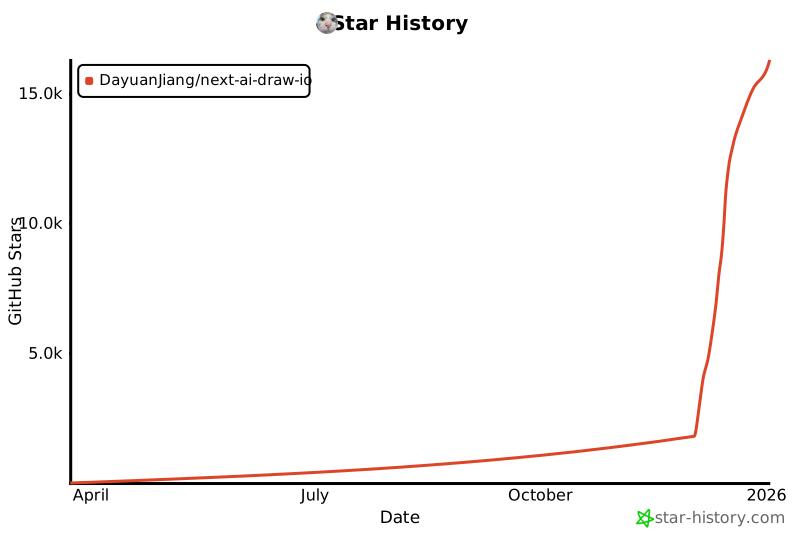](https://www.star-history.com/#DayuanJiang/next -ai-draw-io&type=date&legend=top-left)
---
