2025-03-23 15:03:38 +00:00
# Next AI Draw.io
2025-12-02 22:53:31 +09:00
<div align="center">
2025-03-23 15:03:38 +00:00
2025-12-02 22:53:31 +09:00
**AI-Powered Diagram Creation Tool - Chat, Draw, Visualize**
2025-12-31 00:04:32 +09:00
English | [中文 ](./docs/cn/README_CN.md ) | [日本語 ](./docs/ja/README_JA.md )
2025-12-02 22:53:31 +09:00
2025-12-08 11:48:14 +09:00
[](https://next-ai-drawio.jiang.jp/)
[](https://opensource.org/licenses/Apache-2.0)
[](https://nextjs.org/)
[](https://react.dev/)
2025-12-02 22:53:31 +09:00
[](https://github.com/sponsors/DayuanJiang)
2025-12-08 11:48:14 +09:00
[](https://next-ai-drawio.jiang.jp/)
2025-12-02 22:53:31 +09:00
</div>
2025-11-10 11:42:38 +09:00
2025-12-02 22:53:31 +09:00
A Next.js web application that integrates AI capabilities with draw.io diagrams. Create, modify, and enhance diagrams through natural language commands and AI-assisted visualization.
2026-03-16 20:48:39 +09:00
> Note: Thanks to <img src="https://raw.githubusercontent.com/DayuanJiang/next-ai-draw-io/main/public/doubao-color.png" alt="" height="20" /> [ByteDance Doubao](https://www.volcengine.com/activity/codingplan?ac=MMAP8JTTCAQ2&rc=Z9Z3LDTJ&utm_campaign=drawio&utm_content=drawio&utm_medium=devrel&utm_source=OWO&utm_term=drawio) sponsorship, the demo site now uses the powerful glm-4.7 model!
2025-12-11 12:25:00 +09:00
https://github.com/user-attachments/assets/9d60a3e8-4a1c-4b5e-acbb-26af2d3eabd1
2025-03-23 15:28:05 +00:00
2025-12-08 11:48:14 +09:00
## Table of Contents
2025-12-29 11:30:58 +09:00
- [Next AI Draw.io ](#next-ai-drawio )
2025-12-08 11:48:14 +09:00
- [Table of Contents ](#table-of-contents )
- [Examples ](#examples )
- [Features ](#features )
2026-04-06 10:17:38 +09:00
- [MCP Server ](#mcp-server )
2025-12-29 11:30:58 +09:00
- [Claude Code CLI ](#claude-code-cli )
2025-12-08 11:48:14 +09:00
- [Getting Started ](#getting-started )
- [Try it Online ](#try-it-online )
2025-12-22 10:39:28 +09:00
- [Desktop Application ](#desktop-application )
2025-12-31 00:04:32 +09:00
- [Run with Docker ](#run-with-docker )
2025-12-08 11:48:14 +09:00
- [Installation ](#installation )
- [Deployment ](#deployment )
2025-12-31 00:04:32 +09:00
- [Deploy to EdgeOne Pages ](#deploy-to-edgeone-pages )
2026-01-06 16:57:40 +08:00
- [Deploy on Vercel ](#deploy-on-vercel )
2025-12-29 11:30:58 +09:00
- [Deploy on Cloudflare Workers ](#deploy-on-cloudflare-workers )
2025-12-08 11:48:14 +09:00
- [Multi-Provider Support ](#multi-provider-support )
2026-06-10 20:41:17 +09:00
- [Server-Side Multi-Model Configuration ](#server-side-multi-model-configuration )
- [Admin Panel ](#admin-panel )
2025-12-08 11:48:14 +09:00
- [How It Works ](#how-it-works )
- [Support \& Contact ](#support--contact )
2026-01-09 13:30:07 +09:00
- [FAQ ](#faq )
2025-12-08 11:48:14 +09:00
- [Star History ](#star-history )
## Examples
2025-11-17 15:12:16 +09:00
Here are some example prompts and their generated diagrams:
2025-11-17 19:35:55 +09:00
<div align="center">
<table width="100%">
2025-12-02 22:53:31 +09:00
<tr>
<td colspan="2" valign="top" align="center">
<strong>Animated transformer connectors</strong><br />
<p><strong>Prompt:</strong> Give me a **animated connector ** diagram of transformer's architecture.</p>
<img src="./public/animated_connectors.svg" alt="Transformer Architecture with Animated Connectors" width="480" />
</td>
</tr>
2025-11-17 19:35:55 +09:00
<tr>
<td width="50%" valign="top">
feat: Update some tool demos in english about page (#598)
* feat: update about page examples with new diagrams
Replace old cloud architecture and cat examples with ResNet50, RAG,
Authentication, Agile Scrum, and Open Innovation diagrams.
Update all three language versions (EN, CN, JA) for consistency.
* fix: correct ResNet50 prompt text and keep prompts in English
Update the ResNet50 example prompt to match the actual diagram.
Keep all prompt texts in English across CN and JA about pages
since prompts are what users type into the AI.
* docs: update README examples to match about page
Replace GCP, AWS, Azure examples with ResNet50, RAG, Auth,
Agile Scrum, and Open Innovation. Keep Animated Transformer
and Cat Sketch. Keep prompts in English across all versions.
* docs: remove ResNet50 and Agile Scrum examples from READMEs
---------
Co-authored-by: dayuan.jiang <jdy.toh@gmail.com>
2026-04-10 11:11:34 +07:00
<strong>RAG Technique Diagram</strong><br />
<p><strong>Prompt:</strong> Generate a RAG architecture diagram for **chat application ** . Use connected diagram for data ingestion</p>
<img src="./public/rag_prod.svg" alt="RAG Architecture Diagram" width="480" />
2025-11-17 19:35:55 +09:00
</td>
<td width="50%" valign="top">
feat: Update some tool demos in english about page (#598)
* feat: update about page examples with new diagrams
Replace old cloud architecture and cat examples with ResNet50, RAG,
Authentication, Agile Scrum, and Open Innovation diagrams.
Update all three language versions (EN, CN, JA) for consistency.
* fix: correct ResNet50 prompt text and keep prompts in English
Update the ResNet50 example prompt to match the actual diagram.
Keep all prompt texts in English across CN and JA about pages
since prompts are what users type into the AI.
* docs: update README examples to match about page
Replace GCP, AWS, Azure examples with ResNet50, RAG, Auth,
Agile Scrum, and Open Innovation. Keep Animated Transformer
and Cat Sketch. Keep prompts in English across all versions.
* docs: remove ResNet50 and Agile Scrum examples from READMEs
---------
Co-authored-by: dayuan.jiang <jdy.toh@gmail.com>
2026-04-10 11:11:34 +07:00
<strong>Authentication using React and AWS</strong><br />
<p><strong>Prompt:</strong> Generate authentication process using React with **AWS ** . Use Serverless architecture.</p>
<img src="./public/auth.svg" alt="Authentication Architecture Diagram" width="480" />
2025-11-17 19:35:55 +09:00
</td>
</tr>
<tr>
<td width="50%" valign="top">
feat: Update some tool demos in english about page (#598)
* feat: update about page examples with new diagrams
Replace old cloud architecture and cat examples with ResNet50, RAG,
Authentication, Agile Scrum, and Open Innovation diagrams.
Update all three language versions (EN, CN, JA) for consistency.
* fix: correct ResNet50 prompt text and keep prompts in English
Update the ResNet50 example prompt to match the actual diagram.
Keep all prompt texts in English across CN and JA about pages
since prompts are what users type into the AI.
* docs: update README examples to match about page
Replace GCP, AWS, Azure examples with ResNet50, RAG, Auth,
Agile Scrum, and Open Innovation. Keep Animated Transformer
and Cat Sketch. Keep prompts in English across all versions.
* docs: remove ResNet50 and Agile Scrum examples from READMEs
---------
Co-authored-by: dayuan.jiang <jdy.toh@gmail.com>
2026-04-10 11:11:34 +07:00
<strong>Open Innovation</strong><br />
<p><strong>Prompt:</strong> Create visualization of Henry Chesbrough's Open Innovation model.</p>
<img src="./public/inno.svg" alt="Open Innovation Diagram" width="480" />
2025-11-17 19:35:55 +09:00
</td>
<td width="50%" valign="top">
feat: Update some tool demos in english about page (#598)
* feat: update about page examples with new diagrams
Replace old cloud architecture and cat examples with ResNet50, RAG,
Authentication, Agile Scrum, and Open Innovation diagrams.
Update all three language versions (EN, CN, JA) for consistency.
* fix: correct ResNet50 prompt text and keep prompts in English
Update the ResNet50 example prompt to match the actual diagram.
Keep all prompt texts in English across CN and JA about pages
since prompts are what users type into the AI.
* docs: update README examples to match about page
Replace GCP, AWS, Azure examples with ResNet50, RAG, Auth,
Agile Scrum, and Open Innovation. Keep Animated Transformer
and Cat Sketch. Keep prompts in English across all versions.
* docs: remove ResNet50 and Agile Scrum examples from READMEs
---------
Co-authored-by: dayuan.jiang <jdy.toh@gmail.com>
2026-04-10 11:11:34 +07:00
<strong>Cat sketch</strong><br />
2025-11-17 19:35:55 +09:00
<p><strong>Prompt:</strong> Draw a cute cat for me.</p>
2025-12-02 22:53:31 +09:00
<img src="./public/cat_demo.svg" alt="Cat Drawing" width="240" />
2025-11-17 19:35:55 +09:00
</td>
</tr>
2025-11-17 15:12:16 +09:00
</table>
2025-11-17 19:35:55 +09:00
</div>
2025-03-19 06:04:06 +00:00
2025-12-08 11:48:14 +09:00
## Features
2025-03-23 15:03:38 +00:00
2025-12-08 11:48:14 +09:00
- **LLM-Powered Diagram Creation ** : Leverage Large Language Models to create and manipulate draw.io diagrams directly through natural language commands
- **Image-Based Diagram Replication ** : Upload existing diagrams or images and have the AI replicate and enhance them automatically
2025-12-11 14:57:16 +09:00
- **PDF & Text File Upload ** : Upload PDF documents and text files to extract content and generate diagrams from existing documents
- **AI Reasoning Display ** : View the AI's thinking process for supported models (OpenAI o1/o3, Gemini, Claude, etc.)
2025-12-08 11:48:14 +09:00
- **Diagram History ** : Comprehensive version control that tracks all changes, allowing you to view and restore previous versions of your diagrams before the AI editing.
- **Interactive Chat Interface ** : Communicate with AI to refine your diagrams in real-time
2025-12-11 14:57:16 +09:00
- **Cloud Architecture Diagram Support ** : Specialized support for generating cloud architecture diagrams (AWS, GCP, Azure)
2025-12-08 11:48:14 +09:00
- **Animated Connectors ** : Create dynamic and animated connectors between diagram elements for better visualization
2025-03-23 15:24:49 +00:00
2026-04-06 10:17:38 +09:00
## MCP Server
2025-12-17 14:50:07 +09:00
Use Next AI Draw.io with AI agents like Claude Desktop, Cursor, and VS Code via MCP (Model Context Protocol).
```json
{
"mcpServers": {
"drawio": {
"command": "npx",
"args": ["@next -ai-drawio/mcp-server@latest "]
}
}
}
```
### Claude Code CLI
```bash
claude mcp add drawio -- npx @next -ai-drawio/mcp-server@latest
```
Then ask Claude to create diagrams:
> "Create a flowchart showing user authentication with login, MFA, and session management"
The diagram appears in your browser in real-time!
See the [MCP Server README ](./packages/mcp-server/README.md ) for VS Code, Cursor, and other client configurations.
2025-12-08 11:48:14 +09:00
## Getting Started
2025-11-15 13:36:42 +09:00
2025-12-08 11:48:14 +09:00
### Try it Online
2025-11-15 13:36:42 +09:00
2025-12-08 11:48:14 +09:00
No installation needed! Try the app directly on our demo site:
2025-12-05 18:53:34 +09:00
2025-12-08 11:48:14 +09:00
[](https://next-ai-drawio.jiang.jp/)
2025-12-05 18:53:34 +09:00
2025-12-29 11:30:58 +09:00
2025-03-23 15:03:38 +00:00
feat: add bring-your-own-API-key support (#186)
- Add AI provider settings to config panel (provider, model, API key, base URL)
- Support 7 providers: OpenAI, Anthropic, Google, Azure, OpenRouter, DeepSeek, SiliconFlow
- Client API keys stored in localStorage, never stored on server
- Client settings override server env vars when provided
- Skip server credential validation when client provides API key
- Bypass usage limits (request/token/TPM) when using own API key
- Add /api/config endpoint for fetching usage limits
- Add privacy notices to settings dialog, about pages, and quota toast
- Add clear settings button to reset saved API keys
- Update README files (EN/CN/JA) with BYOK documentation
Co-authored-by: dayuan.jiang <jiangdy@amazon.co.jp>
2025-12-09 17:50:07 +09:00
> **Bring Your Own API Key**: You can use your own API key to bypass usage limits on the demo site. Click the Settings icon in the chat panel to configure your provider and API key. Your key is stored locally in your browser and is never stored on the server.
2025-12-22 10:39:28 +09:00
### Desktop Application
Download the native desktop app for your platform from the [Releases page ](https://github.com/DayuanJiang/next-ai-draw-io/releases ):
2025-12-31 00:04:32 +09:00
Supported platforms: Windows, macOS, Linux.
2025-12-22 10:39:28 +09:00
2025-12-31 00:04:32 +09:00
### Run with Docker
2025-12-22 10:39:28 +09:00
2025-12-31 00:04:32 +09:00
[Go to Docker Guide ](./docs/en/docker.md )
2025-12-09 22:00:54 +09:00
2025-03-23 15:03:38 +00:00
### Installation
1. Clone the repository:
```bash
2025-03-23 15:24:49 +00:00
git clone https://github.com/DayuanJiang/next-ai-draw-io
2025-03-23 15:03:38 +00:00
cd next-ai-draw-io
npm install
2025-11-15 15:32:21 +09:00
cp env.example .env.local
2025-03-23 15:03:38 +00:00
```
2025-11-10 19:52:08 +09:00
2025-12-31 00:04:32 +09:00
See the [Provider Configuration Guide ](./docs/en/ai-providers.md ) for detailed setup instructions for each provider.
2025-03-23 15:03:38 +00:00
2025-12-31 00:04:32 +09:00
2. Run the development server:
2025-03-19 06:04:06 +00:00
```bash
npm run dev
```
2025-12-31 00:04:32 +09:00
3. Open [http://localhost:6002 ](http://localhost:6002 ) in your browser to see the application.
2025-03-23 15:03:38 +00:00
2025-03-24 01:02:09 +00:00
## Deployment
2025-03-19 06:04:06 +00:00
2025-12-30 21:13:22 +08:00
### Deploy to EdgeOne Pages
You can deploy with one click using [Tencent EdgeOne Pages ](https://pages.edgeone.ai/ ).
Deploy by this button:
[](https://edgeone.ai/pages/new?repository-url=https%3A%2F%2Fgithub.com%2FDayuanJiang%2Fnext-ai-draw-io)
Check out the [Tencent EdgeOne Pages documentation ](https://pages.edgeone.ai/document/deployment-overview ) for more details.
Additionally, deploying through Tencent EdgeOne Pages will also grant you a [daily free quota for DeepSeek models ](https://pages.edgeone.ai/document/edge-ai ).
2026-01-06 16:57:40 +08:00
### Deploy on Vercel
2025-03-23 15:03:38 +00:00
2025-03-24 01:02:09 +00:00
[](https://vercel.com/new/clone?repository-url=https%3A%2F%2Fgithub.com%2FDayuanJiang%2Fnext-ai-draw-io)
2025-03-23 15:03:38 +00:00
2025-12-29 11:30:58 +09:00
The easiest way to deploy is using [Vercel ](https://vercel.com/new ), the creators of Next.js. Be sure to **set the environment variables ** in the Vercel dashboard as you did in your local `.env.local` file.
See the [Next.js deployment documentation ](https://nextjs.org/docs/app/building-your-application/deploying ) for more details.
2025-11-15 15:32:21 +09:00
2025-12-29 11:30:58 +09:00
### Deploy on Cloudflare Workers
2025-12-27 17:43:23 +05:30
2025-12-31 00:04:32 +09:00
[Go to Cloudflare Deploy Guide ](./docs/en/cloudflare-deploy.md )
2025-12-27 17:43:23 +05:30
2025-12-08 11:48:14 +09:00
## Multi-Provider Support
2026-03-16 20:48:39 +09:00
- [ByteDance Doubao ](https://www.volcengine.com/activity/codingplan?ac=MMAP8JTTCAQ2&rc=Z9Z3LDTJ&utm_campaign=drawio&utm_content=drawio&utm_medium=devrel&utm_source=OWO&utm_term=drawio )
2025-12-08 11:48:14 +09:00
- AWS Bedrock (default)
- OpenAI
- Anthropic
- Google AI
2026-01-11 01:34:31 -05:00
- Google Vertex AI
2025-12-08 11:48:14 +09:00
- Azure OpenAI
- Ollama
- OpenRouter
- DeepSeek
- SiliconFlow
2026-01-06 18:41:25 +08:00
- ModelScope
2025-12-31 00:04:32 +09:00
- SGLang
- Vercel AI Gateway
2025-12-08 11:48:14 +09:00
2025-12-29 11:30:58 +09:00
2025-12-08 11:48:14 +09:00
All providers except AWS Bedrock and OpenRouter support custom endpoints.
2025-12-31 00:04:32 +09:00
📖 * * [Detailed Provider Configuration Guide ](./docs/en/ai-providers.md )** - See setup instructions for each provider.
2025-12-08 11:48:14 +09:00
2026-01-15 21:28:22 +05:30
### Server-Side Multi-Model Configuration
Administrators can configure multiple server-side models that are available to all users without requiring personal API keys. Configure via `AI_MODELS_CONFIG` environment variable (JSON string) or `ai-models.json` file.
2026-06-10 20:41:17 +09:00
### Admin Panel
feat: graphical model management in admin panel
Replace the provider credential fields and raw AI_MODELS_CONFIG JSON
textarea with a Models section mirroring the in-app model settings UI:
provider instance list with logos, credential fields per provider type,
model add/remove with suggestions, per-model connectivity test, and a
default-provider star.
On save the server derives everything the runtime needs into
settings.json: credential env vars (with _2 suffixes for multiple
instances of one provider), AI_MODELS_CONFIG, and AI_PROVIDER/AI_MODEL
for the default. Secrets round-trip as masked markers and are never
sent back to the browser. The general settings registry now only
covers non-provider settings (generation, access, features,
observability, quota).
2026-06-10 23:15:18 +09:00
Instead of hand-editing `.env` , you can manage server settings in a web admin panel:
2026-06-10 20:41:17 +09:00
1. Set the `ADMIN_PASSWORD` environment variable (leave unset to disable the panel).
2. Visit `/admin` and sign in.
2026-06-12 11:34:11 +09:00
3. In the Models section, add providers with their API keys and model lists — the same UI as the in-app model settings. Saved models become server-side models available to all users; they are stored in `data/settings.json` and merged with any `AI_MODELS_CONFIG` / `ai-models.json` from your environment at request time (the panel does not modify those env files).
feat: graphical model management in admin panel
Replace the provider credential fields and raw AI_MODELS_CONFIG JSON
textarea with a Models section mirroring the in-app model settings UI:
provider instance list with logos, credential fields per provider type,
model add/remove with suggestions, per-model connectivity test, and a
default-provider star.
On save the server derives everything the runtime needs into
settings.json: credential env vars (with _2 suffixes for multiple
instances of one provider), AI_MODELS_CONFIG, and AI_PROVIDER/AI_MODEL
for the default. Secrets round-trip as masked markers and are never
sent back to the browser. The general settings registry now only
covers non-provider settings (generation, access, features,
observability, quota).
2026-06-10 23:15:18 +09:00
4. Other sections cover access codes, generation parameters, features, observability, and quota. Saved settings are written to `data/settings.json` and apply immediately — no restart needed (a few settings such as Langfuse and DynamoDB are marked "Restart Required").
2026-06-10 20:41:17 +09:00
Precedence: settings saved in the panel override environment variables, which override built-in defaults. Removing a saved value falls back to the environment variable.
Notes:
- Secrets are stored in plaintext in `data/settings.json` (file mode 600). Keep the file private.
- On serverless platforms (Vercel, Cloudflare Workers) there is no persistent disk, so the panel is read-only — configure via environment variables there.
- With Docker, the `data/` directory is persisted via the volume in `docker-compose.yml` .
- `NEXT_PUBLIC_*` variables are baked in at build time and cannot be changed in the panel.
2025-12-10 08:19:21 +09:00
**Model Requirements**: This task requires strong model capabilities for generating long-form text with strict formatting constraints (draw.io XML). Recommended models include Claude Sonnet 4.5, GPT-5.1, Gemini 3 Pro, and DeepSeek V3.2/R1.
2025-12-08 11:48:14 +09:00
2025-12-31 00:04:32 +09:00
Note that the `claude` series has been trained on draw.io diagrams with cloud architecture logos like AWS, Azure, GCP. So if you want to create cloud architecture diagrams, this is the best choice.
2025-12-08 11:48:14 +09:00
## How It Works
The application uses the following technologies:
- **Next.js ** : For the frontend framework and routing
- **Vercel AI SDK ** (`ai` + `@ai-sdk/*` ): For streaming AI responses and multi-provider support
- **react-drawio ** : For diagram representation and manipulation
Diagrams are represented as XML that can be rendered in draw.io. The AI processes your commands and generates or modifies this XML accordingly.
2025-03-23 15:03:38 +00:00
## Support & Contact
2026-03-16 20:48:39 +09:00
**Special thanks to [ByteDance Doubao ](https://www.volcengine.com/activity/codingplan?ac=MMAP8JTTCAQ2&rc=Z9Z3LDTJ&utm_campaign=drawio&utm_content=drawio&utm_medium=devrel&utm_source=OWO&utm_term=drawio ) for sponsoring the API token usage of the demo site!** Register on the ARK platform to get 500K free tokens for all models!
2025-12-29 11:30:58 +09:00
2025-12-02 22:53:31 +09:00
If you find this project useful, please consider [sponsoring ](https://github.com/sponsors/DayuanJiang ) to help me host the live demo site!
2025-03-23 15:03:38 +00:00
For support or inquiries, please open an issue on the GitHub repository or contact the maintainer at:
2025-03-23 15:24:49 +00:00
- Email: me[at]jiang.jp
2025-03-19 06:04:06 +00:00
2026-01-09 13:30:07 +09:00
## FAQ
See [FAQ ](./docs/en/FAQ.md ) for common issues and solutions.
2025-12-01 22:40:43 +09:00
## Star History
[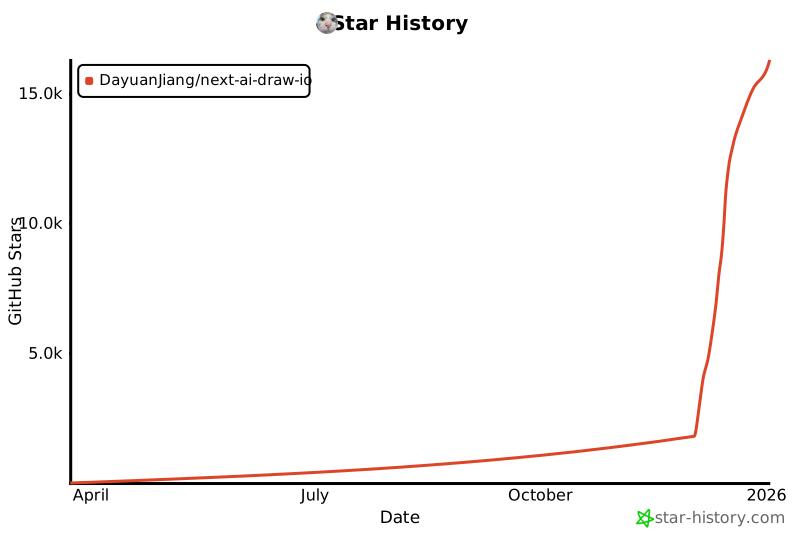](https://www.star-history.com/#DayuanJiang/next -ai-draw-io&type=date&legend=top-left)
2025-03-23 15:24:49 +00:00
---
