2025-12-02 22:53:31 +09:00
# Next AI Draw.io
<div align="center">
**AI搭載のダイアグラム作成ツール - チャット、描画、可視化**
2025-12-31 00:04:32 +09:00
[English ](../../README.md ) | [中文 ](../cn/README_CN.md ) | 日本語
2025-12-02 22:53:31 +09:00
2025-12-10 08:42:53 +09:00
[](https://next-ai-drawio.jiang.jp/)
2025-12-02 22:53:31 +09:00
2025-12-10 08:42:53 +09:00
[](https://opensource.org/licenses/Apache-2.0)
[](https://nextjs.org/)
[](https://react.dev/)
[](https://github.com/sponsors/DayuanJiang)
2025-12-09 15:53:59 +09:00
2025-12-31 00:04:32 +09:00
[](https://next-ai-drawio.jiang.jp/)
feat: add bring-your-own-API-key support (#186)
- Add AI provider settings to config panel (provider, model, API key, base URL)
- Support 7 providers: OpenAI, Anthropic, Google, Azure, OpenRouter, DeepSeek, SiliconFlow
- Client API keys stored in localStorage, never stored on server
- Client settings override server env vars when provided
- Skip server credential validation when client provides API key
- Bypass usage limits (request/token/TPM) when using own API key
- Add /api/config endpoint for fetching usage limits
- Add privacy notices to settings dialog, about pages, and quota toast
- Add clear settings button to reset saved API keys
- Update README files (EN/CN/JA) with BYOK documentation
Co-authored-by: dayuan.jiang <jiangdy@amazon.co.jp>
2025-12-09 17:50:07 +09:00
2025-12-02 22:53:31 +09:00
</div>
AI機能とdraw.ioダイアグラムを統合したNext.jsウェブアプリケーションです。自然言語コマンドとAI支援の可視化により、ダイアグラムを作成、修正、強化できます。
2026-03-16 20:48:39 +09:00
> 注:<img src="https://raw.githubusercontent.com/DayuanJiang/next-ai-draw-io/main/public/doubao-color.png" alt="" height="20" /> [ByteDance Doubao](https://www.volcengine.com/activity/codingplan?ac=MMAP8JTTCAQ2&rc=Z9Z3LDTJ&utm_campaign=drawio&utm_content=drawio&utm_medium=devrel&utm_source=OWO&utm_term=drawio) のご支援により、デモサイトに強力な glm-4.7 モデルを導入しました!
2025-12-29 11:30:58 +09:00
2025-12-02 22:53:31 +09:00
https://github.com/user-attachments/assets/b2eef5f3-b335-4e71-a755-dc2e80931979
2025-12-10 08:42:53 +09:00
## 目次
- [Next AI Draw.io ](#next-ai-drawio )
- [目次 ](#目次 )
- [例 ](#例 )
- [機能 ](#機能 )
2026-04-06 10:17:38 +09:00
- [MCPサーバー ](#mcpサーバー )
2025-12-31 00:04:32 +09:00
- [Claude Code CLI ](#claude-code-cli )
2025-12-10 08:42:53 +09:00
- [はじめに ](#はじめに )
- [オンラインで試す ](#オンラインで試す )
2025-12-31 00:04:32 +09:00
- [デスクトップアプリケーション ](#デスクトップアプリケーション )
- [Dockerで実行 ](#dockerで実行 )
2025-12-10 08:42:53 +09:00
- [インストール ](#インストール )
- [デプロイ ](#デプロイ )
2025-12-31 00:04:32 +09:00
- [EdgeOne Pagesへのデプロイ ](#edgeone-pagesへのデプロイ )
2026-01-06 16:57:40 +08:00
- [Vercelへのデプロイ ](#vercelへのデプロイ )
2025-12-31 00:04:32 +09:00
- [Cloudflare Workersへのデプロイ ](#cloudflare-workersへのデプロイ )
2025-12-10 08:42:53 +09:00
- [マルチプロバイダーサポート ](#マルチプロバイダーサポート )
- [仕組み ](#仕組み )
- [サポート&お問い合わせ ](#サポートお問い合わせ )
2026-01-09 13:30:07 +09:00
- [よくある質問 ](#よくある質問 )
2025-12-10 08:42:53 +09:00
- [スター履歴 ](#スター履歴 )
## 例
2025-12-02 22:53:31 +09:00
以下はいくつかのプロンプト例と生成されたダイアグラムです:
<div align="center">
<table width="100%">
<tr>
<td colspan="2" valign="top" align="center">
<strong>アニメーションTransformerコネクタ</strong><br />
feat: Update some tool demos in english about page (#598)
* feat: update about page examples with new diagrams
Replace old cloud architecture and cat examples with ResNet50, RAG,
Authentication, Agile Scrum, and Open Innovation diagrams.
Update all three language versions (EN, CN, JA) for consistency.
* fix: correct ResNet50 prompt text and keep prompts in English
Update the ResNet50 example prompt to match the actual diagram.
Keep all prompt texts in English across CN and JA about pages
since prompts are what users type into the AI.
* docs: update README examples to match about page
Replace GCP, AWS, Azure examples with ResNet50, RAG, Auth,
Agile Scrum, and Open Innovation. Keep Animated Transformer
and Cat Sketch. Keep prompts in English across all versions.
* docs: remove ResNet50 and Agile Scrum examples from READMEs
---------
Co-authored-by: dayuan.jiang <jdy.toh@gmail.com>
2026-04-10 11:11:34 +07:00
<p><strong>Prompt:</strong> Give me a **animated connector ** diagram of transformer's architecture.</p>
2025-12-31 00:04:32 +09:00
<img src="../../public/animated_connectors.svg" alt="アニメーションコネクタ付きTransformerアーキテクチャ" width="480" />
2025-12-02 22:53:31 +09:00
</td>
</tr>
<tr>
<td width="50%" valign="top">
feat: Update some tool demos in english about page (#598)
* feat: update about page examples with new diagrams
Replace old cloud architecture and cat examples with ResNet50, RAG,
Authentication, Agile Scrum, and Open Innovation diagrams.
Update all three language versions (EN, CN, JA) for consistency.
* fix: correct ResNet50 prompt text and keep prompts in English
Update the ResNet50 example prompt to match the actual diagram.
Keep all prompt texts in English across CN and JA about pages
since prompts are what users type into the AI.
* docs: update README examples to match about page
Replace GCP, AWS, Azure examples with ResNet50, RAG, Auth,
Agile Scrum, and Open Innovation. Keep Animated Transformer
and Cat Sketch. Keep prompts in English across all versions.
* docs: remove ResNet50 and Agile Scrum examples from READMEs
---------
Co-authored-by: dayuan.jiang <jdy.toh@gmail.com>
2026-04-10 11:11:34 +07:00
<strong>RAG技術ダイアグラム</strong><br />
<p><strong>Prompt:</strong> Generate a RAG architecture diagram for **chat application ** . Use connected diagram for data ingestion</p>
<img src="../../public/rag_prod.svg" alt="RAGアーキテクチャ図" width="480" />
2025-12-02 22:53:31 +09:00
</td>
<td width="50%" valign="top">
feat: Update some tool demos in english about page (#598)
* feat: update about page examples with new diagrams
Replace old cloud architecture and cat examples with ResNet50, RAG,
Authentication, Agile Scrum, and Open Innovation diagrams.
Update all three language versions (EN, CN, JA) for consistency.
* fix: correct ResNet50 prompt text and keep prompts in English
Update the ResNet50 example prompt to match the actual diagram.
Keep all prompt texts in English across CN and JA about pages
since prompts are what users type into the AI.
* docs: update README examples to match about page
Replace GCP, AWS, Azure examples with ResNet50, RAG, Auth,
Agile Scrum, and Open Innovation. Keep Animated Transformer
and Cat Sketch. Keep prompts in English across all versions.
* docs: remove ResNet50 and Agile Scrum examples from READMEs
---------
Co-authored-by: dayuan.jiang <jdy.toh@gmail.com>
2026-04-10 11:11:34 +07:00
<strong>ReactとAWSによる認証</strong><br />
<p><strong>Prompt:</strong> Generate authentication process using React with **AWS ** . Use Serverless architecture.</p>
<img src="../../public/auth.svg" alt="認証アーキテクチャ図" width="480" />
2025-12-02 22:53:31 +09:00
</td>
</tr>
<tr>
<td width="50%" valign="top">
feat: Update some tool demos in english about page (#598)
* feat: update about page examples with new diagrams
Replace old cloud architecture and cat examples with ResNet50, RAG,
Authentication, Agile Scrum, and Open Innovation diagrams.
Update all three language versions (EN, CN, JA) for consistency.
* fix: correct ResNet50 prompt text and keep prompts in English
Update the ResNet50 example prompt to match the actual diagram.
Keep all prompt texts in English across CN and JA about pages
since prompts are what users type into the AI.
* docs: update README examples to match about page
Replace GCP, AWS, Azure examples with ResNet50, RAG, Auth,
Agile Scrum, and Open Innovation. Keep Animated Transformer
and Cat Sketch. Keep prompts in English across all versions.
* docs: remove ResNet50 and Agile Scrum examples from READMEs
---------
Co-authored-by: dayuan.jiang <jdy.toh@gmail.com>
2026-04-10 11:11:34 +07:00
<strong>オープンイノベーション</strong><br />
<p><strong>Prompt:</strong> Create visualization of Henry Chesbrough's Open Innovation model.</p>
<img src="../../public/inno.svg" alt="オープンイノベーション図" width="480" />
2025-12-02 22:53:31 +09:00
</td>
<td width="50%" valign="top">
<strong>猫のスケッチ</strong><br />
feat: Update some tool demos in english about page (#598)
* feat: update about page examples with new diagrams
Replace old cloud architecture and cat examples with ResNet50, RAG,
Authentication, Agile Scrum, and Open Innovation diagrams.
Update all three language versions (EN, CN, JA) for consistency.
* fix: correct ResNet50 prompt text and keep prompts in English
Update the ResNet50 example prompt to match the actual diagram.
Keep all prompt texts in English across CN and JA about pages
since prompts are what users type into the AI.
* docs: update README examples to match about page
Replace GCP, AWS, Azure examples with ResNet50, RAG, Auth,
Agile Scrum, and Open Innovation. Keep Animated Transformer
and Cat Sketch. Keep prompts in English across all versions.
* docs: remove ResNet50 and Agile Scrum examples from READMEs
---------
Co-authored-by: dayuan.jiang <jdy.toh@gmail.com>
2026-04-10 11:11:34 +07:00
<p><strong>Prompt:</strong> Draw a cute cat for me.</p>
2025-12-31 00:04:32 +09:00
<img src="../../public/cat_demo.svg" alt="猫の絵" width="240" />
2025-12-02 22:53:31 +09:00
</td>
</tr>
</table>
</div>
2025-12-10 08:42:53 +09:00
## 機能
2025-12-02 22:53:31 +09:00
2025-12-10 08:42:53 +09:00
- **LLM搭載のダイアグラム作成 ** :
- **画像ベースのダイアグラム複製 ** :
2025-12-11 14:57:16 +09:00
- **PDFとテキストファイルのアップロード ** :
- **AI推論プロセス表示 ** : ( )
2025-12-10 08:42:53 +09:00
- **ダイアグラム履歴 ** :
- **インタラクティブなチャットインターフェース ** :
2025-12-11 14:57:16 +09:00
- **クラウドアーキテクチャダイアグラムサポート ** : ( )
2025-12-10 08:42:53 +09:00
- **アニメーションコネクタ ** :より良い可視化のためにダイアグラム要素間に動的でアニメーション化されたコネクタを作成
2025-12-02 22:53:31 +09:00
2026-04-06 10:17:38 +09:00
## MCPサーバー
2025-12-17 14:50:07 +09:00
MCP( )
```json
{
"mcpServers": {
"drawio": {
"command": "npx",
"args": ["@next -ai-drawio/mcp-server@latest "]
}
}
}
```
### Claude Code CLI
```bash
claude mcp add drawio -- npx @next -ai-drawio/mcp-server@latest
```
Claudeにダイアグラムの作成を依頼:
> 「ログイン、MFA、セッション管理を含むユーザー認証のフローチャートを作成してください」
ダイアグラムがリアルタイムでブラウザに表示されます!
2025-12-31 00:04:32 +09:00
詳細は[MCPサーバーREADME ](../../packages/mcp-server/README.md )をご覧ください( )
2025-12-17 14:50:07 +09:00
2025-12-10 08:42:53 +09:00
## はじめに
2025-12-02 22:53:31 +09:00
2025-12-10 08:42:53 +09:00
### オンラインで試す
2025-12-05 18:53:34 +09:00
2025-12-10 08:42:53 +09:00
インストール不要!デモサイトで直接お試しください:
2025-12-05 18:53:34 +09:00
2025-12-31 00:04:32 +09:00
[](https://next-ai-drawio.jiang.jp/)
2025-12-05 18:53:34 +09:00
2025-12-10 08:42:53 +09:00
> **自分のAPIキーを使用**:
2025-12-02 22:53:31 +09:00
2025-12-31 00:04:32 +09:00
### デスクトップアプリケーション
2025-12-03 21:15:25 +09:00
2025-12-31 00:04:32 +09:00
[Releases ページ ](https://github.com/DayuanJiang/next-ai-draw-io/releases )からお使いのプラットフォーム用のネイティブデスクトップアプリをダウンロードしてください:
2025-12-03 21:15:25 +09:00
2025-12-31 00:04:32 +09:00
対応プラットフォーム:
2025-12-03 21:15:25 +09:00
2025-12-31 00:04:32 +09:00
### Dockerで実行
2025-12-03 21:15:25 +09:00
2025-12-31 00:04:32 +09:00
[Docker ガイドを参照 ](./docker.md )
2025-12-10 08:42:53 +09:00
2025-12-02 22:53:31 +09:00
### インストール
1. リポジトリをクローン:
```bash
git clone https://github.com/DayuanJiang/next-ai-draw-io
cd next-ai-draw-io
npm install
cp env.example .env.local
```
2025-12-10 08:42:53 +09:00
詳細な設定手順については[プロバイダー設定ガイド ](./ai-providers.md )を参照してください。
2025-12-02 22:53:31 +09:00
2025-12-31 00:04:32 +09:00
2. 開発サーバーを起動:
2025-12-02 22:53:31 +09:00
```bash
npm run dev
```
2025-12-31 00:04:32 +09:00
3. ブラウザで[http://localhost:6002 ](http://localhost:6002 )を開いてアプリケーションを確認。
2025-12-02 22:53:31 +09:00
## デプロイ
2025-12-30 21:13:22 +08:00
### EdgeOne Pagesへのデプロイ
[Tencent EdgeOne Pages ](https://pages.edgeone.ai/ )を使用してワンクリックでデプロイできます。
このボタンでデプロイ:
[](https://edgeone.ai/pages/new?repository-url=https%3A%2F%2Fgithub.com%2FDayuanJiang%2Fnext-ai-draw-io)
詳細は[Tencent EdgeOne Pagesドキュメント ](https://pages.edgeone.ai/document/deployment-overview )をご覧ください。
また、Tencent EdgeOne Pagesでデプロイすると、[DeepSeekモデルの毎日の無料クォータ ](https://pages.edgeone.ai/document/edge-ai )が付与されます。
2026-01-06 16:57:40 +08:00
### Vercelへのデプロイ
2025-12-30 21:13:22 +08:00
2025-12-31 00:04:32 +09:00
[](https://vercel.com/new/clone?repository-url=https%3A%2F%2Fgithub.com%2FDayuanJiang%2Fnext-ai-draw-io)
Next.jsアプリをデプロイする最も簡単な方法は、Next.jsの作成者による[Vercelプラットフォーム ](https://vercel.com/new )を使用することです。ローカルの`.env.local` ファイルと同様に、Vercelダッシュボードで**環境変数を設定**してください。
2025-12-02 22:53:31 +09:00
詳細は[Next.jsデプロイメントドキュメント ](https://nextjs.org/docs/app/building-your-application/deploying )をご覧ください。
2025-12-31 00:04:32 +09:00
### Cloudflare Workersへのデプロイ
2025-12-02 22:53:31 +09:00
2025-12-31 00:04:32 +09:00
[Cloudflare デプロイガイドを参照 ](./cloudflare-deploy.md )
2025-12-02 22:53:31 +09:00
2025-12-10 08:42:53 +09:00
## マルチプロバイダーサポート
2026-03-16 20:48:39 +09:00
- [ByteDance Doubao ](https://www.volcengine.com/activity/codingplan?ac=MMAP8JTTCAQ2&rc=Z9Z3LDTJ&utm_campaign=drawio&utm_content=drawio&utm_medium=devrel&utm_source=OWO&utm_term=drawio )
2025-12-10 08:42:53 +09:00
- AWS Bedrock( )
- OpenAI
- Anthropic
- Google AI
2026-01-11 01:34:31 -05:00
- Google Vertex AI
2025-12-10 08:42:53 +09:00
- Azure OpenAI
- Ollama
- OpenRouter
- DeepSeek
- SiliconFlow
2026-01-06 18:41:25 +08:00
- ModelScope
2025-12-31 00:04:32 +09:00
- SGLang
- Vercel AI Gateway
2025-12-10 08:42:53 +09:00
AWS BedrockとOpenRouter以外のすべてのプロバイダーはカスタムエンドポイントをサポートしています。
📖 * * [詳細なプロバイダー設定ガイド ](./ai-providers.md )** - 各プロバイダーの設定手順をご覧ください。
2026-01-15 21:28:22 +05:30
### サーバーサイドマルチモデル設定
管理者は、ユーザーが個人のAPIキーを提供することなく利用できる複数のサーバーサイドモデルを設定できます。`AI_MODELS_CONFIG` 環境変数( ) `ai-models.json` ファイルで設定します。
2025-12-31 00:04:32 +09:00
**モデル要件**: ( )
2025-12-10 08:42:53 +09:00
2025-12-31 00:04:32 +09:00
注:`claude` シリーズはAWS、Azure、GCPなどのクラウドアーキテクチャロゴ付きのdraw.ioダイアグラムで学習されているため、クラウドアーキテクチャダイアグラムを作成したい場合は最適な選択です。
2025-12-10 08:42:53 +09:00
## 仕組み
本アプリケーションは以下の技術を使用しています:
- **Next.js ** :フロントエンドフレームワークとルーティング
- **Vercel AI SDK ** ( `ai` + `@ai-sdk/*` ) :
- **react-drawio ** :ダイアグラムの表現と操作
ダイアグラムはdraw.ioでレンダリングできるXMLとして表現されます。AIがコマンドを処理し、それに応じてこのXMLを生成または変更します。
2025-12-02 22:53:31 +09:00
## サポート&お問い合わせ
2026-03-16 20:48:39 +09:00
**デモサイトのAPIトークン使用を支援してくださった[ByteDance Doubao ](https://www.volcengine.com/activity/codingplan?ac=MMAP8JTTCAQ2&rc=Z9Z3LDTJ&utm_campaign=drawio&utm_content=drawio&utm_medium=devrel&utm_source=OWO&utm_term=drawio )に特別な感謝を申し上げます!** ARKプラットフォームに登録すると、50万トークンが無料でもらえます!
2025-12-29 11:30:58 +09:00
2025-12-02 22:53:31 +09:00
このプロジェクトが役に立ったら、ライブデモサイトのホスティングを支援するために[スポンサー ](https://github.com/sponsors/DayuanJiang )をご検討ください!
サポートやお問い合わせについては、GitHubリポジトリでissueを開くか、メンテナーにご連絡ください:
- メール:
2026-01-09 13:30:07 +09:00
## よくある質問
一般的な問題と解決策については [FAQ ](./FAQ.md ) をご覧ください。
2025-12-02 22:53:31 +09:00
## スター履歴
[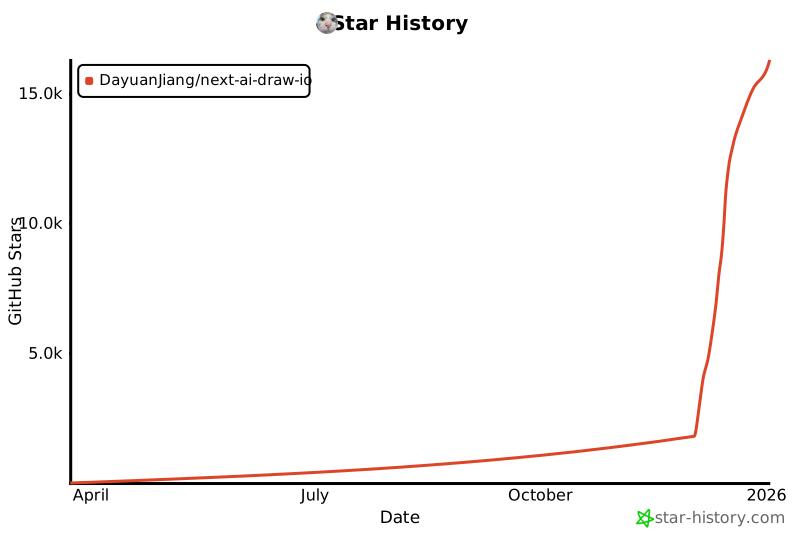](https://www.star-history.com/#DayuanJiang/next -ai-draw-io&type=date&legend=top-left)
---
