A Next.js web application that integrates AI capabilities with draw.io diagrams. Create, modify, and enhance diagrams through natural language commands and AI-assisted visualization.
> Note: Thanks to <img src="https://raw.githubusercontent.com/DayuanJiang/next-ai-draw-io/main/public/doubao-color.png" alt="" height="20" /> [ByteDance Doubao](https://www.volcengine.com/activity/codingplan?ac=MMAP8JTTCAQ2&rc=Z9Z3LDTJ&utm_campaign=drawio&utm_content=drawio&utm_medium=devrel&utm_source=OWO&utm_term=drawio) sponsorship, the demo site now uses the powerful glm-4.7 model!
> 🎁 Thanks to **[Atlas Cloud](https://www.atlascloud.ai/?utm_source=github&utm_medium=link&utm_campaign=next-ai-draw-io)** for sponsoring next-ai-draw-io. Its OpenAI-compatible API gives diagram workflows one provider connection for DeepSeek, Qwen, GLM, Kimi, MiniMax, and more. Budget-friendly access is available through the [Coding Plan](https://www.atlascloud.ai/console/coding-plan).
-**Diagram History**: Comprehensive version control that tracks all changes, allowing you to view and restore previous versions of your diagrams before the AI editing.
-**Interactive Chat Interface**: Communicate with AI to refine your diagrams in real-time
> **Bring Your Own API Key**: You can use your own API key to bypass usage limits on the demo site. Click the Settings icon in the chat panel to configure your provider and API key. Your key is stored locally in your browser and is never stored on the server.
You can deploy with one click using [Tencent EdgeOne Pages](https://pages.edgeone.ai/).
Deploy by this button:
[](https://edgeone.ai/pages/new?repository-url=https%3A%2F%2Fgithub.com%2FDayuanJiang%2Fnext-ai-draw-io)
Check out the [Tencent EdgeOne Pages documentation](https://pages.edgeone.ai/document/deployment-overview) for more details.
Additionally, deploying through Tencent EdgeOne Pages will also grant you a [daily free quota for DeepSeek models](https://pages.edgeone.ai/document/edge-ai).
[](https://vercel.com/new/clone?repository-url=https%3A%2F%2Fgithub.com%2FDayuanJiang%2Fnext-ai-draw-io)
The easiest way to deploy is using [Vercel](https://vercel.com/new), the creators of Next.js. Be sure to **set the environment variables** in the Vercel dashboard as you did in your local `.env.local` file.
Administrators can configure multiple server-side models that are available to all users without requiring personal API keys. Configure via `AI_MODELS_CONFIG` environment variable (JSON string) or `ai-models.json` file. For a single-provider quick setup, list comma-separated model IDs in `AI_MODEL`.
Set the `ADMIN_PASSWORD` environment variable and visit `/admin` to manage server settings (models, access codes, features, observability, quota) from a web panel instead of hand-editing `.env`.
📖 **[Admin Panel Guide](./docs/en/admin-panel.md)** — setup, precedence rules, and notes.
**Model Requirements**: This task requires strong model capabilities for generating long-form text with strict formatting constraints (draw.io XML). Recommended models include Claude Sonnet 4.5, GPT-5.1, Gemini 3 Pro, and DeepSeek V3.2/R1.
Note that the `claude` series has been trained on draw.io diagrams with cloud architecture logos like AWS, Azure, GCP. So if you want to create cloud architecture diagrams, this is the best choice.
**Special thanks to [ByteDance Doubao](https://www.volcengine.com/activity/codingplan?ac=MMAP8JTTCAQ2&rc=Z9Z3LDTJ&utm_campaign=drawio&utm_content=drawio&utm_medium=devrel&utm_source=OWO&utm_term=drawio) for sponsoring the API token usage of the demo site!** Register on the ARK platform to get 500K free tokens for all models!
**Special thanks to [Atlas Cloud](https://www.atlascloud.ai/?utm_source=github&utm_medium=link&utm_campaign=next-ai-draw-io) for sponsoring next-ai-draw-io and supporting its multi-provider ecosystem!** Try its OpenAI-compatible LLM API through the [Atlas Cloud Coding Plan](https://www.atlascloud.ai/console/coding-plan).
[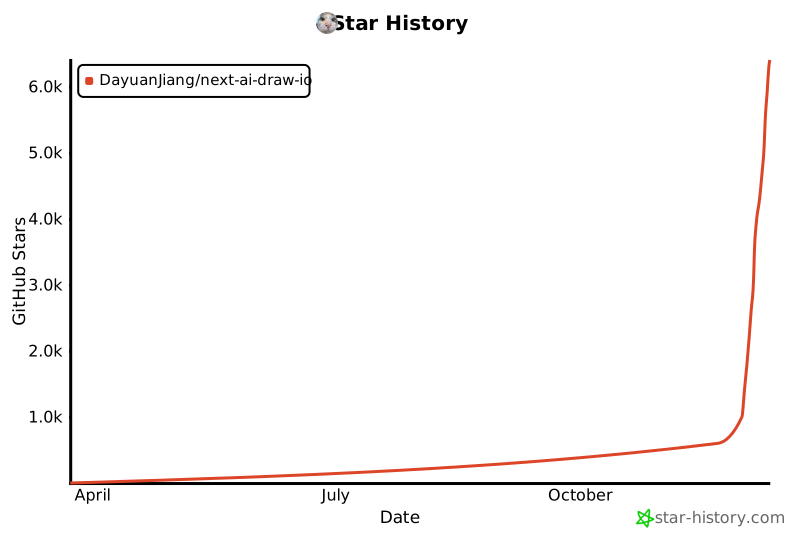](https://www.star-history.com/#DayuanJiang/next-ai-draw-io&type=date&legend=top-left)
